
FileUpload Add-on - Import files containing URLs not working / option not showing up
352 views
Skip to first unread message

daniel krohn siqveland
Apr 28, 2022, 7:34:59 AM4/28/22
to OWASP ZAP Developer Group
Hi, I'm having issues importing URLs/IPs to zap GUI and using automated scan of the list uploaded. Tried finding some guides but they had an section in options i dont have.
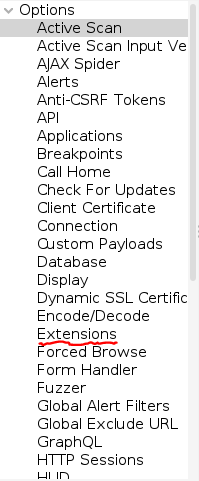


Tried uninstalling the add-ons and reinstalling them but still not working.
I'm able to upload the file but cant access it or run it using " http:// ${fileName} " mentioned in the guide: https://www.zaproxy.org/blog/2021-08-20-zap-fileupload-addon/
It just says "You need to enter a valid URL"
Any idea what i can do to solve this issue?

psiinon
Apr 28, 2022, 7:39:23 AM4/28/22
to OWASP ZAP Developer Group
Hiya,
The FileUpload add-on may support "${fileName}" but the Quick Start / Automated Scan dialog doesnt.
For that you will need to specify an actual URL.
Cheers,
Simon

kingthorin+owaspzap
Apr 28, 2022, 9:58:13 AM4/28/22
to OWASP ZAP Developer Group
I think you've totally misunderstood the point of the FileUpload add-on. It's an add-on that specifically tests/targets File Upload functionality within web apps. (It has nothing to do with importing URLs.)
The reason you don't see it in your Options dialog is that you haven't installed it.
![zap-screenshot-browse-addons[1].png](https://groups.google.com/group/zaproxy-develop/attach/2766f0d40b910/zap-screenshot-browse-addons%5B1%5D.png?part=0.1&view=1)
daniel krohn siqveland
Apr 28, 2022, 10:30:48 AM4/28/22
to OWASP ZAP Developer Group
Seems like I've mixed up the functionality of the addon "FileUpload" and "Import files containing URLs"

What i ment to do is preform an automated scan from a list of URLs, and i thought the "Import files containing URLs" addon made that possible(so i dont have to manually insert them one by one. Usually it takes a long time between each scan is completed and it would be very nice to insert a list, press start and all of the 20 or so IP-addresses are being scanned one by one), and i thought the
"Import files containing URLs" addon made that possible
Have i totally misunderstood this and its no way possible to do(even with another addon)?
The addon I refer to:

thc...@gmail.com
Apr 28, 2022, 10:42:56 AM4/28/22
to zaproxy...@googlegroups.com
It does allow to import the URLs from a file:
https://www.zaproxy.org/docs/desktop/addons/import-export/
Use Import > Import a File Containing URLs.
If you want the URLs to be active scanned at the same time you can use
the attack mode (note that they need to be in scope).
https://www.zaproxy.org/docs/desktop/start/features/modes/
Otherwise you need to start the active scan "manually" after importing.
Best regards.
https://www.zaproxy.org/docs/desktop/addons/import-export/
Use Import > Import a File Containing URLs.
If you want the URLs to be active scanned at the same time you can use
the attack mode (note that they need to be in scope).
https://www.zaproxy.org/docs/desktop/start/features/modes/
Otherwise you need to start the active scan "manually" after importing.
Best regards.
Reply all
Reply to author
Forward
0 new messages