
LaTex questions and changing variables

Loni

Simon Haynes
--
You received this message because you are subscribed to the Google Groups "yWriter" group.
To unsubscribe from this group and stop receiving emails from it, send an email to ywriter+u...@googlegroups.com.
To view this discussion on the web visit https://groups.google.com/d/msgid/ywriter/f5a20ed7-0988-43dc-90e5-f941331fd3fbn%40googlegroups.com.
--
Loni

Peter T.
Loni
Peter T.
Peter T.
For instance, I don't number my chapters in yWriter because I prefer using the whole word for the chapter number, I also use chapter titles, I keep moving chapters around, and I got tired of redoing all the numbers if I add a chapter in the middle of my epic fantasy tome.
Simon Haynes
--
You received this message because you are subscribed to the Google Groups "yWriter" group.
To unsubscribe from this group and stop receiving emails from it, send an email to ywriter+u...@googlegroups.com.
To view this discussion on the web visit https://groups.google.com/d/msgid/ywriter/18e5f296-2ead-4839-9dd6-a6725fde141an%40googlegroups.com.
Peter T.
Newer versions of yWriter will renumber chapters using the first number found in the title, rather than expecting 'Chapter X'
Simon Haynes
--
You received this message because you are subscribed to the Google Groups "yWriter" group.
To unsubscribe from this group and stop receiving emails from it, send an email to ywriter+u...@googlegroups.com.
To view this discussion on the web visit https://groups.google.com/d/msgid/ywriter/5d7ec62b-0b3c-46d9-938c-85c48a82650bn%40googlegroups.com.
Simon Haynes
Peter T.
Simon Haynes
--
You received this message because you are subscribed to the Google Groups "yWriter" group.
To unsubscribe from this group and stop receiving emails from it, send an email to ywriter+u...@googlegroups.com.
To view this discussion on the web visit https://groups.google.com/d/msgid/ywriter/6a94d16b-bbc2-4b3e-9fef-5a8e4360b663n%40googlegroups.com.
Peter T.
The old system (Look for 'Chapter X') actually looked for cLang.GetTranslation("Chapter") & " " & X as wellIn other words, if the user was running yWriter with a french translation, it would look for Chapitre X (I don't have the caret symbol for the a on this keyboard)Not sure, but I think it also used the translation when creating new chapters?
Simon Haynes
--
You received this message because you are subscribed to the Google Groups "yWriter" group.
To unsubscribe from this group and stop receiving emails from it, send an email to ywriter+u...@googlegroups.com.
To view this discussion on the web visit https://groups.google.com/d/msgid/ywriter/3b91444f-0aaa-4299-845d-540d2d34d034n%40googlegroups.com.
Peter T.
Yep, every time someone sends me a new translation I add it to the existing ones. At least that way there's a choice.
Loni


Simon Haynes
--
You received this message because you are subscribed to the Google Groups "yWriter" group.
To unsubscribe from this group and stop receiving emails from it, send an email to ywriter+u...@googlegroups.com.
To view this discussion on the web visit https://groups.google.com/d/msgid/ywriter/5d336965-7a0e-40bd-980e-661ac79fa8cdn%40googlegroups.com.
Peter T.

Trevor Prinn
That takes me back. Back in VB6 days I had to make an app able to
handle translations and came up with a neat way of doing it using
a sprintf (or string.format) routine and a list of translated
strings, indexed on the English version of the string. Numbers,
names etc got substituted in at run time. I had already written
container controls that managed resizing, including captions, so
that I didn't need to worry about the length of translated
strings. It meant you could take a large, existing app written in
English and quickly change it to use other languages without
losing the English in the source code. Also handy for customer
specific customisation within languages, which was very useful for
the app I wrote it for.
One of the first things I did with .net 1 when I first got it about 17/18 years ago was to write a full translation system for Windows Forms that used reflection to walk through all the controls on a form and translate them (also handled putting Accelerators on controls, captions and menus automatically), either automatically or using an optional ITranslatable interface. String.format calls were replaced with Translate.format calls that handled translating and adding parameterised values into strings. There was a utility that went through the code populating a database with English string literals and then a simple website that translators could use to populate the database with translations. At release time, each language's data would get dumped into XML so it could be loaded in at run time.
I probably still have the code somewhere, but I suspect that getting it to work on modern versions of .net would be quite a job, and I can't see any way of handling syntax like $"There are {lightCount} lights".
Trevor
To view this discussion on the web visit https://groups.google.com/d/msgid/ywriter/CAN0R%3DkQfQMCOG_pNnvHvzb5GRXTS5Be%3DU%3Dm0bXEVxqG9Ef-jKQ%40mail.gmail.com.
Peter T.

Loni
Peter T.
Peter T.
My brain associates chapters based on title, so if I have to click on all the different chapter numbers to see the title, it'll likely frustrate me. Unless there's a way to show the description on the green line next to the number?

Loni
Peter T.
Peter T.

Loni
Peter T.

Loni
Peter T.
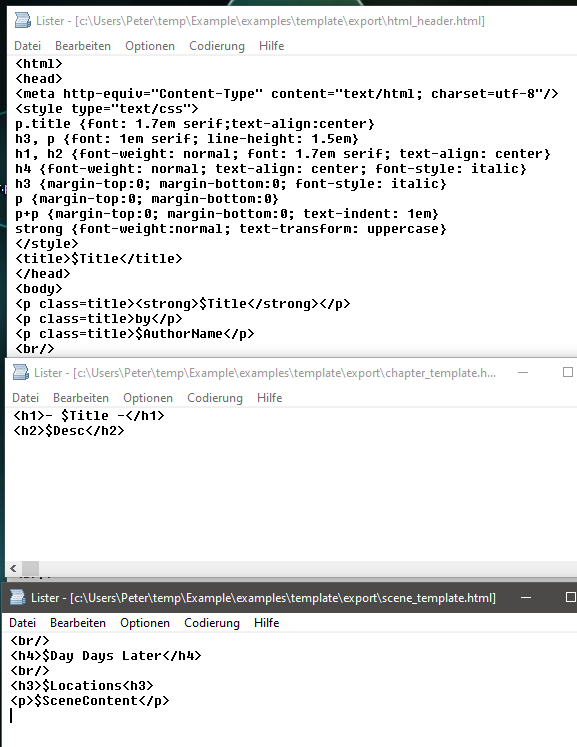
- The HTML converter creates capitalized written out numbers. For the final upper or lower case the style template is responsible. In the example I set "lowercase" and chose a small caps font.
- You have probably noticed that the first level heading is displayed in white in the target document, i.e. it is not printed. This is a trick to control the display in the table of contents.
- The initials in the target document are set by the ***.ChStart paragraph style. You may also have to post-process the ***.ScStart paragraph style so that the first line of the scenes is not indented. (If I create an ODT document directly with my converter, I can use the "Text body" and "First line indent" paragraph styles; however, HTML does not know this distinction and makes each paragraph a "Text body". Hence the two extra styles.)
Peter T.
Loni


Peter T.
Peter T.


Peter T.
I'm once again looking at LaTex and using the output from yWriter to format my books. I started out using the Memoir document class, but I came across another class called Novel. According to that documentation, it ignores things like \chapter and \section, instead using \clearpage, \cleartorecto, and \scenebreakline (among other scene break options).If I was to try out Novel, is there a way to set up yWriter to use \clearpage instead of \chapter and \scenebreakline instead of \section? Would that be through the global variables? If so, how would I do that?Also, if I wanted to do drop caps for each chapter, would I set it up like this?<TEX \lettrine[lines=2,lraise=-0.2,loversize=0.5,nindent=-0.01em]{T}{he} /TEX><html><span class="dropcap">T</span><span class="smallcap">he</span></html> mate debate had gone on for far too long.The sentence is "The mate debate had gone on for far too long." But I want the T to be a drop cap and the he to be small caps before heading into the rest of the sentence. Are they supposed to be mashed together like they are to get the proper flow? Or should I be manually editing the tex and html files to do the drop caps like I want? If I do the above, is it going to skip the word "The" altogether if I do an RTF export?