
re: Problem with latest freeware version of xxclone

Dan Anderson
I'll respond through the xxclone googlegroups discussion forum.
Maybe provide an exact quote of what the error message says and when it occurs, and describe your disk configuration if it is anything other than a normal set of C: source and D: destination drives, with a single partition on each of the two hard drives.
Have you used Xxclone before to clone your current operating system configuration? What operating system are you trying to clone?
Dan
__________________________________________
-------- Original Message --------
Subject: [xxcopy] Problem with latest freeware version of xxclone
From: red02xjy <red0...@yahoo.com>
To: xxc...@yahoogroups.com
Date: 05/12/2012 2:49 AM
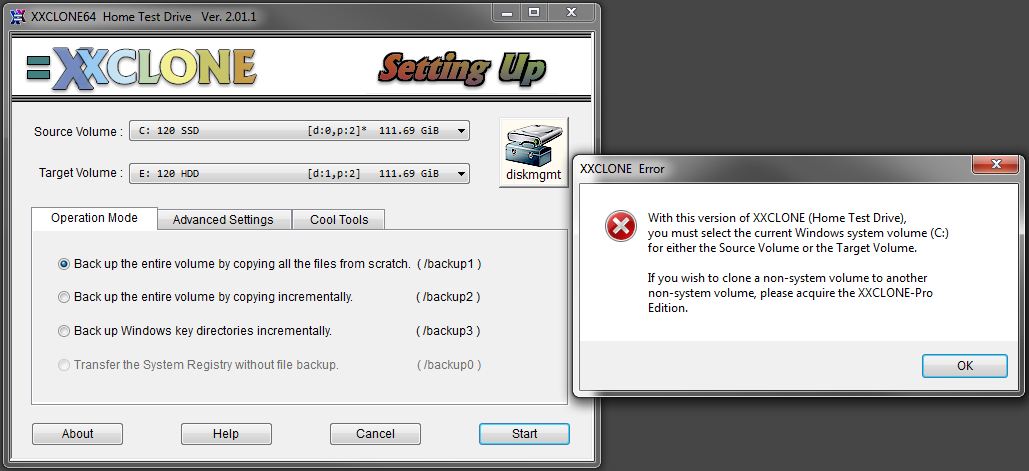
I just downloaded the latest xxclone freeware version. It comes up with a message that either the source or the target must be a system drive. It then will not run. I am using the system drive as my source so the message should not apply. I tried to load an older version but it will not let me do that so I can't use the program. Any suggestions?
__._,_.___
Reply via web post Reply to sender Reply to group Start a New Topic Messages in this topic (1)  .
.
__,_._,___
Dan Anderson
Hmmm. That does seem strange, and maybe a glitch in the current freeware version? It Xxclone already displays C as the source drive, the error message doesn't seem to make much sense.
Maybe someone else will have some suggestions on how to troubleshoot the problem. Curious.
Dan
__________________________________________
-------- Original Message --------
Subject: [xxcopy] Re: Problem with latest freeware version of xxclone
From: red02xjy <red0...@yahoo.com>
To: xxc...@yahoogroups.com
--- In xxc...@yahoogroups.com, Dan Anderson <dan.anderson@...> wrote:
>
> Hi red02xjy,
>
> I'll respond through the xxclone googlegroups discussion forum.
>
> Maybe provide an exact quote of what the error message says and when it
> occurs, and describe your disk configuration if it is anything other
> than a normal set of C: source and D: destination drives, with a single
> partition on each of the two hard drives.
>
> Have you used Xxclone before to clone your current operating system
> configuration? What operating system are you trying to clone?
>
>
> Dan
>
There is nothing unusual about my configuration. I am using XP on the computer being tried here. C is the system drive and the screen after loading and looking around, comes up with C in the source box and another internal drive in the target box.
When I tell it to start, it comes up with the error box with the words "With this version of XXClone (freeware) you must select the current Windows system volume (C:) for either the source volume or the Target volume".
I am using an older version of XXClone on my other computer and it works fine. However, if I try to load an older version of XXClone on the problem computer, it is not possible as it says the version is too old. I get the too old message even on a computer that never had XXClone loaded.
Anthony
> __________________________________________
>
>
> -------- Original Message --------
> Subject: [xxcopy] Problem with latest freeware version of xxclone
> From: red02xjy <red02xjy@...>
> To: xxc...@yahoogroups.com
> Date: 05/12/2012 2:49 AM
> >
> > I just downloaded the latest xxclone freeware version. It comes up
> > with a message that either the source or the target must be a system
> > drive. It then will not run. I am using the system drive as my source
> > so the message should not apply. I tried to load an older version but
> > it will not let me do that so I can't use the program. Any suggestions?
> >
> >
>
>
>
> [Non-text portions of this message have been removed]
>
__._,_.___
.
__,_._,___


brum...@gmail.com

Freestone

charrid
Freestone
Dan Anderson
I don't think what you are describing would be considered a problem with the latest freeware.
I'm not sure, but the reference to "unlimited free use" and "no timeout" might just mean (and probably always meant) that if you had a humongous operating system partition and wanted to back it up and it took, say, six hours, the process would not cut you off after, say, 90 minutes or after X gigabytes; and furthermore you could rerun the process as many times as you wanted on a daily basis for weeks or months. All in all, that provides a generous service.
Regarding the eventual expiry of the freeware version, I think that has always been a feature, maybe partially because of the expectation that systems gradually become obsolete anyway, and there are ongoing improvements and bug fixes for the freeware (and paid) versions. Also, practically speaking, I think the end objective may be to encourage purchasing a licensed version. FWIW, even the various licensed versions probably all have some sort of expiry period, for similar reasons.
Dan
_____________________________________________
-------- Original Message --------
Subject: [xxclone] Re: Problem with latest freeware version of xxclone
From: Greegor <gree...@gmail.com>
To: The Xxclone Forum <xxc...@googlegroups.com>
Date: 16/02/2013 7:01 AM
On Feb 4, 10:43 pm, Greegor <greego...@gmail.com> wrote:I'm not having any trouble ..yet. The mere existance of an error message that says "This program’s design life has expired." in a freeware program should be troubling. Was this the policy on older versions of xxclone freeware? http://www.xxclone.com/iscenter.htm Version 2.01.2 Released 2012-12-28 "Good for one-time migration of Windows disk to a larger disk" One time???Version 2.00.4b said unlimited free use, no timeout. But there was. Even just 5 months after installing it and using it I got the "This program’s design life has expired." message and it shut down. So I downloaded the new one 12/28/2012 and tested it. It worked, but then I set my system BIOS/CMOS clock ahead a year. "More than 1 year old" and it shut down. Interestingly, once it "triggered" this, even when I set the BIOS clock date/time back to current date and time it still says "This program’s design life has expired." So by definition the freeware version is not really freeware, but fully working trialware. This actually upsets my archive plan. I thought that each image copy was able to replicate itself to a damaged partition. On the Pixielab page for comparing different versions of the product it clearly says no expiration for the Freeware version, using a - mark the same as the paid versions. The timeout shutdown makes the "Freeware" version more like a "test drive" version. Could this be a coding mistake? http://www.xxclone.com/iscenter.htm "Good for one-time migration of Windows disk to a larger disk"