
thickness - avoiding self intersections
314 views
Skip to first unread message

Fabricio Chamon
Dec 12, 2016, 9:56:15 AM12/12/16
to soft...@listproc.autodesk.com
Hey everybody,

what are your choices when it comes to thickness/solidify (or whatever you call it) geometry?
What software/operator or plugin you find most reliable to ouput a good geo?
I'm doing some fracture work lately, and I've always had problems to solidify complex geometry (with varying thickness/sharp angles and corners/etc). It ends up self-intersecting the inside part, which obviusly causes problems when you have to shatter later on.
Here's a good example, this is a corner piece from a rubiks cube (left original, right solidified, bottom isolated internal result geo):
I've tried some options like:
- apply the operator, then select the internal part and relax/smooth the geo (not ideal, since it starts to degrade the original shape, to the point it starts creating some internal/external intersections in some areas)
- using blender, that has a nice feature on its thickness operator called "clamp". It is exaclty what I need, but it's limited and does not work good in this piece for some reason.
I'm sure there are more smart options out there...maybe a vdb stuff for the internal part, then converting it back to geo, but I'm out of ideas right now.
How would you approach this ? (mesh is attached, in case someone wants to give it a shot).
Thanks a lot guys!
Fabricio Chamon
Dec 12, 2016, 10:25:32 AM12/12/16
to soft...@listproc.autodesk.com
...well and minutes after writing the e-mail I found a really reliable solution in houdini, that is messing with vdb to smooth the internal part. The vdbsmooth op retains the nice sharp corners while reducing intersections, that is exactly what I want! The only problem is how to merge both parts back while mantaining UVs. Houdini is giving me this warning: "A mis-match of attributes on the inputs was detected. Some of the attribute values may not be initialized to expected values, i.e.: name, path, N, uv."

Of course this is me not handling the attribute transfer correctly, so any help is much appreciated! =)
Tree and results:

toonafish
Dec 12, 2016, 10:41:39 AM12/12/16
to soft...@listproc.autodesk.com
you could try Meshmixer, it’s free and used for 3D printing but has a “hollowing” feature that might work.
-Ronald
-Ronald
On 12 Dec 2016, at 16:25, Fabricio Chamon <xsim...@gmail.com> wrote:
...well and minutes after writing the e-mail I found a really reliable solution in houdini, that is messing with vdb to smooth the internal part. The vdbsmooth op retains the nice sharp corners while reducing intersections, that is exactly what I want! The only problem is how to merge both parts back while mantaining UVs. Houdini is giving me this warning: "A mis-match of attributes on the inputs was detected. Some of the attribute values may not be initialized to expected values, i.e.: name, path, N, uv."Of course this is me not handling the attribute transfer correctly, so any help is much appreciated! =)Tree and results:
<houdini.jpg>
2016-12-12 12:55 GMT-02:00 Fabricio Chamon <xsim...@gmail.com>:
Hey everybody,what are your choices when it comes to thickness/solidify (or whatever you call it) geometry?What software/operator or plugin you find most reliable to ouput a good geo?I'm doing some fracture work lately, and I've always had problems to solidify complex geometry (with varying thickness/sharp angles and corners/etc). It ends up self-intersecting the inside part, which obviusly causes problems when you have to shatter later on.Here's a good example, this is a corner piece from a rubiks cube (left original, right solidified, bottom isolated internal result geo):
<bad_geo.jpg>
I've tried some options like:- apply the operator, then select the internal part and relax/smooth the geo (not ideal, since it starts to degrade the original shape, to the point it starts creating some internal/external intersections in some areas)- using blender, that has a nice feature on its thickness operator called "clamp". It is exaclty what I need, but it's limited and does not work good in this piece for some reason.I'm sure there are more smart options out there...maybe a vdb stuff for the internal part, then converting it back to geo, but I'm out of ideas right now.How would you approach this ? (mesh is attached, in case someone wants to give it a shot).Thanks a lot guys!
------
Softimage Mailing List.
To unsubscribe, send a mail to softimag...@listproc.autodesk.com with "unsubscribe" in the subject, and reply to confirm.

Christopher Crouzet
Dec 12, 2016, 10:50:33 AM12/12/16
to Softimage Mailing List
Have you tried using `AttribTransfer SOP` to transfer the UVs from the original mesh onto the output of the node 'polyreduce1', and then merging?
To unsubscribe, send a mail to softimage-request@listproc.autodesk.com with "unsubscribe" in the subject, and reply to confirm.
------
Softimage Mailing List.
To unsubscribe, send a mail to softimage-request@listproc.autodesk.com with "unsubscribe" in the subject, and reply to confirm.
--

Jonathan Moore
Dec 12, 2016, 10:57:41 AM12/12/16
to soft...@listproc.autodesk.com
I find QuickThickness (on rray) to be pretty reliable.

You'll need to flip the normals on the inside surface but it avoids self intersections and remains parallel (as long as you're not adding too much thickness for the topological layout of the points).
To unsubscribe, send a mail to softimag...@listproc.autodesk.com with "unsubscribe" in the subject, and reply to confirm.
------
Softimage Mailing List.
To unsubscribe, send a mail to softimag...@listproc.autodesk.com with "unsubscribe" in the subject, and reply to confirm.
--

Cristobal Infante
Dec 12, 2016, 2:53:14 PM12/12/16
to soft...@listproc.autodesk.com
Once you use vdb, than all the uv data is gone so as Christopher is saying you must attribute
Transfer those uv back to your new
Mesh. Depending how much your topology changed this operation will work nicely or not.
Send me a hip file if you want :)
Jonathan Moore
Dec 12, 2016, 4:10:22 PM12/12/16
to soft...@listproc.autodesk.com
you could try Meshmixer, it’s free and used for 3D printing but has a “hollowing” feature that might work.
-Ronald
Interesting. Meshmixer works in a similar manner to the VDB tools in Houdini (it's solidifying and hollowing tools are based on voxels).
I can see how it's useful for it's designed purpose in 3d printing but it will be interesting to throw some lower poly stuff at it and see how much of the topology survives the process.
To unsubscribe, send a mail to softimage-request@listproc.autodesk.com with "unsubscribe" in the subject, and reply to confirm.
------
Softimage Mailing List.
To unsubscribe, send a mail to softimage-request@listproc.autodesk.com with "unsubscribe" in the subject, and reply to confirm.
Fabricio Chamon
Dec 13, 2016, 2:48:21 PM12/13/16
to soft...@listproc.autodesk.com
hey thanks everyone for the feedback. I tried meshmixer, but houdini actually does the job better and faster (of course because it is more biased in terms of workflow choices), so I'll stick to that ultimately. The attribute transfer SOP was what I needed. yayy =)
To unsubscribe, send a mail to softimag...@listproc.autodesk.com with "unsubscribe" in the subject, and reply to confirm.
------
Softimage Mailing List.
To unsubscribe, send a mail to softimag...@listproc.autodesk.com with "unsubscribe" in the subject, and reply to confirm.
Jonathan Moore
Dec 13, 2016, 4:31:47 PM12/13/16
to soft...@listproc.autodesk.com
hey thanks everyone for the feedback. I tried meshmixer, but houdini actually does the job better and faster (of course because it is more biased in terms of workflow choices), so I'll stick to that ultimately. The attribute transfer SOP was what I needed. yayy =)
Had a little play with MeshMixer and came to the same conclusions.
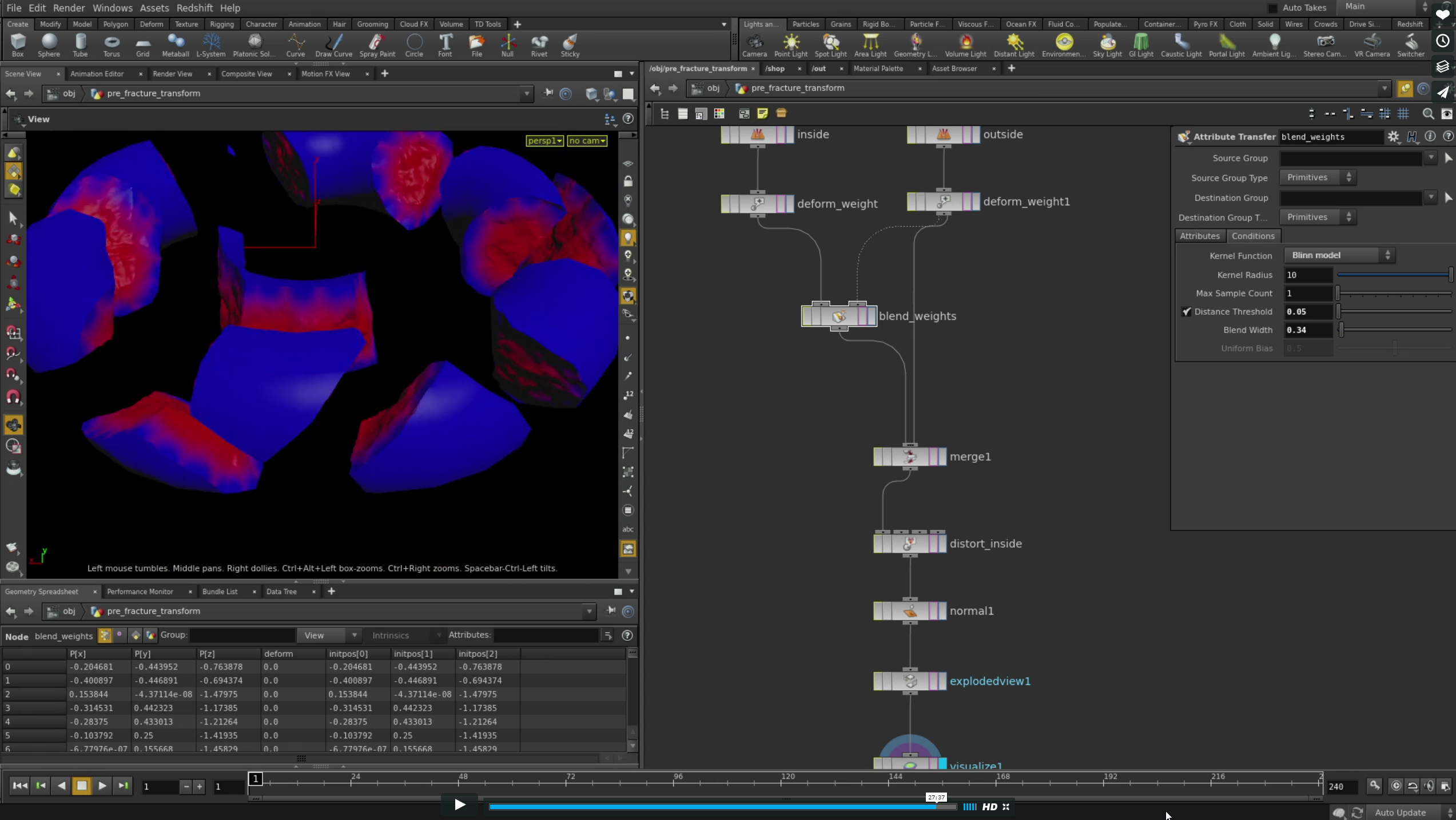
Your original request made think a bit more about fracturing in Houdini. I tend to use iFX in XSI and transfer the fractured geometry via Alembic to Houdini as I don't like using Voronoi fracturing. In researching other techniques I came across a nice workflow using Attribute Transfer and Attribute VOP's to apply noise to both the edges and internal faces of the Voronoi fracture to get rid of the straight edges and planer internal faces. Not sure if it's any use to you or if it's a techniques you're already using but somebody might find it useful.
It's so simple I'm a tad annoyed I didn't think of something similar myself - but I'm relatively new to Houdini so I'm not beating myself up too much! :)
It's so simple I'm a tad annoyed I didn't think of something similar myself - but I'm relatively new to Houdini so I'm not beating myself up too much! :)
Fabricio Chamon
Dec 13, 2016, 5:07:58 PM12/13/16
to soft...@listproc.autodesk.com
yeah Johnatan me to, not super addicted to the voronoi stuff...that straight edges are terrible... I like to use the iterative shatter in IFX...to be honest IFX is a super tool for shattering, but it crashes often with complex geometry (or skips the operator), which makes it unsuable unfortunatelly. Houdini on the other hand is super robust, but needs more advanced work to get that detailed edges.
I've already seen this guy's video, it is a nice technique, but it limits you in a way you can't distort too much the geometry or it starts degrading. In such a procedural oriented DCC like houdini I tend to dislike having these limitations, because it makes you care too much about your parameters, and your output is not 100% reliable all the time. One could introduce small artifacts that are hard to see in dense meshes but will surelly show up as holes or overlapping geo at rendertime.
anyway, I'm also diving slowly into houdini as projects allow, and I'm liking it so much!
Fabricio Chamon
Dec 13, 2016, 5:08:57 PM12/13/16
to soft...@listproc.autodesk.com
doh..sorry I misspelled your name. Jonathan =)
Jonathan Moore
Dec 13, 2016, 6:09:56 PM12/13/16
to soft...@listproc.autodesk.com
doh..sorry I misspelled your name. Jonathan =)
No worries. I often misspell it myself - when I've been a tad too greedy with the vino the night before. ;)
To unsubscribe, send a mail to softimage-request@listproc.autodesk.com with "unsubscribe" in the subject, and reply to confirm.
Cristobal Infante
Dec 13, 2016, 6:59:25 PM12/13/16
to soft...@listproc.autodesk.com
Another option would have been to ray the original geo to the converted vdb geo. Using vdb reshape for the erode, and minimun distance on the ray node. This would give you the same topo, on the inner side so no need to worry about UVs.
So many options ;)

Fabricio Chamon
Dec 13, 2016, 7:27:28 PM12/13/16
to soft...@listproc.autodesk.com
oh that is really neat Cristobal, thanks for the screenshot and explanation! going to use that right now!
To unsubscribe, send a mail to softimage-request@listproc.autodesk.com with "unsubscribe" in the subject, and reply to confirm.
Reply all
Reply to author
Forward
0 new messages