
Driving a Color At Vertices (CAV) map using ICE?

Bradley Gabe
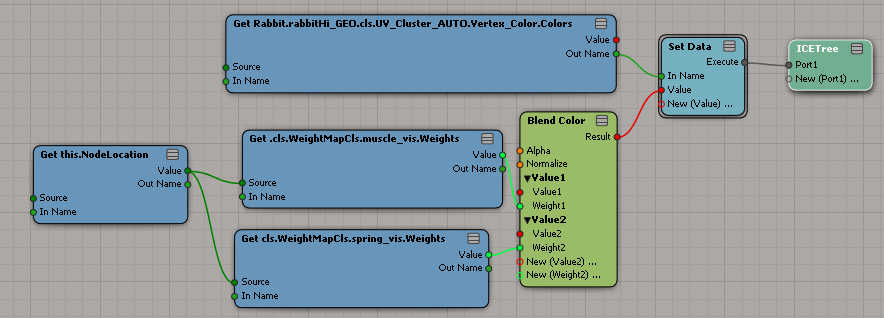
I have multiple weight maps on a mesh, and I'd like to use their per point scalar values to drive a resulting vertex color map.
If this is not possible, that would also be good to know. :-)
-Bradley

Sajjad Amjad
Not exactly sure what you're after but perhaps the following link can help:
http://vimeo.com/7052244
I made this a few years ago. There's a link to a downloadable scene on the page.
Cheers,
-----
"Consistency is the last resort of the unimaginative" - O. Wilde

Vladimir Jankijevic
---------------------------------------
Vladimir Jankijevic
Technical Direction
Elefant Studios AG
Lessingstrasse 15
CH-8002 Zürich
+41 44 500 48 20
www.elefantstudios.ch
---------------------------------------
Bradley Gabe

Grahame Fuller
GetData(self.NodeToVertex) --> SelectInArray
gray
From: softimag...@listproc.autodesk.com [mailto:softimag...@listproc.autodesk.com] On Behalf Of Vladimir Jankijevic
Sent: Monday, February 27, 2012 12:15 PM
To: soft...@listproc.autodesk.com
Subject: Re: Driving a Color At Vertices (CAV) map using ICE?
you have to look it up from the node context. so a tree like this should work:
getData(self.nodelocation)->getData(cls.WeightMapCls.Weight_Map.Weights)->gradient->setData(XXXXX.cls.UV_Cluster_AUTO.Vertex_Color.Colors)
cheers
vladimir
On Mon, Feb 27, 2012 at 12:10 PM, Sajjad Amjad <sajjad...@gmail.com<mailto:sajjad...@gmail.com>> wrote:
Hi,
Not exactly sure what you're after but perhaps the following link can help:
http://vimeo.com/7052244
I made this a few years ago. There's a link to a downloadable scene on the page.
Cheers,
On 27 February 2012 17:04, Bradley Gabe <with...@gmail.com<mailto:with...@gmail.com>> wrote:
Does anyone know how to get the context to work, in order to drive per point values into a CAV map?
I have multiple weight maps on a mesh, and I'd like to use their per point scalar values to drive a resulting vertex color map.
If this is not possible, that would also be good to know. :-)
-Bradley
--
-----
"Consistency is the last resort of the unimaginative" - O. Wilde
--
---------------------------------------
Vladimir Jankijevic
Technical Direction
Elefant Studios AG
Lessingstrasse 15
CH-8002 Zürich
www.elefantstudios.ch<http://www.elefantstudios.ch>
---------------------------------------

Matt Lind
Weight maps stored data on vertices, vertex colors store data on Polygon Nodes.
My experience in the past has been to do everything at the most granular level and do the up-sample if needed. In this case, define your main context as polygon node and try to upsample to the vertex to get any weight map value. It’s a PITA to get working.
Matt

Sam Cuttriss

Matt Lind
When you start doing other things such as get closest location from other parts of the mesh, it gets a little harry to deal with as you’ll run into more context issues.