
Calculation in custom forms only works in preview
94 views
Skip to first unread message

Laura
May 31, 2023, 9:48:31 AM5/31/23
to xnat_discussion
Hey,
I created some custom forms in which some calculation is done. My problem is, that this only works in the preview. When I save my settings and run the form, the field, where the result of the calculation should be displayed remains empty.
For example I wanna add two values of two number fields. The result should be displayed in a further field. All three field are in one panel. (Details below)
Do you habe an idea to solve this issue?
Laura
------------------------------
XNAT version: 1.8.8
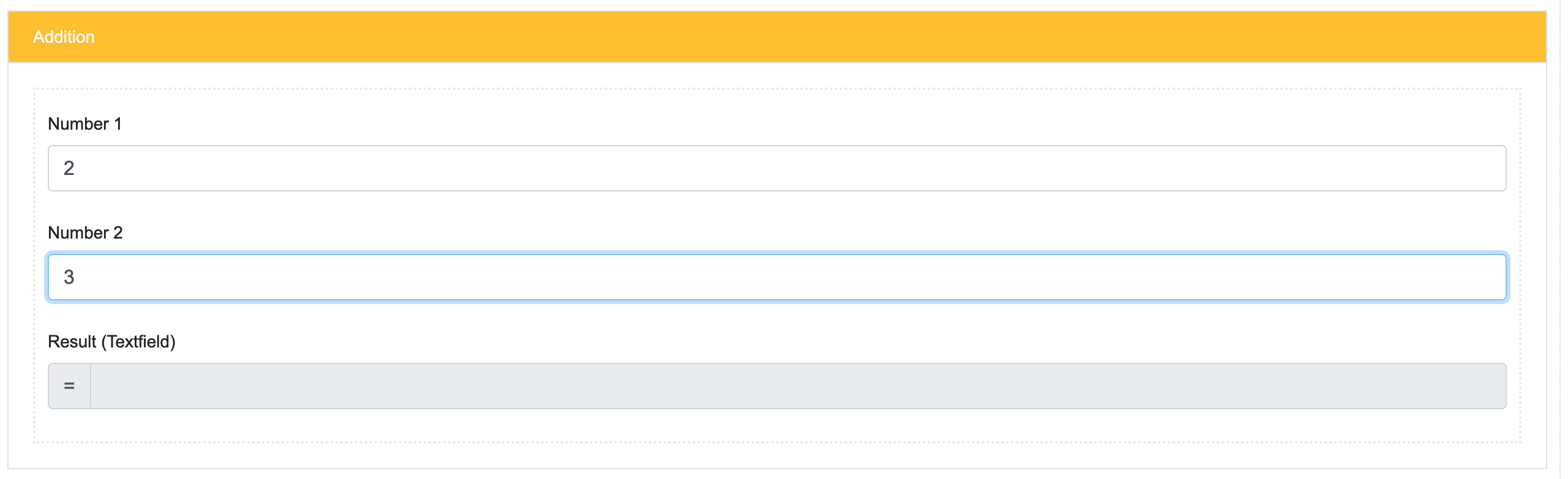
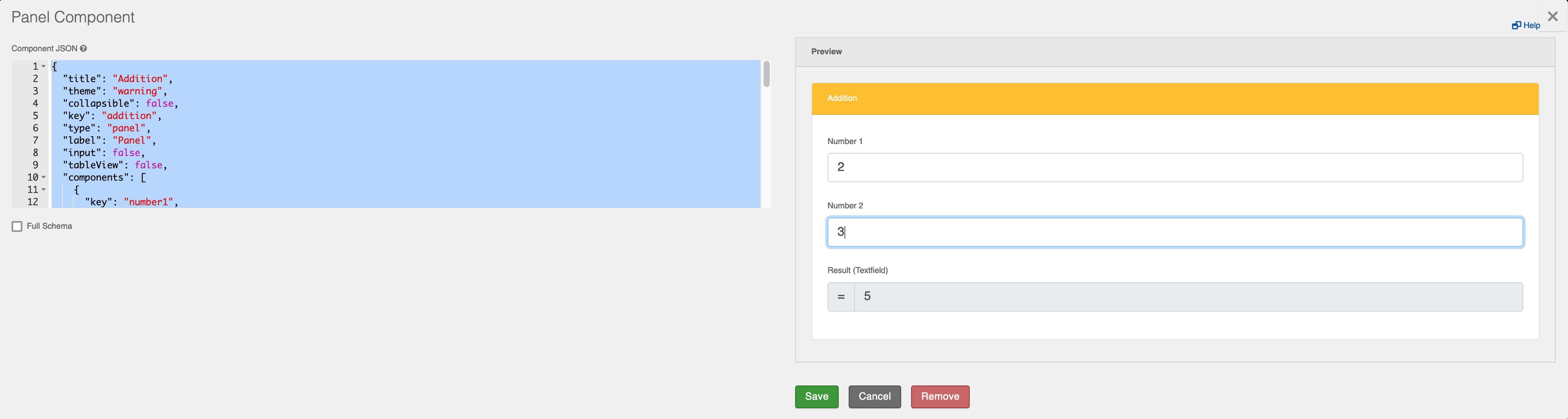
And the .json code of the panel:
{
"title": "Addition",
"theme": "warning",
"collapsible": false,
"key": "addition",
"type": "panel",
"label": "Panel",
"input": false,
"tableView": false,
"components": [
{
"key": "number1",
"type": "xnatNumber",
"input": true,
"label": "Number 1",
"delimiter": false,
"tableView": false,
"requireDecimal": false,
"truncateMultipleSpaces": false
},
{
"key": "number2",
"type": "xnatNumber",
"input": true,
"label": "Number 2",
"delimiter": false,
"tableView": false,
"requireDecimal": false,
"truncateMultipleSpaces": false
},
{
"label": "Result (Textfield)",
"redrawOn": "data",
"calculateValue": {
"+": [
{
"var": "data.number1"
},
{
"var": "data.number2"
}
]
},
"key": "result",
"type": "textfield",
"input": true,
"prefix": "=",
"disabled": true,
"refreshOn": "change",
"tableView": true,
"keyModified": true
}
]
}
"title": "Addition",
"theme": "warning",
"collapsible": false,
"key": "addition",
"type": "panel",
"label": "Panel",
"input": false,
"tableView": false,
"components": [
{
"key": "number1",
"type": "xnatNumber",
"input": true,
"label": "Number 1",
"delimiter": false,
"tableView": false,
"requireDecimal": false,
"truncateMultipleSpaces": false
},
{
"key": "number2",
"type": "xnatNumber",
"input": true,
"label": "Number 2",
"delimiter": false,
"tableView": false,
"requireDecimal": false,
"truncateMultipleSpaces": false
},
{
"label": "Result (Textfield)",
"redrawOn": "data",
"calculateValue": {
"+": [
{
"var": "data.number1"
},
{
"var": "data.number2"
}
]
},
"key": "result",
"type": "textfield",
"input": true,
"prefix": "=",
"disabled": true,
"refreshOn": "change",
"tableView": true,
"keyModified": true
}
]
}

Ian Gauthier
May 31, 2023, 3:58:45 PM5/31/23
to xnat_discussion
Hi Laura,
Unfortunately, calculated value type fields are not currently supported within the current version of XNAT custom forms. As such, this is the expected functionality for these inputs. We are planning to add this type of field into XNAT in a future version of custom forms and we have noted down your interest in them within our ticketing system.
Thanks for reaching out,
Ian

roman....@gmail.com
Feb 26, 2024, 10:07:04 AM2/26/24
to xnat_discussion
Hi Ian,
I would like to ask you if there is any current development in this matter. Laura used to work in our group and helped us setting up xnat and custom forms.
Sincerely
Sandro

Leo Abhi
Dec 21, 2025, 1:41:08 AM12/21/25
to xnat_discussion
Hi Ian,
Just a quick follow-up to check if there has been any progress on this. I am currently looking into automating values within the forms and wanted to confirm whether this is possible for XNAT version 1.8.9. Could you please let me know if this functionality is supported now?
Leo

Timothy Olsen
Dec 23, 2025, 12:17:24 PM12/23/25
to xnat_di...@googlegroups.com
Unfortunately, I don't think any additional work has been done here in the interim. It isn't on the current road map, though I'd love to see some more investment in Custom Forms (particularly scan level forms) if we could find the funding.
Tim
Tim
Timothy R Olsen
Founder, President


--
You received this message because you are subscribed to the Google Groups "xnat_discussion" group.
To unsubscribe from this group and stop receiving emails from it, send an email to xnat_discussi...@googlegroups.com.
To view this discussion visit https://groups.google.com/d/msgid/xnat_discussion/f21fe4f0-aa93-482a-a532-a1c1fd505fcen%40googlegroups.com.
Reply all
Reply to author
Forward
0 new messages