Programmatically submitting a job using LEGACY PDF as a Print Format

173 views
Skip to first unread message

James Harrod

unread,
Jun 26, 2018, 11:15:15 AM6/26/18
to XMPie Interest Group
Hi,

I am developing my own C# console to monitor jobs in uProduce.

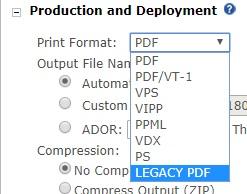
I am at the stage where I can re-submit failed jobs via the console. However, I am stuck on which "JobTicket..::.SetOutputType" to use for LEGACY PDF.
The help file doesn't seem to give a code to use for that type of output.

Can anyone help me?

Thanks,
James Harrod
HelpFileOutputTypes.JPG
uProducePrintFormat.jpg

ROBERT HOPFNER

unread,
Jun 26, 2018, 11:23:47 AM6/26/18
to xmpie...@googlegroups.com, James Harrod

FWIW,


Do you have to use Legacy? PDF output is "native" to InDesign and produces a better PDF. It doesn't go through a distiller process that strips color management information among other things...


I think it is quicker and the output file size is usually smaller too.


cheers,

Bob

--
You received this message because you are subscribed to the Google Groups "XMPie Interest Group" group.
To unsubscribe from this group and stop receiving emails from it, send an email to xmpie-users...@googlegroups.com.
To post to this group, send email to xmpie...@googlegroups.com.
Visit this group at https://groups.google.com/group/xmpie-users.
For more options, visit https://groups.google.com/d/optout.

James Harrod

unread,
Jun 26, 2018, 11:58:00 AM6/26/18
to XMPie Interest Group
Hi Bob,

My other C# application auto-submits jobs when it sees files in hot folders.

Sometimes, files fail with the following messages:

Print Production
The operation was canceled due to PDF standards compliance error. Please consult support for further investigation. This error might have occurred because of a missing font or a missing glyph character.

SQL Query
There is a type mismatch between the field types of the recipients filter and the Plan file Recipient Information Schema.
The mismatch(es) occurred between (Plan type - filter type):
col_000(string - number), OCR(string - number).

The data source is then resubmitted using the LEGACY PDF option and goes through fine. I just want the option of my C# monitoring tool to resubmit as LEGACY PDF, so that the file does not have to be resubmitted manually.

Hope that makes sense.

Thanks

ROBERT HOPFNER

unread,
Jun 26, 2018, 12:15:08 PM6/26/18
to xmpie...@googlegroups.com, James Harrod

That makes perfect sense, I just didn't want you missing out on better features by defaulting to a lower standard. This is the best approach. 


I wish I could help you with your actual problem, but I don't know much about the API. I know I have had discussions with developers on which one to use but I can't recall the name. I am sure Steve Couch will tell you the second he sees this if you don't get an answer sooner. You might want to put in a ticket to the help desk just to cover your bases.


cheers,

Bob

James Harrod

unread,
Jun 27, 2018, 6:38:12 AM6/27/18
to XMPie Interest Group
Thanks for your reply.

I think I'll try and resubmit with the output format as just PDF (we are using PDFO at the moment), and see what output type it selects in the GUI.

I'll wait and see if Steve does see this thread and respond to it.

Many thanks

couch

unread,
Jun 27, 2018, 6:51:59 PM6/27/18
to XMPie Interest Group
Sorry - been a bit busy lately.

For legacy pdf, the output type is:  PDFDSTL

I will log a documentation bug because it does not appear to be listed in the API SDK.

Anyway, for debugging any problems in the jobticket (or to find out what some setting in the dashboard does to the ticket) just process your document in the dashboard, then go to the SQL database.
Look in the XMPDB2 database, TBL_JOBS table.
Identify the row of the job you just submitted by the jobid in the dashboard job centre.
The JobParams field in that row will contain the job ticket and you can lookup the value - which is what i just did - (or compare to this good job ticket  against one you submitted with your application code that doesn't do quite what you want, and compare to find your problem)

James Harrod

unread,
Jun 29, 2018, 5:10:05 AM6/29/18
to XMPie Interest Group
Hi,

Thanks for the reply. I used that in my code and it worked! :D

Yes, I know about the tables in the SQL database. I was looking at them when developing my monitoring tool, and experimenting with different settings.

Thanks again!
Reply all
Reply to author
Forward
0 new messages