
possible to make wxChoice a little shorter(smaller) inside wxToolbar
466 views
Skip to first unread message

asmwarrior
Feb 16, 2019, 10:18:14 AM2/16/19
to wx-u...@googlegroups.com
Hi, first, please look at the screen shot as attachment(which is CodeBlocks IDE's build against wx3.1.2). You see the rows of toolbar have different height. The first toolbar row's height is much larger than the second row, this does not happens under wx2.8, where both two rows have the same height.
The cause of this issue comes from this commit: Ensure toolbar fits controls that are taller than the buttons in wxMS… · wxWidgets/wxWidgets@0185d61 — https://github.com/wxWidgets/wxWidgets/commit/0185d61a2c6f91cf47932fce0d68d70b7e578b17
I do not know what is the reason of this commit, but I do see after this commit, wxChoice becomes larger.
To demonstrate this issue, you can use a simple test program by me from here: https://trac.wxwidgets.org/ticket/18138 (note #18138 is another toolbar background repaint issue, which is already fixed in wx's trunk now)
So, here's my question: is it possible to make the wxChoice a litter smaller? I need a compact toolbar here just like wx2.8 does. Thanks.
ollydbg from C::B from.
BTW: I have reported this issue several years ago here: https://groups.google.com/forum/#!topic/wx-users/2riQ9W_vcOs Basically, when debugging I found that the wxChoice is 3 pixels larger after the commit 0185d61a2c6f91cf47932fce0d68d70b7e578b17
BTW2: We also discussion this issue under C::B forum for several years: http://forums.codeblocks.org/index.php/topic,20938.msg157431/topicseen.html#msg157431
The cause of this issue comes from this commit: Ensure toolbar fits controls that are taller than the buttons in wxMS… · wxWidgets/wxWidgets@0185d61 — https://github.com/wxWidgets/wxWidgets/commit/0185d61a2c6f91cf47932fce0d68d70b7e578b17
I do not know what is the reason of this commit, but I do see after this commit, wxChoice becomes larger.
To demonstrate this issue, you can use a simple test program by me from here: https://trac.wxwidgets.org/ticket/18138 (note #18138 is another toolbar background repaint issue, which is already fixed in wx's trunk now)
So, here's my question: is it possible to make the wxChoice a litter smaller? I need a compact toolbar here just like wx2.8 does. Thanks.
ollydbg from C::B from.
BTW: I have reported this issue several years ago here: https://groups.google.com/forum/#!topic/wx-users/2riQ9W_vcOs Basically, when debugging I found that the wxChoice is 3 pixels larger after the commit 0185d61a2c6f91cf47932fce0d68d70b7e578b17
BTW2: We also discussion this issue under C::B forum for several years: http://forums.codeblocks.org/index.php/topic,20938.msg157431/topicseen.html#msg157431

Vadim Zeitlin
Feb 24, 2019, 5:49:21 PM2/24/19
to wx-u...@googlegroups.com
On Sat, 16 Feb 2019 23:17:58 +0800 asmwarrior wrote:
a> Hi, first, please look at the screen shot as attachment(which is
a> CodeBlocks IDE's build against wx3.1.2). You see the rows of toolbar
a> have different height. The first toolbar row's height is much larger
a> than the second row, this does not happens under wx2.8, where both two
a> rows have the same height.
Hello and sorry for the delay with the reply, but I needed some time to
try to fix this. I think I've perhaps done this now, so it would be great
if you could please test the changes of
https://github.com/wxWidgets/wxWidgets/pull/1241
and let me know how does it affect C::B. I'm not sure if this really fixes
the problem you're describing (because I couldn't find any simple way to
test it), but in any case any additional fixes would need to be done on top
of these changes.
a> The cause of this issue comes from this commit: Ensure toolbar fits
a> controls that are taller than the buttons in wxMS… ·
a> wxWidgets/wxWidgets@0185d61 —
a> https://github.com/wxWidgets/wxWidgets/commit/0185d61a2c6f91cf47932fce0d68d70b7e578b17
a>
a> I do not know what is the reason of this commit,
As far as I could ascertain, this was done to allow having controls taller
than buttons in the toolbars, which would be broken if this commit were
simply reverted, as can be easily seen with my one-line patch at
https://trac.wxwidgets.org/ticket/18294#comment:4
a> but I do see after this commit, wxChoice becomes larger.
a>
a> To demonstrate this issue, you can use a simple test program by me from
a> here: https://trac.wxwidgets.org/ticket/18138
I'm somewhat confused because this ticket is AUI-related, while the
problem we're discussing is not, it's rather a bug in wxToolbar itself.
Would it be possible for you to make a patch to the toolbar sample showing
the problem without involving AUI, if it's still present with the changes
of the PR above?
a> So, here's my question: is it possible to make the wxChoice a litter
a> smaller?
It should be now as wxToolBar size logic is more reasonable but, again, it
would be great to have a simple way to test this.
Regards,
VZ
--
TT-Solutions: wxWidgets consultancy and technical support
http://www.tt-solutions.com/
a> Hi, first, please look at the screen shot as attachment(which is
a> CodeBlocks IDE's build against wx3.1.2). You see the rows of toolbar
a> have different height. The first toolbar row's height is much larger
a> than the second row, this does not happens under wx2.8, where both two
a> rows have the same height.
Hello and sorry for the delay with the reply, but I needed some time to
try to fix this. I think I've perhaps done this now, so it would be great
if you could please test the changes of
https://github.com/wxWidgets/wxWidgets/pull/1241
and let me know how does it affect C::B. I'm not sure if this really fixes
the problem you're describing (because I couldn't find any simple way to
test it), but in any case any additional fixes would need to be done on top
of these changes.
a> The cause of this issue comes from this commit: Ensure toolbar fits
a> controls that are taller than the buttons in wxMS… ·
a> wxWidgets/wxWidgets@0185d61 —
a> https://github.com/wxWidgets/wxWidgets/commit/0185d61a2c6f91cf47932fce0d68d70b7e578b17
a>
a> I do not know what is the reason of this commit,
As far as I could ascertain, this was done to allow having controls taller
than buttons in the toolbars, which would be broken if this commit were
simply reverted, as can be easily seen with my one-line patch at
https://trac.wxwidgets.org/ticket/18294#comment:4
a> but I do see after this commit, wxChoice becomes larger.
a>
a> To demonstrate this issue, you can use a simple test program by me from
a> here: https://trac.wxwidgets.org/ticket/18138
I'm somewhat confused because this ticket is AUI-related, while the
problem we're discussing is not, it's rather a bug in wxToolbar itself.
Would it be possible for you to make a patch to the toolbar sample showing
the problem without involving AUI, if it's still present with the changes
of the PR above?
a> So, here's my question: is it possible to make the wxChoice a litter
a> smaller?
It should be now as wxToolBar size logic is more reasonable but, again, it
would be great to have a simple way to test this.
Regards,
VZ
--
TT-Solutions: wxWidgets consultancy and technical support
http://www.tt-solutions.com/
AsmWarrior
Feb 28, 2019, 4:05:41 AM2/28/19
to wx-users
On Monday, February 25, 2019 at 6:49:21 AM UTC+8, Vadim Zeitlin wrote:
On Sat, 16 Feb 2019 23:17:58 +0800 asmwarrior wrote:
a> Hi, first, please look at the screen shot as attachment(which is
a> CodeBlocks IDE's build against wx3.1.2). You see the rows of toolbar
a> have different height. The first toolbar row's height is much larger
a> than the second row, this does not happens under wx2.8, where both two
a> rows have the same height.
Hello and sorry for the delay with the reply, but I needed some time to
try to fix this. I think I've perhaps done this now, so it would be great
if you could please test the changes of
https://github.com/wxWidgets/wxWidgets/pull/1241
and let me know how does it affect C::B. I'm not sure if this really fixes
the problem you're describing (because I couldn't find any simple way to
test it), but in any case any additional fixes would need to be done on top
of these changes.
Hi, Thanks for the help.
I extract the diff file of your pull request, and apply it in the my local wx3.1.2 source release. See the attachment of the result C::B. It looks like the wxChoice is still a bit larger.
The first arrow shows that the toolbar button and the wxChoice is now vertically aligned.
The second arrow shows that some extra space is added, I don't know why.
But I think the wxChoice is still a bit larger, is it possible to make it a a litter shorter? I add another screen shot, which is C::B against wx2.8.12 for reference.
I will see if I can create a minimal wxToolbar sample code to reproduce this issue.
Vadim Zeitlin
Mar 9, 2019, 11:05:58 AM3/9/19
to wx-u...@googlegroups.com
On Thu, 28 Feb 2019 01:05:40 -0800 (PST) AsmWarrior wrote:
A> I extract the diff file of your pull request, and apply it in the my local
A> wx3.1.2 source release.
Sorry, but I'm going to have to ask you to retest again as I've just
updated https://github.com/wxWidgets/wxWidgets/pull/1241 significantly,
see https://trac.wxwidgets.org/ticket/18294#comment:19 for more details,
but, in short, this is the version which I'd like to merge into master,
finally.
A> See the attachment of the result C::B. It looks like the wxChoice is
A> still a bit larger.
You should be able to make wxChoice smaller by setting its initial size,
i.e. either creating it with the smaller size or calling SetInitialSize()
explicitly. But I don't understand why is it so tall by default: it seems
to be 28 tall in your screenshot while its normal height is 23px (which
is exactly the same as the default push button height) and this is what I
see in the toolbar sample (even if I remove the label). Do you create it
with non-default size?
Other than that, my latest changes do reduce the height of the toolbar to
tallest control height + 4px (2px for the toolbar border and 1px on either
side because it looks really ugly without any gap), so you should get the
smallest possible toolbars if you reduce your wxChoice size. However
wxToolBar now will _not_ truncate your controls for you, which is something
it should have never done in the first place, of course.
A> The first arrow shows that the toolbar button and the wxChoice is now
A> vertically aligned.
A> The second arrow shows that some extra space is added, I don't know why.
Me neither... Is there a stretchable separator, i.e. a space added with
wxToolBar::AddStretchableSpace(), in this toolbar by chance? They used to
be broken and I've fixed them as part of my changes.
A> But I think the wxChoice is still a bit larger, is it possible to make it a
A> a litter shorter? I add another screen shot, which is C::B against wx2.8.12
A> for reference.
Please check if it's better with the latest PR 1241.
A> I will see if I can create a minimal wxToolbar sample code to reproduce
A> this issue.
And if not, a patch to the toolbar sample would be really welcome.
TIA,
A> I extract the diff file of your pull request, and apply it in the my local
A> wx3.1.2 source release.
Sorry, but I'm going to have to ask you to retest again as I've just
updated https://github.com/wxWidgets/wxWidgets/pull/1241 significantly,
see https://trac.wxwidgets.org/ticket/18294#comment:19 for more details,
but, in short, this is the version which I'd like to merge into master,
finally.
A> See the attachment of the result C::B. It looks like the wxChoice is
A> still a bit larger.
You should be able to make wxChoice smaller by setting its initial size,
i.e. either creating it with the smaller size or calling SetInitialSize()
explicitly. But I don't understand why is it so tall by default: it seems
to be 28 tall in your screenshot while its normal height is 23px (which
is exactly the same as the default push button height) and this is what I
see in the toolbar sample (even if I remove the label). Do you create it
with non-default size?
Other than that, my latest changes do reduce the height of the toolbar to
tallest control height + 4px (2px for the toolbar border and 1px on either
side because it looks really ugly without any gap), so you should get the
smallest possible toolbars if you reduce your wxChoice size. However
wxToolBar now will _not_ truncate your controls for you, which is something
it should have never done in the first place, of course.
A> The first arrow shows that the toolbar button and the wxChoice is now
A> vertically aligned.
A> The second arrow shows that some extra space is added, I don't know why.
Me neither... Is there a stretchable separator, i.e. a space added with
wxToolBar::AddStretchableSpace(), in this toolbar by chance? They used to
be broken and I've fixed them as part of my changes.
A> But I think the wxChoice is still a bit larger, is it possible to make it a
A> a litter shorter? I add another screen shot, which is C::B against wx2.8.12
A> for reference.
Please check if it's better with the latest PR 1241.
A> I will see if I can create a minimal wxToolbar sample code to reproduce
A> this issue.
And if not, a patch to the toolbar sample would be really welcome.
TIA,
asmwarrior
Mar 21, 2019, 10:02:12 AM3/21/19
to wx-u...@googlegroups.com, Vadim Zeitlin
On Sun Mar 10 2019 00:05:54 GMT+0800, Vadim Zeitlin wrote:
> On Thu, 28 Feb 2019 01:05:40 -0800 (PST) AsmWarrior wrote:
>
> A> I extract the diff file of your pull request, and apply it in the my local
> A> wx3.1.2 source release.
>
> Sorry, but I'm going to have to ask you to retest again as I've just
> updated https://github.com/wxWidgets/wxWidgets/pull/1241 significantly,
> see https://trac.wxwidgets.org/ticket/18294#comment:19 for more details,
> but, in short, this is the version which I'd like to merge into master,
> finally.
Hi, VZ, sorry for the late reply.
> On Thu, 28 Feb 2019 01:05:40 -0800 (PST) AsmWarrior wrote:
>
> A> I extract the diff file of your pull request, and apply it in the my local
> A> wx3.1.2 source release.
>
> Sorry, but I'm going to have to ask you to retest again as I've just
> updated https://github.com/wxWidgets/wxWidgets/pull/1241 significantly,
> see https://trac.wxwidgets.org/ticket/18294#comment:19 for more details,
> but, in short, this is the version which I'd like to merge into master,
> finally.
What wx code base should I test? Do I need to clone this branch https://github.com/vadz/wxWidgets/tree/msw-tbar-resize, build the wx library, and test it?
Thanks.
Asmwarrior
Vadim Zeitlin
Mar 21, 2019, 10:04:39 AM3/21/19
to wx-u...@googlegroups.com
On Thu, 21 Mar 2019 22:02:01 +0800 asmwarrior wrote:
a> What wx code base should I test? Do I need to clone this branch
a> https://github.com/vadz/wxWidgets/tree/msw-tbar-resize, build the wx
a> library, and test it?
Yes, you need to use this branch (you don't "clone a branch" but rather
clone a repository and then checkout a branch from it, but this is just
terminology).
I'd also like to point you to what I just wrote at
https://trac.wxwidgets.org/ticket/18294#comment:23
notably this part:
> If you want to have less tall toolbars, just make the controls in
> them less tall.
Thanks for testing,
a> What wx code base should I test? Do I need to clone this branch
a> https://github.com/vadz/wxWidgets/tree/msw-tbar-resize, build the wx
a> library, and test it?
Yes, you need to use this branch (you don't "clone a branch" but rather
clone a repository and then checkout a branch from it, but this is just
terminology).
I'd also like to point you to what I just wrote at
https://trac.wxwidgets.org/ticket/18294#comment:23
notably this part:
> If you want to have less tall toolbars, just make the controls in
> them less tall.
Thanks for testing,
asmwarrior
Mar 21, 2019, 10:10:06 AM3/21/19
to wx-u...@googlegroups.com, Vadim Zeitlin
On Thu Mar 21 2019 22:04:35 GMT+0800, Vadim Zeitlin wrote:
> On Thu, 21 Mar 2019 22:02:01 +0800 asmwarrior wrote:
>
> a> What wx code base should I test? Do I need to clone this branch
> a> https://github.com/vadz/wxWidgets/tree/msw-tbar-resize, build the wx
> a> library, and test it?
>
> Yes, you need to use this branch (you don't "clone a branch" but rather
> clone a repository and then checkout a branch from it, but this is just
> terminology).
>
> I'd also like to point you to what I just wrote at
>
> https://trac.wxwidgets.org/ticket/18294#comment:23
>
> notably this part:
>
> > If you want to have less tall toolbars, just make the controls in
> > them less tall.
OK, Thanks for the quick response, and I will also check the C::B's source code to see how C::B's wxChoice is created in toolbar.
> On Thu, 21 Mar 2019 22:02:01 +0800 asmwarrior wrote:
>
> a> What wx code base should I test? Do I need to clone this branch
> a> https://github.com/vadz/wxWidgets/tree/msw-tbar-resize, build the wx
> a> library, and test it?
>
> Yes, you need to use this branch (you don't "clone a branch" but rather
> clone a repository and then checkout a branch from it, but this is just
> terminology).
>
> I'd also like to point you to what I just wrote at
>
> https://trac.wxwidgets.org/ticket/18294#comment:23
>
> notably this part:
>
> > If you want to have less tall toolbars, just make the controls in
> > them less tall.
Asmwarrior
asmwarrior
Mar 24, 2019, 8:43:29 AM3/24/19
to wx-u...@googlegroups.com, Vadim Zeitlin
On Thu Mar 21 2019 22:04:35 GMT+0800, Vadim Zeitlin wrote:
> On Thu, 21 Mar 2019 22:02:01 +0800 asmwarrior wrote:
>
> a> What wx code base should I test? Do I need to clone this branch
> a> https://github.com/vadz/wxWidgets/tree/msw-tbar-resize, build the wx
> a> library, and test it?
>
> Yes, you need to use this branch (you don't "clone a branch" but rather
> clone a repository and then checkout a branch from it, but this is just
> terminology).
>
>
Strange, I got such build error with i686-7.2.0-release-posix-dwarf-rt_v5-rev1
>
> a> What wx code base should I test? Do I need to clone this branch
> a> https://github.com/vadz/wxWidgets/tree/msw-tbar-resize, build the wx
> a> library, and test it?
>
> Yes, you need to use this branch (you don't "clone a branch" but rather
> clone a repository and then checkout a branch from it, but this is just
> terminology).
>
>
E:\code\wxWidgets\build\msw>mingw32-make -f makefile.gcc USE_XRC=1 SHARED=1 MONOLITHIC=1 BUILD=release UNICODE=1 USE_OPENGL=1 VENDOR=cb CXXFLAGS="-Wno-unused-local-typedefs -Wno-deprecated-declarations -fno-keep-inline-dllexport"
if not exist gcc_mswudll mkdir gcc_mswudll
if not exist ..\..\lib\gcc_dll\mswu mkdir ..\..\lib\gcc_dll\mswu
gcc -c -o gcc_mswudll\wxregex_regcomp.o -O2 -mthreads -DHAVE_W32API_H -DNDEBUG -I..\..\include -I..\..\lib\gcc_dll\mswu -D__WXMSW__ -D_UNICODE -MTgcc_mswudll\wxregex_regcomp.o -MFgcc_mswudll\wxregex_regcomp.o.d -MD -MP ../../src/regex/regcomp.c
gcc -c -o gcc_mswudll\wxregex_regexec.o -O2 -mthreads -DHAVE_W32API_H -DNDEBUG -I..\..\include -I..\..\lib\gcc_dll\mswu -D__WXMSW__ -D_UNICODE -MTgcc_mswudll\wxregex_regexec.o -MFgcc_mswudll\wxregex_regexec.o.d -MD -MP ../../src/regex/regexec.c
gcc -c -o gcc_mswudll\wxregex_regerror.o -O2 -mthreads -DHAVE_W32API_H -DNDEBUG -I..\..\include -I..\..\lib\gcc_dll\mswu -D__WXMSW__ -D_UNICODE -MTgcc_mswudll\wxregex_regerror.o -MFgcc_mswudll\wxregex_regerror.o.d -MD -MP ../../src/regex/regerror.c
gcc -c -o gcc_mswudll\wxregex_regfree.o -O2 -mthreads -DHAVE_W32API_H -DNDEBUG -I..\..\include -I..\..\lib\gcc_dll\mswu -D__WXMSW__ -D_UNICODE -MTgcc_mswudll\wxregex_regfree.o -MFgcc_mswudll\wxregex_regfree.o.d -MD -MP ../../src/regex/regfree.c
if exist ..\..\lib\gcc_dll\libwxregexu.a del ..\..\lib\gcc_dll\libwxregexu.a
ar rcu ..\..\lib\gcc_dll\libwxregexu.a gcc_mswudll\wxregex_regcomp.o gcc_mswudll\wxregex_regexec.o gcc_mswudll\wxregex_regerror.o gcc_mswudll\wxregex_regfree.o
ranlib ..\..\lib\gcc_dll\libwxregexu.a
mingw32-make: *** No rule to make target '../../src/zlib/adler32.c', needed by 'gcc_mswudll\wxzlib_adler32.o'. Stop.
Asmwarrior

Gunter Königsmann
Mar 24, 2019, 8:47:54 AM3/24/19
to wx-u...@googlegroups.com, Vadim Zeitlin
Seems you haven't told git to download the submodules, see https://git-scm.com/book/en/v2/Git-Tools-Submodules
Kind regards,
Gunter.
--
Please read http://www.wxwidgets.org/support/mlhowto.htm before posting.
To unsubscribe, send email to wx-users+u...@googlegroups.com
or visit http://groups.google.com/group/wx-users
asmwarrior
Mar 24, 2019, 10:15:53 AM3/24/19
to wx-u...@googlegroups.com, Gunter Königsmann, Vadim Zeitlin
On Sun Mar 24 2019 20:47:39 GMT+0800, Gunter Königsmann wrote:
> Seems you haven't told git to download the submodules, see https://git-scm.com/book/en/v2/Git-Tools-Submodules
>
> Kind regards,
>
> Gunter.
Thanks for the help. I just fixed this issue. It's building now.
> Seems you haven't told git to download the submodules, see https://git-scm.com/book/en/v2/Git-Tools-Submodules
>
> Kind regards,
>
> Gunter.
Asmwarrior
asmwarrior
Mar 28, 2019, 10:37:05 AM3/28/19
to wx-u...@googlegroups.com, Vadim Zeitlin
On Thu Mar 21 2019 22:04:35 GMT+0800, Vadim Zeitlin wrote:
> On Thu, 21 Mar 2019 22:02:01 +0800 asmwarrior wrote:
>
> a> What wx code base should I test? Do I need to clone this branch
> a> https://github.com/vadz/wxWidgets/tree/msw-tbar-resize, build the wx
> a> library, and test it?
>
> Yes, you need to use this branch (you don't "clone a branch" but rather
> clone a repository and then checkout a branch from it, but this is just
> terminology).
>
> I'd also like to point you to what I just wrote at
>
> https://trac.wxwidgets.org/ticket/18294#comment:23
>
> notably this part:
>
> > If you want to have less tall toolbars, just make the controls in
> > them less tall.
>
> Thanks for testing,
> VZ
>
I build the https://github.com/vadz/wxWidgets/tree/msw-tbar-resize branch, the latest commit is:
>
> a> What wx code base should I test? Do I need to clone this branch
> a> https://github.com/vadz/wxWidgets/tree/msw-tbar-resize, build the wx
> a> library, and test it?
>
> Yes, you need to use this branch (you don't "clone a branch" but rather
> clone a repository and then checkout a branch from it, but this is just
> terminology).
>
> I'd also like to point you to what I just wrote at
>
> https://trac.wxwidgets.org/ticket/18294#comment:23
>
> notably this part:
>
> > If you want to have less tall toolbars, just make the controls in
> > them less tall.
>
> Thanks for testing,
> VZ
>
SHA-1: 6ad5aee8ac663b86d3bafdf86136524cca7e5f3f
* Document the change in wxMSW wxToolBar height determination
and I also build the toolbar sample.
I'm on Windows 7 64bit system, and I'm using i686-7.2.0-release-posix-dwarf-rt_v5-rev1 from Mingw-w64's site.
Now, here is the screen shot of the toolbar.exe (I have select show only the icons option) in attachment.
You see, the default wxChoice is a bit taller than the toolbar button. Is it the expected behavior?
Asmwarrior
Vadim Zeitlin
Mar 28, 2019, 11:34:25 AM3/28/19
to wx-u...@googlegroups.com
[Could you please avoid cc'ing me the messages posted to the list?]
On Thu, 28 Mar 2019 22:36:53 +0800 asmwarrior wrote:
a> I build the https://github.com/vadz/wxWidgets/tree/msw-tbar-resize branch, the latest commit is:
a> SHA-1: 6ad5aee8ac663b86d3bafdf86136524cca7e5f3f
a> * Document the change in wxMSW wxToolBar height determination
a> and I also build the toolbar sample.
a> I'm on Windows 7 64bit system, and I'm using i686-7.2.0-release-posix-dwarf-rt_v5-rev1 from Mingw-w64's site.
a> Now, here is the screen shot of the toolbar.exe (I have select show only the icons option) in attachment.
a> You see, the default wxChoice is a bit taller than the toolbar button.
a> Is it the expected behavior?
Your wxChoice is 28px height which is different from my Windows 7 system,
where it is 23px, but you seem to be using some non-standard theme settings
as your title bar buttons are also noticeably larger than mine. So I guess
this probably is the normal size for your settings/theme.
The important point is that you can set its size to a smaller height when
creating it and it should work. Relying on toolbar automatically resizing
the controls to fit in its height instead of accommodating their height
is not the right thing to do, IMO.
Regards,
On Thu, 28 Mar 2019 22:36:53 +0800 asmwarrior wrote:
a> I build the https://github.com/vadz/wxWidgets/tree/msw-tbar-resize branch, the latest commit is:
a> SHA-1: 6ad5aee8ac663b86d3bafdf86136524cca7e5f3f
a> * Document the change in wxMSW wxToolBar height determination
a> and I also build the toolbar sample.
a> I'm on Windows 7 64bit system, and I'm using i686-7.2.0-release-posix-dwarf-rt_v5-rev1 from Mingw-w64's site.
a> Now, here is the screen shot of the toolbar.exe (I have select show only the icons option) in attachment.
a> You see, the default wxChoice is a bit taller than the toolbar button.
a> Is it the expected behavior?
Your wxChoice is 28px height which is different from my Windows 7 system,
where it is 23px, but you seem to be using some non-standard theme settings
as your title bar buttons are also noticeably larger than mine. So I guess
this probably is the normal size for your settings/theme.
The important point is that you can set its size to a smaller height when
creating it and it should work. Relying on toolbar automatically resizing
the controls to fit in its height instead of accommodating their height
is not the right thing to do, IMO.
Regards,


Catalin
Mar 28, 2019, 5:20:09 PM3/28/19
to wx-u...@googlegroups.com
FWIW playing with toolbar sample and latest wxW head on Win10, VS shows a lot of errors like
...include\wx\msw\private.h(355): 'GetWindowRect' failed with error 0x00000578 (Invalid window handle.).
Could it be that geometry details are invalid while the toolbar is being recreated?
One scenario for this is to open toolbar sample and choose menu Toolbar -> Show icons [Ctrl+Alt+i].
There will be multiple occurrences, but the stack trace of the first one is below:
> toolbar.exe!wxGetWindowRect(HWND__ * hwnd) Line 358 C++
toolbar.exe!wxWindow::DoGetSize(int * x, int * y) Line 1852 C++
toolbar.exe!wxWindowBase::GetSize() Line 321 C++
toolbar.exe!wxFrame::GetClientAreaOrigin() Line 925 C++
toolbar.exe!wxWindowBase::AdjustForParentClientOrigin(int & x, int & y, int sizeFlags) Line 2775 C++
toolbar.exe!wxControl::MSWCreateControl(const wchar_t * classname, unsigned long style, const wxPoint & pos, const wxSize & size, const wxString & label, unsigned long exstyle) Line 135 C++
toolbar.exe!wxControl::MSWCreateControl(const wchar_t * classname, const wxString & label, const wxPoint & pos, const wxSize & size) Line 97 C++
toolbar.exe!wxToolBar::MSWCreateToolbar(const wxPoint & pos, const wxSize & size) Line 439 C++
toolbar.exe!wxToolBar::Recreate() Line 480 C++
toolbar.exe!wxToolBar::SetWindowStyleFlag(long style) Line 1711 C++
toolbar.exe!wxWindowBase::SetWindowStyle(long style) Line 662 C++
toolbar.exe!MyFrame::OnToolbarStyle(wxCommandEvent & event) Line 966 C++
toolbar.exe!wxAppConsoleBase::HandleEvent(wxEvtHandler * handler, void(wxEvtHandler::*)(wxEvent &) func, wxEvent & event) Line 658 C++
[...]
Regards,
C
asmwarrior
Mar 29, 2019, 1:12:06 AM3/29/19
to wx-u...@googlegroups.com
On Thu Mar 28 2019 23:34:22 GMT+0800, Vadim Zeitlin wrote:
> [Could you please avoid cc'ing me the messages posted to the list?]
OK, sorry about the noise.
> [Could you please avoid cc'ing me the messages posted to the list?]
>
> On Thu, 28 Mar 2019 22:36:53 +0800 asmwarrior wrote:
>
> a> I build the https://github.com/vadz/wxWidgets/tree/msw-tbar-resize branch, the latest commit is:
> a> SHA-1: 6ad5aee8ac663b86d3bafdf86136524cca7e5f3f
> a> * Document the change in wxMSW wxToolBar height determination
> a> and I also build the toolbar sample.
> a> I'm on Windows 7 64bit system, and I'm using i686-7.2.0-release-posix-dwarf-rt_v5-rev1 from Mingw-w64's site.
> a> Now, here is the screen shot of the toolbar.exe (I have select show only the icons option) in attachment.
> a> You see, the default wxChoice is a bit taller than the toolbar button.
> a> Is it the expected behavior?
>
> Your wxChoice is 28px height which is different from my Windows 7 system,
> where it is 23px, but you seem to be using some non-standard theme settings
> as your title bar buttons are also noticeably larger than mine. So I guess
> this probably is the normal size for your settings/theme.
>
> The important point is that you can set its size to a smaller height when
> creating it and it should work. Relying on toolbar automatically resizing
> the controls to fit in its height instead of accommodating their height
> is not the right thing to do, IMO.
>
> Regards,
> VZ
I don't have a non-standard theme setting. I just checked my theme, it is "Windows 7 Basic", I changed it to "Windows classic" or "Windows 7 standard", it has the same result.
> On Thu, 28 Mar 2019 22:36:53 +0800 asmwarrior wrote:
>
> a> I build the https://github.com/vadz/wxWidgets/tree/msw-tbar-resize branch, the latest commit is:
> a> SHA-1: 6ad5aee8ac663b86d3bafdf86136524cca7e5f3f
> a> * Document the change in wxMSW wxToolBar height determination
> a> and I also build the toolbar sample.
> a> I'm on Windows 7 64bit system, and I'm using i686-7.2.0-release-posix-dwarf-rt_v5-rev1 from Mingw-w64's site.
> a> Now, here is the screen shot of the toolbar.exe (I have select show only the icons option) in attachment.
> a> You see, the default wxChoice is a bit taller than the toolbar button.
> a> Is it the expected behavior?
>
> Your wxChoice is 28px height which is different from my Windows 7 system,
> where it is 23px, but you seem to be using some non-standard theme settings
> as your title bar buttons are also noticeably larger than mine. So I guess
> this probably is the normal size for your settings/theme.
>
> The important point is that you can set its size to a smaller height when
> creating it and it should work. Relying on toolbar automatically resizing
> the controls to fit in its height instead of accommodating their height
> is not the right thing to do, IMO.
>
> Regards,
> VZ
Oh, I think the DPI setting are affecting the result. In my previous post's attachment, I use the DPI setting of 125%, which is the default setting of my notebook.
Now, I changed it to 100%, and you can see the attachment of the toolbar sample. It looks better than the previous screen shot.
Asmwarrior

Vadim Zeitlin
Mar 29, 2019, 9:10:05 AM3/29/19
to wx-u...@googlegroups.com
On Fri, 29 Mar 2019 13:11:54 +0800 asmwarrior wrote:
a> I don't have a non-standard theme setting. I just checked my theme, it
a> is "Windows 7 Basic", I changed it to "Windows classic" or "Windows 7
a> standard", it has the same result.
Very strange. Do you have non-default font size selected perhaps? Because
you title bar decorations are clearly much bigger than mine and wx doesn't
do anything about those, so something in your Windows settings must be
different.
a> Oh, I think the DPI setting are affecting the result. In my previous
a> post's attachment, I use the DPI setting of 125%, which is the default
a> setting of my notebook.
This definitely should affect combobox height in pixels, yes. And 1.25*23
is indeed 28 (rounded down).
a> Now, I changed it to 100%, and you can see the attachment of the toolbar
a> sample. It looks better than the previous screen shot.
But it's still 25px and not 23px. And the cross button in the title bar as
well as the title bar itself is higher: for me the height of the title bar
is 22px, while in your screenshot is 30px. I have no idea where does the
difference come from.
However, while interesting, this is not really that important. The real
question is whether you can make CodeBlocks appear as you'd like it to by
setting the combobox height explicitly. If this works for you, I'm going to
merge this branch and declare victory. If it doesn't, please let me know
how/why.
Thanks,
a> I don't have a non-standard theme setting. I just checked my theme, it
a> is "Windows 7 Basic", I changed it to "Windows classic" or "Windows 7
a> standard", it has the same result.
Very strange. Do you have non-default font size selected perhaps? Because
you title bar decorations are clearly much bigger than mine and wx doesn't
do anything about those, so something in your Windows settings must be
different.
a> Oh, I think the DPI setting are affecting the result. In my previous
a> post's attachment, I use the DPI setting of 125%, which is the default
a> setting of my notebook.
This definitely should affect combobox height in pixels, yes. And 1.25*23
is indeed 28 (rounded down).
a> Now, I changed it to 100%, and you can see the attachment of the toolbar
a> sample. It looks better than the previous screen shot.
But it's still 25px and not 23px. And the cross button in the title bar as
well as the title bar itself is higher: for me the height of the title bar
is 22px, while in your screenshot is 30px. I have no idea where does the
difference come from.
However, while interesting, this is not really that important. The real
question is whether you can make CodeBlocks appear as you'd like it to by
setting the combobox height explicitly. If this works for you, I'm going to
merge this branch and declare victory. If it doesn't, please let me know
how/why.
Thanks,
Vadim Zeitlin
Mar 29, 2019, 2:19:20 PM3/29/19
to wx-u...@googlegroups.com
On Thu, 28 Mar 2019 21:20:02 +0000 (UTC) 'Catalin' via wx-users wrote:
C> FWIW playing with toolbar sample and latest wxW head on Win10, VS shows
C> a lot of errors like...include\wx\msw\private.h(355): 'GetWindowRect'
C> failed with error 0x00000578 (Invalid window handle.).Could it be that
C> geometry details are invalid while the toolbar is being recreated?
C> One scenario for this is to open toolbar sample and choose menu Toolbar
C> -> Show icons [Ctrl+Alt+i].
I see this, thanks. It's not due to my latest changes however, and was
probably there since quite some time. And it's due to using wxToolBar with
a (temporarily) invalid HWND, as it's being recreated and it's not really
obvious how to work around this.
For now I've just added code to hide the toolbar while it's being
recreated. This is not ideal, but it does avoid these errors and I don't
see what else can be done here without some much more major changes.
I've also fixed another set of spurious debug error messages, about
TB_DELETEBUTTON failures and, finally, I went ahead and merged the branch
which is this thread is mostly about as I don't think it's useful to leave
it unmerged for much longer.
C> FWIW playing with toolbar sample and latest wxW head on Win10, VS shows
C> a lot of errors like...include\wx\msw\private.h(355): 'GetWindowRect'
C> failed with error 0x00000578 (Invalid window handle.).Could it be that
C> geometry details are invalid while the toolbar is being recreated?
C> One scenario for this is to open toolbar sample and choose menu Toolbar
C> -> Show icons [Ctrl+Alt+i].
I see this, thanks. It's not due to my latest changes however, and was
probably there since quite some time. And it's due to using wxToolBar with
a (temporarily) invalid HWND, as it's being recreated and it's not really
obvious how to work around this.
For now I've just added code to hide the toolbar while it's being
recreated. This is not ideal, but it does avoid these errors and I don't
see what else can be done here without some much more major changes.
I've also fixed another set of spurious debug error messages, about
TB_DELETEBUTTON failures and, finally, I went ahead and merged the branch
which is this thread is mostly about as I don't think it's useful to leave
it unmerged for much longer.
asmwarrior
Mar 31, 2019, 4:17:26 AM3/31/19
to wx-u...@googlegroups.com
Hi, VZ:
I see you have already merged your branch to wx's official master now. Thanks.
On 2019/3/29 下午9:10, Vadim Zeitlin wrote:
> On Fri, 29 Mar 2019 13:11:54 +0800 asmwarrior wrote:
>
> a> I don't have a non-standard theme setting. I just checked my theme, it
> a> is "Windows 7 Basic", I changed it to "Windows classic" or "Windows 7
> a> standard", it has the same result.
>
> Very strange. Do you have non-default font size selected perhaps? Because
> you title bar decorations are clearly much bigger than mine and wx doesn't
> do anything about those, so something in your Windows settings must be
> different.
I think it is strange. My system is Windows 7 64bit Home edition, and the system language is Chinese. I don't change any font of the theme.
Maybe, it caused by the default language?
To demonstrate this issue, you can use the attached sample cpp code(C::B use the same method to create the toolbar, so I create a minimal sample), to demonstrate a shorter wxChoice, you can just set the size argument in the wxChoice's constructor, such as:
wxChoice* choice = new wxChoice(m_tb3, wxID_ANY, wxDefaultPosition, wxSize(-1, 16));
There is another issue: the space in the toolbar, I see that this comes from the long labels of the wxChoice, for example, in my test code, I have such code snippet:
wxChoice* choice = new wxChoice(m_tb3, wxID_ANY, wxDefaultPosition);//, wxSize(-1, 23));
choice->AppendString(wxT("One choice"));
choice->AppendString(wxT("Another choice XXXXXXXXXXXXXXXXXXXXXX"));
m_tb3->AddControl(choice);
Now, you see the attachment screen shot of the toolbar, a large space in the toolbar. So I believe that the calculation of the length of the wxChoice is wrong here for wxToolbar?
Asmwarrior
I see you have already merged your branch to wx's official master now. Thanks.
On 2019/3/29 下午9:10, Vadim Zeitlin wrote:
> On Fri, 29 Mar 2019 13:11:54 +0800 asmwarrior wrote:
>
> a> I don't have a non-standard theme setting. I just checked my theme, it
> a> is "Windows 7 Basic", I changed it to "Windows classic" or "Windows 7
> a> standard", it has the same result.
>
> Very strange. Do you have non-default font size selected perhaps? Because
> you title bar decorations are clearly much bigger than mine and wx doesn't
> do anything about those, so something in your Windows settings must be
> different.
Maybe, it caused by the default language?
> a> Oh, I think the DPI setting are affecting the result. In my previous
> a> post's attachment, I use the DPI setting of 125%, which is the default
> a> setting of my notebook.
>
> This definitely should affect combobox height in pixels, yes. And 1.25*23
> is indeed 28 (rounded down).
>
> a> Now, I changed it to 100%, and you can see the attachment of the toolbar
> a> sample. It looks better than the previous screen shot.
>
> But it's still 25px and not 23px. And the cross button in the title bar as
> well as the title bar itself is higher: for me the height of the title bar
> is 22px, while in your screenshot is 30px. I have no idea where does the
> difference come from.
>
> However, while interesting, this is not really that important. The real
> question is whether you can make CodeBlocks appear as you'd like it to by
> setting the combobox height explicitly. If this works for you, I'm going to
> merge this branch and declare victory. If it doesn't, please let me know
> how/why.
The height issue of C::B is still there. By adding the function call of SetInitialSize() to the wxChoice inside the C::B's Toolbar, I see the wxChoice is shorter now, but the whole toolbar is still having the same height as before(which means adding SetInitialSize() to the wxChoice does not have effects on the Toolbar's height). If the wxChoice is shorter, the bottom part of the label text is truncated. I think I can't reduce the label of the wxChoice.
> a> post's attachment, I use the DPI setting of 125%, which is the default
> a> setting of my notebook.
>
> This definitely should affect combobox height in pixels, yes. And 1.25*23
> is indeed 28 (rounded down).
>
> a> Now, I changed it to 100%, and you can see the attachment of the toolbar
> a> sample. It looks better than the previous screen shot.
>
> But it's still 25px and not 23px. And the cross button in the title bar as
> well as the title bar itself is higher: for me the height of the title bar
> is 22px, while in your screenshot is 30px. I have no idea where does the
> difference come from.
>
> However, while interesting, this is not really that important. The real
> question is whether you can make CodeBlocks appear as you'd like it to by
> setting the combobox height explicitly. If this works for you, I'm going to
> merge this branch and declare victory. If it doesn't, please let me know
> how/why.
To demonstrate this issue, you can use the attached sample cpp code(C::B use the same method to create the toolbar, so I create a minimal sample), to demonstrate a shorter wxChoice, you can just set the size argument in the wxChoice's constructor, such as:
wxChoice* choice = new wxChoice(m_tb3, wxID_ANY, wxDefaultPosition, wxSize(-1, 16));
There is another issue: the space in the toolbar, I see that this comes from the long labels of the wxChoice, for example, in my test code, I have such code snippet:
wxChoice* choice = new wxChoice(m_tb3, wxID_ANY, wxDefaultPosition);//, wxSize(-1, 23));
choice->AppendString(wxT("One choice"));
choice->AppendString(wxT("Another choice XXXXXXXXXXXXXXXXXXXXXX"));
m_tb3->AddControl(choice);
Now, you see the attachment screen shot of the toolbar, a large space in the toolbar. So I believe that the calculation of the length of the wxChoice is wrong here for wxToolbar?
Asmwarrior

Vadim Zeitlin
Mar 31, 2019, 7:44:42 AM3/31/19
to wx-u...@googlegroups.com
On Sun, 31 Mar 2019 16:17:18 +0800 asmwarrior wrote:
a> I see you have already merged your branch to wx's official master now.
Yes, I was impatient to finish with this and hoped that it would make
testing the new code easier.
a>
a> On 2019/3/29 下午9:10, Vadim Zeitlin wrote:
a> > a> is "Windows 7 Basic", I changed it to "Windows classic" or "Windows 7
a> > a> standard", it has the same result.
a> >
a> > Very strange. Do you have non-default font size selected perhaps? Because
a> > you title bar decorations are clearly much bigger than mine and wx doesn't
a> > do anything about those, so something in your Windows settings must be
a> > different.
a>
a> I think it is strange. My system is Windows 7 64bit Home edition, and the system language is Chinese. I don't change any font of the theme.
a> Maybe, it caused by the default language?
I have really no idea. All I see is that the size of decorations (and also
comboboxes) are different between our systems and I have no idea why is it
so.
a> The height issue of C::B is still there. By adding the function call of
a> SetInitialSize() to the wxChoice inside the C::B's Toolbar, I see the
a> wxChoice is shorter now, but the whole toolbar is still having the same
a> height as before(which means adding SetInitialSize() to the wxChoice
a> does not have effects on the Toolbar's height). If the wxChoice is
a> shorter, the bottom part of the label text is truncated. I think I can't
a> reduce the label of the wxChoice.
a>
a> To demonstrate this issue, you can use the attached sample cpp code(C::B use the same method to create the toolbar, so I create a minimal sample), to demonstrate a shorter wxChoice, you can just set the size argument in the wxChoice's constructor, such as:
a> wxChoice* choice = new wxChoice(m_tb3, wxID_ANY, wxDefaultPosition, wxSize(-1, 16));
a>
a> There is another issue: the space in the toolbar, I see that this comes from the long labels of the wxChoice, for example, in my test code, I have such code snippet:
a> wxChoice* choice = new wxChoice(m_tb3, wxID_ANY, wxDefaultPosition);//, wxSize(-1, 23));
a> choice->AppendString(wxT("One choice"));
a> choice->AppendString(wxT("Another choice XXXXXXXXXXXXXXXXXXXXXX"));
a> m_tb3->AddControl(choice);
a>
a> Now, you see the attachment screen shot of the toolbar, a large space in
a> the toolbar. So I believe that the calculation of the length of the
a> wxChoice is wrong here for wxToolbar?
Yes indeed and I think this also explains the first issue: I've wrongly
used the best size of the control when determining the toolbar best size
instead of its current size, so it ignored the size actually specified when
adding the control to the toolbar. Could you please check if
b0ad9ccffdf3a7f289c7526537e94cf1625e6a7f helps?
Thanks again,
a> I see you have already merged your branch to wx's official master now.
Yes, I was impatient to finish with this and hoped that it would make
testing the new code easier.
a>
a> On 2019/3/29 下午9:10, Vadim Zeitlin wrote:
a> > On Fri, 29 Mar 2019 13:11:54 +0800 asmwarrior wrote:
a> >
a> > a> I don't have a non-standard theme setting. I just checked my theme, it
a> >
a> > a> is "Windows 7 Basic", I changed it to "Windows classic" or "Windows 7
a> > a> standard", it has the same result.
a> >
a> > Very strange. Do you have non-default font size selected perhaps? Because
a> > you title bar decorations are clearly much bigger than mine and wx doesn't
a> > do anything about those, so something in your Windows settings must be
a> > different.
a>
a> I think it is strange. My system is Windows 7 64bit Home edition, and the system language is Chinese. I don't change any font of the theme.
a> Maybe, it caused by the default language?
I have really no idea. All I see is that the size of decorations (and also
comboboxes) are different between our systems and I have no idea why is it
so.
a> The height issue of C::B is still there. By adding the function call of
a> SetInitialSize() to the wxChoice inside the C::B's Toolbar, I see the
a> wxChoice is shorter now, but the whole toolbar is still having the same
a> height as before(which means adding SetInitialSize() to the wxChoice
a> does not have effects on the Toolbar's height). If the wxChoice is
a> shorter, the bottom part of the label text is truncated. I think I can't
a> reduce the label of the wxChoice.
a>
a> To demonstrate this issue, you can use the attached sample cpp code(C::B use the same method to create the toolbar, so I create a minimal sample), to demonstrate a shorter wxChoice, you can just set the size argument in the wxChoice's constructor, such as:
a> wxChoice* choice = new wxChoice(m_tb3, wxID_ANY, wxDefaultPosition, wxSize(-1, 16));
a>
a> There is another issue: the space in the toolbar, I see that this comes from the long labels of the wxChoice, for example, in my test code, I have such code snippet:
a> wxChoice* choice = new wxChoice(m_tb3, wxID_ANY, wxDefaultPosition);//, wxSize(-1, 23));
a> choice->AppendString(wxT("One choice"));
a> choice->AppendString(wxT("Another choice XXXXXXXXXXXXXXXXXXXXXX"));
a> m_tb3->AddControl(choice);
a>
a> Now, you see the attachment screen shot of the toolbar, a large space in
a> the toolbar. So I believe that the calculation of the length of the
a> wxChoice is wrong here for wxToolbar?
Yes indeed and I think this also explains the first issue: I've wrongly
used the best size of the control when determining the toolbar best size
instead of its current size, so it ignored the size actually specified when
adding the control to the toolbar. Could you please check if
b0ad9ccffdf3a7f289c7526537e94cf1625e6a7f helps?
Thanks again,
asmwarrior
Mar 31, 2019, 11:21:06 AM3/31/19
to wx-u...@googlegroups.com
On Sun Mar 31 2019 19:44:40 GMT+0800, Vadim Zeitlin wrote:
> On Sun, 31 Mar 2019 16:17:18 +0800 asmwarrior wrote:
>
> a> I see you have already merged your branch to wx's official master now.
>
> Yes, I was impatient to finish with this and hoped that it would make
> testing the new code easier.
>
> a>
> a> On 2019/3/29 下午9:10, Vadim Zeitlin wrote:
> a> > On Fri, 29 Mar 2019 13:11:54 +0800 asmwarrior wrote:
> a> >
> a> > a> I don't have a non-standard theme setting. I just checked my theme, it
> a> > a> is "Windows 7 Basic", I changed it to "Windows classic" or "Windows 7
> a> > a> standard", it has the same result.
> a> >
> a> > Very strange. Do you have non-default font size selected perhaps? Because
> a> > you title bar decorations are clearly much bigger than mine and wx doesn't
> a> > do anything about those, so something in your Windows settings must be
> a> > different.
> a>
> a> I think it is strange. My system is Windows 7 64bit Home edition, and the system language is Chinese. I don't change any font of the theme.
> a> Maybe, it caused by the default language?
>
> I have really no idea. All I see is that the size of decorations (and also
> comboboxes) are different between our systems and I have no idea why is it
> so.
I will try to find a Windows 7 system which the default language is English, and see whether it works there.
> On Sun, 31 Mar 2019 16:17:18 +0800 asmwarrior wrote:
>
> a> I see you have already merged your branch to wx's official master now.
>
> Yes, I was impatient to finish with this and hoped that it would make
> testing the new code easier.
>
> a>
> a> On 2019/3/29 下午9:10, Vadim Zeitlin wrote:
> a> > On Fri, 29 Mar 2019 13:11:54 +0800 asmwarrior wrote:
> a> >
> a> > a> I don't have a non-standard theme setting. I just checked my theme, it
> a> > a> is "Windows 7 Basic", I changed it to "Windows classic" or "Windows 7
> a> > a> standard", it has the same result.
> a> >
> a> > Very strange. Do you have non-default font size selected perhaps? Because
> a> > you title bar decorations are clearly much bigger than mine and wx doesn't
> a> > do anything about those, so something in your Windows settings must be
> a> > different.
> a>
> a> I think it is strange. My system is Windows 7 64bit Home edition, and the system language is Chinese. I don't change any font of the theme.
> a> Maybe, it caused by the default language?
>
> I have really no idea. All I see is that the size of decorations (and also
> comboboxes) are different between our systems and I have no idea why is it
> so.
Now, it comes another question: If the wxChoice has limited width, and we have long width labels in its suggestion list.
The current way, I see the long width lables are also truncated by the wxChoice's visual width, but what I suggest is that could the suggestion list be a bit longer?
For example, when I type some web address in my web browser's address bar. Though the address bar is an edit control, which can have limited visual width, but I see the suggestion list can be much longer than the shown address bar.
I just checked the wx2.8 and wx master based toolbar which containing long wxChoice items, and I see that the suggestion list has the same width as the shown wxChoice. Thus the user may hard to distinguish or select the items if the item text is long.
Thanks.
Asmwarrior
Vadim Zeitlin
Mar 31, 2019, 11:26:52 AM3/31/19
to wx-u...@googlegroups.com
On Sun, 31 Mar 2019 23:20:54 +0800 asmwarrior wrote:

a> >  Yes indeed and I think this also explains the first issue: I've wrongly
a> > used the best size of the control when determining the toolbar best size
a> > instead of its current size, so it ignored the size actually specified when
a> > adding the control to the toolbar. Could you please check if
a> > b0ad9ccffdf3a7f289c7526537e94cf1625e6a7f helps?
a> I did a test, and this commit did fix the wrong space issue in toolbars.

 Thanks for testing, but what about the other issue, does it still remain?
a> Now, it comes another question: If the wxChoice has limited width, and
a> we have long width labels in its suggestion list. The current way, I see
a> the long width lables are also truncated by the wxChoice's visual width,
a> but what I suggest is that could the suggestion list be a bit longer?
a> For example, when I type some web address in my web browser's address
a> bar. Though the address bar is an edit control, which can have limited
a> visual width, but I see the suggestion list can be much longer than the
a> shown address bar.
Unfortunately wxChoice doesn't support this natively, only wxComboCtrl
could (or maybe does already?) support this.
Regards,
a> > Yes indeed and I think this also explains the first issue: I've wrongly
a> > used the best size of the control when determining the toolbar best size
a> > instead of its current size, so it ignored the size actually specified when
a> > adding the control to the toolbar. Could you please check if
a> > b0ad9ccffdf3a7f289c7526537e94cf1625e6a7f helps?
a> I did a test, and this commit did fix the wrong space issue in toolbars.
Thanks for testing, but what about the other issue, does it still remain?
a> Now, it comes another question: If the wxChoice has limited width, and
a> we have long width labels in its suggestion list. The current way, I see
a> the long width lables are also truncated by the wxChoice's visual width,
a> but what I suggest is that could the suggestion list be a bit longer?
a> For example, when I type some web address in my web browser's address
a> bar. Though the address bar is an edit control, which can have limited
a> visual width, but I see the suggestion list can be much longer than the
a> shown address bar.
Unfortunately wxChoice doesn't support this natively, only wxComboCtrl
could (or maybe does already?) support this.
Regards,
asmwarrior
Mar 31, 2019, 11:37:50 AM3/31/19
to wx-u...@googlegroups.com
On Sun Mar 31 2019 23:26:49 GMT+0800,
Vadim Zeitlin wrote:
On Sun, 31 Mar 2019 23:20:54 +0800 asmwarrior wrote: a> > Yes indeed and I think this also explains the first issue: I've wrongly a> > used the best size of the control when determining the toolbar best size a> > instead of its current size, so it ignored the size actually specified when a> > adding the control to the toolbar. Could you please check if a> > b0ad9ccffdf3a7f289c7526537e94cf1625e6a7f helps? a> I did a test, and this commit did fix the wrong space issue in toolbars. Thanks for testing, but what about the other issue, does it still remain?
I think now the toolbar's height are calculated correctly. (I mean
it use the max height of all embedding controls)
For testing, I just use the test_aui_toolbarApp.cpp I posted in this thread. And I only change one line:
For testing, I just use the test_aui_toolbarApp.cpp I posted in this thread. And I only change one line:
wxChoice* choice = new wxChoice(m_tb3, wxID_ANY, wxDefaultPosition,wxSize(-1, 16));
choice->AppendString(wxT("One choice"));
choice->AppendString(wxT("Another choice
XXXXXXXXXXXXXXXXXXXXXx"));
m_tb3->AddControl(choice);
Now, the three toolbars are having the same height. See the attachment screen shot.
Though the bad thing is the text is too large to shown in the wxChoice. :-(. I don't know how to tweak the text font size of the wxChoice.
But I think I will first find another English Win 7 system to see whether the default wxChoice and a 16x16 pixel button shown good in toolbar there.
Thanks.
Asmwarrior
m_tb3->AddControl(choice);
Now, the three toolbars are having the same height. See the attachment screen shot.
Though the bad thing is the text is too large to shown in the wxChoice. :-(. I don't know how to tweak the text font size of the wxChoice.
But I think I will first find another English Win 7 system to see whether the default wxChoice and a 16x16 pixel button shown good in toolbar there.
Thanks.
Asmwarrior

Vadim Zeitlin
Mar 31, 2019, 1:16:01 PM3/31/19
to wx-u...@googlegroups.com
On Sun, 31 Mar 2019 23:37:37 +0800 asmwarrior wrote:

a> I think now the toolbar's height are calculated correctly. (I mean it
a> use the max height of all embedding controls)

 Thanks for confirming this!
a> For testing, I just use the test_aui_toolbarApp.cpp I posted in this thread. And I only change one line:
a>
a> wxChoice* choice = new wxChoice(m_tb3, wxID_ANY, wxDefaultPosition,wxSize(-1, 16));
a> choice->AppendString(wxT("One choice"));
a> choice->AppendString(wxT("Another choice XXXXXXXXXXXXXXXXXXXXXx"));
a> m_tb3->AddControl(choice);
a>
a> Now, the three toolbars are having the same height. See the attachment
a> screen shot. Though the bad thing is the text is too large to shown in
a> the wxChoice. :-(. I don't know how to tweak the text font size of the
a> wxChoice.
You can call SetFont() on it as usual, but the question still remains why
the font size on your system is bigger than on mine. And it is, even just
comparing the height of the characters in the title bar I can see that. And
I just don't believe it can be related to the default system language, I
really think your font size is bigger, either because you've adjusted it
directly or because the DPI is still not 96/100% but something else.
a> I think now the toolbar's height are calculated correctly. (I mean it
a> use the max height of all embedding controls)
Thanks for confirming this!
a> For testing, I just use the test_aui_toolbarApp.cpp I posted in this thread. And I only change one line:
a>
a> wxChoice* choice = new wxChoice(m_tb3, wxID_ANY, wxDefaultPosition,wxSize(-1, 16));
a> choice->AppendString(wxT("One choice"));
a> choice->AppendString(wxT("Another choice XXXXXXXXXXXXXXXXXXXXXx"));
a> m_tb3->AddControl(choice);
a>
a> Now, the three toolbars are having the same height. See the attachment
a> screen shot. Though the bad thing is the text is too large to shown in
a> the wxChoice. :-(. I don't know how to tweak the text font size of the
a> wxChoice.
You can call SetFont() on it as usual, but the question still remains why
the font size on your system is bigger than on mine. And it is, even just
comparing the height of the characters in the title bar I can see that. And
I just don't believe it can be related to the default system language, I
really think your font size is bigger, either because you've adjusted it
directly or because the DPI is still not 96/100% but something else.
asmwarrior
Mar 31, 2019, 10:30:47 PM3/31/19
to wx-u...@googlegroups.com
On Mon Apr 01 2019 01:15:59 GMT+0800, Vadim Zeitlin wrote:
> You can call SetFont() on it as usual, but the question still remains why
> the font size on your system is bigger than on mine. And it is, even just
> comparing the height of the characters in the title bar I can see that. And
> I just don't believe it can be related to the default system language, I
> really think your font size is bigger, either because you've adjusted it
> directly or because the DPI is still not 96/100% but something else.
>
I think it is System language related. I just fresh installed a Win7 System, which is Chinese language. And I have installed a Win7 system which has English language.
> You can call SetFont() on it as usual, but the question still remains why
> the font size on your system is bigger than on mine. And it is, even just
> comparing the height of the characters in the title bar I can see that. And
> I just don't believe it can be related to the default system language, I
> really think your font size is bigger, either because you've adjusted it
> directly or because the DPI is still not 96/100% but something else.
>
Here the screen shots are the same program running on those two systems. I can see under Chinese language Win7, the height of wxChoice and the title bar is a litter larger then English system.
All the above two system are quite new, and I don't change any setting of the theme and the font.
Both of the system is DPI 100%.
Asmwarrior


asmwarrior
Apr 1, 2019, 2:54:47 AM4/1/19
to wx-u...@googlegroups.com
Under Win7 Chinese Language edition, I see the default font is "Microsoft YaHei". This font can be seen in "Window Colors and Appearance" setting dialog under control panel. If I select the font as "Segoe UI" (this font is the default font in Win7 English language edition), then I see the title bar get a bit shorter, and I get the same result as English Win7 edition.
Asmwarrior
asmwarrior
Apr 3, 2019, 1:05:10 AM4/3/19
to wx-u...@googlegroups.com
On Mon Apr 01 2019 01:15:59 GMT+0800,
Vadim Zeitlin wrote:
On Sun, 31 Mar 2019 23:37:37 +0800 asmwarrior wrote: a> I think now the toolbar's height are calculated correctly. (I mean it a> use the max height of all embedding controls) Thanks for confirming this!
Oh, I see the bugs are not fully fixed.
I think their are some other issue here in toolbar, see the image shot below, this is the C::B I built against the latest wx's github master branch.

I'm still see vertical spaces there. Also, this can be reproduced by adding more buttons in my toolbar demo code, see the image shot below:

It looks like the space are accumulated by adding more buttons.
Asmwarrior
I think their are some other issue here in toolbar, see the image shot below, this is the C::B I built against the latest wx's github master branch.
I'm still see vertical spaces there. Also, this can be reproduced by adding more buttons in my toolbar demo code, see the image shot below:
It looks like the space are accumulated by adding more buttons.
Asmwarrior
Vadim Zeitlin
Apr 3, 2019, 7:53:16 AM4/3/19
to wx-u...@googlegroups.com
On Wed, 3 Apr 2019 13:04:47 +0800 asmwarrior wrote:

a> Oh, I see the bugs are not fully fixed.
a> I think their are some other issue here in toolbar, see the image shot
a> below, this is the C::B I built against the latest wx's github master
a> branch.
a>
a> I'm still see vertical spaces there.

 Is this even after decreasing the height of wxChoice?
a> Also, this can be reproduced by adding more buttons in my toolbar demo
a> code, see the image shot below:
a>
a> It looks like the space are accumulated by adding more buttons.

 Would it be possible for you to make a patch to the toolbar sample
reproducing this?
TIA!
a> Oh, I see the bugs are not fully fixed.
a> I think their are some other issue here in toolbar, see the image shot
a> below, this is the C::B I built against the latest wx's github master
a> branch.
a>
a> I'm still see vertical spaces there.
Is this even after decreasing the height of wxChoice?
a> Also, this can be reproduced by adding more buttons in my toolbar demo
a> code, see the image shot below:
a>
a> It looks like the space are accumulated by adding more buttons.
Would it be possible for you to make a patch to the toolbar sample
reproducing this?
TIA!
asmwarrior
Apr 3, 2019, 11:02:54 AM4/3/19
to wx-u...@googlegroups.com
On Wed Apr 03 2019 19:53:13 GMT+0800,
Vadim Zeitlin wrote:
On Wed, 3 Apr 2019 13:04:47 +0800 asmwarrior wrote: a> Oh, I see the bugs are not fully fixed. a> I think their are some other issue here in toolbar, see the image shot a> below, this is the C::B I built against the latest wx's github master a> branch. a> a> I'm still see vertical spaces there. Is this even after decreasing the height of wxChoice?
Yes, see the image shot below:

a minimal standalone sample code to reproduce this bug is in attachment file: test_aui_toolbarApp.cpp
a minimal standalone sample code to reproduce this bug is in attachment file: test_aui_toolbarApp.cpp
a> Also, this can be reproduced by adding more buttons in my toolbar demo a> code, see the image shot below: a> a> It looks like the space are accumulated by adding more buttons. Would it be possible for you to make a patch to the toolbar sample reproducing this?
No, I can't see this issue in the toolbar sample. Because the
toolbar sample only have one toolbar which covers the whole
horizontal line.
Anyway, I can reproduce this bug on the auidemo example, here is the patch file in attachment, and you can see the screen shot below:
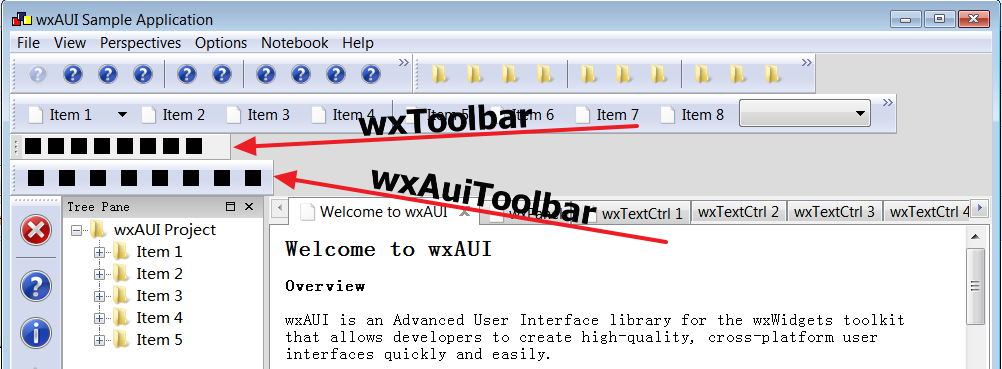
Basically, if I use wxToolbar in the wxAui environment, I see the toolbar buttons are more compact, and you see the extra spaces in the toolbar's right edge.
While when I use wxAuiToolbar, I see that the button takes more spaces, and it doesn't cause such issue.
Note that C::B currently use wxToolbar instead wxAuiToolbar, but C::B use the Aui framework to manage other controls, such as the AuiNotebook.
Asmwarrior
Anyway, I can reproduce this bug on the auidemo example, here is the patch file in attachment, and you can see the screen shot below:
Basically, if I use wxToolbar in the wxAui environment, I see the toolbar buttons are more compact, and you see the extra spaces in the toolbar's right edge.
While when I use wxAuiToolbar, I see that the button takes more spaces, and it doesn't cause such issue.
Note that C::B currently use wxToolbar instead wxAuiToolbar, but C::B use the Aui framework to manage other controls, such as the AuiNotebook.
Asmwarrior
asmwarrior
Apr 5, 2019, 6:05:02 AM4/5/19
to wx-u...@googlegroups.com
Under DPI=100%, I measure the toolbar's width, see the image shot as attachment.
Each toolbar button's width is 23 pixels shown on the screen.
But I see wx's add 26 pixels for each button's width, so 3 pixels extra spaces were added for each button.
I see you have changed the way of wxSize wxToolBar::DoGetBestSize() const (in src/msw/toolbar.cpp). Before the changes, it used Windows native Messages to measure the whole toolbar size, but with your changes, it just accumulated the width one by one of each elements in toolbar. Maybe, it is not correct here.
Asmwarrior
Each toolbar button's width is 23 pixels shown on the screen.
But I see wx's add 26 pixels for each button's width, so 3 pixels extra spaces were added for each button.
I see you have changed the way of wxSize wxToolBar::DoGetBestSize() const (in src/msw/toolbar.cpp). Before the changes, it used Windows native Messages to measure the whole toolbar size, but with your changes, it just accumulated the width one by one of each elements in toolbar. Maybe, it is not correct here.
Asmwarrior

Vadim Zeitlin
Apr 5, 2019, 7:40:14 AM4/5/19
to wx-u...@googlegroups.com
On Fri, 5 Apr 2019 18:04:51 +0800 asmwarrior wrote:
a> Under DPI=100%, I measure the toolbar's width, see the image shot as attachment.
a> Each toolbar button's width is 23 pixels shown on the screen.
a> But I see wx's add 26 pixels for each button's width, so 3 pixels extra spaces were added for each button.
a> I see you have changed the way of wxSize wxToolBar::DoGetBestSize()
a> const (in src/msw/toolbar.cpp). Before the changes, it used Windows
a> native Messages to measure the whole toolbar size, but with your
a> changes, it just accumulated the width one by one of each elements in
a> toolbar. Maybe, it is not correct here.
Yes, you're absolutely correct, the code did add extra padding for each
tool. I've fixed this in 0dfe0d0a9c65bb12ace967f43c6dcd2646a126f5, thanks
for your help with testing and providing the example reproducing the
problem, it's really appreciated!
a> Under DPI=100%, I measure the toolbar's width, see the image shot as attachment.
a> Each toolbar button's width is 23 pixels shown on the screen.
a> But I see wx's add 26 pixels for each button's width, so 3 pixels extra spaces were added for each button.
a> I see you have changed the way of wxSize wxToolBar::DoGetBestSize()
a> const (in src/msw/toolbar.cpp). Before the changes, it used Windows
a> native Messages to measure the whole toolbar size, but with your
a> changes, it just accumulated the width one by one of each elements in
a> toolbar. Maybe, it is not correct here.
Yes, you're absolutely correct, the code did add extra padding for each
tool. I've fixed this in 0dfe0d0a9c65bb12ace967f43c6dcd2646a126f5, thanks
for your help with testing and providing the example reproducing the
problem, it's really appreciated!
asmwarrior
Apr 5, 2019, 8:57:16 AM4/5/19
to wx-u...@googlegroups.com
Asmwarrior
asmwarrior
Apr 7, 2019, 4:41:13 AM4/7/19
to wx-u...@googlegroups.com
Hi, Vadim, I still see problems when a toolbar have separators.
This was found when I build C::B against the wx git master.
So, I make a minimal standalone program to reproduce this bug, see the source file in attachment.
Also, see the bug screen shot below:
So, I make a minimal standalone program to reproduce this bug, see the source file in attachment.
Also, see the bug screen shot below:

Asmwarrior
Vadim Zeitlin
Apr 7, 2019, 7:29:30 AM4/7/19
to wx-u...@googlegroups.com
On Sun, 7 Apr 2019 16:41:03 +0800 asmwarrior wrote:
a> Hi, Vadim, I still see problems when a toolbar have separators.
Oops, yes, you're absolutely right once again, I've somehow stupidly
assumed that all tools had the same size in the toolbar, which is obviously
not true for the separators. I've fixed this problem in
909adbb6bf832ada3db034cffc5548b8309a1602
Thanks a lot for all your testing and providing the test cases allowing to
immediately see the problem!
a> Hi, Vadim, I still see problems when a toolbar have separators.
Oops, yes, you're absolutely right once again, I've somehow stupidly
assumed that all tools had the same size in the toolbar, which is obviously
not true for the separators. I've fixed this problem in
909adbb6bf832ada3db034cffc5548b8309a1602
Thanks a lot for all your testing and providing the test cases allowing to
immediately see the problem!
asmwarrior
Apr 7, 2019, 10:07:36 AM4/7/19
to wx-u...@googlegroups.com
On Sun Apr 07 2019 19:29:27 GMT+0800, Vadim Zeitlin wrote:
> On Sun, 7 Apr 2019 16:41:03 +0800 asmwarrior wrote:
>
> a> Hi, Vadim, I still see problems when a toolbar have separators.
>
> Oops, yes, you're absolutely right once again, I've somehow stupidly
> assumed that all tools had the same size in the toolbar, which is obviously
> not true for the separators. I've fixed this problem in
> 909adbb6bf832ada3db034cffc5548b8309a1602
>
> Thanks a lot for all your testing and providing the test cases allowing to
> immediately see the problem!
> VZ
Thanks for the quick fix, I can confirm 909adbb6bf832ada3db034cffc5548b8309a1602 fixed my reported issue.
> On Sun, 7 Apr 2019 16:41:03 +0800 asmwarrior wrote:
>
> a> Hi, Vadim, I still see problems when a toolbar have separators.
>
> Oops, yes, you're absolutely right once again, I've somehow stupidly
> assumed that all tools had the same size in the toolbar, which is obviously
> not true for the separators. I've fixed this problem in
> 909adbb6bf832ada3db034cffc5548b8309a1602
>
> Thanks a lot for all your testing and providing the test cases allowing to
> immediately see the problem!
> VZ
Asmwarrior
Reply all
Reply to author
Forward
0 new messages