
wxgrid with merged columns misbehaves when adding a row (Issue #23929)

Milind Gupta
I am using wxwidgets using wxlua. To reproduce the issue I created a small test example. The example creates the following control:

Here wxgrid is created with some cells merged using the following code:
`require("wx")
local frame = wx.wxFrame(wx.NULL, wx.wxID_ANY, "wxLua wxGrid Sample",
wx.wxPoint(25, 25), wx.wxSize(350, 250))
local fileMenu = wx.wxMenu("", wx.wxMENU_TEAROFF)
fileMenu:Append(wx.wxID_EXIT, "E&xit\tCtrl-X", "Quit the program")
local helpMenu = wx.wxMenu("", wx.wxMENU_TEAROFF)
helpMenu:Append(wx.wxID_ABOUT, "&About\tCtrl-A", "About the Grid wxLua Application")
local menuBar = wx.wxMenuBar()
menuBar:Append(fileMenu, "&File")
menuBar:Append(helpMenu, "&Help")
frame:SetMenuBar(menuBar)
frame:CreateStatusBar(1)
frame:SetStatusText("Welcome to wxLua.")
frame:Connect(wx.wxID_EXIT, wx.wxEVT_COMMAND_MENU_SELECTED,
function (event)
frame:Close()
end )
frame:Connect(wx.wxID_ABOUT, wx.wxEVT_COMMAND_MENU_SELECTED,
function (event)
wx.wxMessageBox('This is the "About" dialog of the wxGrid wxLua sample.\n'..
wxlua.wxLUA_VERSION_STRING.." built with "..wx.wxVERSION_STRING,
"About wxLua",
wx.wxOK + wx.wxICON_INFORMATION,
frame )
end )
grid = wx.wxGrid(frame, wx.wxID_ANY)
grid:CreateGrid(12, 10)
grid:SetColSize(3, 200)
grid:SetRowSize(4, 45)
for r = 0,11 do
for c = 0,9 do
grid:SetCellValue(r, c, (r+1)..":"..(c+1))
--mat:setcell(r,c,r..":"..c)
end
--mat:setcell(r,0,r)
end
--grid:SetCellValue(0, 0, "First cell")
--grid:SetCellValue(1, 1, "Another cell")
--grid:SetCellValue(2, 2, "Yet another cell")
--grid:SetCellFont(0, 0, wx.wxFont(10, wx.wxROMAN, wx.wxITALIC, wx.wxNORMAL))
--grid:SetCellTextColour(1, 1, wx.wxRED)
--grid:SetCellBackgroundColour(2, 2, wx.wxCYAN)
function doFormat()
grid:SetCellSize(1,0,2,1)
grid:SetCellSize(1,9,2,1)
grid:SetCellSize(3,1,1,4)
grid:SetCellSize(4,1,1,4)
grid:SetCellSize(3,5,1,4)
grid:SetCellSize(4,5,1,4)
grid:SetCellSize(5,0,3,1)
grid:SetCellSize(5,9,3,1)
grid:SetCellSize(8,1,1,4)
grid:SetCellSize(9,1,1,4)
grid:SetCellSize(10,1,1,4)
grid:SetCellSize(8,5,1,4)
grid:SetCellSize(9,5,1,4)
grid:SetCellSize(10,5,1,4)
end
--grid:SetRowLabelSize(1,2*grid:GetDefaultRowSize())
doFormat()
MainSizer = wx.wxBoxSizer(wx.wxVERTICAL)
MainSizer:Add(grid)
OKButton = wx.wxButton(frame, wx.wxID_ANY, "OK", wx.wxDefaultPosition, wx.wxDefaultSize, 0, wx.wxDefaultValidator)
MainSizer:Add(OKButton)
OKButton:Connect(wx.wxEVT_COMMAND_BUTTON_CLICKED,
function (event)
print("Clicked")
print(grid:GetCellValue(7,0))
grid:InsertRows(6,1,false)
print(grid:GetCellValue(8,0))
--grid:ForceRefresh()
end)
frame:SetSizer(MainSizer)
MainSizer:SetSizeHints(frame)
frame:Layout()
frame:Show(true)
-- Call wx.wxGetApp():MainLoop() last to start the wxWidgets event loop,
-- otherwise the wxLua program will exit immediately.
-- Does nothing if running from wxLua, wxLuaFreeze, or wxLuaEdit since the
-- MainLoop is already running or will be started by the C++ program.
wx.wxGetApp():MainLoop()`
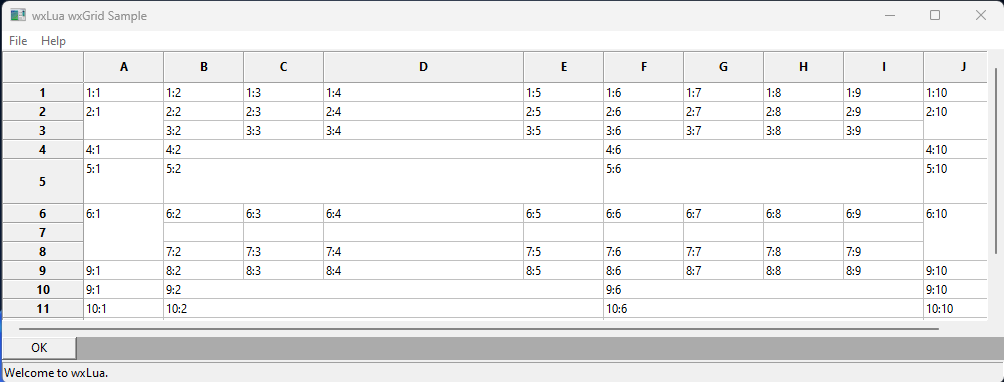
Notice that the Cell A9 shows the value 9:1, expected was 8:1. Although as I am printing thevalues in the OK button call back before and after inserting the row and in both cases I get the correct value of 8:1.
Now when you click the OK button it adds a row at the 7th row. The grid after that looks like:
—
Reply to this email directly, view it on GitHub, or unsubscribe.
You are receiving this because you are subscribed to this thread.
VZ
Thanks for the example but this is a bit difficult to understand: merging which cells exactly results in a problem? I.e. could you please try to reduce it to leave just the required SetCellSize() calls and leave out as much as can be left out?
—
Reply to this email directly, view it on GitHub, or unsubscribe.
You are receiving this because you are subscribed to this thread.
PB
I know little about wxGrid and nothing about Lua but I tried to rewrite Lua code to C++ and run it with the master.
#include <wx/wx.h>
#include <wx/grid.h>

class MyFrame: public wxFrame
{
public:
    wxGrid* m_grid;

    MyFrame(wxWindow* parent = nullptr) : wxFrame(parent, wxID_ANY, "Test")
    {
        wxBoxSizer* mainSizer = new wxBoxSizer(wxVERTICAL);

        m_grid = new wxGrid(this, wxID_ANY);
        m_grid->CreateGrid(12, 10);
        m_grid->SetColSize(3, 200);
        m_grid->SetRowSize(4, 45);

        for ( int r = 0; r < m_grid->GetNumberRows(); ++r )
            for ( int c = 0; c < m_grid->GetNumberCols(); ++c )
                m_grid->SetCellValue(r, c, wxString::Format("%d:%d", r + 1, c + 1));

        DoFormat();

        mainSizer->Add(m_grid, wxSizerFlags().Proportion(1).Expand().Border());

        wxButton* button = new wxButton(this, wxID_ANY, "OK");
        button->Bind(wxEVT_BUTTON, [this](wxCommandEvent&)
            {
                wxLogMessage("m_grid->GetCellValue(7, 0): %s", m_grid->GetCellValue(7, 0));
                m_grid->InsertRows(6, 1, false);
                wxLogMessage("m_grid->GetCellValue(8, 0): %s", m_grid->GetCellValue(8, 0));
            });
        mainSizer->Add(button, wxSizerFlags().Border());

        SetSizer(mainSizer);
    }

    void DoFormat()
    {
        m_grid->SetCellSize(1,0,2,1);
        m_grid->SetCellSize(1,9,2,1);
        m_grid->SetCellSize(3,1,1,4);
        m_grid->SetCellSize(4,1,1,4);
        m_grid->SetCellSize(3,5,1,4);
        m_grid->SetCellSize(4,5,1,4);
        m_grid->SetCellSize(5,0,3,1);
        m_grid->SetCellSize(5,9,3,1);
        m_grid->SetCellSize(8,1,1,4);
        m_grid->SetCellSize(9,1,1,4);
        m_grid->SetCellSize(10,1,1,4);
        m_grid->SetCellSize(8,5,1,4);
        m_grid->SetCellSize(9,5,1,4);
        m_grid->SetCellSize(10,5,1,4);
    }
};

class MyApp : public wxApp
{
    bool OnInit() override
    {
        (new MyFrame())->Show();
        return true;
    }
}; wxIMPLEMENT_APP(MyApp);
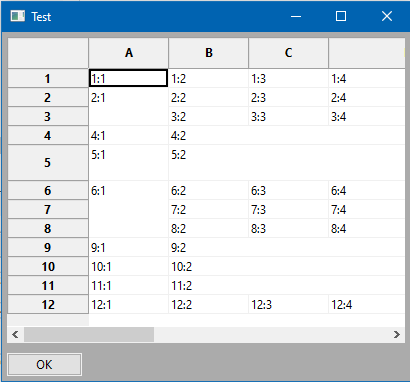
I cannot reproduce, with C++ code (but maybe I did not rewrite it correctly):
C++ code before
C++ code after
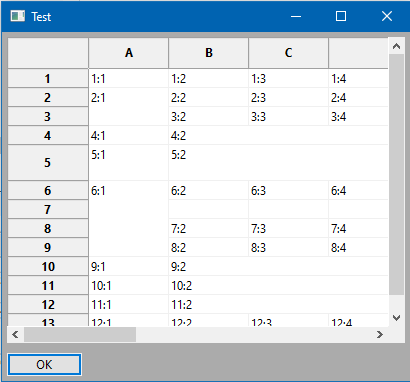
In mine after, the newly added row is visible, A:7-9 is empty and values in A:10+ seem to be properly shifted?
Which wxWidgets version are you using, @aryajur? Moreover, the Lua application does not have an application manifest but I have no idea whether this could affect anything here: Is the grid displayed the same after resizing the frame a lot up and down (to let the grid redraw itself)?
—
Reply to this email directly, view it on GitHub, or unsubscribe.
You are receiving this because you are subscribed to this thread.
Milind Gupta
Thank you for looking at this. Here is some more information:
I am using wxwidgets version 3.1.4, so its not the latest one, probably it is fixed in the latest one. I will try and compile the latest one and try it out.
One stark difference I see in your screenshots @PBfordev is that your merged cell grew in size by one row when you added a row while in my case it does not. That is a functionality change which would matter a lot so now I need to make sure I am using the latest one.
Let me shorten the example here:
require("wx")

local frame = wx.wxFrame(wx.NULL, wx.wxID_ANY, "wxLua wxGrid Sample",
                         wx.wxPoint(25, 25), wx.wxSize(350, 250
))

grid = wx.wxGrid(frame, wx.wxID_ANY)

grid:CreateGrid(12, 10)
for r = 0,11 do
	for c = 0,9 do
    grid:SetCellValue(r, c, (r+1)..":"..(c+1
))
	end
end


  grid:SetCellSize(5,0,3,1)
  grid:SetCellSize(5,9,3,1)


MainSizer = wx.wxBoxSizer(wx.wxVERTICAL)
MainSizer:Add(grid)
OKButton = wx.wxButton(frame, wx.wxID_ANY, "OK", wx.wxDefaultPosition, wx.wxDefaultSize, 0, wx.wxDefaultValidator)
MainSizer:Add(OKButton)
OKButton:Connect(wx.wxEVT_COMMAND_BUTTON_CLICKED,
function (event)
    print("Clicked")
    print(grid:GetCellValue(7,0))
    grid:InsertRows(6,1,false)
    print(grid:GetCellValue(8,0
))
end)
frame:SetSizer(MainSizer)
MainSizer:SetSizeHints(frame)
frame:Layout()
frame:Show(true
)

wx.wxGetApp():MainLoop()
—
Reply to this email directly, view it on GitHub, or unsubscribe.
You are receiving this because you are subscribed to this thread.
PB
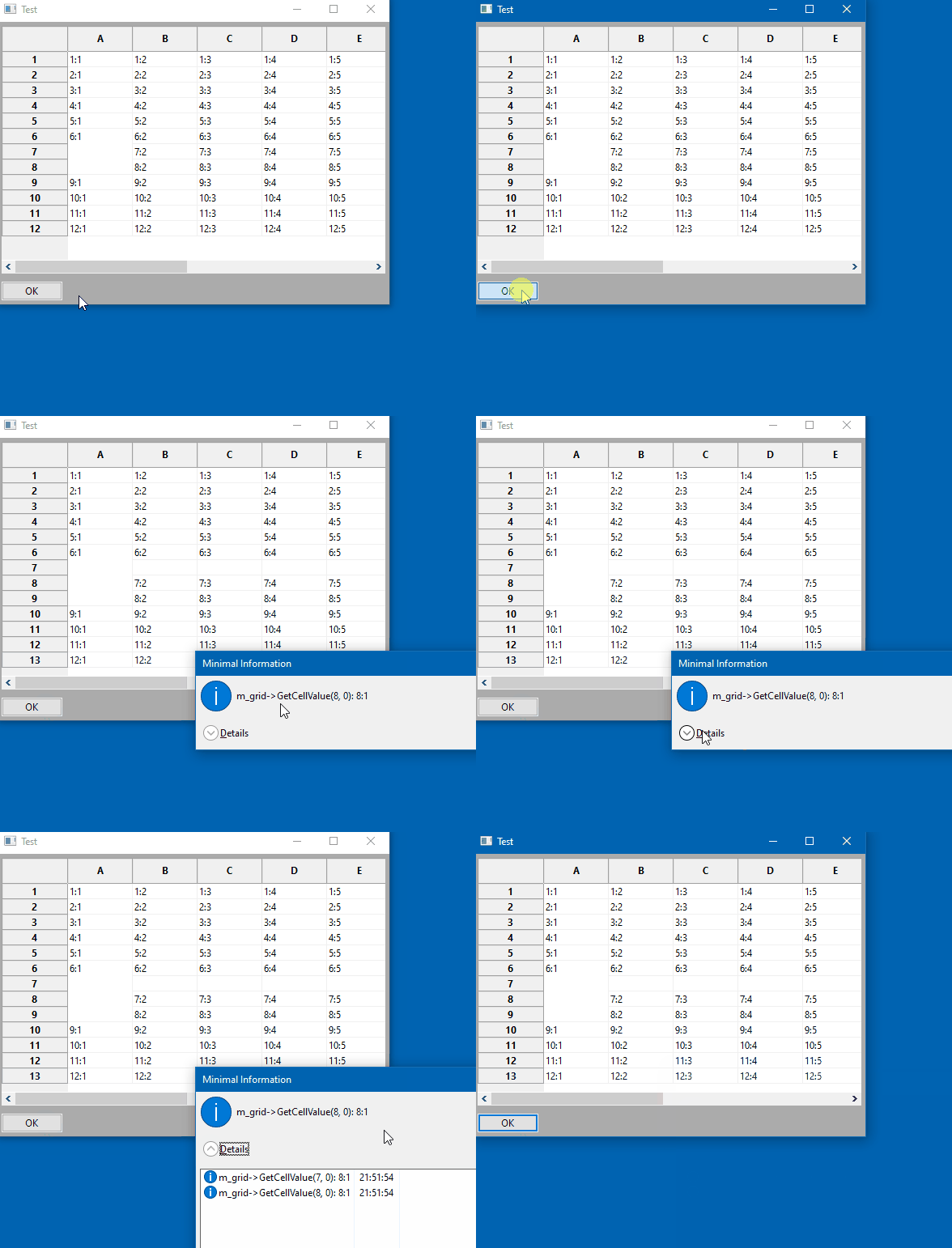
FWIW, here is the C++ code for the minimal example and the result of running it on wxWidgets GIT master.
C++ code#include <wx/wx.h> #include <wx/grid.h> class MyFrame: public wxFrame { public: wxGrid* m_grid; MyFrame(wxWindow* parent = nullptr) : wxFrame(parent, wxID_ANY, "Test") { wxBoxSizer* mainSizer = new wxBoxSizer(wxVERTICAL); m_grid = new wxGrid(this, wxID_ANY); m_grid->CreateGrid(12, 10
);
for ( int r = 0; r < m_grid->GetNumberRows(); ++r )
            for ( int c = 0; c < m_grid->GetNumberCols(); ++c )
                m_grid->SetCellValue(r, c, wxString::Format("%d:%d", r + 1, c + 1
));

        m_grid->SetCellSize(5,0,3,1);
        m_grid->SetCellSize(5,9,3,1);

        mainSizer->Add(m_grid, wxSizerFlags().Proportion(1).Expand().Border());

        wxButton* button = new wxButton(this, wxID_ANY, "OK");
        button->Bind(wxEVT_BUTTON, [this](wxCommandEvent&)
            {
wxLogMessage("m_grid->GetCellValue(7, 0): %s", m_grid->GetCellValue(7, 0));
                m_grid->InsertRows(6, 1, false);
                wxLogMessage("m_grid->GetCellValue(8, 0): %s", m_grid->GetCellValue(8, 0));
            });
        mainSizer->Add(button, wxSizerFlags().Border());

        SetSizer
(mainSizer);
    }
};
class MyApp : public wxApp
{
    bool OnInit() override
    {
        (new MyFrame())->Show();
        return true;
    }
}; wxIMPLEMENT_APP(MyApp);
—
Reply to this email directly, view it on GitHub, or unsubscribe.
You are receiving this because you are subscribed to this thread.
Milind Gupta
Tested it using WxWidgets 3.2.2.1. The problem is no more.
—
Reply to this email directly, view it on GitHub, or unsubscribe.
You are receiving this because you are subscribed to this thread.
Milind Gupta
Closed #23929 as completed.
—
Reply to this email directly, view it on GitHub, or unsubscribe.
You are receiving this because you are subscribed to this thread.