
cannot find wx/setup.h (Issue #23346)

wieniawski-lai
hi,
I have downloaded wxWidgets3.0.5 source file and build, which install to /opt/wxWidgets on linux.
- make
- make install
- ldconfig
And I am using codeblocks to create a demo project for wxWidgets, however, it reported while building:
cannot find wx/setup.h in platform.h
I resolved this error on windows by changing wx/setup.h to wx/msw/setup.h in platform.h
However, in linux (OpenSuse15.4), there is no file named setup.h under wx folder.
How can I solve this problem?
thx.
—
Reply to this email directly, view it on GitHub, or unsubscribe.
You are receiving this because you are subscribed to this thread.
VZ
Your "fix" under Windows is wrong, please don't do it, this will result in worse problems in the future. You need to use the correct wx/setup.h located under the lib directory. The exact path depends on the compiler/build you use.
Under Linux it's much simpler and you just need to use wx-config as explained in the docs.
Also consider using 3.2 instead of the very old 3.0 for new development.
—
Reply to this email directly, view it on GitHub, or unsubscribe.
You are receiving this because you are subscribed to this thread.
VZ
Closed #23346 as not planned.
—
Reply to this email directly, view it on GitHub, or unsubscribe.
You are receiving this because you are subscribed to this thread.
wieniawski-lai
Your "fix" under Windows is wrong, please don't do it, this will result in worse problems in the future. You need to use the correct
wx/setup.hlocated under thelibdirectory. The exact path depends on the compiler/build you use.Under Linux it's much simpler and you just need to use wx-config as explained in the docs.
Also consider using 3.2 instead of the very old 3.0 for new development.
Under windows, do you mean I should use
- wxWidgets-3.0.5\lib\gcc_dll\mswu\wx\setup.h, while dynamic link using MinGW in release version
- wxWidgets-3.0.5\lib\gcc_dll\mswud\wx\setup.h while dynamic link using MinGW in debug version
- wxWidgets-3.0.5\lib\gcc_lib\mswu\wx\setup.h while static link using MinGW in release version
- wxWidgets-3.0.5\lib\gcc_lib\mswud\wx\setup.h while static link using MinGW in debug version
—
Reply to this email directly, view it on GitHub, or unsubscribe.
You are receiving this because you are subscribed to this thread.
VZ
Yes, you need to use -I option with the appropriate path so that the correct wx/setup.h is found.
—
Reply to this email directly, view it on GitHub, or unsubscribe.
You are receiving this because you are subscribed to this thread.
PB
Under windows, do you mean I should use
As described in the docs, you need to add two folders to the compiler include folders:
- The generic include folder, e.g.,
c:\wxWidgets-3.0.5\include. - The build specific folder, e.g.,
c:\wxWidgets-3.0.5\lib\gcc_dll\mswud(for the dynamic debug build) orc:\wxWidgets-3.0.5\lib\gcc_lib\mswu(for the static release build).
Then, your command line for the dynamic debug build could look like this
g++.exe -Ic:\wxWidgets-3.0.5\include -Ic:\wxWidgets-3.0.5\lib\gcc_dll\mswud <...more parameters>
This guarantees the correct setup.h will be picked.
—
Reply to this email directly, view it on GitHub, or unsubscribe.
You are receiving this because you are subscribed to this thread.
wieniawski-lai
Yes, you need to use
-Ioption with the appropriate path so that the correctwx/setup.his found.
great thx
—
Reply to this email directly, view it on GitHub, or unsubscribe.
You are receiving this because you are subscribed to this thread.
wieniawski-lai
Your "fix" under Windows is wrong, please don't do it, this will result in worse problems in the future. You need to use the correct
wx/setup.hlocated under thelibdirectory. The exact path depends on the compiler/build you use.Under Linux it's much simpler and you just need to use wx-config as explained in the docs.
Also consider using 3.2 instead of the very old 3.0 for new development.
I am trying on linux now.
hello world example
First of all, I tried the hello world example. And I saved it in hello.cpp. I am using
g++ hello.cpp `wx-config --cxxflags --libs` -o helloThen I can successfully build, and ./hello is OK to run.
codeblocks setting
Then I changed to codeblocks(linux), as wxWidgets wiki said, I add 2 options in codeblocks' build option:
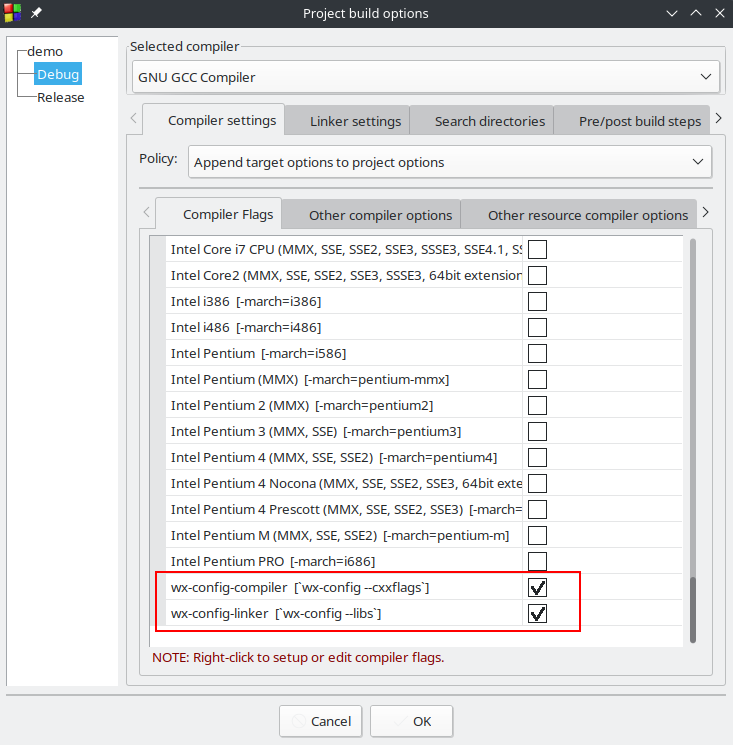
However, it seems not effect. while the build log is
g++ -Wall -g -I../../../../../opt/wxWidgets/include/wx-3.0 -c /home/schoenberg/work/wxWidgets/demo/demoApp.cpp -o obj/Debug/demoApp.o
You can see the command wx-config --cxxflags --libs is not added.
what is wrong?
wx-config
I guess wx-config is a small tool to align the setup.h file. Then where can I find the source code?
I searched wxWidgets/utils and without success.
wx-config windows
wxWidgets wiki also said that there is an windows porting of wx-config.
And it is saved on google. However I failed to download from the link. I guess it is too old.
Have you ever use it?
How can I find the correct download path?
thx
—
Reply to this email directly, view it on GitHub, or unsubscribe.
You are receiving this because you are subscribed to this thread.
VZ
There is nothing wrong with not using the libraries when compiling.
There is no official wx-config for MSW. You need to enter the build paths on your own there.
—
Reply to this email directly, view it on GitHub, or unsubscribe.
You are receiving this because you are subscribed to this thread.
wieniawski-lai
There is nothing wrong with not using the libraries when compiling.
There is no official
wx-configfor MSW. You need to enter the build paths on your own there.
en, thx
- where is the official source code of wx-config?
- I found someone write a windows wx-config
—
Reply to this email directly, view it on GitHub, or unsubscribe.
You are receiving this because you are subscribed to this thread.
ollydbg
https://github.com/eranif/wx-config-msys2
This project supply a more recent wx-config, it has a wx-config.exe and wx-config-msys2.exe for different usage.
—
Reply to this email directly, view it on GitHub, or unsubscribe.
You are receiving this because you are subscribed to this thread.
Maarten
And the source of wx-config is https://github.com/wxWidgets/wxWidgets/blob/master/wx-config.in
—
Reply to this email directly, view it on GitHub, or unsubscribe.
You are receiving this because you are subscribed to this thread.