
DPI Awareness and DPI scale issue on Windows 10 (Issue #23088)

Minggang Li
Description
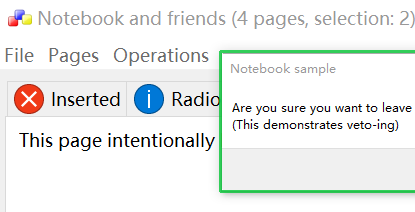
Could not catch the wxEVT_DPI_CHANGED while changing DPI scaling from 100 to 150 or vice versa. Existing standard GUI widgets, wxMenu, wxAuiToolbar, etc, don't respond to the change but the tiltle bar of wxAUINoteBook responds.
My APP looks wired
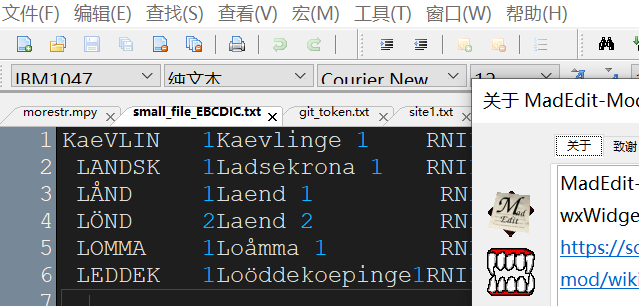
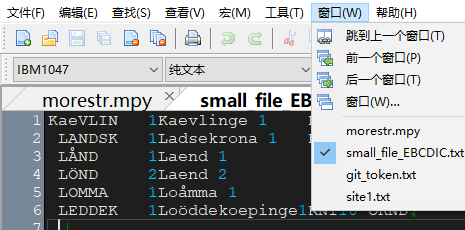
Example of notebook
Platform and version information
- wxWidgets version you use: 3.2.1
- wxWidgets port you use: wxMSW
- OS and its version: Windows 10 64bit
—
Reply to this email directly, view it on GitHub, or unsubscribe.
You are receiving this because you are subscribed to this thread.
Kumazuma
See https://docs.wxwidgets.org/latest/overview_high_dpi.html
The behaviour of the application when running on a high-DPI display depends on the values in its manifest. You may either use your own manifest, in which case you need to define the dpiAware (for compatibility with older OS versions) and dpiAwareness (for proper per-monitor DPI support) in it, or simply include wx/msw/wx.rc from your resource file to use the manifest provided by wxWidgets and predefine wxUSE_DPI_AWARE_MANIFEST to opt-in into high DPI support: define it as 1 for minimal DPI awareness and 2 for full, per-monitor DPI awareness supported by Windows 10 version 1703 or later.
—
Reply to this email directly, view it on GitHub, or unsubscribe.
You are receiving this because you are subscribed to this thread.
Minggang Li
I've done this by option 1, aka, "use your own manifest". It is defined as "per-monitor DPI aware"
See https://docs.wxwidgets.org/latest/overview_high_dpi.html
The behaviour of the application when running on a high-DPI display depends on the values in its manifest. You may either use your own manifest, in which case you need to define the dpiAware (for compatibility with older OS versions) and dpiAwareness (for proper per-monitor DPI support) in it, or simply include wx/msw/wx.rc from your resource file to use the manifest provided by wxWidgets and predefine wxUSE_DPI_AWARE_MANIFEST to opt-in into high DPI support: define it as 1 for minimal DPI awareness and 2 for full, per-monitor DPI awareness supported by Windows 10 version 1703 or later.
—
Reply to this email directly, view it on GitHub, or unsubscribe.
You are receiving this because you are subscribed to this thread.
Maarten
Also tried with samples of wx, eg, textctrl with the code to catch the event but failed
The display sample shows the use of EVT_DPI_CHANGED.
Your app does seem per-monitor DPI aware, since the tab height changes in the screenshots. You can also check in Task Manager (details tab, enable DPI awareness column) if an app is Per-Monitor (v2) aware.
—
Reply to this email directly, view it on GitHub, or unsubscribe.
You are receiving this because you are subscribed to this thread.
VZ
I agree that it's almost certainly due to not using v2 DPI awareness, but I'm surprised that the samples didn't work for you neither. How did you build them? Did you use the official makefiles (which should use v2 DPI awareness by default) and with which compiler?
—
Reply to this email directly, view it on GitHub, or unsubscribe.
You are receiving this because you are subscribed to this thread.
Minggang Li
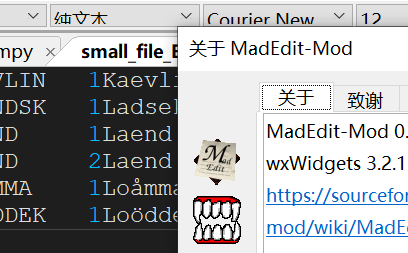
Thanks @vadz and @MaartenBent. The app looks as expected after I added 'v2' to 'Per Monitor DPI aware'. I still have a question. The text looks blurry after I changed from 'Per Monitor DPI aware' to 'Per Monitor DPI aware v2'.
Any comment on this?
V2
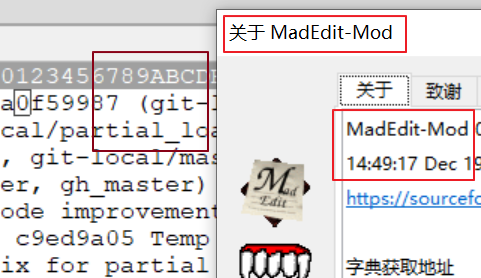
V1
—
Reply to this email directly, view it on GitHub, or unsubscribe.
You are receiving this because you are subscribed to this thread.
Maarten
If it is blurry, it is not per-monitor DPI aware. It also shows Resolution: 96*96 and Scaling: 1.00, this also confirms it is not per monitor DPI aware.
—
Reply to this email directly, view it on GitHub, or unsubscribe.
You are receiving this because you are subscribed to this thread.
Minggang Li
Is there a way to se the pmv2 with VS? It only supports v1
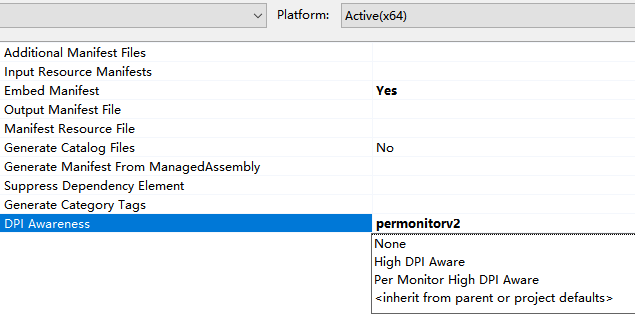
I also tried the snippet in wx/msw/wx.rc which also does not work with the display sampe
—
Reply to this email directly, view it on GitHub, or unsubscribe.
You are receiving this because you are subscribed to this thread.
Maarten
You can put the path to the wxWidgets manifest (yourWxSourceDir/include/wx/msw/wx_dpi_aware_pmv2.manifest; in the Additional Nanifest Files field.
The DPI Awareness option cannot be used for pmV2.
—
Reply to this email directly, view it on GitHub, or unsubscribe.
You are receiving this because you are subscribed to this thread.
Minggang Li
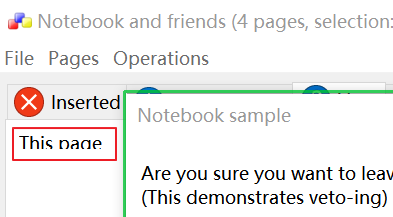
Thanks @MaartenBent . Made it working finally. Below is the official sample of notebook
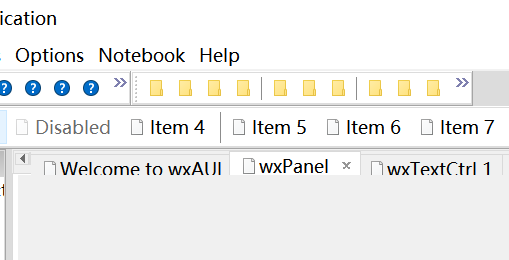
And AUI sample
—
Reply to this email directly, view it on GitHub, or unsubscribe.
You are receiving this because you are subscribed to this thread.
VZ
Closed #23088 as completed.
—
Reply to this email directly, view it on GitHub, or unsubscribe.
You are receiving this because you are subscribed to this thread.
Minggang Li
Hi @vadz, the tab titile of AUI sample are still not well scaled.
—
Reply to this email directly, view it on GitHub, or unsubscribe.
You are receiving this because you are subscribed to this thread.
Maarten
I see the problem in the Notebook sample (when starting on low dpi monitor and moving to high dpi monitor). A workaround is using a sizer instead of adding the wxStaticText directly to the notebook panel:
diff --git "a/samples/notebook/notebook.cpp" "b/samples/notebook/notebook.cpp"
index 8fa3b86a56..2c0dfaad9d 100644
--- "a/samples/notebook/notebook.cpp"
+++ "b/samples/notebook/notebook.cpp"
@@ -143,9 +143,12 @@ wxPanel *CreateInsertPage(wxBookCtrlBase *parent)
 #endif

     panel->SetBackgroundColour( wxColour( "MAROON" ) );
-    (void) new wxStaticText( panel, wxID_ANY,
+    auto text = new wxStaticText( panel, wxID_ANY,
                              "This page has been inserted, not added.",
                              wxPoint(10, 10) );
+    wxBoxSizer* sizer = new wxBoxSizer(wxVERTICAL);
+    panel->SetSizer(sizer);
+    sizer->Add(text, wxSizerFlags());

     return panel;
 }
I think wxAUI has more (per monitor) DPI related issues. The title bar height might be the same issue as #22379.
—
Reply to this email directly, view it on GitHub, or unsubscribe.
You are receiving this because you are subscribed to this thread.
VZ
I also see the problem with the static text being truncated in the notebook sample, but this is indeed because it doesn't use sizers and so its size doesn't change when the DPI changes. I don't think there is anything we can do about this, so I'll just apply the "workaround" above, which is actually the right thing to do.
For the remaining AUI issues, please open separate bugs if they're not covered by the existing ones, such as the already mentioned one.
—
Reply to this email directly, view it on GitHub, or unsubscribe.
You are receiving this because you are subscribed to this thread.