
On MSW platform, the text drawn on a wxBitmap using wxMemoryDC, doesn't apply the antialliasing mode. (Issue #23586)

ROSSANO PARIS
Description
On MSW platform, the text drawn on a wxBitmap using wxMemoryDC, doesn't apply the antialliasing mode.
Other primitives drawn on the bitmap, such as circles and lines are painted correctly.
The bitmap used has got a transparent background.
In my example I draw entities on the bitmap first and then I paint the bitmap on a wxFrame, the same reported issue can be observed saving such bitmap in a png file.
To Reproduce
it is necessary to compile these files src.zip
Platform and version information
- wxWidgets version you use: 3.2.2.1
- wxWidgets port you use: wxMSW
- OS and its version: Microsoft Windows 11 Pro - Version 10.0.22621 Build 22621
Windows platform (which is affected)
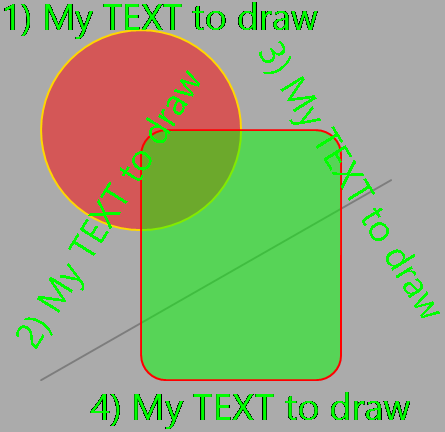
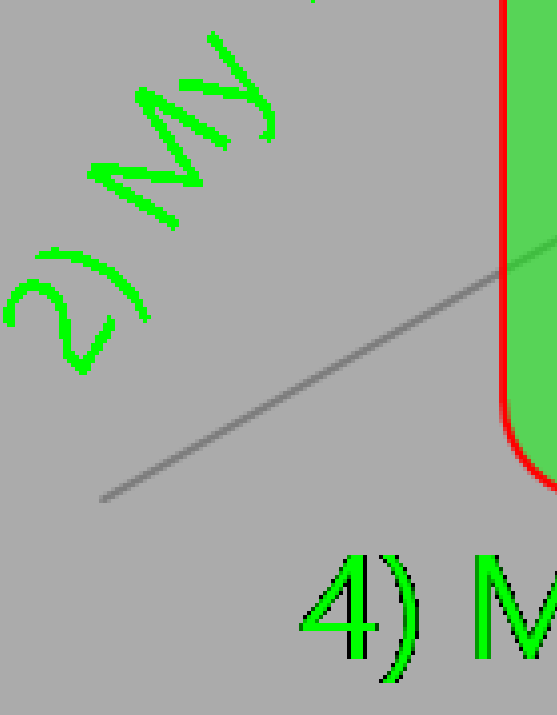
Linux platform (which is OK)

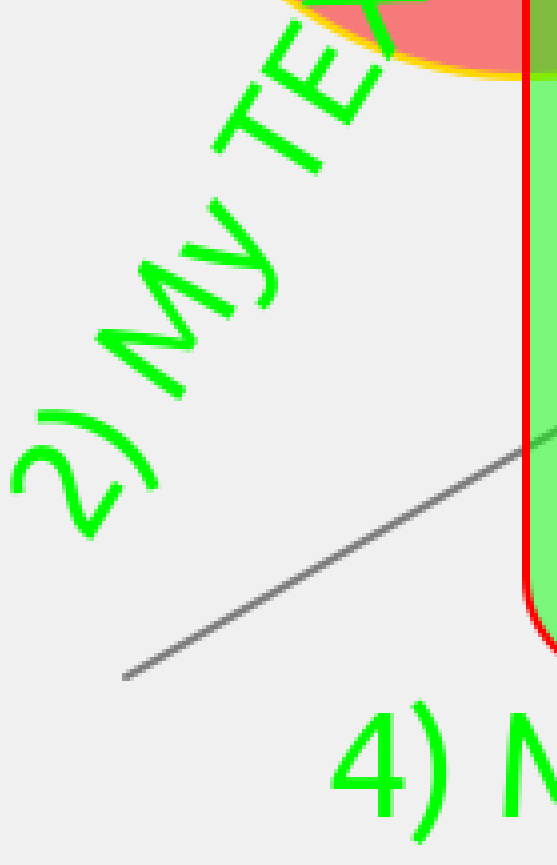
—
Reply to this email directly, view it on GitHub, or unsubscribe.
You are receiving this because you are subscribed to this thread.
VZ
It would be nice to have a small patch to the drawing sample reproducing the issue instead of a ZIP, but in any case, we don't have much control over how wxDC::DrawText() behaves. Consider using wxGraphicsContext instead.
—
Reply to this email directly, view it on GitHub, or unsubscribe.
You are receiving this because you are subscribed to this thread.
ROSSANO PARIS
Excuse me @vadz inside the zip there are the files to compile in order to get the executable.
—
Reply to this email directly, view it on GitHub, or unsubscribe.
You are receiving this because you are subscribed to this thread.
VZ
Yes, to be clear, it's much simpler for me to see what the code does by looking at a (probably very small) diff to the sample rather than dealing with the ZIP.
The link in the comment above explains how to make a patch.
—
Reply to this email directly, view it on GitHub, or unsubscribe.
You are receiving this because you are subscribed to this thread.
ROSSANO PARIS
I'll try to us a sample among those provided, in the meantime let me post the code which is very simple, perhaps I'm doing something wrong, even though using linux it works.
void CMainFrame::OnPaint(wxPaintEvent& event)
{
	PaintWindow();
	event.Skip();
}
void CMainFrame::PaintWindow()
{
	wxBitmap bmp(this->GetClientSize(), 32);
	bmp.UseAlpha();

	if (bmp.IsOk()) {
		wxMemoryDC memdc(bmp);
		wxGCDC gcdc(memdc);

		// Init GC from bitmap
		wxGraphicsContext* pGC = wxGraphicsContext::Create(memdc);
		gcdc.SetBackground(*wxTRANSPARENT_BRUSH);
		gcdc.SetGraphicsContext(pGC);
		gcdc.Clear();

		// Valid GC context
		if (gcdc.IsOk()) {
			// Draw widgets on bitmap
			Draw(gcdc.GetGraphicsContext());

			// Release bitmap
			memdc.SelectObject(wxNullBitmap);

			// Draw bitmap on window
			wxClientDC dc(this);
			dc.DrawBitmap(bmp, 0, 0, false);
		}
	}
}
void CMainFrame::Draw(wxGraphicsContext* pGC)
{
	// Set graphics context attributes
	pGC->SetInterpolationQuality(wxINTERPOLATION_BEST);
	pGC->SetAntialiasMode(wxANTIALIAS_DEFAULT);

	//Draw line
	wxPoint2DDouble points[2] = { wxPoint2DDouble(400, 200), wxPoint2DDouble(50, 400) };
	pGC->SetBrush(*wxTRANSPARENT_BRUSH);
	pGC->SetPen(wxPen(wxColour(125, 125, 125), 2, wxPENSTYLE_SOLID));
	pGC->StrokeLines(2, points);

	//Draw circle
	pGC->SetPen(wxPen(wxColour(255, 215, 0), 2, wxPENSTYLE_SOLID));
	pGC->SetBrush(wxColour(255, 0, 0, 125));
	pGC->DrawEllipse(50, 50, 200, 200);

	//Draw rounded rectangle
	pGC->SetPen(wxPen(wxColour(255, 0, 0), 2, wxPENSTYLE_SOLID));
	pGC->SetBrush(wxColour(0, 255, 0, 125));
	pGC->DrawRoundedRectangle(150, 150, 200, 250, 25);

	//Draw text
	wxFont fnt = this->GetFont();
	fnt.SetPointSize(28);

	pGC->SetBrush(*wxTRANSPARENT_BRUSH);
	pGC->SetFont(fnt, wxColour(0, 255, 0));
	pGC->DrawText("1) My TEXT to draw", 10, 10, 0.0);
	pGC->DrawText("2) My TEXT to draw", 10, 350, 45);
	pGC->DrawText("3) My TEXT to draw", 300, 50, -45);
	pGC->DrawText("4) My TEXT to draw", 100, 400, 0.0);
}
—
Reply to this email directly, view it on GitHub, or unsubscribe.
You are receiving this because you are subscribed to this thread.
oneeyeman1
@hobbitdev ,
Please check the documentation at https://docs.wxwidgets.org/latest/classwx_paint_event.html#ad6d201c4b88ecf72ab454d174a7d607b.
In particular you suppose to create wxPai nDC in the handler and not create any other DC there.
Thank you.
—
Reply to this email directly, view it on GitHub, or unsubscribe.
You are receiving this because you are subscribed to this thread.
ROSSANO PARIS
Thank you @oneeyeman1, you are right.
I've forgotten that specification, I'm sorry for that.
In my application I need to draw on a transparent bitmap and after that overlay the window backgroung which has been painted with other stuff.
Indeed I need to find another strategy regarding the DC able to draw on the bitmap, perhaps an object which is member of the class and created elsewhere not in wxPaintEvent functions chain.
—
Reply to this email directly, view it on GitHub, or unsubscribe.
You are receiving this because you are subscribed to this thread.
ROSSANO PARIS
Kind @vadz and @oneeyeman1
I've implemented the painting of the bitmap into the wxFrame constructor, despite this the result didn't change.
I've implemented my code in minimal example (minimal.cpp)
Due to my poor knoledge of git I couldn't prepare the patch asked; I beg your pardon for that.
Anyway if you could accept the zipped minimal.cpp file [ minimal.zip ], I would be very grateful.
My code is recognizable by the label #23586
—
Reply to this email directly, view it on GitHub, or unsubscribe.
You are receiving this because you are subscribed to this thread.
Brian Nixon
In the screenshots it looks like at least the horizontal text is being antialiased; it’s just not being blended properly. That may be a clash between GDI+ text rendering modes and the underlying GDI device context containing the bitmap. There’s some possibly-related discussion on SO here.
With GDI+, SetAntialiasMode(wxANTIALIAS_DEFAULT) calls SetTextRenderingHint(TextRenderingHintSystemDefault), which will have an effect dependent on the user’s settings for font smoothing. If that’s on, it seems GDI+ will use one of the GridFit modes, which appear not to work well (in this case, at least). Changing it to TextRenderingHintAntiAlias makes the output in this example appear as expected. But that is probably not a solution for the general case. (It’s not clear whether in wx “default” is supposed to mean “on”, regardless of the user’s other settings; note also that wxANTIALIAS_NONE does not yield the same output as wxANTIALIAS_DEFAULT with font smoothing disabled.)
(I don’t know how any of this affects the Direct2D case; that doesn’t work at all for me. On Windows 7 it throws an exception deep inside DirectX (in dxgi!CD3D10Resource::CGdiInterop::CreateDeviceBitmap while trying to create the wxGCDC), which I haven’t investigated further – though the location of the fault is another hint that there’s a problem related to the GDI bitmap. On Windows 10 and 11 there’s no exception, but no output to the window either.)
—
Reply to this email directly, view it on GitHub, or unsubscribe.
You are receiving this because you are subscribed to this thread.
ROSSANO PARIS
Thank you @BrianNixon
Is there a temporary work-around able to make my code working ? Could you please suggest it in case ?
I tried to look at the link SetTextRenderingHint but I'm no able to find the HDC handle required by Graphic object
—
Reply to this email directly, view it on GitHub, or unsubscribe.
You are receiving this because you are subscribed to this thread.
Brian Nixon
In Draw() you can do:
#if defined(__WXMSW__) && wxUSE_GRAPHICS_GDIPLUS
    Graphics* g = static_cast<Graphics*>(pGC->GetNativeContext());
    g->SetTextRenderingHint(TextRenderingHintAntiAlias);
#endif
To access the GDI+ stuff you’ll also need in MainFrame.cpp:
#if defined(__WXMSW__) && wxUSE_GRAPHICS_GDIPLUS
#include "wx/msw/wrapgdip.h"
#endif
—
Reply to this email directly, view it on GitHub, or unsubscribe.
You are receiving this because you are subscribed to this thread.
Brian Nixon
Prego :-)
Actually I might be wrong that the GridFit modes in general don’t work well; it may just be the ClearType mode. You could try TextRenderingHintAntiAliasGridFit as well and compare results.
—
Reply to this email directly, view it on GitHub, or unsubscribe.
You are receiving this because you are subscribed to this thread.
ROSSANO PARIS
Thank you @BrianNixon it was very kind of you
—
Reply to this email directly, view it on GitHub, or unsubscribe.
You are receiving this because you are subscribed to this thread.
ROSSANO PARIS
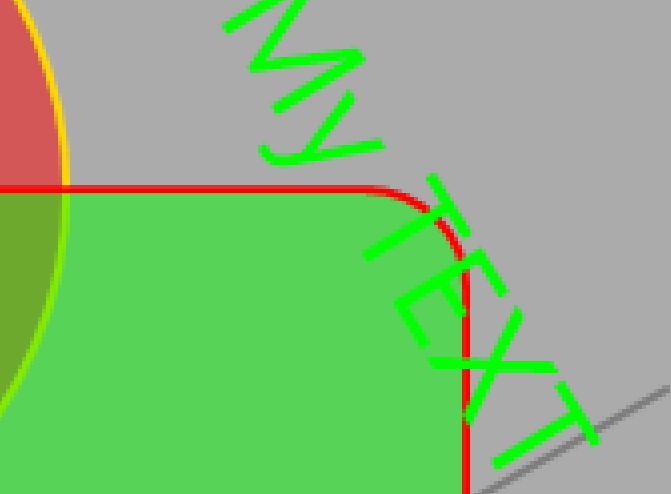
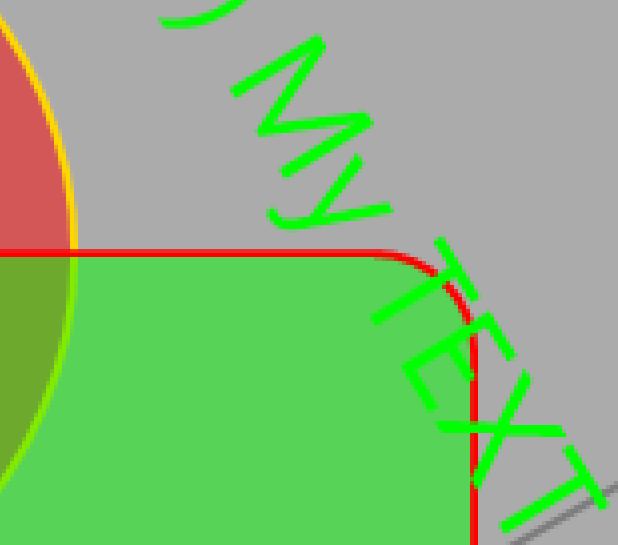
The results using both attributes look same at my eyes.
Once again thank you.
TextRenderingHintAntiAlias
TextRenderingHintAntiAliasGridFit
—
Reply to this email directly, view it on GitHub, or unsubscribe.
You are receiving this because you are subscribed to this thread.
Brian Nixon
It is more noticeable on the horizontal text. Vertical stems are likely to be thicker/blurrier without grid fitting.
TextRenderingHintAntiAlias:

TextRenderingHintAntiAliasGridFit:

—
Reply to this email directly, view it on GitHub, or unsubscribe.
You are receiving this because you are subscribed to this thread.