
Printing (to PDF) crashes on MSW (Issue #23850)

Blake-Madden
Description
On Windows 11 with the latest wxWidgets
- Run the "printing" sample
- Choose Print... from the File menu
- Choose "Microsoft Print to PDF" (this may crash with other printers, but I don't have a real printer to test with).
- Choose any location to save the PDF and hit OK.
I get this exception in winundef.h:
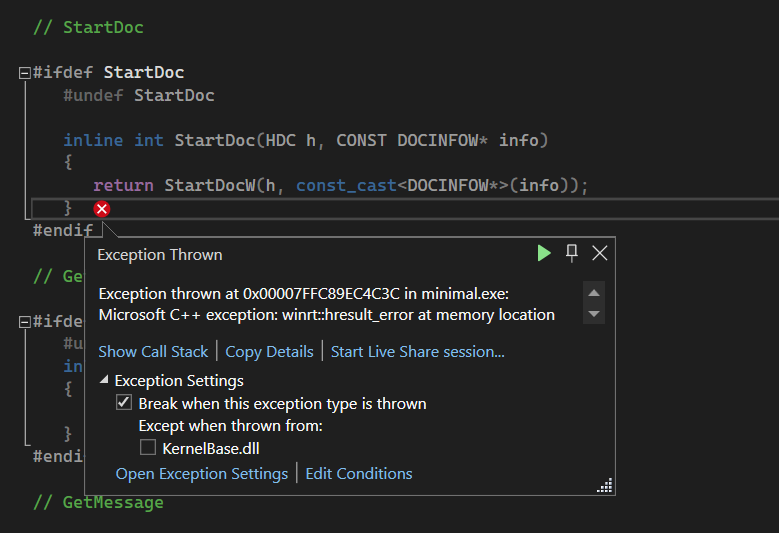
I get the same exception in another program of mine, so I don't think is any in the sample that's wrong.
Platform and version information
wxWidgets 3.3
Windows 11
—
Reply to this email directly, view it on GitHub, or unsubscribe.
You are receiving this because you are subscribed to this thread.
PB
I cannot reproduce on Windows 10 Pro 22H2 build 19045.3324.
I can reproduce on Windows 11 Pro 22H2 build 22621.2134 but only when I run the sample from MSVS. When I run it from the shell, there is no crash and the resulting PDF looks fine. Windows 11 print dialog looks entirely different than Windows 10 one which still has the old school look.
Current GIT master wxWidgets built on both machines as 64-bit Debug DLL with MSVS 2022 v17.7.3 with
cmake -G "Visual Studio 17 2022" -DwxBUILD_SAMPLES=ALL -DwxUSE_WEBVIEW_EDGE=ON -S ../wxWidgets-GIT -B .
cmake --build . --config Debug
The call stack points to the crash deep inside Windows:
	 Print.PrintSupport.Source.dll!winrt::throw_hresult(struct winrt::hresult)    Unknown
	 Print.PrintSupport.Source.dll!winrt::impl::consume_Windows_Foundation_IAsyncOperation<struct winrt::Windows::Foundation::IAsyncOperation<struct winrt::Windows::Devices::Enumeration::DeviceInformation>,struct winrt::Windows::Devices::Enumeration::DeviceInformation>::GetResults(void)    Unknown
	 Print.PrintSupport.Source.dll!winrt::impl::consume_Windows_Foundation_IAsyncOperation<struct winrt::Windows::Foundation::IAsyncOperation<struct winrt::Windows::Devices::Enumeration::DeviceInformation>,struct winrt::Windows::Devices::Enumeration::DeviceInformation>::get(void)    Unknown
	 Print.PrintSupport.Source.dll!PrintSupportUtilInternal::GetDeviceInformation(unsigned __int64,class std::basic_string<unsigned short,struct std::char_traits<unsigned short>,class std::allocator<unsigned short> > const &)    Unknown
	 Print.PrintSupport.Source.dll!IsMandatoryPsaMissing()    Unknown
	 winspool.drv!PrintSupportHelper::CheckIsMandatoryPSAMissing(void *)    Unknown
	 winspool.drv!StartDocPrinterInternal(void *,unsigned long,unsigned char *)    Unknown
	 winspool.drv!StartDocPrinterW()    Unknown
	 gdi32full.dll!StartDocPrinterWEx()    Unknown
	 gdi32full.dll!StartDocWImpl()    Unknown
	 gdi32.dll!StartDocW()    Unknown
	 >    wxmsw330ud_core_vc_x64_custom.dll!StartDoc(HDC__ * h, const _DOCINFOW * info) Line 195    C++
	 wxmsw330ud_core_vc_x64_custom.dll!wxPrinterDCImpl::StartDoc(const wxString & message) Line 196    C++
	 wxmsw330ud_core_vc_x64_custom.dll!wxDC::StartDoc(const wxString & message) Line 787    C++
	 wxmsw330ud_core_vc_x64_custom.dll!wxPrintout::OnBeginDocument(int __formal, int __formal) Line 607    C++
	 printing.exe!MyPrintout::OnBeginDocument(int startPage, int endPage) Line 539    C++
	 wxmsw330ud_core_vc_x64_custom.dll!wxWindowsPrinter::Print(wxWindow * parent, wxPrintout * printout, bool prompt) Line 188    C++
	 wxmsw330ud_core_vc_x64_custom.dll!wxPrinter::Print(wxWindow * parent, wxPrintout * printout, bool prompt) Line 396    C++
	 printing.exe!MyFrame::OnPrint(wxCommandEvent & __formal) Line 369    C++
I did not try to test with the recent(ish) printing range related changes reverted.
—
Reply to this email directly, view it on GitHub, or unsubscribe.
You are receiving this because you are subscribed to this thread.
Blake-Madden
I reverted the recent "print current page" changes and it still crashes, so that is not the issue.
I can confirm also that it crashes from the VS2022 debugger, but not when I run the EXE directly. (Both my program and the printing sample.)
—
Reply to this email directly, view it on GitHub, or unsubscribe.
You are receiving this because you are subscribed to this thread.
Blake-Madden
This may be a Visual Studio debugger issue, I see others (outside of WX) reporting this exact same error:
I'll do some further digging...
—
Reply to this email directly, view it on GitHub, or unsubscribe.
You are receiving this because you are subscribed to this thread.
VZ
Does it actually crash? I.e. are you sure this exception is not being caught somewhere? IOW what happens if you continue after getting it?
—
Reply to this email directly, view it on GitHub, or unsubscribe.
You are receiving this because you are subscribed to this thread.
Blake-Madden
It's not being caught from what I can tell, the debugger does a hard break into the exception and I can't continue. But I'm really starting to think this is a VS debugger issue. I've reported it to the VS team (also referencing the stackoverflow conversation that discusses the same issue outside of wxWidgets)...maybe that will go somewhere? Or it may be an issue with the new Window 11 print dialog that the VS debugger is picking up on. Either way, I see others reporting it from just using Win32 (and not wx). I guess we could close this, or leave it up and I can post any updates if I hear anything more.
—
Reply to this email directly, view it on GitHub, or unsubscribe.
You are receiving this because you are subscribed to this thread.
PB
It's not being caught from what I can tell, the debugger does a hard break into the exception and I can't continue.
As I wrote before, when I hit the Continue button (green triangle) from the MSVS exception popup, the sample recovered and the PDF was OK.
—
Reply to this email directly, view it on GitHub, or unsubscribe.
You are receiving this because you are subscribed to this thread.
VZ
Closed #23850 as not planned.
—
Reply to this email directly, view it on GitHub, or unsubscribe.
You are receiving this because you are subscribed to this thread.
VZ
Then it's definitely just a first chance exception (that could be ignored in the MSVS debugger exceptions options) and not a wx problem at all.
—
Reply to this email directly, view it on GitHub, or unsubscribe.
You are receiving this because you are subscribed to this thread.