
when drag the wxAUI window edge, there are some ugly lines shows in the desktop like edge shadows (Issue #23982)

ollydbg
I'm on Windows 10 64bit, and by using wx 3.2.3, I see this issue, see the image below:
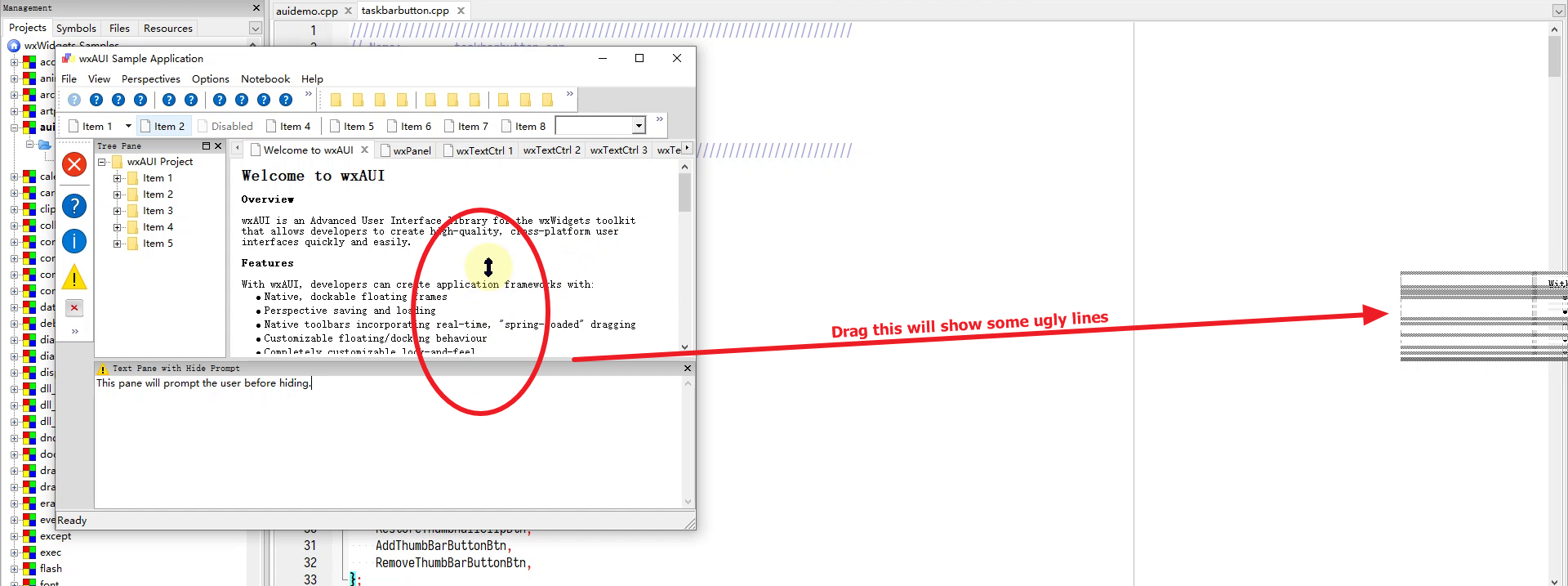
The ugly lines normally are parallel with the dragged wxAUI window edge, but shown in other places.
This issue happens not only on the wxAUI sample code, I see this in Code::Blocks from time to time. This is not a new issue in wx 3.2.3, but it happens for a very long time.
In the above image shot, my desk setting has NO DPI scale, I mean it is 100% on a screen 1920*1080 resolution.
Maybe, this issue is DPI related, see:
github issue: New AUI notebook splitter drawn at incorrect position when dragged on scaled display Issue #18098 wxWidgets/wxWidgets
wx-user maillist discussion: wrong xor line is drawn when I drag the wxSplitterWindow' sash bar with wxSP_LIVE_UPDATE disabled
C::B forum discussion: ugly lines when I drag the aui panel in Code::Blocks
—
Reply to this email directly, view it on GitHub, or unsubscribe.
You are receiving this because you are subscribed to this thread.
VZ
Sorry, this is rather confusing: why do you think this is DPI-related if you're using normal DPI? The linked issues don't seem to have anything to do with this, especially because one of them is about wxSplitterWindow and not wxAUI at all.
What is really needed is a way to reproduce this reliably. I don't see the problem myself in master. Before I retest with 3.2.3, could you please at least tell if you see it when using live update (this can be toggled in the sample) or not and, also, if you have any precise instructions for reproducing it in the sample?
—
Reply to this email directly, view it on GitHub, or unsubscribe.
You are receiving this because you are subscribed to this thread.
ollydbg
Sorry, this is rather confusing: why do you think this is DPI-related if you're using normal DPI? The linked issues don't seem to have anything to do with this, especially because one of them is about
wxSplitterWindowand not wxAUI at all.
This is only my guess, if I remember correctly, the sash bar in wxSplitterWindow also draw such kinds of gray shadow lines. In my mentioned github issues, it is DPI related. Anyway, this is only my guess.
What is really needed is a way to reproduce this reliably. I don't see the problem myself in master. Before I retest with 3.2.3, could you please at least tell if you see it when using live update (this can be toggled in the sample) or not
I just tried the "Live Resize Update" option enabled or disabled in wxAUI sample. I can only tell you that this option is disabled by default, so my screen shot (showing the ugly lines) was in the condition with this option disabled.
But sorry, I can't precisely reproduce this issue. Sometimes, it happens, and sometimes it doesn't. I will try to find a way to reproduce this bug.
—
Reply to this email directly, view it on GitHub, or unsubscribe.
You are receiving this because you are subscribed to this thread.
ollydbg
Hi, I think I can find a clean way to reproduce this bug.
This happens when I have multiple monitors. I have two monitors, the main monitor is my notebook monitor A 19201080 with 100%DPI, and another extended monitor B, it is 1600900 with 100 DPI scale.
Now if I start C::B or wxAUI sample in the monitor A, and than I drag the application from the monitor A to monitor B, and later drag the AUI window edge to resize it, I see that the shadow lines will be drawn in the monitor A.
—
Reply to this email directly, view it on GitHub, or unsubscribe.
You are receiving this because you are subscribed to this thread.
ollydbg
My guess is that the shadow line drawing system has some cache. The cache may remember the monitor(display) where it was initially started. So, when I drag edges in monitor B, it still draws in monitor A.
—
Reply to this email directly, view it on GitHub, or unsubscribe.
You are receiving this because you are subscribed to this thread.
Miguel Gimenez
I suffer this issue also on my application just shaking the splitter long enough. The "live resize update" option reduces probability, but it is not zero.
I am using one monitor on MSW10 with wxWidgets 3.2.3.
—
Reply to this email directly, view it on GitHub, or unsubscribe.
You are receiving this because you are subscribed to this thread.
VZ
If this is really multi-monitor specific I'm going to have trouble testing this because I don't have a multi-monitor Windows system any more (it's supposed to work with QEMU/KVM but it just doesn't for me... if anybody has any hints about setting this up, they'd be very welcome).
@wh11204 Just to make sure, do you mean AUI splitter or wxSplitterWindow?
—
Reply to this email directly, view it on GitHub, or unsubscribe.
You are receiving this because you are subscribed to this thread.
Miguel Gimenez
I mean the AUI splitter, as seen in the OP's image.
—
Reply to this email directly, view it on GitHub, or unsubscribe.
You are receiving this because you are subscribed to this thread.
ollydbg
I found another issue, in my two monitor condition, when I drag the AUI splitter in monitor A, there is NO shadow lines(hint lines) shown around the mouse position. My guess is that in this case, the shadow lines were drawn out the the screen.
Those shadow lines(hint lines) are drawn by the wxAUI system, so the position calculation is wrong here.
—
Reply to this email directly, view it on GitHub, or unsubscribe.
You are receiving this because you are subscribed to this thread.
ollydbg
wxWidgets-3.2.3\src\aui\framemanager.cpp
static void DrawResizeHint(wxDC& dc, const wxRect& rect)
{
    wxBitmap stipple = wxPaneCreateStippleBitmap();
    wxBrush brush(stipple);
    dc.SetBrush(brush);
#ifdef __WXMSW__
    wxMSWDCImpl *impl = (wxMSWDCImpl*) dc.GetImpl();
    PatBlt(GetHdcOf(*impl), rect.GetX(), rect.GetY(), rect.GetWidth(), rect.GetHeight(), PATINVERT);
#else
    dc.SetPen(*wxTRANSPARENT_PEN);

    dc.SetLogicalFunction(wxXOR);
    dc.DrawRectangle(rect);
#endif
}
I just did some text search on the source files, the above function looks like to draw the hint lines.
void wxAuiManager::OnMotion(wxMouseEvent& event)
{
    // sometimes when Update() is called from inside this method,
    // a spurious mouse move event is generated; this check will make
    // sure that only real mouse moves will get anywhere in this method;
    // this appears to be a bug somewhere, and I don't know where the
    // mouse move event is being generated.  only verified on MSW

    wxPoint mouse_pos = event.GetPosition();
    if (m_lastMouseMove == mouse_pos)
        return;
    m_lastMouseMove = mouse_pos;


    if (m_action == actionResize)
    {
        // It's necessary to reset m_actionPart since it destroyed
        // by the Update within DoEndResizeAction.
        if (m_currentDragItem != -1)
            m_actionPart = & (m_uiParts.Item(m_currentDragItem));
        else
            m_currentDragItem = m_uiParts.Index(* m_actionPart);

        if (m_actionPart)
        {
            wxPoint pos = m_actionPart->rect.GetPosition();
            if (m_actionPart->orientation == wxHORIZONTAL)
                pos.y = wxMax(0, event.m_y - m_actionOffset.y);
            else
                pos.x = wxMax(0, event.m_x - m_actionOffset.x);

            if (HasLiveResize())
            {
                m_frame->ReleaseMouse();
                DoEndResizeAction(event);
                m_frame->CaptureMouse();
            }
            else
            {
                wxRect rect(m_frame->ClientToScreen(pos),
                    m_actionPart->rect.GetSize());
                wxScreenDC dc;

                if (!m_actionHintRect.IsEmpty())
                {
                    // remove old resize hint
                    DrawResizeHint(dc, m_actionHintRect);
                    m_actionHintRect = wxRect();
                }

                // draw new resize hint, if it's inside the managed frame
                wxRect frameScreenRect = m_frame->GetScreenRect();
                if (frameScreenRect.Contains(rect))
                {
                    DrawResizeHint(dc, rect);
                    m_actionHintRect = rect;
                }
            }
        }
    }
The code above may draw the hint lines. My guess is that the
wxScreenDC dc;
Is not correct?
wxWidgets: wxScreenDC Class Reference
It said:
A [wxScreenDC](https://docs.wxwidgets.org/latest/classwx_screen_d_c.html) can be used to paint on the screen.

This should normally be constructed as a temporary stack object; don't store a [wxScreenDC](https://docs.wxwidgets.org/latest/classwx_screen_d_c.html) object.

When using multiple monitors, [wxScreenDC](https://docs.wxwidgets.org/latest/classwx_screen_d_c.html) corresponds to the entire virtual screen composed of all of them. Notice that coordinates on [wxScreenDC](https://docs.wxwidgets.org/latest/classwx_screen_d_c.html) can be negative in this case, see [wxDisplay::GetGeometry()](https://docs.wxwidgets.org/latest/classwx_display.html#ab60df0f4e854dda42b890916362b03f9) for more.
So, this is the whole desktop???
We just need a single desktop where the application frame locates.
—
Reply to this email directly, view it on GitHub, or unsubscribe.
You are receiving this because you are subscribed to this thread.
ollydbg
I read some source code especially in src/aui/framemanager.cpp, and I see that when it try to draw something(hint lines or hint rectangles) on the wxScreenDC, the coordinates were translated to virtual screen coordinates by the wxWindow::ClientToScreen(). Maybe this function got the wrong coordinates.
—
Reply to this email directly, view it on GitHub, or unsubscribe.
You are receiving this because you are subscribed to this thread.
ollydbg
I just build a debug version of wx 3.2.3, and try to debug it. I found that the reason is ClientToScreen function only return the coordinates of the current desktop(screen), not the whole desktop. But when it try to draw the rectangle, it use the wxScreenDC, and which is in the whole desktop. So, it draws on the wrong place.
I'm not sure why the ClientToScreen failed, I see it correctly pass the window HWND, the coordinates of relative to the current wxFrame to the Windows API.
—
Reply to this email directly, view it on GitHub, or unsubscribe.
You are receiving this because you are subscribed to this thread.
ollydbg
Maybe this article is related, ScreenToVirtual, also this article: The Virtual Screen - Win32 apps | Microsoft Learn
It looks like the virtual screen coordinates' origin are the top left point of the primary screen. (As mentioned in the above Microsoft link)
But when wx try to draw on the wxScreenDC, the origin is on my other screen's top left point.
—
Reply to this email directly, view it on GitHub, or unsubscribe.
You are receiving this because you are subscribed to this thread.
ollydbg
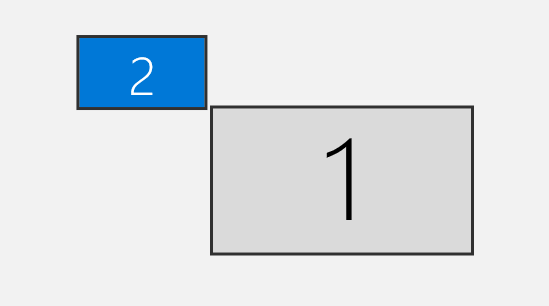
I just upload the image here, suppose I have monitor 1 and monitor 2.
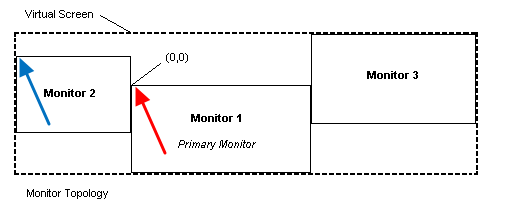
In the image, the red arrow is the origin of the ClientToScreen returned coordinates.
While when we draw the rectangle, it looks like the wxScreenDC has the origin pointed by blue arrow.
—
Reply to this email directly, view it on GitHub, or unsubscribe.
You are receiving this because you are subscribed to this thread.
VZ
Are you sure about wxScreenDC origin part? I'd expect it to be at the top left corner of the primary monitor too.
This is, of course, easy to test: just write a tiny program drawing a line from (0,0) to (1000,1000) using wxScreenDC and check where does it appear.
—
Reply to this email directly, view it on GitHub, or unsubscribe.
You are receiving this because you are subscribed to this thread.
ollydbg

This is the screen shot of my primary monitor 1, a very simple wx program
    void OnMouseMotion(wxMouseEvent& event)
    {
        if (event.Dragging() && event.LeftIsDown())
        {
                wxScreenDC dc;
                wxPen pen(wxColor(255, 0, 0), 5);
                dc.SetPen(pen);
                dc.DrawLine(0, 0, 3000, 500);

        }
    }
My monitor 1 is 1920x1080 with 100%DPI, and the extended monitor 2 is 1600x900 with 100 DPI scale.
Please note that in my test case, I have only monitor 1. I have unplugged the monitor 2, which means I only have one monitor. But it looks like the wxScreenDC are still using the top left corner of the monitor 2 as the origin.
—
Reply to this email directly, view it on GitHub, or unsubscribe.
You are receiving this because you are subscribed to this thread.
VZ
I don't understand how can wxScreenDC "know" about the other monitor if you don't see it in Windows any more. We do need to stop using wxScreenDC anyhow, but this is not that simple to do, unfortunately.
—
Reply to this email directly, view it on GitHub, or unsubscribe.
You are receiving this because you are subscribed to this thread.
ollydbg
My guess is maybe wxScreenDC caches some states that I had two monitors.
—
Reply to this email directly, view it on GitHub, or unsubscribe.
You are receiving this because you are subscribed to this thread.
Maarten
I can reproduce it too with a monitor setup like in the image from @asmwarrior
I can fix drawing on the main monitor by using:
                    rect.x += GetSystemMetrics(SM_XVIRTUALSCREEN);
                    rect.y += GetSystemMetrics(SM_YVIRTUALSCREEN);
DrawResizeHint(dc, rect);
                    m_actionHintRect = rect;
Note that the hint is drawn with PatBlt, and not wxScreenDC directly: https://github.com/wxWidgets/wxWidgets/blob/9bae94022c6aa8bb2b1b207f0f64bc362e5cd6af/src/aui/framemanager.cpp#L283-L286
Also I'm not able to get it to draw hints on the top-left monitor at all.
—
Reply to this email directly, view it on GitHub, or unsubscribe.
You are receiving this because you are subscribed to this thread.
Maarten
After logging out and in again, this patch doesn't work anymore, but the unmodified code works fine.
Seems like it is only an issue when you change monitor layout without logging out/in or restarting.
—
Reply to this email directly, view it on GitHub, or unsubscribe.
You are receiving this because you are subscribed to this thread.
ollydbg
Hi, @MaartenBent thanks for the test.
Do we need some method to detect the display changes? I mean when a monitor added or removed, we should know the display got changed?
Search on the internet, I found this:
Multiple Display Monitors - Win32 apps | Microsoft Learn
Maybe, there are some API's to query the values, or maybe we can catch some event.
Thanks.
—
Reply to this email directly, view it on GitHub, or unsubscribe.
You are receiving this because you are subscribed to this thread.
ollydbg
I can fix drawing on the main monitor by using:
                    rect.x += GetSystemMetrics(SM_XVIRTUALSCREEN);
                    rect.y += GetSystemMetrics(SM_YVIRTUALSCREEN);
                    DrawResizeHint(dc, rect);
                    m_actionHintRect = rect;
Note that the hint is drawn with
PatBlt, and notwxScreenDCdirectly:Also I'm not able to get it to draw hints on the top-left monitor at all.
With the above code patch, I see you just "Add" a X,Y coordinates shift to the rect's position.
Do you mean that by adding this shift, the PatBlt function just sets the monitor 2's top left corner as the origin?
After logging out and in again, this patch doesn't work anymore, but the unmodified code works fine. Seems like it is only an issue when you change monitor layout without logging out/in or restarting.
I haven't tested your patch, but it looks like if I log out and log in, if I have only one monitor, the GetSystemMetrics(SM_XVIRTUALSCREEN) and GetSystemMetrics(SM_YVIRTUALSCREEN) should be 0.
GetSystemMetrics function (winuser.h) - Win32 apps | Microsoft Learn
—
Reply to this email directly, view it on GitHub, or unsubscribe.
You are receiving this because you are subscribed to this thread.
ollydbg
OK, I wrote a simple program(which is mostly generated by chatGPT)
#include <Windows.h>
#include <iostream>

int main()
{
    int numMonitors = GetSystemMetrics(SM_CMONITORS);
    std::cout << "Number of Monitors: " << numMonitors << std::endl;

    int virtualScreenWidth = GetSystemMetrics(SM_CXVIRTUALSCREEN);
    int virtualScreenHeight = GetSystemMetrics(SM_CYVIRTUALSCREEN);
    std::cout << "Virtual Screen Width: " << virtualScreenWidth << std::endl;
    std::cout << "Virtual Screen Height: " << virtualScreenHeight << std::endl;


    int virtualScreenX = GetSystemMetrics(SM_XVIRTUALSCREEN);
    int virtualScreenY = GetSystemMetrics(SM_YVIRTUALSCREEN);
    std::cout << "Virtual Screen X: " << virtualScreenX << std::endl;
    std::cout << "Virtual Screen Y: " << virtualScreenY << std::endl;

    return 0;
}
The result is:
Number of Monitors: 2
Virtual Screen Width: 3520
Virtual Screen Height: 1080
Virtual Screen X: -1600
Virtual Screen Y: 0
So, I think we need the GetSystemMetrics(SM_XVIRTUALSCREEN); and GetSystemMetrics(SM_YVIRTUALSCREEN) instead of the SM_CXVIRTUALSCREEN and SM_CYVIRTUALSCREEN. Which is the X,Y position of the monitor 2. When I have only one monitor, those two values should be 0.
—
Reply to this email directly, view it on GitHub, or unsubscribe.
You are receiving this because you are subscribed to this thread.
ollydbg
I wrote another test:
    void OnMouseMotion(wxMouseEvent& event)
    {
        if (event.Dragging() && event.LeftIsDown())
        {
            wxScreenDC dc;
            wxPen pen(wxColor(255, 0, 0), 5);
            dc.SetPen(pen);
            int virtualScreenX = GetSystemMetrics(SM_XVIRTUALSCREEN);
            int virtualScreenY = GetSystemMetrics(SM_YVIRTUALSCREEN);
            dc.DrawLine(0 + virtualScreenX, 0 + virtualScreenY, 1000 + virtualScreenX, 500 + virtualScreenY);

        }
    }
It looks like in this case, I can draw the line from (0,0) to (1000, 500) in the expected position in the monitor 1, see below image shot:
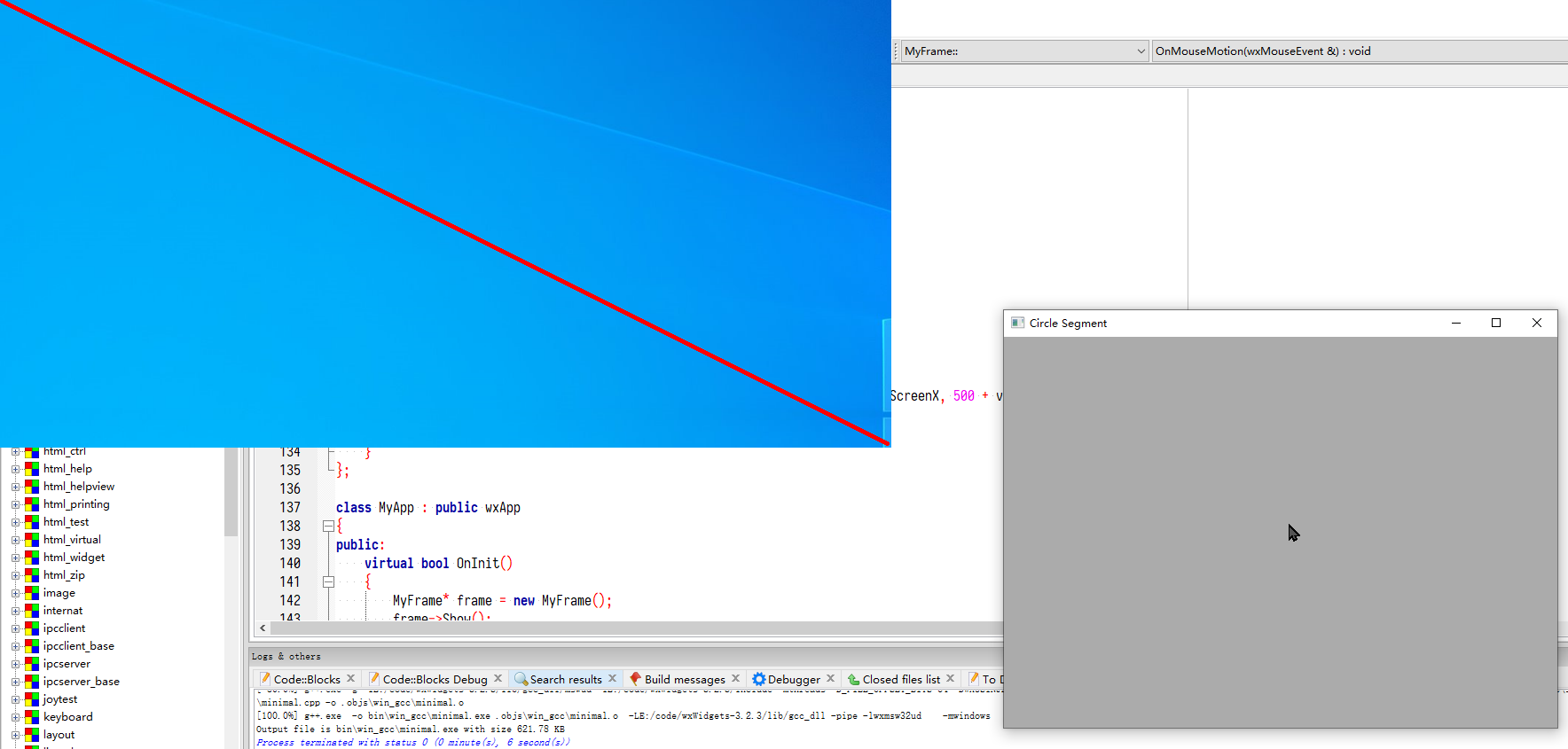
But it looks like the wxScreenDC has some issue, and it mistakenly copies monitor 2's area to monitor 1, so you can see the blue background.
—
Reply to this email directly, view it on GitHub, or unsubscribe.
You are receiving this because you are subscribed to this thread.
ollydbg
When debugging, I see this line has a typo, whether.
—
Reply to this email directly, view it on GitHub, or unsubscribe.
You are receiving this because you are subscribed to this thread.
ollydbg
I did a pure Windows C++ application, which is also generated by chatGPT, I try to draw a line from (0,0) to (virtualScreenWidth, virtualScreenHeight), in my test case, it is (0,0) to (3520, 1080).
#include <Windows.h>

LRESULT CALLBACK WindowProc(HWND hwnd, UINT uMsg, WPARAM wParam, LPARAM lParam)
{
    switch (uMsg)
    {
        case WM_PAINT:
        {
            HDC hdc = GetDC(nullptr); // Get the desktop DC

            // Get the virtual screen dimensions
            int virtualScreenWidth = GetSystemMetrics(SM_CXVIRTUALSCREEN);
            int virtualScreenHeight = GetSystemMetrics(SM_CYVIRTUALSCREEN);

            // Create a pen and select it into the device context
            HPEN pen = CreatePen(PS_SOLID, 2, RGB(255, 0, 0));
            SelectObject(hdc, pen);

            // Draw a line from top-left to bottom-right of the virtual screen
            MoveToEx(hdc, 0, 0, nullptr);
            LineTo(hdc, virtualScreenWidth, virtualScreenHeight);

            // Clean up
            DeleteObject(pen);
            ReleaseDC(nullptr, hdc);
            return 0;
        }

        case WM_DESTROY:
            PostQuitMessage(0);
            return 0;
    }

    return DefWindowProc(hwnd, uMsg, wParam, lParam);
}

int WINAPI WinMain(HINSTANCE hInstance, HINSTANCE hPrevInstance, LPSTR lpCmdLine, int nCmdShow)
{
    // Register the window class
    const wchar_t CLASS_NAME[] = L"MyWindowClass";

    WNDCLASS wc = { 0 };
    wc.lpfnWndProc = WindowProc;
    wc.hInstance = hInstance;
    wc.lpszClassName = CLASS_NAME;

    RegisterClass(&wc);

    // Create the window
    HWND hwnd = CreateWindowEx(
        0,                      // Optional window styles
        CLASS_NAME,             // Window class name
        L"Draw on Virtual Screen", // Window title
        WS_OVERLAPPEDWINDOW,    // Window style
        CW_USEDEFAULT,          // X position
        CW_USEDEFAULT,          // Y position
        CW_USEDEFAULT,          // Width
        CW_USEDEFAULT,          // Height
        nullptr,                // Parent window
        nullptr,                // Menu
        hInstance,              // Instance handle
        nullptr                 // Additional application data
    );

    if (hwnd == nullptr)
        return 0;

    ShowWindow(hwnd, nCmdShow);

    // Run the message loop
    MSG msg;
    while (GetMessage(&msg, nullptr, 0, 0))
    {
        TranslateMessage(&msg);
        DispatchMessage(&msg);
    }

    return 0;
}
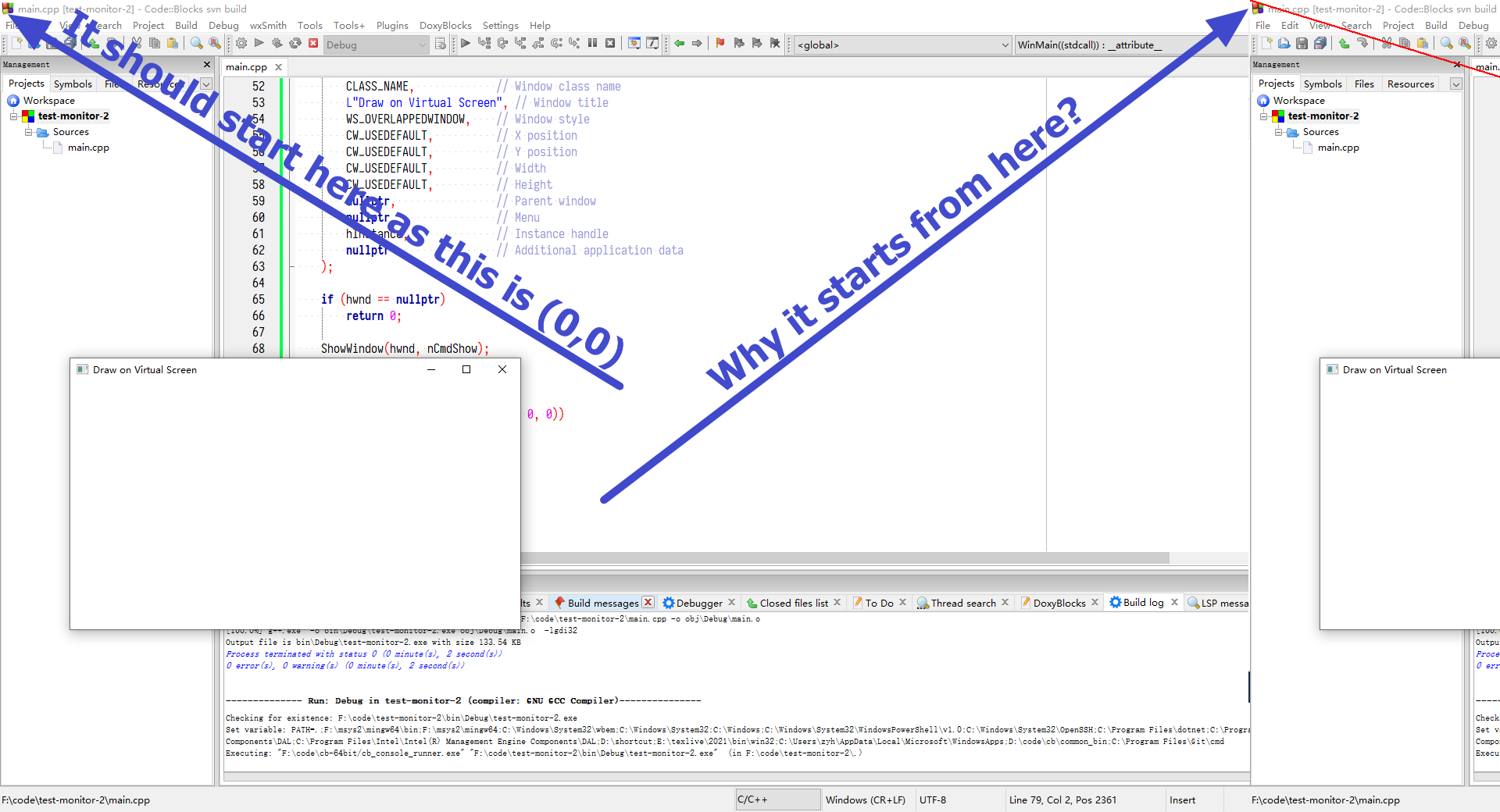
But the result screen shot shows that the line is NOT start from the (0,0) of the monitor 1(the top left of monitor 1).
See image shot below of the monitor 1
—
Reply to this email directly, view it on GitHub, or unsubscribe.
You are receiving this because you are subscribed to this thread.
PB
I just skimmed the thread, so I apologize in advance if I missed something.
Are you sure that the top left coordinate of your left monitor is 0,0? I have two monitors side by side, the right one being my primary display (DISPLAY1 in the screenshot below) and it has display coordinates starting with 0,0 but my left screen (DISPLAY2) has negative x coordinates:

I think if one really wants the top-left coordinate of the whole virtual screen (not sure if this is the case here), this should be obtained with
::GetSystemMetrics(SM_XVIRTUALSCREEN) and ::GetSystemMetrics(SM_YVIRTUALSCREEN).
—
Reply to this email directly, view it on GitHub, or unsubscribe.
You are receiving this because you are subscribed to this thread.
Maarten
I tried the win32 line example with SM_XVIRTUALSCREEN, SM_YVIRTUALSCREEN instead of 0, 0. I moved monitor 2 from the right to the position in the screenshot. Virtual screen coordinates are -1920;-1040 It won't draw the line on monitor 2. The line is flipped and shown on monitor 1 instead. And all kinds of weird artifacts show.
It works correct after I logout and login again (with the same monitor layout). Line is shown on both monitors and no artifacts. The virtual screen coordinates and size are still the same. It must be something in Windows that messes things up.
The aui, splitter and sash examples all show the same problem. Because they use wxScreenDC. I have no idea how to fix this. Or even how to detect that this is happening.
—
Reply to this email directly, view it on GitHub, or unsubscribe.
You are receiving this because you are subscribed to this thread.
ollydbg
Hi, @MaartenBent I try to fix this issue today, and I have take several hours to debug and test the code to find the reason.
I first try to debug the wx source code, and later I see this issue also happens on a pure Win32 code.
Now, even a simple Win32 line drawing on the desktop fails, see my comment, screen shot and source code here: #23982 (comment)
The strange thing is:
Case A: If I put the primary monitor in the left, and the second monitor in the right, I don't see the issue in Win32 line drawing code.
Case B: But if I put the primary monitor in the right, and the second monitor in the left, I can see the issue.
Now, I think this is a bug from either the video driver or the Windows 10 itself, so I try to upgrade my Win10. In-fact, the upgrade feature is disable by myself, so I have to enable it, I'm not finishing the upgrade, but it looks like after running some update, I see that my "Win32 line drawing" issue in Case A is gone!!!
I will do more test tomorrow.
—
Reply to this email directly, view it on GitHub, or unsubscribe.
You are receiving this because you are subscribed to this thread.
PB
I can't say I understand the virtual screen coordinates. Running this:
#include <wx/wx.h>

class MyFrame: public wxFrame
{
public:
    MyFrame(wxWindow* parent = nullptr) : wxFrame(parent, wxID_ANY, "Test")
    {
        wxPanel* mainPanel = new wxPanel(this);
        wxBoxSizer* mainPanelSizer = new wxBoxSizer(wxVERTICAL);

        wxButton* button = new wxButton(mainPanel, wxID_ANY, "Draw Screen Lines");
        mainPanelSizer->Add(button, wxSizerFlags().Expand().Border());
        button->Bind(wxEVT_BUTTON, &MyFrame::DrawScreenLines, this);

        wxTextCtrl* logCtrl = new wxTextCtrl(mainPanel, wxID_ANY, wxEmptyString, wxDefaultPosition, wxDefaultSize, wxTE_MULTILINE | wxTE_READONLY | wxTE_RICH2);
        wxLog::SetActiveTarget(new wxLogTextCtrl(logCtrl));
        mainPanelSizer->Add(logCtrl, wxSizerFlags().Proportion(1).Expand().Border());

        mainPanel->SetSizer(mainPanelSizer);
    }
private:
    void DrawScreenLines(wxCommandEvent&)
    {
        HDC screenDC = ::GetDC(nullptr);
        const int x      = ::GetSystemMetrics(SM_XVIRTUALSCREEN);
        const int y      = ::GetSystemMetrics(SM_YVIRTUALSCREEN);
        const int width  = ::GetSystemMetrics(SM_CXVIRTUALSCREEN);
        const int height = ::GetSystemMetrics(SM_CYVIRTUALSCREEN);
        HPEN pen = ::CreatePen(PS_SOLID, 2, RGB(255, 0, 0));
        HPEN oldPen = (HPEN)::SelectObject(screenDC, pen);

        if ( !screenDC )
            wxLogError("Could not obtain the screen DC!");
        if ( !::MoveToEx(screenDC, x, y, nullptr) )
            wxLogError("MoveToEx() failed!");
        if ( !::LineTo(screenDC, width, height) )
            wxLogError("LineTo() failed!");

        ::SelectObject(screenDC, oldPen);
        ::DeleteObject(pen);
        ::ReleaseDC(nullptr, screenDC);

        wxLogMessage("Screen DC x = %d, y = %d, width = %d, height = %d", x, y, width, height);
    }
};

class MyApp : public wxApp
{
    bool OnInit() override
    {
        (new MyFrame())->Show();
        return true;
    }
}; wxIMPLEMENT_APP(MyApp);
as DPI PMv2 aware application on Win10 setup where the primary screen (right) is 2560x1440@125% DPI and secondary 1680x1050@100 (left, vertically centered), I get this

I understand that I have different resolutions on the two displays, so there are "virtual height" pixels (black area on the top and bottom on the left), but I still find surprising that the line does not hit either corner.
—
Reply to this email directly, view it on GitHub, or unsubscribe.
You are receiving this because you are subscribed to this thread.
ollydbg
Hi, @PBfordev, thanks for the help!
I think I have the same behavior as yours.
I just run the code in your comment, I got the result:
Here is my monitor layout:

And here is the result:
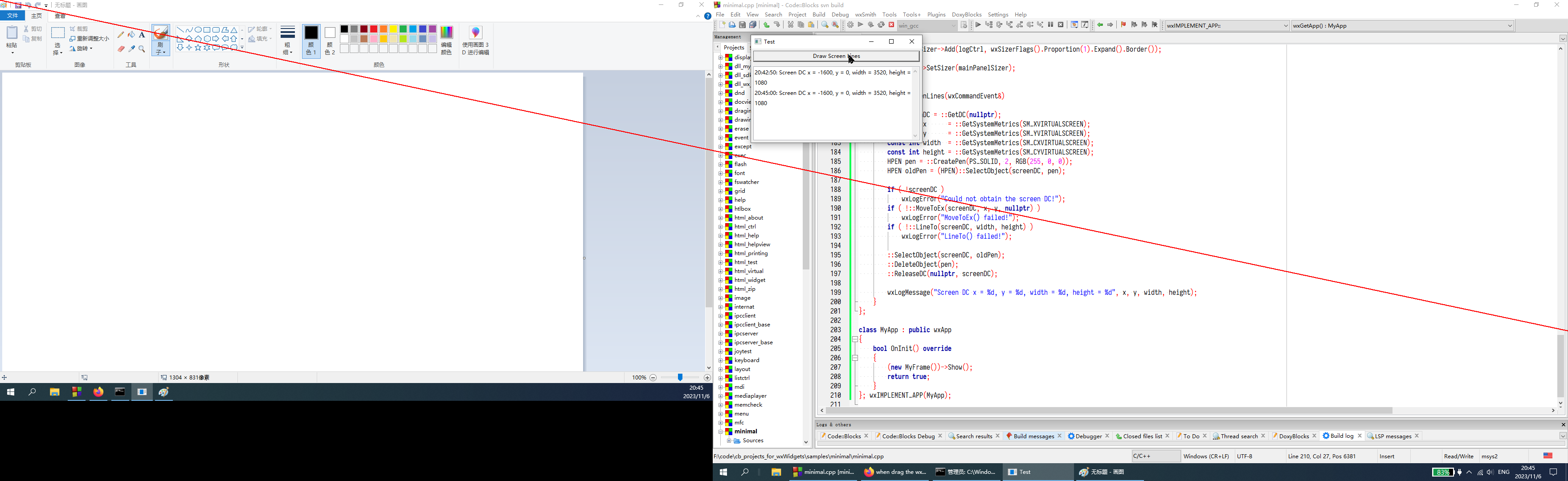
You see, you draw a line from (x,y) to the (width, height).
The (x,y) is the top left corner of the virtual desktop, and the width is the total width of the desktop.
So, the above red line is correct.
If I make the monitors layout like below:

I think it is still correct, I mean the top left corner is in the result image below(I pointed it by a red arrow)
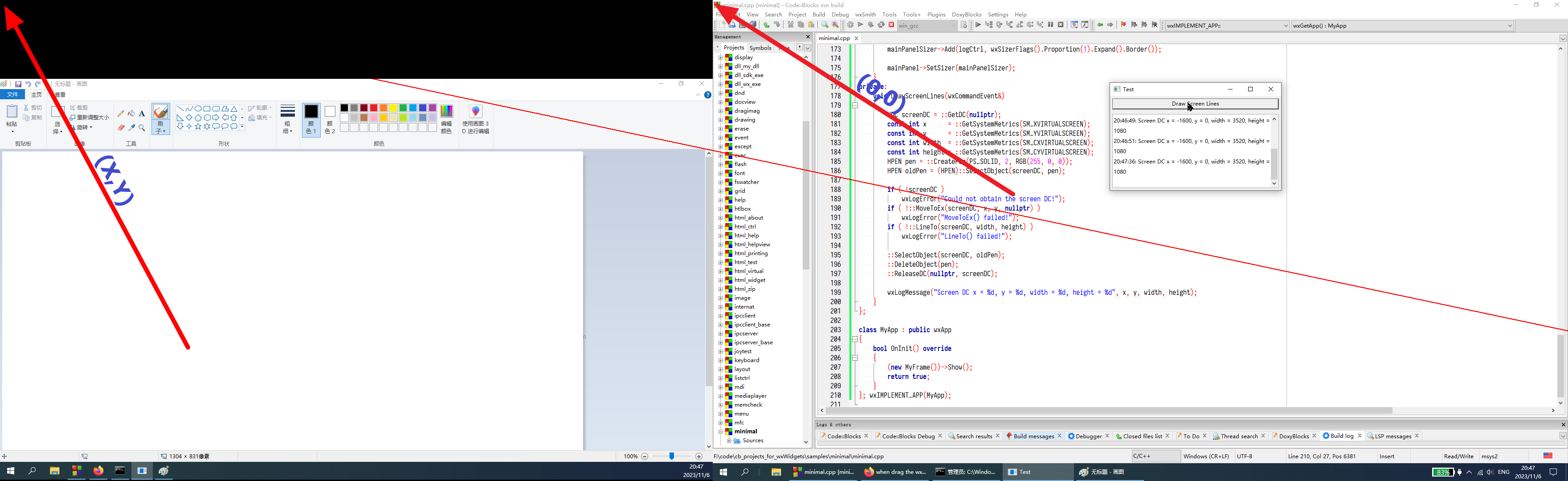
Since the (0,0) is always the top left corner of the primary monitor, the (width, height) point exceeds the right boundary of the primary monitor, so it cannot be displayed.
After the update of my Win10, I think I don't see the ugly lines now. So maybe Microsoft has fixed such drawing issue in the update.
—
Reply to this email directly, view it on GitHub, or unsubscribe.
You are receiving this because you are subscribed to this thread.
PB
@asmwarrior, I still think that the line should hit both top-left and bottom-right corners. In your second screenshot.
If you make the line longer to the left keeping the angle, I don't think it crosses the corner. Similarly, the width and height are inside the virtual screen coordinates, so the line should meet the bottom-right corner.
IMO, if the line was moved down (perhaps by the difference in height between the screens?) and prolonged, it could hit both corners.
But I have very little knowledge of non-trivial things, so I am like wrong using just common sense... Either way, if the issue manifested only on your machine and the update fixed it, perhaps the Issue could be closed? The splitter one mentioned in this thread seems unrelated.
—
Reply to this email directly, view it on GitHub, or unsubscribe.
You are receiving this because you are subscribed to this thread.

mano...@gmail.com
desktop) or duplicated (all show the same, even at different resolutions).
This brings the question: What should any screen-cooordinates query (eg.
screenDC) return?
For the combined desktop it seems clear: the virtual space. But for the
duplicated case, those of the monitor with a focused window? With last
activity?
ollydbg
Hi, @PBfordev I think I need to draw a image to show that the virtual screen in your code is correct. See this image below:
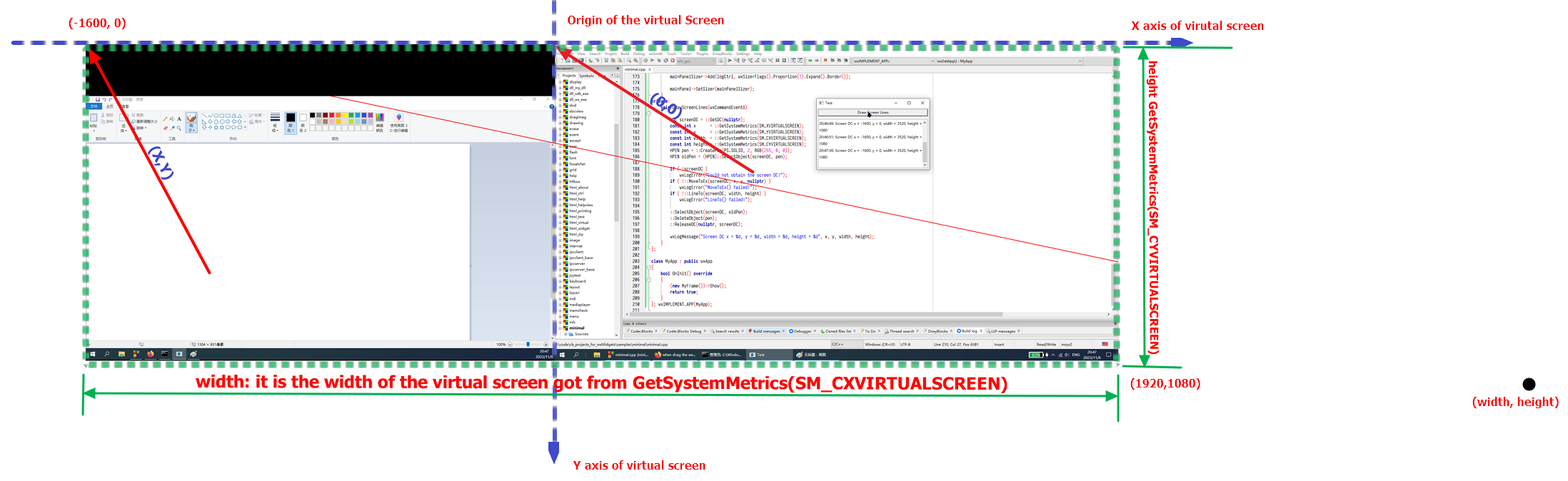
In this image, the "virtual screen" is a dashed green rectangle(the rectangle overs all the monitor areas), with the origin on the top left corner of my monitor 1(my primary monitor, 1920*1080 resolution). My monitor 2 is put on the left side of the monitor 1.
When you call the function:
        const int x      = ::GetSystemMetrics(SM_XVIRTUALSCREEN);
        const int y      = ::GetSystemMetrics(SM_YVIRTUALSCREEN);
You got the x,y values, in my case, the x = -1600, y = 0, which is shown in the image, it is the top left corner of the "virtual screen" relative to the origion.
When you call the function:
        const int width  = ::GetSystemMetrics(SM_CXVIRTUALSCREEN);
        const int height = ::GetSystemMetrics(SM_CYVIRTUALSCREEN);
You got the width and height of the "virtual screen" rectangle, in my case, the width is 1920+1600 = 3520, and the height is 1080.
Now, you try to draw a line from(x,y) to (width, height), that is from (-1600, 0) to (3520, 1080), so you get the correct result that only the lines in the monitor1 and monitor2 areas are drawn.
If you want to draw a line from the "top left corner of monitor 2" to "bottom right corner of monitor 1", you should draw from (-1600, 320) to (1920, 1080).
Please note that all the above coordinates are the virtual screen coordinates.
I hope you can understand my explanation.
—
Reply to this email directly, view it on GitHub, or unsubscribe.
You are receiving this because you are subscribed to this thread.
PB
If you want to draw a line from the "top left corner of monitor 2" to "bottom right corner of monitor 1", you should draw from (-1600, 320) to (1920, 1080).
Thanks, you are absolutely correct, I was being even more dumb then usual. The most-right coordinate of the virtual screen (i.e., on the right-most display) in my code should not be width but x + width, after changing that, the line hits both corners.
—
Reply to this email directly, view it on GitHub, or unsubscribe.
You are receiving this because you are subscribed to this thread.
ollydbg
@PBfordev , grad to hear.
Any way, I'm going to close this issue, because after updating my Win10, I can't reproduce this issue now.
If you guys see this issue in your own OS, please reopen it again, thanks.
—
Reply to this email directly, view it on GitHub, or unsubscribe.
You are receiving this because you are subscribed to this thread.
ollydbg
Closed #23982 as completed.
—
Reply to this email directly, view it on GitHub, or unsubscribe.
You are receiving this because you are subscribed to this thread.

Tony Kennedy


Vadim Zeitlin
TK> I see the same problem on Windows running wx 3.1.5.
Please check if you can reproduce it with 3.2.3 (or the upcoming 3.2.4)
and, if so, whether it appears in the aui sample. If it does, please
describe the exact steps necessary to reproduce it there because I don't
see it on a 200% DPI monitor here.
Regards,
VZ
Tony Kennedy
Tony.

asm warrior
ollydbg
I'm sorry that it looks like this bug happens again in my PC(win10) after I successfully installed Win10 update KB5031356, I'm not sure why, but it does happens again. But it looks like this issue is a Windows system related issue. I will reopen this issue.
—
Reply to this email directly, view it on GitHub, or unsubscribe.
You are receiving this because you are subscribed to this thread.
ollydbg
Reopened #23982.
—
Reply to this email directly, view it on GitHub, or unsubscribe.
You are receiving this because you are subscribed to this thread.
VZ
Sorry, this issue is so long by now that I'm rather lost here, but there are a couple of points I'd like to make:
- We really need to stop using
wxScreenDCwhich doesn't work at all in non-MSW ports. The simplest way to do it would be to always turn on live resize unconditionally everywhere: after all, we already do it under Mac and GTK (and should probably do it in wxQt too, shouldn't we, @AliKet?) and so I don't think it would be that catastrophic to do it also under MSW. I remember that when I had suggested doing the same thing forwxSplitterWindowthere were objections from people who use slow-to-redraw windows with it and I can understand that this might be problematic, but OTOH this problem already exists in non-MSW ports... - The less simple way is to replace the code using
wxScreenDCwith the code usingwxOverlay. AFAICS this should be doable without too many problems because we never actually (need to) draw outside of the window, so I have no idea why waswxScreenDC(and notwxClientDC, at least) used here in the first place. But this would still require some work just to support non-live resizing, so I'm not sure if it's really worth it (i.e. if anybody wants to do it, please do, but I don't think I'm going to do it myself). - The use of
::PatBlt()is a mystery to me, it was added in be794d6 (Fix from wxAUI forum (http://www.kirix.com/forums/viewtopic.php?f=16&t=564) for display problem on Vista, 2007-11-09) and the URL in the link is, of course, dead and not present in the Internet Archive, so I have no idea what the problem was. You might want to try removing it to check if it changes anything.
To summarize, my recommendation is to just enable live resizing, which should avoid all uses of wxScreenDC. If this is inappropriate for some reason (why?), try removing the PatBlt hack, maybe it might help.
—
Reply to this email directly, view it on GitHub, or unsubscribe.
You are receiving this because you are subscribed to this thread.
AliKet
- We really need to stop using
wxScreenDCwhich doesn't work at all in non-MSW ports. The simplest way to do it would be to always turn on live resize unconditionally everywhere: after all, we already do it under Mac and GTK (and should probably do it in wxQt too, shouldn't we, @AliKet?)
Unfortunately, wxScreenDC doesn't work in wxQt either (at least under *nix systems, not sure about wxQt under Windows) and I already enabled live resize for it in this commit fd8d272
I think changing wxScreenDC with wxOverlay will make things work fine, I'll see if I can do it myself (but not in the near future).
—
Reply to this email directly, view it on GitHub, or unsubscribe.
You are receiving this because you are subscribed to this thread.
VZ
Please check if the switch to using wxClientDC in #24166 helps with this problem.
—
Reply to this email directly, view it on GitHub, or unsubscribe.
You are receiving this because you are subscribed to this thread.
AliKet
I tried using wxOverlay + wxClientDC and it works well under wxMSW, wxGTK3 (Wayland) and wxQt.
This is how it looks like under wxMSW (dark mode activated)
https://github.com/wxWidgets/wxWidgets/assets/7704771/6763e570-e8c0-40c2-81fb-f66cb4abd9e0
—
Reply to this email directly, view it on GitHub, or unsubscribe.
You are receiving this because you are subscribed to this thread.
ollydbg
Please check if the switch to using
wxClientDCin #24166 helps with this problem.
Hi, VZ, I haven't tested the #24166, but I think if we enable the live resize feature, my reported issue is gone.
Because in the aui sample, if I enable this option Live resize update(see the image shot below), I'm using the official wx 3.2.4, and I don't see the ugly lines.
—
Reply to this email directly, view it on GitHub, or unsubscribe.
You are receiving this because you are subscribed to this thread.
ollydbg
Oh, sorry, I might be wrong, I just read the gif screen shot from @AliKet 's links. So, you have to switch to use wxOverlay + wxClientDC in the git branch #24166.
I don't have a git clone of the wx, I only have a wx3.2.4 official release zip file extracted and build, let me check whether the diff file from the the pull (the link is: 24166.patch) could apply on the official release wx3.2.4 source files.
—
Reply to this email directly, view it on GitHub, or unsubscribe.
You are receiving this because you are subscribed to this thread.
ollydbg
OK, I have successfully apply the diff in the pull request #24166 in my local wx 3.2.4 source code, and rebuild the wx3.2.4. Now the aui sample code started by "Live Resize Update" option by default, this works OK.
When I turn off that option, It looks like the dragged lines(the hint lines) are not showing very well when the mouse go to the white color background, see the screen cast mp4 file below for this test.
https://github.com/wxWidgets/wxWidgets/assets/561818/dc86375b-3b1d-401f-8620-18efaabe07ae
—
Reply to this email directly, view it on GitHub, or unsubscribe.
You are receiving this because you are subscribed to this thread.
AliKet
Oh, sorry, I might be wrong, I just read the mp4 screen cast from @AliKet 's links. So, you have to switch to use
wxOverlay + wxClientDCin the git branch #24166.
Sorry, I didn't mean it's in master yet! I need to prepare a PR for this first for review,
which I hope I can do sooner.
Regards.
—
Reply to this email directly, view it on GitHub, or unsubscribe.
You are receiving this because you are subscribed to this thread.
AliKet
Is this still relevant to keep it open?
—
Reply to this email directly, view it on GitHub, or unsubscribe.
You are receiving this because you are subscribed to this thread.
ollydbg
Is this still relevant to keep it open?
This is a bit late reply, maybe I missed the email notification. I will test the latest release version of wx(wx 3.2.5), and see whether my original reported issue still exists.
—
Reply to this email directly, view it on GitHub, or unsubscribe.
You are receiving this because you are subscribed to this thread.
ollydbg
Closed #23982 as completed.
—
Reply to this email directly, view it on GitHub, or unsubscribe.
You are receiving this because you are subscribed to this thread.
ollydbg
Is this still relevant to keep it open?
This is a bit late reply, maybe I missed the email notification. I will test the latest release version of wx(wx 3.2.5), and see whether my original reported issue still exists.
Good news.
I just tested with the wxAUI sample build against wx 3.2.5, and Code::Blocks built against wx 3.2.5, and I don't see the shadow(ugly) lines when I drag the wxAUI panel/window in my two monitor system(Win10).
So, I believe this bug can be closed. Thanks guys for your test and help, I learned a lot from the discussions.
—
Reply to this email directly, view it on GitHub, or unsubscribe.
You are receiving this because you are subscribed to this thread.
Mark Roszko
FYI. I'm using wx 3.2.6 here with KiCad. On my work environment with high dpi monitors I get this line bug.
The oddity is the lines are appearing on a completely separate screen.
It does not reproduce on my home system with dual monitors on standard DPI. (no idea if DPI has any part of it, just mentioning it)
https://github.com/user-attachments/assets/251c6d4b-846a-42bc-9329-4dd1f62e4434
—
Reply to this email directly, view it on GitHub, or unsubscribe.
You are receiving this because you are subscribed to this thread.
ollydbg
Oh, this looks like the same issue as I reported. Yes, the ugly line happens in another monitor.
—
Reply to this email directly, view it on GitHub, or unsubscribe.
You are receiving this because you are subscribed to this thread.
VZ
@marekr Does it happen for you in master too?
—
Reply to this email directly, view it on GitHub, or unsubscribe.
You are receiving this because you are subscribed to this thread.
VZ
Reopened #23982.
—
Reply to this email directly, view it on GitHub, or unsubscribe.
You are receiving this because you are subscribed to this thread.
Mark Roszko
@marekr Does it happen for you in master too?
I compiled and ran auidemo from both master and 3.2 branches and it does appear fixed on master
—
Reply to this email directly, view it on GitHub, or unsubscribe.
You are receiving this because you are subscribed to this thread.
VZ
It definitely looks like something is going very wrong with wxScreenDC on multi-monitor systems... I'm rather reluctant to spend time on this because we're not using wxScreenDC at all on master any more, but if we need to fix it in 3.2, I think the simplest would be to add wxDisplay::GetDC() that would create a DC for this monitor only, as I just don't see how can wxScreenDC, which uses an HDC stretching over all monitors, possibly work correctly if the monitors use different DPI (I realize that it seems to happen even if they use the same DPI, but as long as we're talking about fixing it, it would be better to fix it for all cases). I could write the code for this, but I still didn't set things up for using multiple monitors with my Windows VM, so I can't test it :-(
Alternatively, we could just backport the code using wxOverlay in wxAUI to 3.2. But this is hardly trivial neither.
—
Reply to this email directly, view it on GitHub, or unsubscribe.
You are receiving this because you are subscribed to this thread.
Mark Roszko
I don't really need it fixed for 3.2
Some simple debugging, it seems the problem is in DrawResizeHint of framemanager.cpp. where The wxRect being passed is target but it's relative to one screen that is the second screen.
Meanwhile wxScreenDc is the sum of both screens, so since the monitors are identical, the stuff is being drawn in the equivalent space on the first monitor
—
Reply to this email directly, view it on GitHub, or unsubscribe.
You are receiving this because you are subscribed to this thread.
VZ
 vadz left a comment (wxWidgets/wxWidgets#23982)
Do I understand correctly that this is not reproducible in master/3.3.3 any more? Does anybody still see any problems with this version?
—
Reply to this email directly, view it on GitHub, or unsubscribe.
Triage notifications, keep track of coding agent tasks and review pull requests on the go with GitHub Mobile for iOS and Android. Download it today!
You are receiving this because you are subscribed to this thread.
VZ
vadz left a comment (wxWidgets/wxWidgets#23982)@asmwarrior Do you still see this problem in 3.3.3 or current master? I'd like to fix this in 3.3.4 if it's still present.
—
Reply to this email directly, view it on GitHub, or unsubscribe.
Triage notifications, keep track of coding agent tasks and review pull requests on the go with GitHub Mobile for iOS and Android. Download it today!
You are receiving this because you are subscribed to this thread.
ollydbg
 asmwarrior left a comment (wxWidgets/wxWidgets#23982)
@asmwarrior Do you still see this problem in 3.3.3 or current master? I'd like to fix this in 3.3.4 if it's still present.
Hi, @vadz , I don't see this issue in the recent wx 3.3.3 version. So my guess is that this issue is fixed already. Thanks.
—
Reply to this email directly, view it on GitHub, or unsubscribe.
Triage notifications, keep track of coding agent tasks and review pull requests on the go with GitHub Mobile for iOS and Android. Download it today!
You are receiving this because you are subscribed to this thread.
VZ
—
Reply to this email directly, view it on GitHub, or unsubscribe.
Triage notifications, keep track of coding agent tasks and review pull requests on the go with GitHub Mobile for iOS and Android. Download it today!
You are receiving this because you are subscribed to this thread.