
wxFrame icon does not display for Linux GTK build with wxWidgets 3.2.3 (Issue #24034)

Douglas Gaer
I'm upgrading existing applications from wxWidgets 3.0.2 to 3.2.3. I'm able to build my existing applications with no issues. When I run applications built with version 3.2.3 my wxFrame icon does not display. I built the wxWidgets 3.2.3 sample programs and the sample programs all have the issue of not displaying the wxFrame icon. Are there any known bugs or Linux issues in version 3.2.3 displaying wxFrame icons?
- wxWidgets version 3.2.3
- wxWidgets port wxGTK
- OS Red Hat Enterprise Linux release 9.2 (Plow)
- GTK version: gtk3-3.24.31-2.el9
- Which GDK: X11
- Current theme: gnome-classic-xorg
—
Reply to this email directly, view it on GitHub, or unsubscribe.
You are receiving this because you are subscribed to this thread.
VZ
Sorry, where exactly are the icons missing? In the frame title bar or somewhere else?
In any case, to answer your question, no, I didn't know about any regressions with frame icons support since 3.0. If possible, it would be great if you could please run git bisect between 3.0.2 and 3.2.3 to determine what exactly broke this.
—
Reply to this email directly, view it on GitHub, or unsubscribe.
You are receiving this because you are subscribed to this thread.
Douglas Gaer
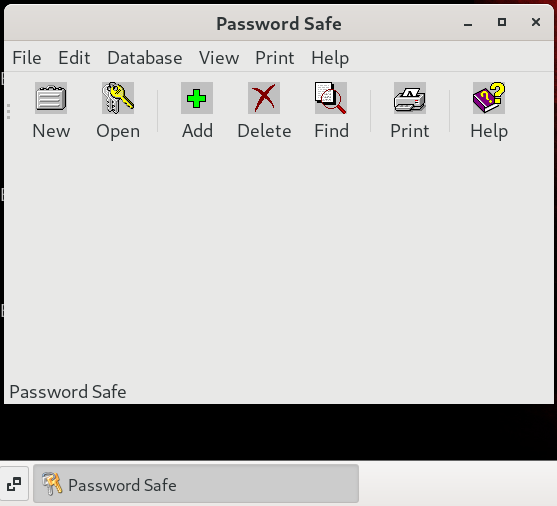
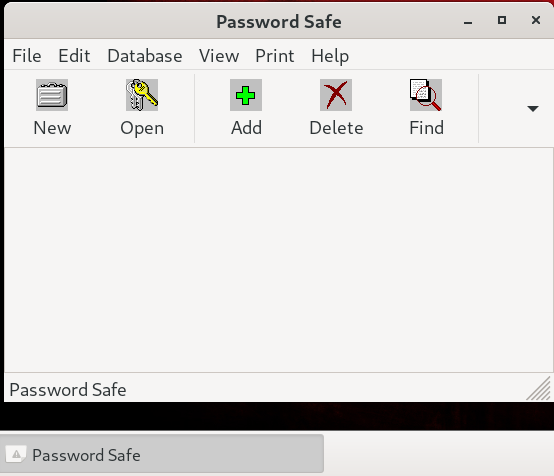
I attached 2 screen captures, 1 from the 3.0.2 app showing the taskbar icon and 1 from the 3.2.3 app with the taskbar icon missing.
I'll start working on the git bisect between 3.0.2 and 3.2.3.
—
Reply to this email directly, view it on GitHub, or unsubscribe.
You are receiving this because you are subscribed to this thread.
Scott Talbert
Would probably also be interesting to confirm that you are using GTK3 in both cases.
—
Reply to this email directly, view it on GitHub, or unsubscribe.
You are receiving this because you are subscribed to this thread.
VZ
I don't have Gnome classic at hand so can't test this easily but from the difference in toolbars appearance it does seem like the old build was using GTK2 and the new one GTK3, which could be enough to explain the problem.
On a completely unrelated note, why is toolbar icons transparency broken?
—
Reply to this email directly, view it on GitHub, or unsubscribe.
You are receiving this because you are subscribed to this thread.
Douglas Gaer
I built wxWidgets 3.2.3 on a Red Hat 7.9 VM and did not have any issues with the taskbar icons appearing in GNOME classic. My Red Hat 8.8 and Red Hat 9.2 builds both have the issue. Below is OS, GTK version, and build information for my RHEL 7 build:
$ cat /etc/redhat-release; uname -r; gtk-launch --version
Red Hat Enterprise Linux Workstation release 7.9 (Maipo)
3.10.0-1160.102.1.el7.x86_64
3.22.30
$ ./configure --prefix=/home/dgaer/wxWidgets --with-gtk=3
Configured wxWidgets 3.2.3 for `x86_64-pc-linux-gnu'
Which GUI toolkit should wxWidgets use? GTK+ 3 with support for GTK+ printing
Should wxWidgets be compiled into single library? no
Should wxWidgets be linked as a shared library? yes
Should wxWidgets support Unicode? yes (using wchar_t)
What level of wxWidgets compatibility should be enabled?
wxWidgets 2.8 no
wxWidgets 3.0 yes
Which libraries should wxWidgets use?
STL no
jpeg sys
png sys
regex builtin
tiff builtin
lzma no
zlib sys
expat sys
libmspack no
sdl no
My RHEL 8 and 9 versions are:
$ cat /etc/redhat-release; uname -r; gtk-launch --version
Red Hat Enterprise Linux release 8.8 (Ootpa)
4.18.0-477.27.1.el8_8.x86_64
3.22.30
Red Hat Enterprise Linux release 9.2 (Plow)
5.14.0-284.30.1.el9_2.x86_64
3.24.31
On RHEL 9 I built wxWidgets 3.2.3 using GTK2 and have the same issue with the taskbar icon not appearing. My build configuration for RHEL 9 with GTK2:
$ ./configure --prefix=/home/dgaer/wxWidgets --with-gtk=2 | tee /tmp/configure.log
Configured wxWidgets 3.2.3 for `x86_64-pc-linux-gnu'
Which GUI toolkit should wxWidgets use? GTK+ 2 with support for GTK+ printing
Should wxWidgets be compiled into single library? no
Should wxWidgets be linked as a shared library? yes
Should wxWidgets support Unicode? yes (using wchar_t)
What level of wxWidgets compatibility should be enabled?
wxWidgets 2.8 no
wxWidgets 3.0 yes
Which libraries should wxWidgets use?
STL no
jpeg sys
png sys
regex sys
tiff sys
lzma no
zlib sys
expat sys
libmspack no
sdl no
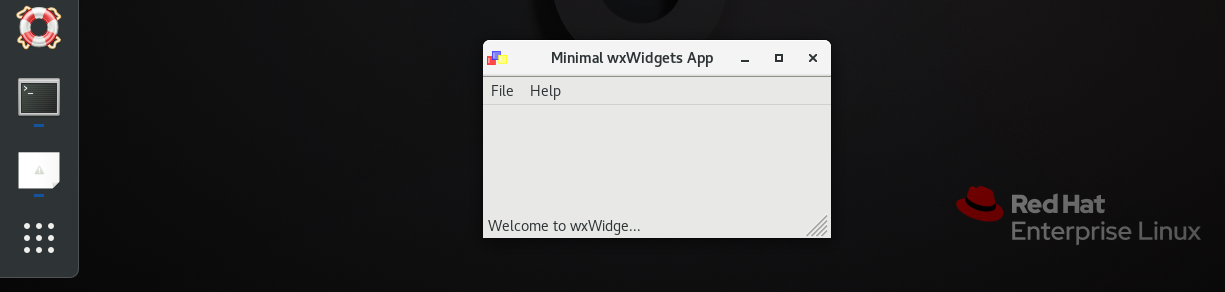
On RHEL 8 I built and tested on a GNOME Wayland desktop and the icon is missing on the activities bar:
—
Reply to this email directly, view it on GitHub, or unsubscribe.
You are receiving this because you are subscribed to this thread.
VZ
I always thought that the icon on the activities bar came from the $appname.desktop file, did it really work without it before?
FWIW I don't see the icon (or rather see the default "app" icon) here, with Gnome 43, too. But if I create the .desktop file it works correctly, of course.
—
Reply to this email directly, view it on GitHub, or unsubscribe.
You are receiving this because you are subscribed to this thread.
Douglas Gaer
Today I built wxWidgets 3.2.3 in my RHEL 8.8 production environment and did not have any issues with the taskbar icons appearing in GNOME classic. In production I tested a GNOME desktop with x11 and the icon is displayed on the activities bar, even without the .desktop file. In production we have Wayland disabled so I could not test with Wayland.
So this is definitely a RHEL 9.2 build issue in my development environment. The applications for production will be built and deployed on RHEL 8.8 so I can move forward with my projects. Tomorrow I'll take a look at my RHEL 9.2 development environment to see if I can find the build issue.
—
Reply to this email directly, view it on GitHub, or unsubscribe.
You are receiving this because you are subscribed to this thread.
Douglas Gaer
I can confirm that my issue was a RHEL 9.2 problem. RHEL 9.3 was released and I re-built the wxWidgets 3.2.3 source and tested with no issues. Below is my OS and build information from the working copy:
$ cat /etc/redhat-release
Red Hat Enterprise Linux release 9.3 (Plow)
$ uname -r
5.14.0-362.8.1.el9_3.x86_64
$ g++ --version
g++ (GCC) 11.4.1 20230605 (Red Hat 11.4.1-2)
$ gtk-launch --version
3.24.31
$ env | grep -i xdg
XDG_MENU_PREFIX=gnome-
XDG_SESSION_DESKTOP=gnome-classic
XDG_SESSION_TYPE=x11
XDG_CURRENT_DESKTOP=GNOME-Classic:GNOME
$ ./configure --prefix=${HOME}/wxWidgets --disable-shared --disable-pic --enable-html --enable-htmlhelp --enable-compat28 --enable-monolithic --enable-xpm --with-gtk=3 | tee /tmp/wxWidgets-3.2.3_configure.log
Configured wxWidgets 3.2.3 for `x86_64-pc-linux-gnu'
Which GUI toolkit should wxWidgets use? GTK+ 3 with support for GTK+ printing
Should wxWidgets be compiled into single library? yes
Should wxWidgets be linked as a shared library? no
Should wxWidgets support Unicode? yes (using wchar_t)
What level of wxWidgets compatibility should be enabled?
wxWidgets 2.8 yes
wxWidgets 3.0 yes
Which libraries should wxWidgets use?
STL no
jpeg sys
png sys
regex sys
tiff sys
lzma no
zlib sys
expat sys
libmspack no
sdl no
—
Reply to this email directly, view it on GitHub, or unsubscribe.
You are receiving this because you are subscribed to this thread.
Douglas Gaer
Closed #24034 as completed.
—
Reply to this email directly, view it on GitHub, or unsubscribe.
You are receiving this because you are subscribed to this thread.
VZ
Thanks for taking the time to test/debug this!
—
Reply to this email directly, view it on GitHub, or unsubscribe.
You are receiving this because you are subscribed to this thread.