
wxAui: Allow minimization of docked panes; add minimized pane "status bar" (Issue #23986)

Jon Evans
Description
It would be helpful to implement minimization of docked panes. Minimization basically means the manager draws an additional “status bar” (or "notebook tab bar") in a docked pane area with buttons containing the title of each pane (with optional icon). Panes can be “minimized” to this toolbar either by clicking the button or (in some implementations) by clicking a minimize button in the pane titlebar. If no un-minimized panes remain, the docked pane area collapses to just the width of the toolbar.
Each docked pane space with such a toolbar can contain multiple panes that act as tabs in a tab control. The minimization toolbar also acts as a tab bar to switch between panes.
Each pane can have a different size in the growable direction of the docked area. For example, a vertical docked area (on the left or right of a main window) can have panes with different widths.
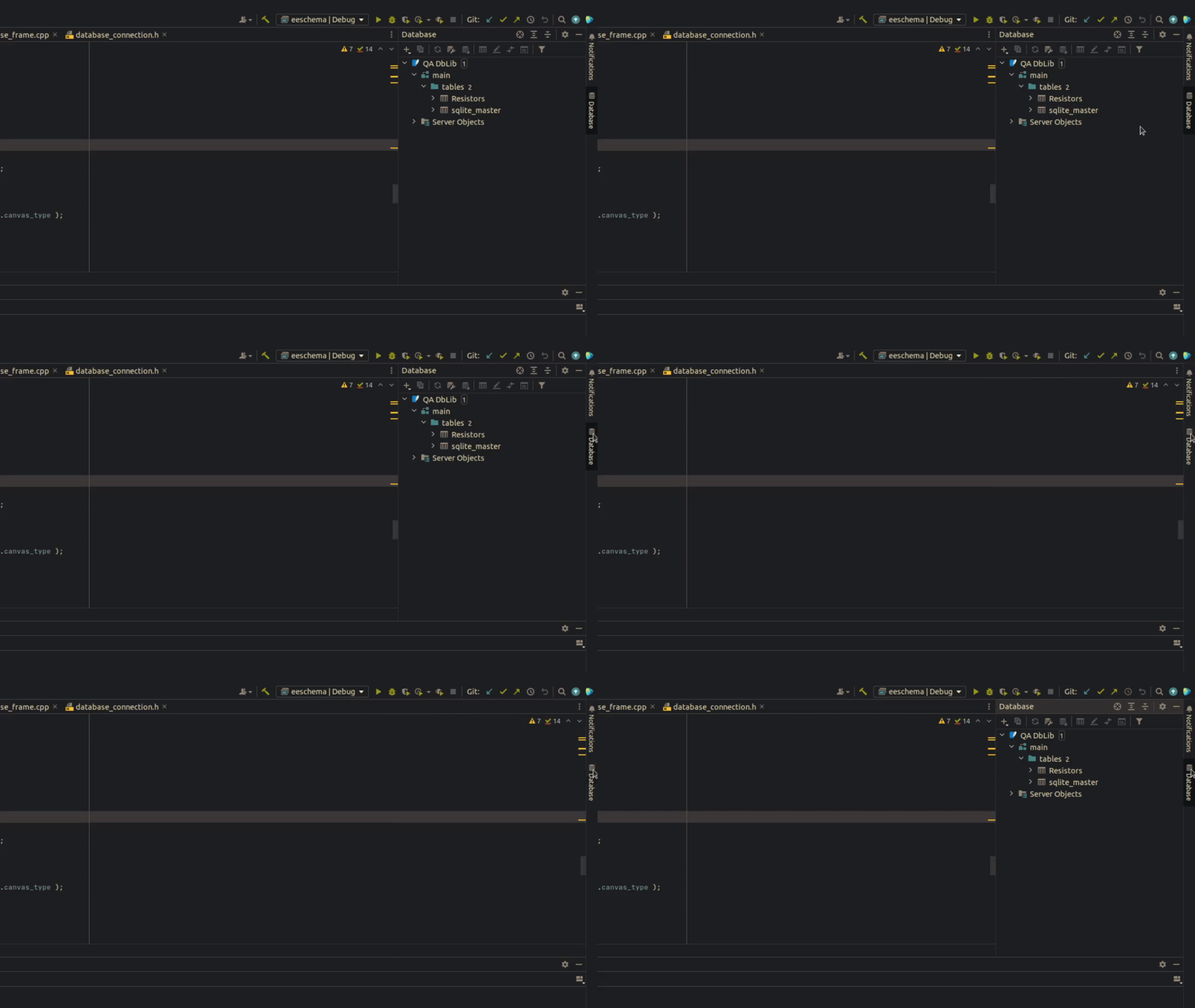
Example of this style of UI in JetBrains IDEs:
—
Reply to this email directly, view it on GitHub, or unsubscribe.
You are receiving this because you are subscribed to this thread.
VZ
 vadz left a comment (wxWidgets/wxWidgets#23986)
@craftyjon I think we might have to postpone this to 3.3.1... As much as I'd like to do it, I think we really need to release 3.3.0 soon and this could be added soon afterwards.
—
Reply to this email directly, view it on GitHub, or unsubscribe.
You are receiving this because you are subscribed to this thread.
VZ
vadz left a comment (wxWidgets/wxWidgets#23986)I've finally (sorry for the very, very long delay...) started working on this and implemented something more or less functional:
image.png (view on web)but I've realized that I have plenty of questions. The main one is probably whether we want to have multiple docking bars and, if so, how do we want to determine where should a particular window minimize: automatically, by choosing the dock closest to it, or by manually associating it with the given dock when adding it to AUI manager?
And if want to have just one dock, should it be created automatically, when the first window which can be minimized is added to the manager, or should we make this more explicit (which would also make customizing it, e.g. specifying where/how it should be positioned, more natural)?
There are also plenty of other, more minor questions:
- Do we want to always show the icons in this dock? As the screenshot shows, this doesn't look great when some panes have icons but others do not. Maybe we should use a placeholder icon for the latter?
- Do we want to rotate the icon, as I do currently?
- Do we want to always show full text which as, again, the screenshot shows, doesn't look great when it is long or maybe truncate/ellipsize it?
- Should floating AUI panes still minimize to this dock or should they minimize as normal top level windows?
@craftyjon (and anybody else interested in using this feature!) Please let me know what do you think, TIA!
—
Reply to this email directly, view it on GitHub, or unsubscribe.
You are receiving this because you are subscribed to this thread.
Jon Evans
 craftyjon left a comment (wxWidgets/wxWidgets#23986)
Thanks for working on this!
The main one is probably whether we want to have multiple docking bars and, if so, how do we want to determine where should a particular window minimize: automatically, by choosing the dock closest to it, or by manually associating it with the given dock when adding it to AUI manager?
For KiCad we would want multiple docking bars (e.g. one each for left, right, and bottom side of a frame). We'd probably be fine with manual management, but what we'd be doing with that manual management is basically something like "is this pane docked on the right side? If so it goes in the right tab bar" so if that process could be automatic that would also work. So, associating it with a dock when adding it to the AUI manager seems like it might not work for me, because I would expect a pane to move docks if the user drags it from the right to the left side of the frame (assuming the frame allows docking on both of those edges).
And if want to have just one dock, should it be created automatically, when the first window which can be minimized is added to the manager, or should we make this more explicit (which would also make customizing it, e.g. specifying where/how it should be positioned, more natural)?
I would expect this to be something we opt-in to manually, to preserve the existing behavior of applications that were written before this feature.
Do we want to always show the icons in this dock? As the screenshot shows, this doesn't look great when some panes have icons but others do not. Maybe we should use a placeholder icon for the latter?
I would expect to be able to control this with some kind of style flag on the dock (icons or no icons, globally). I wouldn't personally worry too much about the case of "only some panes have an icon" -- if I wanted to use icon style, I would expect it to be my responsibility to configure an appropriate icon for every pane. But, I would expect to be able to control icons on docks independently from icons on the pane. For example, the Jetbrains style is that docks only have icons (no text) and panes only have text (no icons).
Do we want to rotate the icon, as I do currently?
I would want the icon to stay normal orientation, not rotated If anyone wants rotation I would expect that to be a style option.
Do we want to always show full text which as, again, the screenshot shows, doesn't look great when it is long or maybe truncate/ellipsize it?
As noted above, I would like an option to show only the icon and no text. Having additional options to ellipsize text perhaps makes sense.
Should floating AUI panes still minimize to this dock or should they minimize as normal top level windows?
I'm not sure about this in general. For my specific applications I would expect floating panes to not be TLWs that have their own minimization controls like regular TLWs, so if they did minimize at all, they could minimize to the dock. But I would also find it reasonable for floating panes to not appear in the dock.
—
Reply to this email directly, view it on GitHub, or unsubscribe.
You are receiving this because you are subscribed to this thread.
VZ
vadz left a comment (wxWidgets/wxWidgets#23986)Thanks for working on this!
Thanks for your replies and sorry for yet another delay here, but I'd like to finally get back to this and hopefully finalize at least the first version soon.
For KiCad we would want multiple docking bars (e.g. one each for left, right, and bottom side of a frame). We'd probably be fine with manual management, but what we'd be doing with that manual management is basically something like "is this pane docked on the right side? If so it goes in the right tab bar" so if that process could be automatic that would also work. So, associating it with a dock when adding it to the AUI manager seems like it might not work for me, because I would expect a pane to move docks if the user drags it from the right to the left side of the frame (assuming the frame allows docking on both of those edges).
If we go with automatically minimizing to the closest size, it probably makes sense to show docs only on demand, i.e. when there are any minimized panes in them, right? I.e. things would look too crowded if we started with showing 3 empty docs from the get go.
But I do like creating the docs along the 3 sides automatically as needed. We may add a way to customize this later, i.e. to explicitly select where the docks can be created, but this seems fine as the default behaviour. I just wonder where should top-docked panes go? I realize that they're unusual, but we still need to do something with them.
And if want to have just one dock, should it be created automatically, when the first window which can be minimized is added to the manager, or should we make this more explicit (which would also make customizing it, e.g. specifying where/how it should be positioned, more natural)?
I would expect this to be something we opt-in to manually, to preserve the existing behavior of applications that were written before this feature.
I think we don't need to care about existing behaviour because using wxAuiPaneInfo::MinimizeButton() didn't have any effect before, so I assume nobody used it anyhow. And only panes with this button can be minimized by the user (the program can also call MinimizePane() explicitly, but this is a brand new function, so there are no concerns about compatibility here either).
But, I would expect to be able to control icons on docks independently from icons on the pane. For example, the Jetbrains style is that docks only have icons (no text) and panes only have text (no icons).
We can allow setting the dock style which would allow selecting whether just the icons or both icons and the text are visible in it (similar to wxTB_TEXT and wxAUI_TB_TEXT).
Showing the icon only in the dock would require adding some wxAuiPaneInfo::DockIcon(bitmap) that would be used even if Icon() was not called, which would achieve what you want.
Do we want to rotate the icon, as I do currently?
I would want the icon to stay normal orientation, not rotated If anyone wants rotation I would expect that to be a style option.
OK, this would go into the dock style too.
Should floating AUI panes still minimize to this dock or should they minimize as normal top level windows?
I'm not sure about this in general. For my specific applications I would expect floating panes to not be TLWs that have their own minimization controls like regular TLWs, so if they did minimize at all, they could minimize to the dock. But I would also find it reasonable for floating panes to not appear in the dock.
I'm still not sure about this myself, but we can leave it for later.
For now I'll implement automatically appearing docks on the sides of the window, if nobody has any objections.
—
Reply to this email directly, view it on GitHub, or unsubscribe.
You are receiving this because you are subscribed to this thread.
Jon Evans
craftyjon left a comment (wxWidgets/wxWidgets#23986)I just wonder where should top-docked panes go? I realize that they're unusual, but we still need to do something with them.
I would assume a tab bar would appear on the top in the same location as the docks would relative to any other widgets like a toolbar/menubar.
For now I'll implement automatically appearing docks on the sides of the window, if nobody has any objections.
Sounds good to me!
—
Reply to this email directly, view it on GitHub, or unsubscribe.
You are receiving this because you are subscribed to this thread.
VZ
vadz left a comment (wxWidgets/wxWidgets#23986)I've implemented the scheme discussed above, that is:
- Initially no "min docks" (short for "docks that show buttons for panes that can be minimized") are shown.
- When any pane is minimized, the dock on the side closest to the pane side where its creation is allowed (there is a new
AllowDocksForMinPanes()for this) is shown, containing an item for this pane and all the other panes that would minimize into this dock. - When a pane is made floating, it is removed from this dock. When it is docked again, it is added to the dock corresponding to its new location if it is already shown (this is similar to (1)).
This is a bit strange, as docks don't appear initially but when they do, they start with potentially many items in them, but this doesn't seem to be too bad and I still think it's preferable to show all these docs initially. But I'm not sure when, if ever, should they be hidden after being shown: should we hide them as soon as there are no more minimized (not just minimizable) panes in them? This would make behaviour consistent with (1), but would also result in the dock showing/hiding all the time as a pane is minimized/restored. I still think we should do it, for consistency, but I'd like to know what do the others think. And if we don't do this, I am almost sure that we should hide the docks when there are no more panes in them at all, i.e. when they become empty, either because all panes that were previously in them were dragged to another side or just closed.
The only alternative I see is to abandon the idea of showing these "min docks" only on demand and show them always. I still don't like this because it would consume screen space unnecessarily, but maybe this could work if we made them (much) thinner than now.
Thoughts?
—
Reply to this email directly, view it on GitHub, or unsubscribe.
You are receiving this because you are subscribed to this thread.
VZ
vadz left a comment (wxWidgets/wxWidgets#23986)I've created #26009 with what I have so far, please let me know what do you think and notably whether you agree that the docking toolbar should disappear when there are no more minimized panes. TIA!
—
Reply to this email directly, view it on GitHub, or unsubscribe.
You are receiving this because you are subscribed to this thread.
Ronny Krüger
I would vote for having the minimize pane disappear when it is empty so to not waste screen space (Visual Studio as one example does it like this)
Jon Evans
craftyjon left a comment (wxWidgets/wxWidgets#23986)I will test and review the PR as soon as I can but it may not be until this weekend.
Although I can see that this might be useful for some, I personally would rather have the minimize toolbar only show the panes that are actually minimized. So maybe this behavior could be made optional.
Since opinions vary on this, I think it should definitely be a style option. For our usage we would want the "taskbar" like behavior where panes are always shown.
I wonder if the 90° rotation of the icon could be made optional as well
I agree, we would not want icons to be rotated and so if some people do, I think that needs to be an option.
I also saw that having an icon for the minimizable panes is mandatory. I think it would be useful to also have the option to only show the text without an icon since it is not always easy to invent an icon for a pane.
I also agree that it would be nice to support only icons, only text, or both icons and text. Different software I have used has different standards here -- for software with not that many panes and with a good design team, only icons can work well. But if a lot of panes are necessary (or if pane captions are up to the user, as may be the case with some applications) text labels are required and icons may not be present.
—
Reply to this email directly, view it on GitHub, or unsubscribe.
You are receiving this because you are subscribed to this thread.
VZ
vadz left a comment (wxWidgets/wxWidgets#23986)A point about icon rotation: currently, they're rotated if the text is shown and not rotated if only icons are shown. It would, of course, be simple to add an option allowing to configure their rotation independently of whether the text is shown or not, but I think this behaviour makes sense as default (and provides what Jon wanted) and I think it would be nice to avoid adding more options (which can always be done later) until we can be sure that people really want to show normal icons with vertical text — which, IMHO, looks really weird (yes, this includes the screenshot in the description).
Similarly, it would be simple enough to add an option for showing only text (currently you have either only icons or both icons and text), but I'd prefer to postpone it until we can confirm that people really want this.
However, to buck the trend, I think that if we need the option to show only currently minimized panes in the docking toolbar, we need to add it right now because this would affect several places in the code. I'm still not sure whether we need it or not, however... I did think about it, and the nice thing about it is that it makes things conceptually simpler: the toolbar is shown if, and only if, there are any minimized windows in it. But aesthetically it doesn't look great, IMHO.
—
Reply to this email directly, view it on GitHub, or unsubscribe.
You are receiving this because you are subscribed to this thread.
Jon Evans
craftyjon left a comment (wxWidgets/wxWidgets#23986)Similarly, it would be simple enough to add an option for showing only text (currently you have either only icons or both icons and text), but I'd prefer to postpone it until we can confirm that people really want this.
In my personal opinion: rotated icons are never the correct choice from an aesthetic or UX point of view. So, if I have to accept rotated icons when text is shown, I would want to be able to show only text, because I would rather have no icons than rotated icons.
nice thing about it is that it makes things conceptually simpler: the toolbar is shown if, and only if, there are any minimized windows in it. But aesthetically it doesn't look great, IMHO.
I agree that it doesn't look great aesthetically.
it would be nice to avoid adding more options (which can always be done later)
The reason I am pushing for more configurability up front is that it often takes a long time for wxWidgets versions to get proliferated on platforms we don't control (Linux). It seems more painful for me as a developer to have to slowly request and get options added over multiple point releases, and account for them not being present for months on some platforms, vs. just asking for a lot of configurability up front.
In my experience with KiCad, the parts of wxWidgets that are highly configurable and overridable are pretty nice to work with, and the parts that have less configuration / ability to patch in and change behavior have been big pain points (even leading us to completely replace widgets with custom implementations because the upstream ones don't have enough things marked as virtual, for example). That is why I am advocating for so many flags/options now, and when I review the code I will be sure to advocate for plenty of virtual methods too :). I think it is inevitable that KiCad will end up wanting a slightly different behavior for this new feature than the default that gets put in the wxWidgets demos, so I am just trying to make sure we can achieve as much of that as possible with the first release that gets this feature.
—
Reply to this email directly, view it on GitHub, or unsubscribe.
You are receiving this because you are subscribed to this thread.
VZ
vadz left a comment (wxWidgets/wxWidgets#23986)Sorry, I had no idea that rotating the icons would turn out to be so controversial. As it looks like I'm the only one who likes it, I made it an option and disabled it by default in the latest version. I've also replaced the "show text" option with "show icons/text/both" style flags.
I still didn't add the "show only minimized panes in the dock" option because I'd like to have at least one other voice in its favour before maybe doing it.
I'll also mostly put aside the problems of newer wxWidgets versions becoming available slower than we'd like it (maybe just to say that I, at once, both sympathize with it and disagree that this is a reason to ignore all the good design practices) because this PR is not supposed to be the final version of this feature: we could still add more options before 3.3.2 and definitely before 3.4.0. But I think it's important to have something in the trunk so that people could play with it — experience shows that very few people test PR branches, and that new features really have to get into master before we start getting feedback about them (and even then, not always, unfortunately). So as long as you think that this could be used, at least experimentally, in KiCad I'd like to merge it.
Thanks in advance for looking at/testing it!
—
Reply to this email directly, view it on GitHub, or unsubscribe.
You are receiving this because you are subscribed to this thread.