
Force D2DRenderTarget's DPI to 96 (PR #23488)

Kumazuma
See #23486
You can view, comment on, or merge this pull request online at:
https://github.com/wxWidgets/wxWidgets/pull/23488
Commit Summary
- 1c0718c Force D2DRenderTarget's DPI to 96
File Changes
(1 file)
- M src/msw/graphicsd2d.cpp (1)
Patch Links:
- https://github.com/wxWidgets/wxWidgets/pull/23488.patch
- https://github.com/wxWidgets/wxWidgets/pull/23488.diff
—
Reply to this email directly, view it on GitHub, or unsubscribe.
You are receiving this because you are subscribed to this thread.
VZ
Doesn't this result in scaling/pixel doubling?
—
Reply to this email directly, view it on GitHub, or unsubscribe.
You are receiving this because you are subscribed to this thread.
Kumazuma
In https://learn.microsoft.com/en-us/windows/win32/api/d2d1/nf-d2d1-id2d1rendertarget-setdpi,
For ID2D1HwndRenderTarget, the DPI defaults to the most recently factory-read system DPI. The default value for all other render targets is 96 DPI.
it seems that that DPI occurs auto scaling like the issue, so I forces DPI to 96 then resulting output become same.
—
Reply to this email directly, view it on GitHub, or unsubscribe.
You are receiving this because you are subscribed to this thread.
VZ
Sorry, I still don't understand how could hardcoding 96 DPI here could possibly be correct.
Have you seen Maarten's comment in #23486? Doesn't it help to fix the problem?
—
Reply to this email directly, view it on GitHub, or unsubscribe.
You are receiving this because you are subscribed to this thread.
Kumazuma
The maarten's solution works well. However it is bypass as avoiding using ID2DHwndRenderTarget.
D2D is seems that logical pixels is not same as physical pixels because D2DHwndRenderTarget's DPI is not 96(100% scale)
I think that reason is other D2DRenderTarget's DPI set to 96 that the maarten's solution works well.
So Output differ between GDIPlusRenderer and Direct2DRenderer targeting to wxWindow.
—
Reply to this email directly, view it on GitHub, or unsubscribe.
You are receiving this because you are subscribed to this thread.
Kumazuma
This show effect about D2DHwndRenderTarget's DPI
#include <wx/wx.h>
#include <wx/graphics.h>
#include <d2d1.h>
#include <wrl.h>

template<typename T>
using ComPtr = Microsoft::WRL::ComPtr<T>;

#pragma comment(lib, "d2d1.lib")

class App: public wxApp
{
public:
    bool OnInit() override;
};

constexpr wxWindowID ID_DPI_COMBOBOX = 1001;

class Dialog: public wxDialog
{
public:
    Dialog(wxWindow* parent);
    wxComboBox* m_pComoBox;
};

Dialog::Dialog(wxWindow* parent)
    : wxDialog(parent, wxID_ANY, wxS("DPI"))
{
    m_pComoBox = new wxComboBox(this, ID_DPI_COMBOBOX);
    m_pComoBox->AppendString("96");
    m_pComoBox->AppendString("120");
    m_pComoBox->AppendString("168");
    m_pComoBox->AppendString("192");
    wxDialog::Layout();
}

class Frame: public wxFrame
{
    DECLARE_EVENT_TABLE();
public:
    Frame();
protected:
    void OnPaint(wxPaintEvent& evt);

private:
    Dialog* m_pDialog;
    ComPtr<ID2D1Factory> m_factory;
    int m_dpi;
};

bool App::OnInit()
{
    if (!wxApp::OnInit())
        return false;

    auto pFrame = new Frame{};
    pFrame->SetClientSize(800, 800);
    pFrame->Show();

    return true;
}

Frame::Frame()
    : wxFrame(nullptr, wxID_ANY,wxS("Transform"), wxDefaultPosition, wxSize{800, 800})
{
    m_pDialog = new Dialog{ this };
    m_pDialog->Show();

    D2D1CreateFactory(D2D1_FACTORY_TYPE_SINGLE_THREADED, __uuidof(ID2D1Factory), &m_factory);
    auto clientRect = GetClientSize();
    ComPtr<ID2D1HwndRenderTarget> hwndRenderTarget;
    m_factory->CreateHwndRenderTarget(
        D2D1::RenderTargetProperties(),
        D2D1::HwndRenderTargetProperties(
            GetHWND(),
            D2D1::SizeU(clientRect.GetWidth(), clientRect.GetHeight())
        ), &hwndRenderTarget);
    float dpiX = 0.f;
    float dpiY = 0.f;
    hwndRenderTarget->GetDpi(&dpiX, &dpiY);
    m_dpi = static_cast<int>(dpiY);
    wxString text;
    text.sprintf(wxS("%d"), m_dpi);
    m_pDialog->m_pComoBox->ChangeValue(text);
    m_pDialog->m_pComoBox->Bind(wxEVT_COMBOBOX,
        [this](wxCommandEvent&)
        {
            int dpi;
            wxString value = m_pDialog->m_pComoBox->GetValue();
            if(value.ToInt(&dpi))
            {
                m_dpi = dpi;
                this->Refresh();
            }
        });
}

wxBEGIN_EVENT_TABLE(Frame, wxFrame)
EVT_PAINT(Frame::OnPaint)
wxEND_EVENT_TABLE()

void Frame::OnPaint(wxPaintEvent& evt)
{
    wxPaintDC dc{ this };
    auto clientRect = GetClientSize();
    ComPtr<ID2D1HwndRenderTarget> hwndRenderTarget;
    m_factory->CreateHwndRenderTarget(
        D2D1::RenderTargetProperties(),
        D2D1::HwndRenderTargetProperties(
            GetHWND(),
            D2D1::SizeU(clientRect.GetWidth(), clientRect.GetHeight())
        ), &hwndRenderTarget);
    float dpi = static_cast<float>(m_dpi);
    hwndRenderTarget->SetDpi(dpi, dpi);
    ComPtr<ID2D1SolidColorBrush> whiteBrush;
    ComPtr<ID2D1SolidColorBrush> blackBrush;
    ComPtr<ID2D1StrokeStyle> strokeStyle;
    hwndRenderTarget->CreateSolidColorBrush(D2D1::ColorF{ D2D1::ColorF::White }, &whiteBrush);
    hwndRenderTarget->CreateSolidColorBrush(D2D1::ColorF{ D2D1::ColorF::Black }, &blackBrush);
    m_factory->CreateStrokeStyle(D2D1::StrokeStyleProperties(), nullptr, 0, &strokeStyle);
    hwndRenderTarget->BeginDraw();
    hwndRenderTarget->Clear(D2D1::ColorF(D2D1::ColorF::Gray));
    hwndRenderTarget->FillRectangle(D2D1::RectF(0, 0, 200, 200), whiteBrush.Get());
    hwndRenderTarget->SetDpi(96.f, 96.f);
    hwndRenderTarget->DrawRectangle(D2D1::RectF(0, 0, 200, 200), blackBrush.Get());
    hwndRenderTarget->EndDraw();
}

wxIMPLEMENT_APP(App);
—
Reply to this email directly, view it on GitHub, or unsubscribe.
You are receiving this because you are subscribed to this thread.
VZ
I'm sorry but I'm totally lost here and don't understand what does this code is trying to do/demonstrate. Could you please try to explain it in words?
—
Reply to this email directly, view it on GitHub, or unsubscribe.
You are receiving this because you are subscribed to this thread.
Kumazuma
- The GraphicsContext created by Direct2DRenderer::createContext(wxWindow*) is use ID2D1HwndRenderTarget.
- ID2D1HwndRenderTarget has Window's DPI initally.
- When ID2D1RenderTarget's DPI is not 96, the logical pixels is not same as physical pixels.
- So I try ID2D1HwndRenderTarget'DPI hardcode to 96
—
Reply to this email directly, view it on GitHub, or unsubscribe.
You are receiving this because you are subscribed to this thread.
Kumazuma
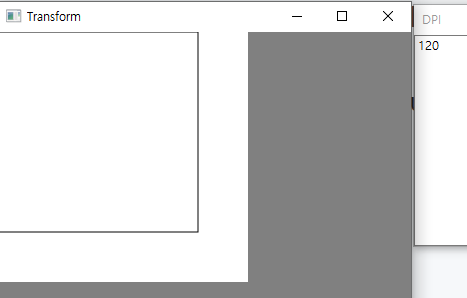
And I want to show rescaling as HwndRenderTarget's DPI.
    hwndRenderTarget->FillRectangle(D2D1::RectF(0, 0, 200, 200), whiteBrush.Get());
    hwndRenderTarget->SetDpi(96.f, 96.f);
    hwndRenderTarget->DrawRectangle(D2D1::RectF(0, 0, 200, 200), blackBrush.Get());
Rectangle's rect is same but actual size is not.
When it's DPI is 96
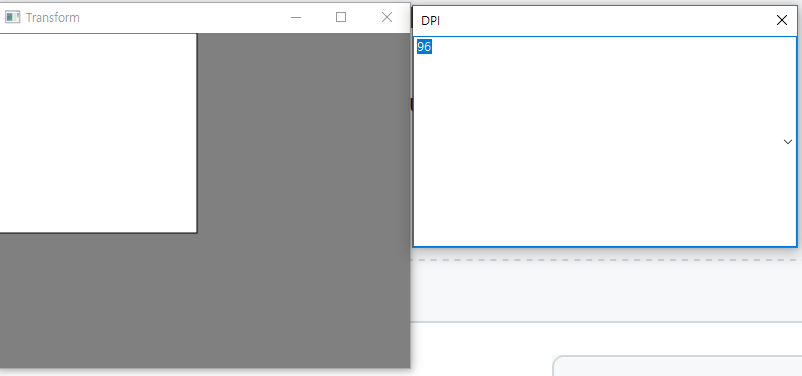
And when it's DPI is 120
—
Reply to this email directly, view it on GitHub, or unsubscribe.
You are receiving this because you are subscribed to this thread.
Kumazuma
Closed #23488.
—
Reply to this email directly, view it on GitHub, or unsubscribe.
You are receiving this because you are subscribed to this thread.
VZ
Thanks, I'll try to look at it. I hadn't realized that ID2D1RenderTarget used logical pixels different from physical pixels -- which seems to be unique among Windows APIs. I wonder if there is a way to disable this...
Also, can you confirm that you don't observe pixel doubling when using this change at 200% DPI?
P.S. Wait, why did you close it?
—
Reply to this email directly, view it on GitHub, or unsubscribe.
You are receiving this because you are subscribed to this thread.
Maarten
I suggested to use wxDC in the linked issue, but both wxDC and wxWindow contexts should work correctly. And there is indeed a difference when ID2D1HwndRenderTarget is used. With this patch it behaves the same as GDI and the same as when the context is created from a wxDC.
I tested creating and moving between displays with different DPI and it all looks correct.
Instead of SetDpi, the DPI can also be initialized to 96 via D2D1::RenderTargetProperties() in CreateHwndRenderTarget.
—
Reply to this email directly, view it on GitHub, or unsubscribe.
You are receiving this because you are subscribed to this thread.