
wm 2.6.2.0 preview 1 - new Clandestine files plugin, fixed Scratch pad plugin ...
861 views
Skip to first unread message

josip
Jul 28, 2014, 4:48:09 AM7/28/14
to write...@googlegroups.com
Writemonkey version 2.6.2.0 preview 1
Plugins like Scratch pad and new Clandestine files should now work for all of you. Hopefully. Changes were made to wm api and plugin files. Corkboards plugin has also been updated (some small additions and fixes). Please test this new build and provide feedback if you care.
i.
---
Clandestine files for Writemonkey
Version: 1.0, requires Writemonkey 2.6.2.0 or higher
Release date: July 27th 2014
Author: Josip
Description:
Save and open password protected files using powerful AES-256 encryption.
Installation:
Unzip the "Clandestine files" directory into the plugins directory.
Deployment:
This plugin is initialized at startup. Use CTRL+E,L to lock currently opened file.
How it works:
Clandestine files plugin uses regular zip file format to save locked writemonkey file. Zip files can be encrypted using strong AES-256 encryption which is unbreakable by today's standards. That is as long you use passwords that cannot be guessed or brute forced easily.
To lock a file, first open or create normal text file, for example "some_file.md". Then hit CTRL+E,L to bring up password dialog. Enter your password (twice), hit Enter and that's it. The plugin will create new file - "some_file.md.LCKD". This file is now encrypted but you can use it as any ordinary writemonkey file. You'll be asked for a password when you attempt to open it.
> CAUTION! Use good passwords, but do not forget them. Forgotten password cannot be recovered by any means except by your remembrance. If that fails, your words are lost!
Additional points:
- Nice side effect of using zip standard is that clandestine files are not only encrypted, but also compressed.
- Passwords are never stored anywhere, except implicitly into the locked file itself.
- After you lock the file, unlocked version is never written anywhere, not even as a temporary file.
- LCKD extension is mandatory for writemonkey clandestine files but you can use some other extension if you need to - see _config.incl file, setting FILE_EXTENSION.
- Clandestine files can be unlocked using many regular zip clients --> just rename "name.ext.LCKD" file to "name.ext.zip" and open it as any other zip file. You'll be asked for password, of course.
- When you create locked file from an ordinary file, the original file is deleted by default. You can prevent that by changing the DELETE_ORIGINAL_FILE setting in _config.incl file.
- You can choose how often you'll be asked for a password (ASK_FOR_PASSWORD setting in _config.incl file). Clandestine files plugin can remember provided passwords for the duration of current session - until wm is closed. The options are:
- 1 = always / will ask for the password every time you attempt to open the file
- 2 = per session / will ask for a password the first time and then remember it until wm is closed
- 3 = assume the same / like "per session" but will also assume other files are encrypted with the last successfully used password and will attempt to use it to open previously unopened locked files

Kensai
Jul 28, 2014, 4:23:48 PM7/28/14
to write...@googlegroups.com
Miracle of miracles, they both work. No apparent bugs at this point, thought admittedly testing has been limited in scope so far.
So, figure out the mystery of the rare 64 bit OS issue? Did it turn out to be something stupid that you should never have had to worry about?
Merry Christmas in July, people :)
Kensai
josip
Jul 29, 2014, 4:03:35 AM7/29/14
to write...@googlegroups.com
Hallelujah!! Alas, the solution is not exactly what I was hoping for. I included dll libraries for Scratch pad and Clandestine files into main wm solution (previously I referenced them directly from plugins). I'd prefer having them separated from the main code base, but it works for now and that's a good thing.
i.
Kensai
Jul 29, 2014, 1:28:24 PM7/29/14
to write...@googlegroups.com
So it was some glitch in .NET or Win7 that was choking on passing stuff to the DLLs? I've seen lots of other situations where folks were waiting on the building blocks they used in their apps to be upgraded to 64 bit version (mostly folks making add-ins for Office, meaning that if you install 64 bit Office, you can't use 32 bit add-ins), and most of those are still unresolved as far as I know. Sounds like a hiccup on Microsoft's part here.
Does this solution cause any issues? I thought I was seeing some increase in the Monkey's startup time, but like I've already mentioned, testing time has been at a premium so far, so nothing definitive on that front. Typical operations, though, seem unaffected.
Kensai
josip
Jul 30, 2014, 1:29:44 PM7/30/14
to write...@googlegroups.com
Longer startup time is due to 2 new plugins you are running. It cannot be anything else. The only difference now is that those dlls are properly registered at build time, which means that wm knows about them before they are used. Previously wm knew nothing about them - plugins referenced them directly from the folder using less conventional methods (reflection) for creating object instances from them. I knew this could be tricky but it worked with all my tests. I still don't know what went wrong and don't think this is Ms fault. Sometimes monkey says: Just because it worked doesn't mean it works :)
The good thing is that with the current setup other plugins can use sqlite database and zip functionality without providing their own copies of those libraries. The bad thing is that there is still no viable method for plugins to use existing dlls that aren't part of wm bundle.
And yes, 32 vs 64 can be quite a hassle. Ideally I should provide two separate releases - 32 and 64 bit, but I don't want to maintain two versions. I compile for x86 32bit - a common denominator for both architectures. And since wm is not an application that needs a lot of ram or some superior computing power, I think this is still a good choice.
I'd like to hear your thoughts on scratch pad - I know there is still room for improvement and some polish.
Thanks,
i.
Kensai
Jul 30, 2014, 8:57:19 PM7/30/14
to write...@googlegroups.com
This looks pretty good :)
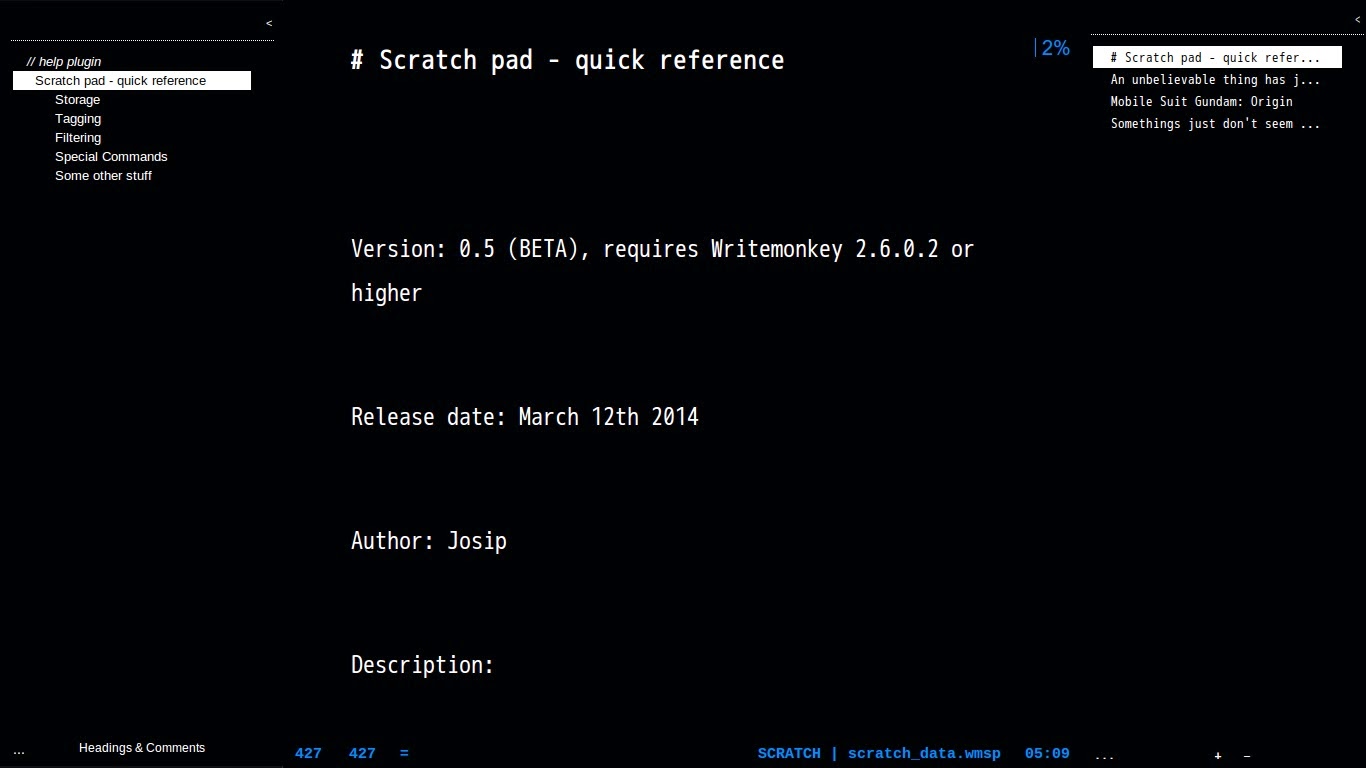
First thing the scratch pad needs is a keyboard shortcut to shift focus to it. I've got the version of Easy Jumps you helped me doctor up with a focus shortcut (Ctrl+3) on the left, so maybe Ctrl+4? Probably keys for for all the functions on the scratch pad (new, open, change sort method, compact, whatever else comes along).
That's pretty much it for now. Not happy about the brute force rejiggering you had to do to get the plugins to work on x64, but I can guarantee some folk will be happy to see it all working now.
Kensai
josip
Jul 31, 2014, 12:36:42 PM7/31/14
to write...@googlegroups.com
Uou, never tried using the same background color for those boxes. Looks very cool (with blinds off), strange I have never imagined this option. A little harder to resize and move I guess. Maybe showing box edges on mouse over or smth. like that. And I just tried Paper + Dimmed combo and it is also looks very elegant. Will stick with this for a while :)
Shortcuts - I hear you.
i.
Kensai
Jul 31, 2014, 4:17:50 PM7/31/14
to write...@googlegroups.com
Managed it by setting background to dimmed, setting everything precisely, then exiting WM and changing background to background in the config file before launching WM again. Easy Peesy (well its not dark green, so maybe its more of a Black Hack or something, but you know what I mean).
Kensai

geoff...@gmail.com
Jun 5, 2015, 8:50:49 PM6/5/15
to write...@googlegroups.com
Hey Josip,
Thanks for spending time on Whitemonkey, it's a usefull tool.
I notice a problem with your Clandestines files plugin : the command ctrl+E,L doesn't work for me (nothing occures).
I have the 2.7.0.3. version with Win 8.1.
Thanks for spending time on Whitemonkey, it's a usefull tool.
I notice a problem with your Clandestines files plugin : the command ctrl+E,L doesn't work for me (nothing occures).
I have the 2.7.0.3. version with Win 8.1.
josip
Jun 6, 2015, 8:53:37 AM6/6/15
to write...@googlegroups.com, geoff...@gmail.com, geoff...@gmail.com
ctrl+E,L = press ctrl+E, release both, press L
i.
Robin Geoffroy
Jun 7, 2015, 4:54:23 PM6/7/15
to josip, write...@googlegroups.com
That's what I did. All I have is the message "Executing: L", no password box.
I correctly unzip the Clandestine Files in the plugins folder. And when I do a right click in a text document, I see Clandestine Files in the plugins tab, in grey, with the mention "(running)".
maurom...@gmail.com
Aug 10, 2015, 1:25:39 PM8/10/15
to Writemonkey, bro...@gmail.com, geoff...@gmail.com
I have the same problem, did you fix it?
thanks...
M.
M.
josip
Aug 10, 2015, 1:30:39 PM8/10/15
to Writemonkey, bro...@gmail.com, geoff...@gmail.com, maurom...@gmail.com
Do you have a wm donor's key? Plugins are only available to donors?
i.

chris.em...@gmail.com
Aug 25, 2017, 1:26:27 PM8/25/17
to Writemonkey, bro...@gmail.com, geoff...@gmail.com, maurom...@gmail.com
Same here ... this fixed yet? Clandestine Files CTRL+E, L does nothing for me. Windows 7 x64. Write Monkey 2.7.0.3
josip
Aug 25, 2017, 1:29:37 PM8/25/17
to Writemonkey, bro...@gmail.com, geoff...@gmail.com, maurom...@gmail.com
ctrl+E,L = press ctrl+E, release both, press L (is that it?)
i.
Reply all
Reply to author
Forward
0 new messages