
weewx-loopdata 6.11 — the sample report is much easier to read

John Kline
Hi all,
weewx-loopdata 6.11 is out. It is a looks-only release: the sample report's dark theme was washed out, and now it isn't. Readouts are white, the numerals and labels around each dial are brighter, the recessed track that makes a dial look like a dial is actually visible, and the windrose's calmest band no longer disappears into the disc. The field captions under each gauge lose an opacity that had them sitting under the accessibility threshold for text their size.
Before and after, same station, same loop packet — 6.10 on the left, 6.11 on the right:
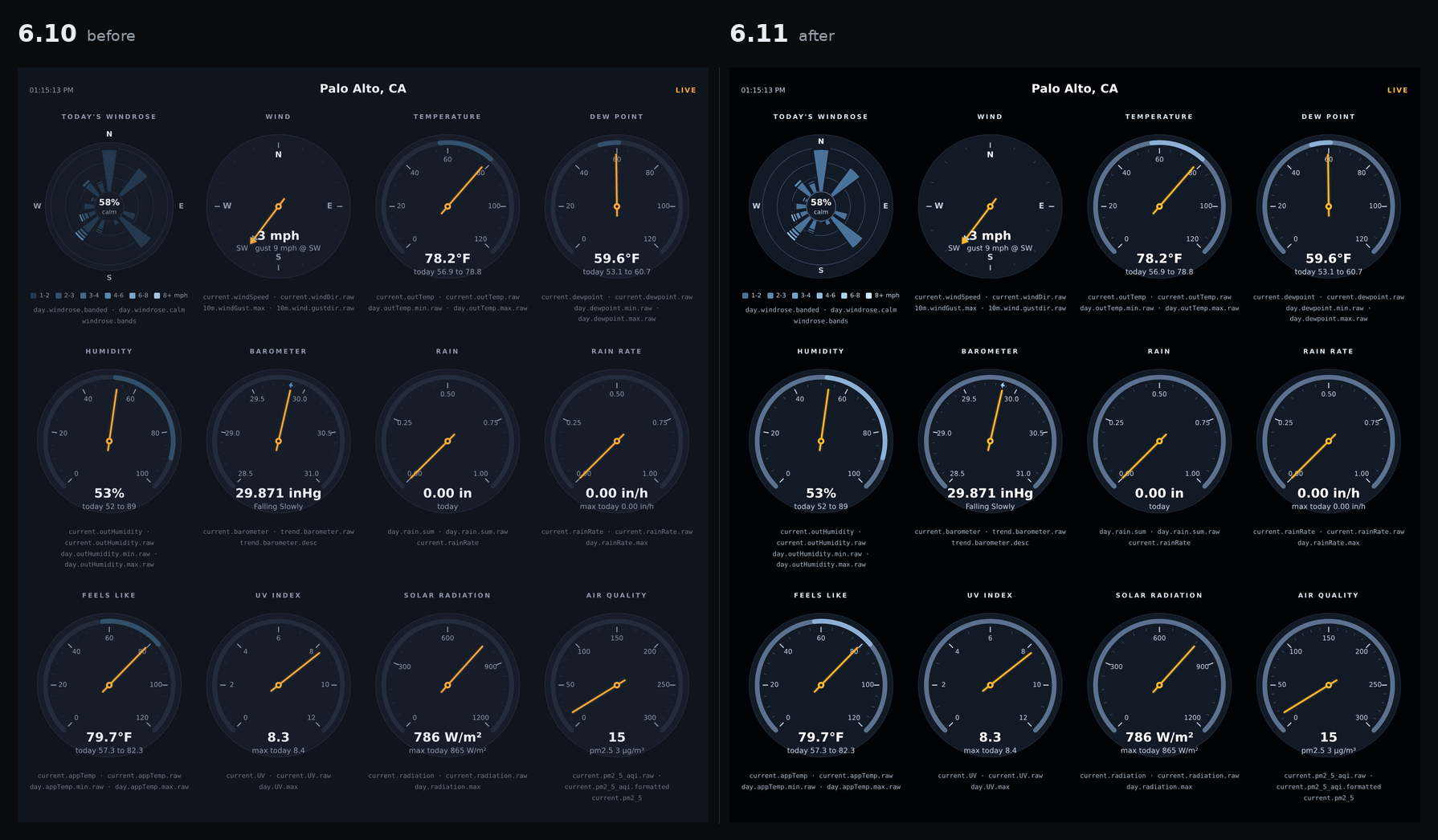
The windrose is also the same size as the other eleven gauges now, with its N/E/S/W letters moved inside the disc. It had been drawn a little smaller on purpose, matched to the boundary the eye read back when a dial's own edge was invisible — which stopped being the right boundary the moment the dials got their contrast back.
Nothing outside the sample skin changes: no configuration, no fields line, no python. It is a drop-in upgrade, and a skin you copied and customized keeps whatever palette you gave it.
Release notes:
https://github.com/chaunceygardiner/weewx-loopdata/releases/tag/v6.11

bgra...@umw.edu
bgra...@umw.edu
John Kline
--
You received this message because you are subscribed to the Google Groups "weewx-user" group.
To unsubscribe from this group and stop receiving emails from it, send an email to weewx-user+...@googlegroups.com.
To view this discussion visit https://groups.google.com/d/msgid/weewx-user/2693d850-9b33-4194-b3c4-0dc5c945d9edn%40googlegroups.com.
John Kline
weewx-loopdata 6.11.1
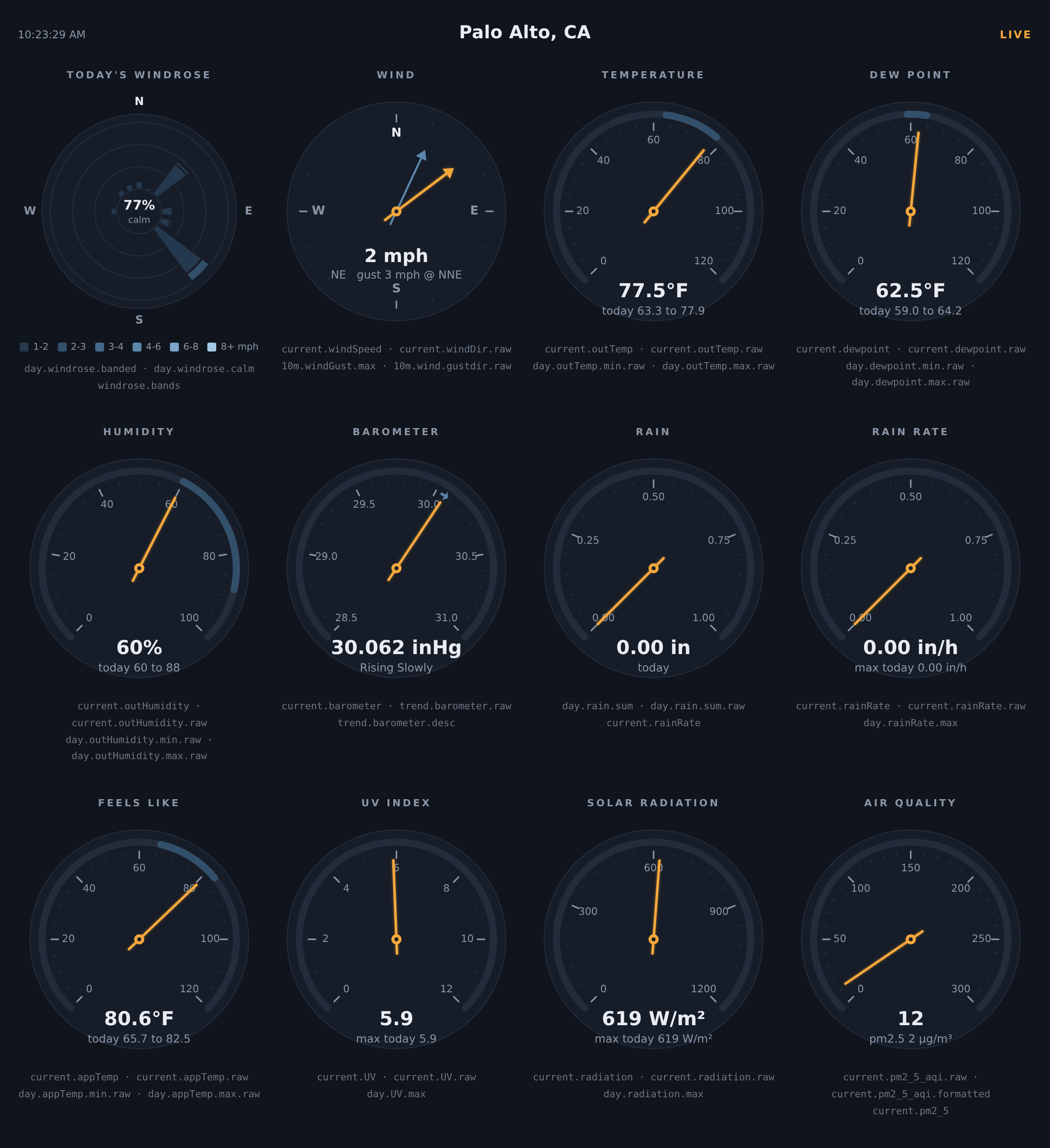
The sample report drops the loopdata field names printed under each
gauge. Drop-in upgrade: install over 6.x, no configuration changes, no
fields line touched. Nothing outside the sample skin changes, and a
skin you copied and customized is untouched.
What's new
- The field captions are gone. Each gauge carried a line naming the
loopdata fields it reads —current.outTemp · current.outTemp.rawand
the like. They were meant as a key to what the panel reads, but on a
live page they read as a template that had failed to render: one user
wrote in asking which part of his install was broken. The mapping now
lives in the manual, under
What each gauge reads. - Troubleshooting covers a single gauge missing its needle. A fields
line carried over an upgrade is already in the manual, but only as the
whole panel losing its needles, bands and windrose — so nobody whose
panel is fine except for one dial finds it. A hand-tuned fields line
short one.rawfield costs exactly one needle, which is what the
same user hit. See
One gauge has no needle, and the others are fine.
Requirements
- WeeWX 4 or 5 (translations need WeeWX 4.6 or later)
- Python 3.7 or later
- No third-party Python packages required
- Satellite almanac fields (
almanac.iss.next_pass...and friends) need
weewx-skyfield
registered as the almanac; every other almanac field works with
PyEphem or WeeWX's built-in almanac, as always
Installing/upgrading
Download weewx-loopdata.zip
and install it over your existing copy, then restart weewxd:
weectl extension install weewx-loopdata.zip
(or wee_extension --install weewx-loopdata.zip on WeeWX 4).