
working weewx 4.5.1 - errors after Ubuntu OS update
557 views
Skip to first unread message

Eric K
Dec 28, 2021, 6:31:04 PM12/28/21
to weewx-user
I saw this thread and the symptoms are VERY similar if not the same:
https://groups.google.com/g/weewx-user/c/LS5QyRlJNU4/m/UtBjwkssAgAJ
https://groups.google.com/g/weewx-user/c/LS5QyRlJNU4/m/UtBjwkssAgAJ
I just tried to update from Ubuntu 20.10 to Ubuntu 21.04 and upon restart weewx generated errors.
(I made a snapshot of the virtual machine before the upgrade so I just rolled back after I saw the errors.)
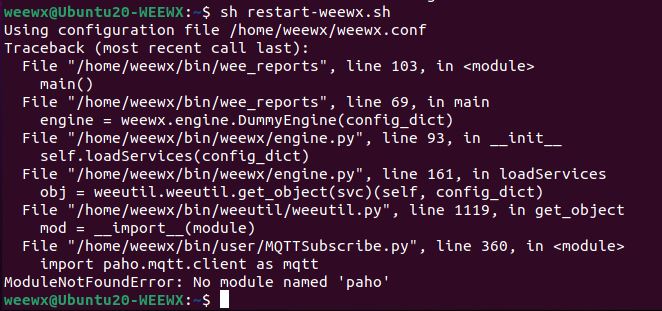
Does it look like the Ubuntu update removed the paho.mqtt.client software that I installed as a dependency for MQTTsubscribe?
Thanks for any pointers.
Eric

Tom Keffer
Dec 28, 2021, 6:38:19 PM12/28/21
to weewx-user
I very much doubt the update deleted anything. More likely, the default version of Python changed from 2 to 3. Were you using Python 2 before?
In any case, the fix is pretty easy: just install paho for whatever version of Python you are using.
--
You received this message because you are subscribed to the Google Groups "weewx-user" group.
To unsubscribe from this group and stop receiving emails from it, send an email to weewx-user+...@googlegroups.com.
To view this discussion on the web visit https://groups.google.com/d/msgid/weewx-user/e519bcc3-9b08-409a-83ea-389981d58446n%40googlegroups.com.
Eric K
Dec 28, 2021, 6:46:17 PM12/28/21
to weewx-user
I'm rolled back into my working snapshot of Ubuntu 20.10.
Python3 is/was installed and running.
I did a locate to see where the files are, so I can look for them after another upgrade attempt:
weewx@Ubuntu20-WEEWX:~$ locate paho
/usr/local/lib/python3.8/dist-packages/paho
/usr/local/lib/python3.8/dist-packages/paho_mqtt-1.5.1.dist-info
/usr/local/lib/python3.8/dist-packages/paho/__init__.py
/usr/local/lib/python3.8/dist-packages/paho/__pycache__
/usr/local/lib/python3.8/dist-packages/paho/mqtt
/usr/local/lib/python3.8/dist-packages/paho/__pycache__/__init__.cpython-38.pyc
/usr/local/lib/python3.8/dist-packages/paho/mqtt/__init__.py
/usr/local/lib/python3.8/dist-packages/paho/mqtt/__pycache__
/usr/local/lib/python3.8/dist-packages/paho/mqtt/client.py
/usr/local/lib/python3.8/dist-packages/paho/mqtt/matcher.py
/usr/local/lib/python3.8/dist-packages/paho/mqtt/packettypes.py
/usr/local/lib/python3.8/dist-packages/paho/mqtt/properties.py
/usr/local/lib/python3.8/dist-packages/paho/mqtt/publish.py
/usr/local/lib/python3.8/dist-packages/paho/mqtt/reasoncodes.py
/usr/local/lib/python3.8/dist-packages/paho/mqtt/subscribe.py
/usr/local/lib/python3.8/dist-packages/paho/mqtt/subscribeoptions.py
/usr/local/lib/python3.8/dist-packages/paho/mqtt/__pycache__/__init__.cpython-38.pyc
/usr/local/lib/python3.8/dist-packages/paho/mqtt/__pycache__/client.cpython-38.pyc
/usr/local/lib/python3.8/dist-packages/paho/mqtt/__pycache__/matcher.cpython-38.pyc
/usr/local/lib/python3.8/dist-packages/paho/mqtt/__pycache__/packettypes.cpython-38.pyc
/usr/local/lib/python3.8/dist-packages/paho/mqtt/__pycache__/properties.cpython-38.pyc
/usr/local/lib/python3.8/dist-packages/paho/mqtt/__pycache__/publish.cpython-38.pyc
/usr/local/lib/python3.8/dist-packages/paho/mqtt/__pycache__/reasoncodes.cpython-38.pyc
/usr/local/lib/python3.8/dist-packages/paho/mqtt/__pycache__/subscribe.cpython-38.pyc
/usr/local/lib/python3.8/dist-packages/paho/mqtt/__pycache__/subscribeoptions.cpython-38.pyc
/usr/local/lib/python3.8/dist-packages/paho_mqtt-1.5.1.dist-info/INSTALLER
/usr/local/lib/python3.8/dist-packages/paho_mqtt-1.5.1.dist-info/LICENSE.txt
/usr/local/lib/python3.8/dist-packages/paho_mqtt-1.5.1.dist-info/METADATA
/usr/local/lib/python3.8/dist-packages/paho_mqtt-1.5.1.dist-info/RECORD
/usr/local/lib/python3.8/dist-packages/paho_mqtt-1.5.1.dist-info/WHEEL
/usr/local/lib/python3.8/dist-packages/paho_mqtt-1.5.1.dist-info/top_level.txt
/usr/local/lib/python3.8/dist-packages/paho
/usr/local/lib/python3.8/dist-packages/paho_mqtt-1.5.1.dist-info
/usr/local/lib/python3.8/dist-packages/paho/__init__.py
/usr/local/lib/python3.8/dist-packages/paho/__pycache__
/usr/local/lib/python3.8/dist-packages/paho/mqtt
/usr/local/lib/python3.8/dist-packages/paho/__pycache__/__init__.cpython-38.pyc
/usr/local/lib/python3.8/dist-packages/paho/mqtt/__init__.py
/usr/local/lib/python3.8/dist-packages/paho/mqtt/__pycache__
/usr/local/lib/python3.8/dist-packages/paho/mqtt/client.py
/usr/local/lib/python3.8/dist-packages/paho/mqtt/matcher.py
/usr/local/lib/python3.8/dist-packages/paho/mqtt/packettypes.py
/usr/local/lib/python3.8/dist-packages/paho/mqtt/properties.py
/usr/local/lib/python3.8/dist-packages/paho/mqtt/publish.py
/usr/local/lib/python3.8/dist-packages/paho/mqtt/reasoncodes.py
/usr/local/lib/python3.8/dist-packages/paho/mqtt/subscribe.py
/usr/local/lib/python3.8/dist-packages/paho/mqtt/subscribeoptions.py
/usr/local/lib/python3.8/dist-packages/paho/mqtt/__pycache__/__init__.cpython-38.pyc
/usr/local/lib/python3.8/dist-packages/paho/mqtt/__pycache__/client.cpython-38.pyc
/usr/local/lib/python3.8/dist-packages/paho/mqtt/__pycache__/matcher.cpython-38.pyc
/usr/local/lib/python3.8/dist-packages/paho/mqtt/__pycache__/packettypes.cpython-38.pyc
/usr/local/lib/python3.8/dist-packages/paho/mqtt/__pycache__/properties.cpython-38.pyc
/usr/local/lib/python3.8/dist-packages/paho/mqtt/__pycache__/publish.cpython-38.pyc
/usr/local/lib/python3.8/dist-packages/paho/mqtt/__pycache__/reasoncodes.cpython-38.pyc
/usr/local/lib/python3.8/dist-packages/paho/mqtt/__pycache__/subscribe.cpython-38.pyc
/usr/local/lib/python3.8/dist-packages/paho/mqtt/__pycache__/subscribeoptions.cpython-38.pyc
/usr/local/lib/python3.8/dist-packages/paho_mqtt-1.5.1.dist-info/INSTALLER
/usr/local/lib/python3.8/dist-packages/paho_mqtt-1.5.1.dist-info/LICENSE.txt
/usr/local/lib/python3.8/dist-packages/paho_mqtt-1.5.1.dist-info/METADATA
/usr/local/lib/python3.8/dist-packages/paho_mqtt-1.5.1.dist-info/RECORD
/usr/local/lib/python3.8/dist-packages/paho_mqtt-1.5.1.dist-info/WHEEL
/usr/local/lib/python3.8/dist-packages/paho_mqtt-1.5.1.dist-info/top_level.txt
Tom Keffer
Dec 28, 2021, 8:53:59 PM12/28/21
to weewx-user
And, what does it look like after the upgrade? Did the upgrade leave you with a later version of Python? Perhaps 3.9?
Don't know why you're worrying about this. Why not just reinstall and be done with it?
To view this discussion on the web visit https://groups.google.com/d/msgid/weewx-user/e5370695-16af-4cb9-b47a-21a0259db6d8n%40googlegroups.com.

vince
Dec 28, 2021, 9:00:32 PM12/28/21
to weewx-user
You're probably overthinking this one, but I'd suggest you avoid using pip or pip3 unless absolutely necessary. My recollection is that modern ubuntu/debian/raspbian have everything you need available in packages nowadays. Using pip should be pretty rarely needed.
apt-get install python3-paho-mqtt
A clean ubuntu 2004 installs it to /usr/lib/python3/dist-packages if you use apt, so you 'likely' used pip3 originally.
FWIW - if you install with apt and do a dist-upgrade, it doesn't delete anything that I can tell. My paho stuff was still there.
But you're overthinking this one for sure. Just add the package it wants,
Eric K
Dec 28, 2021, 10:45:22 PM12/28/21
to weewx-user
At this point, I'm keeping VM snapshots of both the working Ubuntu 20.10 and the broken Ubuntu 21.04 so I can bounce back and forth between them.
Python 3.8 is the version in Ubuntu 20.10.
weewx@Ubuntu20-WEEWX:~$ python3 --version
Python 3.8.10
Python 3.9 is the version in Ubuntu 21.04.
weewx@Ubuntu20-WEEWX:~$ python3 --version
Python 3.9.5
After re-installing python3-paho-mqtt into Ubuntu 21.04 with "sudo apt-get install python3-paho-mqtt"
/usr/local/lib/python3.9/dist-packages/ is emptyI'm not sure where the reinstalled python3-paho-mqtt files got installed?
Back in /usr/local/lib/python3.8/dist-packages/ ?
The /var/log/syslog errors look like mosquitto isn't working or isn't allowing logins from MQTTSubscribe.
Dec 28 21:19:41 Ubuntu20-WEEWX wee_reports[3490] DEBUG user.MQTTSubscribe: (Service) TopicManager self.cached_fields is {}
Dec 28 21:19:41 Ubuntu20-WEEWX wee_reports[3490] INFO user.MQTTSubscribe: (Service) message_callback_provider_name is user.MQTTSubscribe.MessageCallbackProvider
Dec 28 21:19:41 Ubuntu20-WEEWX wee_reports[3490] INFO user.MQTTSubscribe: (Service) clientid is MQTTSubscribe-4939
Dec 28 21:19:41 Ubuntu20-WEEWX wee_reports[3490] INFO user.MQTTSubscribe: (Service) client_session is True
Dec 28 21:19:41 Ubuntu20-WEEWX wee_reports[3490] INFO user.MQTTSubscribe: (Service) host is localhost
Dec 28 21:19:41 Ubuntu20-WEEWX wee_reports[3490] INFO user.MQTTSubscribe: (Service) port is 1883
Dec 28 21:19:41 Ubuntu20-WEEWX wee_reports[3490] INFO user.MQTTSubscribe: (Service) keepalive is 60
Dec 28 21:19:41 Ubuntu20-WEEWX wee_reports[3490] INFO user.MQTTSubscribe: (Service) username is None
Dec 28 21:19:41 Ubuntu20-WEEWX wee_reports[3490] INFO user.MQTTSubscribe: (Service) password is set
Dec 28 21:19:41 Ubuntu20-WEEWX wee_reports[3490] INFO user.MQTTSubscribe: (Service) Archive topic is None
Dec 28 21:19:41 Ubuntu20-WEEWX gnome-shell[1909]: Could not release device (13,69): GDBus.Error:org.freedesktop.login1.DeviceNotTaken: Device not taken
Dec 28 21:19:41 Ubuntu20-WEEWX wee_reports[3490] ERROR user.MQTTSubscribe: (Service) Failed to connect to localhost at 1883. '[Errno 111] Connection refused'
Dec 28 21:19:51 Ubuntu20-WEEWX weewx[3489] CRITICAL __main__: Caught WeeWxIOError: [Errno 111] Connection refused
Dec 28 21:19:51 Ubuntu20-WEEWX weewx[3489] CRITICAL __main__: **** Waiting 60 seconds then retrying...
Dec 28 21:19:56 Ubuntu20-WEEWX ntpd[1137]: 38.229.62.9 local addr 192.168.7.22 -> <null>
Dec 28 21:20:01 Ubuntu20-WEEWX CRON[3518]: (weewx) CMD (sh /home/weewx/webcamgrab.sh)
Dec 28 21:20:03 Ubuntu20-WEEWX CRON[3517]: (CRON) info (No MTA installed, discarding output)
Dec 28 21:19:41 Ubuntu20-WEEWX wee_reports[3490] INFO user.MQTTSubscribe: (Service) message_callback_provider_name is user.MQTTSubscribe.MessageCallbackProvider
Dec 28 21:19:41 Ubuntu20-WEEWX wee_reports[3490] INFO user.MQTTSubscribe: (Service) clientid is MQTTSubscribe-4939
Dec 28 21:19:41 Ubuntu20-WEEWX wee_reports[3490] INFO user.MQTTSubscribe: (Service) client_session is True
Dec 28 21:19:41 Ubuntu20-WEEWX wee_reports[3490] INFO user.MQTTSubscribe: (Service) host is localhost
Dec 28 21:19:41 Ubuntu20-WEEWX wee_reports[3490] INFO user.MQTTSubscribe: (Service) port is 1883
Dec 28 21:19:41 Ubuntu20-WEEWX wee_reports[3490] INFO user.MQTTSubscribe: (Service) keepalive is 60
Dec 28 21:19:41 Ubuntu20-WEEWX wee_reports[3490] INFO user.MQTTSubscribe: (Service) username is None
Dec 28 21:19:41 Ubuntu20-WEEWX wee_reports[3490] INFO user.MQTTSubscribe: (Service) password is set
Dec 28 21:19:41 Ubuntu20-WEEWX wee_reports[3490] INFO user.MQTTSubscribe: (Service) Archive topic is None
Dec 28 21:19:41 Ubuntu20-WEEWX gnome-shell[1909]: Could not release device (13,69): GDBus.Error:org.freedesktop.login1.DeviceNotTaken: Device not taken
Dec 28 21:19:41 Ubuntu20-WEEWX wee_reports[3490] ERROR user.MQTTSubscribe: (Service) Failed to connect to localhost at 1883. '[Errno 111] Connection refused'
Dec 28 21:19:51 Ubuntu20-WEEWX weewx[3489] CRITICAL __main__: Caught WeeWxIOError: [Errno 111] Connection refused
Dec 28 21:19:51 Ubuntu20-WEEWX weewx[3489] CRITICAL __main__: **** Waiting 60 seconds then retrying...
Dec 28 21:19:56 Ubuntu20-WEEWX ntpd[1137]: 38.229.62.9 local addr 192.168.7.22 -> <null>
Dec 28 21:20:01 Ubuntu20-WEEWX CRON[3518]: (weewx) CMD (sh /home/weewx/webcamgrab.sh)
Dec 28 21:20:03 Ubuntu20-WEEWX CRON[3517]: (CRON) info (No MTA installed, discarding output)
Tom Keffer
Dec 29, 2021, 6:51:42 AM12/29/21
to weewx-user
As suspected, the upgrade switched versions of Python.
To find out where the version of paho you are using was installed:
python3 -c "import paho.mqtt.client;print(paho.mqtt.client.__file__)"
As for the connectivity error, you'll have to ask an MQTT expert. Perhaps your broker is not running?
--
You received this message because you are subscribed to the Google Groups "weewx-user" group.
To unsubscribe from this group and stop receiving emails from it, send an email to weewx-user+...@googlegroups.com.
To view this discussion on the web visit https://groups.google.com/d/msgid/weewx-user/be27f515-4748-4502-b6e2-9771205882d6n%40googlegroups.com.

bell...@gmail.com
Dec 29, 2021, 8:15:41 AM12/29/21
to weewx-user
Dec 28 21:19:41 Ubuntu20-WEEWX wee_reports[3490] INFO user.MQTTSubscribe: (Service) username is None
Dec 28 21:19:41 Ubuntu20-WEEWX wee_reports[3490] INFO user.MQTTSubscribe: (Service) password is set
Dec 28 21:19:41 Ubuntu20-WEEWX wee_reports[3490] INFO user.MQTTSubscribe: (Service) password is set
From these two lines, it looks like you have configured a password but not a userid.
Can you connect with mosquitto_sub?
rich
vince
Dec 29, 2021, 11:36:37 AM12/29/21
to weewx-user
On Tuesday, December 28, 2021 at 7:45:22 PM UTC-8 Eric K wrote:
After re-installing python3-paho-mqtt into Ubuntu 21.04 with "sudo apt-get install python3-paho-mqtt"/usr/local/lib/python3.9/dist-packages/ is emptyI'm not sure where the reinstalled python3-paho-mqtt files got installed?Back in /usr/local/lib/python3.8/dist-packages/ ?
Does it really matter as long as it works ?
As I mentioned earlier, if you use pip it goes under /usr/local/lib, but if you use apt then it goes under /usr/lib.
But it doesn't really matter. Just go with it. It works.
Eric K
Dec 30, 2021, 11:38:58 PM12/30/21
to weewx-user
Simply reinstalling python3-paho-mqtt has not fixed the system.
weewx@Ubuntu20-WEEWX:~$ sudo systemctl start mosquitto
Job for mosquitto.service failed because the control process exited with error code.
See "systemctl status mosquitto.service" and "journalctl -xe" for details.
I tried the mosquitto_sub command and mosquitto refused the connection.
weewx@Ubuntu20-WEEWX:~$ mosquitto_sub -h 192.168.7.22 -p 1883 -t tele/BMP280/SENSOR -d
Error: Connection refused
Error: Connection refused
I've got mosquitto.conf set to accpet anymous logins:
protocol mqtt
port 1883
allow_anonymous true
port 1883
allow_anonymous true
and I've got weewx.conf set for:
[MQTTSubscribeService]
enable = true
host = localhost
port = 1883
keepalive = 60
username = None
password = None
host = localhost
port = 1883
keepalive = 60
username = None
password = None
I tried to manually force mosquitto to start - NO-GO.
I followed the instructions to get some debug info.
weewx@Ubuntu20-WEEWX:~$ sudo systemctl start mosquitto
Job for mosquitto.service failed because the control process exited with error code.
See "systemctl status mosquitto.service" and "journalctl -xe" for details.
weewx@Ubuntu20-WEEWX:~$ systemctl status mosquitto.service
● mosquitto.service - Mosquitto MQTT Broker
Loaded: loaded (/lib/systemd/system/mosquitto.service; enabled; vendor preset: enabled)
Active: failed (Result: exit-code) since Thu 2021-12-30 22:23:26 CST; 3min 56s ago
Docs: man:mosquitto.conf(5)
man:mosquitto(8)
Process: 2797 ExecStartPre=/bin/mkdir -m 740 -p /var/log/mosquitto (code=exited, status=0/SUCCESS)
Process: 2798 ExecStartPre=/bin/chown mosquitto: /var/log/mosquitto (code=exited, status=0/SUCCESS)
Process: 2799 ExecStartPre=/bin/mkdir -m 740 -p /var/run/mosquitto (code=exited, status=0/SUCCESS)
Process: 2800 ExecStartPre=/bin/chown mosquitto: /var/run/mosquitto (code=exited, status=0/SUCCESS)
Process: 2801 ExecStart=/usr/sbin/mosquitto -c /etc/mosquitto/mosquitto.conf (code=exited, status=1/FAILURE)
Main PID: 2801 (code=exited, status=1/FAILURE)
● mosquitto.service - Mosquitto MQTT Broker
Loaded: loaded (/lib/systemd/system/mosquitto.service; enabled; vendor preset: enabled)
Active: failed (Result: exit-code) since Thu 2021-12-30 22:23:26 CST; 3min 56s ago
Docs: man:mosquitto.conf(5)
man:mosquitto(8)
Process: 2797 ExecStartPre=/bin/mkdir -m 740 -p /var/log/mosquitto (code=exited, status=0/SUCCESS)
Process: 2798 ExecStartPre=/bin/chown mosquitto: /var/log/mosquitto (code=exited, status=0/SUCCESS)
Process: 2799 ExecStartPre=/bin/mkdir -m 740 -p /var/run/mosquitto (code=exited, status=0/SUCCESS)
Process: 2800 ExecStartPre=/bin/chown mosquitto: /var/run/mosquitto (code=exited, status=0/SUCCESS)
Process: 2801 ExecStart=/usr/sbin/mosquitto -c /etc/mosquitto/mosquitto.conf (code=exited, status=1/FAILURE)
Main PID: 2801 (code=exited, status=1/FAILURE)
I'm not sure how many of weewx's dependencies have to be reinstalled?
Eric K
Dec 30, 2021, 11:40:09 PM12/30/21
to weewx-user
I forgot to post this:
weewx@Ubuntu20-WEEWX:~$ python3 -c "import paho.mqtt.client;print(paho.mqtt.client.__file__)"
/usr/lib/python3/dist-packages/paho/mqtt/client.py
weewx@Ubuntu20-WEEWX:~$ python3 -c "import paho.mqtt.client;print(paho.mqtt.client.__file__)"
/usr/lib/python3/dist-packages/paho/mqtt/client.py

jon.bar...@gmail.com
Dec 31, 2021, 7:20:05 AM12/31/21
to weewx-user
Eric - Im using weewx on a rPi zero with old Rasbian (I cant be bothered to reinstall/upgrade the OS) - and I installed the weewx mqtt report yesterday (after seeing this thread that there is a way for weewx to publish mqtt).
I managed to get it to work - but my system is using python 2.7 - even though my pi has 2 and 3 installed. I had to install the python2 paho-mqtt via pip.
A couple of suggestions for you though :
- double check the Ubuntu hasnt upgraded from python2 to 3 as the default - and theres no harm in installing paho-mqtt for both IMO.
- I vaguely remember (not certain though) that recent MQTT mosquito brokers no longer allow anonymous clients (Im using MQTT on Home Assistant)
- Use MQTT Explorer to double check if the mqtt messages are getting to the broker.
hopefully a few things to try....
vince
Dec 31, 2021, 12:42:42 PM12/31/21
to weewx-user
On Thursday, December 30, 2021 at 8:38:58 PM UTC-8 Eric K wrote:
Simply reinstalling python3-paho-mqtt has not fixed the system.I tried the mosquitto_sub command and mosquitto refused the connection.weewx@Ubuntu20-WEEWX:~$ mosquitto_sub -h 192.168.7.22 -p 1883 -t tele/BMP280/SENSOR -d
Error: Connection refused
Your mosquitto broker is not running....
or it is not listening on port 1883....
or it is not accepting connections to its 192.168.7.22 address.
I tried to manually force mosquitto to start - NO-GO.I followed the instructions to get some debug info.
weewx@Ubuntu20-WEEWX:~$ sudo systemctl start mosquitto
Job for mosquitto.service failed because the control process exited with error code.
See "systemctl status mosquitto.service" and "journalctl -xe" for details.
weewx@Ubuntu20-WEEWX:~$ systemctl status mosquitto.service
Process: 2801 ExecStart=/usr/sbin/mosquitto -c /etc/mosquitto/mosquitto.conf (code=exited, status=1/FAILURE)
Main PID: 2801 (code=exited, status=1/FAILURE)
It would be helpful to also see the 'journalctl -xe' output.
I'm not sure how many of weewx's dependencies have to be reinstalled?
Your problem has 'nothing' to do with weewx.
Your problem is that your mosquitto broker is not set up correctly.
vince
Dec 31, 2021, 1:09:55 PM12/31/21
to weewx-user
If your mosquitto server won't start, run it in the foreground and it'll tell you what line is wrong...
mosquitto -c /etc/mosquitto/mosquitto.conf
This is a minimalist /etc/mosquitto/conf.d/myconfig.conf file that works on ubuntu
#-----------------------------------------------------------
### this is an anonymous listener on the usual port
#
# listener 1883
# allow_anonymous true
#
#-----------------------------------------------------------
### this is a simple username/password pair
#
# remember to make a password file entry for the user
# mosquitto_passwd -c /etc/mosquitto/pwfile myuser
# (and enter the mosquitto password for that user twice)
#
# to subscribe - remember to provide the user and pass you created
# ala:
# mosquitto_sub -t mytopic -h myaddress -u myuser -P mypass
#
listener 1883
allow_anonymous false
password_file /etc/mosquitto/pwfile
#
#-----------------------------------------------------------
### this is an anonymous listener on the usual port
#
# listener 1883
# allow_anonymous true
#
#-----------------------------------------------------------
### this is a simple username/password pair
#
# remember to make a password file entry for the user
# mosquitto_passwd -c /etc/mosquitto/pwfile myuser
# (and enter the mosquitto password for that user twice)
#
# to subscribe - remember to provide the user and pass you created
# ala:
# mosquitto_sub -t mytopic -h myaddress -u myuser -P mypass
#
listener 1883
allow_anonymous false
password_file /etc/mosquitto/pwfile
#
#-----------------------------------------------------------
Eric K
Dec 31, 2021, 2:04:00 PM12/31/21
to weewx-user
I've currently got 2 Ubuntu setups I can switch back and forth between.
mosquitto works fine in Ubuntu 20.10, (works with no passwords).
mosquitto works fine in Ubuntu 20.10, (works with no passwords).
mosquitto does not work after the Ubuntu 21.04 upgrade.
I just switched from 20.10 to 21.04 and can report.
Ubuntu 20.10 has mosquitto 1.6.12
Ubuntu 21.04 has mosquitto 2.0.10
This confirms that mosquitto 2.x requires passwords (where version 1.x does not).
The password requirement appears to be the change that breaks my working mosquitto setup.
They also changed the config file keyword from port to listener.
So "port 1883" becomes "listener 1883"
In Ubuntu 21.04 with mosquitto 2.0.10 using my config file for mosquitto 1.6.12:
weewx@Ubuntu20-WEEWX:~$ mosquitto -c /etc/mosquitto/mosquitto.conf
1640977238: The 'port' option is now deprecated and will be removed in a future version. Please use 'listener' instead.
1640977238: Error: Unable to write pid file.
weewx@Ubuntu20-WEEWX:~$ mosquitto -c /etc/mosquitto/mosquitto.conf
1640977238: The 'port' option is now deprecated and will be removed in a future version. Please use 'listener' instead.
1640977238: Error: Unable to write pid file.
and using the default mosquitto config (not sure where it's finding that default file - no path is shown)
weewx@Ubuntu20-WEEWX:~$ mosquitto
1640976300: mosquitto version 2.0.10 starting
1640976300: Using default config.
1640976300: Starting in local only mode. Connections will only be possible from clients running on this machine.
1640976300: Create a configuration file which defines a listener to allow remote access.
1640976300: For more details see https://mosquitto.org/documentation/authentication-methods/
1640976300: Opening ipv4 listen socket on port 1883.
1640976300: Opening ipv6 listen socket on port 1883.
1640976300: mosquitto version 2.0.10 running
1640976300: mosquitto version 2.0.10 starting
1640976300: Using default config.
1640976300: Starting in local only mode. Connections will only be possible from clients running on this machine.
1640976300: Create a configuration file which defines a listener to allow remote access.
1640976300: For more details see https://mosquitto.org/documentation/authentication-methods/
1640976300: Opening ipv4 listen socket on port 1883.
1640976300: Opening ipv6 listen socket on port 1883.
1640976300: mosquitto version 2.0.10 running
vince
Dec 31, 2021, 2:15:31 PM12/31/21
to weewx-user
On Friday, December 31, 2021 at 11:04:00 AM UTC-8 Eric K wrote:
This confirms that mosquitto 2.x requires passwords (where version 1.x does not).
No, it doesn't.
The example I posted worked fine either way.
I ran it successfully with allow_anonymous and no user specified.
I also ran it with allow_anonymous=false and a user created and specified.
The password requirement appears to be the change that breaks my working mosquitto setup.
Disagree.
In Ubuntu 21.04 with mosquitto 2.0.10 using my config file for mosquitto 1.6.12:
weewx@Ubuntu20-WEEWX:~$ mosquitto -c /etc/mosquitto/mosquitto.conf
1640977238: The 'port' option is now deprecated and will be removed in a future version. Please use 'listener' instead.
1640977238: Error: Unable to write pid file.
Unable to write pid file is because you are running something requiring privileges as a unprivileged user 'weewx'.
Preface your command with "sudo".
You need mosquitto to start as root so it can bind to the privileged port 1883.
and using the default mosquitto config (not sure where it's finding that default file - no path is shown)
If you look at the mosquitto docs, it says it runs a default configuration in the absence of a specified config file.
weewx@Ubuntu20-WEEWX:~$ mosquitto
1640976300: mosquitto version 2.0.10 starting
1640976300: Using default config.
1640976300: Starting in local only mode. Connections will only be possible from clients running on this machine.
1640976300: Create a configuration file which defines a listener to allow remote access.
Yes - in this case you didn't specify a config file so it runs localhost-only for developer debugging purposes.
This is documented on their website.
You want to read https://projects.eclipse.org/projects/iot.mosquitto/releases/2.0 more carefully.
It explains.
And just go with the example I posted which definitely works.
Eric K
Dec 31, 2021, 4:02:38 PM12/31/21
to weewx-user
OK, I edited the /etc/mosquitto/mosquitto.conf so it is like your example:
listener 1883allow_anymous true
weewx@Ubuntu20-WEEWX:~$ sudo mosquitto -c /etc/mosquitto/mosquitto.conf
1640984047: Error: Unable to write pid file.
1640984047: Error: Unable to write pid file.
weewx@Ubuntu20-WEEWX:~$ mosquitto -c /etc/mosquitto/mosquitto.conf
1640984054: Error: Unable to write pid file.
weewx@Ubuntu20-WEEWX:~$ mosquitto
1640984406: mosquitto version 2.0.10 starting
1640984406: Using default config.
1640984406: Starting in local only mode. Connections will only be possible from clients running on this machine.
1640984406: Create a configuration file which defines a listener to allow remote access.
1640984406: For more details see https://mosquitto.org/documentation/authentication-methods/
1640984406: Opening ipv4 listen socket on port 1883.
1640984406: Opening ipv6 listen socket on port 1883.
1640984406: mosquitto version 2.0.10 running
1640984413: New connection from 127.0.0.1:42095 on port 1883.
1640984413: New client connected from 127.0.0.1:42095 as MQTTSubscribe-5503 (p2, c1, k60, u'None').
1640984418: Client MQTTSubscribe-5503 disconnected.
1640984406: mosquitto version 2.0.10 starting
1640984406: Using default config.
1640984406: Starting in local only mode. Connections will only be possible from clients running on this machine.
1640984406: Create a configuration file which defines a listener to allow remote access.
1640984406: For more details see https://mosquitto.org/documentation/authentication-methods/
1640984406: Opening ipv4 listen socket on port 1883.
1640984406: Opening ipv6 listen socket on port 1883.
1640984406: mosquitto version 2.0.10 running
1640984413: New connection from 127.0.0.1:42095 on port 1883.
1640984413: New client connected from 127.0.0.1:42095 as MQTTSubscribe-5503 (p2, c1, k60, u'None').
1640984418: Client MQTTSubscribe-5503 disconnected.
Eric K
Dec 31, 2021, 4:35:55 PM12/31/21
to weewx-user
* typing errror
allow_anymous true
*should have been
allow_anonymous true
vince
Dec 31, 2021, 5:20:01 PM12/31/21
to weewx-user
So is it working ? Not working ?
We can't read minds and your followups are rather cryptic.
Is there any mosquitto process running ?
If so stop it and try again with 'sudo systemctl start mosquitto'
If you want to try to run mosquitto in the foreground to debug it, add the -v switch to make it verbose, and remember to use sudo
Eric K
Dec 31, 2021, 5:36:19 PM12/31/21
to weewx-user
No, its not working.
Running the commands with sudo still failed to generate a pid file.
Running with the default config allowed mosquitto to start and MQTTSubscribe tried to connect but it disconnected after 5 seconds.
When I started weewx and forced wee_reports to run, it bomed out with many errors including MQTTSubscribe errors.
I suspect because it couldn't connect to mosquitto.
Since the mosquitto command changed from "port" to "listener", do I have to change the MQTTSubscribe section of weewx.conf so it calls out "listener = 1883" rather than "port = 1883"?
vince
Dec 31, 2021, 6:47:59 PM12/31/21
to weewx-user
Work your mosquitto broker problem and that only.
root@ubuntu-focal:/run# ls -lagd /run/mosquitto/*
-rw-r--r-- 1 mosquitto 4 Dec 31 23:42 /run/mosquitto/mosquitto.pid
Test with mosquitto_sub and mosquitto_pub and get that to work first.
Once that works, try to get weewx to subscribe.
Try removing any previous garbage your earlier attempts might have put into /run.
sudo rm -r /run/mosquitto
sudo systemctl start mosquitto
On my ubuntu 21.10 vm permissions look like:
root@ubuntu-focal:/run# ls -lagd /run/mosquitto
drwxr----- 2 root 60 Dec 31 23:42 /run/mosquitto
root@ubuntu-focal:/run# ls -lagd /run/mosquitto/*
-rw-r--r-- 1 mosquitto 4 Dec 31 23:42 /run/mosquitto/mosquitto.pid
jon.bar...@gmail.com
Jan 1, 2022, 5:39:39 AM1/1/22
to weewx-user
Eric,
In one of your posts above, the mosquito broker says it has a connection from a client...and given you're running this in a single VM, that must be a client on that machine.
Im struggling to understand why you would want a MQTT broker on the same VM as weewx ...when it only needs the client. as weewx doesnt respond to mqtt messages/commands (someone will correct me if Im wrong) - maybe you dont need mqtt at all ?
I suggest you test wether the weewx client is working (publishing) by using one of the public MQTT brokers such as test.moquito.org (and monitor your messages via mqtt explorer.
If you're running the broker in the same vm as weewx, then you must have other mqtt devices (clients)...do they work ?
I agree with Vince...and Im starting to lose the plot over what you're trying to acheive....
Eric K
Jan 1, 2022, 11:40:16 AM1/1/22
to weewx-user
When using, the MQTTSubscirbe driver in weewx, it runs as a weewx service in the same machine as weewx.
see: https://github.com/bellrichm/WeeWX-MQTTSubscribe
I'm running the mosquitto broker in the same Ubuntu VM as weewx, because its convenient, and it works fine in my Ubuntu 20.10 VM.
I have a barometric pressure sensor (a stand-alone wifi device on a different IP from the Ubuntu VM) that sends data to weewx via MQTT and the MQTTSubscribe driver.
So, I need to get that to properly connect with mosquitto in Ubuntu 21.04, like it does in the Ubuntu 20.10.
The connection we saw when I tried running mosquitto with it's internal default settings was MQTTSubscribe trying to connect to it.
weewx@Ubuntu20-WEEWX:~$ mosquitto
1640984406: mosquitto version 2.0.10 starting
1640984406: Using default config.
1640984406: Starting in local only mode. Connections will only be possible from clients running on this machine.
1640984406: Create a configuration file which defines a listener to allow remote access.
1640984406: For more details see https://mosquitto.org/documentation/authentication-methods/
1640984406: Opening ipv4 listen socket on port 1883.
1640984406: Opening ipv6 listen socket on port 1883.
1640984406: mosquitto version 2.0.10 running
1640984413: New connection from 127.0.0.1:42095 on port 1883.
1640984413: New client connected from 127.0.0.1:42095 as MQTTSubscribe-5503 (p2, c1, k60, u'None').
1640984418: Client MQTTSubscribe-5503 disconnected.
1640984406: mosquitto version 2.0.10 starting
1640984406: Using default config.
1640984406: Starting in local only mode. Connections will only be possible from clients running on this machine.
1640984406: Create a configuration file which defines a listener to allow remote access.
1640984406: For more details see https://mosquitto.org/documentation/authentication-methods/
1640984406: Opening ipv4 listen socket on port 1883.
1640984406: Opening ipv6 listen socket on port 1883.
1640984406: mosquitto version 2.0.10 running
1640984413: New connection from 127.0.0.1:42095 on port 1883.
1640984413: New client connected from 127.0.0.1:42095 as MQTTSubscribe-5503 (p2, c1, k60, u'None').
1640984418: Client MQTTSubscribe-5503 disconnected.
bell...@gmail.com
Jan 1, 2022, 12:09:48 PM1/1/22
to weewx-user
Now that the broker is running, does mosquitto_sub work?
Also, as Vince suggested, adding the -v option (verbose) to the mosquitto command would be useful.
rich
rich
Eric K
Jan 1, 2022, 12:56:36 PM1/1/22
to weewx-user
I just switched back to the Ubuntu 21.04 VM and collected lots of evidence of mosquitto not starting properly.
Job for mosquitto.service failed because the control process exited with error code.
See "systemctl status mosquitto.service" and "journalctl -xe" for details.
● mosquitto.service - Mosquitto MQTT Broker
Loaded: loaded (/lib/systemd/system/mosquitto.service; enabled; vendor preset: enabled)
Docs: man:mosquitto.conf(5)
man:mosquitto(8)
weewx@Ubuntu20-WEEWX:/etc/mosquitto$ sudo mosquitto -c /etc/mosquitto/mosquitto.conf
1641059578: mosquitto version 2.0.10 starting
1641059578: Config loaded from /etc/mosquitto/mosquitto.conf.
1641059578: Error: Unable to open pwfile "/etc/mosquitto/pwfile".
1641059578: Error opening password file "/etc/mosquitto/pwfile".
These are the commands that Vince requested:
weewx@Ubuntu20-WEEWX:/run$ ls -lagd /run/mosquitto
drwxr----- 2 mosquitto 40 Jan 1 11:37 /run/mosquitto
drwxr----- 2 mosquitto 40 Jan 1 11:37 /run/mosquitto
weewx@Ubuntu20-WEEWX:/run$ ls -lagd /run/mosquitto/*
ls: cannot access '/run/mosquitto/*': Permission denied
ls: cannot access '/run/mosquitto/*': Permission denied
weewx@Ubuntu20-WEEWX:/run$ sudo rm -r /run/mosquitto
weewx@Ubuntu20-WEEWX:/run$ sudo systemctl start mosquitto
Job for mosquitto.service failed because the control process exited with error code.
See "systemctl status mosquitto.service" and "journalctl -xe" for details.
weewx@Ubuntu20-WEEWX:/run$ sudo systemctl status mosquitto.service
● mosquitto.service - Mosquitto MQTT Broker
Loaded: loaded (/lib/systemd/system/mosquitto.service; enabled; vendor preset: enabled)
Active: failed (Result: exit-code) since Sat 2022-01-01 11:37:43 CST; 16s ago
Docs: man:mosquitto.conf(5)
man:mosquitto(8)
Process: 3867 ExecStartPre=/bin/mkdir -m 740 -p /var/log/mosquitto (code=exited, status=0/SUCCESS)
Process: 3868 ExecStartPre=/bin/chown mosquitto: /var/log/mosquitto (code=exited, status=0/SUCCESS)
Process: 3869 ExecStartPre=/bin/mkdir -m 740 -p /var/run/mosquitto (code=exited, status=0/SUCCESS)
Process: 3870 ExecStartPre=/bin/chown mosquitto: /var/run/mosquitto (code=exited, status=0/SUCCESS)
Process: 3871 ExecStart=/usr/sbin/mosquitto -c /etc/mosquitto/mosquitto.conf (code=exited, status=1/FAILURE)
Main PID: 3871 (code=exited, status=1/FAILURE)
Jan 01 11:37:43 Ubuntu20-WEEWX systemd[1]: mosquitto.service: Scheduled restart job, restart counter is at 5.
Jan 01 11:37:43 Ubuntu20-WEEWX systemd[1]: Stopped Mosquitto MQTT Broker.
Jan 01 11:37:43 Ubuntu20-WEEWX systemd[1]: mosquitto.service: Start request repeated too quickly.
Jan 01 11:37:43 Ubuntu20-WEEWX systemd[1]: mosquitto.service: Failed with result 'exit-code'.
Jan 01 11:37:43 Ubuntu20-WEEWX systemd[1]: Failed to start Mosquitto MQTT Broker.
weewx@Ubuntu20-WEEWX:/run$ journalctl -xe
Hint: You are currently not seeing messages from other users and the system.
Users in groups 'adm', 'systemd-journal' can see all messages.
Pass -q to turn off this notice.
Jan 01 11:36:45 Ubuntu20-WEEWX dbus-daemon[2070]: [session uid=1001 pid=2070] Successfully activated service 'org.freedesktop.Tracker1.Miner>
Jan 01 11:36:45 Ubuntu20-WEEWX systemd[2052]: Started Tracker metadata extractor.
░░ Subject: A start job for unit UNIT has finished successfully
░░ Defined-By: systemd
░░ Support: http://www.ubuntu.com/support
░░
░░ A start job for unit UNIT has finished successfully.
░░
░░ The job identifier is 633.
Jan 01 11:36:55 Ubuntu20-WEEWX systemd[2052]: tracker-extract.service: Succeeded.
░░ Subject: Unit succeeded
░░ Defined-By: systemd
░░ Support: http://www.ubuntu.com/support
░░
░░ The unit UNIT has successfully entered the 'dead' state.
Jan 01 11:36:59 Ubuntu20-WEEWX nautilus[3434]: The peer-to-peer connection failed: Could not connect: Permission denied. Falling back to the>
Jan 01 11:37:15 Ubuntu20-WEEWX tracker-store[3766]: OK
Jan 01 11:37:15 Ubuntu20-WEEWX systemd[2052]: tracker-store.service: Succeeded.
░░ Subject: Unit succeeded
░░ Defined-By: systemd
░░ Support: http://www.ubuntu.com/support
░░
░░ The unit UNIT has successfully entered the 'dead' state.
Jan 01 11:37:28 Ubuntu20-WEEWX sudo[3841]: weewx : TTY=pts/0 ; PWD=/run ; USER=root ; COMMAND=/usr/bin/rm -r /run/mosquitto
Jan 01 11:37:28 Ubuntu20-WEEWX sudo[3841]: pam_unix(sudo:session): session opened for user root by (uid=1001)
Jan 01 11:37:28 Ubuntu20-WEEWX sudo[3841]: pam_unix(sudo:session): session closed for user root
Jan 01 11:37:42 Ubuntu20-WEEWX sudo[3844]: weewx : TTY=pts/0 ; PWD=/run ; USER=root ; COMMAND=/usr/bin/systemctl start mosquitto
Jan 01 11:37:42 Ubuntu20-WEEWX sudo[3844]: pam_unix(sudo:session): session opened for user root by (uid=1001)
Jan 01 11:37:42 Ubuntu20-WEEWX sudo[3844]: pam_unix(sudo:session): session closed for user root
Jan 01 11:38:00 Ubuntu20-WEEWX sudo[3874]: weewx : TTY=pts/0 ; PWD=/run ; USER=root ; COMMAND=/usr/bin/systemctl status mosquitto.service
Jan 01 11:38:00 Ubuntu20-WEEWX sudo[3874]: pam_unix(sudo:session): session opened for user root by (uid=1001)
Jan 01 11:38:01 Ubuntu20-WEEWX sudo[3874]: pam_unix(sudo:session): session closed for user root
Jan 01 11:38:26 Ubuntu20-WEEWX dbus-daemon[2070]: [session uid=1001 pid=2070] Activating service name='org.gnome.Nautilus' requested by ':1.>
Jan 01 11:38:26 Ubuntu20-WEEWX dbus-daemon[2070]: [session uid=1001 pid=2070] Successfully activated service 'org.gnome.Nautilus'
Jan 01 11:38:27 Ubuntu20-WEEWX org.gnome.Nautilus[3883]: Traceback (most recent call last):
Jan 01 11:38:27 Ubuntu20-WEEWX org.gnome.Nautilus[3883]: File "/usr/share/nautilus-python/extensions/nautilus-admin.py", line 25, in <modu>
Jan 01 11:38:27 Ubuntu20-WEEWX org.gnome.Nautilus[3883]: from gettext import gettext, locale, bindtextdomain, textdomain
Jan 01 11:38:27 Ubuntu20-WEEWX org.gnome.Nautilus[3883]: ImportError: cannot import name 'locale' from 'gettext' (/usr/lib/python3.9/gettext>
Jan 01 11:38:27 Ubuntu20-WEEWX nautilus[3883]: Called "net usershare info" but it failed: Failed to execute child process “net” (No such fil>
Jan 01 11:41:55 Ubuntu20-WEEWX sudo[3932]: weewx : TTY=pts/0 ; PWD=/run ; USER=root ; COMMAND=/usr/bin/systemctl start mosquitto
Jan 01 11:41:55 Ubuntu20-WEEWX sudo[3932]: pam_unix(sudo:session): session opened for user root by (uid=1001)
Jan 01 11:41:55 Ubuntu20-WEEWX sudo[3932]: pam_unix(sudo:session): session closed for user root
lines 3313-3354/3354 (END)
Process: 3868 ExecStartPre=/bin/chown mosquitto: /var/log/mosquitto (code=exited, status=0/SUCCESS)
Process: 3869 ExecStartPre=/bin/mkdir -m 740 -p /var/run/mosquitto (code=exited, status=0/SUCCESS)
Process: 3870 ExecStartPre=/bin/chown mosquitto: /var/run/mosquitto (code=exited, status=0/SUCCESS)
Process: 3871 ExecStart=/usr/sbin/mosquitto -c /etc/mosquitto/mosquitto.conf (code=exited, status=1/FAILURE)
Main PID: 3871 (code=exited, status=1/FAILURE)
Jan 01 11:37:43 Ubuntu20-WEEWX systemd[1]: mosquitto.service: Scheduled restart job, restart counter is at 5.
Jan 01 11:37:43 Ubuntu20-WEEWX systemd[1]: Stopped Mosquitto MQTT Broker.
Jan 01 11:37:43 Ubuntu20-WEEWX systemd[1]: mosquitto.service: Start request repeated too quickly.
Jan 01 11:37:43 Ubuntu20-WEEWX systemd[1]: mosquitto.service: Failed with result 'exit-code'.
Jan 01 11:37:43 Ubuntu20-WEEWX systemd[1]: Failed to start Mosquitto MQTT Broker.
weewx@Ubuntu20-WEEWX:/run$ journalctl -xe
Hint: You are currently not seeing messages from other users and the system.
Users in groups 'adm', 'systemd-journal' can see all messages.
Pass -q to turn off this notice.
Jan 01 11:36:45 Ubuntu20-WEEWX dbus-daemon[2070]: [session uid=1001 pid=2070] Successfully activated service 'org.freedesktop.Tracker1.Miner>
Jan 01 11:36:45 Ubuntu20-WEEWX systemd[2052]: Started Tracker metadata extractor.
░░ Subject: A start job for unit UNIT has finished successfully
░░ Defined-By: systemd
░░ Support: http://www.ubuntu.com/support
░░
░░ A start job for unit UNIT has finished successfully.
░░
░░ The job identifier is 633.
Jan 01 11:36:55 Ubuntu20-WEEWX systemd[2052]: tracker-extract.service: Succeeded.
░░ Subject: Unit succeeded
░░ Defined-By: systemd
░░ Support: http://www.ubuntu.com/support
░░
░░ The unit UNIT has successfully entered the 'dead' state.
Jan 01 11:36:59 Ubuntu20-WEEWX nautilus[3434]: The peer-to-peer connection failed: Could not connect: Permission denied. Falling back to the>
Jan 01 11:37:15 Ubuntu20-WEEWX tracker-store[3766]: OK
Jan 01 11:37:15 Ubuntu20-WEEWX systemd[2052]: tracker-store.service: Succeeded.
░░ Subject: Unit succeeded
░░ Defined-By: systemd
░░ Support: http://www.ubuntu.com/support
░░
░░ The unit UNIT has successfully entered the 'dead' state.
Jan 01 11:37:28 Ubuntu20-WEEWX sudo[3841]: weewx : TTY=pts/0 ; PWD=/run ; USER=root ; COMMAND=/usr/bin/rm -r /run/mosquitto
Jan 01 11:37:28 Ubuntu20-WEEWX sudo[3841]: pam_unix(sudo:session): session opened for user root by (uid=1001)
Jan 01 11:37:28 Ubuntu20-WEEWX sudo[3841]: pam_unix(sudo:session): session closed for user root
Jan 01 11:37:42 Ubuntu20-WEEWX sudo[3844]: weewx : TTY=pts/0 ; PWD=/run ; USER=root ; COMMAND=/usr/bin/systemctl start mosquitto
Jan 01 11:37:42 Ubuntu20-WEEWX sudo[3844]: pam_unix(sudo:session): session opened for user root by (uid=1001)
Jan 01 11:37:42 Ubuntu20-WEEWX sudo[3844]: pam_unix(sudo:session): session closed for user root
Jan 01 11:38:00 Ubuntu20-WEEWX sudo[3874]: weewx : TTY=pts/0 ; PWD=/run ; USER=root ; COMMAND=/usr/bin/systemctl status mosquitto.service
Jan 01 11:38:00 Ubuntu20-WEEWX sudo[3874]: pam_unix(sudo:session): session opened for user root by (uid=1001)
Jan 01 11:38:01 Ubuntu20-WEEWX sudo[3874]: pam_unix(sudo:session): session closed for user root
Jan 01 11:38:26 Ubuntu20-WEEWX dbus-daemon[2070]: [session uid=1001 pid=2070] Activating service name='org.gnome.Nautilus' requested by ':1.>
Jan 01 11:38:26 Ubuntu20-WEEWX dbus-daemon[2070]: [session uid=1001 pid=2070] Successfully activated service 'org.gnome.Nautilus'
Jan 01 11:38:27 Ubuntu20-WEEWX org.gnome.Nautilus[3883]: Traceback (most recent call last):
Jan 01 11:38:27 Ubuntu20-WEEWX org.gnome.Nautilus[3883]: File "/usr/share/nautilus-python/extensions/nautilus-admin.py", line 25, in <modu>
Jan 01 11:38:27 Ubuntu20-WEEWX org.gnome.Nautilus[3883]: from gettext import gettext, locale, bindtextdomain, textdomain
Jan 01 11:38:27 Ubuntu20-WEEWX org.gnome.Nautilus[3883]: ImportError: cannot import name 'locale' from 'gettext' (/usr/lib/python3.9/gettext>
Jan 01 11:38:27 Ubuntu20-WEEWX nautilus[3883]: Called "net usershare info" but it failed: Failed to execute child process “net” (No such fil>
Jan 01 11:41:55 Ubuntu20-WEEWX sudo[3932]: weewx : TTY=pts/0 ; PWD=/run ; USER=root ; COMMAND=/usr/bin/systemctl start mosquitto
Jan 01 11:41:55 Ubuntu20-WEEWX sudo[3932]: pam_unix(sudo:session): session opened for user root by (uid=1001)
Jan 01 11:41:55 Ubuntu20-WEEWX sudo[3932]: pam_unix(sudo:session): session closed for user root
lines 3313-3354/3354 (END)
weewx@Ubuntu20-WEEWX:/run$ mosquitto_sub -v -h 192.168.7.22 -p 1883 -t tele/BMP280/SENSOR -d
Error: Connection refused
Error: Connection refused
weewx@Ubuntu20-WEEWX:/etc/mosquitto$ mosquitto -c /etc/mosquitto/mosquitto.conf
1641059552: mosquitto version 2.0.10 starting
1641059552: Config loaded from /etc/mosquitto/mosquitto.conf.
1641059552: Error: Unable to open pwfile "/etc/mosquitto/pwfile".
1641059552: Error opening password file "/etc/mosquitto/pwfile".
1641059552: mosquitto version 2.0.10 starting
1641059552: Config loaded from /etc/mosquitto/mosquitto.conf.
1641059552: Error: Unable to open pwfile "/etc/mosquitto/pwfile".
1641059552: Error opening password file "/etc/mosquitto/pwfile".
weewx@Ubuntu20-WEEWX:/etc/mosquitto$ sudo mosquitto -c /etc/mosquitto/mosquitto.conf
1641059578: mosquitto version 2.0.10 starting
1641059578: Config loaded from /etc/mosquitto/mosquitto.conf.
1641059578: Error: Unable to open pwfile "/etc/mosquitto/pwfile".
1641059578: Error opening password file "/etc/mosquitto/pwfile".
Eric K
Jan 1, 2022, 1:56:45 PM1/1/22
to weewx-user
I just restarted Ubuntu and made sure the mosquitto.conf file was adjusted for the new 2.x listener command, and mosquitto started working.
I just commented out a couple of lines I had in the mosquitto.conf file (which worked fine in Ubuntu 20.10):
#pid_file /var/run/mosquitto.pid
#pid_file /var/run/mosquitto.pid
#persistence true
#persistence_location /var/lib/mosquitto/
#log_dest file /var/log/mosquitto/mosquitto.log
Earlier, I saw an error about creating /var/log/mosquitto/mosquitto.log
The mosquitto_sub command now works and mosquitto is receiving my barometric pressure data!
weewx@Ubuntu20-WEEWX:~$ mosquitto -c /etc/mosquitto/mosquitto.conf
1641062208: mosquitto version 2.0.10 starting
1641062208: Config loaded from /etc/mosquitto/mosquitto.conf.
1641062208: Opening ipv4 listen socket on port 1883.
1641062208: Error: Address already in use
weewx@Ubuntu20-WEEWX:~$ mosquitto_sub -h 192.168.7.22 -p 1883 -t tele/BMP280/SENSOR -d
Client (null) sending CONNECT
Client (null) received CONNACK (0)
Client (null) sending SUBSCRIBE (Mid: 1, Topic: tele/BMP280/SENSOR, QoS: 0, Options: 0x00)
Client (null) received SUBACK
Subscribed (mid: 1): 0
Client (null) received PUBLISH (d0, q0, r0, m0, 'tele/BMP280/SENSOR', ... (113 bytes))
{"Time":"2022-01-01T12:38:02","BMP280":{"Temperature":69.7,"Pressure":985.8},"PressureUnit":"hPa","TempUnit":"F"}
Client (null) sending PINGREQ
Client (null) received PINGRESP
1641062208: Config loaded from /etc/mosquitto/mosquitto.conf.
1641062208: Opening ipv4 listen socket on port 1883.
1641062208: Error: Address already in use
weewx@Ubuntu20-WEEWX:~$ mosquitto_sub -h 192.168.7.22 -p 1883 -t tele/BMP280/SENSOR -d
Client (null) sending CONNECT
Client (null) received CONNACK (0)
Client (null) sending SUBSCRIBE (Mid: 1, Topic: tele/BMP280/SENSOR, QoS: 0, Options: 0x00)
Client (null) received SUBACK
Subscribed (mid: 1): 0
Client (null) received PUBLISH (d0, q0, r0, m0, 'tele/BMP280/SENSOR', ... (113 bytes))
{"Time":"2022-01-01T12:38:02","BMP280":{"Temperature":69.7,"Pressure":985.8},"PressureUnit":"hPa","TempUnit":"F"}
Client (null) sending PINGREQ
Client (null) received PINGRESP
weewx is running without errors and publishing reports every 300 seconds!
Jan 1 12:35:07 Ubuntu20-WEEWX weewx[1224] DEBUG weewx.engine: Loading service weewx.restx.StdPWSweather
Jan 1 12:35:07 Ubuntu20-WEEWX weewx[1224] INFO weewx.restx: PWSWeather: Data for station WESTGATE1 will be posted
Jan 1 12:35:07 Ubuntu20-WEEWX weewx[1224] DEBUG weewx.engine: Finished loading service weewx.restx.StdPWSweather
Jan 1 12:40:22 Ubuntu20-WEEWX weewx[1224] INFO weewx.restx: PWSWeather: Published record 2022-01-01 12:40:00 CST (1641062400)
Jan 1 12:40:22 Ubuntu20-WEEWX weewx[1224] INFO weewx.restx: Wunderground-PWS: Published record 2022-01-01 12:40:00 CST (1641062400)
Jan 1 12:45:19 Ubuntu20-WEEWX weewx[1224] INFO weewx.restx: PWSWeather: Published record 2022-01-01 12:45:00 CST (1641062700)
Jan 1 12:45:19 Ubuntu20-WEEWX weewx[1224] INFO weewx.restx: Wunderground-PWS: Published record 2022-01-01 12:45:00 CST (1641062700)
Jan 1 12:35:07 Ubuntu20-WEEWX weewx[1224] INFO weewx.restx: PWSWeather: Data for station WESTGATE1 will be posted
Jan 1 12:35:07 Ubuntu20-WEEWX weewx[1224] DEBUG weewx.engine: Finished loading service weewx.restx.StdPWSweather
Jan 1 12:40:22 Ubuntu20-WEEWX weewx[1224] INFO weewx.restx: PWSWeather: Published record 2022-01-01 12:40:00 CST (1641062400)
Jan 1 12:40:22 Ubuntu20-WEEWX weewx[1224] INFO weewx.restx: Wunderground-PWS: Published record 2022-01-01 12:40:00 CST (1641062400)
Jan 1 12:45:19 Ubuntu20-WEEWX weewx[1224] INFO weewx.restx: PWSWeather: Published record 2022-01-01 12:45:00 CST (1641062700)
Jan 1 12:45:19 Ubuntu20-WEEWX weewx[1224] INFO weewx.restx: Wunderground-PWS: Published record 2022-01-01 12:45:00 CST (1641062700)
Eric K
Jan 2, 2022, 6:20:58 PM1/2/22
to weewx-user
Thanks Vince and Rich for the pointers and advice.
It looks like the 2 biggest Ubuntu 21.04 changes that broke my setup were:
1. Python changed from 3.8 to 3.9
2. mosquitto changed from version 1.6 to 2.0
The fixes that worked:
1. reloading python3-paho-mqtt with command "sudo apt install python3-paho-mqtt" (rather than using pip3)
2. edited my existing /etc/mosquitto/mosquitto.conf file:
a. I already had the line "allow_anonymous true" so that stayed as-is
b. changed the "port 1883" line to "listener 1883"
c. commented out the line with "include_dir /etc/mosquitto/conf.d"
3. deleted the directory /run/mosquitto with "sudo rm -r /run/mosquitto"
4. restarted the system
After that, mosquitto started without errors, the MTQQSubscribe service subscribed, and weewx was functional again.
After weewx was working in Ubuntu 21.04 I made a backup and tried upgrading to 21.10 - worked fine, without breakage!
So, now weewx 4.5.1 is running fine in Ubuntu 21.10.
Reply all
Reply to author
Forward
0 new messages