
how to insert additional data (cpu temp) into skins?
378 views
Skip to first unread message

Vetti52
Feb 20, 2020, 11:55:00 AM2/20/20
to weewx-user
Sorry for being too dumb for python...
I want to show the actual cpu temperature in the "About this weather station" section. On my Raspberry Pi I get the result:
$ vcgencmd measure_temp
temp=53.0'C
However, I do not know, how to enter this into a skin file.
I gave a first try to
<?PHP
echo exec('vcgencmd measure_temp|sed "s/'/ °/"');
?>
?>
resulting in
VCHI initialization failed
I have added www-data to the video group, but this did not help. But, may be, it is much easier to realize. Please help!

ed100
Feb 20, 2020, 2:25:26 PM2/20/20
to weewx-user
I am using BCRobotics driver. I rounded to avoid bunch of decimals. Had to encode to avoid python3 errors. This works fine for me. I have 4 rpi4's running and get the temp from all of them.
import math
import subprocess
def round_half_up(n, decimals=0):
multiplier = 10 ** decimals
return math.floor(n*multiplier + 0.5) / multiplier
def get_cpu_temp():
cpu_temp = subprocess.check_output(["cat","/sys/class/thermal/thermal_zone0/temp"],universal_newlines=True)
encoding = 'utf-8'
cpu_temp = int(cpu_temp)
cpu_temp = cpu_temp/1000
cpu_temp = round_half_up(cpu_temp,0)
return cpu_temp
under def get_readings():
cpu_temp = get_cpu_temp()
data = dict()
data["extraTemp1"] = cpu_temp
return data
ed100
Feb 20, 2020, 2:27:12 PM2/20/20
to weewx-user
Forgot to say I am using Belchertown/MQTT and the cpu temp is on front page updating every 10 sec.
On Thursday, February 20, 2020 at 10:55:00 AM UTC-6, Vetti52 wrote:
Vetti52
Feb 20, 2020, 4:08:56 PM2/20/20
to weewx-user
Just to proceed step by step:
Your code goes into a file cpu_temp.py.
First line as usually I added:
#!/usr/bin/env python
Then, how do I have to include this file into my Seasons skin file about.inc?
Sorry, but, as I said, I am totally uncomfortable with python.
ed100
Feb 20, 2020, 4:19:36 PM2/20/20
to weewx-user
What driver are you using?
The edits I show go into BCRobotics.py which is my driver. That is what i use to get the data into LOOP.
On Thursday, February 20, 2020 at 10:55:00 AM UTC-6, Vetti52 wrote:
Vetti52
Feb 21, 2020, 3:54:20 PM2/21/20
to weewx-user
I am using interceptor.py.
Meanwhile I could realise it with PHP, thanks to your input:
<?php
$cpu_temp = exec ('cat /sys/class/thermal/thermal_zone0/temp|sed "s/\([0-9]\{2\}\)\([0-9]\{3\}\)/\1.\2/"');
?>
However, it seems, that the thermal_zone0/temp value differs somewhat from the result of vcgencmd measure_temp
I
don't care about the three decimals, but that might be solved either by
simply cutting it in the sed pipe or by adding another piping e.g. |
awk '{printf "%.1f", $1}
And, of course, I had to enable php snippets in html by inserting this line into lighttpd.conf:
fastcgi.map-extensions = ( ".htm" => ".php", ".html" => ".php")and then I placed the value into the hardware widged:
<tr>
<td class="label">CPU temperature</td>
<td class="data"><?PHP echo "$cpu_temp"; ?> °C</td>
</tr>
<td class="label">CPU temperature</td>
<td class="data"><?PHP echo "$cpu_temp"; ?> °C</td>
</tr>
that's it!
Thanks a lot!Vetti52
Feb 22, 2020, 8:04:48 AM2/22/20
to weewx-user
just to replace my sed skills by regular PHP, there is of course a more sophisticated method available in pure PHP:
<?php
$cpu_temp = exec ('cat /sys/class/thermal/thermal_zone0/temp')/1000;
$cpu_temp = number_format($cpu_temp , 1 , '.' , ',');
?>
although I am glad to know the sed thing.

Mike Revitt
Mar 18, 2020, 9:34:41 AM3/18/20
to weewx-user
Not sure if you are still looking for solutions, but I liked you idea so had a look at implementing it in Python.
2) modify weewx.conf to call the new file
Now the value can be obtained anywhere you want by referencing $current.extraTemp1
Also you can now access the dayTemp graph to see the plots over time
Turns out it was easier than I thought.
1) create a python file and put it into the bin/user directory, this file gets the CPU temperature, coverts it to Fahrenheit and puts it into the extraTemp1 column in the database
import  weewx
from    weewx.engine    import  StdServicefrom    gpiozero        import  CPUTemperature
class AddCpuTemp(StdService):
    def __init__(self, engine, config_dict):
      # Initialize my superclass first:      super(AddCpuTemp, self).__init__(engine, config_dict)
      # Bind to any new archive record events:      self.bind(weewx.NEW_ARCHIVE_RECORD, self.new_archive_record)
    def new_archive_record(self, event):
        cpu = CPUTemperature()
        event.record['extraTemp1'] = ( cpu.temperature * 1.8 ) + 32
2) modify weewx.conf to call the new file
[Engine] [[Services]] # This section specifies the services that should be run. They are # grouped by type, and the order of services within each group # determines the order in which the services will be run. prep_services = weewx.engine.StdTimeSynch data_services = user.cputemp.AddCpuTemp
Now the value can be obtained anywhere you want by referencing $current.extraTemp1
I modified about.inc in the seasons skin with the following
<tr> <td class="label">Server uptime</td> <td class="data">$station.os_uptime</td> </tr> <tr> <td class="label">Server CPU Temp</td> <td class="data">$current.extraTemp1</td> </tr> <tr> <td class="label">WeeWX uptime</td> <td class="data">$station.uptime</td> </tr>
Also you can now access the dayTemp graph to see the plots over time

Thomas Keffer
Mar 18, 2020, 10:14:32 AM3/18/20
to weewx-user
Well done!
However, your extension makes the assumption that the archive record is always in US Customary. Best to put a check in there before doing the conversion.
-tk
--
You received this message because you are subscribed to the Google Groups "weewx-user" group.
To unsubscribe from this group and stop receiving emails from it, send an email to weewx-user+...@googlegroups.com.
To view this discussion on the web visit https://groups.google.com/d/msgid/weewx-user/51911b10-1bd3-4c73-89cd-22532f89eb63%40googlegroups.com.
Mike Revitt
Mar 18, 2020, 11:38:41 AM3/18/20
to weewx-user
Thanks Thomas,
Was looking at that but didn't know how, my Raspberry Pi reports the temperature in Celsius and the database is in Fahrenheit and obviously a check would be best.
But how to do that easily?
Thomas Keffer
Mar 18, 2020, 2:27:59 PM3/18/20
to weewx-user
import weewx
if event.record['usUnits'] == weewx.US:
event.record['extraTemp1'] = ( cpu.temperature * 1.8 ) + 32
else:
event.record['extraTemp1'] = cpu.temperature
-tk
--
You received this message because you are subscribed to the Google Groups "weewx-user" group.
To unsubscribe from this group and stop receiving emails from it, send an email to weewx-user+...@googlegroups.com.
To view this discussion on the web visit https://groups.google.com/d/msgid/weewx-user/0cd4a4b2-bf30-4f34-a567-4bff9120903f%40googlegroups.com.
Mike Revitt
Mar 18, 2020, 2:48:21 PM3/18/20
to weewx-user
Thanks Thomas, easy when you know how👍
On Wednesday, March 18, 2020 at 6:27:59 PM UTC, Thomas Keffer wrote:
import weewxif event.record['usUnits'] == weewx.US:event.record['extraTemp1'] = ( cpu.temperature * 1.8 ) + 32else:event.record['extraTemp1'] = cpu.temperature-tk
On Wed, Mar 18, 2020 at 8:38 AM Mike Revitt <mi...@cougar.eu.com> wrote:
Thanks Thomas,--Was looking at that but didn't know how, my Raspberry Pi reports the temperature in Celsius and the database is in Fahrenheit and obviously a check would be best.But how to do that easily?
On Wednesday, March 18, 2020 at 2:14:32 PM UTC, Thomas Keffer wrote:Well done!However, your extension makes the assumption that the archive record is always in US Customary. Best to put a check in there before doing the conversion.-tk
You received this message because you are subscribed to the Google Groups "weewx-user" group.
To unsubscribe from this group and stop receiving emails from it, send an email to weewx...@googlegroups.com.
Vetti52
Mar 24, 2020, 4:49:20 PM3/24/20
to weewx-user
Thanks a lot for your idea!
Works perfect!
BTW, after modification with the if .. then ... else part, I get an error:
Mar 24 21:04:59 raspbee weewx[618]: **** File "/usr/share/weewx/user/cputemp.py", line 19, in AddCpuTemp
Mar 24 21:04:59 raspbee weewx[618]: **** if event.record['usUnits'] == weewx.US:
Mar 24 21:04:59 raspbee weewx[618]: **** NameError: name 'event' is not defined
Mar 24 21:04:59 raspbee weewx[618]: **** Exiting.
Mar 24 21:04:59 raspbee weewx[618]: **** if event.record['usUnits'] == weewx.US:
Mar 24 21:04:59 raspbee weewx[618]: **** NameError: name 'event' is not defined
Mar 24 21:04:59 raspbee weewx[618]: **** Exiting.
Maybe, my copy/paste went messy with the identation?
Sorry for my poor python skills, please.

gjr80
Mar 24, 2020, 5:19:34 PM3/24/20
to weewx-user
Hi,
Most likely cause is that you have entered some code in the wrong place. Can you post the entire contents of your /usr/share/weewx/user/cputemp.py ?
Gary

Meteo Oberwallis
Mar 26, 2020, 4:44:42 AM3/26/20
to weewx-user
Hello.
Since this is very interesting, I tried it right away. I created a python file called cputemp.AddCpuTemp.py with the content:
import  weewx
from    weewx.engine    import  StdServicefrom    gpiozero        import  CPUTemperature
class AddCpuTemp(StdService):
    def __init__(self, engine, config_dict):
      # Initialize my superclass first:      super(AddCpuTemp, self).__init__(engine, config_dict)
      # Bind to any new archive record events:      self.bind(weewx.NEW_ARCHIVE_RECORD, self.new_archive_record)
    def new_archive_record(self, event):
        cpu = CPUTemperature()
        event.record['extraTemp1'] = ( cpu.temperature * 1.8 ) + 32
and save this under /usr/share/weewx/user/
In the weewx.conf have it the Service: data_services = user.cputemp.AddCpuTemp
Now this error message appears to me:
Mar 26 09:34:29 raspberrypi weewx[1412]: engine: Loading service weewx.engine.StdTimeSynch
Mar 26 09:34:29 raspberrypi weewx[1412]: engine: Finished loading service weewx.engine.StdTimeSynch
Mar 26 09:34:29 raspberrypi weewx[1412]: engine: Loading service user.cputemp.AddCpuTemp
Mar 26 09:34:29 raspberrypi weewx[1412]: engine: Caught unrecoverable exception in engine:
Mar 26 09:34:29 raspberrypi weewx[1412]: **** No module named cputemp
Mar 26 09:34:29 raspberrypi weewx[1412]: **** Traceback (most recent call last):
Mar 26 09:34:29 raspberrypi weewx[1412]: **** File "/usr/share/weewx/weewx/engine.py", line 888, in main
Mar 26 09:34:29 raspberrypi weewx[1412]: **** engine = engine_class(config_dict)
Mar 26 09:34:29 raspberrypi weewx[1412]: **** File "/usr/share/weewx/weewx/engine.py", line 78, in __init__
Mar 26 09:34:29 raspberrypi weewx[1412]: **** self.loadServices(config_dict)
Mar 26 09:34:29 raspberrypi weewx[1412]: **** File "/usr/share/weewx/weewx/engine.py", line 142, in loadServices
Mar 26 09:34:29 raspberrypi weewx[1412]: **** self.service_obj.append(weeutil.weeutil._get_object(svc)(self, config_dict))
Mar 26 09:34:29 raspberrypi weewx[1412]: **** File "/usr/share/weewx/weeutil/weeutil.py", line 1107, in _get_object
Mar 26 09:34:29 raspberrypi weewx[1412]: **** mod = __import__(module)
Mar 26 09:34:29 raspberrypi weewx[1412]: **** ImportError: No module named cputemp
Mar 26 09:34:29 raspberrypi weewx[1412]: **** Exiting.
Mar 26 09:34:29 raspberrypi weewx[1412]: engine: Finished loading service weewx.engine.StdTimeSynch
Mar 26 09:34:29 raspberrypi weewx[1412]: engine: Loading service user.cputemp.AddCpuTemp
Mar 26 09:34:29 raspberrypi weewx[1412]: engine: Caught unrecoverable exception in engine:
Mar 26 09:34:29 raspberrypi weewx[1412]: **** No module named cputemp
Mar 26 09:34:29 raspberrypi weewx[1412]: **** Traceback (most recent call last):
Mar 26 09:34:29 raspberrypi weewx[1412]: **** File "/usr/share/weewx/weewx/engine.py", line 888, in main
Mar 26 09:34:29 raspberrypi weewx[1412]: **** engine = engine_class(config_dict)
Mar 26 09:34:29 raspberrypi weewx[1412]: **** File "/usr/share/weewx/weewx/engine.py", line 78, in __init__
Mar 26 09:34:29 raspberrypi weewx[1412]: **** self.loadServices(config_dict)
Mar 26 09:34:29 raspberrypi weewx[1412]: **** File "/usr/share/weewx/weewx/engine.py", line 142, in loadServices
Mar 26 09:34:29 raspberrypi weewx[1412]: **** self.service_obj.append(weeutil.weeutil._get_object(svc)(self, config_dict))
Mar 26 09:34:29 raspberrypi weewx[1412]: **** File "/usr/share/weewx/weeutil/weeutil.py", line 1107, in _get_object
Mar 26 09:34:29 raspberrypi weewx[1412]: **** mod = __import__(module)
Mar 26 09:34:29 raspberrypi weewx[1412]: **** ImportError: No module named cputemp
Mar 26 09:34:29 raspberrypi weewx[1412]: **** Exiting.
Did I forget something there?

Thanks for Help
gjr80
Mar 26, 2020, 4:48:50 AM3/26/20
to weewx-user
Hi,
Your python file needs to be named cputemp.py not cputemp.AddCpuTemp.py
Gary
Meteo Oberwallis
Mar 26, 2020, 5:33:20 AM3/26/20
to weewx-user
Hello Gary.
Thx. Its Work :-D
Meteo Oberwallis
Mar 26, 2020, 12:09:05 PM3/26/20
to weewx-user
Hello.
Is it also possible to read out the CPU load from the Raspberry and write it to the database?
Is it also possible to read out the CPU load from the Raspberry and write it to the database?
Mike Revitt
Mar 26, 2020, 12:42:14 PM3/26/20
to weewx-user
O have worked out how to get the CPU frequency which sort of helps, but would need to look into this
Meteo Oberwallis
Mar 26, 2020, 1:45:52 PM3/26/20
to weewx-user
Mike Revitt
Mar 28, 2020, 10:46:21 AM3/28/20
to weewx-user
Can't find the CPU frequency code, but while I am looking I thought you might find this interesting, this is the CPU temperature graph from my Raspberry Pi.
On the left is the temperature from the standard case, on the right is the temperature after I get a Flirc case, This case not only looks really cool but my Raspberry Pi now runs 20 degrees cooler. I am using a Raspberry Pi 4 by the way which runs 10 degrees hotter than my 3+.
https://flirc.tv/more/raspberry-pi-4-case for product data
https://www.amazon.co.uk/gp/product/B07WG4DW52/ref=ppx_yo_dt_b_asin_title_o00_s00?ie=UTF8&psc=1 if you want to buy one in the UK

Vetti52
Apr 2, 2020, 2:49:30 PM4/2/20
to weewx-user
Looks pretty nice, Mike!
do you know, if there is enough room inside the flirc case for a hat module? My RPi4 also serves as a ZigBee gateway. The zigbee thing is a hat mounted module board. All of the RPi4 cooling cases, I tried, do not have enough space for this HAT board.
BTW, after using your solution, the CPU temp is monitored at 54 °C. It was at ybut 60 °C, but is lower since the latest kernel update. In comparison to the output of "cat /sys/class/thermal/thermal_zone0/temp", the values vary less then 2 degrees, but they almost always vary. Maybe an academic question...
Thanks so far!
Peter
Vetti52
Apr 2, 2020, 3:03:04 PM4/2/20
to weewx-user
Hi, Gary!
Sorry for the delay, but somehow I was occupied too much by my efforts to introduce an Unifi Security Gateway into my network. And, well, it is still under construction. Don't want to loose another hour of data in my Weewx database.
I moved back to the listing of Mike. But just replacing the line
event.record['extraTemp1'] = ( cpu.temperature * 1.8 ) + 32
by the solution of Thomas turns the syntax wrong. Although I am an absolute newbie in python, I know, that wrong indentation could make things mess up. So I am fine with the listing of Mike. Maybe it is useful to present a complete listing, easily transferable by copy/paste, for people like me.
Thanks!Peter
gjr80
Apr 2, 2020, 4:51:40 PM4/2/20
to weewx-user
Can you post the error you are getting. It should be fairly self evident what the issue is.
Gary
Mike Revitt
Apr 3, 2020, 3:29:23 AM4/3/20
to weewx-user
Don't know the ZigBee gateway and hard to tell from the pictures what it needs.
But the Flicr case is very similar to most cases, but with the Flicr the case is the heat sink, so instead of attaching the standard heat sink to the CPU module you attach the case via a rectangular extrusion that matches the size of the CPU and goes vertically to the top of the case.
Unfortunately I can't send photos or anything as mine is assembled and the downsize is I can't get to the mother board now as it is attached to the lid. which is an obvious drawback if you want to be able to plug things in etc. I guess that as long as you have a supply of double sided thermal tape you could remove the case and reattach it when required though.
Vetti52
Apr 3, 2020, 2:52:25 PM4/3/20
to weewx-user
Hi, Mike!
just replaced your "old" version with this one. And - of course - it works without any errors. Thanks a lot.
Vetti52
Apr 3, 2020, 3:00:17 PM4/3/20
to weewx-user
Hi, Gary!
I posted the error above. Here once again:
Mar 24 21:04:59 raspbee weewx[618]: **** File "/usr/share/weewx/user/cputemp.py", line 19, in AddCpuTemp
Mar 24 21:04:59 raspbee weewx[618]: **** if event.record['usUnits'] == weewx.US:
Mar 24 21:04:59 raspbee weewx[618]: **** NameError: name 'event' is not defined
Mar 24 21:04:59 raspbee weewx[618]: **** Exiting.
Mar 24 21:04:59 raspbee weewx[618]: **** if event.record['usUnits'] == weewx.US:
Mar 24 21:04:59 raspbee weewx[618]: **** NameError: name 'event' is not defined
Mar 24 21:04:59 raspbee weewx[618]: **** Exiting.
so far I can see, python is looking for name 'event', which is not defined. However, I think, that this is due to a wrong identation, which happend after simply pasting the part of Thomas listing into Mike's cputemp.py listing. Althoug this is only a faint idea, as I am not good in python, sorry. But, maybe, you see the background and can explain, how to get closer to this kind of errors and how to avoid them.
Thanks anyway!
Peter
Vetti52
Apr 3, 2020, 3:22:50 PM4/3/20
to weewx-user
As with most of the HAT devices, it is connected directly onto the gpio pins. So the CPU is almost completely covered by the board. No chance to get it fixed that way.
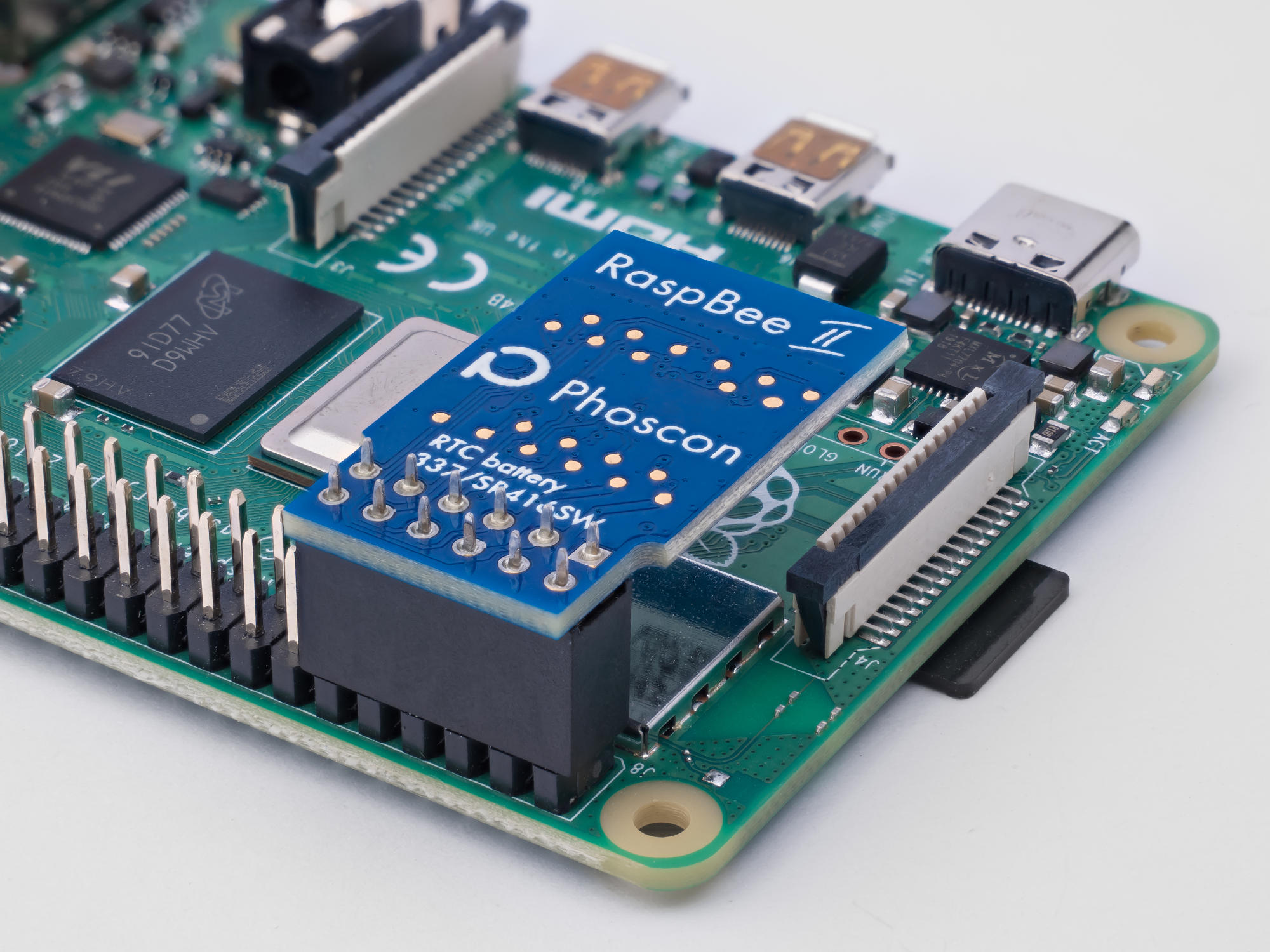
Thanks anyway.
Peter
Reply all
Reply to author
Forward
0 new messages