
First time user with LaCrosse WS-2812 and Raspberry Pi
1,030 views
Skip to first unread message

Daniel
Feb 1, 2015, 5:00:26 PM2/1/15
to weewx...@googlegroups.com
Hi,
I have just working started with both a Raspberry Pi and weewx this weekend. I've been uploading to Wunderground for a number of years, and also CWOP for a couple of months. I am currently using WUHU for uploads and it works great.
I've been toying with the idea to off-load the data uploads to the RPi for a while now. I installed Raspbian, and weewx 3.0.1 (both the latest versions from the respective download sites). I configured weewx to use the LaCrosse driver and upload to Wunderground and CWOP. I use wifi. It initially seemed to work great, other than a sudden jump in the pressure graph on Wunderground, even though the current pressure matched what the console is displaying.
However, I sometimes got 999 values for various elements when I checked the station with a Wunder app on my phone. I did some research, and it looked like it may be the result of RapidFire not having all the information for every packet. I turned off RapidFire in the config and reloaded. After that, I got an extremely spotty upload to Wunderground, and moved uploading back to the Windows PC until I can figure out how to configure weewx correctly. And here I am :).
Below is a screenshot from Wunderground showing what I mean:
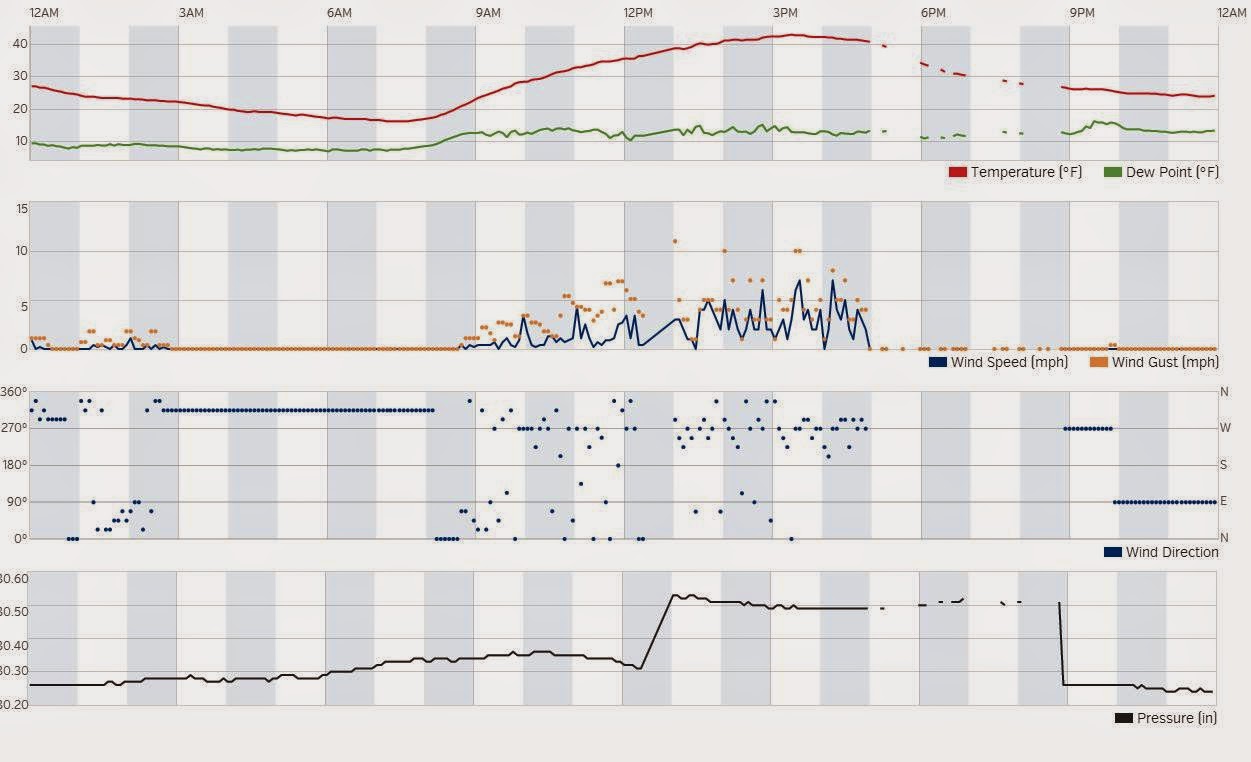
I started the RPi just after noon and it took about 30-40 minutes or so to download the existing data from the console before it started posting around 1PM. I turned off RapidFire just before 5PM, which is when the uploaded started looking spotty. I'm guessing I should not turn off RapidFire. I switched back to the PC just before 9 and you can see the pressure jumping back down to where it "should" be.
So the first question: Why the sudden pressure jump? The value in the graph does not match what's on the console. On the console I did adjust the pressure using the setup in the console, and that seems to be what is reported in the current conditions pressure at the top of the Wunder page. Does this has something to do with pressure vs barometer and I need to add an adjustment to the config file?
Second question: Why does the graph look so spotty after I turned off RapidFire? The table view in Wunderground shows many rows with "---" values for every parameter, which I assume is the same as the 999 that some of my other programs are reporting. I'm guessing that the gaps on the graph corresponds to these empty / invalid rows.
Third question: Even with RapidFire set to true, I occasionally got 999 values reported to my phone app.
Is someone with a successful and stable upload from a Lacrosse to Wunderground willing to share a config file or advice on what I need to configure to allow me to move to the RPi? Or any other advice for a beginner?
Thanks,
Daniel

Thomas Keffer
Feb 1, 2015, 5:44:06 PM2/1/15
to weewx-user
Hello, Daniel
Lot of questions here!
I'm not familiar with the WS-28XX, so I'm afraid my ability to help is limited. A few thoughts:
The difference in pressure could well be a difference in what weewx reports to WU, versus what WUHU reported. Weewx uses "barometer." This is sea-level pressure, adjusted for altitude and temperature. It's possible that WUHU just adjusted for altitude.
Weewx cannot support RapidFire for stations that emit "partial records," which, I think, is the case with the LaCrosse. A partial record is one that contains only one of temperature, barometer, or rain, and never all three. You'll have to use just the regular ol' "PWS" protocol.
Are you using hardware or software record generation? You could try "software." It might help the "spotiness." But, a WS-28xx expert is better qualified is know.
-tk
--
You received this message because you are subscribed to the Google Groups "weewx-user" group.
To unsubscribe from this group and stop receiving emails from it, send an email to weewx-user+...@googlegroups.com.
For more options, visit https://groups.google.com/d/optout.

Steve
Feb 2, 2015, 4:45:45 AM2/2/15
to weewx...@googlegroups.com
What does the log look like? The WiFi isn't constantly going to sleep on the RPi is it?
I don't use a WiFi dongle with my Weewx Pi, but I have used them for other experiments and the WiFi would go to sleep, there is a modification you can make to a file to keep it alive. I can't remember off the top of my head how to fix it.
I don't use a WiFi dongle with my Weewx Pi, but I have used them for other experiments and the WiFi would go to sleep, there is a modification you can make to a file to keep it alive. I can't remember off the top of my head how to fix it.
I found something in my notes but I'm not 100% sure this is the cure unless I tried it again.
Create the file /etc/modprobe.d/8192cu.conf
Add the line: "options 8129cu rtw_power_mgnt=0 rtw_enusbss=0"
Some have added a cron job to ping their router every minute too.
Steve.

mwall
Feb 2, 2015, 7:47:58 AM2/2/15
to weewx...@googlegroups.com
On Sunday, February 1, 2015 at 5:00:26 PM UTC-5, Daniel wrote:
I have just working started with both a Raspberry Pi and weewx this weekend. I've been uploading to Wunderground for a number of years, and also CWOP for a couple of months. I am currently using WUHU for uploads and it works great.
daniel,
are you running heavyweather with wuhu so that wuhu can read the curdat.lst file?
So the first question: Why the sudden pressure jump? The value in the graph does not match what's on the console. On the console I did adjust the pressure using the setup in the console, and that seems to be what is reported in the current conditions pressure at the top of the Wunder page. Does this has something to do with pressure vs barometer and I need to add an adjustment to the config file?
what is your altitude?
does heavy weather have a pressure correction?
does wuhu have a pressure correction?
you can add a correction to 'pressure' in weewx.conf
Second question: Why does the graph look so spotty after I turned off RapidFire? The table view in Wunderground shows many rows with "---" values for every parameter, which I assume is the same as the 999 that some of my other programs are reporting. I'm guessing that the gaps on the graph corresponds to these empty / invalid rows.Third question: Even with RapidFire set to true, I occasionally got 999 values reported to my phone app.
please start by looking at the weewx output. once we know that is ok we can figure out any wunderground and rapidfire quirks.
1) look at the values in the weewx database for the time you ran weewx
sqlite3 /path/to/weewx.sdb
sqlite> select * from archive;
2) run weewx directly and capture 10-15 minutes of LOOP and REC output
sudo weewxd /path/to/weewx.conf
m

Ξ
Feb 2, 2015, 1:13:39 PM2/2/15
to weewx...@googlegroups.com
>Second question: Why does the graph look so spotty after I turned off
RapidFire? The table view in Wunderground shows many rows with "---"
values for every parameter, which I assume is the same as the 999 that
some of my other programs are reporting. I'm guessing that the gaps on
the graph corresponds to these empty / invalid rows.
I don't think they're related. I myself turned off RapidFire just days ago because it sends updates to Wunderground more often than my archive frequency which is 15 minutes (yes, I know RapidFire is supposed to provide live data, but I didn't expect/want that on the graphs). The values you see with '--' are when the console isn't paired/synced with the software, at least that's the case with my station — a TFA Opus which is a LaCrosse 28XX series.
Message has been deleted
Ξ
Feb 2, 2015, 1:17:45 PM2/2/15
to weewx...@googlegroups.com
P.S. Make sure ALL batteries on your sensors/console are good.
Ξ
Feb 2, 2015, 1:40:00 PM2/2/15
to weewx...@googlegroups.com
The difference in pressure could well be a difference in what weewx reports to WU, versus what WUHU reported. Weewx uses "barometer." This is sea-level pressure, adjusted for altitude and temperature. It's possible that WUHU just adjusted for altitude.
Wait, so the difference between what's on the console and what weewx reports to WU/PWS is from those adjustments?! I have set pressure_offset = -45.8 in weewx.conf to overcome the discrepancies.
mwall
Feb 2, 2015, 2:01:56 PM2/2/15
to weewx...@googlegroups.com
On Monday, February 2, 2015 at 1:40:00 PM UTC-5, Ξ wrote:
Wait, so the difference between what's on the console and what weewx reports to WU/PWS is from those adjustments?! I have set pressure_offset = -45.8 in weewx.conf to overcome the discrepancies.
what is your altitude?
pressure_offset was a setting in some weewx v2 drivers. in weewx v3 this is done in [[Corrections]]
m
Ξ
Feb 2, 2015, 2:40:19 PM2/2/15
to weewx...@googlegroups.com
My station's alt is 480 m, that pressure offset setting was retained during the upgrade to v3, and since i didn't change it in [[Corrections]] it explains why it no longer works since the upgrade.
Daniel
Feb 2, 2015, 6:20:06 PM2/2/15
to weewx...@googlegroups.com
Thanks for the replies!
On Monday, February 2, 2015 at 7:47:58 AM UTC-5, mwall wrote:
On Sunday, February 1, 2015 at 5:00:26 PM UTC-5, Daniel wrote:I have just working started with both a Raspberry Pi and weewx this weekend. I've been uploading to Wunderground for a number of years, and also CWOP for a couple of months. I am currently using WUHU for uploads and it works great.
daniel,
are you running heavyweather with wuhu so that wuhu can read the curdat.lst file?
Yes, that is how WUHU is updating.
So the first question: Why the sudden pressure jump? The value in the graph does not match what's on the console. On the console I did adjust the pressure using the setup in the console, and that seems to be what is reported in the current conditions pressure at the top of the Wunder page. Does this has something to do with pressure vs barometer and I need to add an adjustment to the config file?
what is your altitude?
does heavy weather have a pressure correction?
does wuhu have a pressure correction?
I'm at 210 ft. This is a re-image of my old PC, with everything installed new. I did not do any pressure correction on the PC in either HeavyWeather or WUHU. The only correction I made was on the console itself, and that was months ago.
you can add a correction to 'pressure' in weewx.confSecond question: Why does the graph look so spotty after I turned off RapidFire? The table view in Wunderground shows many rows with "---" values for every parameter, which I assume is the same as the 999 that some of my other programs are reporting. I'm guessing that the gaps on the graph corresponds to these empty / invalid rows.Third question: Even with RapidFire set to true, I occasionally got 999 values reported to my phone app.
please start by looking at the weewx output. once we know that is ok we can figure out any wunderground and rapidfire quirks.
1) look at the values in the weewx database for the time you ran weewx
sqlite3 /path/to/weewx.sdb
sqlite> select * from archive;
2) run weewx directly and capture 10-15 minutes of LOOP and REC output
sudo weewxd /path/to/weewx.conf
I will check this out. On first look, all the rows are not the same, and I suspect that the rows with lots of zero's correspond to the 999 values / missing data in WU.
Thanks again for all the replies.
On a side note - how is it that I've been looking at the RPi for more than a year, and then, within a week of me buying one, a much better model is announced at the same price! :)
Daniel
Feb 2, 2015, 8:59:53 PM2/2/15
to weewx...@googlegroups.com
I ran weewxd manually for about 40 minutes, with debug = 1. I don't really understand what is happening. It looks like weewxd is busy trying to upload historical data to Wunderground. In all that time, WU never received an update from the RPi - it kept saying the last update from my station was when I was still on the PC.
I guess the LOOP and REC output goes to console and not /var/log/syslog? I didn't see any LOOP or REC output in the log file.
The other question I have is the number of different devices the console is paired with (blue highlights). Are those the specific sensors, like humidity, rain and wind? My setup actually consists of two consoles, one set of sensors (one each of wind, humidity / temp and rain), one USB receiver and one internet gateway that's not really used. I ended up with this because it was cheaper to buy a whole new weather station from Costco to replace a failing humidity sensor, than trying to source just a replacement humidity sensor. The new station had the internet gateway in place of the USB receiver, but the sensors paired fine with the old 2812 console. I don't think the extra devices should impact the data collection. I'm using the new console in the bedroom as a second viewer.
Also, I noted from the first time I ran, the bogus last rain reset(red highlight). I've never reset the rain totals on the console since we got the system years ago. Is that causing any issues?
Below is a snippet from /var/log/syslog...
Feb 2 20:25:35 raspberrypi weewx[2400]: restx: Wunderground-PWS: Published record 2015-02-01 13:40:00 EST (1422816000)
Feb 2 20:25:41 raspberrypi weewx[2400]: ws28xx: RFComm: ToDateTime: bogus date for LastRainReset: error status in buffer
Feb 2 20:25:44 raspberrypi weewx[2400]: restx: Wunderground-PWS: Published record 2015-02-01 13:45:00 EST (1422816300)
Feb 2 20:25:45 raspberrypi weewx[2400]: ws28xx: RFComm: ToDateTime: bogus date for LastRainReset: error status in buffer
Feb 2 20:25:53 raspberrypi weewx[2400]: restx: Wunderground-PWS: Published record 2015-02-01 13:50:00 EST (1422816600)
Feb 2 20:26:01 raspberrypi weewx[2400]: restx: Wunderground-PWS: Published record 2015-02-01 13:55:00 EST (1422816900)
Feb 2 20:26:07 raspberrypi weewx[2400]: ws28xx: RFComm: ToDateTime: bogus date for LastRainReset: error status in buffer
Feb 2 20:26:10 raspberrypi weewx[2400]: restx: Wunderground-PWS: Published record 2015-02-01 14:00:00 EST (1422817200)
Feb 2 20:26:19 raspberrypi weewx[2400]: restx: Wunderground-PWS: Published record 2015-02-01 14:05:00 EST (1422817500)
Feb 2 20:26:20 raspberrypi weewx[2400]: ws28xx: RFComm: ToDateTime: bogus date for LastRainReset: error status in buffer
Feb 2 20:26:27 raspberrypi weewx[2400]: restx: Wunderground-PWS: Published record 2015-02-01 14:10:00 EST (1422817800)
Feb 2 20:26:36 raspberrypi weewx[2400]: restx: Wunderground-PWS: Published record 2015-02-01 14:15:00 EST (1422818100)
Feb 2 20:26:44 raspberrypi weewx[2400]: restx: Wunderground-PWS: Published record 2015-02-01 14:20:00 EST (1422818400)
Feb 2 20:26:46 raspberrypi weewx[2400]: ws28xx: RFComm: ToDateTime: bogus date for LastRainReset: error status in buffer
Feb 2 20:26:52 raspberrypi weewx[2400]: ws28xx: RFComm: console is paired to device with ID 8008
Feb 2 20:26:52 raspberrypi weewx[2400]: ws28xx: RFComm: generateResponse failed: unknown response type c0
Feb 2 20:26:52 raspberrypi weewx[2400]: ws28xx: RFComm: console is paired to device with ID 0180
Feb 2 20:26:52 raspberrypi weewx[2400]: ws28xx: RFComm: generateResponse failed: unknown response type 0
Feb 2 20:26:53 raspberrypi weewx[2400]: restx: Wunderground-PWS: Published record 2015-02-01 14:25:00 EST (1422818700)
Feb 2 20:26:54 raspberrypi weewx[2400]: ws28xx: RFComm: console is paired to device with ID 01d6
On Sunday, February 1, 2015 at 5:00:26 PM UTC-5, Daniel wrote:
mwall
Feb 2, 2015, 10:05:29 PM2/2/15
to weewx...@googlegroups.com
On Monday, February 2, 2015 at 8:59:53 PM UTC-5, Daniel wrote:
I ran weewxd manually for about 40 minutes, with debug = 1. I don't really understand what is happening. It looks like weewxd is busy trying to upload historical data to Wunderground. In all that time, WU never received an update from the RPi - it kept saying the last update from my station was when I was still on the PC.
when weewx starts up it will do a catchup - it reads historical records from the console and uploads those to weather underground if the wu service is enabled.
I guess the LOOP and REC output goes to console and not /var/log/syslog?
correct, but only when you run weewxd directly, not as daemon.
The other question I have is the number of different devices the console is paired with (blue highlights). Are those the specific sensors, like humidity, rain and wind? My setup actually consists of two consoles, one set of sensors (one each of wind, humidity / temp and rain), one USB receiver and one internet gateway that's not really used. I ended up with this because it was cheaper to buy a whole new weather station from Costco to replace a failing humidity sensor, than trying to source just a replacement humidity sensor. The new station had the internet gateway in place of the USB receiver, but the sensors paired fine with the old 2812 console. I don't think the extra devices should impact the data collection. I'm using the new console in the bedroom as a second viewer.
the messages are about console-transceiver pairing, not contact between sensors and console. i've never tried it with a ws28xx, but with other stations it is ok to have multiple consoles receiving from one set of instruments. however, console-to-transceiver must be one-to-one.
is the first console properly paired to the usb transceiver? or is it paired to the internet gateway? what about the second console? it is quite possible that the transceiver loses contact with one console then automatically pairs with whichever one it happens to contact at the top of the hour.
is the internet gateway feeding data to weather underground, or is weewx feeding data to weather underground? or are they both trying to send data to the same account?
start with one console and the usb transceiver. turn off the second console, and turn off the gateway. make sure that weewx collects data and saves it to the sqlite database. once that works, enable uploads to weather underground in weewx. make sure that works. only then try turning on the second console.
Also, I noted from the first time I ran, the bogus last rain reset(red highlight). I've never reset the rain totals on the console since we got the system years ago. Is that causing any issues?
one of the two consoles has a bogus date. you'll have to clear the rain counter to reset it.
m
Daniel
Feb 3, 2015, 7:56:52 PM2/3/15
to weewx...@googlegroups.com
It's only WUHU that is posting to WU. The internet gateway posts to a Lacrosse site which is not very useful. I turned off all the other equipment and reset the total rain on the main console. I am not seeing any more errors in the log, and I seem to get good data to WU. When I compare the REC output to the console, it appears that the "barometer" value is being sent to WU as pressure. But I may be wrong - none of the pressure unit values match exactly what I see on the console. I added a correction to both pressure and barometer and the data on WU now seems to be in line with what has been uploaded with WUHU.
Is there any way to turn off the upload of historical data? It really messed up my pressure graph for today before I got the correction dialed in.
Is there a way to set the console ID so that weewx always pairs with the right console?
Next step: enabling RapidFire and seeing if that works better now that I have only one console.
Thanks for all the help so far!
Daniel
Feb 4, 2015, 6:25:52 PM2/4/15
to weewx...@googlegroups.com
As soon as I enabled RapidFire, everything went to pot. I.e. I got a number of empty rows uploaded to WU. I turned off RapidFire and I'm running with the default, which uploads every 5 minutes. Even with that, I got two empty data rows on WU yesterday evening. Those two rows corresponded directly with empty rows in the archive table. Not sure what happened there.
Today, the uploads seemed to be flawless.
Also, it appears I should not turn on the other console. That seems to irritate the system also. I'll do some research to see if I can make the console not send updates. After the initial pairing, I thought it would be ok to turn on the other console, but apparently not.
Does weewx remember anything about which device it was paired with? What happens after a power failure when the system comes back up? Will syncing start again automatically? The RPi is on a UPS, so hopefully that will be rare.
So things are looking good so far!
Message has been deleted
Ξ
Feb 6, 2015, 8:52:19 AM2/6/15
to weewx...@googlegroups.com
As soon as I enabled RapidFire, everything went to pot. I.e. I got a number of empty rows uploaded to WU. I turned off RapidFire and I'm running with the default, which uploads every 5 minutes. Even with that, I got two empty data rows on WU yesterday evening. Those two rows corresponded directly with empty rows in the archive table. Not sure what happened there.
On my end that happens when the transceiver isn't synced to the console, it fixes itself at the top of the hour. Start weewx and monitor the log. Did you start RapidFire at the same time when you turned on the second console?! I suspect you might be wrongly zeroing in on rapidfire when the issue is the pairing/syncing.
Daniel
Feb 7, 2015, 12:44:07 PM2/7/15
to weewx...@googlegroups.com
My system has been uploading for a few days now without issue, every 5 minutes. I think it uploaded bad values one time in the last 48h. I tried to enable rapidfire again just now, and immdiately got 999 values on the rapidfire view in WU. Both consoles were running at the time, and has been running for the last couple of days.
I see the following in the logs all the time, but I don't know what it means:
Feb 7 12:27:34 raspberrypi weewx[2218]: ws28xx: RFComm: console is paired to device with ID 8008
Feb 7 12:27:34 raspberrypi weewx[2218]: ws28xx: RFComm: generateResponse failed: unknown response type c0
Feb 7 12:27:34 raspberrypi weewx[2218]: ws28xx: RFComm: console is paired to device with ID 01d6
I'm hoping it means that one console is paired to device 8008, and the other console is paired to 01d6. 01d6 is the one that I see with only console active. I'm also assuming that 01d6 is the ID of the USB stick that's connected to the RPi. I do not see the unknown response type error when the second console is powered off.
Also, by reading through the comments in the device driver code, it appears that the USB stick will remember which console it is paired with, even after power is removed. So once I get a good pairing, I am assuming that the console and the USB stick will remain paired, even if another console is within range.
I've been happy enough with the 5 minute uploads, so I don't mind rapidfire not working. If I can get it working easily, I will turn it on, but the current state meets my needs. I am willing to try some experiments.
Thanks!
mwall
Feb 7, 2015, 1:19:03 PM2/7/15
to weewx...@googlegroups.com
On Saturday, February 7, 2015 at 12:44:07 PM UTC-5, Daniel wrote:
I'm hoping it means that one console is paired to device 8008, and the other console is paired to 01d6. 01d6 is the one that I see with only console active. I'm also assuming that 01d6 is the ID of the USB stick that's connected to the RPi. I do not see the unknown response type error when the second console is powered off.Also, by reading through the comments in the device driver code, it appears that the USB stick will remember which console it is paired with, even after power is removed. So once I get a good pairing, I am assuming that the console and the USB stick will remain paired, even if another console is within range.
daniel,
thank you for the feedback. happy to hear that things are working.
can you confirm that your usb transceiver id is 8008 or 01d6? you should see a log message about this soon after weewx starts up.
can you figure out the id of the bridge?
ideally you would pair one console to the usb transceiver and pair the other console to the bridge.
luc has been working on the driver for klimalogg stations, which use the same transceiver as ws28xx stations. in a month or two we plan to take what we learn from klimalogg and roll that back into the ws28xx driver. this should improve how pairing is reported and might improve behavior when there are multiple consoles and multiple transceivers/bridges.
m
Daniel
Feb 7, 2015, 1:53:02 PM2/7/15
to weewx...@googlegroups.com
I have confirmed that 0x01d6 is the USB stick. The device id reported in syslog matches the last few digits of the printed serial number on the USB stick. I'm assuming that the new console uses a somewhat different protocol between the bridge and the console, resulting in the unknown messages.
Before I started with the RPi, the bridge was paired with the second console, and the USB transceiver with the main console. At this point, the bridge is powered down, and has been for the last couple of days.
Ξ
Feb 10, 2015, 3:57:49 AM2/10/15
to weewx...@googlegroups.com
Matt,
How should I use [[corrections]] to have weewx properly reporting the pressure in my case? I don't quite grasp the barometer ~ pressure ~ altitude adjustments thing going on etc.
How should I use [[corrections]] to have weewx properly reporting the pressure in my case? I don't quite grasp the barometer ~ pressure ~ altitude adjustments thing going on etc.
On Monday, February 2, 2015 at 9:01:56 PM UTC+2, mwall wrote:
mwall
Feb 10, 2015, 10:06:51 AM2/10/15
to weewx...@googlegroups.com
On Tuesday, February 10, 2015 at 3:57:49 AM UTC-5, Ξ wrote:
Matt,
How should I use [[corrections]] to have weewx properly reporting the pressure in my case? I don't quite grasp the barometer ~ pressure ~ altitude adjustments thing going on etc.
in weewx.conf, do something like this:
[StdCalibrate]
[[Corrections]]
pressure = pressure - 1.263888
this applies a correction of 1.26 inHg to the pressure reading from the station.
as noted in the documentation, units of the correction are the same as target_unit
m
Message has been deleted
Daniel
Feb 13, 2015, 4:54:55 PM2/13/15
to weewx...@googlegroups.com
After about a week of almost flawless uploads, typically losing about one entry a day, the system suddenly started uploading invalid or empty values to WU. I am not home at the moment (of course) and had my wife cycle power to the RPi. That allowed it to upload a couple of good values, until it went bad again.
Where do I start to troubleshoot this? And more importantly, what steps can I take to prevent this from happening in the future?
Below is a screen shot of the WU data page.
Thanks!


Andy
Feb 13, 2015, 7:40:50 PM2/13/15
to weewx...@googlegroups.com
so actually it appears you are missing some of your five minute increments also. 3:20 and 4:10 are missing. These were an easy part for me to fix as Tom already fixed it. http://www.weewx.com/wunderfixer/ I run wunderfixer wrapper script from cron every four hours at four minutes after the hour to keep WU updated.
I also had the blank data upload issue with my ws-2813 station, Usually just one missing per day. But the wind speed/direction unit died last weekend and the LaCrosse returned to Costco.
Andy
Daniel
Feb 13, 2015, 9:37:41 PM2/13/15
to weewx...@googlegroups.com
Thanks for the reply. The values actually seem to be missing in the archive database. When I got home, pressing SEL on the console seemed to restore uploads for a bit. I then had another dropout for 30 minutes, that got restored at the top of the hour. I suspect that the console is losing sync (not pairing) with he dongle. No idea why that is suddenly happening today.
I'll try the wunderfixer - I'm hoping it re-reads the data from the console...
BTW, your anemometer problems are almost certainly related to the batteries inside the unit. I'm on my 3rd anemometer. I managed to fix it once by replacing the batteries but it's quite a challenge to do that without breaking something. These units seem to be relatively accurate and super cheap compared to the competition, even though they don't last as long.
Thanks,
Daniel

Luc Heijst
Feb 20, 2015, 4:14:05 PM2/20/15
to weewx...@googlegroups.com
On Saturday, 7 February 2015 15:19:03 UTC-3, mwall wrote:
luc has been working on the driver for klimalogg stations, which use the same transceiver as ws28xx stations. in a month or two we plan to take what we learn from klimalogg and roll that back into the ws28xx driver. this should improve how pairing is reported and might improve behavior when there are multiple consoles and multiple transceivers/bridges.
m
Hi Matthew and Daniel,
Both drivers are receiving and reading each others messages with as result the driver won't get all the time its own messages. On the long run this might lead to communication loss.
At the moment I'm running simultanious two drivers which uses the same type of transceiver. One for TFA Opus (ws28xx) and one for TFA KlomaLogg Pro (the new kl driver).
The drivers have each its own transceiver (controlled by parameter serial in weewx.conf). When a driver receives a message which is for another transceiver it will pause itself to give the other driver a chance to receive a resent message.
So far the used methode is:
a. when time-critical messages from the other transceiver are intercepeted (like getConfig and getHistory) the driver will pause 30 seconds.
b. when other messages from the other transceiver are intercepted a small wait is introduced. Each N-th message a random wait is initiated between 0-6 seconds. The idea is that in this way both drivers not always wait the same time when they intercept each others messages, because otherwise the situation won't be solved.
Maybe this appoach (when succesfull) may also be used in your situation.
The disadvantage of the used method is that it has to be tailor-made for a certain (other) transceiver and cannot be part of a general release.
Luc
Reply all
Reply to author
Forward
0 new messages