
Fine Offset WH-2650 and weewx
1,495 views
Skip to first unread message

Massimiliano Neri
Nov 22, 2018, 6:11:49 PM11/22/18
to weewx-user
Hi, I just bought a WaldBeck Halley WH-2650, basically a clone of the WH-2650 Fine Offset, can you tell me how to configure weewx.conf to intercept its data string?
I thank you in advance.

kan6526
Nov 22, 2018, 10:01:21 PM11/22/18
to weewx-user
--------------------weewx.conf ------------------
[Interceptor]
driver = user.interceptor
device_type = observer
mode = sniff
iface = eth0
pcap_filter = src 192.168.2.252 and dst port 80
----------------------------------------------------------------------
my WH2950 ip:192.168.2.252
Massimiliano Neri
Nov 23, 2018, 5:55:55 AM11/23/18
to weewx-user
kan6526
Nov 23, 2018, 7:02:42 AM11/23/18
to weewx-user
< Can you tell me that you are using to run weewx?
I am very happy to tell you anything, as long as you can accept my bad English. :D
Weewx installed on PC , it is NAT gateway server. (192.168.2.10)
ws-view app setup WH2950-----------> WIFI home router (DHCP client ) ----------->Linux server (eth0:192.168.2.10) ----->PPP0 ---------->internet
you have observer Should be simpler.
Massimiliano Neri
Nov 23, 2018, 7:09:13 AM11/23/18
to weewx-user
Il giorno venerdì 23 novembre 2018 00:11:49 UTC+1, Massimiliano Neri ha scritto:
Message has been deleted

Tanwe Hyalin
Nov 23, 2018, 2:13:04 PM11/23/18
to weewx-user
I have mine configure like this:
weewx.conf
[Interceptor]
driver = user.interceptor
device_type = observer
driver = user.interceptor
device_type = observer
port = 666
And to redirect the traffic to that port I edited /etc/firewall.user in my router and added the following:
iptables -t nat -A PREROUTING -s 192.168.1.103 -p tcp --dport 80 -j DNAT --to-destination 192.168.1.6:666
iptables -t nat -A POSTROUTING -j MASQUERADE
iptables -t nat -A POSTROUTING -j MASQUERADE
Massimiliano Neri
Nov 23, 2018, 3:23:44 PM11/23/18
to weewx-user
Il giorno venerdì 23 novembre 2018 00:11:49 UTC+1, Massimiliano Neri ha scritto:
kan6526
Nov 24, 2018, 1:39:38 AM11/24/18
to weewx-user
192.168.1.103 is WH-2650 bridge
192.168.1.6 is weewx pi
Tanwe Hyalin
Nov 24, 2018, 6:20:59 AM11/24/18
to weewx-user
Exactly.
I also gave both WH2650 and pi a static IP.
My router is a TL-WR1043ND flashed with Gargoyle, https://www.gargoyle-router.com/
Massimiliano Neri
Nov 25, 2018, 5:47:19 AM11/25/18
to weewx-user
The latest WH-2650 interfacing tests with weewx seem to work all the same even if I have to complete some tests, however there are still problems.
For the tests I used a "tp-link tl-wa701nd" where I installed the Gargoyle firmware, connected the "Orange Pi Zero" through its WiFi, connected to the tp-link also the bridge of the WH-2650, made the changes that Tanwe Hyalin told me at /etc/firewall.user.
On Orange Pi Zero I installed weewx and the "interceptor" extension, configuring the software according to the specifications given in previous posts.
Made all this works perfectly.
As I said before some problems remain, and I can not find the part of the iptables in my main router ASUS RT-AC68U, I entered ssh mode but I can not see where I can enter the changes to the firewall.
Does anyone have any ideas? I did not want to put another router to handle the WH-2650 weewx and the bridge.
Soon I would like to try again, install the OpenWRT image on the small Orange Pi Zero, install weewx inside OpenWRT, make the firewall changes and connect the bridge directly to the Orange Pi Zero OpenWRT in order to have everything on one device .
As soon as I have completed the tests, I postpone my conclusions.
Il giorno venerdì 23 novembre 2018 00:11:49 UTC+1, Massimiliano Neri ha scritto:
Massimiliano Neri
Nov 25, 2018, 5:47:40 AM11/25/18
to weewx-user
The latest WH-2650 interfacing tests with weewx seem to work all the same even if I have to complete some tests, however there are still problems.
For the tests I used a "tp-link tl-wa701nd" where I installed the Gargoyle firmware, connected the "Orange Pi Zero" through its WiFi, connected to the tp-link also the bridge of the WH-2650, made the changes that Tanwe Hyalin told me at /etc/firewall.user.
On Orange Pi Zero I installed weewx and the "interceptor" extension, configuring the software according to the specifications given in previous posts.
Made all this works perfectly.
As I said before some problems remain, and I can not find the part of the iptables in my main router ASUS RT-AC68U, I entered ssh mode but I can not see where I can enter the changes to the firewall.
Does anyone have any ideas? I did not want to put another router to handle the WH-2650 weewx and the bridge.
Soon I would like to try again, install the OpenWRT image on the small Orange Pi Zero, install weewx inside OpenWRT, make the firewall changes and connect the bridge directly to the Orange Pi Zero OpenWRT in order to have everything on one device .
As soon as I have completed the tests, I postpone my conclusions.
Il giorno venerdì 23 novembre 2018 00:11:49 UTC+1, Massimiliano Neri ha scritto:
Tanwe Hyalin
Nov 25, 2018, 2:41:23 PM11/25/18
to weewx-user
I'm a bit confused about your setup, you are using 2 routers? How is everything connected? I know that there's community firmware for the Asus RT-AC68U, Asuswrt-Merlin, so maybe that could be an option if the standard firmware does not give you access to iptables. I'm not sure but the interceptor driver can also be used in sniffer mode, as per kan6526 suggestion, thus no modifications to iptables should be required.
My setup is like this, my raspberry pi (raspbian, weewx, interceptor driver) and bridge are connected (via wifi) to the router TL-WR1043ND (running gargoyle firmware), at this router I placed the two lines mentioned before in iptables, the correct place for that on the gargoyle/openwrt firmware is /etc/firewall.user. These two lines redirect the traffic leaving from port 80 of the bridge to the ip of the raspberry pi, at the pi the redirected traffic enters at port 666 were the interceptor driver is waiting for it.
Massimiliano Neri
Nov 25, 2018, 4:39:37 PM11/25/18
to weewx-user
Il giorno venerdì 23 novembre 2018 00:11:49 UTC+1, Massimiliano Neri ha scritto:
Massimiliano Neri
Nov 27, 2018, 6:21:38 PM11/27/18
to weewx-user
Il giorno venerdì 23 novembre 2018 00:11:49 UTC+1, Massimiliano Neri ha scritto:
Tanwe Hyalin
Nov 28, 2018, 6:21:12 PM11/28/18
to weewx-user
I modified th file interceptor.py as per https://github.com/matthewwall/weewx-interceptor/issues/28 to fix this issue.
Massimiliano Neri
Nov 29, 2018, 11:18:52 AM11/29/18
to weewx-user
Il giorno venerdì 23 novembre 2018 00:11:49 UTC+1, Massimiliano Neri ha scritto:
Tanwe Hyalin
Nov 29, 2018, 7:41:33 PM11/29/18
to weewx-user
I changed line 1048 in the interceptor.py file from "if software_type == 'WH2600GEN_V2.2.5':" to "if software_type == 'WH2600GEN_V2.2.5' or software_type == 'WH2650A_V1.2.1':" so it could identify our firmware.

steep...@gmail.com
Nov 30, 2018, 5:44:28 AM11/30/18
to weewx-user
Hello Tanwe and Massimiliano,
I have been following this thread with interest. I too have the WaldBeck Halley WH-2650 which I have recently purchase as a backup for my main station.
I have connected it to Weather Underground, Weather Cloud and Met Office with no problems so I know that data streams are being generated and reaching their target. However when I do a network scan with TCPflow, it detects no data flow or any open ports. I am using the interceptor.py and it set up to sniff in observer mode and no interception is happening. I have followed all the suggestions made apart from IP Tables as I cannot install an appropriate firmware on my router to enable this. I am at a loss to see where to go next. Do you have any more ideas that I could pursue?
Regards
Ian
Tanwe Hyalin
Nov 30, 2018, 9:07:24 AM11/30/18
to weewx-user
I haven't used the sniffer mode with the WH2650 so take this with a grain of salt, our bridge is exclusively wifi as such if your router has an option called "Isolation mode" enabled it could hide the device from the interceptor so the first thing I would try would be that, disabling that feature, if that does not work, honestly I don't think there's much you can do besides getting a device to intercept the bridge, either a small router or rasperry pi/orange pi zero just for this purpose. Again the ideal situation would be for a driver that could mimick the WS View app and grab the weather data directly from the station, that why I shared the source code for the app. While I'm slowly analysing the source, I doubt I will be able to create a driver capable of doing that (not enough time or technical skills with network comunication protocols).
Massimiliano Neri
Nov 30, 2018, 9:20:46 AM11/30/18
to weewx-user
Il giorno venerdì 23 novembre 2018 00:11:49 UTC+1, Massimiliano Neri ha scritto:
steeple ian
Nov 30, 2018, 11:53:31 AM11/30/18
to weewx...@googlegroups.com
Hello Massimiliano,
,
,
Thank you for you feedback. I have a spare Raspberry Pi 3 which I can utilise. I will set it up this evening with the version of Linux you are using, If you can guide me from that, I will be very pleased.
Regards,
Ian
--
You received this message because you are subscribed to the Google Groups "weewx-user" group.
To unsubscribe from this group and stop receiving emails from it, send an email to weewx-user+...@googlegroups.com.
For more options, visit https://groups.google.com/d/optout.
steeple ian
Nov 30, 2018, 11:55:47 AM11/30/18
to weewx...@googlegroups.com
Hello Tanwe,
I am looking into my router but I suspect that the isolation mode is disabled by default anyway.
Regards,
Ian
--
steeple ian
Nov 30, 2018, 12:10:31 PM11/30/18
to weewx...@googlegroups.com
The most recent version of Ubuntu for RaspberryPi is 16.04, so I have installed Debian 9 (Stretch) instead.
Tanwe Hyalin
Nov 30, 2018, 1:13:37 PM11/30/18
to weewx-user
Even disabling isolation mode, grabing wifi traffic is not trivial as it requires a wifi card that has that capability, using the standard ethernet is a lot easier and less prone to issues, unfortunately we don't have that luxury with our bridge.
I'm not sure about all configurations that have to be made to the PI to make it act like a router, but from a cursory look on google there's a couple of tutorials that should help you on that task, on the plus side, by using the pi as router + installing weewx on it you shouldn't need nothing else to send the weather data to wherever you want.
Massimiliano Neri
Nov 30, 2018, 1:31:37 PM11/30/18
to weewx-user
Ian can tell you how I did with the distribution of Ubuntu that you can find on the www.armbian.org site for Orange Pi Zero. I do not know how to set it on the raspberry by not having it. I have always used various types of Orange cards.
If you can set up your raspberry as a hotspot, I can list the procedures for installing iptables and the rest of the configuration.
Hoping it is more or less identical.
Il giorno venerdì 23 novembre 2018 00:11:49 UTC+1, Massimiliano Neri ha scritto:
steeple ian
Dec 2, 2018, 2:57:14 AM12/2/18
to weewx...@googlegroups.com
Massimiliano,
I have tried two options on my RaspberryPi, Openwrt or creating a Wi-fi access point. Of the two I think the access point is the way to go. If you could direct me from that standpoint I will be very grateful. The OS I am using is Raspbian Stretch, a Debian version for ARM.
Regards
Ian
Sent from my iPad
--
Massimiliano Neri
Dec 2, 2018, 1:31:33 PM12/2/18
to weewx-user
Yes, yes, I chose to do a HotSpot with my Orangepi Pi Zero H2.
As an operating system I chose Armbian Bionic mainline kernel 4.14.y, which can be found at this link:
I have done this procedure to install the weewx and the driver interceptor:
1) Launched on the command line "armbian-config", set the time zone, the keyboard and the language, find all this under the heading 'Personal'.
2) return to the main menu and go to "Network", select 'IP' and assign a static address to the network card eth0 (mine is 192.168.10.66) save and run on reboot.
3) restart "armbian-config", go to 'System' and install the beta version packages with the voice 'Nightly', then restart.
4) run the command line command 'apt-get update' and 'apt-get upgrade'.
5) run on the command line "armbian-config", go to 'Network' and activate your access point with the 'HotSpot' entry.
6) install weewx from the documentation found on the program website: http://www.weewx.com/
7) install the extension for weewx "interceptor" following the indications you find on this link: https://github.com/matthewwall/weewx-interceptor
8) Connect your smartphone with the Orange Pi access point (your case with the Raspberry), install the "WS View" app that you find in the google app store, open the app itself and with this colleague the WH-2650 weather station bridge to the access point of the used device.
Check that the station emits on your wunderground account that you should have created and always configured with the same with "WS View".
Before moving on with "Ws View", you need to calibrate the sensors of the station or make the setting operations you believe.
9) Now at the command line of Orange Pi Zero, type: "iptables -t nat -A PREROUTING -s 172.24.1.65 -p tcp --dport 80 -j DNAT --to-destination 192.168.10.66:666", where 172.24.1.65 is the ip of the station bridge and 192.168.10.66 is the ip of the Orange Pi eth0 network card. the final door 666 you could choose it as you want, as long as it is not occupied.
Clearly you have to replace the example ip with your ip that you will soon have discovered with a program of scanning the ports (there are also for smartphones, and I suggest you install one from google play).
Save the configuration of this iptables with the command:
iptables-save> /etc/iptables/iptables.ipv4.nat
This last one is used to load the typed iptables every time, every time the Orange is turned on.
To verify that the iptables command has been loaded, type:
iptables -t nat -L --line-numbers
This displays all the iptables of your card, and you should also find the one that directs your weather bridge on the eth0.
10) open the weewx.conf file at the command line by typing:
nano /etc/weewx/weewx.conf
Scroll to the end of the file and set the [Interceptor] section with these lines:
[Interceptor]
driver = user.interceptor
device_type = observer
port = 666
The [[Wunderground]] section should be set up with your account:
[[Wunderground]]
# This section is for configuring posts to the weather
Underground.
# If you wish to do this, set the option 'enable' to true,
# and specify a station (e.g., 'KORHOODR3') and
password.
# To guard against parsing errors, put the password into
quotes.
enable = true
station = XXXXXXX
password = YYYYYYY
Save the edited file with CTRL + O.
11) Restart weewx with the command:
/etc/init.d/weewx restart
If the Raspberry is the same as my Orange Pi Zero, you should see the WH-2650 data on wunderground and weewx.
Greetings from the MAX.
steeple ian
Dec 3, 2018, 8:08:40 PM12/3/18
to weewx...@googlegroups.com
Hi Massimiliano and Tanwe,
I have got it working by replicating the OrangePi hotspot set up on a RasberryPi. I am letting it stabilise for a few days before I transfer the hotspot setup to my public facing server. I will post a link when it is up and running.
Thanks for all your help. Would never had made this far so quickly without your help.
Cheers,
Ian
Massimiliano Neri
Dec 4, 2018, 4:30:34 AM12/4/18
to weewx-user
Perfect Ian ...
I refer an error to the directory path of the file 'iptables.ipv4.nat'
The original location of the file on Orange Pi Zero with Armbian Bionic is '/etc/iptables.ipv4.nat', so the command to save the added iptables is:
iptables-save > /etc/iptables.ipv4.nat
Remember to check the exact location in your raspberry or another linux distribution of the iptables.ipv4.nat file.
steeple ian
Dec 4, 2018, 5:17:30 AM12/4/18
to weewx...@googlegroups.com
Yes I had worked that one out. In Debian 9 it is '/etc/iptables/rules.v4'.
I now have to replicate everything on my main server which is an Intel NUC, just hoping there is a suitable driver for the wifi antenna on that device.
Thanks once again for your help.
Cheers,
Ian
--
steeple ian
Dec 4, 2018, 7:20:51 PM12/4/18
to weewx...@googlegroups.com
Hi Massimiliano and Tanwe,
Here is the finished article https://claydonsweather.org.uk weeWX, weather34 template, web server, web cam and wi-fi hotspot all running perfectly on an Intel NUC/Debian 9 combination. Seems very solid so far. Had to re-calibrate pressure in weeWX as the WH2650 was running high compared to my other station and surrounding stations. All the dynamic charts (links under the panels) are running off .csv data generated from the weeWX database using the Cheetah templating engine.
Best regards,
Ian
Massimiliano Neri
Dec 5, 2018, 12:27:16 PM12/5/18
to weewx-user
very nice weather portal ... you're a big one :-)
Massimiliano Neri
Dec 18, 2018, 9:09:45 AM12/18/18
to weewx-user
mwall
Dec 20, 2018, 12:48:49 PM12/20/18
to weewx-user
On Tuesday, December 18, 2018 at 9:09:45 AM UTC-5, Massimiliano Neri wrote:
Hello. I would like to modify the sensor map of a WH-2650 on the Interceptor driver, so that the internal sensor placed on a solar screen acts as an external thermo-hygrometer sensor. Clearly the external sensor of the wh-2650 must be redirected as an internal sensor or at most must return null values. Any idea of how to do it? have you already changed the sensor map of the Interceptor?
you should be able to specify the sensor map in the [Interceptor] stanza in your weewx configuration file.
[Interceptor]
outTemp = temperature_out
inTemp = temperature_in
take a look at the Observer section of interceptor.py to see what the default sensor_map is for that station type (i assume that you are using the observer as the device_type)
m
Massimiliano Neri
Dec 26, 2018, 3:53:38 PM12/26/18
to weewx-user
Hello Matt
Yes I'm using the observer as a device-type.
As you can see from the attached photo, the WH-2650 weather station has a sensor that independent of temperature, humidity and atmospheric pressure.
This sensor is usually placed inside the house, and clearly the external sensor package already contains a thermohygrometer sensor, but according to some, in the summer months by readings of some degree higher than normal, due to inadequate solar screen.
Now this is the idea, ie insert the sensor for indoor, inside a solar screen to make it an outdoor sensor.
For this I would like to map the weewx to collect the internal temperature and humidity data, and insert these values into the external temperature and umidity variables.

I am attaching a track intercepted by the observer:
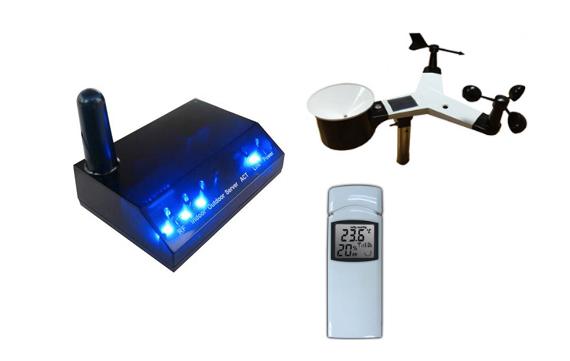
Massimiliano Neri
Jan 2, 2019, 11:34:03 AM1/2/19
to weewx-user
[Interceptor]
# This section is for the network traffic interceptor driver.
# The driver to use:
driver = user.interceptor
# Specify the hardware device to capture. Options include:
# acurite-bridge - acurite internet bridge
# observer - fine offset WH2600/HP1000/HP1003, aka 'observer'
# lw30x - oregon scientific LW301/LW302
# lacrosse-bridge - lacrosse GW1000U/C84612 internet bridge
device_type = observer
port = 666
[[sensor_map]]
outTemp = temperature_in
outHumidity = humidity_in
But I found that the other values such as pressure, rain etc etc are no longer sent.
Do I need to write the whole map again?
Or how can I solve the problem?
mwall
Jan 3, 2019, 10:10:12 AM1/3/19
to weewx-user
On Wednesday, January 2, 2019 at 11:34:03 AM UTC-5, Massimiliano Neri wrote:
I have mapped these values as the following example:
[Interceptor] ... [[sensor_map]] outTemp = temperature_in outHumidity = humidity_in
But I found that the other values such as pressure, rain etc etc are no longer sent. Do I need to write the whole map again?
yes. something like this:
[[sensor_map]]
pressure = pressure
barometer = barometer
outHumidity = humidity_in
outTemp = temperature_out
windSpeed = wind_speed
windGust = wind_gust
windDir = wind_dir
windGustDir = wind_gust_dir
radiation = radiation
dewpoint = dewpoint
windchill = windchill
rain = rain
rainRate = rain_rate
UV = uv
txBatteryStatus = battery
m
Massimiliano Neri
Jan 5, 2019, 6:46:01 AM1/5/19
to weewx-user
Hi Matt.
I solved with this map:
[[sensor_map]]
pressure = pressure
barometer = barometer
outHumidity = humidity_in
inHumidity = humidity_in
outTemp = temperature_in
inTemp = temperature_in
windSpeed = wind_speed
windGust = wind_gust
windDir = wind_dir
windGustDir = wind_gust_dir
radiation = radiation
dewpoint = dewpoint
windchill = windchill
rain = rain
rainRate = rain_rate
UV = uv
txBatteryStatus = battery
Unfortunately I read the specifications of the indoor sensor in question, and the temperature has a range of only 0 - 60 degrees Celsius.
So unusable for outdoor.
Thanks for your help.
Reply all
Reply to author
Forward
0 new messages