
New communication manager is now active
1,972 views
Skip to first unread message

Martin Diphoorn
Jan 25, 2014, 1:45:35 PM1/25/14
to
When you download the last trunk then the new communication manager will be used!
The new communication is the new way to define the communication between your device configured and the real device.
So the paths off the advanced parameters will no longer be used. You will need to define them in the communication manager.
To make things easy, i have created an import button which will try to create an new communication for each device and link it.
To do this manually or if something is wrong this are the steps to follow.
1. Create or check if the communications are defined okay
2. Test the communication with the device by running the test in the communication device ( this can take 5 minutes before the test returns results)
3. Check if in the dropdown / selectionbox of the device the right communication is selected
When done and saved you need to wait at least 15 minutes. If you don't want to wait, then restart wsl.sh or restart your device.
This first item will also contains the frequent asked questions if it is needend.
Why is my smartmeter monitoring no longer working or other PHP script called by websolarlog?
Check if the uri also contains the path to PHP. (uri example: /usr/bin/php /usr/share/nginx/www/websolarlog/utils/wslP1.php )
What should be my settings for weather monitoring?
For weather monitoring you need an device and an communication. The communication uri should be: http://openweathermap.org/data/2.5/find?units=metrics&cnt=1&mode=json
Also check if your "General" settings contains valid coordinates.
Can i delete created Communications?
In the latest trunk this is possible, just check the box before remove and press save.
The new communication is the new way to define the communication between your device configured and the real device.
So the paths off the advanced parameters will no longer be used. You will need to define them in the communication manager.
To make things easy, i have created an import button which will try to create an new communication for each device and link it.
To do this manually or if something is wrong this are the steps to follow.
1. Create or check if the communications are defined okay
2. Test the communication with the device by running the test in the communication device ( this can take 5 minutes before the test returns results)
3. Check if in the dropdown / selectionbox of the device the right communication is selected
When done and saved you need to wait at least 15 minutes. If you don't want to wait, then restart wsl.sh or restart your device.
This first item will also contains the frequent asked questions if it is needend.
Why is my smartmeter monitoring no longer working or other PHP script called by websolarlog?
Check if the uri also contains the path to PHP. (uri example: /usr/bin/php /usr/share/nginx/www/websolarlog/utils/wslP1.php )
What should be my settings for weather monitoring?
For weather monitoring you need an device and an communication. The communication uri should be: http://openweathermap.org/data/2.5/find?units=metrics&cnt=1&mode=json
Also check if your "General" settings contains valid coordinates.
Can i delete created Communications?
In the latest trunk this is possible, just check the box before remove and press save.

Willem Stolk
Jan 22, 2014, 3:39:49 PM1/22/14
to webso...@googlegroups.com
And where can I use it for?
Martin Diphoorn
Jan 22, 2014, 3:52:28 PM1/22/14
to webso...@googlegroups.com
Updated the main post, hope it makes things more clear

Arko de Leeuw
Jan 24, 2014, 12:45:47 PM1/24/14
to webso...@googlegroups.com
Hi Martin,
I've created a new serial port but I'm getting failures when testing the device.
Port: /dev/ttyUSB0
No results just the message "failure". In the errorlog "Invalid first line" is recorded.
When executing the script P1.py /dev/ttyUSB0 using ssh the results are correct.
Can you give me a hint in how to fill in the fields when creating a new Communication device?
Regards,
Arko
Martin Diphoorn
Jan 24, 2014, 2:07:09 PM1/24/14
to webso...@googlegroups.com
Hi Arko,
i have added my settings as an example of how i have defined my smartmeter.
the uri is not fully visible, but it is:
uri=/usr/bin/php /usr/share/nginx/www/websolarlog/utils/wslP1.php
You also need to set the communication on your device settings.
I have experienced that you get the same message if you did not do that.
Added screenshot off that page also.
Hope that helps.
Martin
i have added my settings as an example of how i have defined my smartmeter.
the uri is not fully visible, but it is:
uri=/usr/bin/php /usr/share/nginx/www/websolarlog/utils/wslP1.php
You also need to set the communication on your device settings.
I have experienced that you get the same message if you did not do that.
Added screenshot off that page also.
Hope that helps.
Martin

Bart Baars
Jan 26, 2014, 4:27:07 AM1/26/14
to webso...@googlegroups.com
I noticed Websolarlog stopped logging a couple of days ago..
When testing using the new communicationsmanager, I get the following error:
When testing using the new communicationsmanager, I get the following error:
SMAspot V2.0.6a
Yet another tool to read power production of SMA solar inverters
(c) 2012-2013, SBF (http://code.google.com/p/sma-spot)

Commandline Args: -i
Invalid argument: -i
Use -? for help

Please help!
Bart Baars
Jan 28, 2014, 7:10:41 AM1/28/14
to webso...@googlegroups.com
Solved! Probably the latest trunk update solved it :)

André M.
Jan 28, 2014, 9:13:05 AM1/28/14
to webso...@googlegroups.com
I think my WSL is the most beautiful one using the last trunk :(
The comm managar doesn't show buttons on the right and left so I can't edit or see them.
In the Diehl device I can choose the comm I created but no go.
Errorlog shows no live data as does the dashboard.
I's to bad that almost every update gives me new headages :(
This is about the hosted dutchandre WSL, I can't do anything else then update to a lower version like the old stable.

Marco
Jan 28, 2014, 12:24:21 PM1/28/14
to
I see a button, but its very narrow ;)
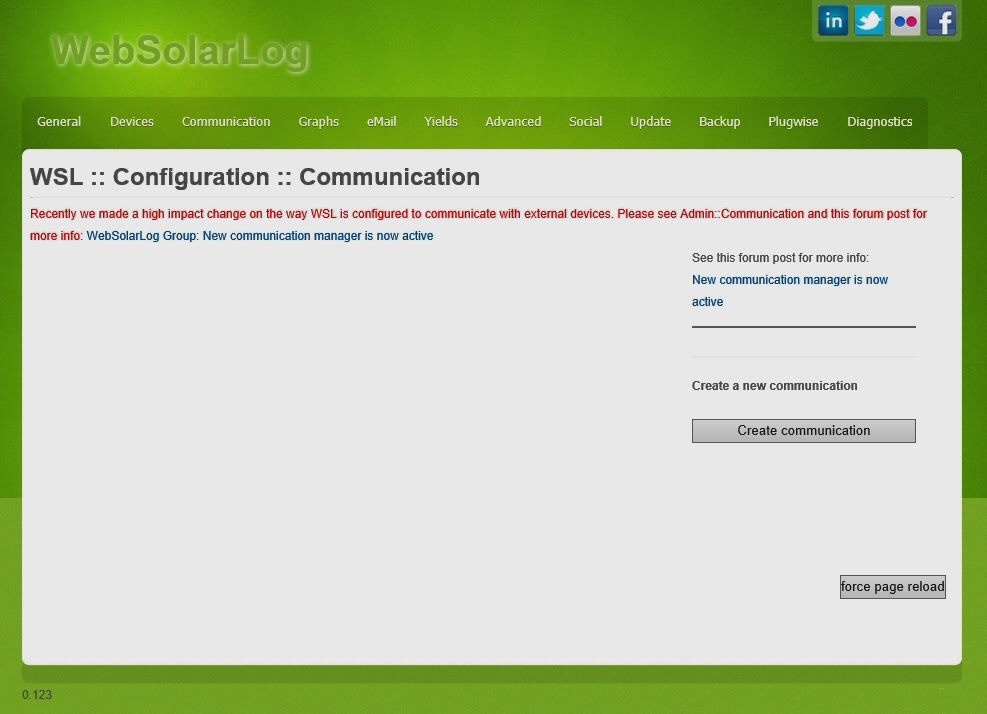
Click on the gray bar below active a give this communication item an name.
André M.
Jan 28, 2014, 12:54:11 PM1/28/14
to webso...@googlegroups.com
That doesn't change anything, I only have one more (not working) comm to choose in the inverter setup.
The dashboard tells that it doesn't find the Diehl and the graphs section is empty.
I tried this on a simpel xp laptop and it shows the same so it's not a browser problem.
The comm part doesn't work for some reason and the created comms don't show up on the comms page.
André M.
Jan 31, 2014, 7:19:18 PM1/31/14
to webso...@googlegroups.com
After some troubleshooting Marco got my WSL online again, I still don't know how an update from one to another trunk can go this wrong.
In the mean time I found out how to get the Weather work again, this also needs the comm manager.
Now I'm busy with a smart meter using an usb/serial device called CP2104 (IR read/write head).
My Rpi can identify this device but now I need some info how to communicate with it.
The standard smart meter has almost the same protocol as my 'dumb' meter with IR readout.
What I want is tell the device to communicate with 300bd, 8n1 (let the dumb meter identify itself) and then read it out with 4800bd.
Is the smart meter script so smart that it can get this info from my meter itself or do I need to change things somewhere?
Marco
Feb 3, 2014, 3:37:50 AM2/3/14
to
Here a little bit the same story as the Delta Solivia and Diehl with serial connection.
Then you could configure a communication item that uses you script to talk to your smartmeter.
Martin coded the script because we didn't want to talk to the smartmeter with Python.
The script is very straight forward and open-source, so you could "clone" the script and change what you want.
Look at /path/to/websolarlog/utils/SmartMeterAgent.php on lines 75-79 where you could change the parameters of the serial connection;
$this->serial->confBaudRate(9600); $this->serial->confParity("even"); $this->serial->confCharacterLength(7); $this->serial->confStopBits(1); $this->serial->confFlowControl("none");Then you could configure a communication item that uses you script to talk to your smartmeter.
André M.
Feb 3, 2014, 5:52:59 AM2/3/14
to webso...@googlegroups.com
I have changed some values in this php and also in the wslP1.php because it is called when testing the comm.
There is no response in the test and WSL restarts for some reason when I run the test (on the prompt I see "not running, starting").
When I readout my meter using Hyper Terminal on a XP pc the next data is sent to the IR-head:
"/?!" (300bd) and then the meter responds with "/AMP45227-0614" where the 4 shows the max comm speed (4800bd).
"000" (4800bd) lets the meter show the data in this format:
0.00.6.0(F8F20000)
0.00.6.1(22197710)
2.18.1(000000.00)
2.18.2(006027.42)
2.18.0(006027.42)
3.28.1(000000.00)
3.28.2(000000.00)
3.28.0(000000.00)! %
0.00.6.1(22197710)
2.18.1(000000.00)
2.18.2(006027.42)
2.18.0(006027.42)
3.28.1(000000.00)
3.28.2(000000.00)
3.28.0(000000.00)! %
As far as I know the smart meter has the same output and it can add some lines for a gas meter.
Maybe my CP2104 device doen't work like expected, the Rpi lists it and dmesg shows it is connected to USB1 (I changed this in the .php).
Marco
Feb 6, 2014, 4:29:44 AM2/6/14
to webso...@googlegroups.com
Looks like the "telegram" is not compatible with DSMR2+
So we need a different converter thats understand the telegram of your meter and can convert it in data that WSL could use.
The current SmartMeter converter uses the following codes:
case "1-0:1.8.1": //tariff 1 1224kWh low usage 1.8.1 $live->lowUsage = Util::telegramStringLineToInterUsage($data,"kWh"); break; case "1-0:1.8.2": //tariff 2 822kWh high usage 1.8.2 $live->highUsage = Util::telegramStringLineToInterUsage($data,"kWh"); break; case "1-0:2.8.1": //tariff 1 233kWh low return 2.8.1 $live->lowReturn = Util::telegramStringLineToInterUsage($data,"kWh"); break; case "1-0:2.8.2": //tariff 2 571kWh high return 2.8.2 $live->highReturn = Util::telegramStringLineToInterUsage($data,"kWh"); break; case "0-0:96.14.0": $live->currentTariff = Util::telegramStringLineToInterUsage($data,""); break; case "1-0:1.7.0": // Current usage $live->liveUsage = Util::telegramStringLineToInterUsage($data,"kW"); break; case "1-0:2.7.0": // Current return $live->liveReturn = Util::telegramStringLineToInterUsage($data,"kW"); break;So we need a different converter thats understand the telegram of your meter and can convert it in data that WSL could use.
André M.
Feb 6, 2014, 4:59:51 AM2/6/14
to webso...@googlegroups.com
Ok, so that's probably why WSL doesn't eat my data.
At least my telegram looks more simpel then the smart meter's.
Marco
Feb 6, 2014, 5:08:39 AM2/6/14
to webso...@googlegroups.com
What's the exact brand/model/type of this meter?
As soon as Martin told me how to add new devices in WSL, i will add this device :)
André M.
Feb 6, 2014, 6:02:11 AM2/6/14
to webso...@googlegroups.com
That would be great!
It is an Ampy 5227F-E
http://www.metsys.hu/villamosenergia/files/5227%20User%20manual%20ver%201_HUN.pdf tells some more but you have to translate it.
The numbers in this pdf are clear to me and it could be a brother of my meter because the pic is different.
Mine has a blue button top right to toggle the display line.
The pic shows how hyperterminal shows the data and the comms.
Probably it reads all data with 300bd, 4800bd is the max speed for the Ampy.

Marco
Feb 7, 2014, 3:59:44 AM2/7/14
to
Could you sent me or post a complete plain-text telegram of the device?
You know my email address ;)
Message has been deleted

Umberto Favari
Mar 17, 2014, 4:56:07 AM3/17/14
to webso...@googlegroups.com
Hi,
I just installed last trunk version (1788) and I have a problem with comunication configuration for my aurora inverter.
Can you post an example of standard configuration of comunicator for aurora?
I have a ftdi rs485/usb converter on ttyUSB0.
I set:
Name: RS485-FTDI
usi:
port: /dev/ttyUSB0
optional: -M3 -Y3 -l
But test show failed
If I run aurora manually it seem it is ok:
root@cubieboard2:/var/www/utils# aurora -a 2 -Y3 -M3 -l3 -c -d 0 -e /dev/ttyUSB0
457.411377 8.258057 3777.329102 457.350708 8.632507 3948.083252 232.209198 10.479702 7592.999023 49.997002 98.286011 35.453064 40.581635 13.100 13.100 0.000 209.500 1037.100 9966.000 9966.000 OK
Marco
Mar 17, 2014, 5:04:28 AM3/17/14
to
Hi Umberto,
Here is the config of my Communication item Admin::Communication::comm.PowerOne4.2;
======================================================================================

======================================================================================
======================================================================================
The is de config of my Admin::Device::PowerOne4.2

======================================================================================
Let us know if this is working for you.
Umberto Favari
Mar 17, 2014, 6:09:37 AM3/17/14
to webso...@googlegroups.com
I copied your configuration and it works well!
Thanks for your work!

chris archer
Sep 19, 2014, 5:19:17 AM9/19/14
to webso...@googlegroups.com
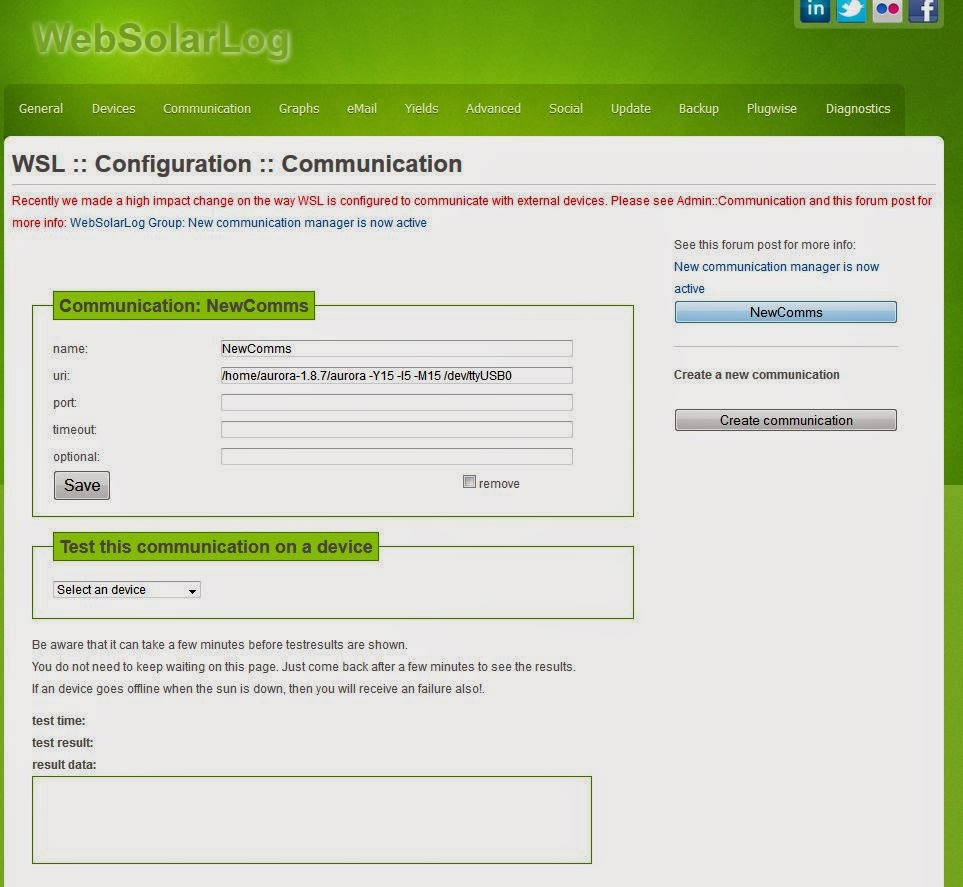
I have a similar problem with my Aurora inverters.
I have just installed a fresh copy on a new SD card of the 1.1 stable release anc copied the wsl.sdb over from my old installation.
I have created a Comms object as shown in your post to Umberto, but WSL can't get the data from the inverters.
From command line I get :
pi@raspberrypi ~/aurora-1.8.7 $ aurora -a 2 -Y15 -l5 -M15 -d 0 /dev/ttyUSB0
Input 1 Voltage = 268.930481 V
Input 1 Current = 1.708678 A
Input 1 Power = 459.515503 W
Input 2 Voltage = 280.880768 V
Input 2 Current = 1.415439 A
Input 2 Power = 397.569672 W
Grid Voltage Reading = 241.605148 V
Grid Current Reading = 3.466649 A
Grid Power Reading = 831.823486 W
Frequency Reading = 50.033020 Hz.
DC/AC Conversion Efficiency = 97.1 %
Inverter Temperature = 35.680340 C
Booster Temperature = 34.371197 C
What have I done wrong? I copied the config style in your post. I originally had the /de/ttyUSB0 on the "port:" line.
Thanks
Chris
Marco
Sep 19, 2014, 5:32:19 AM9/19/14
to
You say; Inverters(!)
So you have 2 or more PowerOne inverters?
If so, have you added the RS485 address number of the inverters to each inverter device?
Go to; Admin::Devices::"your inverter(s)"::RS485/IP:: >> set the right address of the inverter
Do this for each inverter!
If i'm right, the first in the bus is number 2, the second one is number 3, etc.
in my item::uri i have: "/home/pi/aurora-1.8.3/aurora -l5 -M5 /dev/ttyUSB0"
So your config of the Comm. item looks ok.
chris archer
Sep 19, 2014, 6:33:57 AM9/19/14
to webso...@googlegroups.com
Hi Marco,
Thanks for the reply. Yes there are 2. One is address 2 and the other is address 6 on the RS485 network.
I have the address numbers set in the Device configs.
Could the problem be related to importing the wsl.sdb from the old setup? I was not expecting the config to import - just all the data, but all my old config came across as well.
The address of the pi is :
Thanks
Chris
Willem Stolk
Sep 19, 2014, 6:57:18 AM9/19/14
to webso...@googlegroups.com
are the access rights correct on the folders and database? And try updating to the stable version again, i'm missing the info ;
version: (build )
chris archer
Sep 19, 2014, 7:41:17 AM9/19/14
to webso...@googlegroups.com
Hi Willem,
Thanks for the reply. I did an update to v1.1 and it seems to be showing the correct version number now. I did the chmod 777 on the WSL folder again after the update, but still no data from aurora?
I re-checked and at the command line aurora is still working fine.
Thanks
Chris
Willem Stolk
Sep 19, 2014, 7:44:11 AM9/19/14
to webso...@googlegroups.com
WSL is started? Nothing strange in the diagnostic page and in the log file?
Does a test do something in the communication page?
chris archer
Sep 19, 2014, 7:57:18 AM9/19/14
to webso...@googlegroups.com
The comms test on the comms manager reports a failure. Diagnostics look all OK and WSL is running. I have pasted the Diagnostics below.
Thanks
Chris
Chris
Willem Stolk
Sep 19, 2014, 8:07:44 AM9/19/14
to webso...@googlegroups.com
ok. Is the path allright to the aurora program?
i saw in the screenshot that you used /home/aurora-1.8.7/aurora *. in WSL.
is that correct? did you extract the files to that path or is it /home/pi/aurora-1.8.7/aurora * ? (or another username)
chris archer
Sep 19, 2014, 8:14:56 AM9/19/14
to webso...@googlegroups.com
Hi Willem,
Thanks - that's it ! I'm and idiot! Very sorry - typo/copy paste error - the path was wrong. All going fine now with the addition of "pi/"
Thanks
Chris

paul.c...@telenet.be
Feb 8, 2015, 8:54:10 AM2/8/15
to webso...@googlegroups.com
I installed WSL on Raspberry Pi.
everything went well, but after finishing the installation I couldn't find /usr/shar/nginx/www/websolarlog/scripts/./wsl.sh.status or ..../wsl.sh.status.
Anyone an idea what I did wrong?


JanPedaal
Feb 26, 2015, 2:53:59 AM2/26/15
to webso...@googlegroups.com
Hi Oosterlo,
Not sure if you made a typo but the correct path would be /usr/share/nginx/www/websolarlog/scripts/
The "status" is typed as an option behind the script name "wsl.sh", so there's a space in between. Command line input should look like this:
To start WSL: sudo /usr/share/nginx/www/websolarlog/scripts/./wsl.sh start
To stop WSL: sudo /usr/share/nginx/www/websolarlog/scripts/./wsl.sh stop
To query the status: sudo /usr/share/nginx/www/websolarlog/scripts/./wsl.sh status
Reply all
Reply to author
Forward
0 new messages