
Wazuh-logtest run but didn't show the result
88 views
Skip to first unread message

Blue Moon
May 9, 2023, 2:21:00 PM5/9/23
to Wazuh mailing list
Hi all,
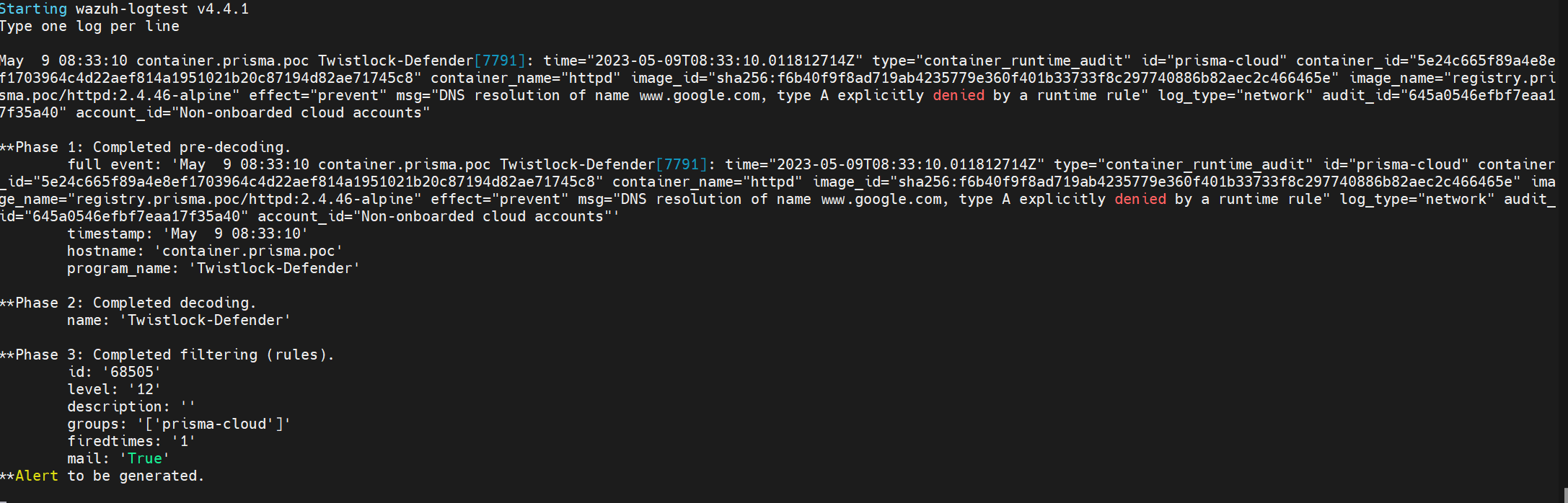
I try to add so custom rules to get my cloud workload logs on wazuh. I run wazuh-logtest. It's success but didn't show any thing in result. This is my example logs and decoder , rules. So why ?
Logs:
May 9 08:33:10 container.prisma.poc Twistlock-Defender[7791]: time="2023-05-09T08:33:10.011812714Z" type="container_runtime_audit" id="prisma-cloud" container_id="5e24c665f89a4e8ef1703964c4d22aef814a1951021b20c87194d82ae71745c8" container_name="httpd" image_id="sha256:f6b40f9f8ad719ab4235779e360f401b33733f8c297740886b82aec2c466465e" image_name="registry.prisma.poc/httpd:2.4.46-alpine" effect="prevent" msg="DNS resolution of name www.google.com, type A explicitly denied by a runtime rule" log_type="network" audit_id="645a0546efbf7eaa17f35a40" account_id="Non-onboarded cloud accounts"
Decoder:
<decoder name="Twistlock-Defender">
<program_name>^Twistlock-Defender</program_name>
</decoder>
<program_name>^Twistlock-Defender</program_name>
</decoder>
<decoder name="Twistlock-Defender-prevent">
<parent>Twistlock-Defender</parent>
<regex>time="(\.+)" type="(\.+)" id="(\.+)" \.+ container_name="(\.+)" \.+ image_name="(\.+)" effect="(\.+)" msg="(\.+)" log_type="(\.+)" \.+ account_id="(\.+)"</regex>
<parent>Twistlock-Defender</parent>
<regex>time="(\.+)" type="(\.+)" id="(\.+)" \.+ container_name="(\.+)" \.+ image_name="(\.+)" effect="(\.+)" msg="(\.+)" log_type="(\.+)" \.+ account_id="(\.+)"</regex>
<order>time,type,id,container_name,image_name,action,msg,log_type,account_id</order>
</decoder>
</decoder>
Rule:
<group name="prisma-cloud,">
<rule id="068500" level="0">
<decoded_as>Twistlock-Defender</decoded_as>
<description>Twistlock-Defender: grouping for rules</description>
</rule>
<rule id="068500" level="0">
<decoded_as>Twistlock-Defender</decoded_as>
<description>Twistlock-Defender: grouping for rules</description>
</rule>
<rule id="068505" level="12">
<if_sid>068500</if_sid>
<match>DNS resolution</match>
<description>$(msg)</description>
</rule>
</group>
<if_sid>068500</if_sid>
<match>DNS resolution</match>
<description>$(msg)</description>
</rule>
</group>

Jose Camargo
May 9, 2023, 2:50:00 PM5/9/23
to Wazuh mailing list
Hi,
I did some tests and verified that the events are ingested correctly. Did you verify that you are getting the events in your manager's /var/ossec/logs/archives/archives.json file? To enable this option, please set the <logall_json> option as yes in your manager's ossec.conf file. Note: please remember to set it back to 'no' after your tests so it won't take disk space.
If you do a search in that file, you can verify if you are getting those logs. To do this, try this command:
cat
/var/ossec/logs/archives/archives.json | grep -i "
Twistlock"
If you get results, check that the log matches the decoders/rules you've set. If they match, do the same search but in the
/var/ossec/logs/alerts/alerts.json file, so you can verify which decoder/rule is actually matching those events.
I'll be awaiting your comments.
Regards,
Jose Camargo
Blue Moon
May 10, 2023, 12:05:54 AM5/10/23
to Wazuh mailing list
Hi, I enable the <logoll_json> options and it is getting the events. But seem the rules and decoders is not working. No alert is generated
Jose Camargo
May 10, 2023, 4:09:17 PM5/10/23
to Wazuh mailing list
Hi,
And if you perform the same search in your
/var/ossec/logs/alerts/alerts.json file, do you see the events? Maybe they are matching a different rule.
If you don't, please attach here some examples of the logs you see in your
/var/ossec/logs/archives/archives.json file so I can evaluate them.
I'll be awaiting your comments.
Reply all
Reply to author
Forward
0 new messages