Filebeat service fails to start

6,377 views
Skip to first unread message

Matt Colucci

unread,
Nov 15, 2021, 12:06:01 PM11/15/21
to Wazuh mailing list
The filebeat service on my SIEM fails to start. Tried removing filebeat and reinstalling but still same error. Nothing helpful in journal logs. Any suggestions on how to resolve this issue?
filebeat-status-error.JPG

Matt Colucci

unread,
Nov 15, 2021, 12:09:31 PM11/15/21
to Wazuh mailing list
Sorry, should have mentioned that Wazuh install is all-in-one on server running Fedora 35 OS.

Federico Rodriguez

unread,
Nov 17, 2021, 9:12:27 AM11/17/21
to Wazuh mailing list
Hi!

before we jump into conclusions let's check in your filebeat host the following test:
filebeat test output

We should also check Elasticsearch and Filebeat logs for errors
Elasticsearch:
less /var/log/elasticsearch/elasticsearch.log | grep -i 'WARN\|ERROR'

Filebeat:
less /var/log/filebeat/filebeat.log | grep -i 'WARN\|ERROR'

And:
journalctl -u filebeat --no-pager | grep -i 'WARN|ERROR'

Also, filebeat config file may prove useful
/etc/filebeat/filebeat.yml

Matt Colucci

unread,
Nov 17, 2021, 9:18:48 AM11/17/21
to Wazuh mailing list
Hi! Thanks for this. I ran the commands as suggested and attached the results.
siem-logs-filebeat.jpg

Federico Rodriguez

unread,
Nov 17, 2021, 11:09:04 AM11/17/21
to Wazuh mailing list
If we are speaking of a fresh all-in-one installation, it's very odd to have Filebeat certificate errors. The filebeat.yml you shared has the certificates paths which are located in:
/etc/filebeat/certs
Could you please check they exist? If not, you could restore the certificates manually following the documentation guide:
https://documentation.wazuh.com/current/user-manual/certificates.html

Knowing which steps you followed to install all-in-one package could also prove to be useful.
If this is a brand new all-in-one installation and you keep having issues with filebeat after restoring the certificates, you could try to reinstall the whole stack with the latest Wazuh all-in-one installation guide.
Please keep me updated!

Matt Colucci

unread,
Nov 17, 2021, 11:28:05 AM11/17/21
to Wazuh mailing list
Just checked on my siem and it looks like there is a filebeat.pem cert in the /etc/filebeat/certs directory.

[root@SIEM ~]# cd  /etc/filebeat/certs
[root@SIEM certs]#
[root@SIEM certs]# ls -hal
total 8.0K
drwxr-xr-x. 2 root root   45 Nov 15 08:48 .
drwxr-xr-x. 4 root root  131 Nov 15 08:55 ..
-rw-r--r--. 1 root root 1.3K Nov  8 10:40 filebeat.pem
-rw-r--r--. 1 root root 1.2K Nov 15 08:48 root-ca.pem

I followed the step-by-step instructions (Step-by-step installation - All-in-one deployment (wazuh.com))from the Wazuh installation guide. I'll try recreating the certs and see if that helps.

Matt Colucci

unread,
Nov 17, 2021, 12:14:04 PM11/17/21
to Wazuh mailing list
Recreated the certs and moved to proper locations based on install instructions. Restarted the filebeat service but no luck.

[root@SIEM ~]# systemctl status filebeat
× filebeat.service - Filebeat sends log files to Logstash or directly to Elasticsearch.
     Loaded: loaded (/usr/lib/systemd/system/filebeat.service; enabled; vendor preset: disabled)
     Active: failed (Result: exit-code) since Wed 2021-11-17 11:58:02 EST; 12min ago
    Process: 1834 ExecStart=/usr/share/filebeat/bin/filebeat --environment systemd $BEAT_LOG_OPTS $BEAT_CONFIG_OPTS $BEAT_PATH_OPTS (code=exited, status=2)
   Main PID: 1834 (code=exited, status=2)
        CPU: 76ms

Nov 17 11:58:02 SIEM systemd[1]: filebeat.service: Scheduled restart job, restart counter is at 5.
Nov 17 11:58:02 SIEM systemd[1]: Stopped Filebeat sends log files to Logstash or directly to Elasticsearch..
Nov 17 11:58:02 SIEM systemd[1]: filebeat.service: Start request repeated too quickly.
Nov 17 11:58:02 SIEM systemd[1]: filebeat.service: Failed with result 'exit-code'.
Nov 17 11:58:02 SIEM systemd[1]: Failed to start Filebeat sends log files to Logstash or directly to Elasticsearch..


Also ran filebeat output test and getting TLS error.

[root@SIEM ~]# filebeat test output
elasticsearch: https://127.0.0.1:9200...
  parse url... OK
  connection...
    parse host... OK
    dns lookup... OK
    addresses: 127.0.0.1
    dial up... OK
  TLS...
    security: server's certificate chain verification is enabled
    handshake... ERROR x509: certificate signed by unknown authority (possibly because of "crypto/rsa: verification error" while trying to verify candidate authority certificate "Wazuh")

Thanks for all your help!

Federico Rodriguez

unread,
Nov 18, 2021, 11:58:38 AM11/18/21
to Wazuh mailing list
I noticed that filebeat certificates have an older modified date than they should. 
rw-r--r--. 1 root root 1.3K Nov  8 10:40 filebeat.pem
-rw-r--r--. 1 root root 1.2K Nov 15 08:48 root-ca.pem

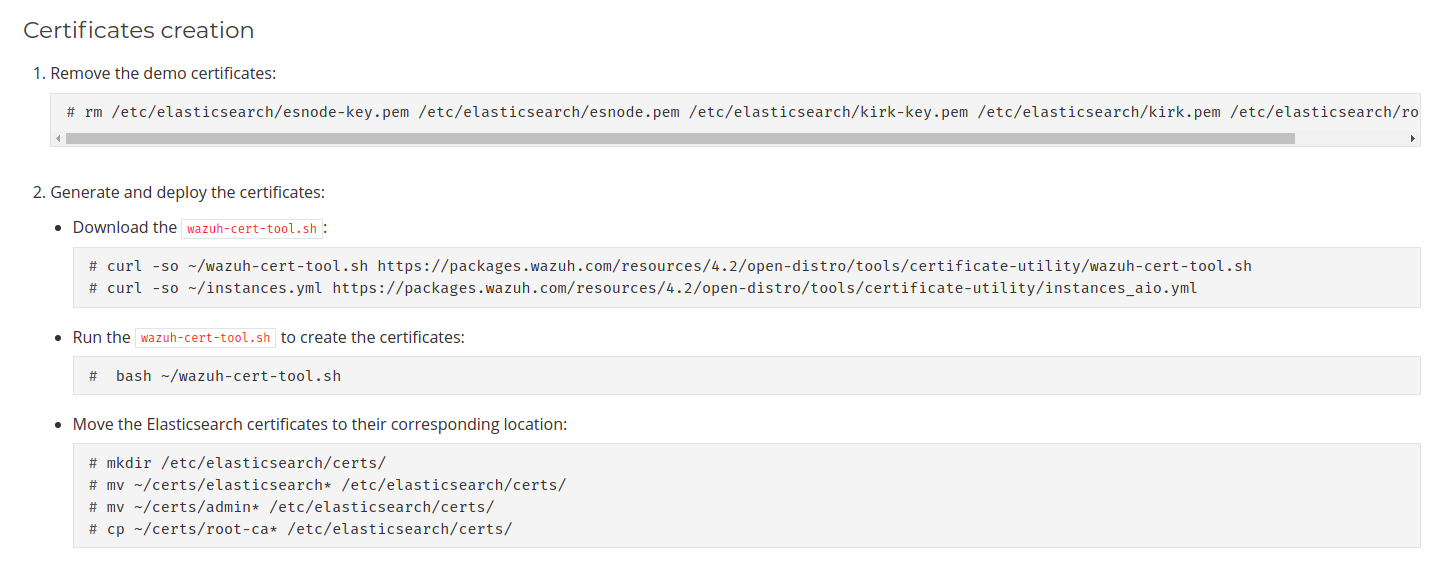
Sorry if I sound redundant, but could you please confirm Filebeat certs were replaced by executing:

Screenshot from 2021-11-18 16-57-23.png
Creating and moving Elastic certificates:

------------------------------------------------------------------------------------------------------------------------------------------
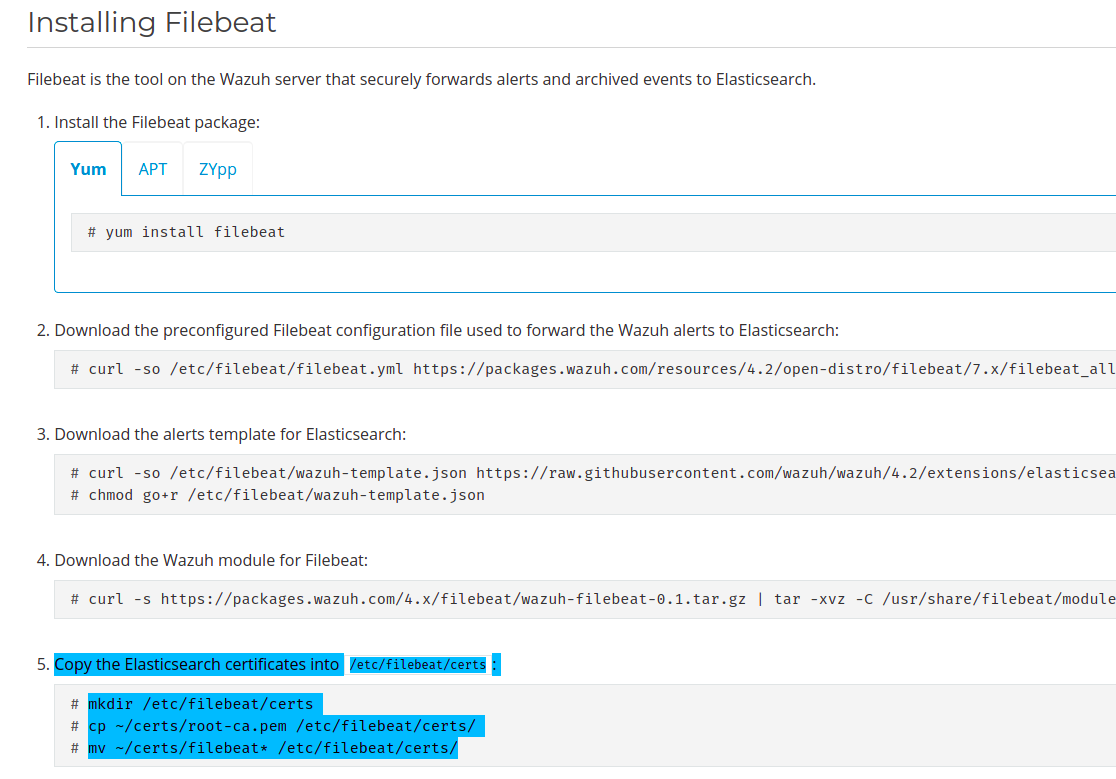
Screenshot from 2021-11-18 16-57-50.png
Installing Filebeat certificates:
------------------------------------------------------------------------------------------------------------------------------------------

If this is a dev environment, as a temporary solution, you could set output.elasticsearch.ssl.verification_mode: none 
This is NOT recommended on production.
https://www.elastic.co/guide/en/beats/filebeat/current/configuration-ssl.html

Matt Colucci

unread,
Nov 22, 2021, 10:04:49 AM11/22/21
to Wazuh mailing list
Hi, sorry for the late response. I recreated the certs again and moved them to the proper directories. The filebeat service still fails to start. Did I forget a step? I'm still following the online installation guide.

[root@SIEM certs]# ls -hal
total 12K
drwxr-xr-x. 2 root root   69 Nov 22 09:50 .
drwxr-xr-x. 4 root root  131 Nov 17 11:53 ..
-rw-------. 1 root root 1.7K Nov 22 09:48 filebeat-key.pem
-rw-r--r--. 1 root root 1.3K Nov 22 09:48 filebeat.pem
-rw-r--r--. 1 root root 1.2K Nov 22 09:50 root-ca.pem


[root@SIEM certs]# systemctl status filebeat.service
× filebeat.service - Filebeat sends log files to Logstash or directly to Elasticsearch.
     Loaded: loaded (/usr/lib/systemd/system/filebeat.service; enabled; vendor preset: disabled)
     Active: failed (Result: exit-code) since Mon 2021-11-22 09:55:16 EST; 8min ago
    Process: 1860 ExecStart=/usr/share/filebeat/bin/filebeat --environment systemd $BEAT_LOG_OPTS $BEAT_CONFIG_OPTS $BEAT_PATH_OPTS (code=exited, status=2)
   Main PID: 1860 (code=exited, status=2)
        CPU: 93ms

Nov 22 09:55:15 SIEM systemd[1]: filebeat.service: Main process exited, code=exited, status=2/INVALIDARGUMENT
Nov 22 09:55:15 SIEM systemd[1]: filebeat.service: Failed with result 'exit-code'.
Nov 22 09:55:16 SIEM systemd[1]: filebeat.service: Scheduled restart job, restart counter is at 5.
Nov 22 09:55:16 SIEM systemd[1]: Stopped Filebeat sends log files to Logstash or directly to Elasticsearch..
Nov 22 09:55:16 SIEM systemd[1]: filebeat.service: Start request repeated too quickly.
Nov 22 09:55:16 SIEM systemd[1]: filebeat.service: Failed with result 'exit-code'.
Nov 22 09:55:16 SIEM systemd[1]: Failed to start Filebeat sends log files to Logstash or directly to Elasticsearch..


Federico Rodriguez

unread,
Nov 24, 2021, 9:49:19 AM11/24/21
to Wazuh mailing list
It seems that the certificates still don't match.
The CA is not right or the certificate you use for Filebeat is signed by another CA that is not the same as for Elasticsearch. You could verify that the Certificate Authority in Filebeat and Elasticsearch is the same by comparing the files:
cat /etc/filebeat/certs/root-ca.pem
cat /etc/elasticsearch/certs/root-ca.pem
On the other hand, check that the Filebeat certificate is signed by the same CA:
cd /etc/filebeat/certs openssl verify -verbose -CAfile root-ca.pem filebeat.pem
The name of the certificates can change according to the name you have given them.


Now, the generated certificates, should be on their respective folders with the necessary permissions.

Elasticsearch

/etc/elasticsearch/certs
- Configuration: 
/etc/elasticsearch/elasticsearch.yml 

should include:
opendistro_security.ssl.transport.pemcert_filepath: /etc/elasticsearch/certs/elasticsearch.pem opendistro_security.ssl.transport.pemkey_filepath: /etc/elasticsearch/certs/elasticsearch-key.pem opendistro_security.ssl.transport.pemtrustedcas_filepath: /etc/elasticsearch/certs/root-ca.pem opendistro_security.ssl.transport.enforce_hostname_verification: false opendistro_security.ssl.transport.resolve_hostname: false opendistro_security.ssl.http.enabled: true opendistro_security.ssl.http.pemcert_filepath: /etc/elasticsearch/certs/elasticsearch.pem opendistro_security.ssl.http.pemkey_filepath: /etc/elasticsearch/certs/elasticsearch-key.pem opendistro_security.ssl.http.pemtrustedcas_filepath: /etc/elasticsearch/certs/root-ca.pem opendistro_security.nodes_dn: - CN=node-1,OU=Docu,O=Wazuh,L=California,C=US opendistro_security.authcz.admin_dn: - CN=admin,OU=Docu,O=Wazuh,L=California,C=US
Filebeat
/etc/filebeat/certs -Configuration:  
/etc/filebeat/filebeat.yml
ssl.certificate_authorities: - /etc/filebeat/certs/root-ca.pem ssl.certificate: "/etc/filebeat/certs/filebeat.pem" ssl.key: "/etc/filebeat/certs/filebeat-key.pem"
Kibana
/etc/kibana/certs
-Configuration: 
/etc/kibana/kibana.yml
server.ssl.enabled: true server.ssl.key: "/etc/kibana/certs/kibana-key.pem" server.ssl.certificate: "/etc/kibana/certs/kibana.pem" elasticsearch.ssl.certificateAuthorities: ["/etc/kibana/certs/root-ca.pem"]
Restarting all the services with the correct certificates should apply the changes. Make sure with Filebeat test output that Filebeat is able to connect correctly to the Elasticsearch.

Matt Colucci

unread,
Nov 24, 2021, 10:40:04 AM11/24/21
to Wazuh mailing list

I recently uninstalled/reinstalled elasticsearch, filebeat & kibana on the SIEM. Installation was successful on all 3. I restarted the SIEM and the filebeat service still fails to start. I went through all three yml config file and confirmed that those cert entries are there and correct.


[root@SIEM ~]# systemctl status filebeat.service

× filebeat.service - Filebeat sends log files to Logstash or directly to Elasticsearch.

     Loaded: loaded (/usr/lib/systemd/system/filebeat.service; enabled; vendor preset: disabled)

     Active: failed (Result: exit-code) since Wed 2021-11-24 10:36:11 EST; 7s ago

       Docs: https://www.elastic.co/products/beats/filebeat

    Process: 15249 ExecStart=/usr/share/filebeat/bin/filebeat --environment systemd $BEAT_LOG_OPTS $BEAT_CONFIG_OPTS $BEAT_PATH_OPTS (code=exited, status=2)

   Main PID: 15249 (code=exited, status=2)

        CPU: 106ms


Nov 24 10:36:11 SIEM systemd[1]: filebeat.service: Scheduled restart job, restart counter is at 5.

Nov 24 10:36:11 SIEM systemd[1]: Stopped Filebeat sends log files to Logstash or directly to Elasticsearch..

Nov 24 10:36:11 SIEM systemd[1]: filebeat.service: Start request repeated too quickly.

Nov 24 10:36:11 SIEM systemd[1]: filebeat.service: Failed with result 'exit-code'.

Nov 24 10:36:11 SIEM systemd[1]: Failed to start Filebeat sends log files to Logstash or directly to Elasticsearch..

Matt Colucci

unread,
Nov 24, 2021, 10:52:45 AM11/24/21
to Wazuh mailing list
Filebeat test output appears successful also.

[root@SIEM ~]# filebeat test output
elasticsearch: https://127.0.0.1:9200...
  parse url... OK
  connection...
    parse host... OK
    dns lookup... OK
    addresses: 127.0.0.1
    dial up... OK
  TLS...
    security: server's certificate chain verification is enabled
    handshake... OK
    TLS version: TLSv1.3
    dial up... OK
  talk to server... OK


Federico Rodriguez

unread,
Nov 25, 2021, 5:51:30 AM11/25/21
to Wazuh mailing list

Well, the good news is filebeat test output seems to be working correctly and as someone once said "a different error is progress". If Filebeat still fails to start after solving the certificates issue, we should dive again into the logs, as we will probably find new information. We should check mainly Filebeat logs, but Elasticsearch might provide some insight as well. Thanks a lot for you patience.

Filebeat:
cat /var/log/filebeat/filebeat | grep -i -E "error|warn"
Elasticsearch:
cat /var/log/elasticsearch/elasticsearch.log | grep -i -E "error|warn"

Matt Colucci

unread,
Dec 6, 2021, 11:47:14 AM12/6/21
to Wazuh mailing list
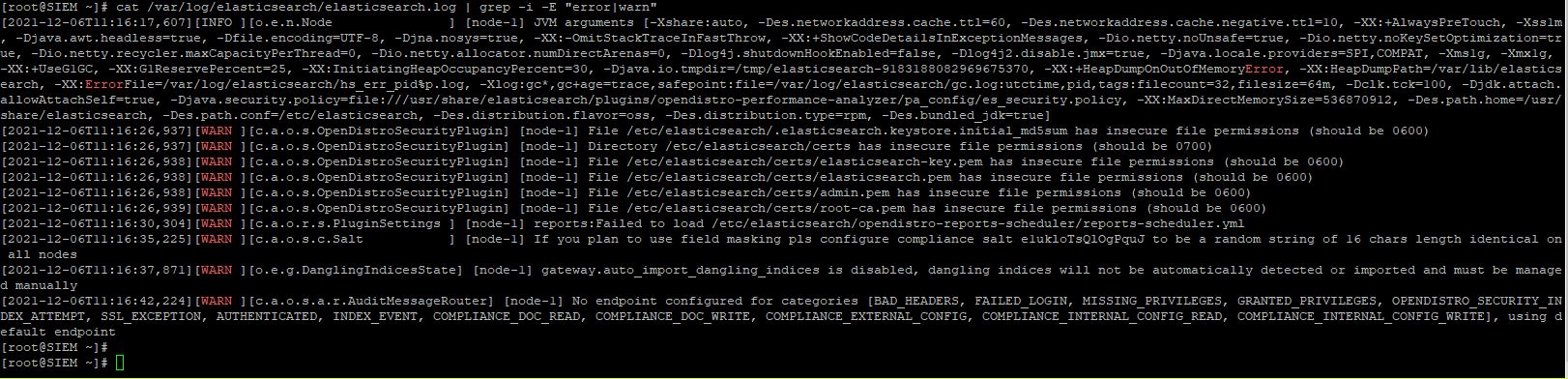
Hi! Sorry again for the late response. I ran both commands for logging. The filebeat command returned nothing. The command for elasticsearch returned some information. I've attached it to this reply. Thanks so much for all your help! Please let me know if there is anything else I should try and test.
Capture.JPG

Matt Colucci

unread,
Dec 16, 2021, 9:40:38 AM12/16/21
to Wazuh mailing list
Still messing with filebeat service on my siem. Just noticed this in journal for filebeat service. Not sure if this helps at all. Thanks again for all your help in trying to get this working for me. I truly appreciate it.

Dec 16 09:26:36 SIEM systemd[1]: filebeat.service: Main process exited, code=exited, status=2/INVALIDARGUMENT
Dec 16 09:26:36 SIEM systemd[1]: filebeat.service: Failed with result 'exit-code'.
Dec 16 09:26:36 SIEM systemd[1]: filebeat.service: Scheduled restart job, restart counter is at 3.
Dec 16 09:26:36 SIEM systemd[1]: Stopped Filebeat sends log files to Logstash or directly to Elasticsearch..
Dec 16 09:26:36 SIEM systemd[1]: Started Filebeat sends log files to Logstash or directly to Elasticsearch..
Dec 16 09:26:36 SIEM filebeat[127599]: 2021-12-16T09:26:36.612-0500        INFO        instance/beat.go:645        Home path: [/usr/share/filebeat] Config path: [/etc/filebeat] Data path: [/var/lib/f>
Dec 16 09:26:36 SIEM filebeat[127599]: 2021-12-16T09:26:36.612-0500        INFO        instance/beat.go:653        Beat ID: 96171bd3-319a-4fb0-9833-5918cafe83f5
Dec 16 09:26:36 SIEM filebeat[127599]: 2021-12-16T09:26:36.614-0500        INFO        [seccomp]        seccomp/seccomp.go:124        Syscall filter successfully installed
Dec 16 09:26:36 SIEM filebeat[127599]: 2021-12-16T09:26:36.614-0500        INFO        [beat]        instance/beat.go:981        Beat info        {"system_info": {"beat": {"path": {"config": "/etc/fi>
Dec 16 09:26:36 SIEM filebeat[127599]: 2021-12-16T09:26:36.614-0500        INFO        [beat]        instance/beat.go:990        Build info        {"system_info": {"build": {"commit": "aacf9ecd9c494a>
Dec 16 09:26:36 SIEM filebeat[127599]: 2021-12-16T09:26:36.614-0500        INFO        [beat]        instance/beat.go:993        Go runtime info        {"system_info": {"go": {"os":"linux","arch":"am>
Dec 16 09:26:36 SIEM filebeat[127599]: 2021-12-16T09:26:36.617-0500        INFO        [beat]        instance/beat.go:997        Host info        {"system_info": {"host": {"architecture":"x86_64","bo>
Dec 16 09:26:36 SIEM filebeat[127599]: 2021-12-16T09:26:36.617-0500        INFO        [beat]        instance/beat.go:1026        Process info        {"system_info": {"process": {"capabilities": {"in>
Dec 16 09:26:36 SIEM filebeat[127599]: 2021-12-16T09:26:36.618-0500        INFO        instance/beat.go:299        Setup Beat: filebeat; Version: 7.10.2
Dec 16 09:26:36 SIEM filebeat[127599]: 2021-12-16T09:26:36.619-0500        INFO        eslegclient/connection.go:99        elasticsearch url: https://127.0.0.1:9200
Dec 16 09:26:36 SIEM filebeat[127599]: runtime/cgo: pthread_create failed: Operation not permitted
Dec 16 09:26:36 SIEM filebeat[127599]: SIGABRT: abort

Matt Colucci

unread,
Jan 11, 2022, 1:42:28 PM1/11/22
to Wazuh mailing list
Hello! I was able to resolve my issue with the filebeat service. However this "fix" was to format the SIEM server and install a new operating system. I changed from Fedora 35 to CentOS 8. Following the same instructions for installation afterwards and everything worked successfully. Thanks again for all of your help and suggestions.
Reply all
Reply to author
Forward
Message has been deleted
0 new messages