
Detect if port 3389 RDP is enabled

gabriel yap
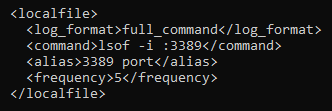
I also added this rule in my wazuh manager
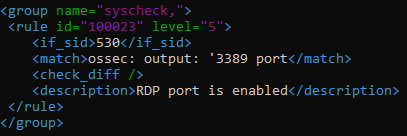
This is the output I get when I run the command

This is the output I get when I turn port 3389 off


Pedro Nicolás Gomez
Hi gabriel yap,
The check_diff statement in the rule makes this rule trigger when the output is different, so if between executions of the command "lsof -i :3389" the port is enabled this rule is not triggered because the previous output is equal to the current one.
I have done a test with the configuration you have passed and by stopping the xrdp service and restarting it we can see how the rule is triggered:
{"timestamp":"2023-06-28T11:21:10.346-0300","rule":{"level":3,"description":"RDP port is enabled.","id":"100023","fir
edtimes":2,"mail":false,"groups":["syscheckpci_dss_10.2.7"],"pci_dss":["10.6.1"],"gpg13":["10.1"],"gdpr":["IV_35.7.d"
]},"agent":{"id":"000","name":"nico-VirtualBox"},"manager":{"name":"nico-VirtualBox"},"id":"1687962070.2179288","prev
ious_output":"Previous output:\nossec: output: '3389 port':\nCOMMAND PID USER FD TYPE DEVICE SIZE/OFF NODE NAME
\nxrdp 32180 xrdp 11u IPv6 547588 0t0 TCP *:ms-wbt-server (LISTEN)","full_log":"ossec: output: '3389 port
':\nCOMMAND PID USER FD TYPE DEVICE SIZE/OFF NODE NAME\nxrdp 33654 xrdp 11u IPv6 562187 0t0 TCP *:m
s-wbt-server (LISTEN)","decoder":{"name":"ossec"},"previous_log":"ossec: output: '3389 port':\nCOMMAND PID USER F
D TYPE DEVICE SIZE/OFF NODE NAME\nxrdp 32180 xrdp 11u IPv6 547588 0t0 TCP *:ms-wbt-server (LISTEN)","lo
cation":"3389 port"}
If you want the rule to be triggered whenever port 3389 is enabled, you would have to make some changes to the rule, for example like this:
<group name="syscheck">
<rule id="100023" level="3">
<if_sid>530</if_sid>
<match>ossec: output: '3389 port</match>
<regex>xrdp\.+(\d+)</regex>
<description>RDP port is enabled.</description>
<group>pci_dss_10.2.7,pci_dss_10.6.1,gpg13_10.1,gdpr_IV_35.7.d,</group>
</rule>
</group>
Here we must take into account that it can fill alerts because if we keep the frequency of execution of the command in 5, if the port is enabled it would generate an alert every 5 sec:
{"timestamp":"2023-06-28T11:38:03.222-0300","rule":{"level":3,"description":"RDP port is enabled.","id":"100023","firedtimes":106,"mail":false,"groups":["syscheckpci_dss_10.2.7"],"pci_dss":["10.6.1"],"gpg13":["10.1"],"gdpr":["IV_35.7.d"]},"agent":{"id":"000","name":"nico-VirtualBox"},"manager":{"name":"nico-VirtualBox"},"id":"1687963083.2223881","full_log":"ossec: output: '3389 port':\nCOMMAND PID USER FD TYPE DEVICE SIZE/OFF NODE NAME\nxrdp 33654 xrdp 11u IPv6 562187 0t0 TCP *:ms-wbt-server (LISTEN)","decoder":{"name":"ossec"},"location":"3389 port"}
{"timestamp":"2023-06-28T11:38:09.263-0300","rule":{"level":3,"description":"RDP port is enabled.","id":"100023","firedtimes":107,"mail":false,"groups":["syscheckpci_dss_10.2.7"],"pci_dss":["10.6.1"],"gpg13":["10.1"],"gdpr":["IV_35.7.d"]},"agent":{"id":"000","name":"nico-VirtualBox"},"manager":{"name":"nico-VirtualBox"},"id":"1687963089.2224237","full_log":"ossec: output: '3389 port':\nCOMMAND PID USER FD TYPE DEVICE SIZE/OFF NODE NAME\nxrdp 33654 xrdp 11u IPv6 562187 0t0 TCP *:ms-wbt-server (LISTEN)","decoder":{"name":"ossec"},"location":"3389 port"}
{"timestamp":"2023-06-28T11:38:15.335-0300","rule":{"level":3,"description":"RDP port is enabled.","id":"100023","firedtimes":108,"mail":false,"groups":["syscheckpci_dss_10.2.7"],"pci_dss":["10.6.1"],"gpg13":["10.1"],"gdpr":["IV_35.7.d"]},"agent":{"id":"000","name":"nico-VirtualBox"},"manager":{"name":"nico-VirtualBox"},"id":"1687963095.2224593","full_log":"ossec: output: '3389 port':\nCOMMAND PID USER FD TYPE DEVICE SIZE/OFF NODE NAME\nxrdp 33654 xrdp 11u IPv6 562187 0t0 TCP *:ms-wbt-server (LISTEN)","decoder":{"name":"ossec"},"location":"3389 port"}
{"timestamp":"2023-06-28T11:38:21.335-0300","rule":{"level":3,"description":"RDP port is enabled.","id":"100023","firedtimes":109,"mail":false,"groups":["syscheckpci_dss_10.2.7"],"pci_dss":["10.6.1"],"gpg13":["10.1"],"gdpr":["IV_35.7.d"]},"agent":{"id":"000","name":"nico-VirtualBox"},"manager":{"name":"nico-VirtualBox"},"id":"1687963101.2224949","full_log":"ossec: output: '3389 port':\nCOMMAND PID USER FD TYPE DEVICE SIZE/OFF NODE NAME\nxrdp 33654 xrdp 11u IPv6 562187 0t0 TCP *:ms-wbt-server (LISTEN)","decoder":{"name":"ossec"},"location":"3389 port"}
I hope it helps.
Best regards,
Pedro Nicolas.
gabriel yap

**Phase 1: Completed pre-decoding.
full event: '{"timestamp":"2023-06-28T15:19:29.013+0000","agent":{"id":"001","name":"Agent1","ip":"192.168.254.126"},"manager":{"name":"123"},"id":"1687965569.51781","full_log":"ossec: output: '3389 port':\nCOMMAND PID USER FD TYPE DEVICE SIZE/OFF NODE NAME\nxrdp 2444 xrdp 11u IPv6 182608 0t0 TCP *:ms-wbt-server (LISTEN)","decoder":{"name":"ossec"},"location":"3389 port"}'
**Phase 2: Completed decoding.
name: 'json'
**Phase 3: Completed filtering (rules).
id: '100023'
level: '5'
description: 'RDP port is enabled'
groups: '['syscheck']'
firedtimes: '5'
mail: 'False'
**Alert to be generated.
Pedro Nicolás Gomez
Hi Gabriel,
Ok, the logs will generate an alert.
Now we must make sure that you have restarted the manager after adding the new rule, it is not necessary to test in wazuh-logtest but it is necessary to generate alerts.
Note: tests in wazuh-logtest do not generate an alert to be displayed in wazuh-dashboard.
After restarting wazuh-manager you can check if the new rule is being activated, to do this check if in the file /var/ossec/logs/alerts/alerts.json alerts like the following are being generated:
{"timestamp":"2023-06-28T11:38:21.335-0300","rule":{"level":3,"description":"RDP port is enabled.","id":"100023","firedtimes":109,"mail":false,"groups":["syscheckpci_dss_10.2.7"],"pci_dss":["10.6.1"],"gpg13":["10.1"],"gdpr":["IV_35.7.d"]},"agent":{"id":"000","name":"nico-VirtualBox"},"manager":{"name":"nico-VirtualBox"},"id":"1687963101.2224949","full_log":"ossec: output: '3389 port':\nCOMMAND PID USER FD TYPE DEVICE SIZE/OFF NODE NAME\nxrdp 33654 xrdp 11u IPv6 562187 0t0 TCP *:ms-wbt-server (LISTEN)","decoder":{"name":"ossec"},"location":"3389 port"}
For this "xrdp" should be activated in the agent you have configured the localfile
