
Wazuh, filebeat, logstash log
821 views
Skip to first unread message

Felipe Andres Concha Sepúlveda
Oct 8, 2018, 5:29:20 AM10/8/18
to Wazuh mailing list
Hello everyone,
I have a question regarding the configuration of the log in Wazuh, Filebeat, elasticsearch and Logstash
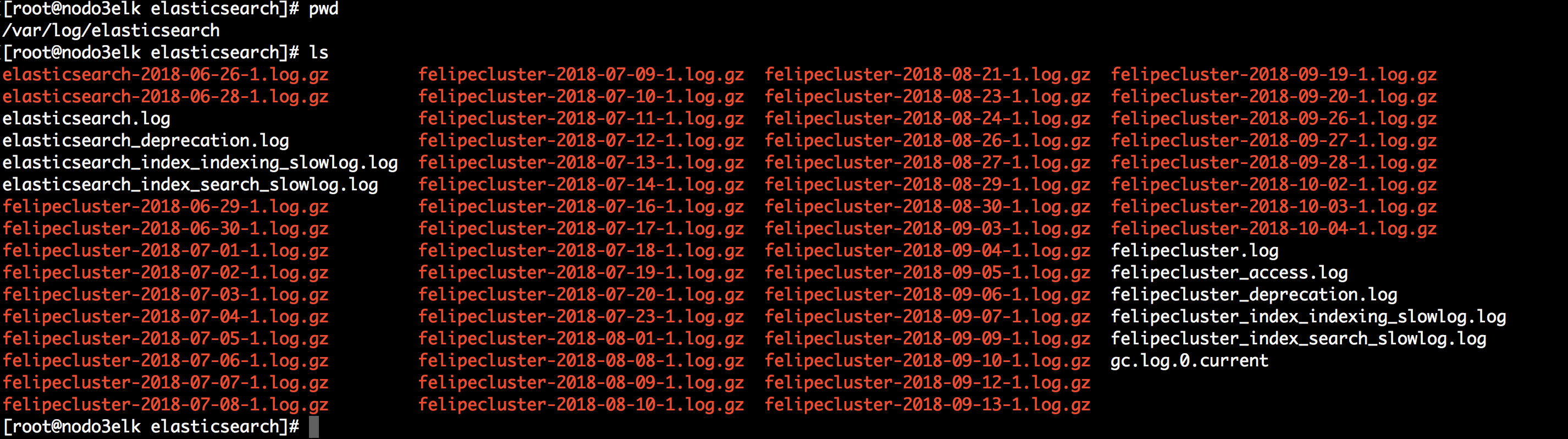
Where can I change the configuration of the rotation, compression of the old ones etc .. of the log in Filebeat
I do not see that they are with logrotate

Where can I change the configuration of the rotation, compression of the old etc .. of the log in cluster.log and ossec.log
I do not see that they are with logrotate

Where can I change the configuration of the rotation, compression of the old etc .. of the log in logstash-plain.log
I do not see that they are with logrotate

Where can I change the configuration of the rotation, compression of the old etc .. of the log in cluster.log
I do not see that they are with logrotate

jesus.g...@wazuh.com
Oct 8, 2018, 7:36:44 AM10/8/18
to Wazuh mailing list
Hello Felipe,
From my view, the relevant section for you is:
Same procedure as Elasticsearch.
There are some files for your desired goal. I'm going to explain component by component.
Elasticsearch and Logstash
Both components are using log4j2 as logger. Edit the file under /etc/elasticsearch/log4j2.properties, that file is the "log" configuration for Elasticsearch.
vi /etc/elasticsearch/log4j2.propertiesFrom my view, the relevant section for you is:
...
appender.rolling.type = RollingFile
appender.rolling.name = rolling
appender.rolling.fileName = ${sys:es.logs.base_path}${sys:file.separator}${sys:es.logs.cluster_name}.log
appender.rolling.layout.type = PatternLayout
appender.rolling.layout.pattern = [%d{ISO8601}][%-5p][%-25c{1.}] %marker%.-10000m%n
appender.rolling.filePattern = ${sys:es.logs.base_path}${sys:file.separator}${sys:es.logs.cluster_name}-%d{yyyy-MM-dd}-%i.log.gz
appender.rolling.policies.type = Policies
appender.rolling.policies.time.type = TimeBasedTriggeringPolicy
appender.rolling.policies.time.interval = 1
appender.rolling.policies.time.modulate = true
appender.rolling.policies.size.type = SizeBasedTriggeringPolicy
appender.rolling.policies.size.size = 128MB
appender.rolling.strategy.type = DefaultRolloverStrategy
appender.rolling.strategy.fileIndex = nomax
appender.rolling.strategy.action.type = Delete
appender.rolling.strategy.action.basepath = ${sys:es.logs.base_path}
appender.rolling.strategy.action.condition.type = IfFileName
appender.rolling.strategy.action.condition.glob = ${sys:es.logs.cluster_name}-*
appender.rolling.strategy.action.condition.nested_condition.type = IfAccumulatedFileSize
...
There you can see properties such appender.rolling.policies.size.size or appender.rolling.filePattern
When modifying Logstash, please edit the file under /etc/logstash/log4j2.properties
vi /etc/logstash/log4j2.propertiesSame procedure as Elasticsearch.
Full log4j2 reference:
Useful link:
Regarding to Wazuh itself we are supporting modify the ossec.log settings but not the cluster.log settings:
- There are a few of internal options for the Wazuh manager the ossec.log file. Edit the internal options and restart your Wazuh manager.
- The cluster.log file, currently works in a different way, you can take a look at this function.
- https://github.com/wazuh/wazuh/blob/master/framework/wazuh/cluster/cluster.py#L577
- Feature request for further releases.
Filebeat
Edit the Filebeat configuration file under /etc/filebeat/filebeat.yml, adding the required logging settings. Here is a
reference from /etc/filebeat/filebeat.reference.yml:
#================================ Logging ======================================
# There are four options for the log output: file, stderr, syslog, eventlog
# The file output is the default.


# Sets log level. The default log level is info.
# Available log levels are: error, warning, info, debug
#logging.level: info


# Enable debug output for selected components. To enable all selectors use ["*"]
# Other available selectors are "beat", "publish", "service"
# Multiple selectors can be chained.
#logging.selectors: [ ]


# Send all logging output to syslog. The default is false.
#logging.to_syslog: false


# Send all logging output to Windows Event Logs. The default is false.
#logging.to_eventlog: false


# If enabled, filebeat periodically logs its internal metrics that have changed
# in the last period. For each metric that changed, the delta from the value at
# the beginning of the period is logged. Also, the total values for
# all non-zero internal metrics are logged on shutdown. The default is true.
#logging.metrics.enabled: true


# The period after which to log the internal metrics. The default is 30s.
#logging.metrics.period: 30s


# Logging to rotating files. Set logging.to_files to false to disable logging to
# files.
logging.to_files: true
logging.files:
  # Configure the path where the logs are written. The default is the logs directory
  # under the home path (the binary location).
  #path: /var/log/filebeat


  # The name of the files where the logs are written to.
  #name: filebeat


  # Configure log file size limit. If limit is reached, log file will be
  # automatically rotated
  #rotateeverybytes: 10485760 # = 10MB


  # Number of rotated log files to keep. Oldest files will be deleted first.
  #keepfiles: 7


  # The permissions mask to apply when rotating log files. The default value is 0600.
  # Must be a valid Unix-style file permissions mask expressed in octal notation.
  #permissions: 0600


# Set to true to log messages in json format.
#logging.json: false
Add your desired settings to your /etc/filebeat/filebeat.yml
That's all Felipe. Remember to restart each service if you modify its configuration. I also want to say that I've not tested all the options described above.
Let us know. I hope it helps.
Best regards,
Jesús
Felipe Andres Concha Sepúlveda
Oct 8, 2018, 10:51:29 AM10/8/18
to Wazuh mailing list
Very clear!!!
thank you Jesus for the answer
Regards,
Felipe
> El 08-10-2018, a las 11:29, Felipe Andres Concha Sepúlveda <felipeandresc...@gmail.com> escribió:
>
> Hello everyone,
> I have a question regarding the configuration of the log in Wazuh, Filebeat, elasticsearch and Logstash
>
> Where can I change the configuration of the rotation, compression of the old ones etc .. of the log in Filebeat
> I do not see that they are with logrotate
> <PastedGraphic-1.png>
thank you Jesus for the answer
Regards,
Felipe
> El 08-10-2018, a las 11:29, Felipe Andres Concha Sepúlveda <felipeandresc...@gmail.com> escribió:
>
> Hello everyone,
> I have a question regarding the configuration of the log in Wazuh, Filebeat, elasticsearch and Logstash
>
> Where can I change the configuration of the rotation, compression of the old ones etc .. of the log in Filebeat
> I do not see that they are with logrotate
>
>
>
> Where can I change the configuration of the rotation, compression of the old etc .. of the log in cluster.log and ossec.log
> I do not see that they are with logrotate
> <PastedGraphic-2.png>
>
>
> Where can I change the configuration of the rotation, compression of the old etc .. of the log in cluster.log and ossec.log
> I do not see that they are with logrotate
>
>
> Where can I change the configuration of the rotation, compression of the old etc .. of the log in logstash-plain.log
> I do not see that they are with logrotate
> <PastedGraphic-3.png>
>
> Where can I change the configuration of the rotation, compression of the old etc .. of the log in logstash-plain.log
> I do not see that they are with logrotate
>
>
>
> Where can I change the configuration of the rotation, compression of the old etc .. of the log in cluster.log
> I do not see that they are with logrotate
> <PastedGraphic-4.png>
>
>
> Where can I change the configuration of the rotation, compression of the old etc .. of the log in cluster.log
> I do not see that they are with logrotate
jesus.g...@wazuh.com
Oct 9, 2018, 4:50:41 AM10/9/18
to Wazuh mailing list
You are welcome Felipe!
El lunes, 8 de octubre de 2018, 16:51:29 (UTC+2), Felipe Andres Concha Sepúlveda escribió:
Very clear!!!
thank you Jesus for the answer
Regards,
Felipe
jesus.g...@wazuh.com
Oct 9, 2018, 3:12:29 PM10/9/18
to Wazuh mailing list
Hi Felipe,
I hope it helps Felipe.
Best regards,
It looks like I was the only one reading your answer in my mail inbox, so I'm copying here your last mail:
Hi Jesus,
I have a question regarding the removal of ossec logs
While I see in configuration file /var/ossec/etc/internal_options.conf that monitord.keep_log_days is set in 31 days, this configuration is for all log in /var/ossec/logs?
Does ossec.log have a different behavior than the alert or archives folder?
Because I see that for each type of log a folder is created with the year and then every month with the information.
There is some automatic way to remove the oldest log files: alerts, archives, oseec, firewall, cluster, api?
So the Elastic components logs are solved in my last message, right? Let's dig into the Wazuh logs.
- Alert logs are rotated and archived. Since they are probably ingested by Elasticsearch you have two options here:
- Clean your rotated logs or clean your old Elasticsearch indices. My suggestion is to clean old Elasticsearch indices and move your rotated Wazuh alert logs to a different storage.
- Old rotated Wazuh alert logs can be reindexed into Elasticsearch if needed, let us know if you need help with this some day.
- Files to move are located under /var/ossec/logs/alerts/<YEAR>
- Do not move/delete next two files: /var/ossec/logs/alerts/alerts.json and /var/ossec/logs/alerts/alerts.log
- Archives log are commonly used for debug purposes, you can disable it, edit your ossec.conf and look for <log_all>, set it to no.
- The ossec.log can be customized as I said in my last message, so I understand it's clear for you. Let us know if not the case.
- Other logs should be rotated using the same structure (<LOG_NAME>/<YEAR>) and you can remove it. This means rotated API logs are for your own usage, you can look for errors or API usage, they are not used by the core components. Their role is to provide you useful information in error case.
Best regards,
Jesús
Reply all
Reply to author
Forward
0 new messages