
ERROR x509: certificate signed by unknown authority

stetnt4
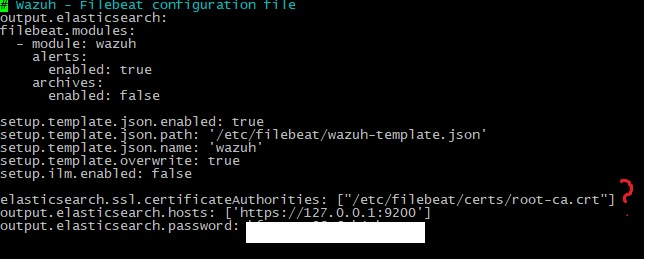
I generated 2 keys server.crt and server.key according to the instructions https://documentation.wazuh.com/current/user-manual/api/configuration.html#ssl-certificate, put them in the /etc/filebeat/certs folder. I tried to register /etc/filebeat/filebeat.yml keys to elasticsearch.ssl.certificateAuthorities: ["/etc/filebeat/certs/root-ca.crt"] instead of root-ca.crt.
What am I doing wrong?


Raul Del Pozo Moreno
Keep in mind that the documentation you have followed is for the API and has nothing to do with Filebeat or the communication between the components, if you want to redo the certificates you should use the tool https://packages.wazuh.com/4.5/wazuh-certs-tool.sh (depends on the version you are using)
In this link, I leave the process to create the certificates: https://documentation.wazuh.com/current/installation-guide/wazuh-indexer/step-by-step.html#generating-the-ssl-certificates
To see more options please look at the output of: wazuh-certs-tool.sh -h
No, you cannot modify that configuration in that way, the root-ca certificates are the root certificates through which the rest of the certificates are created and it is common to all the component configurations, if you modify it, you will have to redo the rest of the certificates, in that specific configuration there must be a root certificate and not the others.
The Filebeat configuration sets the certificates as follows (this is an example of the 4.5.2 version):
output.elasticsearch:
ssl.certificate_authorities:
- /etc/filebeat/certs/root-ca.pem
ssl.certificate: "/etc/filebeat/certs/wazuh-server.pem"
ssl.key: "/etc/filebeat/certs/wazuh-server-key.pem"
Note that you haven't put it inside the output block.
 | Raúl Del Pozo Moreno QA + Automation engineer |
--
You received this message because you are subscribed to the Google Groups "Wazuh | Mailing List" group.
To unsubscribe from this group and stop receiving emails from it, send an email to wazuh+un...@googlegroups.com.
To view this discussion on the web visit https://groups.google.com/d/msgid/wazuh/a70d61f7-6ac0-4bb7-8a7a-55077aae689fn%40googlegroups.com.
stetnt4


Raul Del Pozo Moreno
- What are you trying to achieve?
- What type of deployment have you done and what version of Wazuh are you using?
- Are you rewriting the Filebeat template?
- What guide have you followed to carry out the deployment and configuration?
Hello!I'm setting up wazuh dashboard. To do this I need to configure wazuh-manager, wazuh-indexer, filebeat, elasticsearch.
If you are installing everything from scratch, it is not necessary to install Elasticsearch since Wazuh indexer replaces it, if you are carrying out an upgrade, it requires migrating from Elasticsearch to Wazuh indexer
If you are carrying out a deployment, I recommend following the documentation, either through the Wazuh installation assistant or through Step by Step, both for an All in One deployment and for a distributed deployment, but it is important to follow the documentation in order and as indicated
This guide will do the following:
- Creation of certificates
- Creation of the certificates and creation of a tar file for them, this file must be transferred to the other nodes (if distributed) in order to complete the certificate configuration of each component
- Installation and configuration of Wazuh indexer
- Installation and configuration of Filebeat and Wazuh manager
- Installation and configuration of Wazuh dashboard
Regarding the images, I see that the Wazuh indexer service has failed, could you tell me what error you have? To do this, run the following commands:
- journalctl -r -u wazuh-indexer | grep -i -E "error|critical|fatal|warning"
- grep -R -i -E "error|critical|fatal|warning" /var/log/wazuh-indexer
Store the output of the two previous commands in two files and share them as an attached file. Please eliminate any sensitive information such as public IPs.
Regarding the Filebeat configuration, the line you are modifying is not a native Filebeat option, please remove it
- elasticsearch.ssl.certificateAuthorities
Why are you adding this line? Note that you already have the certificate authorities established in the configuration itself
output.elasticsearch:
ssl.certificate_authorities:
- /etc/filebeat/certs/root-ca.pem
Keep in mind that although it makes references to the word elasticsearch, this does not mean that you have to install Elasticsearch, due to the license change that Elasticsearch made, AWS created a fork called OpenSearch, of which we are making our own fork (Wazuh indexer), the word elasticsearch is just a part of the Filebeat configuration structure
The line that you are adding can be found in the Wazuh dashboard configuration:
- opensearch.ssl.certificateAuthorities: ["/etc/wazuh-dashboard/certs/root-ca.pem"]
| Raúl Del Pozo Moreno QA + Automation engineer |
To view this discussion on the web visit https://groups.google.com/d/msgid/wazuh/71bb0434-dd2e-4d9b-a921-8965774a5535n%40googlegroups.com.
stetnt4
curl -so /etc/filebeat/filebeat.yml https://packages.wazuh.com/4.5/tpl/wazuh/filebeat/filebeat.yml
Installation from scratch. Removed elascticsearch
Returned filebeat to initial configuration
I used these guides https://documentation.wazuh.com/current/installation-guide/index.html
https://documentation.wazuh.com/current/deployment-options/elastic-stack/all-in-one-deployment/index.html


stetnt4
stetnt4

Raul Del Pozo Moreno
I'm trying to set up a dashboard! All-in-one deployment without Kibana
Why did you share this link? https://documentation.wazuh.com/current/deployment-options/elastic-stack/all-in-one-deployment/index.html, this link is to install the Elastic Stack, this deployment cannot coexist with Wazuh dashboard or Wazuh indexer, let's see, we currently have 2 types of deployment:
- Deployment of Wazuh components (Wazuh server (manager and Filebeat), Wazuh indexer and Wazuh dashboard
- Deployment of Wazuh with Elastic Stack (Wazuh server (manager and Fileeat), Elasticsearch, and Kibana
Either you do one deployment or the other, but not both at the same time
Okay, assuming you only have Wazuh manager, Filebeat, Wazuh indexer, and Wazuh dashboard installed on your system, let's go from the beginning to get each component working.
The first step is to fix the Wazuh indexer, as you can see, it failed, the Filebeat error is expected since the Wazuh indexer is not running (connects through port 9200)
Can you show me the configuration of the Wazuh indexer located at /etc/wazuh-indexer/opensearch.yml?
| Raúl Del Pozo Moreno QA + Automation engineer |
To view this discussion on the web visit https://groups.google.com/d/msgid/wazuh/0a00c665-44ba-410b-8e87-b34dac97aaben%40googlegroups.com.
stetnt4

stetnt4
Raul Del Pozo Moreno
It is strange that the service is in a failed state but no error logs are seen, since the messages
Sep 20 13:39:22 centos71 systemd-entrypoint[2885]: WARNING: System::setSecurityManager will be removed in a future release
Sep 20 13:39:22 centos71 systemd-entrypoint[2885]: WARNING: Please consider reporting this to the maintainers of org.opensearch.bootstrap.OpenSearch
Sep 20 13:39:22 centos71 systemd-entrypoint[2885]: WARNING: System::setSecurityManager has been called by org.opensearch.bootstrap.OpenSearch (file:/usr/share/wazuh-indexer/lib/opensearch-2.6. 0.jar)
Sep 20 13:39:22 centos71 systemd-entrypoint[2885]: WARNING: A terminally deprecated method in java.lang.System has been called
are expected and classified as WARNING, which does not cause the service to fail
What is different is the additional message that you have identified by at org., what system are you using?
Please show the output of the following command:
- cat /usr/share/wazuh-indexer/VERSION
It is also strange that there is no error log in /var/log/wazuh-indexer, please run the following commands again:
- grep -R -i -E "error|critical|fatal|warning" /var/log/wazuh-indexer > indexer.log
- wc -l indexer.log
- journalctl -r -u wazuh-indexer | grep -i -E "error|critical|fatal|warning" > indexer-journal.log
Please attach the log files to this conversation.
| Raúl Del Pozo Moreno QA + Automation engineer |
To view this discussion on the web visit https://groups.google.com/d/msgid/wazuh/9a43d171-6983-467b-a3e0-0a49740f4d75n%40googlegroups.com.


stetnt4

Raul Del Pozo Moreno

The latest published version of Wazuh is 4.5.2, how did you install Wazuh? If you are installing from the repository please check that you are using the correct repository
For Yum systems
- rpm --import https://packages.wazuh.com/key/GPG-KEY-WAZUH
- echo -e '[wazuh]\ngpgcheck=1\ngpgkey=https://packages.wazuh.com/key/GPG-KEY-WAZUH\nenabled=1\nname=EL-$releasever - Wazuh\nbaseurl=https:/ /packages.wazuh.com/4.x/yum/\nprotect=1' | tee /etc/yum.repos.d/wazuh.repo
For APT systems
- curl -s https://packages.wazuh.com/key/GPG-KEY-WAZUH | gpg --no-default-keyring --keyring gnupg-ring:/usr/share/keyrings/wazuh.gpg --import && chmod 644 /usr/share/keyrings/wazuh.gpg
- echo "deb [signed-by=/usr/share/keyrings/wazuh.gpg] https://packages.wazuh.com/4.x/apt/ stable main" | tee -a /etc/apt/sources.list.d/wazuh.list
| Raúl Del Pozo Moreno QA + Automation engineer |
To view this discussion on the web visit https://groups.google.com/d/msgid/wazuh/fad710bf-386d-468e-b32e-a9fd117653fan%40googlegroups.com.
stetnt4
stetnt4

Raul Del Pozo Moreno
Could you check the directory: /etc/apt/sources.list.d/?
You should only have one wazuh.list file
Also, do this search and show me the result.
- grep -i -E -R "wazuh" /etc/apt/sources.list.d
| Raúl Del Pozo Moreno QA + Automation engineer |
To view this discussion on the web visit https://groups.google.com/d/msgid/wazuh/45ee8270-addd-4824-bb94-1981df20d7een%40googlegroups.com.
stetnt4


Raul Del Pozo Moreno
You must delete the /etc/apt/sources.list.d/wazuh_pre_release.list file and update the repositories on the system with apt-get update
| Raúl Del Pozo Moreno QA + Automation engineer |
To view this discussion on the web visit https://groups.google.com/d/msgid/wazuh/ec7874bc-1f72-40f2-b96b-c88c07f1cd76n%40googlegroups.com.
stetnt4

Raul Del Pozo Moreno

| Raúl Del Pozo Moreno QA + Automation engineer |
To view this discussion on the web visit https://groups.google.com/d/msgid/wazuh/a3b6ec4a-ae88-49aa-871d-48d2802f3a5an%40googlegroups.com.
Raul Del Pozo Moreno
The command "journalctl -r -u wazuh-indexer | grep -i -E "error|critical|fatal|warning" > indexer-journal.log" redirects the output of the journalctl command into a new file called indexer-journal.log that is created in the directory from where you executed the command. I need to analyze said file to be able to determine where the problem you have may be.
| Raúl Del Pozo Moreno QA + Automation engineer |
To view this discussion on the web visit https://groups.google.com/d/msgid/wazuh/da6e49b6-5e85-4ed9-89cc-8537fb705a16n%40googlegroups.com.
Raul Del Pozo Moreno
- systemctl restart wazuh-indexer
- journalctl -r -u wazuh-indexer > full-indexer.log
| Raúl Del Pozo Moreno QA + Automation engineer |
To view this discussion on the web visit https://groups.google.com/d/msgid/wazuh/f4d246ec-bd29-405e-afd0-e08b3f8f3deen%40googlegroups.com.
Raul Del Pozo Moreno
Sep 21 16:37:39 ossec systemd[1]: Starting Wazuh-indexer...
Sep 21 16:37:41 ossec systemd-entrypoint[115191]: Exception in thread "main" SettingsException[Failed to load settings from [opensearch.yml]]; nested: ParsingException[Failed to parse object: expecting token of type [START_OBJECT] but found [VALUE_STRING]];
Sep 21 16:37:41 ossec systemd-entrypoint[115191]: at org.opensearch.common.settings.Settings$Builder.loadFromStream(Settings.java:1140)
Sep 21 16:37:41 ossec systemd-entrypoint[115191]: at org.opensearch.common.settings.Settings$Builder.loadFromPath(Settings.java:1111)
Sep 21 16:37:41 ossec systemd-entrypoint[115191]: at org.opensearch.node.InternalSettingsPreparer.prepareEnvironment(InternalSettingsPreparer.java:96)
Sep 21 16:37:41 ossec systemd-entrypoint[115191]: at org.opensearch.cli.EnvironmentAwareCommand.createEnv(EnvironmentAwareCommand.java:118)
Sep 21 16:37:41 ossec systemd-entrypoint[115191]: at org.opensearch.cli.EnvironmentAwareCommand.createEnv(EnvironmentAwareCommand.java:109)
Sep 21 16:37:41 ossec systemd-entrypoint[115191]: at org.opensearch.cli.EnvironmentAwareCommand.execute(EnvironmentAwareCommand.java:104)
Sep 21 16:37:41 ossec systemd-entrypoint[115191]: at org.opensearch.cli.Command.mainWithoutErrorHandling(Command.java:138)
Sep 21 16:37:41 ossec systemd-entrypoint[115191]: at org.opensearch.cli.MultiCommand.execute(MultiCommand.java:104)
Sep 21 16:37:41 ossec systemd-entrypoint[115191]: at org.opensearch.cli.Command.mainWithoutErrorHandling(Command.java:138)
Sep 21 16:37:41 ossec systemd-entrypoint[115191]: at org.opensearch.cli.Command.main(Command.java:101)
Sep 21 16:37:41 ossec systemd-entrypoint[115191]: at org.opensearch.common.settings.KeyStoreCli.main(KeyStoreCli.java:56)
Sep 21 16:37:41 ossec systemd-entrypoint[115191]: Caused by: ParsingException[Failed to parse object: expecting token of type [START_OBJECT] but found [VALUE_STRING]]
Sep 21 16:37:41 ossec systemd-entrypoint[115191]: at org.opensearch.common.xcontent.XContentParserUtils.parsingException(XContentParserUtils.java:97)
Sep 21 16:37:41 ossec systemd-entrypoint[115191]: at org.opensearch.common.xcontent.XContentParserUtils.ensureExpectedToken(XContentParserUtils.java:90)
Sep 21 16:37:41 ossec systemd-entrypoint[115191]: at org.opensearch.common.settings.Settings.fromXContent(Settings.java:621)
Sep 21 16:37:41 ossec systemd-entrypoint[115191]: at org.opensearch.common.settings.Settings$Builder.loadFromStream(Settings.java:1136)
Sep 21 16:37:41 ossec systemd-entrypoint[115191]: Exception in thread "main" SettingsException[Failed to load settings from [opensearch.yml]]; nested: ParsingException[Failed to parse object: expecting token of type [START_OBJECT] but found [VALUE_STRING]];
| Raúl Del Pozo Moreno QA + Automation engineer |
To view this discussion on the web visit https://groups.google.com/d/msgid/wazuh/9ccdcbcc-8bd3-4925-ab2b-7d5055234efen%40googlegroups.com.
stetnt4

stetnt4
Raul Del Pozo Moreno

network.host: "127.0.0.1"
| Raúl Del Pozo Moreno QA + Automation engineer |
To view this discussion on the web visit https://groups.google.com/d/msgid/wazuh/8ea577a3-1650-47eb-8109-2f0269803631n%40googlegroups.com.


Raul Del Pozo Moreno
- CN=node-1,OU=Wazuh,O=Wazuh,L=California,C=US
to:
- "CN=node-1,OU=Wazuh,O=Wazuh,L=California,C=US"
Looking at the output, it looks like you have a non-encapsulated string
... .opendistro-anomaly-detector*", ".opendistro-anomaly-check>
To rule it out, share your opensearch.yml file with me so I can analyze it, but the error according to the logs is in:
Sep 21 16:58:09 ossec systemd-entrypoint[116185]: in 'reader', line 45, column 1:
Sep 21 16:58:09 ossec systemd-entrypoint[116185]: found unexpected end of stream
Sep 21 16:58:09 ossec systemd-entrypoint[116185]: ^
Sep 21 16:58:09 ossec systemd-entrypoint[116185]: ... .opendistro-anomaly-detector*", ".opendistro-anomaly-check>
Sep 21 16:58:09 ossec systemd-entrypoint[116185]: in 'reader', line 41, column 211:
Sep 21 16:58:09 ossec systemd-entrypoint[116185]: Caused by: while scanning a quoted scalar
| Raúl Del Pozo Moreno QA + Automation engineer |
To view this discussion on the web visit https://groups.google.com/d/msgid/wazuh/3dc511b6-3277-4baa-a2aa-e369986eeff1n%40googlegroups.com.
Raul Del Pozo Moreno

| Raúl Del Pozo Moreno QA + Automation engineer |
To view this discussion on the web visit https://groups.google.com/d/msgid/wazuh/28ebe5db-5613-4f0b-84a9-5d97dc8323d8n%40googlegroups.com.
Raul Del Pozo Moreno
have you copied the content from the terminal?
| Raúl Del Pozo Moreno QA + Automation engineer |


Raul Del Pozo Moreno
Exception in thread "main" org.opensearch.bootstrap.BootstrapException: java.nio.file.AccessDeniedException: /etc/wazuh-indexer/backup
In any case, you are having too many errors to carry out the installation with all the modifications you have made, so we are going to take a safe cut.
- Save the certificates
# mkdir indexer-certs-sv
# mv /etc/wazuh-indexer/certs/* indexer-certs-sv/
- Uninstall the Wazuh indexer completely
# apt remove --purge wazuh-indexer
# rm -rf /var/lib/wazuh-indexer
- Install the Wazuh indexer
# apt install wazuh-indexer
- Restore the certificates
# mkdir /etc/wazuh-indexer/certs
# mv indexer-certs-sv/* /etc/wazuh-indexer/certs/
# chmod 500 /etc/wazuh-indexer/certs
# chmod 400 /etc/wazuh-indexer/certs/*
# chown -R wazuh-indexer:wazuh-indexer /etc/wazuh-indexer/certs
- Start the Wazuh indexer service
# systemctl start wazuh-indexer
| Raúl Del Pozo Moreno QA + Automation engineer |
To view this discussion on the web visit https://groups.google.com/d/msgid/wazuh/34706697-b609-4d2f-b07b-5a525321606en%40googlegroups.com.
stetnt4
stetnt4

But a problem arose, I forgot my dashboard password and I had to generate new ones. But an error appeared in filebeat. How can I add a new password?
Using the instructions, I created new passwords
https://documentation.wazuh.com/current/user-manual/user-administration/password-management.html
curl -so wazuh-passwords-tool.sh https://packages.wazuh.com/4.5/wazuh-passwords-tool.sh
bash wazuh-passwords-tool.sh -a
We got it as an example
INFO: Wazuh API admin credentials not provided, Wazuh API passwords not changed.
INFO: The password for user admin is kwd139yG?YoIK?lRnqcXQ4R4gJDlAqKn
INFO: The password for user kibanaserver is Bu1WIELh9RdRlf*oGjinN1?yhF6XzA7V
INFO: The password for user kibanaro is 7kZvau11cPn6Y1SbOsdr8Kwr*BRiK3u+
INFO: The password for user logstash is SUbk4KTmLl*geQbUg0c5tyfwahjDMhx5
INFO: The password for user readall is ?w*Itj1Lgz.5w.C7vOw0Kxi7G94G8bG*
INFO: The password for user snapshotrestore is Z6UXgM8Sr0bfV.i*6yPPEUY3H6Du2rdz
WARNING: Wazuh indexer passwords changed. Remember to update the password in the Wazuh dashboard and Filebeat nodes if necessary, and restart the services.
stetnt4
stetnt4
Raul Del Pozo Moreno
| Raúl Del Pozo Moreno QA + Automation engineer |
To view this discussion on the web visit https://groups.google.com/d/msgid/wazuh/d6e219b7-9a92-411a-b799-6a5e57a9a1c0n%40googlegroups.com.