
Login Logs are not showing in Wazuh
186 views
Skip to first unread message

Vijay Rana
Apr 7, 2023, 8:14:03 AM4/7/23
to Wazuh mailing list
I have configured Cisco Router to send logs to Wazuh server. I am able to see failed logs, but login logs are not showing up. Can someone help me on this.
cat /var/ossec/logs/archives/archives.json | grep 172.17.42.161
This is showing up (Failed Login):
{"timestamp":"2023-04-07T13:13:00.013+0530","rule":{"level":5,"description":"syslog: User authentication failure.","id":"2501","firedtimes":1,"mail":false,"groups":["syslog","access_control","authentication_failed"],"pci_dss":["10.2.4","10.2.5"],"gpg13":["7.8"],"gdpr":["IV_35.7.d","IV_32.2"],"hipaa":["164.312.b"],"nist_800_53":["AU.14","AC.7"],"tsc":["CC6.1","CC6.8","CC7.2","CC7.3"]},"agent":{"id":"000","name":"wazuh2"},"manager":{"name":"wazuh2"},"id":"1680853380.9539","full_log":"7360: KBP-TUNNEL-ROUTER: 2w6d: %SEC_LOGIN-4-LOGIN_FAILED: Login failed [user: admin] [Source: 172.17.27.132] [localport: 22] [Reason: Login Authentication Failed] at 13:12:59 IST Fri Apr 7 2023","decoder":{},"location":"172.17.42.161"}
This is not showing up (Sucess Login):
{"timestamp":"2023-04-07T13:13:17.428+0530","agent":{"id":"000","name":"wazuh2"},"manager":{"name":"wazuh2"},"id":"1680853397.9784","full_log":"7361: KBP-TUNNEL-ROUTER: 2w6d: %SEC_LOGIN-5-LOGIN_SUCCESS: Login Success [user: vijay.rana] [Source: 172.17.27.132] [localport: 22] at 13:13:16 IST Fri Apr 7 2023","decoder":{},"location":"172.17.42.161"}
This is not showing up (Sucess Login):
{"timestamp":"2023-04-07T13:13:17.428+0530","agent":{"id":"000","name":"wazuh2"},"manager":{"name":"wazuh2"},"id":"1680853397.9784","full_log":"7361: KBP-TUNNEL-ROUTER: 2w6d: %SEC_LOGIN-5-LOGIN_SUCCESS: Login Success [user: vijay.rana] [Source: 172.17.27.132] [localport: 22] at 13:13:16 IST Fri Apr 7 2023","decoder":{},"location":"172.17.42.161"}


Abdullah Al Rafi Fahim
Apr 9, 2023, 11:08:57 PM4/9/23
to Wazuh mailing list
Hello Vijay,


Thank you for using Wazuh!
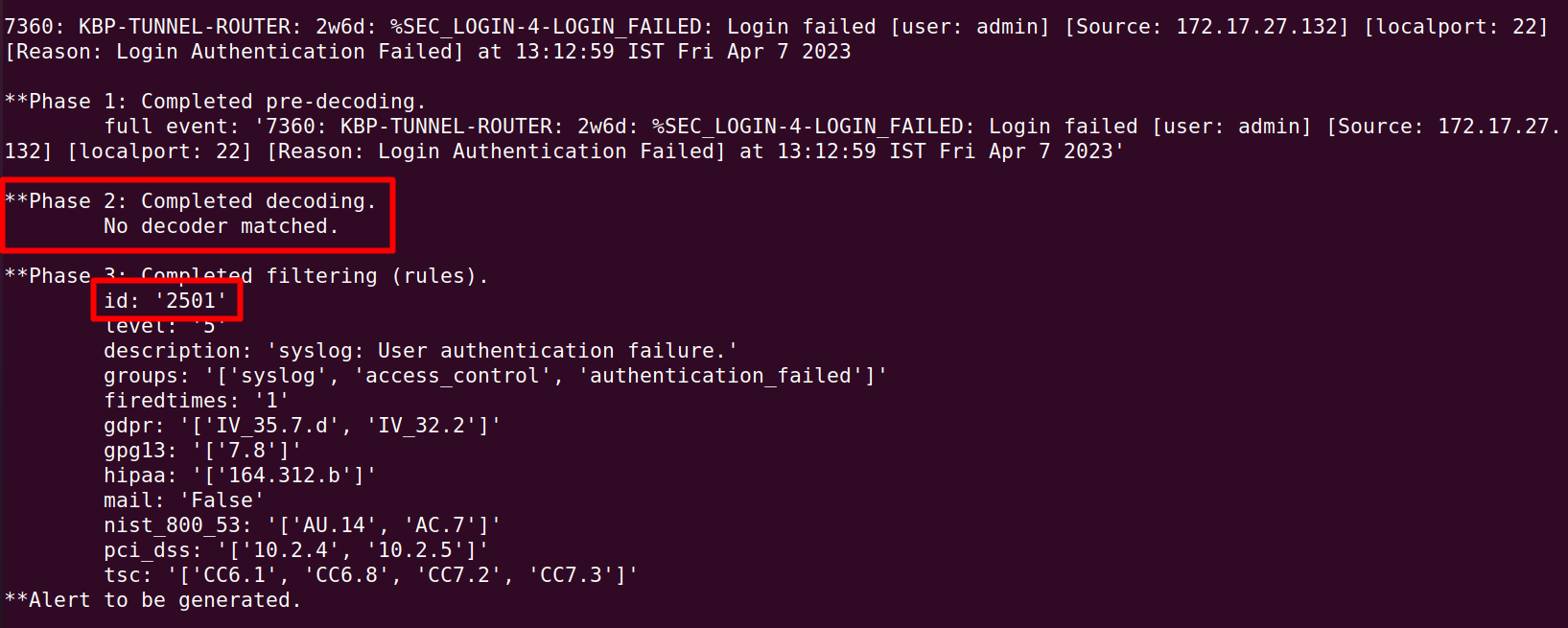
I have reviewed your sample logs from archives.json and tested them with wazuh-logtest tool. Unfortunately, none of these logs are decoded by any of the default decoders as the log format does not match them. However, the "login failed" log is generating an alert for the common syslog authentication failure rule (2501) as it is matching the "Login failed" phrase from the log.
Here are the initial logtest output:
Sample log: 7360: KBP-TUNNEL-ROUTER: 2w6d: %SEC_LOGIN-4-LOGIN_FAILED: Login failed [user: admin] [Source: 172.17.27.132] [localport: 22] [Reason: Login Authentication Failed] at 13:12:59 IST Fri Apr 7 2023
Sample log: 7361: KBP-TUNNEL-ROUTER: 2w6d: %SEC_LOGIN-5-LOGIN_SUCCESS: Login Success [user: vijay.rana] [Source: 172.17.27.132] [localport: 22] at 13:13:16 IST Fri Apr 7 2023
Therefore, the solution for this issue is to prepare some custom decoder and rule for this use case. I have prepared some of them in my testing lab and sharing them here for you as examples.
Decoders:
<decoder name="kbp-tunnel-router">
<prematch>\d+: KBP-TUNNEL-ROUTER:</prematch>
</decoder>
<decoder name="kbp-tunnel-router">
<parent>kbp-tunnel-router</parent>
<regex>(%\S+): (\.+) [user: (\S+)]</regex>
<order>log_type, log_msg, user</order>
</decoder>
<prematch>\d+: KBP-TUNNEL-ROUTER:</prematch>
</decoder>
<decoder name="kbp-tunnel-router">
<parent>kbp-tunnel-router</parent>
<regex>(%\S+): (\.+) [user: (\S+)]</regex>
<order>log_type, log_msg, user</order>
</decoder>
Rules:
<group name="kbp-tunnel-router,">
<rule id="240001" level="0">
<decoded_as>kbp-tunnel-router</decoded_as>
<description>KBP Tunnel Router Messages</description>
</rule>
<rule id="240002" level="3">
<if_sid>240001</if_sid>
<field name="log_msg">Login Success</field>
<description>Router login success by user: $(user)</description>
</rule>
<rule id="240003" level="10">
<if_sid>240001</if_sid>
<field name="log_msg">Login failed</field>
<description>Router login failed by user: $(user)</description>
</rule>
</group>
<rule id="240001" level="0">
<decoded_as>kbp-tunnel-router</decoded_as>
<description>KBP Tunnel Router Messages</description>
</rule>
<rule id="240002" level="3">
<if_sid>240001</if_sid>
<field name="log_msg">Login Success</field>
<description>Router login success by user: $(user)</description>
</rule>
<rule id="240003" level="10">
<if_sid>240001</if_sid>
<field name="log_msg">Login failed</field>
<description>Router login failed by user: $(user)</description>
</rule>
</group>
You can use this custom decoders for shared use case. You can also extend the decoded fields and add more rules for different use cases. You can go through this documentations to understand more about the custom decoders and rules and prepare/modify them according to your need.
- Custom rules and decoders - Ruleset · Wazuh documentation
- Creating decoders and rules from scratch | Wazuh | The Open Source Security Platform
Here is the logtest output after adding the decoders and rules.
I hope it helps. Please let us know if you need anything else here.
Vijay Rana
Apr 20, 2023, 9:34:08 AM4/20/23
to Wazuh mailing list
Hi,
I have created decoder as per your instructions but is is decoding using json. Any idea why it is not picking up custom decoder.
**Phase 1: Completed pre-decoding.
full event: '{"timestamp":"2023-04-07T13:13:17.428+0530","agent":{"id":"000","name":"wazuh2"},"manager":{"name":"wazuh2"},"id":"1680853397.9784","full_log":"7361: KBP-TUNNEL-ROUTER: 2w6d: %SEC_LOGIN-5-LOGIN_SUCCESS: Login Success [user: vijay.rana] [Source: 172.17.27.132] [localport: 22] at 13:13:16 IST Fri Apr 7 2023","decoder":{},"location":"172.17.42.161"}'
**Phase 2: Completed decoding.
name: 'json'
agent.id: '000'
agent.name: 'wazuh2'
full_log: '7361: KBP-TUNNEL-ROUTER: 2w6d: %SEC_LOGIN-5-LOGIN_SUCCESS: Login Success [user: vijay.rana] [Source: 172.17.27.132] [localport: 22] at 13:13:16 IST Fri Apr 7 2023'
id: '1680853397.9784'
location: '172.17.42.161'
manager.name: 'wazuh2'
timestamp: '2023-04-07T13:13:17.428+0530'
**Phase 2: Completed decoding.
name: 'json'
agent.id: '000'
agent.name: 'wazuh2'
full_log: '7361: KBP-TUNNEL-ROUTER: 2w6d: %SEC_LOGIN-5-LOGIN_SUCCESS: Login Success [user: vijay.rana] [Source: 172.17.27.132] [localport: 22] at 13:13:16 IST Fri Apr 7 2023'
id: '1680853397.9784'
location: '172.17.42.161'
manager.name: 'wazuh2'
timestamp: '2023-04-07T13:13:17.428+0530'
Abdullah Al Rafi Fahim
Apr 24, 2023, 11:52:13 PM4/24/23
to Wazuh mailing list
Hello Vijay,
Sorry for the late response.
From your last reply, I can understand that you are using the json logs from the archives.json to do the logtest. However, the log in archives.json contains timestamp, agent info, manager info etc. along with the actual full log in a json format. Therefore, instead of using the json log, you only need to extract the full_log value from there and use it for the logtest as this is the exact log that the manager receives from the log source.
In case of the last sample log, the relevant full_log would be as following:
7361: KBP-TUNNEL-ROUTER: 2w6d: %SEC_LOGIN-5-LOGIN_SUCCESS: Login Success [user: vijay.rana] [Source: 172.17.27.132] [localport: 22] at 13:13:16 IST Fri Apr 7 2023
I hope it helps. Please let us know if you have any further query or confusion.
Reply all
Reply to author
Forward
0 new messages