
Wazuh Error
925 views
Skip to first unread message

lesther abong
May 18, 2023, 4:50:22 AM5/18/23
to Wazuh mailing list
Good day team,
Hi,
Hi,
I am facing this challenge with my WAZUH setup, I cannot view anything on my wazuh portal. Every time I click on something
null_pointer_exception Cannot invoke "org.elasticsearch.search.aggregations.InternalAggregations.getSerializedSize()" because "reducePhase.aggregations" is null Error: Internal Server Error at Fetch._callee3$ (https://10.10.0.20:5601/36136/bundles/core/core.entry.js:6:59535) at tryCatch (https://10.10.0.20:5601/36136/bundles/plugin/opendistroQueryWorkbenchKibana/opendistroQueryWorkbenchKibana.plugin.js:1:32004) at Generator.invoke [as _invoke] (https://10.10.0.20:5601/36136/bundles/plugin/opendistroQueryWorkbenchKibana/opendistroQueryWorkbenchKibana.plugin.js:1:35968) at forEach.prototype.<computed> [as next] (https://10.10.0.20:5601/36136/bundles/plugin/opendistroQueryWorkbenchKibana/opendistroQueryWorkbenchKibana.plugin.js:1:33129) at fetch_asyncGeneratorStep (https://10.10.0.20:5601/36136/bundles/core/core.entry.js:6:52652) at _next (https://10.10.0.20:5601/36136/bundles/core/core.entry.js:6:52968)
null_pointer_exception Cannot invoke "org.elasticsearch.search.aggregations.InternalAggregations.getSerializedSize()" because "reducePhase.aggregations" is null Error: Internal Server Error at Fetch._callee3$ (https://10.10.0.20:5601/36136/bundles/core/core.entry.js:6:59535) at tryCatch (https://10.10.0.20:5601/36136/bundles/plugin/opendistroQueryWorkbenchKibana/opendistroQueryWorkbenchKibana.plugin.js:1:32004) at Generator.invoke [as _invoke] (https://10.10.0.20:5601/36136/bundles/plugin/opendistroQueryWorkbenchKibana/opendistroQueryWorkbenchKibana.plugin.js:1:35968) at forEach.prototype.<computed> [as next] (https://10.10.0.20:5601/36136/bundles/plugin/opendistroQueryWorkbenchKibana/opendistroQueryWorkbenchKibana.plugin.js:1:33129) at fetch_asyncGeneratorStep (https://10.10.0.20:5601/36136/bundles/core/core.entry.js:6:52652) at _next (https://10.10.0.20:5601/36136/bundles/core/core.entry.js:6:52968)

Awwal Ishiaku
May 18, 2023, 5:11:13 AM5/18/23
to Wazuh mailing list
Hi Lesther,
According to a previous issue, you can resolve this by disabling telemetry.
- Add telemetry.enabled: false into the /etc/wazuh-dashboard/opensearch_dashboards.yml file.
- Restart the Wazuh dashboard: systemctl restart wazuh-dashboard and try again from a new private (incognito) web page.
lesther abong
May 22, 2023, 4:15:40 AM5/22/23
to Wazuh mailing list
same error in wazuh dashboard ,


Antonio Kim
May 22, 2023, 4:54:02 AM5/22/23
to Wazuh mailing list
Hi Lesther.
Looking you screenshot, I can see that the message is informing that in the timeframe "Last 15 minutes" in Security events, there are no results.
Could you check changing the timeframe?
Looking you screenshot, I can see that the message is informing that in the timeframe "Last 15 minutes" in Security events, there are no results.
Could you check changing the timeframe?
Antonio
Message has been deleted
Antonio Kim
May 30, 2023, 5:42:39 AM5/30/23
to lesther abong, Wazuh mailing list
Ok, thanks Lesther.
I could talk with a specific team to double-check your issue.Please, could you share both logs to me in order to review them with the team?
On the other hand, it seems there is a problem with a database in agent 167. May I ask you how many agents you have and which OS is using agent 167?
Antonio
On Tue, May 30, 2023 at 11:25 AM lesther abong <hcducusi...@gmail.com> wrote:
my wazuh server is version 4.2.7
ossec.log outputOn Tue, May 30, 2023 at 5:23 PM Antonio Kim <anton...@wazuh.com> wrote:AntonioAt the same time, I will ask Front End team for your new error message.Let me see if they can guide us to solver your situation.On Tue, May 30, 2023 at 11:17 AM lesther abong <hcducusi...@gmail.com> wrote:Ok, I will check.On Tue, May 30, 2023 at 5:12 PM Antonio Kim <anton...@wazuh.com> wrote:Hi Lesther,Looking at your logs, I can see that there are problems with the database. Let me research old related cases.Sincerely, I have my research time as well. In this specific case, I do not believe that I will be able to help you better by doing a remote server.In order to see why your database is 'corrupted', would you tell me the version of Wazuh you are using?Let's use debug mode to get more information about your system:
- Edit the /var/ossec/etc/local_internal_options.conf file.
- Add the line wazuh_db.debug=2.
- Restart Wazuh and let's check ossec.log file.
After changing to debug mode, please share me back ossec.log file.AntonioOn Tue, May 30, 2023 at 10:37 AM lesther abong <hcducusi...@gmail.com> wrote:no error was detected in the security tab.tail -f /var/ossec/logs/ossec.logOn Tue, May 30, 2023 at 4:13 PM Antonio Kim <anton...@wazuh.com> wrote:Ok Lesther, it is a good step that now we can see some graphs and data on the screen.Could you find the same error detected before in the Security tab?In case you are not finding it, it will be essential to check Wazuh logs using:tail -f /var/ossec/logs/ossec.logIn this log you will be able to check if Wazuh has some detection activity and make some adjustments in /var/ossec/etc/ossec.confIn case you there information about events, it will be needed to check the activity of filebeat, indexer, and dashboardPlease let me know if you have the warning in the Security tab.AntonioOn Tue, May 30, 2023 at 6:03 AM lesther abong <hcducusi...@gmail.com> wrote:I tried to set a date for the last 30 days it's working showing the date is May 11 2023On Tue, May 30, 2023 at 11:59 AM lesther abong <hcducusi...@gmail.com> wrote:Sorry for the late reply,
no problem pop up in my dashboard, but it shows There are no results for the selected time range,
I tried to change it to last 1 hour last 7 days
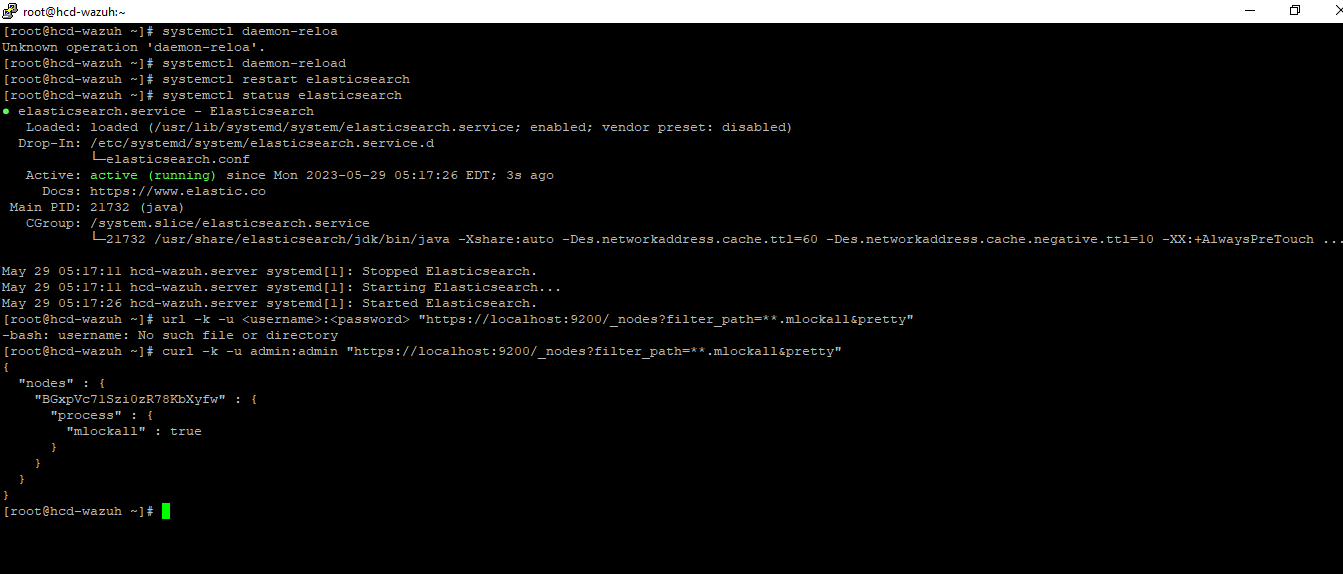
also i tried to restart wazuh-dashboard but it shows Failed to restart wazuh-dashboard.service: Unit not found.On Mon, May 29, 2023 at 5:30 PM Antonio Kim <anton...@wazuh.com> wrote:Perfect, everything seems working ok.Can you restart now the manager and the dashboard with ..systemctl restart wazuh-managersystemctl restart wazuh-dashboardOnce done this, access to the dashboard and check if the warning is still there, please..On Mon, May 29, 2023 at 11:19 AM lesther abong <hcducusi...@gmail.com> wrote:hi antonio,On Mon, May 29, 2023 at 5:16 PM Antonio Kim <anton...@wazuh.com> wrote:Ok, let's move step by step.Could you restart properly your elasticsearch using?:systemctl daemon-reloadsystemctl restart elasticsearchCan you check the status withsystemctl status elasticsearchWhich answer did you get running? :
curl -k -u <username>:<password> "https://localhost:9200/_nodes?filter_path=**.mlockall&pretty"On Mon, May 29, 2023 at 10:43 AM lesther abong <hcducusi...@gmail.com> wrote:i have a problem with this command, also my wazuh server is version 4.2.7On Mon, May 29, 2023 at 4:04 PM Antonio Kim <anton...@wazuh.com> wrote:AntonioI will wait for your response, let's check out first these steps related to initial warning alerts.I repeated this point because I could talk with Front end team and they reaffirmed to me that following these steps should work.On Mon, May 29, 2023 at 10:01 AM lesther abong <hcducusi...@gmail.com> wrote:Thank you, I will do that.On Mon, May 29, 2023, 3:52 PM Antonio Kim <anton...@wazuh.com> wrote:Hi Lesther,Could you try first with the steps mentioned in this documentation?
https://documentation.wazuh.com/current/user-manual/elasticsearch/elastic-tuning.htmlWe can arrange a remote hangout, but firstly I would like to see the api response doing these steps.AntonioOn Mon, May 29, 2023 at 8:14 AM lesther abong <hcducusi...@gmail.com> wrote:Good day team,
please help me to fix this issue :(On Sat, May 27, 2023 at 11:38 AM lesther abong <hcducusi...@gmail.com> wrote:I will set the date of available time to remote our server,
Available date and time on May 29 4 to 5 PM PH time. If you are not available kindly inform me of the date of your availability thanks.On Sat, May 27, 2023 at 11:34 AM lesther abong <hcducusi...@gmail.com> wrote:Good day antonio,
already sent the info of remote via hangouts thanksOn Fri, May 26, 2023 at 4:39 PM Antonio Kim <anton...@wazuh.com> wrote:AntonioRegarding remote your wazuh, if you bring me some details, I would be pleased to do it.There is additional information that we did not check before, then I would like to check together (basically, responses from the API during the process)Something has changed in that process and I would like to ask you if we can do what is written in this documentation step by step.I could talk with my team to ask about your issue and we were facing the problem of correctly changing the RAM limit before.Hi again Lesther.Sorry for not asking before about the structure of your nodes and clusters.
https://documentation.wazuh.com/current/user-manual/elasticsearch/elastic-tuning.htmlOn Fri, May 26, 2023 at 8:31 AM lesther abong <hcducusi...@gmail.com> wrote:can you remote our wazuh server so that you can more easily see the issue or the problem with our server.On Fri, May 26, 2023 at 2:19 PM lesther abong <hcducusi...@gmail.com> wrote:Good day Antonio,
my wazuh server stands alone single node installation in the hyper v virtual server, allocated virtual disk in the wazuh server is 8000GBOn Thu, May 25, 2023 at 9:08 PM Antonio Kim <anton...@wazuh.com> wrote:In relation with your responses from command line, check that you should run each command in different clusters:
Wazuh indexer:
cat /var/log/wazuh-indexer/wazuh-cluster.log | grep -i -E "error|warn"
Wazuh manager:
cat /var/log/filebeat/filebeat | grep -i -E "error|warn"cat /var/ossec/logs/ossec.log | grep -i -E "error|warn"
Wazuh dashboard:
journalctl -u wazuh-dashboardcat /usr/share/wazuh-dashboard/data/wazuh/logs/wazuhapp.log | grep -i -E "error|warn"Let me know when you have the data in order to help you debugging.On Thu, May 25, 2023 at 7:45 AM lesther abong <hcducusi...@gmail.com> wrote:Good day Antonio,
For your reference please see the screenshot below.On Thu, May 25, 2023 at 1:03 AM Antonio Kim <anton...@wazuh.com> wrote:Hi lester, Sorry for the late reply.I could see the error and researching. It seems there are not enough free disk space on elasticsearch data node.In order to help you could you bring me this information:
Wazuh indexer:
cat /var/log/wazuh-indexer/wazuh-cluster.log | grep -i -E "error|warn"
Wazuh manager:
cat /var/log/filebeat/filebeat | grep -i -E "error|warn"cat /var/ossec/logs/ossec.log | grep -i -E "error|warn"
Wazuh dashboard:
journalctl -u wazuh-dashboardcat /usr/share/wazuh-dashboard/data/wazuh/logs/wazuhapp.log | grep -i -E "error|warn"AntonioOn Wed, May 24, 2023 at 11:25 AM lesther abong <hcducusi...@gmail.com> wrote:Any support here?On Wed, May 24, 2023 at 11:44 AM lesther abong <hcducusi...@gmail.com> wrote:please help me to fix this issue :(On Wed, May 24, 2023 at 11:05 AM lesther abong <hcducusi...@gmail.com> wrote:Good day team,
already added the -Xms6g -Xmx6g in the nano /etc/elasticsearch/jvm.option, but here's another error please see the screenshot below.On Mon, May 22, 2023 at 5:55 PM Antonio Kim <anton...@wazuh.com> wrote:Considering that it is not working in short timeframes. I consider that it seems like your Elasticsearch is running out of RAM. The circuit_breaking_exception is a mechanism used to prevent operations from causing an OutOfMemoryError.
It seems like Elasticsearch was using most of the JVM heap configured, and the total memory required for all operations was superior to the memory available, so the operation you requested was aborted. I'll suggest increasing the heap size as Elasticsearch forums suggest (The one you've already mentioned):If you want to increase the JVM heap, remember that the min and max value should be the same.To do that add the following lines to your /etc/elasticsearch/jvm.options .In this example we will increase it to 6GB:
-Xms6g -Xmx6gThen, to apply the changes:Restart Elasticsearch:# systemctl restart elasticsearchBear in mind that the value to be configured is not recommended to be greater than 50% of the available RAM.This webinar about optimizing resources will probably come in handy:
https://www.elastic.co/webinars/optimizing-storage-efficiency-in-elasticsearchI would also recommend taking a look at this guide:Hope it helps. Please let us know if you have any other questions!AntonioOn Mon, May 22, 2023 at 11:30 AM lesther abong <hcducusi...@gmail.com> wrote:here are the logs last 30 daysOn Mon, May 22, 2023 at 5:27 PM lesther abong <hcducusi...@gmail.com> wrote:I tried to set the last 30 days, yes it's working but for the previous 7 days and up, there's no showing alerts or logsOn Mon, May 22, 2023 at 5:24 PM lesther abong <hcducusi...@gmail.com> wrote:No, it doesn't.On Mon, May 22, 2023 at 5:22 PM Antonio Kim <anton...@wazuh.com> wrote:I would like to ask you,It doesn't work for you in any timeframe?On Mon, May 22, 2023 at 11:17 AM lesther abong <hcducusi...@gmail.com> wrote:when I go to the security tab, there displays an errorOn Mon, May 22, 2023 at 5:15 PM lesther abong <hcducusi...@gmail.com> wrote:same display, I tried to change the timeframe to today.




--
You received this message because you are subscribed to the Google Groups "Wazuh mailing list" group.
To unsubscribe from this group and stop receiving emails from it, send an email to wazuh+un...@googlegroups.com.
To view this discussion on the web visit https://groups.google.com/d/msgid/wazuh/f8ab13be-5a12-4b5d-bc4e-c303525f5a28n%40googlegroups.com.
Antonio Kim
May 31, 2023, 4:00:13 AM5/31/23
to lesther abong, Wazuh mailing list
Good Day Lesther,
Hope you are doing well.
In this command, it is required to replace
Hope you are doing well.
In this command, it is required to replace
<elasticsearch-cluster-name> by the cluster name.
cat /var/log/elasticsearch/<elasticsearch-cluster-name>.log | grep -i -E "error|warn"
I will talk with my team back once I get a reply from you.
Antonio
PS: Please, reply to everybody when you answer this mail to make it public so I can share it easily.
We have 63 total agents.


167 agent is a Windows base OS
Check the Elastic Stack log files:
Check the Wazuh Kibana plugin log file:
Check the Wazuh manager log file:
lesther abong
May 31, 2023, 4:20:17 AM5/31/23
to Antonio Kim, Wazuh mailing list
Good day antonio.
output of elasticsearch log

output of elasticsearch log
Antonio Kim
May 31, 2023, 5:28:56 AM5/31/23
to lesther abong, Wazuh mailing list
Hi Lesther.
I could check the information with my team and we could detect that you reached the shards limit count (1000 by default in the node). To fix this issue, there are multiple options detailed in the next document:
Hope it helps you.
Please let me know if you could make it.
Antonio
lesther abong
Jun 3, 2023, 4:52:56 AM6/3/23
to Antonio Kim, Wazuh mailing list
Based on the documentation there are multiple remediations, what is your recommendation for our infra?
On our requirements wazuh server is required to maintain logs, audit logs, log management, and log retention are all essential parts of PCI DSS requirements. The standard mandates that audit logs be retained for at least one yr. ninety days of PCI audit logs must also be available for immediate analysis
On our requirements wazuh server is required to maintain logs, audit logs, log management, and log retention are all essential parts of PCI DSS requirements. The standard mandates that audit logs be retained for at least one yr. ninety days of PCI audit logs must also be available for immediate analysis
Reply all
Reply to author
Forward
0 new messages