Log Rotation / Archival

3,410 views
Skip to first unread message

swapnils

unread,
Nov 15, 2022, 3:04:40 AM11/15/22
to Wazuh mailing list
Hello Team,

Would like to seek your help in achieving following requirement. Appreciate if any one can share KBs and/or guide me in this regard.

Setup: v4.3
Wazuh Server  - 2 nodes [on-prem]
Wazuh Indexer - 2 nodes [on-prem]

Requirement:
Need to setup a Wazuh in such a way that only a week's logs are present on-prem. Logs (older than 7 days) should be moved to s3 bucket on AWS.


F Tux

unread,
Nov 15, 2022, 6:48:09 AM11/15/22
to Wazuh mailing list
Hi swapnils,

There are a few considerations to be taken here:

  • Each Wazuh Server node is estimated to be able to handle about 3000 Wazuh Agents correctly. If your endpoint count is below that, and you don't need High Availability, you can probably do away with just one node.
  • The Wazuh Indexer Cluster needs to have an odd number of nodes. So once again, 1 node should be fine for smaller environments, and as soon as you need HA, or your data volumes outgrow the single node install, you must jump to 3 nodes.
  • The KB/s figures vary wildly between endpoint types, but you can deduce the maximum network throughput in the following manner:
    • The default Events Per Second (EPS) cap is set at 500 EPS
    • We estimate the average Event to be about 1KB in size
    • Alert information gets compressed to about 1/10th of their original size

      All this being considered, your maximum throughput per agent should be about 50 KB/s if you don't modify the EPS limit.
  • In order to keep only a week of Hot Storage, you need to set up an Index Management Policy which would delete indices older than 7 days.
  • A recommended practice for cold storage (the data you want to rotate to AWS), is to enable <logall_json> in the ossec.conf file.
    This will generate a file at /var/ossec/logs/archives/archives.json which will include a json object per every event the Wazuh Server receives, irrespective of whether that event triggered an alert.
    That file will automatically get rotated and compressed by Wazuh on a daily basis, so with a little cronjob magic you can scp them to your S3 bucket daily and delete the older ones.
    With this method, if you ever need to go back, you can not only recreate your full environment from a certain timeframe, but also analyze any data that might have gone below the radar (ie. not triggered a rule).

Let me know your thoughts on this and if you hit any issues during your setup process.

Regards,
Fede

swapnils

unread,
Nov 15, 2022, 7:17:28 AM11/15/22
to Wazuh mailing list
Hi Fede,

Thank you so much for your help!
Currently we are already running on Wazuh of an older version which is being decommissioned due to some reasons. Team managing old setup says that, there is a log volume of ~300GB/day  from ~2000 devices (Network devices, Unix systems and few Windows systems).
As the log volume is huge, I have no option but to setup a log rotation at indexer.

Please advise -
1. https://www.elastic.co/guide/en/elasticsearch/reference/7.10/index-lifecycle-management.html - this document is applicable for OpenSearch as well? I do not have elastic installed.
2. Is it necessary too at Wazuh Server to rotate the logs? Per my observation, it consumes less storage.
3. If Master goes down, at least devices will send data to worker hence 2 Managers were deployed. Also, will my setup break if there are 2 indexers and not 3? I shall try to add one more node there.

 
Regards,
swapnils

Allen Shau

unread,
Nov 16, 2022, 2:18:38 AM11/16/22
to Wazuh mailing list
Hi Fede,

Can I also ask 2 questions in this thread according to your messages?

 1. You mentioned to use scp those zipped alerts to S3 bucket.
      So can I scp to somewhere else, such as a mounted disk, since I am not allowed to use cloud storage?
 2. If I have to restore those cold data in S3 buket, How should I recreate them into the Wazuh index?

Allen

federic...@gmail.com 在 2022年11月15日 星期二晚上7:48:09 [UTC+8] 的信中寫道:

Federico Gustavo Galland

unread,
Nov 16, 2022, 11:53:30 AM11/16/22
to Wazuh mailing list
swapnils,


>> 1. https://www.elastic.co/guide/en/elasticsearch/reference/7.10/index-lifecycle-management.html - this document is applicable for OpenSearch as well? I do not have elastic installed.

The document gives a general overview on how index management works, but if you want a step by step guide, you can follow these steps:

Go to Index Management on the left hand side stack menu:

2022-11-16_13-40.jpg

Under Index Policies, Go to Create Policy

2022-11-16_13-40_1.jpg

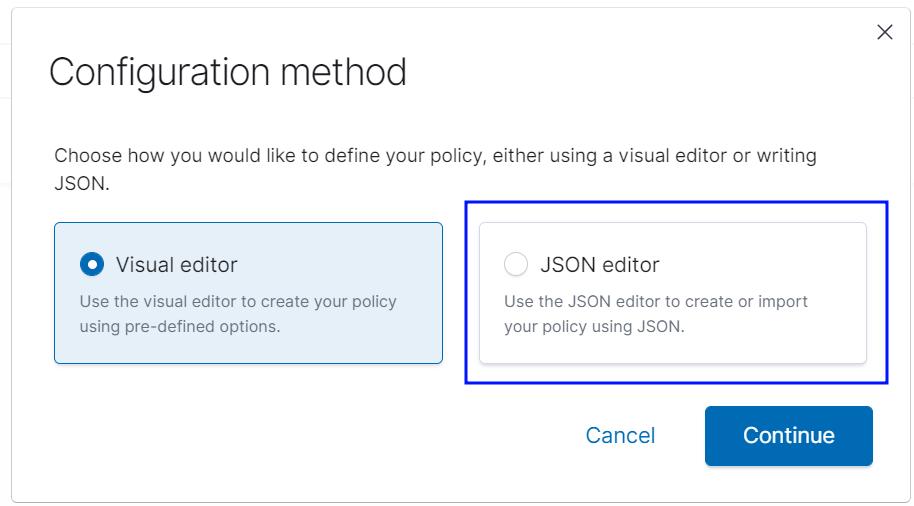
Select the json editor

2022-11-16_13-40_2.jpg

Enter the json found attached to this e-mail.

screencapture-192-168-56-10-app-opensearch-index-management-dashboards-2022-11-16-13_41_00.png
After you accept this, the policy will be applied.

Make sure you modify the "min_index_age" in the hot state transition from "90d" to your required hot storage retention period.


>> 2. Is it necessary too at Wazuh Server to rotate the logs? Per my observation, it consumes less storage.

It is not strictly necessary, but logs will acumulate over time. Particularly if you enable archives, which logs everything that reaches the manager.

>> 3. If Master goes down, at least devices will send data to worker hence 2 Managers were deployed. Also, will my setup break if there are 2 indexers and not 3? I shall try to add one more

The Wazuh Server side of things looks good. The Indexer needs an odd number of nodes to avoid the split brain problem:

Let me know if this helps!

Regards,
Federico
90dayretention.json

Federico Gustavo Galland

unread,
Nov 16, 2022, 12:00:00 PM11/16/22
to Wazuh mailing list
Hi Allen,

The zipped alerts can be found at /var/ossec/logs/alerts and /var/ossec/logs/archives on the server, so you can basically rotate them at will using cronjobs.
It would be hard to suggest a particular cronjob command without knowing the specifics of your environment but it would be something along these lines:

0 0 * * * find /var/ossec/logs/alerts/ -type f -mtime +90 -exec mv {} /mnt/backup \;

For daily rotating of alert logs older than 90 days to /mnt/backup.

I hope this helps.

Regards,
Federico

Allen Shau

unread,
Nov 16, 2022, 7:23:35 PM11/16/22
to Federico Gustavo Galland, Wazuh mailing list
Hi Federico,

This helps a lot for my first question. Many thanks.

So how do I re-ingest/re-create the alerts if the server crashed and has been re-installed?  
Just move them to the original location and unzip them? Or I need to run some other commands?

Allen

'Federico Gustavo Galland' via Wazuh mailing list <wa...@googlegroups.com> 於 2022年11月17日 週四 凌晨1:00寫道:
--
You received this message because you are subscribed to a topic in the Google Groups "Wazuh mailing list" group.
To unsubscribe from this topic, visit https://groups.google.com/d/topic/wazuh/L-yz_vK1lGg/unsubscribe.
To unsubscribe from this group and all its topics, send an email to wazuh+un...@googlegroups.com.
To view this discussion on the web visit https://groups.google.com/d/msgid/wazuh/4ed8d2b9-71bc-433b-a40c-685fbee1d761n%40googlegroups.com.

Federico Gustavo Galland

unread,
Nov 17, 2022, 3:53:49 AM11/17/22
to Allen Shau, Wazuh mailing list
Hi Allen,

The process is documented in the following page of our blog:

Let us know if that helped.

Regards,
Federico
--

Allen Shau

unread,
Nov 17, 2022, 10:08:48 PM11/17/22
to Federico Gustavo Galland, Wazuh mailing list
One more question, Federico.

Looks the link is about ES Basic. If for OpenDistro, are they the same? (Or I made some misunderstanding here?)
Many thanks for your information.

Allen


Federico Gustavo Galland <federico...@wazuh.com> 於 2022年11月17日 週四 下午4:53寫道:

Federico Gustavo Galland

unread,
Nov 18, 2022, 3:55:24 AM11/18/22
to Wazuh mailing list
If you are using either OpenDistro or OpenSearch, you can follow my guide here:

Make sure you make the necessary customizations to the policy to fit your environment and use case.

swapnils

unread,
Nov 18, 2022, 4:18:59 AM11/18/22
to Wazuh mailing list
Thank you so much Fede for all the detailed procedure! :)

Few doubts here again.. Sorry!

What I understood is -
All the raw logs from Manager (/var/ossec/logs/archives/archives.json) will be auto archived by Wazuh and those (zips) need to be moved to AWS.  *Only if logall is enabled.*
Index policies are specific to Indexers and Indices older than 90 days will be auto deleted with this policy. Do I have an option not to delete these indices and compress those instead and move to AWS? Will it be of any use?
Or only raw logs at manager are enough to regenerate new indices?

Apologies if I am not making any sense.


Regards,
swapnils

Federico Gustavo Galland

unread,
Nov 18, 2022, 6:16:12 AM11/18/22
to swapnils, Wazuh mailing list
Hi Swapnils,

All the raw logs from Manager (/var/ossec/logs/archives/archives.json) will be auto archived by Wazuh and those (zips) need to be moved to AWS.  *Only if logall is enabled.*

This sound about right.
 
Index policies are specific to Indexers and Indices older than 90 days will be auto deleted with this policy.

 This is also correct.

Do I have an option not to delete these indices and compress those instead and move to AWS? Will it be of any use?

You can modify the policy to take the "snapshot" action to rotate the indices to an S3 bucket.


However, our supported procedure for cold storage re ingestion is in the answer below. 
 
Or only raw logs at manager are enough to regenerate new indices?

This is partially true. The raw alerts.json or archives.json files can be used to restore cold storage. But in order to re-index this data, you need to follow this guide:


Which tells you how to take your alert/archives data from cold-storage and re-ingest it. So to answer your question: It is not enough with just placing your backups on the manager.

I hope this helps!

Regards,
Federico

--
You received this message because you are subscribed to a topic in the Google Groups "Wazuh mailing list" group.
To unsubscribe from this topic, visit https://groups.google.com/d/topic/wazuh/L-yz_vK1lGg/unsubscribe.
To unsubscribe from this group and all its topics, send an email to wazuh+un...@googlegroups.com.

swapnils

unread,
Nov 21, 2022, 7:29:27 AM11/21/22
to Wazuh mailing list
Hello Federico,

I am stuck at further configuration as you guided earlier. May be because I have directly jumped into Wazuh deployment without understanding ELK basics.
While I was reading documents, I came across following terms.. Could you please help me here as well?
>> Hot/Warm/Cold Phase -- Is it a good practice to implement this? In few of the scenarios I read, each node is configured with different phase. I understood that hot would be ongoing, warm would be less used & cold would be least used. If it is advisable to configure this, could you please share KBs so that I can study this?
>> Enable archives -- Is it a good practice to implement this? Could you please help me share relevant KB to configure this?

Thank you very much for your continuous support! :)


Regards,
swapnils

Federico Gustavo Galland

unread,
Nov 22, 2022, 5:33:18 AM11/22/22
to swapnils, Wazuh mailing list
>> Hot/Warm/Cold Phase -- Is it a good practice to implement this? In few of the scenarios I read, each node is configured with different phase. I understood that hot would be ongoing, warm would be less used & cold would be least used. If it is advisable to configure this, could you please share KBs so that I can study this?

We don't really have documentation on this topic other than what I've already shared. These are common terms that are used across the industry to refer to different stages of data availability.
Hot storage refers to keeping data easily available. Cold storage usually refers to a storage medium that is less accesible but has more capacity for long term storage.
Usually, your hot storage infrastructure would be tuned for I/O performance, since it would be accessed frequently. Your cold storage, OTOH, would usually be set up in a cost effective manner.
Common questions you could ask yourself are:
  • Is there an external requirement that I should adhere to in terms of data retention?
    • If there is not, how long do I want to keep data?
    • I there is, does it mention minimum periods of retention in an accesible manner (hot storage)?

On a side note, The Wazuh Indexer / Elasticsearch Index Management Policies let you define the way the transitions between your defined phases will be performed.
In this regard, we tend to take a minimalistic approach: we usually set up only two phases on the Wazuh Indexer, Cold and Hot.
Hot storage is the default for incoming data, but after any index reaches it's transition age (usually 90 days), we just delete it.
We can do this confidently, since at the same time, we would be keeping our full incoming data, which leads to the other question:

 >> Enable archives -- Is it a good practice to implement this? Could you please help me share relevant KB to configure this?

There is no guide for this option, but its reference can be found here:

So if you set this option to "yes" any event that reaches the manager will be stored to /var/ossec/logs/archives/archives.json, a file that will be rotated daily and which you can later use to rebuild the whole of the Indexed data.

So picking up where we left with our common practices, instead of setting up a cold storage transition within Wazuh Indexer, the simplest route is to just keep those archive log files stored either within the Wazuh Manager itself or to periodically rotate it to a NAS/bucket of sorts.

Let me know if this makes it clearer.

Regards,
Federico Galland
 

swapnils

unread,
Nov 22, 2022, 6:28:09 AM11/22/22
to Wazuh mailing list
Thank you so much for the clarification Federico!

So I can safely ignore about the cold and warm phase right now.
I would need to keep the logs probably for a year (1 year retention) and that I believe will be achieved by moving the log archives from the manager to the remote storage. AWS share in my case. I could keep 180 days logs on the manager and rest can be moved away. For 180+ days files, I would use scp on manager and to purge 365+ days old files, I would use find command with mtime + rm.

Apologies as I was not specific while mentioning 'archives' earlier; actually I wanted to refer to the Indexer and its index pattern which is something like : wazuh-archives-*. How helpful it is to configure for my environment? Would you suggest me to get it created? Per my understanding, it will be used along with the warm phase and having it created under hot phase will not make any difference. [Please correct me if I am wrong.]

I feel it is better to keep indices for 120 days so that 4 months old history will be available for visualization & query search.


Regards,
swapnils

PS : As suggested, added 3rd node to Indexer cluster which is so far working smooth. Thanks!

Federico Gustavo Galland

unread,
Nov 22, 2022, 6:59:19 AM11/22/22
to swapnils, Wazuh mailing list
The intended use-case for the wazuh-archives* index is documented here:

And it's intended for browsing of cold-storage data.

The set up that you mention sounds good. To recap:

  • An index policy that deletes indices after 120 days
  • logall_json enabled, saving all events to /var/log/archives/
  • A script moving your archives files to your S3 bucket periodically

If you ever want to reindex your cold storage data, you could use the method described in the link above, or you can follow the steps in the following guide:

I'm happy to hear your indexer is set up properly now. Once you make sure you have the above running smoothly, you can rest assured that your data can be recovered properly.

Regards,
Federico

swapnils

unread,
Nov 25, 2022, 1:22:04 AM11/25/22
to Wazuh mailing list

Hello Federico,

Thank you for your continuous support! I have started integrating the agents now.
I have observed following -
* After enabling logall_json, I could see two files getting created on both master and a worker which loooks identical in size and grows upto hundreds of gigs.
MASTER > `-rw-r——- 2 wazuh wazuh 3.6G Nov 25 11:33 /var/ossec/logs/archives/archives.json`
MASTER > `-rw-r——- 2 wazuh wazuh 3.6G Nov 25 11:33 /var/ossec/logs/archives/2022/Nov/ossec-archive-25.json`
WORKER > `-rw-r——- 2 wazuh wazuh 1.6G Nov 25 11:40 /var/ossec/logs/archives/archives.json`

WORKER > `-rw-r——- 2 wazuh wazuh 1.6G Nov 25 11:40 /var/ossec/logs/archives/2022/Nov/ossec-archive-25.json`

Is it creating two duplicate files? Is it a normal behavior?
* Compared to wazuh-manager, when checked on wazuh-indexers, I was shocked as hardly any space getting consumed (few hundred MBs). Will it grow later post data processing?


Regards,

swapnils


Federico Gustavo Galland

unread,
Nov 25, 2022, 4:28:00 AM11/25/22
to swapnils, Wazuh mailing list
Hi Swapnils,

MASTER > `-rw-r——- 2 wazuh wazuh 3.6G Nov 25 11:33 /var/ossec/logs/archives/archives.json`
MASTER > `-rw-r——- 2 wazuh wazuh 3.6G Nov 25 11:33 /var/ossec/logs/archives/2022/Nov/ossec-archive-25.json`
WORKER > `-rw-r——- 2 wazuh wazuh 1.6G Nov 25 11:40 /var/ossec/logs/archives/archives.json`

WORKER > `-rw-r——- 2 wazuh wazuh 1.6G Nov 25 11:40 /var/ossec/logs/archives/2022/Nov/ossec-archive-25.json`

Is it creating two duplicate files? Is it a normal behavior?

That's normal behavior. If the file is growing up to hundreds of gigs quickly, it probably means you either have a sizeable number of agents or your endpoints are generating many events a second.  
The reason there are two files there, is these files will get rotated daily. 

* Compared to wazuh-manager, when checked on wazuh-indexers, I was shocked as hardly any space getting consumed (few hundred MBs). Will it grow later post data processing?

The reason is probably that lots of the events that are being stored to the archives.json file are not matching any rule level 3 or higher, so they are not occupying Indexer storage space.

If you want to check whether that's the case, you can sample a few random lines of the archives file like so:

archives='/var/ossec/logs/archives/archives.json'; lines=$(wc -l $archives | awk '{print $1}'); for i in {1..5}; do random_line=$(( $RANDOM % $lines + 1 )); awk "NR==$random_line" $archives; done

This will output 5 lines of the file at random. You can take those lines and input them at the log test to see whether they generated an alert (level 3 or higher) or not. Of course, it may very well be that a single or only a handful of events are flooding the file, so you might or might not see variety over here.

Regards,
Fede 

Reply all
Reply to author
Forward
0 new messages