
Kibana unable to connect to wazuh api

Nelson Rosien
Hello,
I’ve had Wazuh up and running for a while now, but recently I’m running into this error. I’m running this distributed across two hosts (Wazuh-api/manager/filebeat and ELK).
<Wazuh-url> below refers to kibana host, running behind httpd reverse proxy on same host.
When I navigate to https://<wazuh-url>/app/wazuh, I get the message “Health Check. 3002 - Error reading file (/api/check-stored-api)”.
I’ve found this issue, which seems to describe my issue fairly accurately. When following the steps to look at the xhr network requests I see:
Request URL:https://<wazuh-url>/api/check-stored-api
Request method:POST
Remote address:<IP>:443
Status code:500
Version:HTTP/1.1
Referrer Policy:no-referrer-when-downgrade
Which seems to correspond to this message in the kibana logs:
{"date":"2019-09-19T17:31:23.605Z","level":"error","location":"wazuh-api:checkStoredAPI","message":"Error reading file"}
I can’t seem to find any help to resolve this though.
Cheers,
Nelson R
Juan Carlos Rodríguez
Hi Nelson,
If you don’t mind losing the APIs you already have configured, we can try to clear the .wazuh index and cookies in case there is some erroneous data stored that is breaking our initialization flow.
systemctl stop kibana
curl -XDELETE <elastic-ip>:9200/.wazuh
systemctl restart kibana
On the other hand, it may be that you have an incorrect cookie in the cache, perhaps due to an earlier version installed.
You need to delete all cookies stored in your browser and try to enter the Wazuh application again.
In Firefox you must press F12 to open the developer tools. In them, go to Storage, and Delete all cookies.
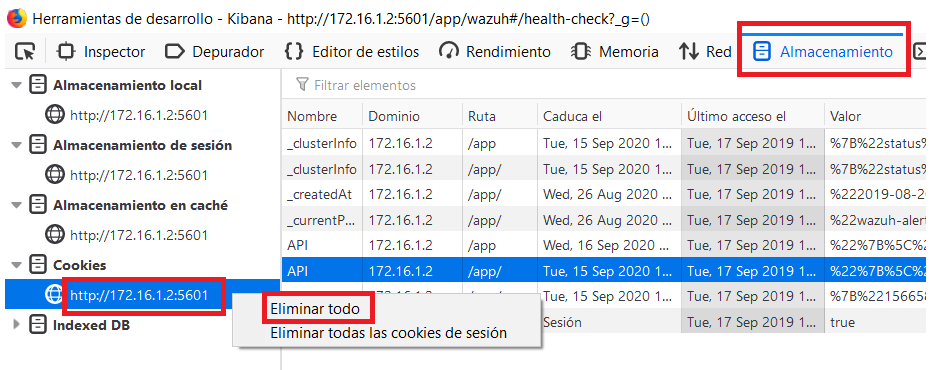
In Chrome you must press F12 to open the developer tools. In them, go to Application, and Delete all cookies.
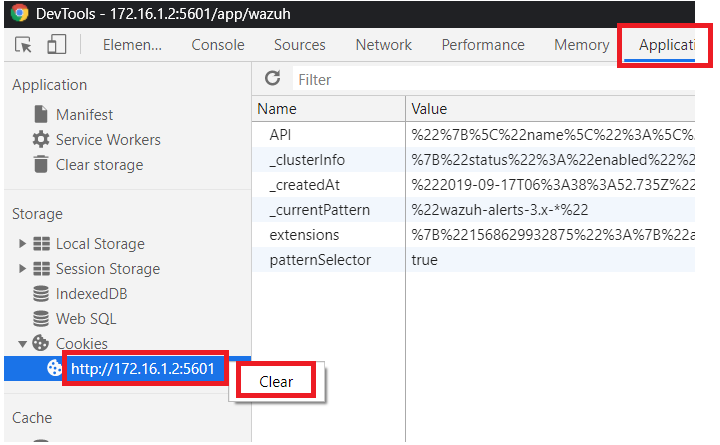
Wait a few seconds, then try again.
Hope this helps.
Let us know the results.
Regards,
Juan Carlos
Nelson Rosien
Hey Juan Carlos,
I did try clearing the cookies without change in the message. I didn’t try troubleshooting with Elasticsearch though.
I noticed that 3.10.x was released, and figured I’d try upgrading to the latest version before troubleshooting further. I’m glad I did, that seems to have resolved my issue - It must have been a bad version of something somewhere.
Thanks for your assistance.
Cheers,
Nelson R
From: wa...@googlegroups.com <wa...@googlegroups.com>
On Behalf Of Juan Carlos Rodríguez
Sent: Tuesday, September 24, 2019 7:08 AM
To: Wazuh mailing list <wa...@googlegroups.com>
Subject: Re: Kibana unable to connect to wazuh api
Hi Nelson,
If you don’t mind losing the APIs you already have configured, we can try to clear the
.wazuh index and cookies in case there is some erroneous data stored that is breaking our initialization
flow.
systemctl stop kibanacurl -XDELETE <elastic-ip>:9200/.wazuhsystemctl restart kibanaOn the other hand, it may be that you have an incorrect cookie in the cache, perhaps due to an earlier version installed.
You need to delete all cookies stored in your browser and try to enter the Wazuh application again.
In Firefox you must press F12 to open the developer tools. In them, go to Storage, and Delete all cookies.
In Chrome you must press F12 to open the developer tools. In them, go to Application, and Delete all cookies.
Wait a few seconds, then try again.
Hope this helps.
Let us know the results.
Regards,
Juan Carlos
--
You received this message because you are subscribed to the Google Groups "Wazuh mailing list" group.
To unsubscribe from this group and stop receiving emails from it, send an email to
wazuh+un...@googlegroups.com.
To view this discussion on the web visit
https://groups.google.com/d/msgid/wazuh/dd1c7fce-8d35-4fb1-a0dc-9244d2468369%40googlegroups.com.

Rhys Evans
To unsubscribe from this group and stop receiving emails from it, send an email to wazuh+unsubscribe@googlegroups.com.