
Fortigate firewall monitoring issue
103 views
Skip to first unread message

Phạm Q. Đạt
May 10, 2023, 6:02:22 AM5/10/23
to Wazuh mailing list
Hi Wazuh team,
Before hand, I want to clarify our infrastrure first. We use some ELB nodes but I won't put it here.

Our need is to monitor Fortigate firwall.
There are 3 types of log in Fortigate as following image: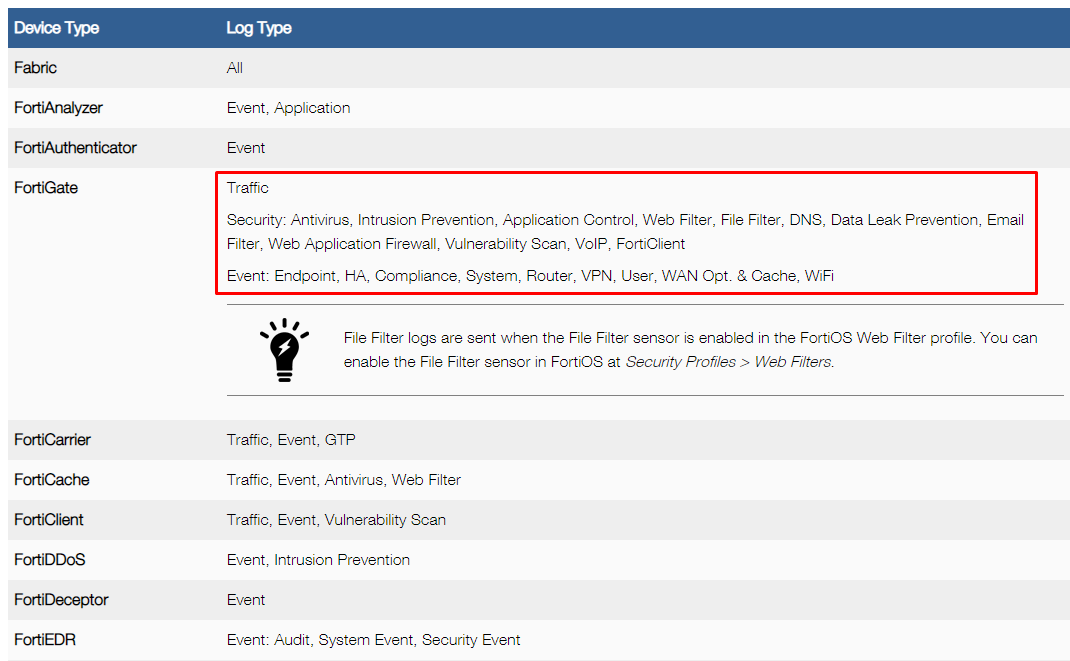
We normally receive Security log only from Fortigate and it works well.
But in the past few days, because of some reasons we need to send all the logs include Traffic logs, Security logs and Event logs.
I found these github issue https://github.com/wazuh/wazuh/issues/15952 telling me to increase EPS number but we can observe that the agent is gonna full soon.
Before hand, I want to clarify our infrastrure first. We use some ELB nodes but I won't put it here.
Our need is to monitor Fortigate firwall.
There are 3 types of log in Fortigate as following image:
We normally receive Security log only from Fortigate and it works well.
But in the past few days, because of some reasons we need to send all the logs include Traffic logs, Security logs and Event logs.
Then we got the alert like this on Wazuh Manager when checking the Syslog server's security event:
Agent buffer is full. Events may be lost.
Agent buffer is full. Events may be lost.
It means the agent event queue is full on Syslog server.
The reason indeed is that the agent have to send too many logs include non-security logs to the manager. So the queue is always full.
The reason indeed is that the agent have to send too many logs include non-security logs to the manager. So the queue is always full.
I found these github issue https://github.com/wazuh/wazuh/issues/15952 telling me to increase EPS number but we can observe that the agent is gonna full soon.
Is there any solution to force the Syslog wazuh agent to collect only Security logs? Or can we filter which logs would be collected by the agent?
Hope to see your recommendation about this issue?
Thank you.

Federico Gustavo Galland
May 10, 2023, 6:16:57 AM5/10/23
to Wazuh mailing list
Hi There!
If so, the simpler route would be to establish a filter at your rsyslog configuration level, that would split your Traffic, Security and Event logs to different files.
If I understand your problem correctly, you want to have your rsyslog server store Traffic, Security and Event logs, but you only want Wazuh to report on Security logs.
Is that correct?
If so, the simpler route would be to establish a filter at your rsyslog configuration level, that would split your Traffic, Security and Event logs to different files.
The exact configuration would depend on the fields available on the fortigate logs, but you should be able to tweak this to work for you:
if $msg contains 'channel=event' then /var/log/fortigate/event.log
& ~
if $msg contains 'channel=security' then /var/log/fortigate/security.log
& ~
if $msg contains 'channel=traffic' then /var/log/fortigate/traffic.log
& ~
After this, you could instruct the agent to only read the security.log file by modifying the appropriate <localfile> block.
Let me know if this helps.
Regards,
Fede
Phạm Q. Đạt
May 18, 2023, 10:52:11 PM5/18/23
to Wazuh mailing list
Hi,
I solved my issue with a bit filter on rsyslog configuration file.
Reply all
Reply to author
Forward
0 new messages