
Wazuh indexer error

Catatan mpoo
This is my first time installing Wazuh. Then I run wazuh-indexer step by step. However, when I started the wazuh indexer, I encountered an error as shown in the image.
Reference installation : https://documentation.wazuh.com/current/installation-guide/wazuh-indexer/step-by-step.html
I use ubuntu Ubuntu 20.04.1 LTS


Adrián Jesús Peña Rodríguez
Hello,
Checking the screenshot you provide it seems that the problem may be related to the value of the vm.max_map_count parameter of the host where you are installing Wazuh-indexer.

To solve this problem you should run this command on the host:
sudo sysctl -w vm.max_map_count=262144
You can find more information here: https://documentation.wazuh.com/current/deployment-options/docker/docker-installation.html#increase-max-map-count-on-your-host-linux
I hope this answer will help you to solve the problem, if it persists or you have any doubt don’t hesitate to ask.
Regards.
Catatan mpoo
Thank you for information
But, I tried to do according to the reference you provided. However, it still fails with the caption on the image.
then, I tried manually adding vm.max_map_count in /etc/sysctl.conf, and the result didn't change.
Are there any other references?

Catatan mpoo
RAM : 4 GB
CPU : 2vCPU
Adrián Jesús Peña Rodríguez
Got it, you are running a virtual machine with Ubuntu 20.04.1 LTS right? Is it possible that the host is a Windows machine with WSL? Also, it is important to reboot the machine after applying changes to sysctl.
Please run the following commands and share the output to help you better:
sysctl vm.max_map_count
cat /etc/sysctl.conf
ls /proc/sys/vm/
In case max_map_count exists in the output of the previous command we will execute the following:
cat /proc/sys/vm/max_map_count
Catatan mpoo
I have implemented the recommendations you provided.
But, Stay Failed.
Adrián Jesús Peña Rodríguez
In order to help you, I need the output of the commands I sent you in the previous message, and also let’s remove the line you added in /etc/sysctl.conf(https://groups.google.com/g/wazuh/c/7Yg1Dzp-2ps/m/kafo0nKcAwAJ):
sysctl vm.max_map_count
cat /etc/sysctl.conf
ls /proc/sys/vm/
In case max_map_count exists in the output of the previous command we will execute the following:
cat /proc/sys/vm/max_map_count
Finally, let’s execute the following:
sudo /bin/su -c "echo 'vm.max_map_count=262144' >> /etc/sysctl.conf"
Then reload the configuration with the following command:
sudo sysctl -p
Catatan mpoo
sysctl: setting key "vm.max_map_count": No such file or directory
Adrián Jesús Peña Rodríguez
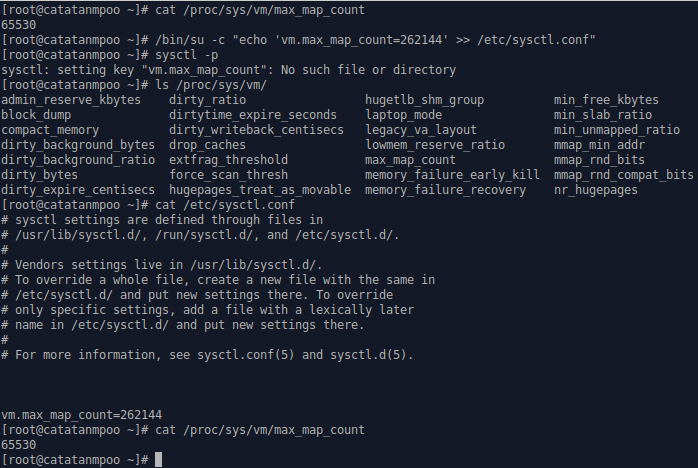
I need more information to be able to replicate and investigate this problem. Please send me the output of this command:
ls /proc/sys/vm/
And this one:
cat /etc/sysctl.conf
And this:
cat /proc/sys/vm/max_map_count
I will try to get back to you as soon as possible.
Adrián Jesús Peña Rodríguez
Well, since we can’t use “sysctl”, let’s try modifying /proc/sys/vm/max_map_count by running the following:
echo 262144 > /proc/sys/vm/max_map_count
And we will verify with:
cat /proc/sys/vm/max_map_count
The return value for the latter should be 262144.
If this is correct, we can make this change persistent by adding to the /etc/rc.local file the following line:
echo 262144 > /proc/sys/vm/max_map_count
If this file does not exist, we will have to enable it using the following command:
systemctl enable rc-local.service