
Rule for monitor if somebody goes to specific URL
200 views
Skip to first unread message

Nataliia
Jun 9, 2022, 10:06:46 AM6/9/22
to Wazuh mailing list
Hi!
I want to monitor who goes to specific URL.
For example the log is:
1650019217.524 185 10.23.65.8 TCP_MISS/200 5589 CONNECT email.ukrgas.com.ua:443 - DIRECT/46.164.137.235 -
So, I added rule:
<rule id="35096" level="10">
<url>email.ukrgas.com.ua|</url>
<description>Squid: Attempt to access forbidden file(test).</description>
</rule>
<url>email.ukrgas.com.ua|</url>
<description>Squid: Attempt to access forbidden file(test).</description>
</rule>
Where "email.ukrgas.com.ua" is URL, acces to which I want to monitor.
But in the Ruleset test this log mathes only with predefined rule:
**Phase 3: Completed filtering (rules).
id: 35000
level: -
description: Squid messages grouped.
groups: ["squid"]
firedtimes: 3
gdpr: "-"
gpg13: "-"
hipaa: "-"
mail: "-"
mitre.id: "-"
mitre.technique: "-"
nist_800_53: "-"
pci_dss: "-"
tsc: "-"
Help me to set up rule correctly, please.

Matias Pereyra
Jun 9, 2022, 3:05:15 PM6/9/22
to Wazuh mailing list
Hello Nataliia! Thanks for using Wazuh.
<url>email.ukrgas.com.ua|</url>
<description>Squid: Attempt to access forbidden file(test).</description>
</rule>
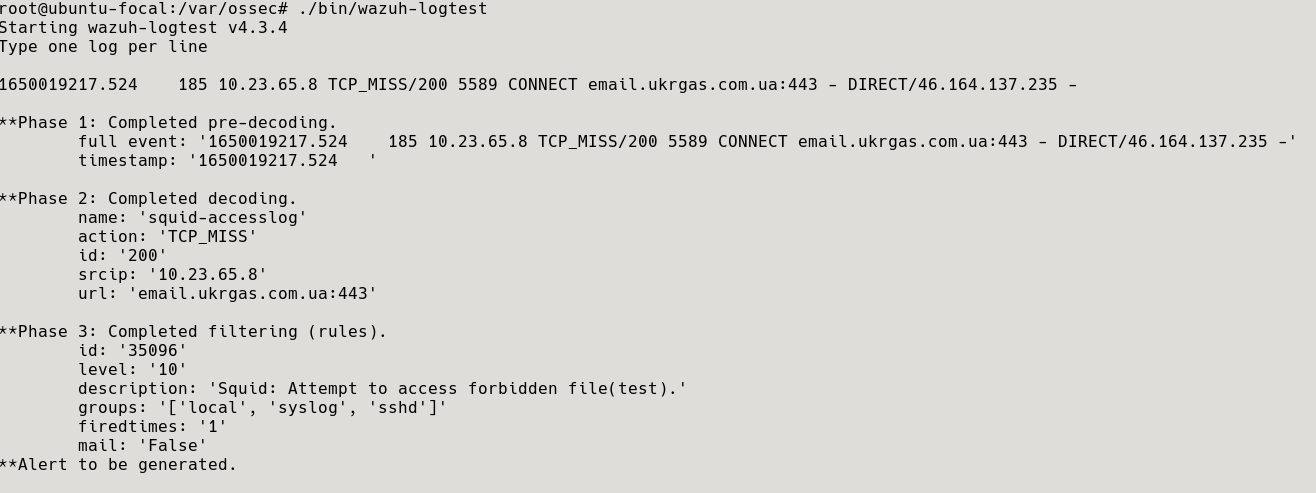
I have tested your rule in wazuh-logtest and it seems you need to define your new rule as a child of 35000. If you don't, the default rule will always match before your custom one
<rule id="35096" level="10">
<if_sid>35000</if_sid>
<url>email.ukrgas.com.ua|</url>
<description>Squid: Attempt to access forbidden file(test).</description>
</rule>
This is the result of the test
You can find more examples of these type of rules in the file wazuh/ruleset/rules/0275-squid_rules.xml, here you have one
<rule id="35022" level="6">
<if_sid>35006</if_sid>
<url>/jk/exp.wmf$|/PopupSh.ocx$</url>
<description>Squid: Attempt to access a worm/trojan related site.</description>
<mitre>
<id>T1108</id>
</mitre> <group>automatic_attack,pci_dss_11.4,pci_dss_6.2,gdpr_IV_35.7.d,nist_800_53_SI.4,nist_800_53_SI.2,tsc_CC6.1,tsc_CC6.8,tsc_CC7.2,tsc_CC7.3,</group>
</rule>
Regards.
Nataliia
Jun 10, 2022, 9:06:27 AM6/10/22
to Wazuh mailing list
Hello Matias!
<url>email.ukrgas.com.ua|</url>
<description>Squid: Attempt to access forbidden file(test).</description>
</rule>
Thank you! I have done what you written and in the ruletest I see that alert to be generated. But I don't see this logs in the Discover tab. And, what is interesting, if I write log with another URL in the ruleset and saw the same filtering. The log is:
1650019218.275 100298 10.23.65.76 TCP_MISS/200 5604 CONNECT ws.youcontrol.com.ua:443 zoia.myronenko DIRECT/172.67.72.146 -
And what I see in the ruleset:
**Phase 1: Completed pre-decoding.
full event: 1650019218.275 100298 10.23.65.76 TCP_MISS/200 5604 CONNECT ws.youcontrol.com.ua:443 zoia.myronenko DIRECT/172.67.72.146 -
timestamp: 1650019218.275
hostname: -
program_name: -
**Phase 2: Completed decoding.
name: squid-accesslog
data: {
"action": "TCP_MISS",
"srcip": "10.23.65.76",
"id": "200",
"url": "ws.youcontrol.com.ua:443"
}
**Phase 3: Completed filtering (rules).
id: 35097
level: 10
description: Squid: Attempt to access forbidden file(test).
groups: ["squid"]
firedtimes: 1
gdpr: "-"
gpg13: "-"
hipaa: "-"
mail: "-"
mitre.id: "-"
mitre.technique: "-"
nist_800_53: "-"
pci_dss: "-"
tsc: "-"
**Alert to be generated.
I tried to write rule in another way, but result was same:
<rule id="35096" level="4">
<if_sid>35000</if_sid>
<id>^2</id>
<description>Squid Successful Transaction.</description>
</rule>
<rule id="35097" level="10">
<if_sid>35096</if_sid>
<if_sid>35000</if_sid>
<id>^2</id>
<description>Squid Successful Transaction.</description>
</rule>
<rule id="35097" level="10">
<if_sid>35096</if_sid>
<url>email.ukrgas.com.ua|</url>
<description>Squid: Attempt to access forbidden file(test).</description>
</rule>
четверг, 9 июня 2022 г. в 22:05:15 UTC+3, matias....@wazuh.com:
Matias Pereyra
Jun 10, 2022, 3:27:26 PM6/10/22
to Wazuh mailing list
Hello again!
<description>Squid: Attempt to access forbidden file(test).</description>
</rule>
If you need to add more than one <url>, I suggest you add them in the same rule so you don't have to create a new rule every time.
Also, considering the recommendations in Custom rules and decoders, the new customs rules should be written in etc/rules/local_rules.xml. This file won't be overwritten during upgrades. Also, the ID of custom rules should be in the range of 100000 to 120000, to avoid conflicts in the future.
So here is the result
<rule id="100002" level="10">
Also, considering the recommendations in Custom rules and decoders, the new customs rules should be written in etc/rules/local_rules.xml. This file won't be overwritten during upgrades. Also, the ID of custom rules should be in the range of 100000 to 120000, to avoid conflicts in the future.
So here is the result
<rule id="100002" level="10">
<url>ws.youcontrol.com.ua</url>
<description>Squid: Attempt to access forbidden file(test).</description>
</rule>
On the other hand, you are having a match with another log because there is a typo in the first example I sent to you. I apologize for any inconvenience.
If you look closely at the above example, the last <url> doesn't end with | . And if you only have one tag, then we don't need to use this character at all.
If you look closely at the above example, the last <url> doesn't end with | . And if you only have one tag, then we don't need to use this character at all.
If we do, we'll have a match with any value of the field instead of those detailed.
Finally, when the results in the wazuh-logtest binary are satisfactory, restart the manager to apply the changes.
Then, if you still don't see the alerts in the Discovery tab, you could temporarily enable the logall option in the manager. This will save all the logs in /var/ossec/logs/archives/archives.log even when they don't trigger a rule. This will confirm that the logs are arriving at the manager and that they are correct.
Then, disable the option because the archives.log file could consume too much space in your disk.
Regards.
Then, if you still don't see the alerts in the Discovery tab, you could temporarily enable the logall option in the manager. This will save all the logs in /var/ossec/logs/archives/archives.log even when they don't trigger a rule. This will confirm that the logs are arriving at the manager and that they are correct.
Then, disable the option because the archives.log file could consume too much space in your disk.
Regards.
Nataliia
Jun 14, 2022, 4:37:40 AM6/14/22
to Wazuh mailing list
I've done what you said and everything is working.
Thank you a lot!
пятница, 10 июня 2022 г. в 22:27:26 UTC+3, matias....@wazuh.com:
Reply all
Reply to author
Forward
0 new messages