
what to do when element is not clickable because is another element obsures it
1,675 views
Skip to first unread message

c w
Jun 15, 2018, 1:41:17 PM6/15/18
to watir-...@googlegroups.com
Hi all,
I do have this situation and at runtime I have to see if this button is on\off ...
I see is checkbos but I see 2 spans
I tried to check uncheck it just to see it working. I see it is not with this application.
I have no idea what to do.
Can one help please.
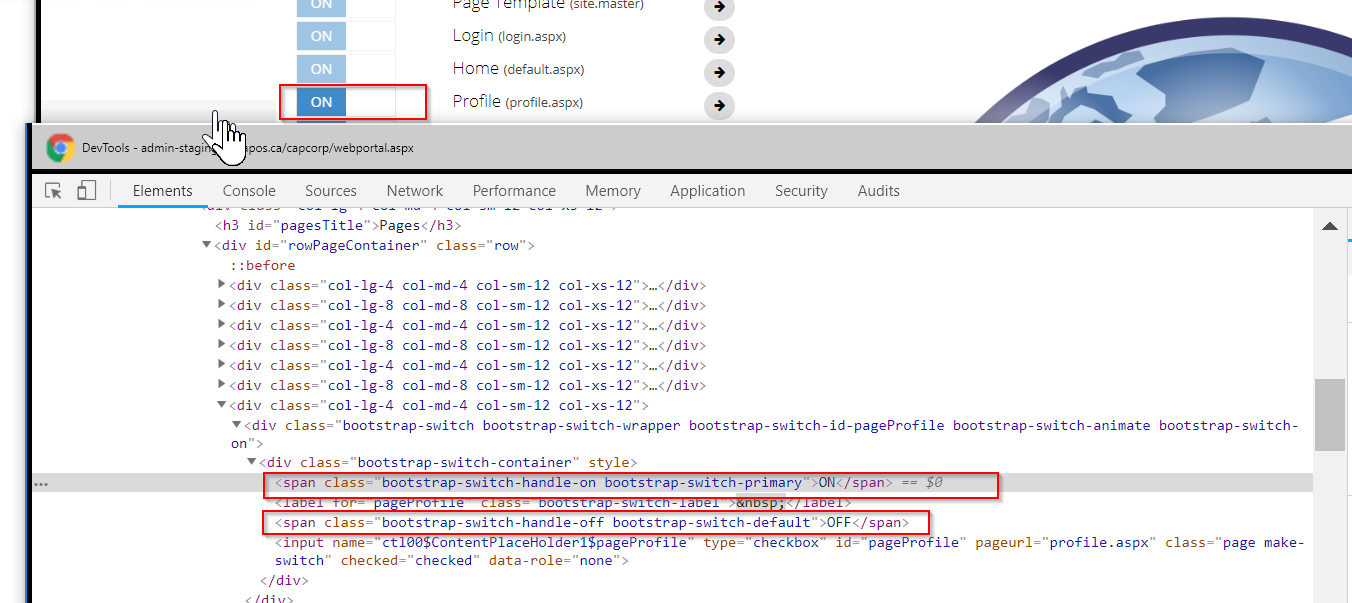

This is what I try to see the button on\off:
@manage_web_portal_page.checkbox(:id,"pageProfile").clear
@manage_web_portal_page.checkbox(:id,"pageProfile").set(false)
puts @manage_web_portal_page.checkbox(:id,"pageProfile").set?
puts @manage_web_portal_page.checkbox(:id,"pageProfile").enabled?
@manage_web_portal_page.checkbox(:id,"pageProfile").set
@manage_web_portal_page.checkbox(:id,"pageProfile").set(true)
puts @manage_web_portal_page.checkbox(:id,"pageProfile").set?
puts @manage_web_portal_page.checkbox(:id,"pageProfile").enabled?
But I get this error on console:
Element <input id="pageProfile" class="page make-switch" name="ctl00$ContentPlaceHolder1$pageProfile" type="checkbox"> is not clickable at point (262.5,291.8999938964844) because another element <span class="bootstrap-switch-handle-on bootstrap-switch-primary"> obscures it (Selenium::WebDriver::Error::ElementClickInterceptedError)
WebDriverError@chrome://marionette/content/error.js:178:5
ElementClickInterceptedError@chrome://marionette/content/error.js:275:5
webdriverClickElement@chrome://marionette/content/interaction.js:167:11

rajagopalan madasami
Jun 15, 2018, 1:44:12 PM6/15/18
to watir-...@googlegroups.com
This error is coming because some other element is overlaying your element which you tend to click. Try to run again and see.
--
--
Before posting, please read https://github.com/watir/watir_meta/wiki/Guidelines-for-Posting-to-Watir-General-Google-Group.
In short: search before you ask, be nice.
watir-...@googlegroups.com
http://groups.google.com/group/watir-general
watir-genera...@googlegroups.com
---
You received this message because you are subscribed to the Google Groups "Watir General" group.
To unsubscribe from this group and stop receiving emails from it, send an email to watir-genera...@googlegroups.com.
For more options, visit https://groups.google.com/d/optout.
c w
Jun 15, 2018, 1:56:36 PM6/15/18
to watir-...@googlegroups.com
I found out why and make it working using fire_event
@manage_web_portal_page.checkbox(:id,"pageProfile").fire_event :click
---
You received this message because you are subscribed to the Google Groups "Watir General" group.
To unsubscribe from this group and stop receiving emails from it, send an email to watir-general+unsubscribe@googlegroups.com.
For more options, visit https://groups.google.com/d/optout.
--
--
Before posting, please read https://github.com/watir/watir_meta/wiki/Guidelines-for-Posting-to-Watir-General-Google-Group.
In short: search before you ask, be nice.
watir-...@googlegroups.com
http://groups.google.com/group/watir-general
---
You received this message because you are subscribed to the Google Groups "Watir General" group.
To unsubscribe from this group and stop receiving emails from it, send an email to watir-general+unsubscribe@googlegroups.com.
rajagopalan madasami
Jun 15, 2018, 1:59:59 PM6/15/18
to watir-...@googlegroups.com
If you use fire event then you are clicking through JavaScript not through selenium. You may be running into the risk of something else. Make sure everything works fine.
---
You received this message because you are subscribed to the Google Groups "Watir General" group.
To unsubscribe from this group and stop receiving emails from it, send an email to watir-genera...@googlegroups.com.
For more options, visit https://groups.google.com/d/optout.
--
--
Before posting, please read https://github.com/watir/watir_meta/wiki/Guidelines-for-Posting-to-Watir-General-Google-Group.
In short: search before you ask, be nice.
watir-...@googlegroups.com
http://groups.google.com/group/watir-general
---
You received this message because you are subscribed to the Google Groups "Watir General" group.
To unsubscribe from this group and stop receiving emails from it, send an email to watir-genera...@googlegroups.com.
For more options, visit https://groups.google.com/d/optout.
--
--
Before posting, please read https://github.com/watir/watir_meta/wiki/Guidelines-for-Posting-to-Watir-General-Google-Group.
In short: search before you ask, be nice.
watir-...@googlegroups.com
http://groups.google.com/group/watir-general
---
You received this message because you are subscribed to the Google Groups "Watir General" group.
To unsubscribe from this group and stop receiving emails from it, send an email to watir-genera...@googlegroups.com.

Jeff Fagot
Jun 15, 2018, 7:36:00 PM6/15/18
to Watir General
The error message indicates specifically what element is obscuring the one you are trying to click on.
You can look it up : <span class="bootstrap-switch-handle-on bootstrap-switch-primary">
Jeff Fagot
Jun 15, 2018, 8:02:59 PM6/15/18
to Watir General
Sorry for my inappropriate answer as I came to see you found the element.
Have you tried to run it with a sleep time?
Does the screenshot of your error matches the scenario you have given us? Are you seeing only one yes printing??
c w
Jun 18, 2018, 8:33:19 AM6/18/18
to watir-...@googlegroups.com
Hi Jeff,


If there is another way to click it it please advise me.
do not say sorry, I try all my best to make things working but I am not confident that I can use another way...
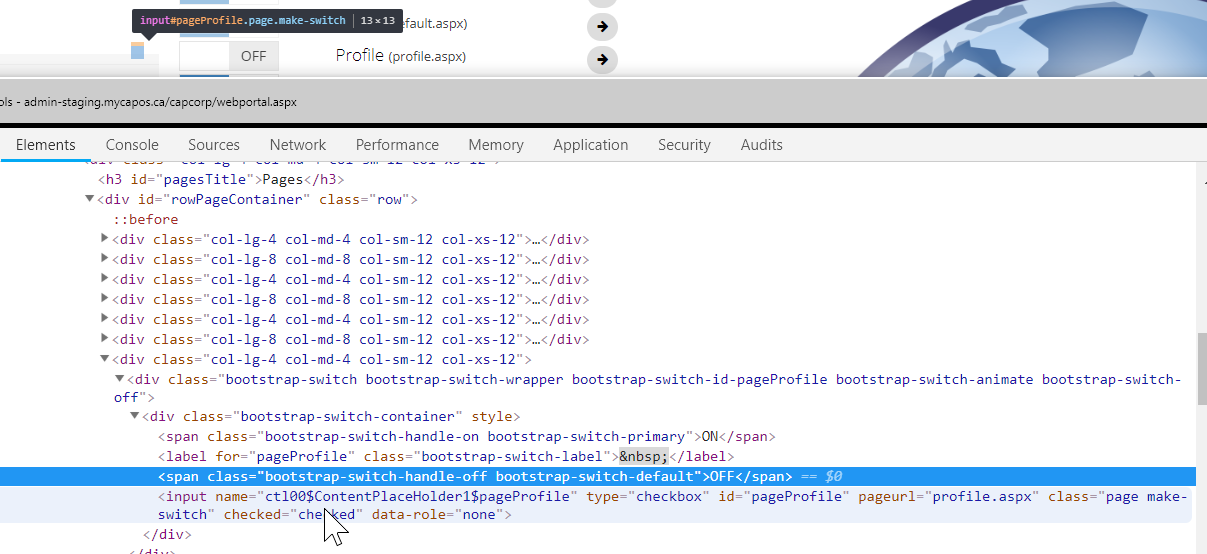
Here is a screen snapshot when I inspect the Off "button" which in fact is a check box
and this is when I have the button ON
Thank you!
--
--
Before posting, please read https://github.com/watir/watir_meta/wiki/Guidelines-for-Posting-to-Watir-General-Google-Group.
In short: search before you ask, be nice.
watir-...@googlegroups.com
http://groups.google.com/group/watir-general
---
You received this message because you are subscribed to the Google Groups "Watir General" group.
To unsubscribe from this group and stop receiving emails from it, send an email to watir-general+unsubscribe@googlegroups.com.
Jeff Fagot
Jun 18, 2018, 1:44:00 PM6/18/18
to Watir General
The checkbox appears to always be checked.
So instead I would rather look up 2 divs and compare the class:
<div class="bootstrap-switch bootstrap-switch-wrapper bootstrap-switch-id-pageProfile bootstrap-switch-off bootstrap-switch-animate">
vs
<div class="bootstrap-switch bootstrap-switch-wrapper bootstrap-switch-id-pageProfile bootstrap-switch-on bootstrap-switch-animate">
I guess the checkbox itself can be used to switch but not for determining the Value to where it is set to, if that makes sense.
Hope that helps.
JFF
On Monday, June 18, 2018 at 8:33:19 AM UTC-4, christina wrote:
Hi Jeff,do not say sorry, I try all my best to make things working but I am not confident that I can use another way...Here is a screen snapshot when I inspect the Off "button" which in fact is a check boxand this is when I have the button ONIf there is another way to click it it please advise me.Thank you!


On Fri, Jun 15, 2018 at 8:02 PM, Jeff Fagot <jffa...@gmail.com> wrote:
Sorry for my inappropriate answer as I came to see you found the element.Have you tried to run it with a sleep time?Does the screenshot of your error matches the scenario you have given us? Are you seeing only one yes printing??
On Friday, June 15, 2018 at 7:36:00 PM UTC-4, Jeff Fagot wrote:The error message indicates specifically what element is obscuring the one you are trying to click on.You can look it up : <span class="bootstrap-switch-handle-on bootstrap-switch-primary">
--
--
Before posting, please read https://github.com/watir/watir_meta/wiki/Guidelines-for-Posting-to-Watir-General-Google-Group.
In short: search before you ask, be nice.
watir-...@googlegroups.com
http://groups.google.com/group/watir-general
---
You received this message because you are subscribed to the Google Groups "Watir General" group.
To unsubscribe from this group and stop receiving emails from it, send an email to watir-genera...@googlegroups.com.

Titus Fortner
Jun 18, 2018, 3:19:52 PM6/18/18
to watir-general
cristina,
Yes, sometimes front end developers like to cover up or override default interactions with the underlying html elements, and using javascript becomes a necessary way to overcome that.
Note that this does the same thing, but might be slightly easier to read:
Note that this does the same thing, but might be slightly easier to read:
`@manage_web_portal_page.checkbox(id: 'pageProfile').click!`
rajagopalan madasami
Jun 18, 2018, 3:23:22 PM6/18/18
to watir-...@googlegroups.com
Can you explain me the difference between selenium click and JS click if any? I know selenium click can only be performed if element is visible on the other hand JS click can be even if element is not visible. Is there any other difference do you know?
Titus Fortner
Jun 18, 2018, 3:43:47 PM6/18/18
to watir-general
That's pretty much it. The driver attempts to determine if a user would be able to click the element, and if it can it clicks it, and if it can't, it throws the error based on the reason the algorithm found (Click Intercepted, Element not Interactable, Not Displayed, etc).
Sometimes the way the devs have created the UI, the driver doesn't think a user can do the thing that it is being told to do. Sometimes it works to click on the parent of the element you want, sometimes it makes sense to make a call to enact the click event handler directly (https://developer.mozilla.org/en-US/docs/Web/API/GlobalEventHandlers/onclick) using JavaScript
rajagopal...@gmail.com
Jun 21, 2018, 12:19:09 PM6/21/18
to Watir General
Hi Titus,
Thanks for reply. I don't believe that's not the only difference. For an example, If you do selenium click on an option of a select_list, then it would be chosen but Javascript script click towards the option doesn't choose the option. We need to write corresponding Javascript code to choose the option like `document.getElementById('something').options[1].selected=true`. But when we click the button then there is no difference between Javascript click and Selenium click except very few differences like selenium doesn't release the control unless the next page loads completely.
Reply all
Reply to author
Forward
0 new messages