
Jupyter Notebook
291 views
Skip to first unread message

Poul Riis
Feb 25, 2016, 8:08:32 AM2/25/16
to VPython-users
I'm just trying to get used to Jupyter Notebook, using the silly example below.
I have several questions:
1) Do I really have to rerun the kernel every time I edit the program?
2) I cannot find a 'find and replace' editing command. Do people normally edit the program in a different editor program?
3) I cannot see any wood structure in the floor? Furthermore, for instance marble does not seem to work. Why?
4) How can I make a sound from the program? (In the old version I used winsound with Beep and MessageBeep).
5) Why does the sphere look like a cigar? In the original program it was indeed a sphere.
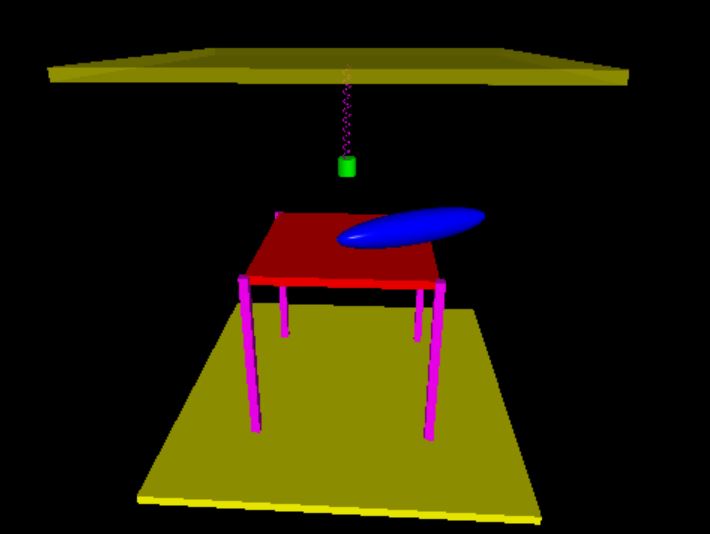
6) How can I show the output in full screen (well, pressing F11 is kind of full screen, but the graphics is far from filling the full screen)?
Poul Riis
from vpython import *
#from winsound import *
scene = display(title='Vpython-demo',x=0, y=0, width=1200, height=800,center=(0,0,0), background=color.black)
ceiling = box(length=2, height=0.05, width=2, color=color.yellow,pos=vec(0,1.025,0),material=materials.plastic,opacity=0.5)
floor = box(length=2, height=0.05, width=2, color=color.yellow,pos=vec(0,-1.025,0),material=materials.plastic)
table = box(length=1, height=0.05, width=1, color=color.red,pos=vec(0,-0.025,0),material=materials.wood)
leg1 = box(length=1.00, height=0.05, width=0.05, color=color.magenta,pos=vec(0.5,-0.50,-0.5),axis=vec(0,-1,0),material=materials.wood)
leg2 = box(length=1.00, height=0.05, width=0.05, color=color.magenta,pos=vec(0.5,-0.50,0.5),axis=vec(0,-1,0),material=materials.wood)
leg3 = box(length=1.00, height=0.05, width=0.05, color=color.magenta,pos=vec(-0.5,-0.50,-0.5),axis=vec(0,-1,0),material=materials.wood)
leg4 = box(length=1.00, height=0.05, width=0.05, color=color.magenta,pos=vec(-0.5,-0.50,0.5),axis=vec(0,-1,0),material=materials.wood)
bold=sphere(pos=vec(0.4,0.8,0),radius=0.1,color=color.blue,material=materials.plastic)
fjeder=helix(pos=vec(0,1,0), axis=vec(0,-0.2,0), radius=0.02,thickness=0.005,coils=10,color=color.magenta,material=materials.plastic)
lod=cylinder(pos=vec(0,0.8,0),axis=vec(0,-0.1,0),radius=0.05,color=color.green,material=materials.plastic)
g=9.82 #Acceleration of gravity
k=100 #Spring constant
m=0.5 #Mass of plumb
A=0.3 #Amplitude of oscillation
y0=0.5 #y-coordinate of equilibrium position
tau=2 #Dampning tid
eps=0.9 #Restitution coefficient
alpha=2/5
omega=sqrt(k/m)
h1=bold.pos.y-bold.radius
t1=sqrt(2*h1/g)
v1=-g*sqrt(2*h1/g)
omegay=3
t=0
told=t
dt=0.0004
while True:
rate(1000)
t=t+dt
lod.pos=vec(0,y0+A*cos(omega*t)*exp(-t/tau),0)
fjeder.axis=vec(0,lod.pos.y-1,0)
if t<t1:
ybold=bold.radius+v1*(t-t1)-g*(t-t1)**2/2
bold.pos=vec(0.4,ybold,0)
else:
v1=eps*v1
t1=t1-v1*2/g
#Beep(440,25)
#MessageBeep(-1)
ybold=bold.radius+v1*(t-t1)-g*(t-t1)**2/2
bold.axis=vec(cos(omegay*t),0,sin(omegay*t))
bold.pos=vec(0.4,ybold,0)
if -v1*2/g<dt:
break

Bruce Sherwood
Feb 25, 2016, 12:30:53 PM2/25/16
to VPython-users
These are all good questions, Poul. Many of the issues simply reflect the beta character of Jupyter VPython, and there is active development aimed at making a fully usable version. Moveover, Jupyter itself is constantly being upgraded. Here are detailed comments on your individual questions:
1) Rerunning a program is very awkward, and we intend to provide a customization of the Jupyter notebook to give single-keypress or button click rerun capabilities. If you do "conda upgrade conda" and "conda upgrade notebook" you'll find an enigmatic button "command palette" on which is a promising option "restart kernel and run all cells" which alas doesn't have an associated keypress nor a separate button.
2) On the new Jupyter notebook page the Edit menu has a "Find and replace" option. I'm really surprised that this wasn't always available.
3) Some Classic VPython features are not available in either GlowScript VPython or the Jupyter version that is based on GlowScript VPython. Use the Help at glowscript.org for details. In particular, there is no "material" attribute of objects. However, you can say box(texture=textures.wood), for example. Here you can see the currently available built-in textures:
The GlowScript Help describes how you can use other images from elsewhere as textures.
4) I don't know how to make a sound; I would have thought that you could still do so with the module you are using, as one of the main points of the Jupyter environment is the ability to import and use existing Python modules.
5) The problem of the sphere becoming elongated is a previously unrecognized bug in GlowScript VPython, and I'm grateful for your report. It is a general rule even in Classic VPython that changing the axis of an object causes object.size.x to be set to the magnitude of object.axis. But sphere is an exception to this rule; in Classic VPython changing the axis of a sphere does not affect its size, which makes sense, since you said you wanted a sphere, not an ellipsoid, and this should be fixed. This issue is related to the flexibility now available in the GlowScript environment, that for example you can make a cylinder using radius or you can make a cylinder using size, in which case you can make its cross section be elliptical. But you're right that a sphere should stay a sphere, and if you want a cigar you should use an ellipsoid. Fixing sphere can induce incompatiblities and so will require a new GlowScript version number, 2.1, which is about to happen anyway in order to address some problems with title and caption that have always been present but are more acute in the Jupyter case. So your report comes at a particularly useful moment.
Bruce Sherwood
Feb 25, 2016, 12:59:00 PM2/25/16
to VPython-users
Correction: GlowScript VPython does it correctly. Changing the axis of a sphere does not affect the size of the sphere. The bug is in our new Jupyter code and will be fixed.

Henri Girard
Feb 25, 2016, 2:18:21 PM2/25/16
to VPython-users
Writing center=vec and changing texture do work in jupyter notebook vpython and local glowscript server
I haven't tried sound yet.
I haven't tried sound yet.
Poul Riis
Feb 25, 2016, 5:19:41 PM2/25/16
to VPython-users
Thanks, Bruce, for all the answers.
Futhermore, what about my question no. 6?
Question no. 3.: After replacing material with texture my computer responds with the following error message:
---------------------------------------------------------------------------
NameError                                 Traceback (most recent call last)
<ipython-input-1-705b6205cfe8> in <module>()
      4 scene = display(title='Vpython-demo',x=0, y=0, width=1200, height=800,center=(0,0,0), background=color.black)
      5
----> 6 ceiling = box(length=2, height=0.05, width=2, color=color.yellow,pos=vec(0,1.025,0),texture=textures.granite,opacity=0.5)
      7 floor = box(length=2, height=0.05, width=2, color=color.yellow,pos=vec(0,-1.025,0),texture=textures.rough)
      8 table = box(length=1, height=0.05, width=1, color=color.red,pos=vec(0,-0.025,0),texture=textures.wood)

NameError: name 'textures' is not defined
???
Poul Riis
Bruce Sherwood
Feb 25, 2016, 6:21:30 PM2/25/16
to VPython-users
The problem with the program is that "display" must be changed to "canvas". This recent change, available in GlowScript and required in Jupyter, is due to the important use of the name "display" in the Jupyter environment (and canvas is more descriptive, too, because it's what this entity is called in the browser world).
As for full-screen options, which I forgot to address, I don't know enough about the Jupyter environment as yet to be able to comment. Maybe someone else here knows?
Poul Riis
Feb 26, 2016, 1:53:24 AM2/26/16
to VPython-users
Thanks, again.
And what about the texture error message?
Poul Riis
Poul Riis
Feb 26, 2016, 3:21:19 AM2/26/16
to VPython-users
Here is what my computer says when I replace 'display' with 'canvas':
---------------------------------------------------------------------------
TypeError                                 Traceback (most recent call last)
<ipython-input-2-c965779a8b37> in <module>()
      2 #from winsound import *
      3
----> 4 scene = canvas(title='Vpython-demo',x=0, y=0, width=1200, height=800,center=(0,0,0), background=color.black)
      5
      6 ceiling = box(length=2, height=0.05, width=2, color=color.yellow,pos=vec(0,1.025,0),opacity=0.5)#,texture=textures.granite

C:\Users\pr\AppData\Local\Continuum\Anaconda3\lib\site-packages\vpython\vpython.py in __init__(self, **args)
   2119                 aval = args[a]
   2120                 if not isinstance(aval, vector):
-> 2121                     raise TypeError(a, 'must be a vector')
   2122                 cmd["attrs"].append({"attr":a, "value": aval.value})
   2123                 del args[a]

TypeError: ('center', 'must be a vector')
???
Poul Riis
Den fredag den 26. februar 2016 kl. 00.21.30 UTC+1 skrev Bruce Sherwood:
Poul Riis
Feb 26, 2016, 3:45:18 AM2/26/16
to VPython-users
More to my question no. 6:
I would by far prefer the output to be presented in separate windows not embedded in the Jupyter notebook. This is actually what happens when I plot some points with matplotlib:
I would by far prefer the output to be presented in separate windows not embedded in the Jupyter notebook. This is actually what happens when I plot some points with matplotlib:

Poul Riis
Den fredag den 26. februar 2016 kl. 00.21.30 UTC+1 skrev Bruce Sherwood:
Poul Riis
Feb 26, 2016, 4:36:07 AM2/26/16
to VPython-users
Sorry, this works:
scene = canvas(title='Vpython-demo',x=0, y=0,width=1200,height=800,center=vec(0,0,0), background=color.orange)

Steve Spicklemire
Feb 26, 2016, 6:22:19 AM2/26/16
to vpytho...@googlegroups.com, Steve Spicklemire
Hi Paul,
Can you try: center=vector(0,0,0)
thanks,
-steve
> --
> You received this message because you are subscribed to the Google Groups "VPython-users" group.
> To unsubscribe from this group and stop receiving emails from it, send an email to vpython-user...@googlegroups.com.
> For more options, visit https://groups.google.com/d/optout.
Can you try: center=vector(0,0,0)
thanks,
-steve
> You received this message because you are subscribed to the Google Groups "VPython-users" group.
> To unsubscribe from this group and stop receiving emails from it, send an email to vpython-user...@googlegroups.com.
> For more options, visit https://groups.google.com/d/optout.
Bruce Sherwood
Feb 26, 2016, 12:01:03 PM2/26/16
to VPython-users, Steve Spicklemire
I believe that John Coady experimented with placing the canvas in a separate window, and I agree that in many cases that would be preferable, because often it's awkward to scroll down or up to find the display. Definitely something worth implementing.
Poul Riis
Feb 26, 2016, 12:23:06 PM2/26/16
to VPython-users, stevespi...@gmail.com
And it becomes even more desirable when you add more windows (for instance 2-D-graphs) as I have done in my (still silly) example below.
I still wonder why i cannot make texture work....?
Poul Riis
from vpython import *
#from winsound import *
scene = canvas(title='Vpython-demo',x=0, y=0,width=500,height=500,center=vector(0,0,0), background=color.orange)#, background=color.black)
typlots = graph(x=500, y=0, width=900, height=200, title='Oscillating plumb and jumping ball', xtitle='t', ytitle='y',background=color.green)
ballgraph = gcurve(color=color.blue)
plumbgraph = gdots(color=color.red,size=1)
ceiling = box(length=2, height=0.05, width=2, color=color.yellow,pos=vec(0,1.025,0),opacity=1)#,texture=textures.granite
floor = box(length=2, height=0.05, width=2, color=color.yellow,pos=vec(0,-1.025,0))#,texture=textures.rough
table = box(length=1, height=0.05, width=1, color=color.red,pos=vec(0,-0.025,0))#,texture=textures.wood
leg1 = box(length=1.00, height=0.05, width=0.05, color=color.magenta,pos=vec(0.5,-0.50,-0.5),axis=vec(0,-1,0))#,texture=textures.metal
leg2 = box(length=1.00, height=0.05, width=0.05, color=color.magenta,pos=vec(0.5,-0.50,0.5),axis=vec(0,-1,0))#,texture=textures.metal
leg3 = box(length=1.00, height=0.05, width=0.05, color=color.magenta,pos=vec(-0.5,-0.50,-0.5),axis=vec(0,-1,0))#,texture=textures.metal
leg4 = box(length=1.00, height=0.05, width=0.05, color=color.magenta,pos=vec(-0.5,-0.50,0.5),axis=vec(0,-1,0))#,texture=textures.metal
ball=sphere(pos=vec(0.4,0.8,0),radius=0.1,color=color.blue)#,texture=textures.gravel
spring=helix(pos=vec(0,1,0), axis=vec(0,-0.2,0), radius=0.02,thickness=0.005,coils=10,color=color.magenta)#,texture=textures.rock
plumb=cylinder(pos=vec(0,0.8,0),axis=vec(0,-0.1,0),radius=0.05,color=color.green)#,texture=textures.stucco
g=9.82 #Acceleration of gravity
k=100 #Spring constant
m=0.5 #Mass of plumb
A=0.3 #Amplitude of oscillation
y0=0.5 #y-coordinate of equilibrium position
tau=2 #Damping time
eps=0.9 #Restitution coefficient
alpha=2/5
omega=sqrt(k/m)
h1=ball.pos.y-ball.radius
t1=sqrt(2*h1/g)
v1=-g*sqrt(2*h1/g)
omegay=3
i=0
t=0
told=t
dt=0.0004
while True:
rate(1000)
i=i+1
t=t+dt
plumb.pos=vec(0,y0+A*cos(omega*t)*exp(-t/tau),0)
spring.axis=vec(0,plumb.pos.y-1,0)
if t<t1:
yball=ball.radius+v1*(t-t1)-g*(t-t1)**2/2
ball.pos=vec(0.4,yball,0)
else:
v1=eps*v1
t1=t1-v1*2/g
#Beep(440,25)
#MessageBeep(-1)
yball=ball.radius+v1*(t-t1)-g*(t-t1)**2/2
ball.axis=vec(cos(omegay*t),0,sin(omegay*t))
ball.pos=vec(0.4,yball,0)
if i%20==0:
ballgraph.plot(pos=(t,ball.pos.y))
plumbgraph.plot(pos=(t,plumb.pos.y))
if -v1*2/g<dt:
break
Henri Girard
Feb 27, 2016, 1:33:51 AM2/27/16
to VPython-users
it does work in jupyter notebook, I just add from math import * (for sqrt)
I uncomment your texture and run the programm (by the way it works nicer than mine because I hadn't graph)
from vpython import *
#from winsound import *
from math import *
from math import *
ceiling = box(length=2, height=0.05, width=2, color=color.yellow,pos=vec(0,1.025,0),opacity=1,texture=textures.granite)
Le jeudi 25 février 2016 14:08:32 UTC+1, Poul Riis a écrit :
I'm just trying to get used to Jupyter Notebook, using the silly example below.I have several questions:1) Do I really have to rerun the kernel every time I edit the program?2) I cannot find a 'find and replace' editing command. Do people normally edit the program in a different editor program?3) I cannot see any wood structure in the floor? Furthermore, for instance marble does not seem to work. Why?4) How can I make a sound from the program? (In the old version I used winsound with Beep and MessageBeep).5) Why does the sphere look like a cigar? In the original program it was indeed a sphere.
Poul Riis
Feb 27, 2016, 2:18:13 AM2/27/16
to VPython-users
I don't understand that - my computer still says
NameError: name 'textures' is not definedPoul Riis
Henri Girard
Feb 27, 2016, 2:45:34 AM2/27/16
to VPython-users
What are you using gs (glowscript) or jn (jupyter notebook ) ?
I tried your program on jn : with kernel python3 and vpython kernel (I use ubuntu 16.04 with sudo pip3 install vpython and sudo pip install vpython) I have too an env for user using python3 and python because jupyter doesn't accept all kernel as I use too sagemath. I guess it's very redondant but I haven't find a way of clearing that. In fact I got read of anaconda that's a "+".
I am testing it now on glowscript, public and local
I tried your program on jn : with kernel python3 and vpython kernel (I use ubuntu 16.04 with sudo pip3 install vpython and sudo pip install vpython) I have too an env for user using python3 and python because jupyter doesn't accept all kernel as I use too sagemath. I guess it's very redondant but I haven't find a way of clearing that. In fact I got read of anaconda that's a "+".
I am testing it now on glowscript, public and local
Le jeudi 25 février 2016 14:08:32 UTC+1, Poul Riis a écrit :
Henri Girard
Feb 27, 2016, 2:46:56 AM2/27/16
to VPython-users
Where can I send you the modified code ?
I don't want to polluate le list
I don't want to polluate le list
Le jeudi 25 février 2016 14:08:32 UTC+1, Poul Riis a écrit :
Henri Girard
Feb 27, 2016, 3:07:24 AM2/27/16
to VPython-users
I delete my example !!!!
Well it was worth because copying yours in jupyter it doesn't work ?
What the problem ?
I will see if a I can get back a file backup
Well it was worth because copying yours in jupyter it doesn't work ?
What the problem ?
I will see if a I can get back a file backup
Le jeudi 25 février 2016 14:08:32 UTC+1, Poul Riis a écrit :
Reply all
Reply to author
Forward
0 new messages