
VoiceAttack won't understand me
849 views
Skip to first unread message

Skovdam
Mar 3, 2015, 6:01:18 PM3/3/15
to voice...@googlegroups.com
The program is running as admin
under speec properties in control panel i have used the train voice 4 time (no differends from each time)
i have tryed having the mic close and far away from my mouth, and changed the volume my speech via the mic is.
i dont know what else to try, can someone help?

mowe...@gmail.com
Mar 3, 2015, 7:56:50 PM3/3/15
to voice...@googlegroups.com
Just to clarify, when you run Speech Recognition in Windows before loading Voice Attack it doesn't understand your voice, or is your mic is not being picked up at all as if it was turned off?
When you start Speech Recognition and start talking can you see the sound bar next to the microphone icon moving up and down?
If everything is working but windows cannot understand your voice because of maybe a strong accent or something there is a way to edit or add individual words, though this could be very tedious if you have alot of commands. You can type in a word, then say it and TTS will use what you say and match it to what you type.
I've added a couple of slang words this way for example " max " and " weps " so I can say " max weps " to get full pips to weapons. I like to keep my system commands as short as possible, especially in battle.
Skovdam
Mar 4, 2015, 9:15:16 AM3/4/15
to voice...@googlegroups.com
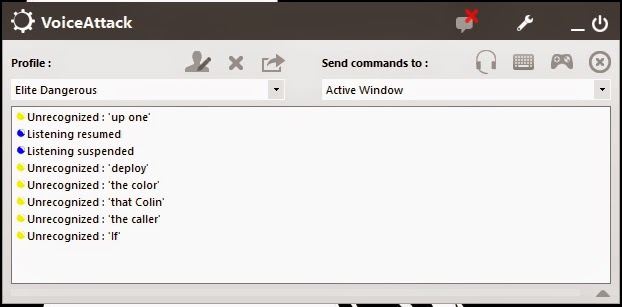
example (look at the photo)
the first (if) is just from me picking up the mic, and it thinks the sound of the air is someone saying "if"
the next four (the caller, that colin, the color and deploy) is my saying deploy four time, (with no change in the way im saying it.
the last (up one) is me putting down the mic :/
hopes that clarifies it :)
Skovdam
Mar 6, 2015, 9:03:38 AM3/6/15
to voice...@googlegroups.com
noone have a solution?

Joshua Bennett
Mar 6, 2015, 10:59:42 AM3/6/15
to voice...@googlegroups.com
What is the system volume level of your input?
I've found if something like Skype or Hangouts adjusts my Microphone level below ~50 then Windows Speech Recognition/VA gets really muddy results
On Friday, March 6, 2015 at 9:03:38 AM UTC-5, Skovdam wrote:
On Friday, March 6, 2015 at 9:03:38 AM UTC-5, Skovdam wrote:
noone have a solution?
mowe...@gmail.com
Mar 6, 2015, 2:04:12 PM3/6/15
to voice...@googlegroups.com
As far as the " if " word goes, that's normal. TTS wil always interpret background noise as text in weird ways. If I sniff into my mic it registers as Shhh.
The deploy word i'm not sure what's happening but I would try and use the link above and train TTS to understand " deploy " the way you say it and see if it works better in VA. When you edit the word in TTS be careful that you say the word as natural as possible. Say it the way you would when in game, just use your natural volume and voice. TTS will record it and connect what you say to the word you type. Try it with one word first and see if VA recognizes it better.
Fixx

Gary
Mar 6, 2015, 3:04:56 PM3/6/15
to voice...@googlegroups.com
I wouldn't go by the trainer accepting your speech as it working fine. What it is doing is taking a baseline of what to expect. So, if your environment is noisy or your mic is hot/quiet, it will compensate.
Speech recognition not working with VoiceAttack usually falls into one of these categories :
Mic level too low/high, mic too close to mouth
Background noise too high
Thick accent / using a speech engine for a language that is not your native language / you are Scottish*
Mic input not acceptable... bad/noisy sound card
Windows speech profile has been corrupted
Outside of this, I'm not sure what can be done, since the voice response part of VA relies on the Windows speech engine, and can only process what the speech engine is handing out.
* - Two of my dearest friends are from Scotland... I have a hard time understanding them sometimes... especially when they talk to each other. I do love you, Scotland, and hope to visit one day!
Gary
Skovdam
Mar 6, 2015, 3:47:37 PM3/6/15
to voice...@googlegroups.com
The mic volume is at max, and it has enhanced enabled.
i have tried to adjust the volume and the placement of the mic.
there is absolutly no background noise (in a sound isolated room with only me :P )
Im from Denmark so my accent may be the problem (cant do much about that)
when talking with others over skype or teamspeak they have no problem understanding what im saying.
i have tried to make a new profile and train it, but still same result.

Ice Blast
Mar 20, 2015, 9:35:36 PM3/20/15
to voice...@googlegroups.com
There are some words Voice Attack has trouble understanding for me. What I usually do is, say the word or command 4 or 5 times. When Voice Attack seems to hear the same word, or command multiple times in a row, I use those word with the command.
Example:
Three, Voice Attack doesn't hear Three, it hears Stirring. No idea how it hears that, when I'm trying to say Three, but it does. So, this is the command I use to make Three work for me, pretty much every time I use it now.
Stirring;Three - I kept Three, just encase, it ever really hears the correct work I'm trying to say.
Another Examples
Stepped;Six - Six apparently sounds like Stepped.
Buying;By;Five - When I say Five, it hears either Buying, or By, so, I used both.
Kind;Nine - This one here, was hard, Because it confused it for Five. I'd say nine, and it would active the Five command. So, I say, Kind, for Nine. Luckily, there aren't many commands I have to remember that are different then what I want.
But usually, after you give a few different possible answers, Voice Attack is more likely to understand the command you are trying to say, even if, it's different words it hears, you can add those words, as possible command triggers.
Also, Mic's can make a big difference. I'm using the Amigo Cobra Buddy Mic. Under $40 on Amazon. It's a great mic, works good up close and a couple feet away, or across the room if you yell. Also, I run a loud box fan, pretty much at all times in my room, and it has no problem with it. White noise isn't a problem, it's other noises, that can be confused as a command, and make your voice not heard. Get a USB mic, if you don't already have one. They are usually dead quiet when plugged in. You should test you mic, in a dead quiet room. Use a program to record your voice, but instead of talking, just record like 10 seconds of quiet and play it back. Now, when you play it back, do you hear quiet, or are there odd sounds. If you are picking up sounds that aren't there, then that could be your problem. If it's a 3.5mm connection, then try a usb mic, if it's a USB mic, then try a different USB port, move from the back to the front of your computer, or the other way around, till you hear plain quiet on the playback.
Anyway, I don't know if any of that will help or not. But I thought I'd give it a try.

Chris Milner
Mar 21, 2015, 7:43:27 AM3/21/15
to voice...@googlegroups.com
On voice attack mis-reporting what you say: This sounds like you have a corrupted speech file. I would recommend either starting a new profile (Control panel: speech recognition) or do some more training of the speech recognition software. I have recently had this happen to me.
Reply all
Reply to author
Forward
0 new messages