
Re: Data Import from Excel: Solution
90 views
Skip to first unread message

Pedro Valero
Jun 6, 2012, 10:54:51 AM6/6/12
to visual-s...@googlegroups.com
Just a quick note endorsing this method of transferring data to ViSta. Quite convenient and seems to work well in several scenarios.
On Wednesday, June 6, 2012 2:30:05 PM UTC+2, Piranha wrote:
On Wednesday, June 6, 2012 2:30:05 PM UTC+2, Piranha wrote:
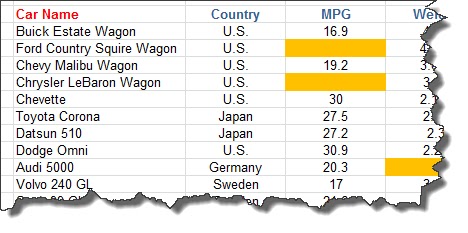
Hello allThe original Excel-Vista link does not work due to different Excel versions, languages and Code to run within Vista.I solved the issue by just creating the correct XLISP term with an Excel macro and copying it to the clipboard.In VISTA one can then paste this to the listener. Copying a range of data (inlcuding dataset name from worksheet name, Column titles and even empty cells...creates the follwing XLISP term when pressing the macro button (not shown above): (DATA "Some Cars" :TITLE "Some Cars" :ABOUT "Excel Data" :VARIABLES '("Car Name" "Coun........There is no VISTA DLL code involved and the XLISP term in the clipboard is adapted to what VISTA needs. There might well be some limitations, like e.g. the length of the string being transported via Clipboard. I did not check it with large data.It could be modified by transporting the XLISP term via a file - may be that overcomes size limitations.I hope this helps - obviosuly I was not the only one with the problem...RegardsPiranha

Ruben Ledesma
Jun 6, 2012, 11:13:26 AM6/6/12
to visual-s...@googlegroups.com
Excellent!!!
Just a problem with my spanish version of excel.
It uses "," for decimal points, but ViSta requieres "." (and it interpreted your example data in that form).
So, if you are a spanish-excel user, you should replace "," by "." as a first step.
Thanks for your work!!
Ruben.
--
Dr. Rubén Ledesma - CONICET/UNMdP
http://www.mdp.edu.ar/psicologia/vista/
Just a problem with my spanish version of excel.
It uses "," for decimal points, but ViSta requieres "." (and it interpreted your example data in that form).
So, if you are a spanish-excel user, you should replace "," by "." as a first step.
Thanks for your work!!
Ruben.
2012/6/6 Piranha <peter....@uster.com>
Hello allThe original Excel-Vista link does not work due to different Excel versions, languages and Code to run within Vista.I solved the issue by just creating the correct XLISP term with an Excel macro and copying it to the clipboard.In VISTA one can then paste this to the listener. Copying a range of data (inlcuding dataset name from worksheet name, Column titles and even empty cells...creates the follwing XLISP term when pressing the macro button (not shown above): (DATA "Some Cars" :TITLE "Some Cars" :ABOUT "Excel Data" :VARIABLES '("Car Name" "Coun........There is no VISTA DLL code involved and the XLISP term in the clipboard is adapted to what VISTA needs. There might well be some limitations, like e.g. the length of the string being transported via Clipboard. I did not check it with large data.It could be modified by transporting the XLISP term via a file - may be that overcomes size limitations.I hope this helps - obviosuly I was not the only one with the problem...Regards
Piranha--
You received this message because you are subscribed to the Google Groups "Visual Statistics" group.
To view this discussion on the web visit https://groups.google.com/d/msg/visual-statistics/-/FNLpu5QdMSgJ.
To post to this group, send email to visual-s...@googlegroups.com.
To unsubscribe from this group, send email to visual-statist...@googlegroups.com.
For more options, visit this group at http://groups.google.com/group/visual-statistics?hl=en.
--
Dr. Rubén Ledesma - CONICET/UNMdP
http://www.mdp.edu.ar/psicologia/vista/

Frank Thomas
Jun 6, 2012, 10:57:13 AM6/6/12
to visual-s...@googlegroups.com
Does this also work with OpenOffice /LibreOffice Calc ?
--
You received this message because you are subscribed to the Google Groups "Visual Statistics" group.
To view this discussion on the web visit https://groups.google.com/d/msg/visual-statistics/-/S1zttyWBbFMJ.

Piranha
Jun 6, 2012, 12:17:39 PM6/6/12
to visual-s...@googlegroups.com
Hello
I do not know OpenOffice/LibreOffice Calc.
But the Excel-File has just a macro. This macro reads the marked cells content and creates the LISP string out of it.
If the macro language in open office is the same (in Excel it is a VBA, Visual Basic for Applications) then it works.
Otherwise you can look at the macro and try to create something similar.
Kind regards
Piranha
Am Mittwoch, 6. Juni 2012 16:57:13 UTC+2 schrieb Frank Thomas:
Does this also work with OpenOffice /LibreOffice Calc ?
On 06/06/2012 16:54, Pedro Valero wrote:
Just a quick note endorsing this method of transferring data to ViSta. Quite convenient and seems to work well in several scenarios.
On Wednesday, June 6, 2012 2:30:05 PM UTC+2, Piranha wrote:--Hello allThe original Excel-Vista link does not work due to different Excel versions, languages and Code to run within Vista.I solved the issue by just creating the correct XLISP term with an Excel macro and copying it to the clipboard.In VISTA one can then paste this to the listener. Copying a range of data (inlcuding dataset name from worksheet name, Column titles and even empty cells...creates the follwing XLISP term when pressing the macro button (not shown above): (DATA "Some Cars" :TITLE "Some Cars" :ABOUT "Excel Data" :VARIABLES '("Car Name" "Coun........There is no VISTA DLL code involved and the XLISP term in the clipboard is adapted to what VISTA needs. There might well be some limitations, like e.g. the length of the string being transported via Clipboard. I did not check it with large data.It could be modified by transporting the XLISP term via a file - may be that overcomes size limitations.I hope this helps - obviosuly I was not the only one with the problem...RegardsPiranha
You received this message because you are subscribed to the Google Groups "Visual Statistics" group.
To view this discussion on the web visit https://groups.google.com/d/msg/visual-statistics/-/S1zttyWBbFMJ.
To post to this group, send email to visual-statistics@googlegroups.com.
To unsubscribe from this group, send email to visual-statistics+unsubscribe@googlegroups.com.
Piranha
Jun 7, 2012, 3:24:34 AM6/7/12
to visual-s...@googlegroups.com
Hello again
I forgot to mention one hint:
The Excel file has a button to access the macro. But you can copy/transfer the macro to your personal Excel sheet which contains code to be available in ALL Excel sheets. By assigning a short cut to that macro (e.g. CTRL+SHIFT+some letter) you can make the data transfer available in all Excel sheets without a preparation in advance.
Regards
Piranha
Reply all
Reply to author
Forward
0 new messages