
[vim/vim] add support for focusing in popup (#7555)

Prabir Shrestha
Fixes #5639 which has been a common request.
- allow
win_gotoid()to focus inside a popup - add a flag called
focusableinpopup_create. Iffocusableis falsewin_gotoid()should fail with error. - update docs
- add tests
Demo can be found at https://asciinema.org/a/381243
One thing I noticed is that :qa! didn't work inside the popup but everything else seems to be working well such inside the popp such as editing, yanking, moving around, searching.
You can view, comment on, or merge this pull request online at:
https://github.com/vim/vim/pull/7555
Commit Summary
- add support for focusing in popup
File Changes
- M src/evalwindow.c (4)
Patch Links:
—
You are receiving this because you are subscribed to this thread.
Reply to this email directly, view it on GitHub, or unsubscribe.
Prabir Shrestha
you can test with the following.
function! g:Popup() abort
  let winid = popup_create('hello', { 'minwidth': 20, 'minheight': 3, 'maxheight': 4 })
  call win_gotoid(winid)
endfunction

call g:Popup()
use :call win_gotoid(1001) to go to popup and :call win_gotoid(1000) to goto the main window.
codecov[bot]
Codecov Report
Merging #7555 (2291dee) into master (e5730bd) will decrease coverage by
86.09%.
The diff coverage is0.00%.

@@             Coverage Diff             @@

##           master    #7555       +/-   ##

===========================================

- Coverage   88.58%    2.49%   -86.10%

===========================================

  Files         148      146        -2

  Lines      163588   158554     -5034

===========================================

- Hits       144917     3955   -140962

- Misses      18671   154599   +135928
| Flag | Coverage Δ | |
|---|---|---|
| huge-clang-none | ? |
|
| huge-gcc-none | ? |
|
| huge-gcc-unittests | 2.49% <0.00%> (-0.01%) |
⬇️ |
Flags with carried forward coverage won't be shown. Click here to find out more.
| Impacted Files | Coverage Δ | |
|---|---|---|
| src/evalwindow.c | 0.00% <0.00%> (-95.62%) |
⬇️ |
| src/sha256.c | 0.00% <0.00%> (-97.96%) |
⬇️ |
| src/digraph.c | 0.00% <0.00%> (-97.78%) |
⬇️ |
| src/gui_gtk_f.c | 0.00% <0.00%> (-97.54%) |
⬇️ |
| src/crypt_zip.c | 0.00% <0.00%> (-97.06%) |
⬇️ |
| src/vim9type.c | 0.00% <0.00%> (-96.70%) |
⬇️ |
| src/libvterm/src/rect.h | 0.00% <0.00%> (-96.56%) |
⬇️ |
| src/debugger.c | 0.00% <0.00%> (-96.38%) |
⬇️ |
| src/eval.c | 0.11% <0.00%> (-96.30%) |
⬇️ |
| src/evalbuffer.c | 0.00% <0.00%> (-96.25%) |
⬇️ |
| ... and 135 more |
Continue to review full report at Codecov.
Legend - Click here to learn more
Δ = absolute <relative> (impact),ø = not affected,? = missing data
Powered by Codecov. Last update e5730bd...2291dee. Read the comment docs.
Shane-XB-Qian
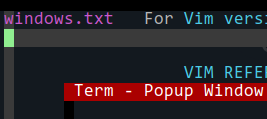
for now, it can escape from popup/term, just cannot jump back..
// but looks/i-think it's buggy, not purposed to..
// would be abnormal when windo bufdo..
Prabir Shrestha
@prabirshrestha pushed 1 commit.
- e17093d add win_gotoid(popup_winid) tests
—
You are receiving this because you are subscribed to this thread.

Prabir Shrestha
@prabirshrestha pushed 1 commit.
- c686593 add comment
—
You are receiving this because you are subscribed to this thread.
Prabir Shrestha
@prabirshrestha pushed 1 commit.
- 1bd136d add focusable flag
—
You are receiving this because you are subscribed to this thread.
Prabir Shrestha
@ Shane-XB-Qian not sure what your comments are. Can you clarify with instructions and vimscript so I can try it out. My demo includes focusing in and out. I also added tests which can focus in and out of popup. not sure what it means by cannot jump back. what are the items that are buggy? what do you mean by abnormal windo/bufdo. can you provide examples?
Prabir Shrestha
@brammool this is ready for the initial review. I had added tests and a focusable flags similar to neovim.
I do have few questions.
- should
f_win_gotoidthrow an error viaemsgif the popup is found but not focusable or should we silently ignore. - what does
undo_syncmean inwin_enter(win_T *wp, int undo_sync)? I'm currently passing it asTRUEwhen usingwin_gotoid. - If the
popupis currently focused. What shouldpopup_close()do? Should we focus back similar topopup_close_and_callback? - If the
popupis currently focused and we updatefocusableflag tofalseshould we focus back similar to 3? - What about
terminals? Any reason we can't open a second popup with a terminal? For example I could use two popup one to show fuzzy matches via a terminal program such asfzfand another popup window to show the contents of the file by using tools such as bat which is a fancier version ofcatwith syntax highlighting. - Let me know if there are any particular tests you would want me to add.
bfrg
What about popup-filters? Are those disabled once the popup is focused, and later restored?
For example I could use two popup one to show fuzzy matches via a terminal program such as fzf and another popup window to show the contents of the file by using tools such as bat which is a fancier version of cat with syntax highlighting.
Why do you need a second popup for this? fzf already provides a builtin preview window with --preview bat {}.
Shane-XB-Qian
Can you clarify
um.. the screenshot perhaps not showed out..
anyway,
1, create a popup with term in it, then win_gotoid(1234), which to a normal window,
2, for now that's workable even without your patch,
but i think that's a bug or was not vim purposed to..
and once out, it cannot jump back..
3, after so, windo, bufdo etc perhaps abnormal.. had to popup_clear()
Prabir Shrestha
@bfrg fzf and bat for preview was just an example of use case since those are the most popular ones that I thought folks would be familiar with. There are other fuzzy finders that doesn't support preview.
What about popup-filters? Are those disabled once the popup is focused, and later restored?
Great question. I haven't used it so wouldn't know what the best default for this would be.
@ Shane-XB-Qian That makes sense now. It was most likely always a bug. Should be easy to block or allow focusing back to popup terminal. But first let us wait for confirmation from Bram on what it should be. I personally would prefer to be focusable in and out.
Bram Moolenaar
I don't see an update for the help, thus I can only guess what this would be used for.
Generally, it looks like it's going to introduce lots of bugs, since popups were not made to be focused.
And a slew of more feature request, e.g. mouse support.
Why not use a popup filter?
lacygoill
should f_win_gotoid throw an error via emsg if the popup is found but not focusable or should we silently ignore.
I would say, let's be consistent. Does Vim raise an error if we try to escape then refocus a popup terminal with win_gotoid()? No:
vim -Nu NONE -S <(cat <<'EOF'
    vim9
    var origin = win_getid()
    var popup_id = term_start(&shell, {hidden: true})
        ->popup_create({border: []})
    win_gotoid(origin)
    win_gotoid(popup_id)
EOF
)
So, FWIW, I would go with "silently ignore".
In general, low-level builtin functions don't raise any error (contrary to Ex commands):
call setline(-1, 'some text on a line which doesn''t exist')
Unless you use a wrong syntax:
call setline({}, 'the first argument should be a number, not a dict')
E728: Using a Dictionary as a Number
E731: using Dictionary as a String
Sorry for the next and short digression:
- The fact that we can escape a popup terminal with
win_gotoid()is a bug. It is currently not allowed to do that. - The fact that
setline()raisesE731when we pass a dictionary as the first argument tosetline()is unexpected (E728is expected though). - The fact that
setline()raises an error when we pass it a dictionary, but notsetbufline()is inconsistent.
If the popup is currently focused. What should popup_close() do? Should we focus back similar to popup_close_and_callback?
According to this todo item, we should go to the previous current window:
https://github.com/vim/vim/blob/9618a25b9c054f0ee4e267d2db96b6e7c113ed7a/runtime/doc/todo.txt#L161
If the popup is currently focused and we update focusable flag to false should we focus back similar to 3?
How would we update the flag? With popup_setoptions()? I'm not a dev, but I would not allow that; at least not until this feature is merged, get some users feedback to make it stable, then get a feature request which receives enough interest (and explains for which use case this would be useful).
Any reason we can't open a second popup with a terminal?
It was allowed for some time, but it caused too many issues:
What about popup-filters? Are those disabled once the popup is focused, and later restored?
No, they remain active. I've checked with this script:
vim9script
def Filter(id: number, key: string): bool
    if key == 'a'
        return true
    else
        return false
    endif
enddef
popup_create('hello', {
    minwidth: 20,
    minheight: 3
,
    maxheight: 4,
    focusable: true,
    filter: Filter,
    })
    ->win_gotoid()
When I press a while in the popup, I don't enter insert mode, which probably means that the key has been consumed by the filter.
Run :call popup_clear(1) | qa! to quit.
Great question. I haven't used it so wouldn't know what the best default for this would be.
As @bfrg mentioned, I think the best would be to temporarily disable the popup filters while a popup window is focused. If you need more info about the purpose of popup filters, and how they're meant to be used, see :h popup-filter.
A few remarks:
- I think the user would want an interactive command to escape a focused popup (
win_gotoid()is a low-level function for plugin authors), like<Esc>:
https://github.com/vim/vim/blob/9618a25b9c054f0ee4e267d2db96b6e7c113ed7a/runtime/doc/todo.txt#L161 - The todo list suggests an interactive
<C-W>Pcommand to cycle between the current window, the preview window, and all the popup windows:
https://github.com/vim/vim/blob/9618a25b9c054f0ee4e267d2db96b6e7c113ed7a/runtime/doc/todo.txt#L158-L160 - We can't undo a change in the buffer displayed in the focused popup (pressing
ugives an "already at oldest change" message). And settingundo_syncwithFALSEwhen passing it towin_enter()doesn't help.
lacygoill
Generally, it looks like it's going to introduce lots of bugs, since popups were not made to be focused.
Based on my short experience with multiple popup terminals, I tend to agree.
And a slew of more feature request, e.g. mouse support.
Aside from a "focusable popup to handle user input for fuzzy finder" special case, it seems that's exactly what they want. If you look for backlinks on this PR, you'll notice prabirshrestha/vim-lsp#975 and puremourning/vimspector#316 . In both cases, it seems to be about the inability to use the mouse to scroll vertically or horizontally in a popup. Although, there might be more than that, as I haven't read/understood everything they wrote.
Why not use a popup filter?
The current PR tries to fix #5639.
This feature request argues that popup windows should be focusable based on 4 issues:
Before going further, some context is necessary.
The author of the feature request maintains a plugin whose purpose is to let the user find some needle(s) in a haystack, with which the user can then interact in some arbitrary way.
The haystack could be:
- the list of all the files in the current project
- the list of all the color schemes which are currently available
- the list of all the Vim
:marks
...
Any list of things which Vim knows about, or can know about.
To let the user find the needle(s) in the haystack, the plugin displays the list in a popup window, and waits for the user to type some text. The list items are filtered based on some fuzzy algorithm. What remains at any given time is always displayed in the popup. Once the user has found its needle(s), it presses some mapping to use it/them in some arbitrary way. For example, if the haystack is a list of files:
- pressing
C-dcould delete them - pressing
C-acould add them into the arglist - pressing
C-qcould add them into the quickfix list
...
Now, let's go back to the 4 numbered issues on which the feature request rely to argue that a popup window should be focusable.
1. has been fixed by 8.2.0329; thus, it's no longer relevant.
2. and 3. are about line editing commands to let the user edit its input text: like <BS> to delete the previous character, <C-W> to delete the previous word, <C-A> to jump at the start of the input text, ...
4. is about leveraging Vim's modes and regular mappings to interact with the popup buffer (i.e. with the needle(s)).
If we recognize integrating an interactive fuzzy finder inside Vim as a legitimate use case, then 2. and 3. are valid, because:
A: AFAIK, Vim doesn't provide any builtin feature to display and handle the user input the way a fuzzy finder expects it to be.
So you have to emulate it in some way.
B: It's not easy to re-implement a line editor inside a popup filter.
C: It's tricky to handle the cursor while the user is typing its input text.
Regarding A: I do it with a simple :echo. Same thing for a plugin written by @yegappan.
Regarding B: You can expect plugin authors to not bother, except maybe for some very basic commands like <BS> (no <C-W>, no <C-A>, ...). This could also result in an inconsistent user experience: each fuzzy plugin providing its own subset of editing commands (probably with its own bugs too).
Regarding C: I think you need to make it temporarily invisible. And you definitely need to emulate a cursor on the input line.
What about the issue 4.? I think it's due to the fact that when you're typing text, the set of keys which is available to interact with the needles is too limited. You can't map anything to a printable character, because you might need to insert it. What remains are chords like <C-A>, <M-B>, ... and some people don't like chords. For example, for some users, when the needles are files, and they want to delete them, they would rather press dd than <C-D>.
IMO, there is a workaround for this issue: group all the commands which you want to be able to run on your needles behind 1 not-too-awkward chord, like <S-TAB>. This is possible thanks to the popup_menu() and popup_filter_menu() functions. From there, you can select which command you want to execute on your needles by pressing j and k. So, instead of learning various uncomfortable chords, you just need to use one. It's easier to find 1 comfortable chord, than many. BTW, that's exactly what the author of the feature request has done.
OK, so what remains is 2. and 3.. That is, line editing commands.
What they need is not the ability to focus any popup. They need to focus one extra popup window below or above a popup menu displaying the needle(s). It would be 1 line high, and as wide as the popup menu. It would stay open as long as the popup menu is open. Not longer. Since we can only have 1 popup menu at a time, we would only have 1 focusable popup window. I suppose it would not cause more issues than a popup terminal.
The issue is not the focusable property of this extra popup. The issue is how to make it cooperate with the main menu.
Shane-XB-Qian
Sorry for the next and short digression:
* _The fact that we can escape a popup terminal with `win_gotoid()` is a bug. It is currently not allowed to do that._
@lacygoill now -it Can (even without this patch).
just like your dome code win_gotoid(origin) actually worked, but win_gotoid(popup_id) was failed -just no err msg.
but yea, not sure if it was vim purposed, i supposed vim should Not Allow escape from popup/term, cannot allow jump back too.
but perhaps there some user cases just wish can escape from popup/term, then had self-minded to popup_clear/close it -or made mess.
lacygoill
Ben Jackson
To summarise the use-case for vimspector (puremourning/vimspector#316):
- Vimspector is a debugging UI for vim (supporting many different languages)
- It currently uses
ballooneval/balloon_show()etc. to support mouse-hover on an expression to show its value - This is quite restricted at the moment; expressions you hover on might be structured (c struct, python object, etc...), but it can only display a single trivial value (usually scalar)
- Users have requested a way to hover on an expression and to be able to interact with the hover popup in order to expand/collapse structured data. This is not uncommon amongst debugger UIs.
- In the above linked PR we have support for doing this using a popup (
popup_beval()) and the mouse (drag, resize, double-click)
This works quite nicely, I think. Or, it can be made to work, though the inability to horizontally scroll is still somewhat restrictive and presents problems for data like large strings of text or binary. Solution to those may be to use the "watch" buffer which is a real buffer, not a popup.
However, we have also implemented a keyboard only version which some mapping calls vimspector#ShowTooltip(). This pops up the same popup near the cursor and uses a popup filter to navigate j, k, <CR>, <esc>
- a bit like
popup_menu_filter. The tricky part here is sizing the window, which can't easily be scrolled. it's not possible to correctly size the popup window without a priori knowledge of the structure being displayed, and so we have to start introducing more filter overrides (likezl,zh,zL,zH,Ctrl-u,ctrl-d, settingscrolloff, etc.) which quite quickly starts to fell like writing a normal-mode emulation. It's at this point that I think some form of popup-normal mode would be useful, or at least a more general solution to this UI.
To be clear, 'focussing' the popup window is not necessarily a solution or a good UX for that, just summarising what the linked vimspector PR is all about. Happy to answer any questions, etc.
cc @dsych who Is the "we" who actually did all this work ;)
Ben Jackson
on reflection, for our case a popup_filter_normal would work, which would just be a built-in filter that does "most" of the normal mode commands for navigation and prevents bad things from happening that shouldn't. We have no need/requirement for ctrl-w commands to work at all. ctrl-w w to escape might be intuitive, but so would be <esc>.
This could be extended to be used in a theoretical "preview peek" popup, which e.g. previews a tag under cursor in a popup, but allows for scrolling, browsing the file previewed (as if focussing the real preview window). Just a thought.
Bram Moolenaar
I think what you actually need is not a popup_filter_normal(), since you do want to add some key commands to navigate through the information and perhaps open/close sections with more details (which you may need to fetch asynchronously).
You would need some utility function you can call from your custom popup, which allows for scrolling the buffer inside the popup window. You could implement this yourself, but it would be quite a bit of work, and another plugin doing something similar might have a different implementation, resulting in the user having to learn the commands for each of them. If Vim has this builtin then long term it would work better. But up front it will take some time before the use has the required Vim version.
Ben Jackson
Yep, agree. I was thinking with the normal filter to do something like:
function! MyFilter( char )
  if a:char === "\<CR>"
    if vimspector#ExpandVariable( ... )
      return 1
    endif
  elseif a:char === "\<esc>"
    " close the popup
    return 1
  endif
  return popup_filter_normal( a:char )
endfunction
Prabir Shrestha
@prabirshrestha pushed 2 commits.
—
You are receiving this because you are subscribed to this thread.
Prabir Shrestha
Added docs including few more tests.
My use case for focusing popup besides scrolling was mentioned in past issues. #4063 (comment)
For my case I would want to focus not just to scroll but search and potentially copy text and paste it. If I use filter menu I would need to replicate all these features.
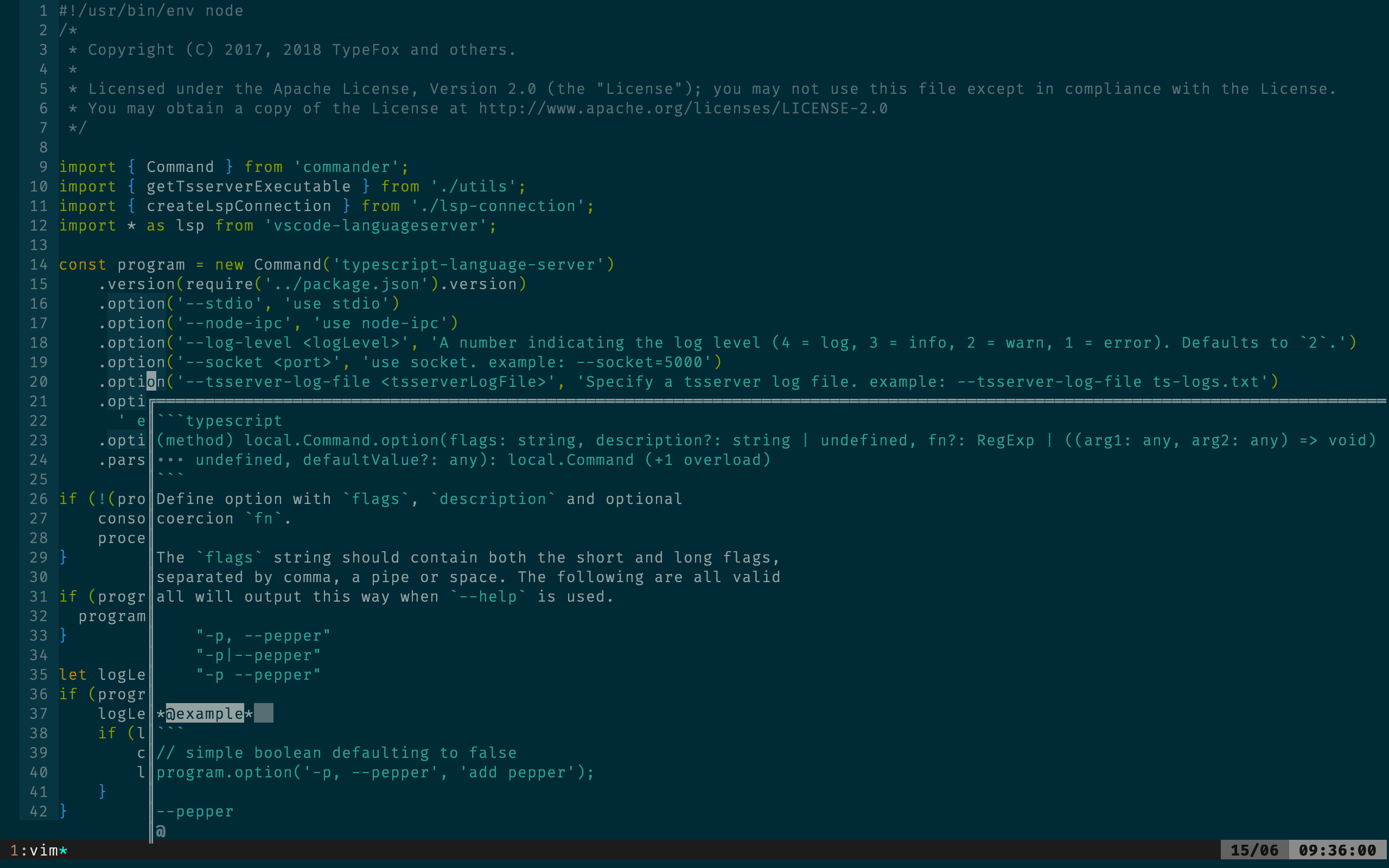
Do note that we can have multiple focusable popup but only one can focus at a time. What about adding some checks to avoid focusing under certain circumstances.
- if terminal popup is enabled
win_gotoidshould be a noop. this solves the bug mentioned above. - if filter_menu is open
win_gotoidfor popup should be a noop. - if focus is currently in a focusable popup. opening a popup with
filter_menushould work and the focus should go to the last buffer that is not popup??? Not sure about this.
Based on the doc of win_gotoid it mentions Return 1 if successful, 0 if the window cannot be found. we could change this to 0 if the window cannot be found or popup cannot be focused. besides being a noop.
I would rather enable focusing and fixing bugs if we continue to discover instead of not allowing focusing at all.
opening multiple terminal popup or focusing to a different one when it is open can be handled separately if there are future requests for it.
If we can lock down on some of the behaviors in the meantime on what we can expect I can try changing it and update tests.
Thoughts?

Maxim Kim
What they need is not the ability to focus any popup. They need to focus one extra popup window below or above a popup menu displaying the needle(s). It would be 1 line high, and as wide as the popup menu. It would stay open as long as the popup menu is open. Not longer. Since we can only have 1 popup menu at a time, we would only have 1 focusable popup window.
Bram Moolenaar
> opening multiple terminal popup or focusing to a different one when it
> is open can be handled separately if there are future requests for it.
If we run into trouble with handling all the possible bugs and usage
problems, we might decide it would have been better not to go this way,
but then it's too late.
It's a matter of weighing the risc of running into trouble versus the
gain the feature brings. In this case I estimate there will be loads of
problems, while other solutions might actually work better.
If we handle a popup window like a normal window, it would mean we can
also have popups in popup windows. Recursively. There is no end to it.
For the functionality you mention, such as searching and copy/pasting,
wouldn't it be better to open that text in a normal window? Then you
have lots more space, can do anything you like, and won't have any new
bugs. I mean, if you start searching, it sounds like you have a regular
file that you are editing, why not do that in a regular window?
I imagine a popup would show a preview, e.g. a function header. And if
you want to go into that function, there needs to be some way to display
that buffer in a normal window. And when closing it restore the
previous view.
For the popup it would be sufficient to see it as a preview, with some
limited functionality:
- Resize (already possible)
- Scroll (already possible)
- Drag the popup away so you can see what's under it (already possible)
- Change the view (that would be new)
As discussed elsewhere, adding a function that can be used in the popup
filter to have a standard way of making the filter change the view in
the popup might be a good solution.
--
Microsoft is to software what McDonalds is to gourmet cooking
/// Bram Moolenaar -- Br...@Moolenaar.net -- http://www.Moolenaar.net \\\
/// sponsor Vim, vote for features -- http://www.Vim.org/sponsor/ \\\
\\\ an exciting new programming language -- http://www.Zimbu.org ///
\\\ help me help AIDS victims -- http://ICCF-Holland.org ///
Prabir Shrestha
It is really bummer that vim doesn't want focusable popups. I think there is lot of great opportunity that it can bring in.
Why not do same like how vimscript9/job/channels/textprops have been checked in. All of these were checked in as incomplete features to master and was slowly patched to fix multiple bugs.
提及
Really looking forward to vim supporting true floating windows!
Found a small bug, the editable floating window made me have a pleasant experience!
Actually it is previewpopup.
I think there are not many commands supported, most of them will prompt: E994: Not allowed in a popup window
Still, if this bug can be 100% code-triggered, some great plugins will be created
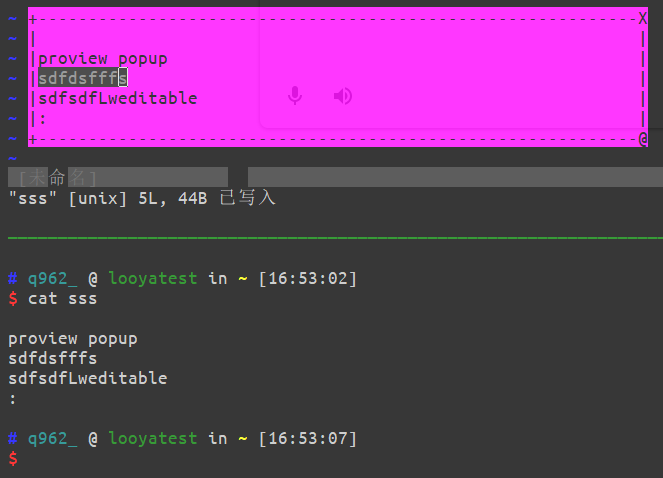
premise:
set previewpopup=height:5,width:60
Trigger method:
pedit <file path> Enter and then quickly type C-c
—
Reply to this email directly, view it on GitHub.
You are receiving this because you are subscribed to this thread.
Jusufadis Bakamovic
The use-case I have is a godbolt-like disassembly service that allows devs to match the symbol of interest (on source-code level) to the symbol in the disassembled target binary. The catch here is that often real-world projects will have a build process that results in multiple binaries compiled so in principle before jumping (or searching for the best fit) symbol, the user will first be presented with the available targets to select from. Among different types of targets interesting ones could be a resulting executable that is going to be deployed, a micro-benchmark or unit-test executable containing the source-code of interest. But also even static or dynamic library. For example, MySQL release builds contain ~500 different targets.
So, to cope with this design challenge I thought I would make use of the popup-menus to present the initial list of targets available and then have the user select the target of interest by either (1) using the navigation keys or (2) typing in the text to narrow down the choice. The actual work of building up the list, and what I want to achieve, fuzzy-finding through it, is at the end of an asynchronous and LSP-like engine running in the background process.
I skimmed through the :h popup-functions to try to understand if there's a straightforward way to implement nr. (2) but I couldn't find any. Similar design problem I had with the code-completion but in that case, I was able to pull it off because I could make use of CursorHold*, TextChanged, and CodeComplete events.
Am I missing something or is this not possible to achieve in a straightforward way in the case of popups?
—
Reply to this email directly, view it on GitHub.
You are receiving this because you are subscribed to this thread.
Jakub Łukasiewicz
Focusable popups would enable me to create a plugin partially providing feature requested in #1847 (+ #10825, + #10852)
—
Reply to this email directly, view it on GitHub, or unsubscribe.
You are receiving this because you are subscribed to this thread.
Christian Brabandt
@prabirshrestha can you please rebase to latest master?
—
Reply to this email directly, view it on GitHub, or unsubscribe.
You are receiving this because you are subscribed to this thread.
Ben Jackson
If I understand what you're trying to do, I think is entirely possible today, for example see what YCM does with its symbol searcher
—
Reply to this email directly, view it on GitHub, or unsubscribe.
You are receiving this because you are subscribed to this thread.
bfrg
If I understand what you're trying to do, I think is entirely possible today, for example see what YCM does with its symbol searcher and type hierarchy views
I think what he wants is a popup with an input prompt such that items can be filtered, similar to vscode's command palette (the popup that is opened when pressing Ctrl-P).
This has been requested several times in the past, most recent request: #15666
—
Reply to this email directly, view it on GitHub.
You are receiving this because you are subscribed to this thread.
Jusufadis Bakamovic
@bfrg your understanding is correct. https://github.com/JBakamovic/cxxd-vim?tab=readme-ov-file#disassembly will perhaps make it more clear for others: in this case there's a big list of targets presented and in order to select the target of interest one has to navigate through the list by scrolling. It would have been nicer of one could filter the list by typing in the substring.
—
Reply to this email directly, view it on GitHub, or unsubscribe.
You are receiving this because you are subscribed to this thread.
Ben Jackson
If I understand what you're trying to do, I think is entirely possible today, for example see what YCM does with its symbol searcher and type hierarchy views
I think what he wants is a popup with an input prompt such that items can be filtered, similar to vscode's command palette (the popup that is opened when pressing Ctrl-P).
This has been requested several times in the past, most recent request: #15666
That’s not very different from what I was referring to at all: you hit a key, type something and the display updates according to what you type, and you select from the listed options. Only difference seems to be relatively minor aesthetics; though I admit implementing it is not trivial.
But complexity for vim vs minor aesthetics and a little bit of work? Seems a difficult trade off to me.
—
Reply to this email directly, view it on GitHub, or unsubscribe.
You are receiving this because you are subscribed to this thread.
Christian Brabandt
so it seems this is already possible and not really needed then.
—
Reply to this email directly, view it on GitHub, or unsubscribe.
You are receiving this because you are subscribed to this thread.
Maxim Kim
There is plenty of implementations out there for that case, e.g. mine is https://github.com/habamax/.vim/blob/master/autoload/popup.vim#L134-L134
https://asciinema.org/a/lQJECR901sT7aON9ZTZAUYcv8
And if there was something built-in I wouldn't be bothered to do my own thing.
—
Reply to this email directly, view it on GitHub.
You are receiving this because you are subscribed to this thread.
Shougo
I need this feature for plugin development.
This is because, in the current Vim's popup window, when users input text, the plugin has to capture the input.
In Neovim, there are no such restrictions, allowing for more freedom in designing the plugin's UI.
Other example, if you want to use terminal buffer as popup window, it cannot in Vim.
This is because users need to input directly into the terminal buffer.
—
Reply to this email directly, view it on GitHub, or unsubscribe.
You are receiving this because you are subscribed to this thread.
Christian Brabandt
Other example, if you want to use terminal buffer as popup window, it cannot in Vim.
I don't get this. We even have a test for a terminal in a popup.
—
Reply to this email directly, view it on GitHub, or unsubscribe.
You are receiving this because you are subscribed to this thread.
Ben Jackson
There is an explicit exception for a terminal in a popup, anllowing the tty to capture input, it was added for things like fzf iirc.
—
Reply to this email directly, view it on GitHub, or unsubscribe.
You are receiving this because you are subscribed to this thread.
Shougo
I don't get this. We even have a test for a terminal in a popup.
Well, it is not the good example.
It means I want to convert any window into a popup and allow users to input freely without the plugin having to capture their input.
—
Reply to this email directly, view it on GitHub, or unsubscribe.
You are receiving this because you are subscribed to this thread.
Christian Brabandt
Well, I don't have a strong opinion about this (although Bram was against it). But I'd like to have this PR first updated and then have a few people try it out, whether this solves their problems with popups.
—
Reply to this email directly, view it on GitHub, or unsubscribe.
You are receiving this because you are subscribed to this thread.
Shougo
OK. I can try the feature.
—
Reply to this email directly, view it on GitHub, or unsubscribe.
You are receiving this because you are subscribed to this thread.
Shougo
Hm... I have read the changes. It is not so big.
If @prabirshrestha is busy, I can rebase it instead.
—
Reply to this email directly, view it on GitHub, or unsubscribe.
You are receiving this because you are subscribed to this thread.
Prabir Shrestha
@Shougo feel free to rebase and take over the PR. Will be quite busy this month so most likely won't get it until dec.
—
Reply to this email directly, view it on GitHub, or unsubscribe.
You are receiving this because you are subscribed to this thread.
Shougo
Thank you. I will do it later.
—
Reply to this email directly, view it on GitHub, or unsubscribe.
You are receiving this because you are subscribed to this thread.
John M Devin
It has been stated in this thread that adding this feature would create bugs, but I'm not sure that statement is exactly true. Adding popups in general caused some issues - I even reported a couple such as #5816 and #5515.
However, from what I have seen there are many bugs that exist specifically because popups cannot be focused. Just my use of the 'previewpopup' option caused problems with three different plugins I use: see tpope/vim-fugitive#1418, dense-analysis/ale#3213, and tpope/vim-git#84. Additionally, there are plugins which generally support both vim and neovim, but which have specific features that only work on neovim, because its popups can be focused, whereas vim's cannot. coc.nvim is one such plugin.
Disallowing focusing popups creates issues for both users and for plugins authors, who will constantly need to code around the issue that some of vim's (and only vim's) windows and buffers cannot be focused.
—
Reply to this email directly, view it on GitHub, or unsubscribe.
You are receiving this because you are subscribed to this thread.
Ben Jackson
How do Ctrl-w commands behave when there are popups on screen which can be focused?
—
Reply to this email directly, view it on GitHub, or unsubscribe.
You are receiving this because you are subscribed to this thread.
Shougo
How do Ctrl-w commands behave when there are popups on screen which can be focused?
It can be moved like other windows in neovim.
—
Reply to this email directly, view it on GitHub, or unsubscribe.
You are receiving this because you are subscribed to this thread.
John M Devin
How do Ctrl-w commands behave when there are popups on screen which can be focused?
Which specifically did you have in mind? I don't have them all memorized, but I can think of many that wouldn't really be affected one way or the other by whether popups can be focused. <C-W>+ and <C-W>_ seem obvious. <C-W>x has always been limited to a window's own column/row for some reason, so I guess that doesn't apply. I can think of <C-W>o, which should do nothing, and <C-W>p, which is debatable. As @Shougo said, there is already an implementation of this if we need ideas.
—
Reply to this email directly, view it on GitHub, or unsubscribe.
You are receiving this because you are subscribed to this thread.
Ben Jackson
I mainly meant the ones that are layout aware. h,j,k,l,H,J,K,L,r etc
My recollection is that Ctrl-w hjkl etc behave unpredictably in neovim implementation but it’s been a long while since I tried it.
—
Reply to this email directly, view it on GitHub, or unsubscribe.
You are receiving this because you are subscribed to this thread.
Shougo
I mainly meant the ones that are layout aware. h,j,k,l,H,J,K,L,r etc
neovim behavior:
C-w w works
C-w j,k,h,l It cannot move to floating window
C-w J,K,H,L works, but floating window state is disabled
—
Reply to this email directly, view it on GitHub, or unsubscribe.
You are receiving this because you are subscribed to this thread.
Ben Jackson
How do Ctrl-w commands behave when there are popups on screen which can be focused?
It can be moved like other windows in neovim.
That doesn’t really answer
I mainly meant the ones that are layout aware. h,j,k,l,H,J,K,L,r etc
neovim behavior:
C-w w works C-w j,k,h,l It cannot move to floating window C-w J,K,H,L works, but floating window state is disabled
So yeah, inconsistent. How about ctrl-w r? Ignores popups?
—
Reply to this email directly, view it on GitHub, or unsubscribe.
You are receiving this because you are subscribed to this thread.
Ben Jackson
When I say inconsistent I mean thinks like what does popup_locate do if you just did ctrl-w L in a popup? Does its win ID suddenly stop being a popup? Not sure how to handle that.
—
Reply to this email directly, view it on GitHub, or unsubscribe.
You are receiving this because you are subscribed to this thread.
Shougo
So yeah, inconsistent. How about ctrl-w r? Ignores popups?
E5602: Cannot exchange or rotate float
It is error.
can popups enter insert and other modes? Assume they can. Where does the preview window and location list appear?
The popup can change the mode. The preview window appears to be displayed split below a non-floating window.
—
Reply to this email directly, view it on GitHub, or unsubscribe.
You are receiving this because you are subscribed to this thread.
Shougo
When I say inconsistent I mean thinks like what does popup_locate do if you just did ctrl-w L in a popup? Does its win ID suddenly stop being a popup? Not sure how to handle that.
Yes. The floating window will be non floating window.
—
Reply to this email directly, view it on GitHub, or unsubscribe.
You are receiving this because you are subscribed to this thread.
Ben Jackson
When I say inconsistent I mean thinks like what does popup_locate do if you just did ctrl-w L in a popup? Does its win ID suddenly stop being a popup? Not sure how to handle that.
Yes. The floating window will be non floating window.
This would be very bad for plugins.
—
Reply to this email directly, view it on GitHub, or unsubscribe.
You are receiving this because you are subscribed to this thread.
John M Devin
So yeah, inconsistent. How about ctrl-w r? Ignores popups?
For <C-W>r, the documentation says it "only works within the row or column of windows that the current window is in." That's just like <C-W>x. I don't think (I haven't checked) a popup is in a row or column; I think it's on its own. So in vim, maybe this would do nothing?
can popups enter insert and other modes? Assume they can. Where does the preview window and location list appear?
Absolutely; I don't think it would make sense to focus a popup for it to only ever be in normal mode. In my opinion, a user should be able to interact with a buffer in a popup window the same way they would in a normal window, to the extent possible.
When I say inconsistent I mean thinks like what does popup_locate do if you just did ctrl-w L in a popup? Does its win ID suddenly stop being a popup? Not sure how to handle that.
If it works as @Shougo says neovim works, then I think it would do that, yes. However, I'm not sure I love the idea of <C-W>L etc. turning a popup into a normal window. That can be decided later though.
These are questions that don't necessarily have answers until the maintainers decide what they want the answer to be. However, these aren't questions that reveal a problem with making popup windows focusable. They don't reveal any problem with the idea, they just reveal an implementation detail that has yet to be figured out.
Plugin Idea
Why
Some people had a problem with the use cases given to justify the need for focusable popups, so I'll describe a plugin idea here that I think offers a good reason.
Background
When I first started using Windows 7 eleven years ago, I remember it had a "Sticky Notes" program (I think Windows still has it). It allowed you to create a post-it note that floated on your desktop. You could type in simple notes. It was useful.

Details
When working in vim fullscreen, I have multiple files open in different splits in a layout that I find easy to navigate and edit with. I do not keep my todo list and other small files open all the time. When I do need my todo list or some other small notes, I either need to mess up my existing layout by opening a new split, or I need to use a tab, in which case I cannot see any of my other files while writing my note.
To ease this workflow, let's make a "Sticky Notes" plugin for vim. The :StickyNoteCreate command will create and focus a new popup window and place me in insert mode inside it. Then I can type a note for myself while still seeing most of my other open files. When I exit insert mode, I can drag the "Sticky Note" popup window around. It could even have a "close" button and a "collapse/expand" button in the corner. I can create multiple sticky notes and leave them around my screen to reference, but without ever messing up my layout. We should probably have a :StickyNoteHideAll command to make them all hidden so they don't obscure my files, and a corollary :StickyNoteShowAll command to show them all. You can imagine a bunch of other features.
To make this plugin in vim currently as I understand it, one would need to completely re-implement all the interactive modes of vim using popup filters to alter a buffer that will be displayed, but not focused, in a popup window. Correct me if I am wrong. If popup windows were focusable, then this entire need would be eliminated. You would just need to make a popup window with some defaults, and the user could focus it and type as they want.
—
Reply to this email directly, view it on GitHub, or unsubscribe.
You are receiving this because you are subscribed to this thread.
John M Devin
When I say inconsistent I mean thinks like what does popup_locate do if you just did ctrl-w L in a popup? Does its win ID suddenly stop being a popup? Not sure how to handle that.
Yes. The floating window will be non floating window.
This would be very bad for plugins.
See my most recent comment, but again, this is an implementation detail of neovim; vim does not need to copy its behavior. Do you have any issues with the idea of focusable popups that you think would not have reasonable solutions?
—
Reply to this email directly, view it on GitHub, or unsubscribe.
You are receiving this because you are subscribed to this thread.
Shougo
I have rebased it in new branch.
—
Reply to this email directly, view it on GitHub, or unsubscribe.
You are receiving this because you are subscribed to this thread.
Christian Brabandt
This would be very bad for plugins.
I tend to agree. This shouldn't happen.
—
Reply to this email directly, view it on GitHub, or unsubscribe.
You are receiving this because you are subscribed to this thread.
Christian Brabandt
closing in favor of #16000
—
Reply to this email directly, view it on GitHub, or unsubscribe.
You are receiving this because you are subscribed to this thread.
Christian Brabandt
Closed #7555.
—
Reply to this email directly, view it on GitHub.
You are receiving this because you are subscribed to this thread.