
[vim/vim] wasted space of toolbar in openSUSE Leap 15.0 (#2957)

hdenzler
gvim-7.4.326-12.1.x86_64 of Leap 42.3 looks much better
—
You are receiving this because you are subscribed to this thread.
Reply to this email directly, view it on GitHub
Kazunobu Kuriyama
I'm not sure if I understand you correctly. Perhaps, you might want to read :h gtk-css? If not, please describe your issue more precisely so that devs can know what to do with it.
Christian Brabandt
At the minimum please show the related version numbers and a screenshot might also be helpful.
hdenzler
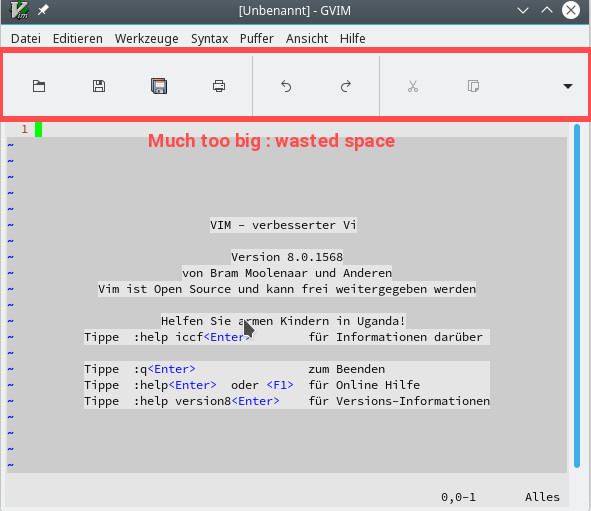
hdenzler
Closed #2957.
hdenzler
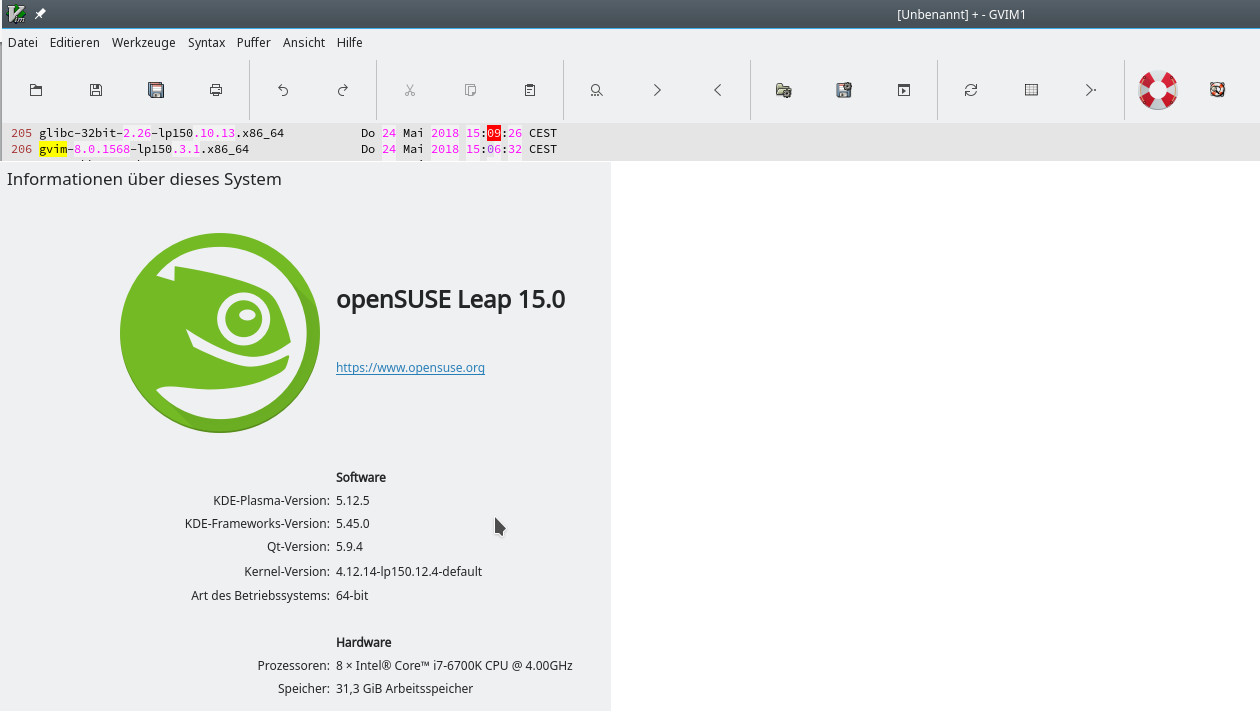
Christian Brabandt
Please show the complete :version output of the OpenSuse Leap 15 version and Leap 42.3. BTW: Have you tried compiling your own version? Perhaps you should take this issue to the OpenSuse maintainers?
Christian Brabandt
Reopened #2957.
hdenzler
Closed #2957.
hdenzler
:version
VIM - Vi IMproved 8.0 (2016 Sep 12)
Inklusive der Patches: 1-1568
Übersetzt von 'http://www.opensuse.org/'
Riesige Version mit GTK3 GUI. Ein- (+) oder ausschließlich (-) der Eigenschaften:
Christian Brabandt
I asked for the complete version output of both versions.
hdenzler closed this 4 hours ago
Oh well nevermind
hdenzler
Reopened #2957.
hdenzler
version.txt
Sorry, I have no access anymore to Leap 42.3 since I was forced to make a fresh installation because of an upgrade problem during installation of the bootloader (system hang)
Tony Mechelynck
I'm running openSUSE 42.3, the "stable version" which was current until Friday 25, 12:00 UTC. I'll upgrade to the new version 15.0 when I get the time, probably not before Wednesday. (And why the versions between 13.3 and 15.0 are named 42.1, 42.2 and 42.3 is an internal joke of openSUSE's, a detailed explanation would be too long for me to put it here.)
I normally run my own-compiled Vim (currently 8.1.26) but the distro's vi, vim and gvim are also installed; currently they're at version 7.4.356 without patch 208. Both my gvim and the distro's have a GTK2 GUI, and when I run either of them (mine as "gvim" i.e. /usr/local/bin/gvim, or the distro's as "usr/bin/gvim"), in both cases I get a small toolbar with small icons, maybe 20 or 24 px high or so with icons similar to @hdenzler . No huge wasted space at all. No change in that respect when invoked with -N -u NONE on the command-line.
But this is the "looks much better" version mentioned by the OP. Here is its :version output:
VIM - Vi IMproved 7.4 (2013 Aug 10)
Included patches: 1-207, 209-326
Compiled by 'http://www.opensuse.org/'
Huge version with GTK2 GUI.  Features included (+) or not (-):
+acl             +comments        +ex_extra        +jumplist        +mouseshape      +path_extra      +signs           +textobjects     +writebackup
+arabic          +conceal         +extra_search    +keymap          +mouse_dec       +perl            +smartindent     +title           +X11
+autocmd         +cryptv          +farsi           +langmap         +mouse_gpm       +persistent_undo +sniff           +toolbar         -xfontset
+balloon_eval    +cscope          +file_in_path    +libcall         -mouse_jsbterm   +postscript      +startuptime     +user_commands   +xim
+browse          +cursorbind      +find_in_path    +linebreak       +mouse_netterm   +printer         +statusline      +vertsplit       +xsmp_interact
++builtin_terms  +cursorshape     +float           +lispindent      +mouse_sgr       +profile         -sun_workshop    +virtualedit     +xterm_clipboard
+byte_offset     +dialog_con_gui  +folding         +listcmds        -mouse_sysmouse  +python/dyn      +syntax          +visual          -xterm_save
+cindent         +diff            -footer          +localmap        +mouse_urxvt     +python3/dyn     +tag_binary      +visualextra     -xpm
+clientserver    +digraphs        +fork()          +lua/dyn         +mouse_xterm     +quickfix        +tag_old_static  +viminfo
+clipboard       +dnd             +gettext         +menu            +multi_byte      +reltime         -tag_any_white   +vreplace
+cmdline_compl   -ebcdic          -hangul_input    +mksession       +multi_lang      +rightleft       -tcl             +wildignore
+cmdline_hist    +emacs_tags      +iconv           +modify_fname    -mzscheme        +ruby/dyn        +terminfo        +wildmenu
+cmdline_info    +eval            +insert_expand   +mouse           +netbeans_intg   +scrollbind      +termresponse    +windows
   system vimrc file: "/etc/vimrc"
     user vimrc file: "$HOME/.vimrc"
 2nd user vimrc file: "~/.vim/vimrc"
      user exrc file: "$HOME/.exrc"
  system gvimrc file: "/etc/gvimrc"
    user gvimrc file: "$HOME/.gvimrc"
2nd user gvimrc file: "~/.vim/gvimrc"
    system menu file: "$VIMRUNTIME/menu.vim"
  fall-back for $VIM: "/etc"
 f-b for $VIMRUNTIME: "/usr/share/vim/current"
Compilation: gcc -c -I. -Iproto -DHAVE_CONFIG_H -DFEAT_GUI_GTK  -pthread -I/usr/include/gtk-2.0 -I/usr/lib64/gtk-2.0/include -I/usr/include/pango-1.0 -I/usr/include/atk-1.0 -I/usr/include/cairo -I/usr/include/pixman-1 -I/usr/include/libdrm -I/usr/include/libpng16 -I/usr/include/gdk-pixbuf-2.0 -I/usr/include/libpng16 -I/usr/include/pango-1.0 -I/usr/include/harfbuzz -I/usr/include/pango-1.0 -I/usr/include/glib-2.0 -I/usr/lib64/glib-2.0/include -I/usr/include/freetype2    -fmessage-length=0 -grecord-gcc-switches -O2 -Wall -D_FORTIFY_SOURCE=1 -fstack-protector -funwind-tables -fasynchronous-unwind-tables -g -Wall -pipe -fno-strict-aliasing
Linking: gcc   -L. -fstack-protector -rdynamic -Wl,-export-dynamic -Wl,-E -Wl,-rpath,/usr/lib/perl5/5.18.2/x86_64-linux-thread-multi/CORE   -L/usr/local/lib -Wl,--as-needed -o vim   -lgtk-x11-2.0 -lgdk-x11-2.0 -lpangocairo-1.0 -latk-1.0 -lcairo -lgdk_pixbuf-2.0 -lgio-2.0 -lpangoft2-1.0 -lpango-1.0 -lgobject-2.0 -lglib-2.0 -lfontconfig -lfreetype  -lSM -lICE -lXt -lX11 -lSM -lICE  -lm -lnsl    -ltinfo -lacl -lattr -lgpm -ldl   -Wl,-E -Wl,-rpath,/usr/lib/perl5/5.18.2/x86_64-linux-thread-multi/CORE  -L/usr/local/lib64 -fstack-protector  -L/usr/lib/perl5/5.18.2/x86_64-linux-thread-multi/CORE -lperl -lm -ldl -lcrypt -lpthread
The version of GTK2 on openSUSE 42.3 is 2.4.31-14.24 (where the part after the dash is a SUSE build sequence number). If I can reproduce the OP's problem after upgrading to openSUSE 15.0 I'll report here with more info than he gave, but I expect that the cause of the problem will lie somewhere in GTK; my guess is that it lies in the difference between GTK2 and GTK3, since from what the OP said it seems that the gvim on openSUSE 15.0 has a GTK3 GUI.
Best regards,
Tony.
Bram Moolenaar
Since Vim didn't change between releases, it's most likely caused by a change in the GUI library. I doubt if Vim can change this. Leaving it open for now, in case someone knows a toolbar property that we can set.
hdenzler
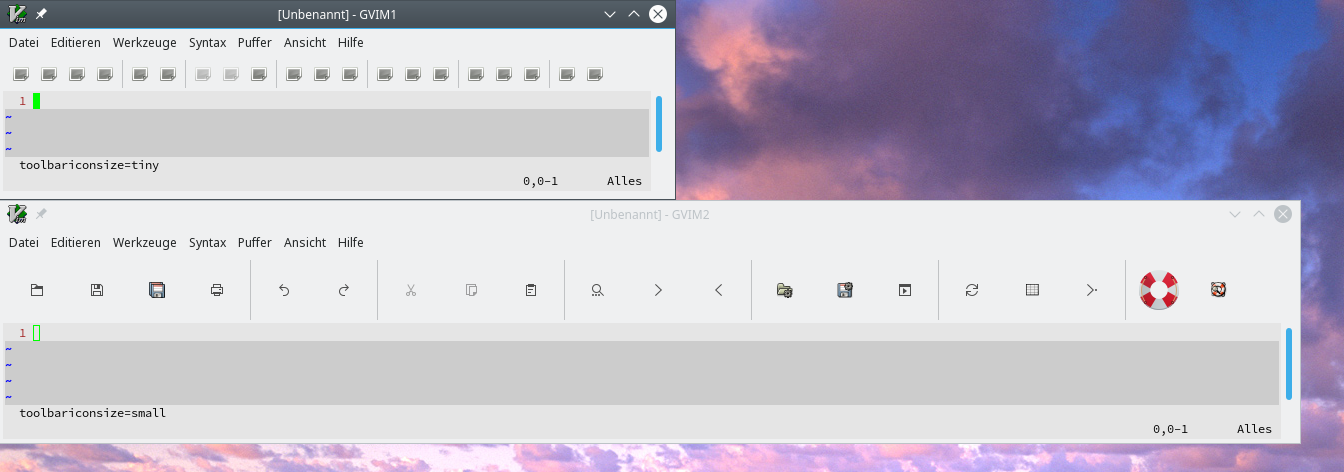
Missing tiny icons
Kazunobu Kuriyama
It appears to me that the issue is about the irregularity in icon sizes rather than "wasted space"; obviously, "Vim Help" icon (the icon just left to the rightmost one on the toolbar shown in the second screenshot is too big in comparison with the other ones. The toolbar has to add extra spaces to around the not-big ones in order to accommodate the big one as well. Needless to say, that's a normal, expected behavior of toolbars.
The toolbar icons used with GTK+ 2 and 3 GVims have two origins: one comes from Vim's own and another from an icon theme in use. In particular, by default, the icon in question, that is, "Vim Help" icon, comes from /usr/*/share/icons/{Adwaita,Gnome}/<size>x<size>/apps/help-browser.png.
For GTK+3 GVim's toolbar, the icon size is set to 16x16, while the size of the Vim-providing icons is 24x24. Accordingly, the GVim has to convert them into 16x16 images (cf. gui_gtk_register_stock_icons()). The same applies to the ones coming from an icon theme in use.
At startup, the GVim only specifies icon names and their preferable size (not icon image paths/files directly) and has to live with those images and sizes which are selected by the library. The selection is supposed to be carried out in accordance with the specifications and there's little way for the GVim (and other ordinary applications in general) to interfere in selection.
It should be noted that the specifications imply that the library is allowed to select substitutes for named icons in case some or all of them are not found. Hence, missing icons are most likely to result in "wasted space." If this is the case, there's little room left for GVim to compensate that.
So, @hdenzler , please make sure in some way or other that your icon themes are properly installed and not broken. For that, gtk-update-icon-cache-3.0 could help you. If you are lucky enough, all you need to do is only to update the icon cache to resolve the issue...
hdenzler

hdenzler
It was a completely new installation without any tricks
Kazunobu Kuriyama
It was a completely new installation without any tricks
That proves nothing about whether or not your installation was done normally. I was asking you about the current state of your machine, not what you did.
hdenzler
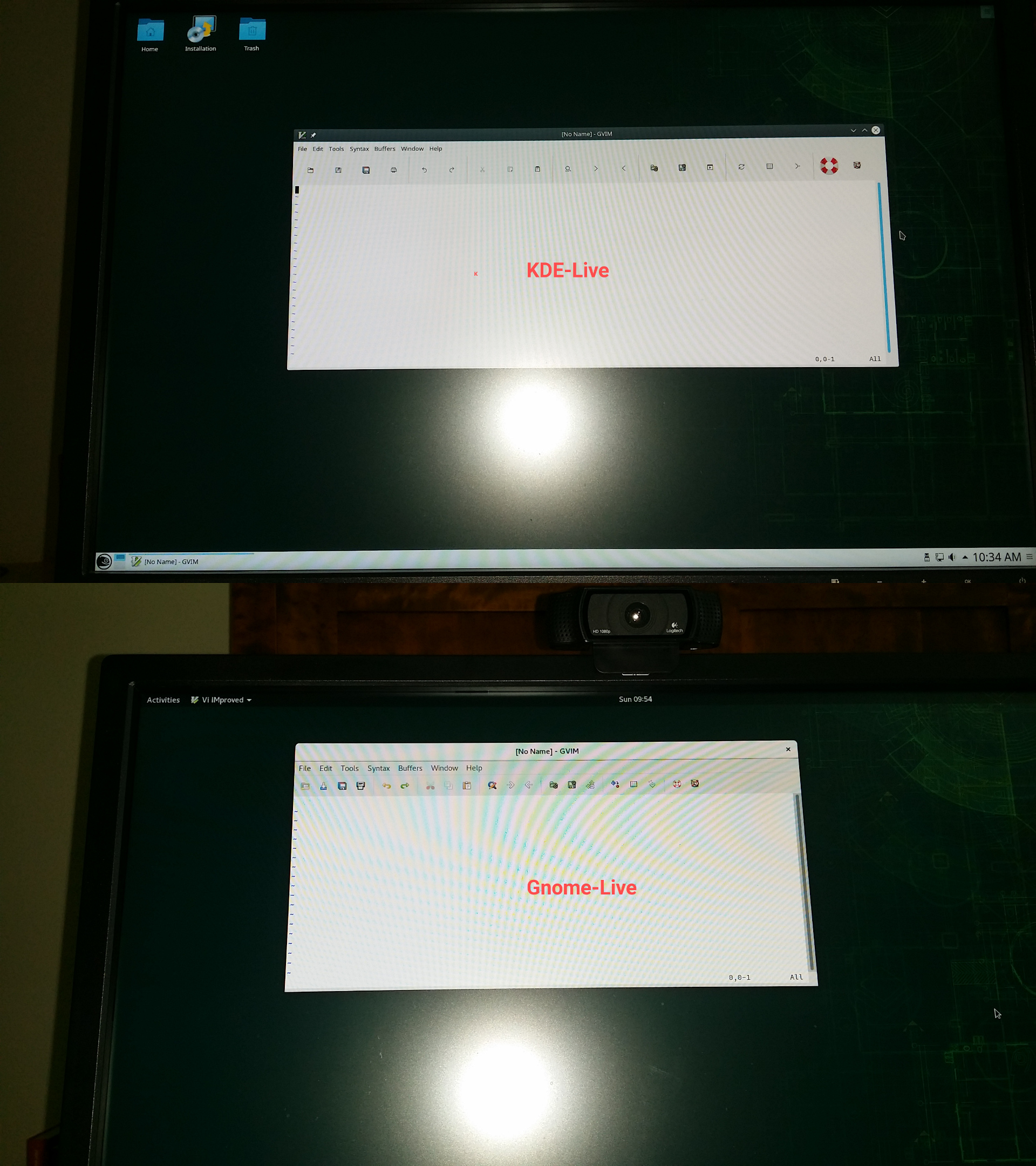
hdenzler
For me it's a proof
hdenzler
hrd@linux-dzg9:> gtk-update-icon-cache-3.0 -v /usr/share/icons/Adwaita/> gtk-update-icon-cache-3.0 -v /usr/share/icons/oxygen/
hrd@linux-dzg9:
hrd@linux-dzg9:> gtk-update-icon-cache-3.0 -v /usr/share/icons/hicolor/>
hrd@linux-dzg9:
hdenzler
/usr/share/icons/breeze-dark/apps/48> dir system-help.svg
-rw-r--r-- 1 root root 4119 7. Apr 09:46 system-help.svg
in package breeze5-icons-5.45.0-lp150.1.11.noarch
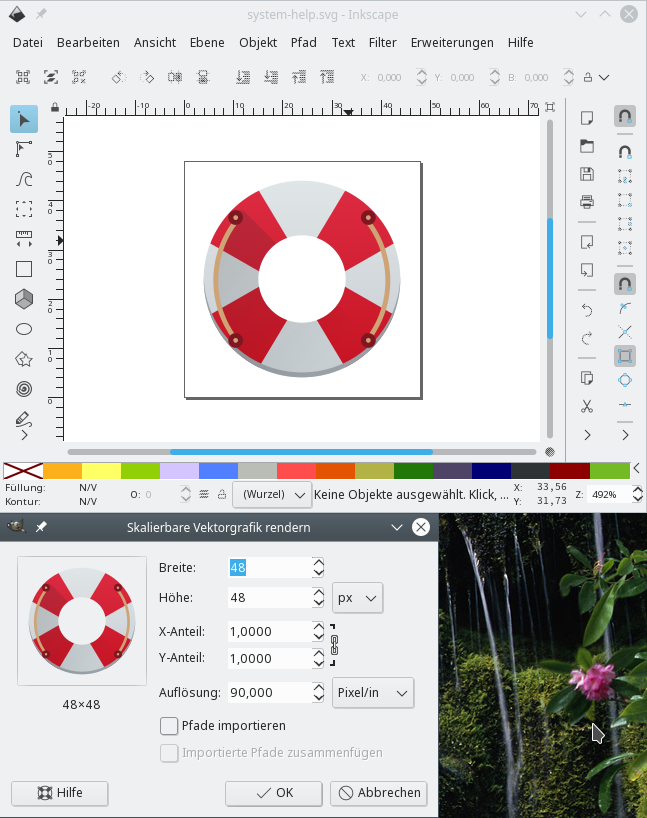
This is the trouble maker
Kazunobu Kuriyama
Does breeze have 16x16, 24x24 or scalable icons?
Kazunobu Kuriyama
Or equivalently, are there files such as /usr/share/icons/breeze-dark/{24x24,48x48,scalable}/apps/system-help.svg on your openSUSE machine?
hdenzler
find /usr/share/icons/breeze-dark/ -name system-help.svg
/usr/share/icons/breeze-dark/apps/16/system-help.svg
/usr/share/icons/breeze-dark/apps/22/system-help.svg
/usr/share/icons/breeze-dark/apps/48/system-help.svg
Kazunobu Kuriyama
Are they exact paths? I mean, no typo there?
hdenzler
yes
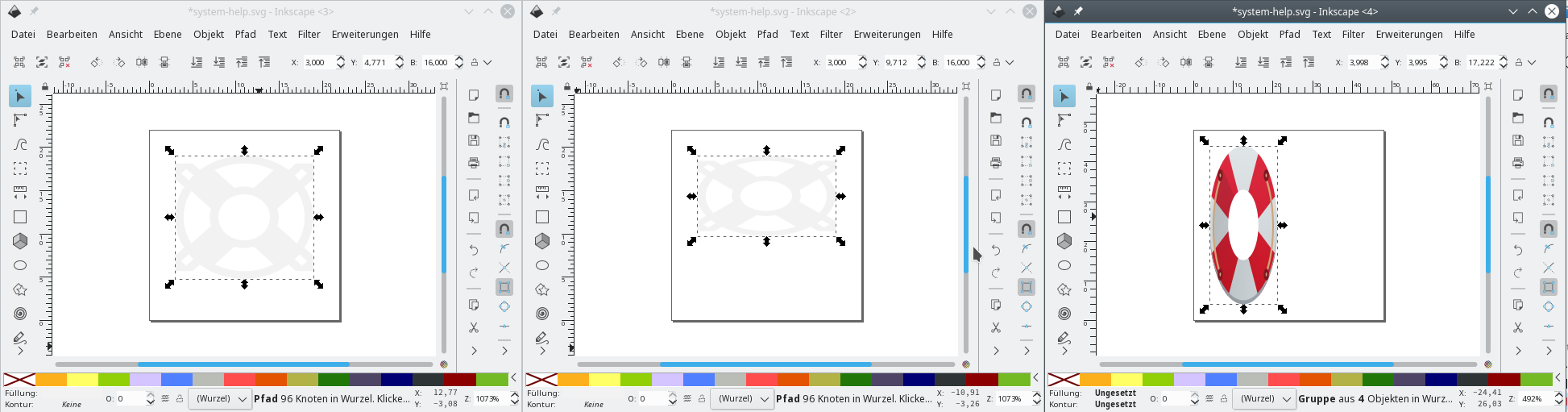
no typo
hdenzler
rpm -qf /usr/share/icons/breeze-dark/apps/16/system-help.svg
breeze5-icons-5.45.0-lp150.1.11.noarch
hdenzler
rpm -ql breeze5-icons-5.45.0-lp150.1.11.noarch|grep system-help.svg
/usr/share/icons/breeze-dark/apps/16/system-help.svg
/usr/share/icons/breeze-dark/apps/22/system-help.svg
/usr/share/icons/breeze-dark/apps/48/system-help.svg
/usr/share/icons/breeze/apps/16/system-help.svg
/usr/share/icons/breeze/apps/22/system-help.svg
/usr/share/icons/breeze/apps/48/system-help.svg
Kazunobu Kuriyama
Ah, then, the directory layout of breeze doesn't comply with the specs I mentioned previously.
Since icon lookup is to be done more or less following the psudo code which is based on the specified directory layout, I think GTK+ library cannot pick the correct 16x16 icon file but select a bad substitute for it as a fallback.
As shown in one of the screenshots, namely, that of GNOME live, GTK+ 3 GVim properly renders icons if a given icon theme complies with the specs. Consider using proper icon themes instead.
hdenzler
All the above IS the Leap 15.0 default as shown with KDE-live or a full new installation (my current system)
Kazunobu Kuriyama
OK, I take back the last paragraph. But I think the first and the second ones still hold. Anyway, the conclusion doesn't change.
BTW, why didn't you tell us that you were using a icon theme different from the default and give captions suitable for understanding to each screenshots? This conversation has been quite exhausting to me due to them so far. If you did them from the outset, we wouldn't need to do this fruitless exchange of views.
hdenzler
Everything I explained was the Leap 15.0 default. I didn't change anything. KDE-live and Gnome-live just ran in RAM. It's not my issue and it's not fruitless. It's an openSUSE issue
https://bugzilla.opensuse.org/show_bug.cgi?id=1094753
hdenzler
su
cd /usr/share/icons/breeze-dark/apps/48/
mv system-help.svg system-help.svg~
.. and the problem is fixed
hdenzler
Closed #2957.
Tony Mechelynck
Not fixed, only worked around. All the other openSUSE users who have just upgraded to 15.0, or will be doing it in the next few days (as I did today, earlier than I thought) will have the same problem (as I do now) in the distro's gvim 8.0.1568 with GTK3 GUI.
In my own-compiled gvim 8.1.26 with GTK2-GNOME GUI I don't have this problem, not even after a full rebuild with "make reconfig".
The GTK3 version offered by the distro is 3.22.30-lp150.2.2 (where the part after the dash is, again, a SUSE build ID).
Kazunobu Kuriyama
For the record, this issue isn't due to Vim or GTK+ 3, but the icon theme that doesn't comply with the specs.
If the directory layout of Breeze were
/usr/share/icons/breeze-dark/16x16/apps/system-help.svg
instead of the current
/usr/share/icons/breeze-dark/apps/16/system-help.svg
there would be no issue at all (The point is, 16x16/apps vs. apps/16).
So, if you still want to use the current Breeze as is, you should ask freedesktop.org and GTK+ 3 to change the specs and add a support for the directory layout that Breeze adopts. That said, I don't think that is likely to happen. Perhaps, the most viable solution is to ask Breeze devs to follow the specs.
su
cd /usr/share/icons/breeze-dark/apps/48/
mv system-help.svg system-help.svg~.. and the problem is fixed
CAVEAT: Because this solution depends on the fallback mechanism of the icon file selection, the result is unpredictable and hence may vary from user to user.
hdenzler
Reopened #2957.
hdenzler
@nuko8 Could you please answer to
https://bugs.kde.org/show_bug.cgi?id=394788
Kazunobu Kuriyama
I'm not a KDE user. So I don't think I'm qualified enough to answer the question there.
Instead, let me show you some excerpts from the specs:
- Applications may further add their own icon directories to this list, and users may extend or change the list (in application/desktop specific ways) ---from the section "Directory Layout" (Emphasis mine)
So, as someone who replied to you said, you can do anything with the directory layout. At the same time, if you don't follow those application/desktop specific ways, you have no choice but to give up making best use of them.
- In the theme directory are also a set of subdirectories containing image files. Each directory contains icons designed for a certain nominal icon size and scale, as described by the index.theme file. The subdirectories are allowed to be several levels deep, e.g. the subdirectory "48x48/apps" in the theme "hicolor" would end up at $basedir/hicolor/48x48/apps. ---from the section "Directory Layout" (Emphasis mine)
Here, you see "hicolor/48x48/apps" instead of "hicolor/apps/48". Arguably, one can call it no more than an illustrative example, not part of the specs. However, the section Icon Lookup says:
- The lookup is done first in the current theme, and then recursively in each of the current theme's parents, and finally in the default theme called "hicolor" (implementations may add more default themes before "hicolor", but "hicolor" must be last). As soon as there is an icon of any size that matches in a theme, the search is stopped. Even if there may be an icon with a size closer to the correct one in an inherited theme, we don't want to use it. Doing so may generate an inconsistant change in an icon when you change icon sizes (e.g. zoom in).---from the section "Icon Lookup" (Emphasis mine)
As such, it'd be better to have a directory layout which would help the lookup algorithm work efficiently, thereby giving a better UX rather than giving wasted space to toolbars.
- The lookup inside a theme is done in three phases. First all the directories are scanned for an exact match, e.g. one where the allowed size of the icon files match what was looked up. Then all the directories are scanned for any icon that matches the name. If that fails we finally fall back on unthemed icons. If we fail to find any icon at all it is up to the application to pick a good fallback, as the correct choice depends on the context.---from the section "Icon Lookup" (Emphasis mine)
So, (name, size)-pair match first; then, name-only match next. To implement such a lookup algorithm, a directory layout having size/whole-name (e.g., 48x48/apps) are more natural and easier to handle than one having part-of-name/size/part-of-name (e.g., apps/48).
In conclusion, as someone who replied to you said, names themselves don't matter at all. The order of them only matters, I think.
Christoph Feck
Are you saying that other implementations (besides KDE's one) do not follow the spec completely, because it is "easier to handle"?

John Little
>For the record, this issue isn't due to Vim or GTK+ 3, but the icon theme that doesn't comply with the specs.
>...the directory layout of Breeze...
Thank you for that explanation. I've been mystified by some icon behaviour in another context with GTK 3.
hdenzler
Christoph Feck 2018-05-28 10:42:52 UTC
The "index.theme" lists the directories, and they can have any name, structure, and number of levels you want, as long as the information in the index file. I see no reference in the XDG icon theme specification that the directories need to have specific names.
hdenzler
https://bugs.kde.org/show_bug.cgi?id=394788
Status: | RESOLVED INVALID
@nuko8
cfeck seems to disagree and closed the bug. The issue has no solution yet
Kazunobu Kuriyama
I am nether a GNOEM nor GTK+ dev. What I can do is only to tell people why Breeze doesn't work with GVim, not to persuade people who don't understand the specs to follow their non-KDE way of thinking. (FWIW, the author of the specs is a leading dev of GTK+, IIRC.)
As I said already, the problem lies in the order or hierarchy of icon theme directories, not their names. So, if someone is still talking about names only even after I showed you the excerpts from the specs with my comments, I don't know what to do with his view and don't like to spend my time more arguing about what GVim is not responsible for.
Christian Brabandt
Closed #2957.
Christian Brabandt
I am closing this as invalid then. Does not seem to be a real Vim issue we can fix here.
Heiko Jansen
I'm having the same problem right now and after reading the spec and the comments in the two issues (here and at bugs.kde.org) I am sure this issue should not have been closed as "invalid".
Reason:
The spec IMHO clearly states that one has to parse the "index.theme" file, create a data structure from its contents and then use this data structure to find an appropriate icon.
Which means that one is NOT expected to traverse some filesystem directory structure (which is intentionally arbitrary and not required to follow any predetermined layout) to locate the icon.
Tony Mechelynck
IIUC, the KDE bug has been RESOLVED INVALID. But has the issue been reported to https://bugzilla.opensuse.org/ ? And if it has, what is the bug number?
FWIW, the Vim build in openSUSE 15.0 has not been updated since my comment of May 28 (not even in their Update-Test repository), it is still a Huge gvim 8.0.1568 with GTK3 GUI and the Help icon in the toolbar is still abnormally big, about three times as big in either direction as the other toolbar icons, i.e. my guess is 48x48 for the Help icon and 16x16 for the other ones.
My home-built Big gvim 8.1.513 with GTK2 GUI still does not experience the same problem — all toolbar icons, including Help, are the same size, approx. 16x16 pixels.
Best regards,
Tony.
Heiko Jansen
IIUC, the KDE bug has been RESOLVED INVALID. But has the issue been reported to https://bugzilla.opensuse.org/ ? And if it has, what is the bug number?
I do not think so. And I also think that it should not:
Based on the comments above and my understanding (as described in my previous comment) I
believe that the issue lies with the way vim currently selects it's icons (because that way does not conform to the spec).
So I think opening an issue for openSUSE would be inappropriate and that the issue has to be fixed in vim itself.
Why it works for you with your local build I unfortunately cannot explain. Might be using GTK2 instead of GTK3, might be it not picking up the KDE default icon set or whatever.
Tony Mechelynck
IIUC, the KDE bug has been RESOLVED INVALID. But has the issue been reported to https://bugzilla.opensuse.org/ ? And if it has, what is the bug number?
I do not think so. And I also think that it should not:
Based on the comments above and my understanding (as described in my previous comment) I
believe that the issue lies with the way vim currently selects it's icons (because that way does not conform to the spec).
So I think opening an issue for openSUSE would be inappropriate and that the issue has to be fixed in vim itself.
Since the issue is present in the Vim build currently distributed together with openSUSE 15.0 (i.e. their latest "stable" version), I don't think it would be inappropriate to open a SUSE bug about the presence of this issue in that particular gvim build (whose :version text includes Compiled by: 'www.opensuse.org'). Whether they decide to handle it themselves (e.g. by distributing a GTK2 gvim rather than a GTK3 gvim, or by rearranging their icon files so that their GTK3 gvim can find a 16x16 help icon straightaway) or to pass the hot potato (either to Gnome/GTK or to Vim) and then set the bug to RESOLVED UPSTREAM (which is one of the custom resolutions in their Bugzilla installation) would then be their problem. As long as there is no bug about this in their Bugzilla system, they haven't been "made aware" of a problem in the specific gvim build which that they distribute. Also, once made aware of it, one of the SUSE engineers responsible for the Vim packages of openSUSE Tumbleweed, SUSE Enterprise 15.0 and openSUSE Leap 15.0 might decide that it is worth his while to work with us towards fixing the Vim issue present in that build, so that it will (hopefully) be gone by next May when the time comes to build the openSUSE 15.1 release.
Why it works for you with your local build I unfortunately cannot explain. Might be using GTK2 instead of GTK3, might be it not picking up the KDE default icon set or whatever.
I think it is building with GTK2 rather than GTK3. I did nothing special about selecting the icons: I have no configure argument about them.
Kazunobu Kuriyama
As I wrote somewhere previously, icons on the toolbar are chosen by the selection algorithm the GUI toolkit in use adopts. Accordingly, Vim has nothing to do for it. If someone calls it a bug, then it should be the bug of the toolkit; therefore, such a bug should be reported to the developers of it, not to this issue tracker or those of desktop environment integrators.
Heiko Jansen
Well, that's not the message I got from your comments above where to my understanding you blamed the icon set for not following a predefined directory structure and thereby breaking icon lookup.
But if you use the toolkit functions properly then closing this bug as invalid is probably appropriate.
Still, there's some more info I'd like to share:
a) First I need to say that I could reproduce everything described here using a locally compiled version of vim (latest source from github compiled with gtk3 support) and the vim from the openSUSE package (openSUSE Tumbleweed, to be precise).
b) Icons might not always be available in the size wanted. AFAIK they should be scaled on the fly, but in this case this apparently does not work. The reason for this apparently is the attribute MinSize=48 in the apps/48 section in the index.theme file of the breeze icon set. Once I changed that to MinSize=16 all icons in the toolbar were of the same visual size.
c) I think the toolbar icons are shown with a default size of 16px. I do not understand why the toolkit does not try to find the icon with precisely this size first (which does exist in the breeze icon set!) but starts searching at a much larger size. Since scaling usually results in loss of display quality this does not look like a sensible default.
Maybe this behaviour could be influenced by vim code calling GTK functions? Does vim currently specify a certain search order?
d) There is something else wrong with toolbar icon handling in vim: if I use the vim command set toolbariconsize=... (with values like large or huge) to modify the toolbar at runtime the icons change size but at the same time some icons vanish (they still take space and are clickable, but no image is shown) while others are replaced by some default image (the same for every affected icon).
Kazunobu Kuriyama
Maybe this behaviour could be influenced by vim code calling GTK functions? Does vim currently specify a certain search order?
No. I'm wondering what made you think so. If applications were able to choose a selection algorithm arbitrarily, the algorithm given in the "Icon Lookup" section of Icon Theme Specification would lose its raison d'être. Accordingly, in this particular case, I don't think any deviation from the spec is worth doing.
There is something else wrong with toolbar icon handling in vim:...
If a given icon theme can't work well with the GUI toolkit, there's nothing for Vim to do for it.
Heiko Jansen
No. I'm wondering what made you think so. If applications were able to choose a selection algorithm arbitrarily, the algorithm given in the "Icon Lookup" section of Icon Theme Specification would lose its raison d'être. Accordingly, in this particular case, I don't think any deviation from the spec is worth doing.
I did not talk about the "selection algorithm".
I thought that depending on the display context inside the application the application might ask the toolkit for the icon best fitting this particular context. And that maybe vim would currently not ask specifically for a 16px icon thus not getting the best fitting icon back.
If that's not the case you may just forget about it.
There is something else wrong with toolbar icon handling in vim:...
If a given icon theme can't work well with the GUI toolkit, there's nothing for Vim to do for it.
I never said this was dependent on the current icon set. I made sure I selected a "Gnome" icon set ("Adwaita", to be precise) as icon set for Gnome apps. I then started gvim, saw the icons alright, executed set toolbariconsize=huge and saw all individual icons being replaced with one generic one.
Kazunobu Kuriyama
There is something else wrong with toolbar icon handling in vim:...
If a given icon theme can't work well with the GUI toolkit, there's nothing for Vim to do for it.
I never said this was dependent on the current icon set. I made sure I selected a "Gnome" icon set ("Adwaita", to be precise) as icon set for Gnome apps. I then started gvim, saw the icons alright, executed set toolbariconsize=huge and saw all individual icons being replaced with one generic one.
Then, that's an issue different from the one we've talked about so far and hence is not appropriate to discuss further here. You can open a new issue about that, and, of course, it's up to you.
Heiko Jansen
So, since we a) know that the directory structure is irrelevant and b) @nuko8 on the other hand insists on vim using the toolkit functions correctly the problem has to be something else.
I had not questioned that the icon to be used was system-help.svg as stated in a previous comment but once I executed gvim under strace I saw that the file access was actually for help-browser.svg. For breeze, help-browser.svg is just a symlink to system-help.svg - but for some unknown reason this symlink exists only for the 48px variant (/usr/share/icons/breeze/apps/48/help-browser.svg pointing to /usr/share/icons/breeze/apps/48/system-help.svg)!
Once I added the same symlink to the apps/16 directory the gvim toolbar looked just fine.
Modifying the index.theme as I described in a previous comment is therefore unnecessary.
I'll try to locate the correct place to raise an issue for the breeze icon theme, so that its developers can add the symlink to the other directories as I see no reason why that should not be done for all sizes likewise.
Christoph Feck
The KDE bug referenced above was reported for the Breeze icons. If you find a different bug about it, just create a ticket there with the same product/component.
Tony Mechelynck
KDE has nothing to do with GTK icons and themes. IMHO the bug should be reported to https://bugzilla.gnome.org/ instead, since GTK is a Gnome product.
Heiko Jansen
https://bugs.kde.org/show_bug.cgi?id=400852 has been resolved by KDE developers for KDE Frameworks 5.53.
Once that is released and made available for your distribution the gvim toolbar should look just fine by default: with the added symlinks the selection algorithm will find the help-browser.svg icon in a version with a proper size for the toolbar.
Jonathan Washington
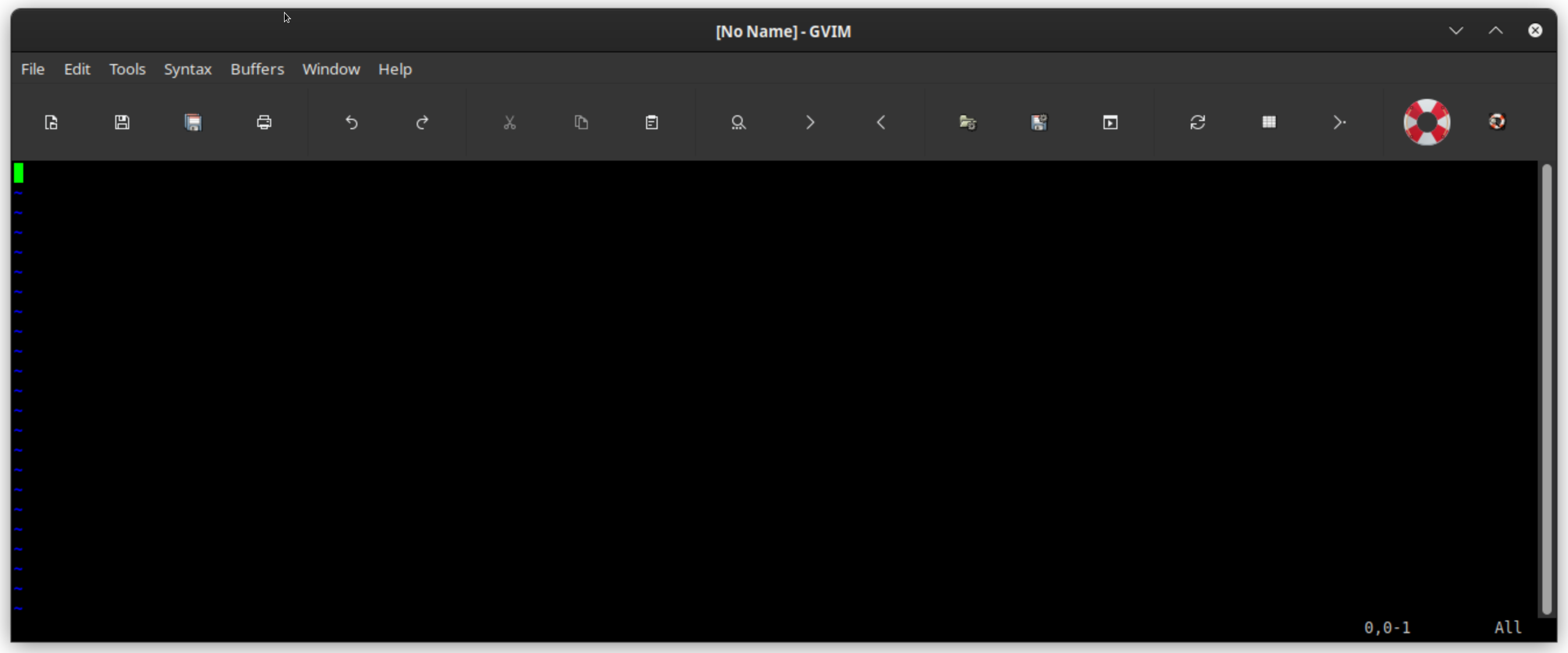
Having a similar issue in current Debian sid, per attachment.
Reported it here: https://bugs.kde.org/show_bug.cgi?id=456737 .
—
Reply to this email directly, view it on GitHub.
You are receiving this because you are subscribed to this thread.