
[vim/vim] `set termguicolors` and `set spell` break colorschemes in the Windows console and Windows Terminal (Issue #13446)

matteocoder
Steps to reproduce
Prerequisite: have a markdown file with many highlighted elements, such as https://github.com/lifepillar/vim-gruvbox8/blob/master/Readme.md
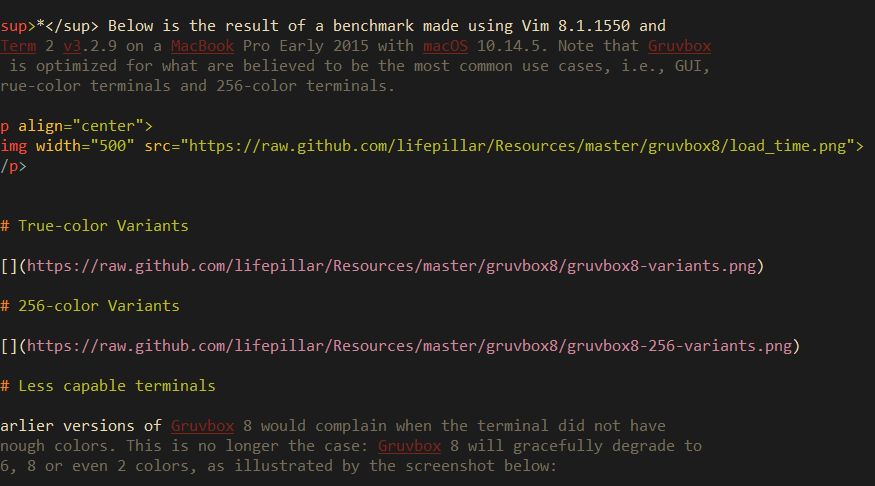
vim --clean .\Readme.md:colorscheme retrobox:set spell:set termguicolors
Visual result:
Expected behaviour
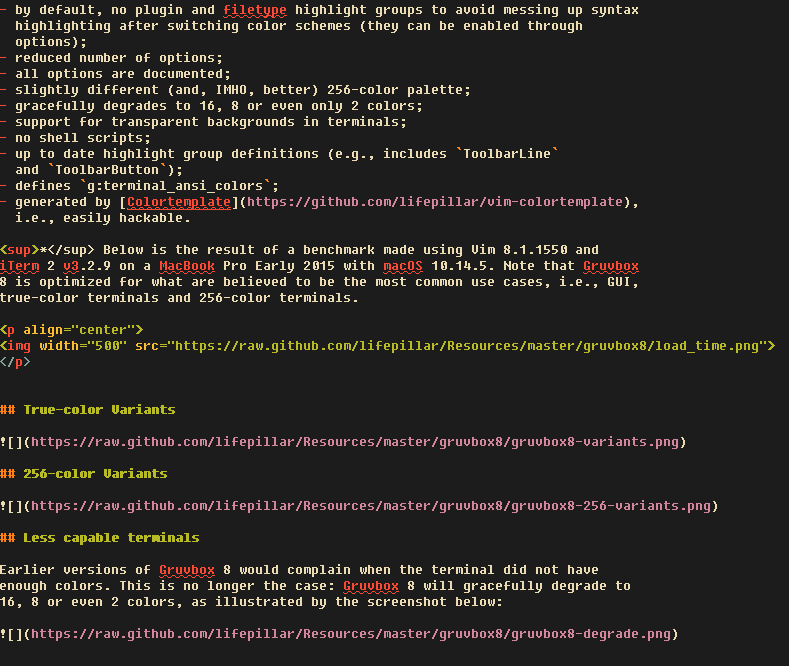
Colours should be displayed correctly. The following screenshot is from gvim.
Version of Vim
9.0.2026
Environment
OS: Windows 11 22H2 build 22621.2428
Terminal: conhost, Windows Terminal 1.18.2822.0, mintty 3.6.4 (x86_64-pc-msys)
$TERM: xterm-256color (only applicable to mintty)
Shell: cmd.exe, PowerShell 7, MSYS2 Bash 5.2, MSYS2 zsh 5.9
Logs and stack traces
No response
—
Reply to this email directly, view it on GitHub.
You are receiving this because you are subscribed to this thread.
Christian Brabandt
Hm, I cannot reproduce this. Using the same font and vim --clean -c ':colorscheme retrobox' -c 'termguicolors bg=dark' Readme.md It looks quite okay to me:
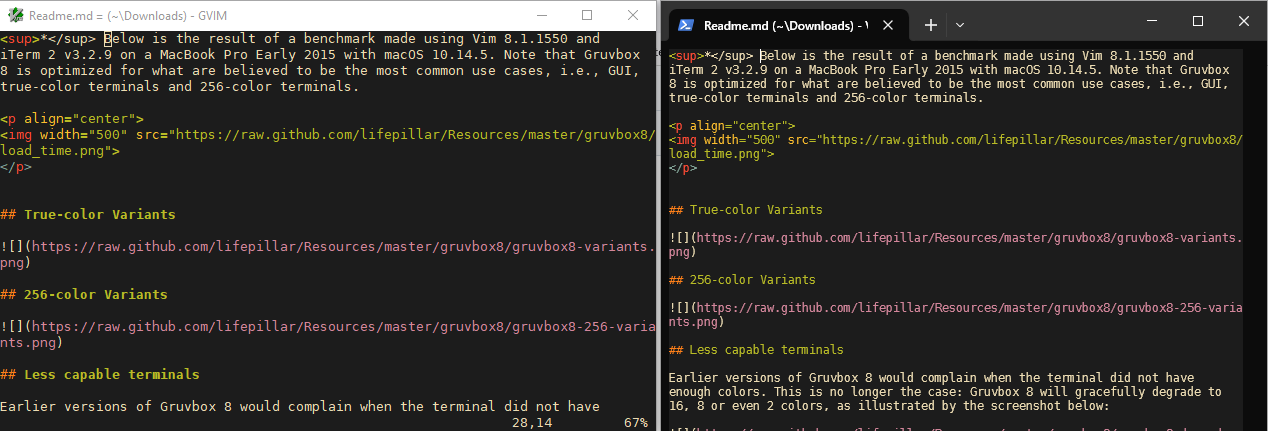
Actually, it seems the SpellBad highlighting breaks some things (because the characters get displayed darked then without spelling enabled) in the terminal, but that might be an issue with the markdown syntax file.
—
Reply to this email directly, view it on GitHub.
You are receiving this because you are subscribed to this thread.
Christian Brabandt
hm, it seems t_ue is causing this. These are the relevant terminal codes for underline in an xterm:
  t_ue=^[[m
  t_us=^[[4m
In a win32 terminal it is:
  t_ue=^[|24m
  t_us=^[|4m
If you set it like the xterm codes, it seems to fix the highlighting
:set t_us=^[[4m t_ue=^[[m
Note that the ^[ is a literal escape char.
—
Reply to this email directly, view it on GitHub.
You are receiving this because you are subscribed to this thread.
matteocoder
@chrisbra Thank you for the quick response. The solution you offer fixes the highlighting, but introduces an annoying screen flicker whenever I move throughout the text, unfortunately.
https://github.com/vim/vim/assets/22897138/2f40ce9b-52d6-4cc5-ba44-6f2f9659d36a
—
Reply to this email directly, view it on GitHub.
You are receiving this because you are subscribed to this thread.
Christian Brabandt
well, try to find out what the correct escape code is then
—
Reply to this email directly, view it on GitHub.
You are receiving this because you are subscribed to this thread.
matteocoder
@chrisbra All right, I'll see what I can do. Thank you for your help.
—
Reply to this email directly, view it on GitHub.
You are receiving this because you are subscribed to this thread.