
[vim/vim] Vim's background turns opaque in new Windows Terminal (#7147)

Chaoticsys101
Instructions: Open Vim in Windows Terminal
Describe the bug
I use the new Windows Terminal with Vim.
It becomes totally opaque when I enter vim...
I think it has something to do with my _vimrc because if I do 'vim -u NONE -U NONE' it looks as it is supposed to.
Expected behavior
Windows Terminal's background shouldn't change.
Screenshots

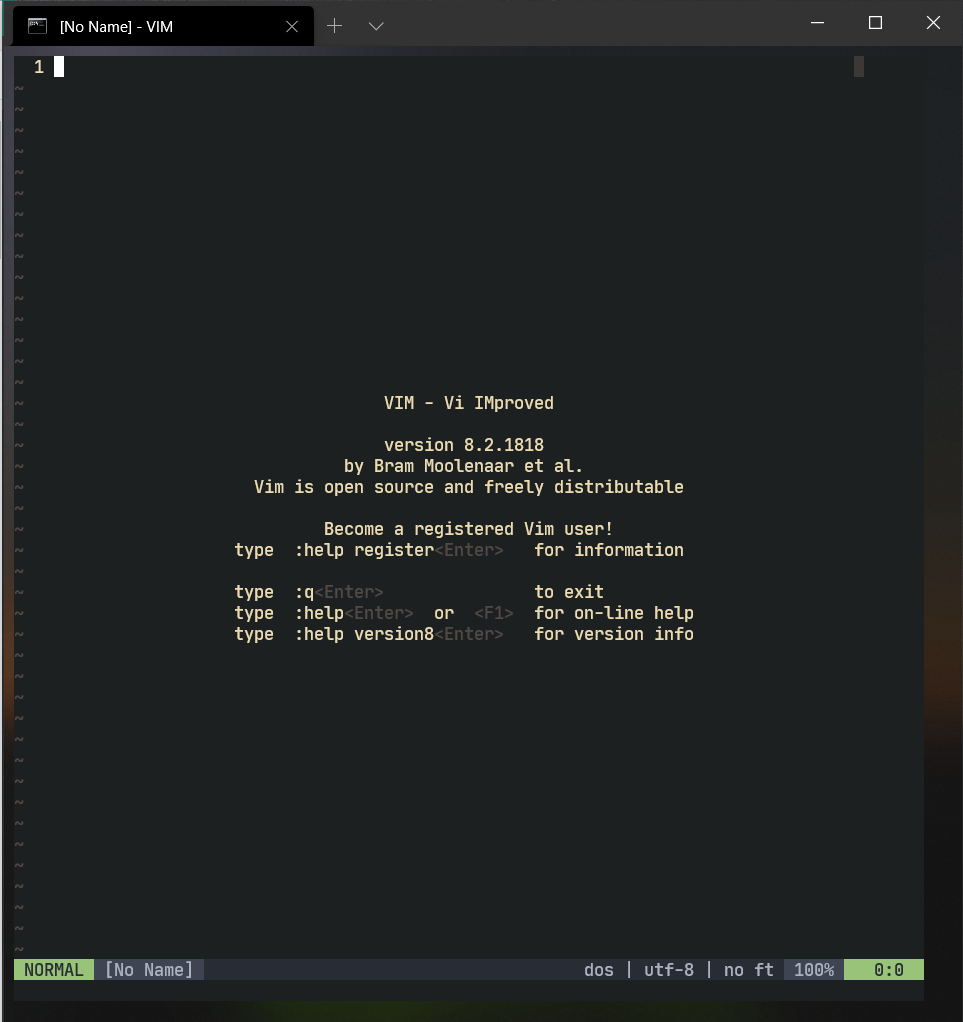
Environment (please complete the following information):
- Vim version: 8.2.1818
- OS: Windows 10
- Terminal: Windows Terminal 1.3.2651.0
Additional context
-
-
-
-
-
- _VIMRC - - - - - -
" ---------------------------------------------------------------------"
" ---------------- ADD PLUGINS ----------------------------------------"
" ---------------------------------------------------------------------"
" --- Vim-Plug ---
call plug#begin('~/vimfiles/autoload')
" Plugins
Plug 'preservim/nerdtree'
Plug 'itchyny/lightline.vim'
Plug 'majutsushi/tagbar'
Plug 'preservim/nerdcommenter'
Plug 'miyakogi/conoline.vim'
Plug 'tpope/vim-surround'
Plug 'pseewald/vim-anyfold'
Plug 'xolox/vim-misc'
Plug 'xolox/vim-notes'
Plug 'tpope/vim-repeat'
Plug 'wfxr/minimap.vim'
Plug 'junegunn/fzf', { 'do': { -> fzf#install() } }
Plug 'junegunn/fzf.vim'
Plug 'ervandew/supertab'
Plug 'ryanoasis/vim-devicons'
Plug 'dhruvasagar/vim-table-mode'
Plug 'neoclide/coc.nvim', {'branch': 'release'}
Plug 'SirVer/ultisnips'
Plug 'honza/vim-snippets'
Plug 'lervag/vimtex'
" Themes
Plug 'chriskempson/base16-vim'
Plug 'dracula/vim', { 'as': 'dracula' }
Plug 'morhetz/gruvbox'
Plug 'joshdick/onedark.vim'
Plug 'sonph/onehalf', {'rtp': 'vim/'}
Plug 'ayu-theme/ayu-vim'
Plug 'arcticicestudio/nord-vim'
Plug 'rakr/vim-one'
Plug 'sheerun/vim-wombat-scheme'
Plug 'lifepillar/vim-solarized8'
Plug 'flazz/vim-colorschemes'
Plug 'colepeters/spacemacs-theme.vim'
Plug 'phanviet/vim-monokai-pro'
call plug#end()
- _VIMRC - - - - - -
-
-
-
-
" ---------------------------------------------------------------------"
" ---------------- PLUGIN SETTINGS ------------------------------------"
" ---------------------------------------------------------------------"
" --- Define mapleader for keymaps ---
let mapleader = " "
" --- For NERDTree ---
map n :NERDTreeToggle
" --- For Tagbar ---
nmap :TagbarToggle
" --- For lightline ---
set laststatus=2
" let g:lightline.colorscheme = 'default'
" --- For NERDCommenter ---
" cc to comment
" cu to uncomment
let NERDSpaceDelims=1
" --- For Conoline ---
let g:conoline_auto_enable = 1
let g:conoline_color_normal_dark = 'ctermbg=None'
let g:conoline_color_insert_dark = 'ctermbg=None'
let g:conoline_color_normal_nr_dark = 'ctermbg=None ctermfg=white'
let g:conoline_color_insert_nr_dark = 'ctermbg=None ctermfg=white'
" --- For creating presentations in vim (use Goyo plugin) ---
autocmd BufNewFile,BufRead *.vpm call SetVimPresentationMode()
function SetVimPresentationMode()
set laststatus=0
hi NonText guifg=bg ctermfg=bg
set nonu
DisableWhitespace
nnoremap :n
nnoremap :N
endfunction
" --- For vim-anyfold ---
autocmd Filetype * AnyFoldActivate
let g:anyfold_fold_toplevel=0
set foldlevel=99
" --- For minimap ---
let g:minimap_width=14
nnoremap m :MinimapToggle
" --- For fzf ---
let g:fzf_layout = { 'down': '~40%' }
" --- For SuperTab ---
let g:SuperTabDefaultCompletionType = ""
" --- For vimtex ---
let g:tex_flavor='latex'
let g:vimtex_quickfix_mode=0
let g:tex_conceal='abdmg'
let g:vimtex_view_general_viewer = 'SumatraPDF'
let g:vimtex_view_general_options='-reuse-instance -forward-search @tex @line @pdf'
let g:vimtex_view_general_options_latexmk='-reuse-instance'
" --- For UtilSnips ---
" Trigger configuration
let g:UltiSnipsExpandTrigger=",,"
let g:UltiSnipsJumpForwardTrigger=""
let g:UltiSnipsJumpBackwardTrigger=""
" --- For lightline ---
let g:lightline = {
\ 'colorscheme': 'onedark',
\ }
" ---------------------------------------------------------------------"
" ---------------- SOME SETTINGS --------------------------------------"
" ---------------------------------------------------------------------"
" --- Set GUI Font ---
if has("gui_running")
if has("gui_gtk2")
set guifont=Inconsolata\ 12
elseif has("gui_macvim")
set guifont=Menlo\ Regular:h14
elseif has("gui_win32")
set guifont=JetBrainsMonoMedium_NF:h10
endif
endif
" --- Set colorscheme ---
" For 256 color support
if exists('+termguicolors')
let &t_8f = "<Esc>[38;2;%lu;%lu;%lum"
let &t_8b = "<Esc>[48;2;%lu;%lu;%lum"
set termguicolors
endif
" Colorscheme
" colorscheme onedark
colorscheme gruvbox
set background=dark
let g:gruvbox_contrast_dark='hard'
let g:gruvbox_italic=0
" --- Global settings ---
syntax on
set nocompatible
set nowrap
set clipboard=unnamed
set encoding=utf-8
set noerrorbells
set tabstop=4 softtabstop=4
set shiftwidth=4
set expandtab
set smartindent
set nu
set ignorecase
set smartcase
set noswapfile
set nobackup
set undodir=~/vimfiles/undodir
set undofile
set termwinsize=10x0
set incsearch
set textwidth=80
set colorcolumn=+1
" See 'Restore Screen Size And Pos' section
" let g:screen_size_restore_pos = 1
" --- Python3 ---
set pythonthreehome=\AppData\Local\Programs\Python\Python38\AppData\Local\Programs\Python\Python38\python38.dll
set pythonthreedll=
" --- Highlights ---
" highlight NonText ctermfg=lightgrey guifg=#555555
" highlight VertSplit ctermfg=grey ctermbg=grey guibg=bg
" highlight lCursor ctermfg=black ctermbg=white
" --- Set OmniCompletion on ---
filetype plugin on
set omnifunc=syntaxcomplete#Complete
" Spell check
set complete+=kspell
set completeopt=menuone,longest
" --- Removing menubar/toolbar/scrollbar from gvim ---
set guioptions-=m
set guioptions-=T
set guioptions-=r
" --- Change guicursor ---
set guicursor=i:hor20-Cursor
set guicursor+=r:hor25-Cursor
set guicursor+=c-ci-cr:block-Cursor
—
You are receiving this because you are subscribed to this thread.
Reply to this email directly, view it on GitHub, or unsubscribe.
バクダンくん
Seems that background cannot be transparent when termguicolors is on.
How to reproduce
vim --cleanin Windows Terminal // bg is transparent as expected:set termguicolors// bg become opaque even though:hi Normalstill returnscleared
Chaoticsys101
Then is there another way to achieve true colors and transparent background in Windows Terminal?
バクダンくん
I think no. This should be a bug of Vim.
I believe this bug did not exist before, because my vimrc have settings to make background transparent when launched in WT.
Chaoticsys101
Closed #7147.
Chaoticsys101
Reopened #7147.
Chaoticsys101
Thanks. Should I submit a new issue regarding termguicolors bug?
Chaoticsys101
Closed #7147.
Chaoticsys101
I am closing this issue and opening a new, more specific one.
#7162
dapovich
Try the command autocmd vimenter * ++nested highlight normal ctermbg=none guibg=none and move it after your colorscheme declaration
—
You are receiving this because you are subscribed to this thread.
Reply to this email directly, view it on GitHub.
Triage notifications on the go with GitHub Mobile for iOS or Android.
