
[vim/vim] Termdebug display wrong file name in the GDB prompt buffer (Issue #12550)

Linwei
Steps to reproduce
:packadd termdebug
:Termdebug xxx
and type "run" in the gdb prompt window
Expected behaviour
display the correct file name, not this:
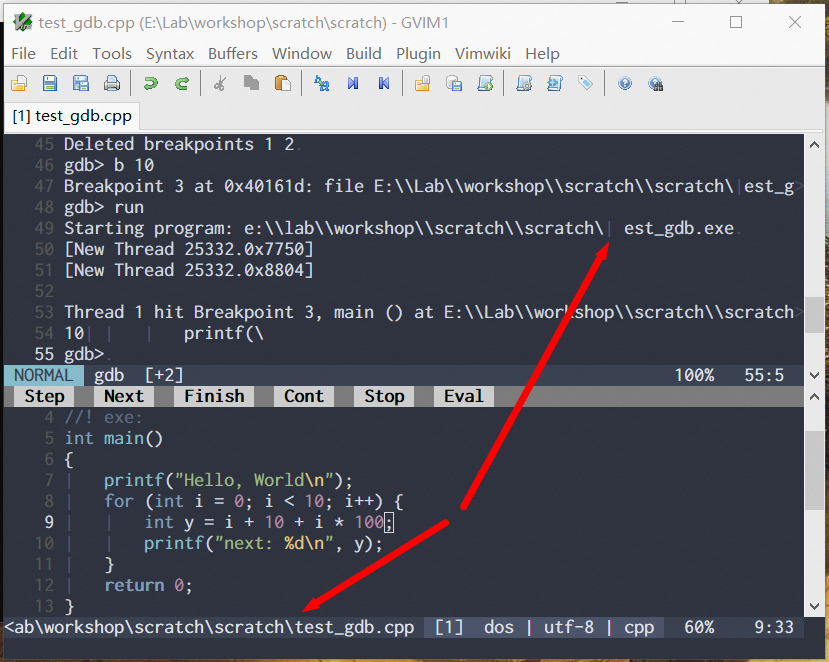
The full path of the executable is E:\Lab\workshop\scratch\scratch\test_gdb.exe
gdb displays is as ``E:\Lab\workshop\scratch\scratch\test_gdb.exe`
in the last segment of the path, the \\test has been replaced as a backslash and a tab character
(the tab character is visible as the bar character according to my listchar option).
This only happens on Windows.
Definitely a minor display error, but it would be nice to get fixed, since termdebug is the
only gdb front-end can work on MS Windows (excluding vscode).
I want to give it a go, and wish it could be polished on Windows.
Version of Vim
9.0.1627
Environment
OS: Windows 10
Terminal: None (GVim)
Logs and stack traces
No response
—
Reply to this email directly, view it on GitHub.
You are receiving this because you are subscribed to this thread.
Linwei
the display error happens in the command line as well:

see the ^I in the right side of the command line.
—
Reply to this email directly, view it on GitHub, or unsubscribe.
You are receiving this because you are subscribed to this thread.
Christian Brabandt
Can you try if :set shellslash fixes the issue?
—
Reply to this email directly, view it on GitHub.
You are receiving this because you are subscribed to this thread.
Linwei
same, after :set shellslash :

and

—
Reply to this email directly, view it on GitHub, or unsubscribe.
You are receiving this because you are subscribed to this thread.
Linwei
and I found that the breakpointer in the signcolumn is not displayed on Windows (I have disabled vim-signify and vim-signature for potential conflict).
The current line highlighting is invisible too.
I'm not sure is it related to the same issue (file name can't be correctly read) ?
—
Reply to this email directly, view it on GitHub.
You are receiving this because you are subscribed to this thread.
Christian Brabandt
this seems to be a duplicate of #12560
—
Reply to this email directly, view it on GitHub.
You are receiving this because you are subscribed to this thread.
Bram Moolenaar
Closed #12550 as completed via c9a4a8a.
—
Reply to this email directly, view it on GitHub.
You are receiving this because you are subscribed to this thread.