
[vim/vim] Formatting using quickfixtextfunc is lost when updating location lists for different buffers (#8400)

Yorick Peterse
Describe the bug
I sometimes open two windows: A and B. I then open a location list for A. This list is formatted using quickfixtextfunc as expect. If I then switch to window B, and somehow trigger the updating of the location list for A (e.g. using some plugin triggered by wa), the formatting of the location list for A is lost.
The reason for this appears as follows: the dictionary passed to the formatting function contains a field called winid. When I switch to window B, the ID is set to the ID of B. But if B has no location list items, there's nothing to format. The bug here seems that vim (and NeoVim, which also suffers from this) sets winid to the currently active window; not the ID of a window a location list belongs to (for every location list there is to update).
To Reproduce
Create a file called test.vim with the following content:
function! QfFormat(info)
  let l:what = { 'id': a:info['id'], 'items': 1 }
  let l:items = getloclist(a:info['winid'], l:what)

  echo l:items

  return ['Custom format']
endfunction

function! Test()
  let l:winid = 1000

  call setloclist(l:winid, [{ 'bufnr': winbufnr(l:winid), 'lnum': 1, 'col': 1, 'text': 'This is a test', 'type': 'E' }])
endfunction

set quickfixtextfunc=QfFormat
Now start vim using vim -u test.vim. In the buffer, type foo. The text doesn't matter and is just to make it easier to see we're in a different buffer later on.
Next, run :call Test() | lope. This will populate the location list of the first window with some dummy data. Note how in the commandline it prints the items used to populate/format the quickfix/location list entries.
Next, run :vne followed by :call Test(). Note how this time the items field is an empty list. If our quickfixtextfunc function actually did something with the items, this can result in a loss of formatting (as there are no entries to process, so the default formatting is used).
Expected behavior
When using location lists, quickfixtextfunc should be called in the context of the window every location list belongs to; not simply the currently active window.
Screenshots
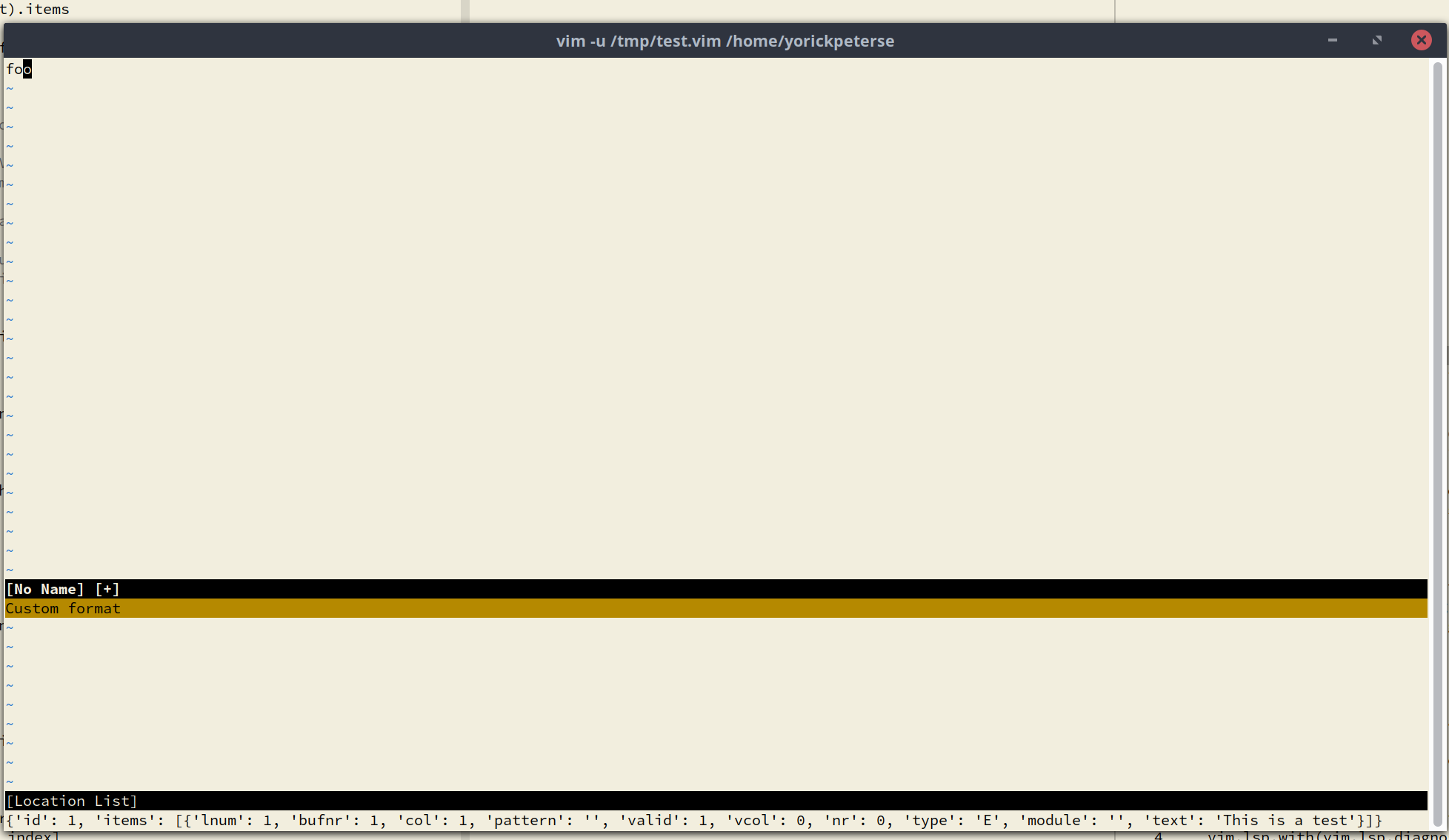
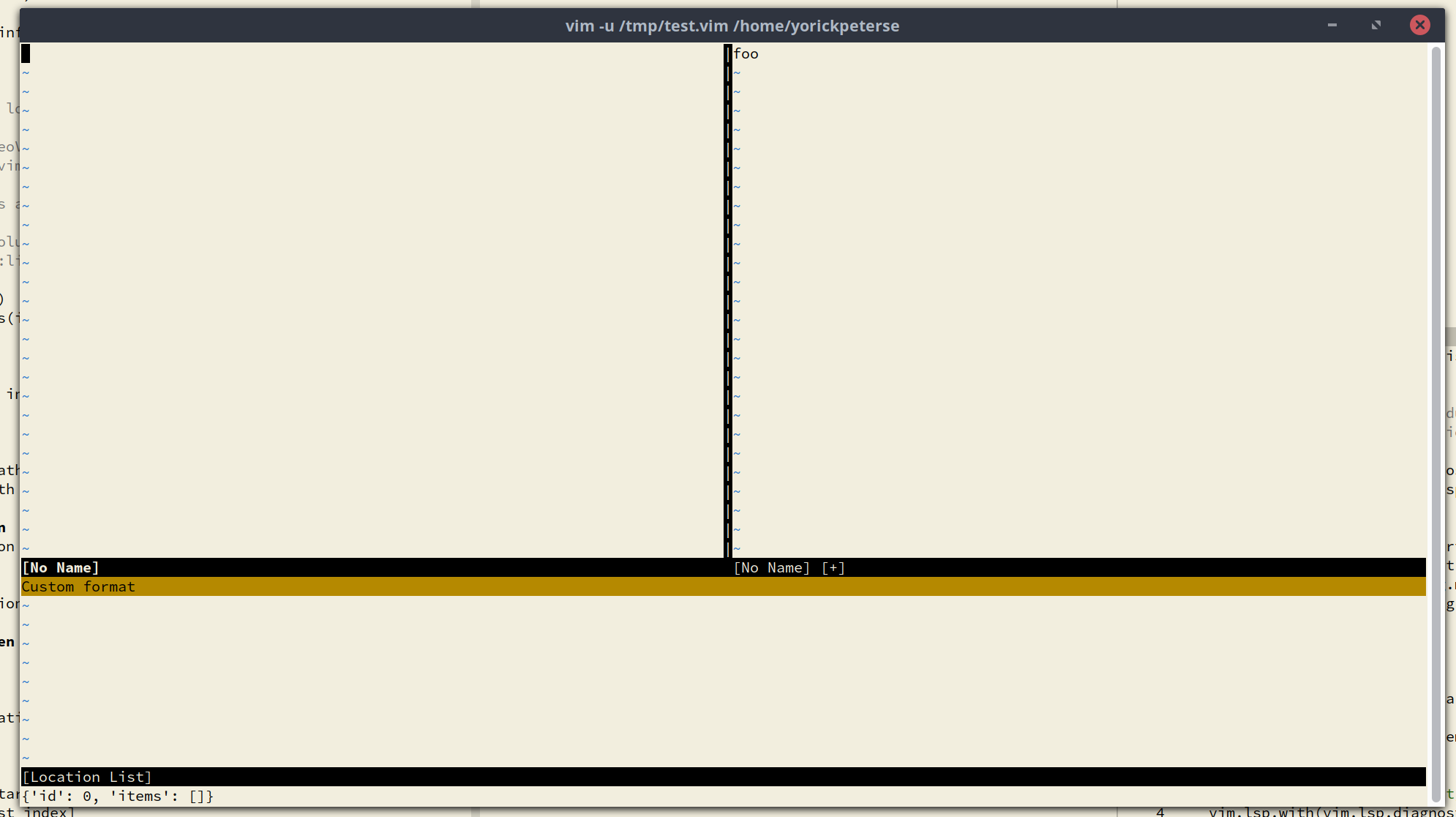
A real-world case where this happens can be seen in the following recording. I'm using NeoVim here, but it appears to affect both Vim and NeoVim:

Note how at the very end my location list formatting reverts back to the default, instead of the custom formatting seen earlier on.
Environment (please complete the following information):
Vim:
VIM - Vi IMproved 8.2 (2019 Dec 12, compiled May 28 2021 06:58:52)
Included patches: 1-2891
Compiled by Arch Linux
Huge version without GUI.  Features included (+) or not (-):
+acl               -farsi             +mouse_sgr         +tag_binary
+arabic            +file_in_path      -mouse_sysmouse    -tag_old_static
+autocmd           +find_in_path      +mouse_urxvt       -tag_any_white
+autochdir         +float             +mouse_xterm       +tcl/dyn
-autoservername    +folding           +multi_byte        +termguicolors
-balloon_eval      -footer            +multi_lang        +terminal
+balloon_eval_term +fork()            -mzscheme          +terminfo
-browse            +gettext           +netbeans_intg     +termresponse
++builtin_terms    -hangul_input      +num64             +textobjects
+byte_offset       +iconv             +packages          +textprop
+channel           +insert_expand     +path_extra        +timers
+cindent           +ipv6              +perl/dyn          +title
-clientserver      +job               +persistent_undo   -toolbar
-clipboard         +jumplist          +popupwin          +user_commands
+cmdline_compl     +keymap            +postscript        +vartabs
+cmdline_hist      +lambda            +printer           +vertsplit
+cmdline_info      +langmap           +profile           +virtualedit
+comments          +libcall           +python/dyn        +visual
+conceal           +linebreak         +python3/dyn       +visualextra
+cryptv            +lispindent        +quickfix          +viminfo
+cscope            +listcmds          +reltime           +vreplace
+cursorbind        +localmap          +rightleft         +wildignore
+cursorshape       +lua/dyn           +ruby/dyn          +wildmenu
+dialog_con        +menu              +scrollbind        +windows
+diff              +mksession         +signs             +writebackup
+digraphs          +modify_fname      +smartindent       -X11
-dnd               +mouse             -sound             -xfontset
-ebcdic            -mouseshape        +spell             -xim
+emacs_tags        +mouse_dec         +startuptime       -xpm
+eval              +mouse_gpm         +statusline        -xsmp
+ex_extra          -mouse_jsbterm     -sun_workshop      -xterm_clipboard
+extra_search      +mouse_netterm     +syntax            -xterm_save
   system vimrc file: "/etc/vimrc"
     user vimrc file: "$HOME/.vimrc"
 2nd user vimrc file: "~/.vim/vimrc"
      user exrc file: "$HOME/.exrc"
       defaults file: "$VIMRUNTIME/defaults.vim"
  fall-back for $VIM: "/usr/share/vim"
Compilation: gcc -c -I. -Iproto -DHAVE_CONFIG_H -march=x86-64 -mtune=generic -O2 -pipe -fno-plt -U_FORTIFY_SOURCE -D_FORTIFY_SOURCE=1
Linking: gcc -L. -Wl,-O1,--sort-common,--as-needed,-z,relro,-z,now -fstack-protector-strong -rdynamic -Wl,-export-dynamic -Wl,-E -Wl,-rpath,/usr/lib/perl5/5.34/core_perl/CORE -Wl,-O1,--sort-common,--as-needed,-z,relro,-z,now -L/usr/local/lib -o vim -lm -ltinfo -lelf -lacl -lattr -lgpm -ldl -Wl,-E -Wl,-rpath,/usr/lib/perl5/5.34/core_perl/CORE -Wl,-O1,--sort-common,--as-needed,-z,relro,-z,now -fstack-protector-strong -L/usr/local/lib -L/usr/lib/perl5/5.34/core_perl/CORE -lperl -lpthread -ldl -lm -lcrypt -lutil -lc -L/usr/lib -ltclstub8.6 -ldl -lz -lpthread -lm
OS: Arch Linux
Terminal: GNOME terminal, but it appears unrelated to the GUI used.
—
You are receiving this because you are subscribed to this thread.
Reply to this email directly, view it on GitHub, or unsubscribe.

Yegappan Lakshmanan
Describe the bug
I sometimes open two windows: A and B. I then open a location list for A. This list is formatted using
quickfixtextfuncas expect. If I then switch to window B, and somehow trigger the updating of the location list for A (e.g. using some plugin triggered bywa), the formatting of the location list for A is lost.The reason for this appears as follows: the dictionary passed to the formatting function contains a field called
winid. When I switch to window B, the ID is set to the ID of B. But if B has no location list items, there's nothing to format. The bug here seems that vim (and NeoVim, which also suffers from this) setswinidto the currently active window; not the ID of a window a location list belongs to (for every location list there is to update).To Reproduce
Create a file called
test.vimwith the following content:function! QfFormat(info) let l:what = { 'id': a:info['id'], 'items': 1 } let l:items = getloclist(a:info['winid'], l:what) echo l:items return ['Custom format'] endfunction function! Test() let l:winid = 1000 call setloclist(l:winid, [{ 'bufnr': winbufnr(l:winid), 'lnum': 1, 'col': 1, 'text': 'This is a test', 'type': 'E' }]) endfunction set quickfixtextfunc=QfFormatNow start vim using
vim -u test.vim. In the buffer, typefoo. The text doesn't matter and is just to make it easier to see we're in a different buffer later on.Next, run
:call Test() | lope. This will populate the location list of the first window with some dummy data. Note how in the commandline it prints the items used to populate/format the quickfix/location list entries.Next, run
:vnefollowed by:call Test(). Note how this time theitemsfield is an empty list. If our quickfixtextfunc function actually did something with the items, this can result in a loss of formatting (as there are no entries to process, so the default formatting is used).Expected behavior
When using location lists,
quickfixtextfuncshould be called in the context of the window every location list belongs to; not simply the currently active window.
A real-world case where this happens can be seen in the following recording. I'm using NeoVim here, but it appears to affect both Vim and NeoVim:
Note how at the very end my location list formatting reverts back to the default, instead of the custom formatting seen earlier on.
index ad07a5b4e..653f7f5c0 100644
--- a/src/quickfix.c
+++ b/src/quickfix.c
@@ -4473,7 +4473,12 @@ qf_update_buffer(qf_info_T *qi, qfline_T *old_last)
int qf_winid = 0;
if (IS_LL_STACK(qi))
- qf_winid = curwin->w_id;
+ {
+ win = qf_find_win_with_loclist(qi);
+ if (win == NULL)
+ return;
+ qf_winid = win->w_id;
+ }
if (old_last == NULL)
// set curwin/curbuf to buf and save a few things
vim-dev ML
On Thu, Jun 17, 2021 at 4:06 PM Yorick Peterse ***@***.***>
wrote:
> *Describe the bug*
>
> I sometimes open two windows: A and B. I then open a location list for A.
> This list is formatted using quickfixtextfunc as expect. If I then switch
> to window B, and somehow trigger the updating of the location list for A
> (e.g. using some plugin triggered by wa), the formatting of the location
> list for A is lost.
>
> The reason for this appears as follows: the dictionary passed to the
> formatting function contains a field called winid. When I switch to
> window B, the ID is set to the ID of B. But if B has no location list
> items, there's nothing to format. The bug here seems that vim (and NeoVim,
> window; not the ID of a window a location list belongs to (for every
> location list there is to update).
>
>
> Create a file called test.vim with the following content:
>
> function! QfFormat(info)
> let l:what = { 'id': a:info['id'], 'items': 1 }
> let l:items = getloclist(a:info['winid'], l:what)
>
> echo l:items
>
> return ['Custom format']endfunction
> function! Test()
> let l:winid = 1000
>
> call setloclist(l:winid, [{ 'bufnr': winbufnr(l:winid), 'lnum': 1, 'col': 1, 'text': 'This is a test', 'type': 'E' }])endfunction
> set quickfixtextfunc=QfFormat
>
> Now start vim using vim -u test.vim. In the buffer, type foo. The text
> doesn't matter and is just to make it easier to see we're in a different
> buffer later on.
>
> Next, run :call Test() | lope. This will populate the location list of
> the first window with some dummy data. Note how in the commandline it
> prints the items used to populate/format the quickfix/location list entries.
>
> Next, run :vne followed by :call Test(). Note how this time the items
> field is an empty list. If our quickfixtextfunc function actually did
> something with the items, this can result in a loss of formatting (as there
> are no entries to process, so the default formatting is used).
>
>
> When using location lists, quickfixtextfunc should be called in the
> context of the window every location list belongs to; not simply the
> currently active window.
>
> recording. I'm using NeoVim here, but it appears to affect both Vim and
> NeoVim:
>
>
> Note how at the very end my location list formatting reverts back to the
> default, instead of the custom formatting seen earlier on.
>
>
>
diff --git a/src/quickfix.c b/src/quickfix.c
index ad07a5b4e..653f7f5c0 100644
--- a/src/quickfix.c
+++ b/src/quickfix.c
@@ -4473,7 +4473,12 @@ qf_update_buffer(qf_info_T *qi, qfline_T *old_last)
int qf_winid = 0;
if (IS_LL_STACK(qi))
- qf_winid = curwin->w_id;
+ {
+ win = qf_find_win_with_loclist(qi);
+ if (win == NULL)
+ return;
+ qf_winid = win->w_id;
+ }
if (old_last == NULL)
// set curwin/curbuf to buf and save a few things
Thanks,
Yegappan
Yorick Peterse
@yegappan I tested your patch, and it indeed resolves the problem. Thanks! 😃
—
You are receiving this because you commented.