
[vim/vim] prop_add(): How to add a virtual line upon line 1? (Issue #11084)

JimmyHuang454
I can add a new virtual line below any line by:
    call prop_add(1,
          \0,
          \{'text': 'hello world.',
          \'text_align': 'below',
          \'type': 'Mycolor'
          \})
But how can I add a new virtual line upon line 1? I tried to set the line number to 0, below line 0 upon line 1(vim window is 1-based, so line 1 is the toppest line), but vim throws an error.
Vim version: 9.0.0392
—
Reply to this email directly, view it on GitHub.
You are receiving this because you are subscribed to this thread.
monkoose
AFAIK text_props added to some location (attached to a position on a line). So it is impossible in the current implementation to do so.
Neovim has this feature (but it isn't perfect) and most of the time you would not see this virtual text above first line unless you explicitly scroll the window with C-y
—
Reply to this email directly, view it on GitHub.
You are receiving this because you are subscribed to this thread.
JimmyHuang454
Can i ask why do you need this feature?
I adding inlay hint feature to a LSP plugin, but I find out virtual text in vim is not logically perfect, because it missing some coverage(can't add above first line). LSP may put a virtual line above first line.
—
Reply to this email directly, view it on GitHub.
You are receiving this because you are subscribed to this thread.
Bram Moolenaar
Have a try putting the property on the first character of the first line. This requires a fixed window width, here I used 80:
vim9script
prop_type_add('test', {highlight: 'Special'})
var text = 'Above the first line'
text ..= repeat(' ', 80 - len(text))
prop_add(1, 1, {text: text, type: 'test'})
—
Reply to this email directly, view it on GitHub.
You are receiving this because you are subscribed to this thread.
Bram Moolenaar
If you don't mind the ... at the end of the line, you can add more padding and it still shows OK when you make the window wider:
text ..= repeat(' ', &columns)
—
Reply to this email directly, view it on GitHub.
You are receiving this because you are subscribed to this thread.
bfrg
I think @JimmyHuang454 wants to do something like this:
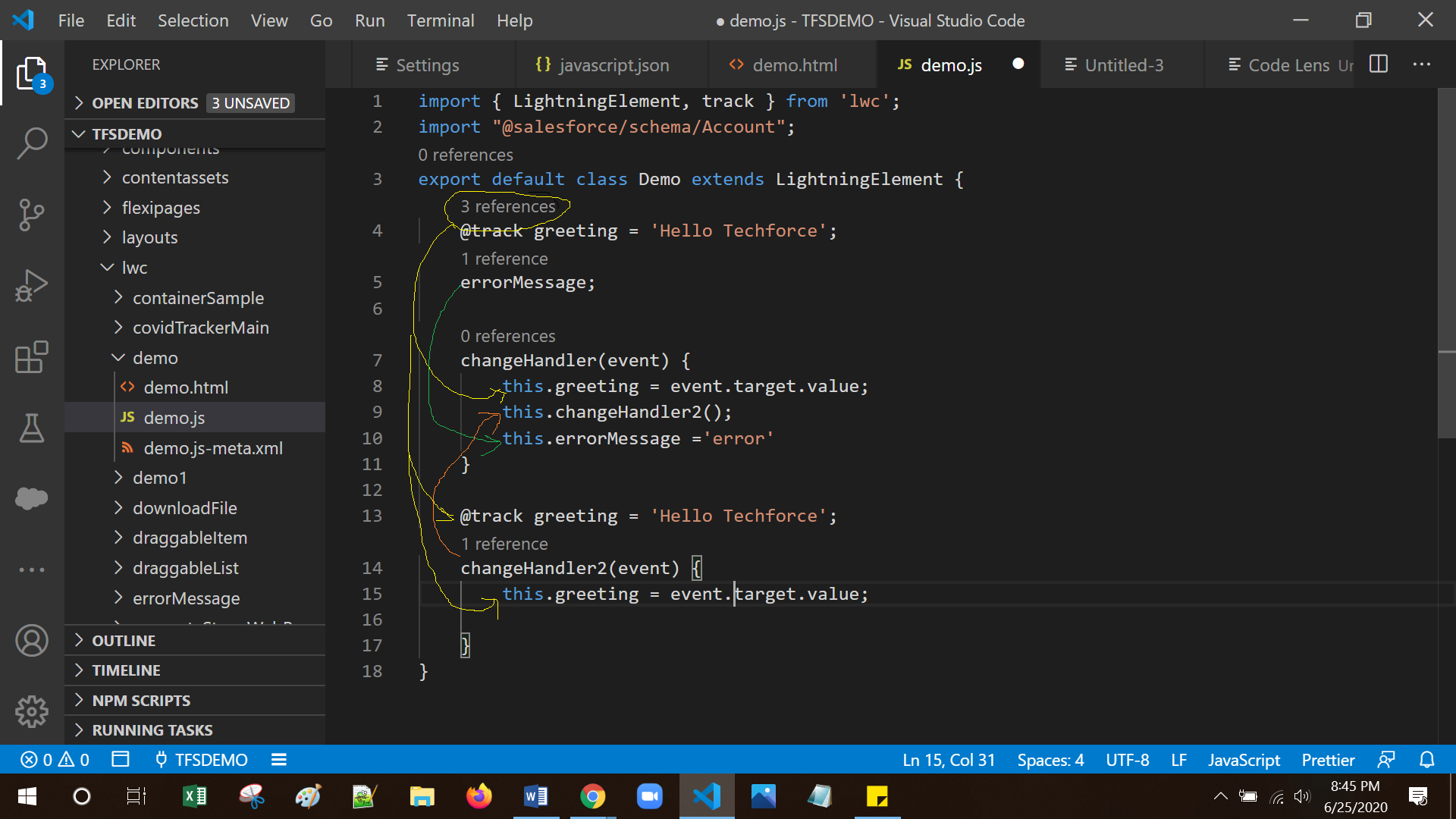
From: https://stackoverflow.com/a/69035610
—
Reply to this email directly, view it on GitHub.
You are receiving this because you are subscribed to this thread.
Bram Moolenaar
> I think @JimmyHuang454 wants to do something like this:
OK, so the virtual text should really be bound to the line below it.
That mattes when inserting or deleting lines.
We could add a "text_align" option "above" that does this.
--
Seen it all, done it all, can't remember most of it.
/// Bram Moolenaar -- ***@***.*** -- http://www.Moolenaar.net \\\
/// \\\
\\\ sponsor Vim, vote for features -- http://www.Vim.org/sponsor/ ///
\\\ help me help AIDS victims -- http://ICCF-Holland.org ///
—
Reply to this email directly, view it on GitHub.
You are receiving this because you are subscribed to this thread.
Bram Moolenaar
Please try out 9.0.0438
—
Reply to this email directly, view it on GitHub.
You are receiving this because you are subscribed to this thread.
bfrg
There are a couple of issues.
Run vim --clean test.vim -S test.vim, with
vim9script
prop_type_add('test', {highlight: 'Special'})
prop_add(1, 0, {
    text:  'Text above the first line',
    type: 'test',
    text_align: 'above'
})
Issues:
-
Place the cursor on the first line and then press
SHIFT-i.
Result: The cursor jumps to the line with the virtual text above the first line. -
Run
:set number.
Result: The first buffer line gets shifted to the right. The line numbering is also wrong. The line with the virtual text above the first buffer line should not be labeled as the first line. -
Run
:set nowrap.
Result: The first buffer line disappears.
—
Reply to this email directly, view it on GitHub.
You are receiving this because you are subscribed to this thread.
JimmyHuang454
There are a couple of issues.
Run
vim --clean test.vim -S test.vim, withvim9script prop_type_add('test', {highlight: 'Special'}) prop_add(1, 0, { text: 'Text above the first line', type: 'test', text_align: 'above' })Issues:
- Place the cursor on the first line and then press
SHIFT-i.
Result: The cursor jumps to the line with the virtual text above the first line.- Run
:set number.
Result: The first buffer line gets shifted to the right. The line numbering is also wrong. The line with the virtual text above the first buffer line should not be labeled as the first line.- Run
:set nowrap.
Result: The first buffer line disappears.
Reproduced.
test.vim:
set number

let s:testColor = 'Comment'

call prop_type_add('testColor', {'highlight': s:testColor})

call prop_add(1, 0, {'text': 'below', 'type':'testColor', 'text_align': 'below'})

call prop_add(1, 0, {'text': 'above', 'type':'testColor', 'text_align': 'above'})
Actual:

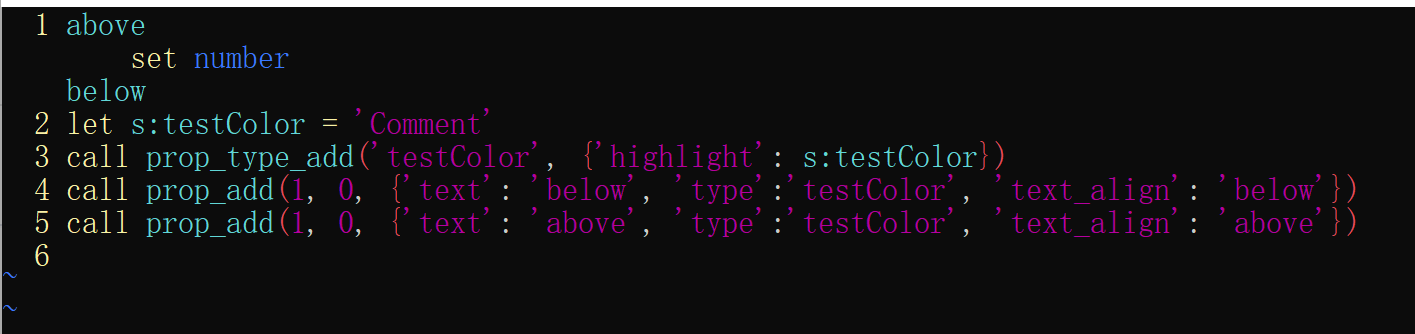
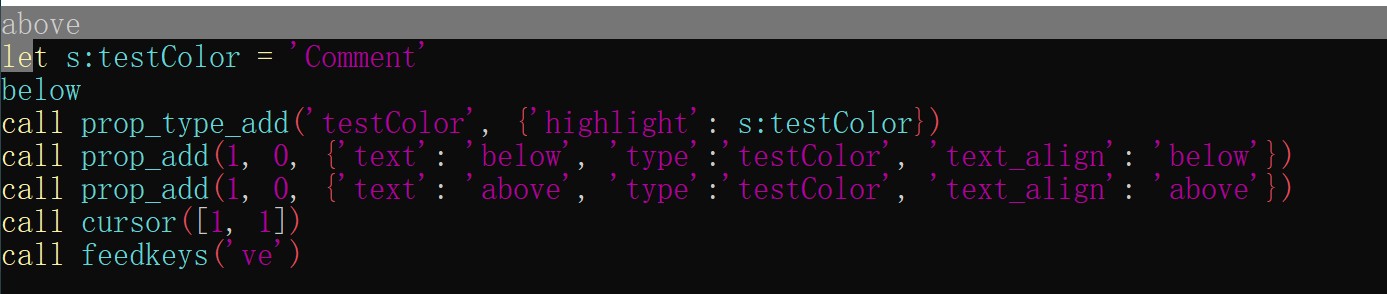
Should seleting range including virtual line?
let s:testColor = 'Comment'

call prop_type_add('testColor', {'highlight': s:testColor})

call prop_add(1, 0, {'text': 'below', 'type':'testColor', 'text_align': 'below'})

call prop_add(1, 0, {'text': 'above', 'type':'testColor', 'text_align': 'above'})

call cursor([1, 1])

call feedkeys('ve')
Actual:
—
Reply to this email directly, view it on GitHub, or unsubscribe.
You are receiving this because you are subscribed to this thread.
Bram Moolenaar
Closed #11084 as completed via c9dc03f.
—
Reply to this email directly, view it on GitHub.
You are receiving this because you are subscribed to this thread.
bfrg
It looks like the line numbering is still wrong, or is the current behavior intended?
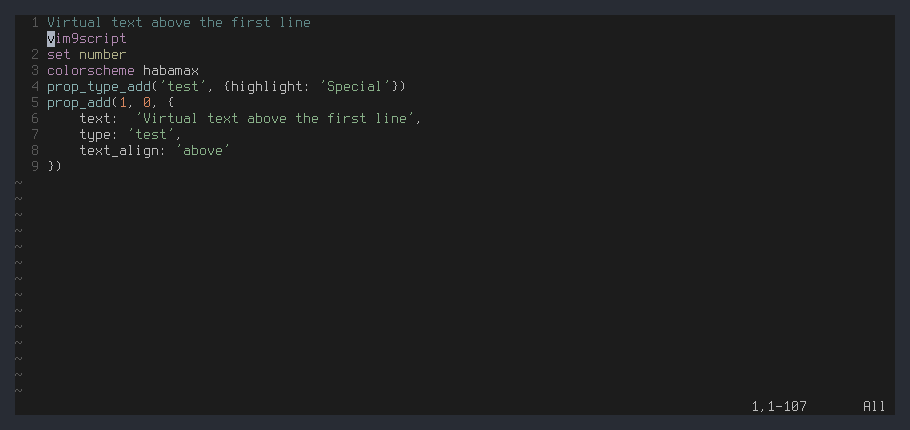
I thought that the first screen line shouldn't have a number.
Tested with 9.0.453.
—
Reply to this email directly, view it on GitHub.
You are receiving this because you are subscribed to this thread.
Bram Moolenaar
> It looks like the line numbering is still wrong, or is the current
> behavior intended?
>
>
> I thought that the first screen line shouldn't have a number.
>
Depends on how you look at it. Is the text above the line included in
the line, thus does the line start there? Or does the line only start
where the actual text is?
A corner case is when you may have both text "below" from one line and
text "above" from the line below it. How do you tell what line the
virtual text belongs to? Having the line number is a good hint.
Let's leave it like this for now. If someone can think of a very good
reason why the line number should be below the "above" text properties
we can reconsier.
--
Master: Boy, there is nothing more for you to learn
Student: I didn't know that!
/// Bram Moolenaar -- ***@***.*** -- http://www.Moolenaar.net \\\
/// \\\
\\\ sponsor Vim, vote for features -- http://www.Vim.org/sponsor/ ///
\\\ help me help AIDS victims -- http://ICCF-Holland.org ///
—
Reply to this email directly, view it on GitHub.
You are receiving this because you are subscribed to this thread.
Nick Jensen
I intuitively expect the line number to represent the actual text, so when I look at the screenshot above, it looks like vim9script is the virtual text.
It's true that this could potentially become confusing when one line has virtual text below, and the following line has virtual text above, but as I see it, this is an issue for the plugin developer to deal with. If both "above" and "below" lines are being used together, they could e.g. prefix lines with ╭ and ╰ :
4  Blah blah

   ╰ Virtual below

   ╭ Virtual above

5  Actual text

   ╰ Virtual below

6  ...
—
Reply to this email directly, view it on GitHub, or unsubscribe.
You are receiving this because you are subscribed to this thread.
bfrg
This is what it actually looks like when we have virtual text above and below:
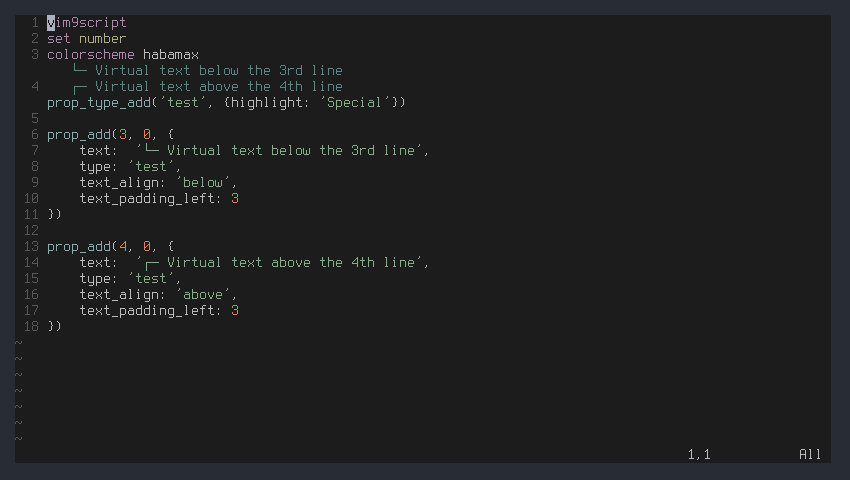
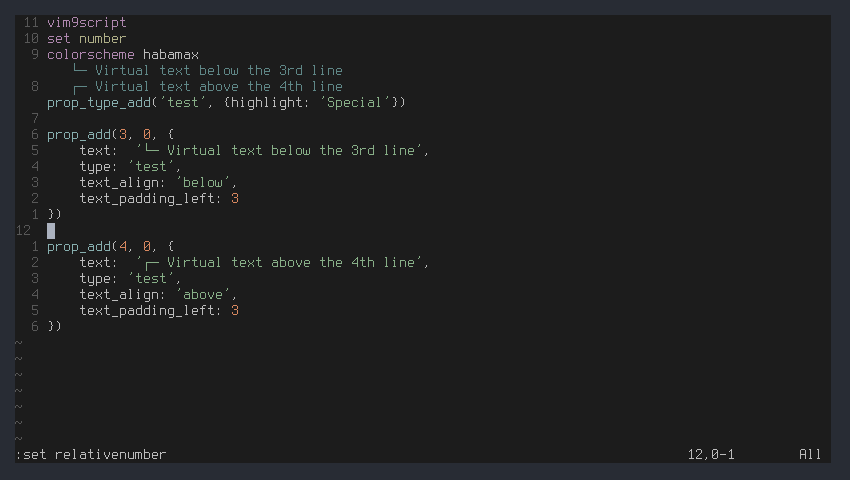
In my opinion the line numbering looks confusing. It's even worse when relativenumber is enabled:
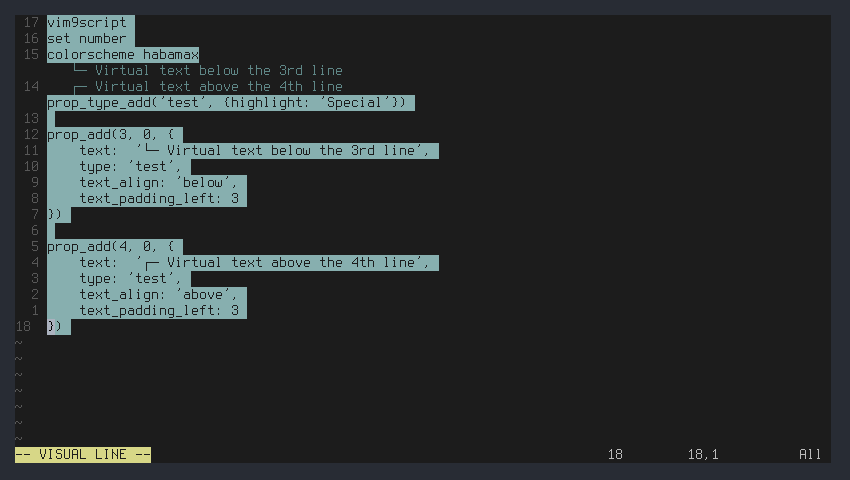
This is what it looks like when all lines are visually selected:
—
Reply to this email directly, view it on GitHub.
You are receiving this because you are subscribed to this thread.
bfrg
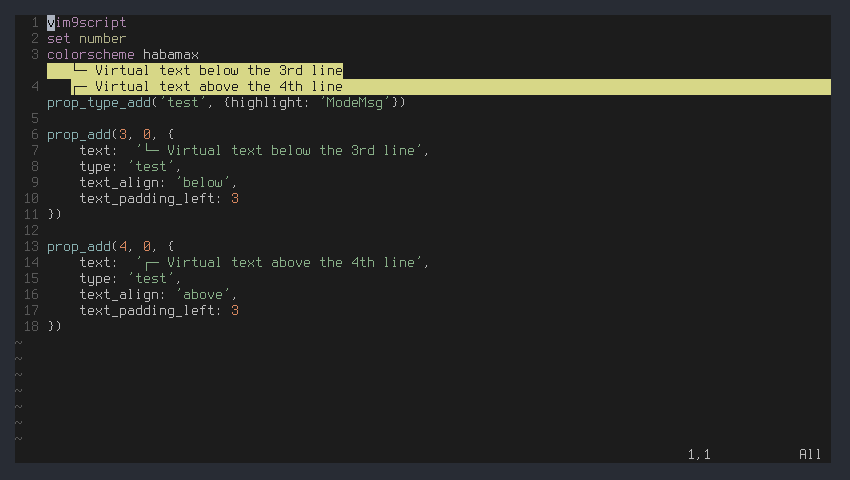
There's another issue. The highlighting is not consistent, see the following screenshot:
—
Reply to this email directly, view it on GitHub.
You are receiving this because you are subscribed to this thread.
Nick Jensen
There is something else funny going on with where the text property is attached—it appears to be attached to the end of the associated line, where I would expect it to be attached to the start. For example, take @bfrg's example from above and add a line break at the end of line 4:
vim9script

set number

colorscheme habamax
prop_type_add('test', {highlight: 'Special'})
prop_add(3, 0, {

    text:  '└─ Virtual text below the 3rd line',

    type: 'test',

    text_align: 'below',

    text_padding_left: 3

})


prop_add(4, 0, {

    text:  '┌─ Virtual text above the 4th line',

    type: 'test',

    text_align: 'above',

    text_padding_left: 3

})

execute "normal! 4GA\<CR>"
This moves the virtual text down to below the new the blank line:
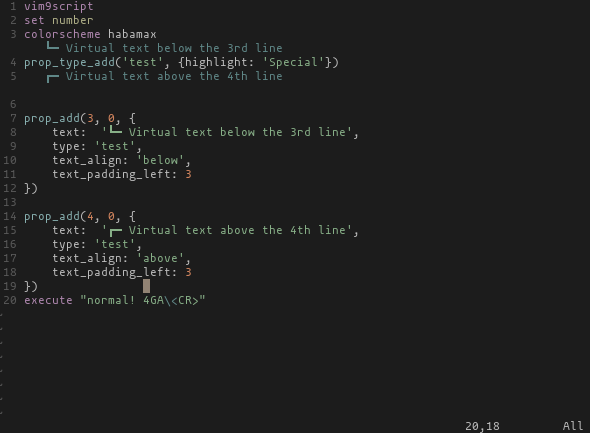
But it also does something strange to the cursor location - note the position of the caret in the screenshot. The caret is now a line above the actual cursor position. If I insert in the current position, text is inserted in the bottom line. But moving the cursor with j and k doesn't appear to be able to get right to the bottom because the caret is on the wrong line.
—
Reply to this email directly, view it on GitHub, or unsubscribe.
You are receiving this because you are subscribed to this thread.
Bram Moolenaar
Nick Jensen wrote:
> There is something else funny going on with where the text property is
> attached—it appears to be attached to the end of the associated line,
> where I would expect it to be attached to the start. For example, take
> @bfrg's example from above and add a line break at the end of line 4:
what you would expect. I'll see if I can fix that.
> But it *also* does something strange to the cursor location - note the
> position of the caret in the screenshot. The caret is now a line above
> the actual cursor position. If I insert in the current position, text
> is inserted in the bottom line. But moving the cursor with `j` and `k`
> doesn't appear to be able to get right to the bottom because the caret
> is on the wrong line.
--
Over the years, I've developed my sense of deja vu so acutely that now
I can remember things that *have* happened before ...
/// Bram Moolenaar -- ***@***.*** -- http://www.Moolenaar.net \\\
/// \\\
\\\ sponsor Vim, vote for features -- http://www.Vim.org/sponsor/ ///
\\\ help me help AIDS victims -- http://ICCF-Holland.org ///
—
Reply to this email directly, view it on GitHub, or unsubscribe.
You are receiving this because you are subscribed to this thread.
Nick Jensen
Thanks Bram, yes the 2 issues in my last comment are now nicely resolved.
So the column position that the virtual line is linked to appears to be related to where it is displayed. So, in the previous example, where the text_padding_left: 3 positions the virtual text over the 4th column of line 4 (p), splitting the line after column 4 ("prop", "_type_add(...") leaves the virtual text on the line above, and splitting before column 4 ("pro", "p_type_add(...") moves the virtual text down. The padding does not move so we can then split again and again on the 4th column and continue to move the virtual text:
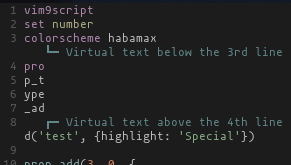
This makes sense, especially when virtual text may be displayed over indented text, and we may want to move the indented text down using I without moving the cursor all the way to column 1.
However, when trying this out, it looks like this functionality has some bugs specifically with indented text. Inserting a line break directly before the text position works as expected (the virtual text moves down together with the actual text), as does line breaks later in the line (the partial line remains and the virtual text remains with it). But when inserting a line break in the middle of the white space or before the whitespace results in a full line of whitespace being added to the end of the line:
vim9script

set number list wrap

set listchars=trail:·
colorscheme habamax

prop_type_add('test', {highlight: 'Special'})
prop_add(10, 0, {

    type: 'test',

    text:  '┌─ Virtual text above this (10th) line',

    text_align: 'above',

    text_padding_left: 4

})


# Add a line break at line 10 after column 3

execute "normal! 10G3|a\<CR>"
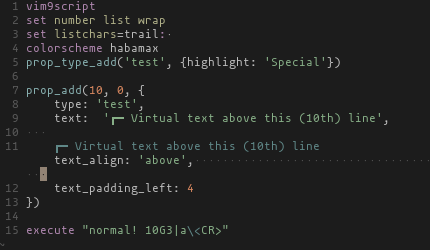
Now the correct 3 spaces remain on line 10 and the virtual text has moved as expected, but line 11 now has enough spaces to wrap the line until the cursor appears at column 3 again..?
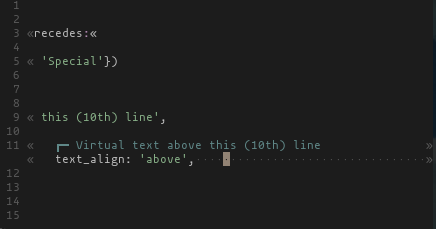
It looks even stranger when using :set nowrap and set listchars=trail:·,extends:»,precedes:«, where the entire virtual text and line 11 are visible, even though the buffer has scrolled right:
—
Reply to this email directly, view it on GitHub, or unsubscribe.
You are receiving this because you are subscribed to this thread.
Bram Moolenaar
> So the column position that the virtual line is linked to appears to
> be related to where it is displayed. So, in the previous example,
> where the `text_padding_left: 3` positions the virtual text over the
> "_type_add(...") leaves the virtual text on the line above, and
> splitting before column 4 ("pro", "p_type_add(...") moves the virtual
> text down. The padding does not move so we can then split again and
> again on the 4th column and continue to move the virtual text:
>
That should be auto-indenting adding the indent.
>
> This makes sense, especially when virtual text may be displayed over
> indented text, and we may want to move the indented text down using
> `I` without moving the cursor all the way to column 1.
>
> However, when trying this out, it looks like this functionality has
> some bugs specifically with indented text. Inserting a line break
> directly before the text position works as expected (the virtual text
> moves down together with the actual text), as does line breaks later
> in the line (the partial line remains and the virtual text remains
> with it). But when inserting a line break in the middle of the white
> space or before the whitespace results in a full line of whitespace
>
> ```vim
> vim9script
> set number list wrap
> set listchars=trail:·
> colorscheme habamax
> prop_type_add('test', {highlight: 'Special'})
>
> prop_add(10, 0, {
> type: 'test',
> text: '┌─ Virtual text above this (10th) line',
> text_align: 'above',
> text_padding_left: 4
> })
>
> # Add a line break at line 10 after column 3
> execute "normal! 10G3|a\<CR>"
>
> 
>
> Now the correct 3 spaces remain on line 10 and the virtual text has
> moved as expected, but line 11 now has enough spaces to wrap the line
> until the cursor appears at column 3 again..?
>
> It looks even stranger when using `:set nowrap` and `set
> listchars=trail:·,extends:»,precedes:«`, where the entire virtual text
> and line 11 are visible, even though the buffer has scrolled right:
>
The trailing spaces should not be there, of course. I'll fix that.
Putting text before a line that isn't actually there is tricky.
Please watch out for other problems.
--
hundred-and-one symptoms of being an internet addict:
69. Yahoo welcomes you with your own start page
/// Bram Moolenaar -- ***@***.*** -- http://www.Moolenaar.net \\\
/// \\\
\\\ sponsor Vim, vote for features -- http://www.Vim.org/sponsor/ ///
\\\ help me help AIDS victims -- http://ICCF-Holland.org ///
—
Reply to this email directly, view it on GitHub, or unsubscribe.
You are receiving this because you are subscribed to this thread.
Nick Jensen
Fixed again, thanks @brammool!
—
Reply to this email directly, view it on GitHub.
You are receiving this because you are subscribed to this thread.
Nick Jensen
What about @bfrg's highlighting issue above?
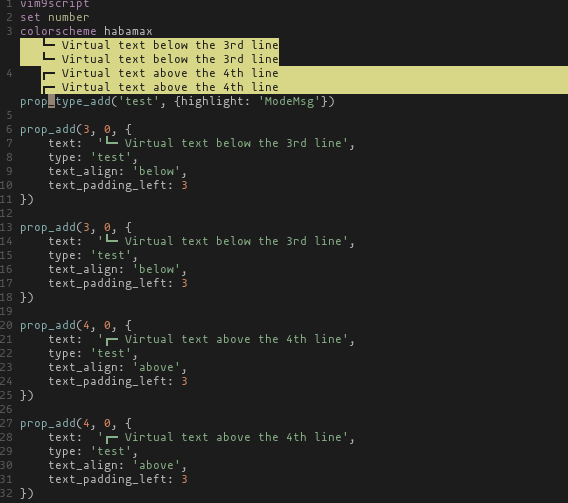
It looks like the highlighting stretches from the beginning of the line to the end of the text for "below" virtual text lines, but from the start of the virtual text to the end of the line for "above" virtual text lines. Really I would have expected either
- The highlighting to only extend over the virtual text itself, or
- Over the full line
Preferably option 1
—
Reply to this email directly, view it on GitHub.
You are receiving this because you are subscribed to this thread.
Bram Moolenaar
This issue is closed. If you still see a problem, please create a new issue with repro steps.
—
Reply to this email directly, view it on GitHub.
You are receiving this because you are subscribed to this thread.
Nick Jensen
To future readers: the highlighting issue has now been resolved (highlighting only extends over the virtual text itself), and the line numbers now reflect actual buffer lines, and are not displayed next to above text property line 🎉
—
Reply to this email directly, view it on GitHub, or unsubscribe.
You are receiving this because you are subscribed to this thread.
Bram Moolenaar
> I can add a new virtual line below any line by:
> call prop_add(1,
> \0,
> \{'text': 'hello world.',
> \'text_align': 'below',
> \'type': 'Mycolor'
> \})
> ```
>
>
> But how can I add a new virtual line upon line 1? I tried to set the
> line number to 0, below line 0 upon line 1(vim window is 1-based, so
> line 1 is the toppest line), but vim throws an error.
You could perhaps put virtual text on the first character of the first
line, and make it occupy the whole screenline. That works so long as
the window width doesn't change. Perhaps we could add a property "pad
to the end of the screenline". But I wonder if it's useful enough.
--
"So this is it," said Arthur, "we are going to die."
"Yes," said Ford, "except...no! Wait a minute!" He suddenly lunged across
the chamber at something behind Arthur's line of vision. "What's this
switch?" he cried.
"What? Where?" cried Arthur, twisting around.
"No, I was only fooling," said Ford, "we are going to die after all."
-- Douglas Adams, "The Hitchhiker's Guide to the Galaxy"
/// Bram Moolenaar -- ***@***.*** -- http://www.Moolenaar.net \\\
/// \\\
\\\ sponsor Vim, vote for features -- http://www.Vim.org/sponsor/ ///
\\\ help me help AIDS victims -- http://ICCF-Holland.org ///
—
Reply to this email directly, view it on GitHub.
You are receiving this because you are subscribed to this thread.