
[vim/vim] Terminal color/s slightly off in macOS Terminal.app vim HEAD (Issue #10347)

C.D. MacEachern
Steps to reproduce
- Set up a Terminal.app profile's 16 colors to match specific colors of a vim colorscheme (using apprentice colorscheme in this test, but same issue happens with Solarized light and dark profiles).
- Open Vim and do
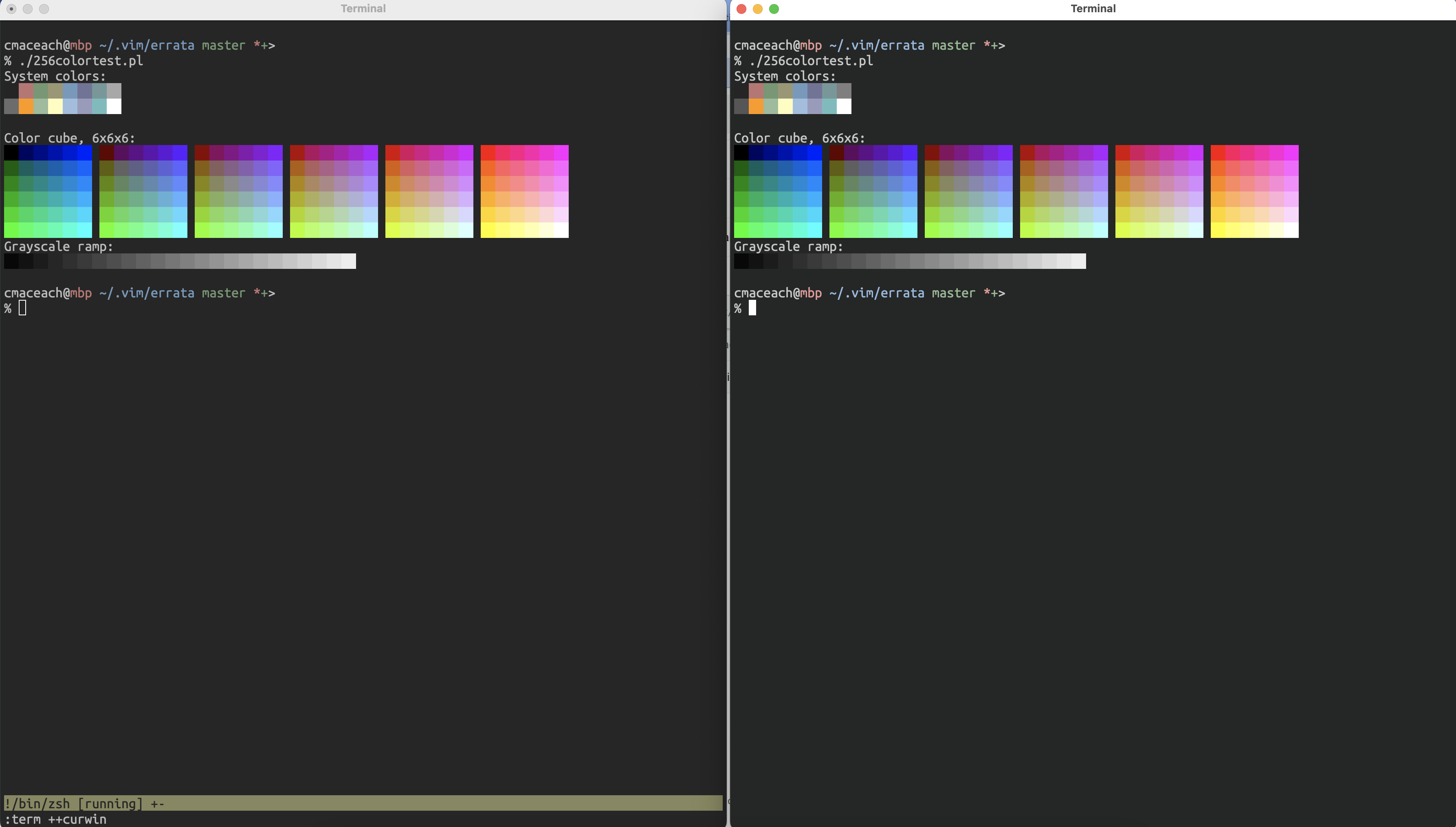
:term ++curwin - Run color test script that shows system colors, see screenshot:
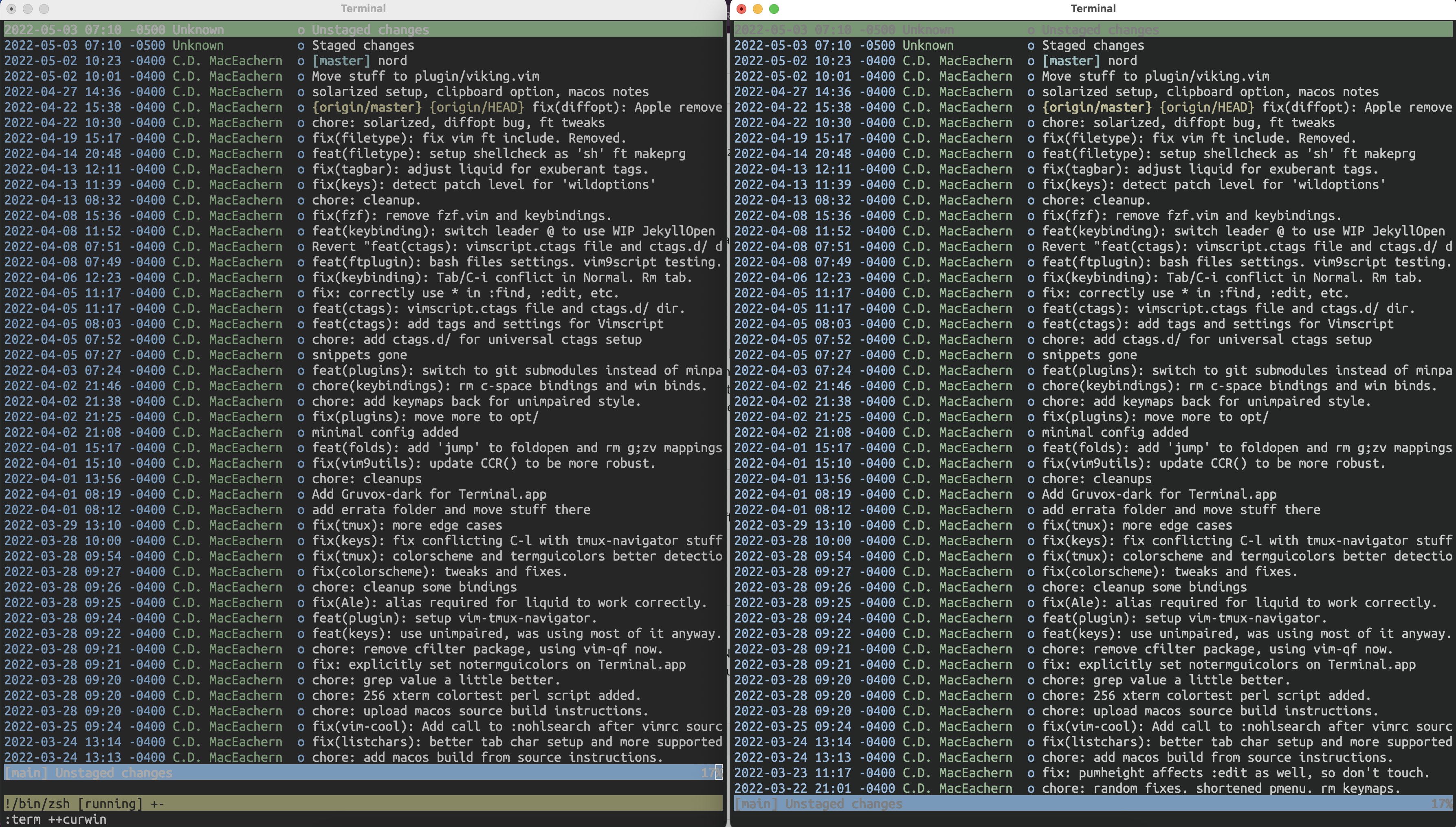
- Try a TUI program like tig in this screenshot, notice how some colors seems dim:
Apprentice profile (had to zip it to upload, unzip and double click it to run the profile in Terminal.app):
apprentice.zip
Expected behaviour
Colors in Vim terminal and Terminal.app match exactly in colortest and TUI programs like tig.
Version of Vim
8.2.4860
Environment
macOS Monterery 12.3.1
Terminal.app (444)
xterm-256color
/bin/zsh (zsh 5.8 (x86_64-apple-darwin21.0))
Logs and stack traces
No response
—
Reply to this email directly, view it on GitHub.
You are receiving this because you are subscribed to this thread.
lacygoill
Do you set 'termguicolors'?
If so, you might be interested in g:terminal_ansi_colors.
FWIW, here is how I set the first 16 colors of the terminal's palette in a Vim terminal buffer:
vim9script
{
    var custom_colors: dict<string> = {
        very_dark_blue: '#1d1f21',
        strong_red: '#cc342b',
        dark_cyan_lime_green: '#198844',
        dark_moderate_orange: '#af8760',
        bright_blue: '#3971ed',
        slightly_desaturated_violet: '#a36ac7',
        dark_grayish_magenta: '#989698',
        moderate_orange: '#d8865f',
    }
    for [name: string, hexcode: string] in custom_colors->items()
        v:colornames->extend({[name]: hexcode})
    endfor
}

g:terminal_ansi_colors =<< trim END
    very_dark_blue
    strong_red
    dark_cyan_lime_green
    dark_moderate_orange
    bright_blue
    slightly_desaturated_violet
    bright_blue
    whitesmoke
    dark_grayish_magenta
    strong_red
    dark_cyan_lime_green
    moderate_orange
    bright_blue
    slightly_desaturated_violet
    bright_blue
    white
END

hlset(highlights)
See also:
—
Reply to this email directly, view it on GitHub.
You are receiving this because you are subscribed to this thread.
C.D. MacEachern
I do not have termguicolors set, Apple's Terminal does not support it. I'll look into explicitly defining some colors like you have, thanks. However, it doesn't solve the issue that if you don't define terminal_ansi_colors Vim is supposed to use the underlying terminal colors, that's my understanding at least. From the examples above it seems to approximate and/or slightly change some of them.
—
Reply to this email directly, view it on GitHub.
You are receiving this because you are subscribed to this thread.
lacygoill
Could it be related to the win32 cmd.exe issue that was just fixed?
Did it work in the past? If it did, then it might be a regression. Could you git-bisect the commit which introduces this regression?
—
Reply to this email directly, view it on GitHub.
You are receiving this because you are subscribed to this thread.
Romain Lafourcade
@lacygoill The colorscheme used by OP in his example defines g:terminal_ansi_colors but the terminal emulator doesn't support true colors anyway so the expected behavior is to have :terminal use the underlying terminal emulator's colors, which it doesn't.
@craigmac I think that #5993 already covers at least some of this and there are various other issues IIRC.
—
Reply to this email directly, view it on GitHub.
You are receiving this because you are subscribed to this thread.
C.D. MacEachern
I ran inspected the values of term_getansicolors(bufnr) after opening a terminal, and here is the values returned vs what the Terminal.app palette is set to:
     vim          Terminal.app palette
0: #000000 #1C1C1C
1: #e00000 #AF5F5F
2: #00e000 #5F875F
3: #e0e000 #87875F
4: #0000e0 #5F87AF
5: #e000e0 #5F5F87
6: #00e0e0 #5F8787
7: #e0e0e0 #6C6C6C
8: #808080 #444444
9: #ff4040 #FF8700
10: #40ff40 #87AF87
11: #ffff40 #FFFFAF
12: #4040ff #8FAFD7
13: #ff40ff #8787AF
14: #40ffff #5FAFAF
15: #ffffff #FFFFFF
So, I'm not sure if those returned values are defaults or where they are coming from...
@romainl I completely agree with your conclusions in that linked issue. @lacygoill no it did not as far back as 8.2.4113 (version shipped as /usr/bin/vim on Monterey 12.3.1). I built HEAD from source to see if that cmd.exe issue fixed my issue, but it did not.
Is there an interim fix until Vim respects underlying terminal colors?
—
Reply to this email directly, view it on GitHub.
You are receiving this because you are subscribed to this thread.
LemonBoy
There's a bit of confusion around all the pieces involved in the color translation logic.
Let's start from the very beginning, what are the color_numbers_XX tables in highlight.c? Those are needed to convert cterm foreground and background colors back into an index in the 8/16/88/256-entry palette supported by the terminal. Of course the less the colors available the harder is to make all of the mappings consistent, if you have more colors than the limited 4-bit palette it's definitely possible to map eg. "DarkYellow" into 130 (#af5f00) rather than 3 (#808000). Beside that, users are free to tweak their terminal palettes and most of the times 3 may not even be remotely related to yellow.
This gives a brief insight on why 8.2.0635 seemingly helped for this problem.
Now, for some reason the terminal code is tries hard to map the sub-16 indexed colors using the same logic, with the idea that no user theme departs from the standard palette. You can probably see where this is going, when t_Co=16 the aforementioned mapping is an identity, but when t_Co becomes greater than that Vim tries to use the "better" map (color_numbers_256, as you can see it also contains entries below 16, making it dependent on the user palette) producing the effects you're seeing.
My tentative solution to the problem is the following patch, let me know if it works for you.
diff --git a/src/terminal.c b/src/terminal.c
index 658d5e0b9..2a4c49d32 100644
--- a/src/terminal.c
+++ b/src/terminal.c
@@ -2798,27 +2798,10 @@ color2index(VTermColor *color, int fg, int *boldp)
 	return 0;
     if (VTERM_COLOR_IS_INDEXED(color))
     {
-	// The first 16 colors and default: use the ANSI index.
-	switch (color->index + 1)
-	{
-	    case  0: return 0;
-	    case  1: return lookup_color( 0, fg, boldp) + 1; // black
-	    case  2: return lookup_color( 4, fg, boldp) + 1; // dark red
-	    case  3: return lookup_color( 2, fg, boldp) + 1; // dark green
-	    case  4: return lookup_color( 7, fg, boldp) + 1; // dark yellow
-	    case  5: return lookup_color( 1, fg, boldp) + 1; // dark blue
-	    case  6: return lookup_color( 5, fg, boldp) + 1; // dark magenta
-	    case  7: return lookup_color( 3, fg, boldp) + 1; // dark cyan
-	    case  8: return lookup_color( 8, fg, boldp) + 1; // light grey
-	    case  9: return lookup_color(12, fg, boldp) + 1; // dark grey
-	    case 10: return lookup_color(20, fg, boldp) + 1; // red
-	    case 11: return lookup_color(16, fg, boldp) + 1; // green
-	    case 12: return lookup_color(24, fg, boldp) + 1; // yellow
-	    case 13: return lookup_color(14, fg, boldp) + 1; // blue
-	    case 14: return lookup_color(22, fg, boldp) + 1; // magenta
-	    case 15: return lookup_color(18, fg, boldp) + 1; // cyan
-	    case 16: return lookup_color(26, fg, boldp) + 1; // white
-	}
+	// Use the color as-is if possible, give up otherwise.
+	if (color->index >= t_colors)
+	    return 0;
+	return color->index + 1;
     }

     if (t_colors >= 256)
—
Reply to this email directly, view it on GitHub, or unsubscribe.
You are receiving this because you are subscribed to this thread.
lacygoill
I can confirm that the patch fixes the issue in xterm. Without the patch, if the color 7 is set to #123456 in ~/.Xresources:
$ printf '*.color7: #123456\n' >>~/.Xresources && xrdb ~/.Xresources
It's not respected inside Vim:
$ vim --clean 'terminal ++curwin'
But it is after applying the patch.
Another alternative is to set g:terminal_ansi_colors, which seems to fix the issue regardless of whether 'termguicolors' is set, and regardless of whether the terminal actually supports true colors (tested in xterm, gnome-terminal, kitty and urxvt; the latte does not even support true colors).
—
Reply to this email directly, view it on GitHub.
You are receiving this because you are subscribed to this thread.
LemonBoy
Another alternative is to set g:terminal_ansi_colors
That's only hiding the problem. Your script sets the palette values to RGB colors and, given tgc being disabled, Vim tries to map the values back to indices in the 256-color palette. If you reduce t_Co or comment the code right below the one modified by the patch you'll see the colors vanish.
—
Reply to this email directly, view it on GitHub.
You are receiving this because you are subscribed to this thread.
lacygoill
That's only hiding the problem. Your script sets the palette values to RGB colors and, given tgc being disabled, Vim tries to map the values back to indices in the 256-color palette. If you reduce t_Co or comment the code right below the one modified by the patch you'll see the colors vanish.
Understood. I was not clear enough, but my comment was not given as a permanent fix, but as a reply to this question:
Is there an interim fix until Vim respects underlying terminal colors?
Maybe it could temporarily fix the OP's issue until the patch is merged.
—
Reply to this email directly, view it on GitHub.
You are receiving this because you are subscribed to this thread.
C.D. MacEachern
Applied the patch, and it's working for me on all the Terminal.app profiles I have on hand, thank you so much!
—
Reply to this email directly, view it on GitHub.
You are receiving this because you are subscribed to this thread.
Bram Moolenaar
Terminal.app is just one terminal implementation, and a very bad one. If someone specifies different colors for the 16-color map then you are up for trouble. I have no idea if this change causes more trouble than it fixes.
—
Reply to this email directly, view it on GitHub.
You are receiving this because you are subscribed to this thread.
lacygoill
Terminal.app is just one terminal implementation
I can reproduce the issue in at least:
- XTerm(353)
- GNOME Terminal 3.36.2 using VTE 0.60.3 +BIDI +GNUTLS +ICU +SYSTEMD
- xfce4-terminal 0.8.9.1 (Xfce 4.14)
- konsole 19.12.3
- rxvt-unicode (urxvt) v9.22 - released: 2016-01-23
- kitty 0.25.0
To reproduce:
$ echo '*.color7: #00FF00' >>~/.Xresources
$ printf 'some \e[48;5;7mcolored\e[0m text\n'
# notice "colored" is in green

$ TERM=xterm-256color vim --clean 'terminal ++curwin'
$ printf 'some \e[48;5;7mcolored\e[0m text\n'
# notice "colored" is in gray
The only requirement I could find is that TERM must not be xterm, which is not uncommon. Even xterm-256color is enough to reproduce the issue.
If someone specifies different colors for the 16-color map then you are up for trouble.
Some people expect to be able to customize the first 16 colors of their terminal palette. There are websites to generate custom palettes, and terminal plugins to choose one out of some default ones.
I have no idea if this change causes more trouble than it fixes.
FWIW, I've run the tests on my machine, and most of them passed:
Executed:  5121 Tests
 Skipped:    56 Tests
  FAILED:     1 Tests

Failures:
        From test_startup.vim:
        Found errors in Test_geometry():
        command line..script /home/lgc/Vcs/vim/src/testdir/runtest.vim[459]..function RunTheTest[44]..Test_geometry line 28: Expected '13' but got '9'
The failure has nothing to do with the patch; it fails even without.
I don't think it's a rare issue. I noticed this a long time ago then completely forgot about it after finding a workaround (setting 'termguicolors' and g:terminal_ansi_colors).
If we don't fix this issue, then maybe we should remove this sentence at :help g:terminal_ansi_colors:
When not using GUI colors, the terminal window always uses the 16 ANSI colors of the underlying terminal.
diff --git a/runtime/doc/terminal.txt b/runtime/doc/terminal.txt
index 3d367bcd7..14cd46d08 100644
--- a/runtime/doc/terminal.txt
+++ b/runtime/doc/terminal.txt
@@ -176,9 +176,7 @@ option for `term_start()`.
 In GUI mode or with 'termguicolors', the 16 ANSI colors used by default in new
 terminal windows may be configured using the variable
 `g:terminal_ansi_colors`, which should be a list of 16 color names or
-hexadecimal color codes, similar to those accepted by |highlight-guifg|.  When
-not using GUI colors, the terminal window always uses the 16 ANSI colors of
-the underlying terminal.
+hexadecimal color codes, similar to those accepted by |highlight-guifg|.
 When using `term_start()` the colors can be set with the "ansi_colors" option.
 The |term_setansicolors()| function can be used to change the colors, and
 |term_getansicolors()| to get the currently used colors.
Unless "the underlying terminal" actually refers to xterm. But I don't know if there exists some kind of standard defining values for the first 16 colors. If there is, it doesn't seem to be widely adopted.
—
Reply to this email directly, view it on GitHub.
You are receiving this because you are subscribed to this thread.
Romain Lafourcade
FWIW: romainl/Apprentice#66 (comment)
Vim definitely doesn't "always uses the 16 ANSI colors of the underlying terminal." so either the line is removed because it doesn't accurately describe reality or the code is fixed to match the line and intended use.
—
Reply to this email directly, view it on GitHub.
You are receiving this because you are subscribed to this thread.
Bram Moolenaar
Closed #10347 as completed via b2b3acb.
—
Reply to this email directly, view it on GitHub.
You are receiving this because you are subscribed to this thread.