
[vim/vim] VIM start screen background wrong with non-white color scheme (macOS) (#6607)

wuehrer
Hello!
A minor problem: I switched to a new version of VIM. i'm using macOS 10.13.6. when starting with a dark or black - tried them all - color scheme and other hints are displayed correctly but the rest is displayed with a wrong background color. Later when working with the color scheme ok.

Greetings Robert
—
You are receiving this because you are subscribed to this thread.
Reply to this email directly, view it on GitHub, or unsubscribe.
K.Takata
Not enough information. Please use the issue template.
What terminal and what colorscheme do you use?
Does it occur with older versions of Vim?
What does :verbose set background? show? How about setting :set background=dark?
What is the value of $TERM?
wuehrer
sorry for the poor reporting, it's one of my first reports on github. I try to do better:
-
Terminal: Program "Terminal" under macOS 10.13.6 with basic profile, no changes.
-
colorschema: Noticed with murphy, I tested all colorschema that are available by default under .../colors, it appears with every dark colorschema.
-
My last version: 8.2.728 - because everything is ok - see screenshot, I changed to 8.2.1352 yesterday. VIM compiled under macOS itself. Standard: "./configure & make"
-
verbose set backgrund: "background=dark, Last set from /usr/local/share/vim/vim82/colors/murphy.vim line 8"
-
:set background=dark; I set this in .vimrc - no changes detectable.
-
variables: TERM=xterm-256color, TERM_PROGRAM=Apple_Terminal, TERM_PROGRAM_VERSION=404.1
Screenshot my last old version 8.2.728:
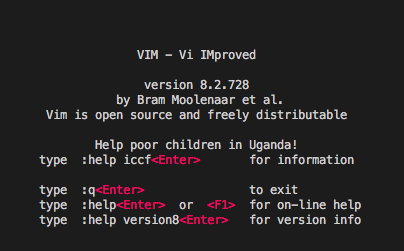
I hope this information helps...
K.Takata
Thank you for the information.
It would be helpful if you build Vim by yourself and bisect between 8.2.0728 and 8.2.1352.
wuehrer
Thanks for the tip, I have narrowed down the version/patch step by step:
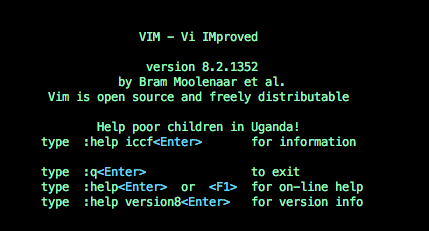
It happens from version 8.2.0935 to 8.2.0936 (see screenshots).
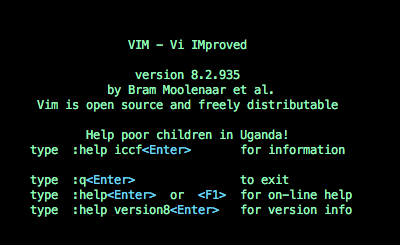

#2126 - patch 8.2.0936: some terminals msinterpret the code for getting curs... The patch for 8.2.0936 was about terminal representations.
Unfortunately I am not a programmer to understand the changes in the patch. I hope it helps ...
wuehrer
There is still a small difference when I start a VIM with a file:
vim test.md
In the first line, the character is displayed with a different background at the 2nd position.
8.2.0935:

8.2.0936:

Only vim started without input...
K.Takata
Cc @ttdoda
Christian Brabandt
Does by any chance setting :set term=xterm fix it?
wuehrer
... set term=xterm sets text color to black ...

Bram Moolenaar
To double check that the code for checking the terminal response is the problem, add this very early in startup:
set t_u7=
E.g. in your vimrc (check :scriptnames and it's usually the first file)
wuehrer
Oh... i don't know what "set t_u7=" does, but it solves both my problems, the right background at the startinfo and the 2nd character when i start "vim test.md".
Check with scriptnames: .vimrc is the first script.
Thanks for the support. Unclear if the cause is in the program or if the setting is required
Bram Moolenaar
Making t_u7 empty is a workaround, but it would still be good to see if we can fix it.
When you get the wrong background, does a CTRL-L fix it? Or does that cause more background to go white?
wuehrer
Thanks for the information; crtl-L shows the correct background, removing the start info - screen blank, Test :help and so everything is ok. Also with crtl-L after calling "vim test.md" the background of the 2nd character is displayed correctly.
Question: Is there a function to display the start info again?
Bram Moolenaar
So it looks like these terminal checks somehow cause a redraw at the wrong moment. I'm afraid it's hard to look into it without being able to reproduce. I hope someone can look into this.
You can display the info with :intro
blehel
I have the same problem under Linux with rxvt-unicode 9.22. See the reproduction steps in the linked issue.
Christian Brabandt
Is your terminal pretending to be xterm?
In any case, the workaround is to use set t_u7= in your start script, as mentioned earlier.
blehel
- It's not pretending to be
xterm, it'srxvt-unicode-256color set t_u7=is indeed a workaround for the problem
Daniel Gibbs
I'm still experiencing this with the following:
- macOS:
11.6.2 - vim:
8.2.5050 - terminal:
Terminal.app set background=dark$TERM:xterm-256color
Adding set t_u7= to my start script does not seem to change anything :/
—
Reply to this email directly, view it on GitHub.
You are receiving this because you are subscribed to this thread.
risa2000
Just for the record if anyone stumbles upon this problem and wonders (like myself), this behavior is still present in vim 9.1 (MacVim from homebrew) on macOS Sonoma 14.4.1, and suggested fix set t_u7= still works.
—
Reply to this email directly, view it on GitHub.
You are receiving this because you are subscribed to this thread.
Yee Cheng Chin
Just for the record if anyone stumbles upon this problem and wonders (like myself), this behavior is still present in vim 9.1 (MacVim from homebrew) on macOS Sonoma 14.4.1, and suggested fix
set t_u7=still works.
Sorry when you say "MacVim from homebrew" are you using it in GUI or terminal?
—
Reply to this email directly, view it on GitHub.
You are receiving this because you are subscribed to this thread.
risa2000
@ychin
Hi there, sorry for being cryptic. What I meant was that it happens when I am running "console" vim from MacVim homebrew cask in OS native Terminal app. The GUI version is fine and does not do that.
FWIW vimr running neovim seems to only intermittently flash the welcome message (which may or may not exhibit the behavior - as it is too fast to confirm) clears the screen buffer with solid background color and then looks fine too. (I am using same .vimrc for both vim and neovim.
Not sure if it can have an impact, but I am using darkblue.vim scheme from the default installation which is further augmented in terminal window by colorsupport.vim script (https://github.com/vim-scripts/colorsupport.vim).
—
Reply to this email directly, view it on GitHub.
You are receiving this because you are subscribed to this thread.
Yee Cheng Chin
Have you tried using vim --clean for comparison? I don't really know what colorsupport.vim does but it's a good idea to try a clean slate to compare. That script looks really old and could have been outdated.
—
Reply to this email directly, view it on GitHub.
You are receiving this because you are subscribed to this thread.
risa2000
I just tried vim --clean but the problem with that is that it does not seem to change the color at all so the background remains black (default terminal background) and the font is white. So the effect described in this issue, even if happened would not be visible.
What I tried then instead - disabling colorsupport.vim plugin but leaving darkblue.vim scheme in and observed the problematic coloring again.
—
Reply to this email directly, view it on GitHub.
You are receiving this because you are subscribed to this thread.
Yee Cheng Chin
Hmm, on my Mac (which is still on macOS 14.3.1) I'm seeing this, after typing vim --clean -c "color darkblue":
I'm using the default Apple Terminal, with mostly default settings. Do you have modified terminal settings, and what's the value of $TERM in your shell (presumably zsh)?
—
Reply to this email directly, view it on GitHub.
You are receiving this because you are subscribed to this thread.
risa2000
Alright. Running vim --clean -c "color darkblue" gives the same result as yours.
Screenshot.2024-04-03.at.1.44.18.png (view on web)
For the record, my TERM=xterm-256color (I believe it is a default). I did only few changes in the default (Basic) profile, changing font, default size of the window, and removed bunch of encodings.
So I guess it must by my .vimrc, or it and some interaction with the terminal. .vimrc I have just merged and moved over from my Windows and Linux versions. It uses few plugins (editorconfig-vim, lightline.vim, vim-fugitive), but nothing sophisticated. Plus it works in GUI mode without problem.
—
Reply to this email directly, view it on GitHub.
You are receiving this because you are subscribed to this thread.
Yee Cheng Chin
It's kind of hard for us to tell what the cause is, especially if you have other plugins like lightline.vim. I would actually recommend starting Vim without any plugins (--noplugin) and try to see if each one is problematic. And make sure to update your plugins, I guess.
—
Reply to this email directly, view it on GitHub.
You are receiving this because you are subscribed to this thread.
risa2000
I removed .vim folder and reduced my .vimrc to single line:
colorscheme darkblue
and it still produces this:
Screenshot.2024-04-03.at.23.15.06.png (view on web)
I can even manage to get this, when running vim ~/.vimrc in terminal:
Screenshot.2024-04-03.at.23.15.27.png (view on web)
So I guess now it only can source anything from $VIMRUNTIME now, and I am not sure how to tackle that. Should be seen on anyone else`s install too, no?
—
Reply to this email directly, view it on GitHub.
You are receiving this because you are subscribed to this thread.
Christian Brabandt
so vim --clean -c "color darkblue" does not reproduce it, but vim -c "color darkblue" reprocudes? One of the differences is compatible vs. non-compatible mode. You may want to diff the outpu of :set from both instances (or even :set termcap).
Does Mac Terminal actually support Cursor Position Report? Does this show any output: printf "^[[6n"?
In any case, if :set t_u7= fixes it, then I would recomment to keep it, I may cause issues when you need wide characters however.
—
Reply to this email directly, view it on GitHub.
You are receiving this because you are subscribed to this thread.
risa2000
so
vim --clean -c "color darkblue"does not reproduce it, butvim -c "color darkblue"reprocudes? One of the differences iscompatiblevs.non-compatiblemode. You may want to diff the outpu of:setfrom both instances (or even:set termcap).
Actually it seems a bit more convoluted. It looks like when vim is executed with command line command (regardless which one of the two) it ends up being color correct. It does not even depend on whether I have any .vimrc. I did five tests and captured the output of :set in the following text:
[NOK] vim with oneliner .vimrc (colorscheme darkblue)
--- Options ---
  background=dark     helplang=en         modified            scroll=19           ttymouse=sgr
  backspace=indent,eol,start
  fileencodings=ucs-bom,utf-8,default,latin1


[OK] vim with oneliner .vimrc (colorscheme darkblue) (vim -c "color darkblue")
--- Options ---
  background=dark     helplang=en         scroll=19           ttymouse=sgr
  backspace=indent,eol,start
  fileencodings=ucs-bom,utf-8,default,latin1


[OK] vim with oneliner .vimrc (colorscheme darkblue) (vim --clean -c "color darkblue")
--- Options ---
  background=dark     incsearch           mouse=a             scrolloff=5         ttymouse=sgr
  display=truncate    langnoremap         nrformats=bin,hex   showcmd             viminfofile=NONE
  helplang=en       nolangremap           ruler               ttimeout            wildmenu
  history=200       noloadplugins         scroll=19           ttimeoutlen=100
  backspace=indent,eol,start
  fileencodings=ucs-bom,utf-8,default,latin1


[OK] vim without .vimrc (vim -c "color darkblue")
--- Options ---
  background=dark     helplang=en       nolangremap           scroll=19           ttimeout
  commentstring=      history=200         mouse=a             scrolloff=5         ttimeoutlen=100
  display=truncate    incsearch           nrformats=bin,hex   showcmd             ttymouse=sgr
  filetype=text       langnoremap         ruler               syntax=text         wildmenu
  backspace=indent,eol,start
  comments=fb:-,fb:*,n:>
  fileencoding=utf-8
  fileencodings=ucs-bom,utf-8,default,latin1


[OK] vim without .vimrc (vim --clean -c "color darkblue")
--- Options ---
  background=dark     incsearch           mouse=a             scrolloff=5         ttymouse=sgr
  display=truncate    langnoremap         nrformats=bin,hex   showcmd             viminfofile=NONE
  helplang=en       nolangremap           ruler               ttimeout            wildmenu
  history=200       noloadplugins         scroll=19           ttimeoutlen=100
  backspace=indent,eol,start
  fileencodings=ucs-bom,utf-8,default,latin1
The first one is just runing vim with the one line .vimrc saying colorscheme darkblue and no .vim folder. Only this run produced the corrupted colors. The other two ones were with the one line .vimrc and with vim run with two different commands and produced correct colors.
The last two were without .vimrc and both produced correct colors too.
The output of :set differs between the runs though and what surprised me was that running vim --clean -c "color darkblue" with and without .vimrc produced different "sets". I would have thought they should be same.
Does Mac Terminal actually support Cursor Position Report? Does this show any output:
printf "^[[6n"?
Well it does produce this:
risa@risa-air ~ % printf "^[[6n"
^[[6n%
Not sure what I should expect but does not look as something I should.
In any case, if
:set t_u7=fixes it, then I would recomment to keep it, I may cause issues when you need wide characters however.
I guess I will. The corrupted screen colors are just a minor annoyance (if I ever need to revert the fix). I was just surprised to land on this right off the bat after the issue has been dormant for quite some time.
—
Reply to this email directly, view it on GitHub.
You are receiving this because you are subscribed to this thread.
Christian Brabandt
risa@risa-air ~ % printf "^[[6n"
Sorry, that should have been a literal escape: printf "\e[6n".
I was just surprised to land on this right off the bat after the issue has been dormant for quite some time.
Well, it's hard to reproduce and investigate if one does not have a Mac.
—
Reply to this email directly, view it on GitHub.
You are receiving this because you are subscribed to this thread.
Yee Cheng Chin
I can see the issue on my Mac if I set the colorscheme to darkblue. For some reason this doesn't happen on desert (probably because it has extra colors for the empty lines). I wonder if there's some initialization issue. I guess I could take a look since I do have a mac.
Seems to have been happening for a while. I think the Apple Terminal always has some funky interactions with Vim sometimes, but maybe it's worthwhile to dig into fixing it to make it work better because this is the default way people use Vim. iTerm2 does work just fine for reference. It's only Apple Terminal.
—
Reply to this email directly, view it on GitHub.
You are receiving this because you are subscribed to this thread.
risa2000
Sorry, that should have been a literal escape:
printf "\e[6n".
This one does this:
risa@risa-air ~ % printf "\e[6n"
risa@risa-air ~ % 1R
@ychin Actually I am new to mac. So do not take me using the native Terminal as any hint on its popularity 😉 . I just did not have much time and knowledge to look into the other terminals. darkblue on the other hand is the scheme I have been using from the beginning.
—
Reply to this email directly, view it on GitHub, or unsubscribe.
You are receiving this because you are subscribed to this thread.
Christian Brabandt
Hm, that is a strange result. It should return the line and column of the cursor:
chrisbra@debian ~/code/vim-src/src (git)-[free-memory-on-failure]- % printf "\e[6n"
^[[2;1Rchrisbra@debian ~/code/vim-src/src (git)-[free-memory-on-failure]- %
2 is the row and 1 is the column. But perhaps there was a redraw in between, which did hide part of the response.
—
Reply to this email directly, view it on GitHub.
You are receiving this because you are subscribed to this thread.