
[vim/vim] 'breakindentopt', 'cursorlineopt', 'colorcolumn' are not applied when displaying the same buffer in a second windo (#4976)

lacygoill
Describe the bug
Some window-local options are not applied when displaying the same buffer in a second window.
To Reproduce
-
Write this in
/tmp/vimrc:sp sil e x put =' some long line of text' sil norm! yy9p %j! setl bri briopt=sbr sbr=+ wincmd w b x -
Start Vim like this:
$ vim -Nu /tmp/vimrc
Alternatively, just run this shell command:
$ vim -Nu NONE +"sp|sil e x|pu=' some long line of text'" +'sil norm! yy9p' +'%j!|setl bri briopt=sbr sbr=+|wincmd w|b x'
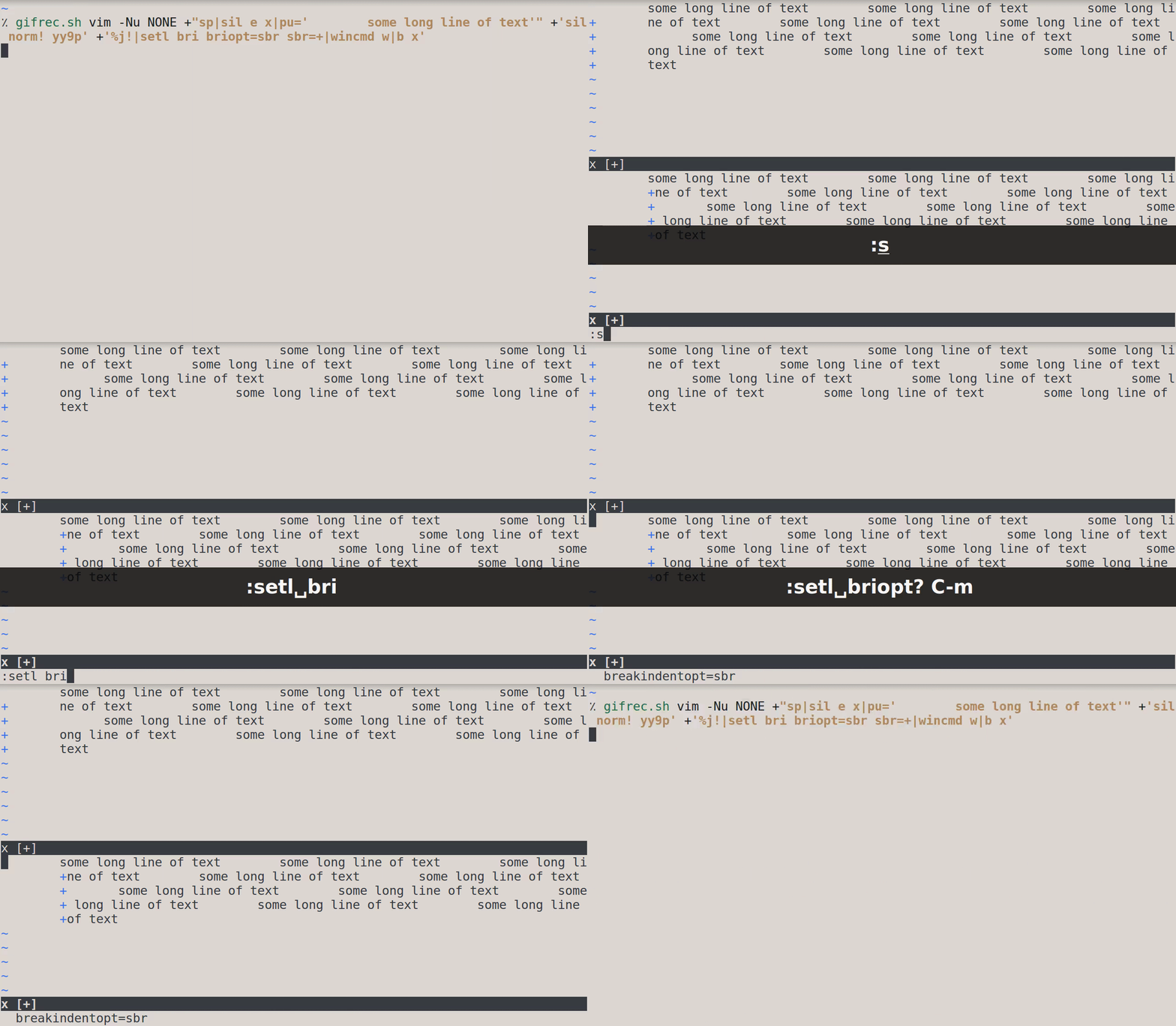
'breakindentopt' is correctly set in the bottom window (as confirmed by the output of :echo getwinvar(2, '&briopt') which is sbr), but the 'showbreak' string is displayed after the additional indent.
-
Write this in
/tmp/vimrc:set co=80 sp sil e x put =' some long line of text' sil norm! yy9p %j! setl cul culopt=screenline wincmd w b x -
Start Vim like this:
$ vim -Nu /tmp/vimrc
Alternatively, just run this shell command:
$ vim -Nu NONE +"set co=80|sp|sil e x|pu=' some long line of text'" +'sil norm! yy9p' +'%j!|setl cul culopt=screenline|wincmd w|b x'
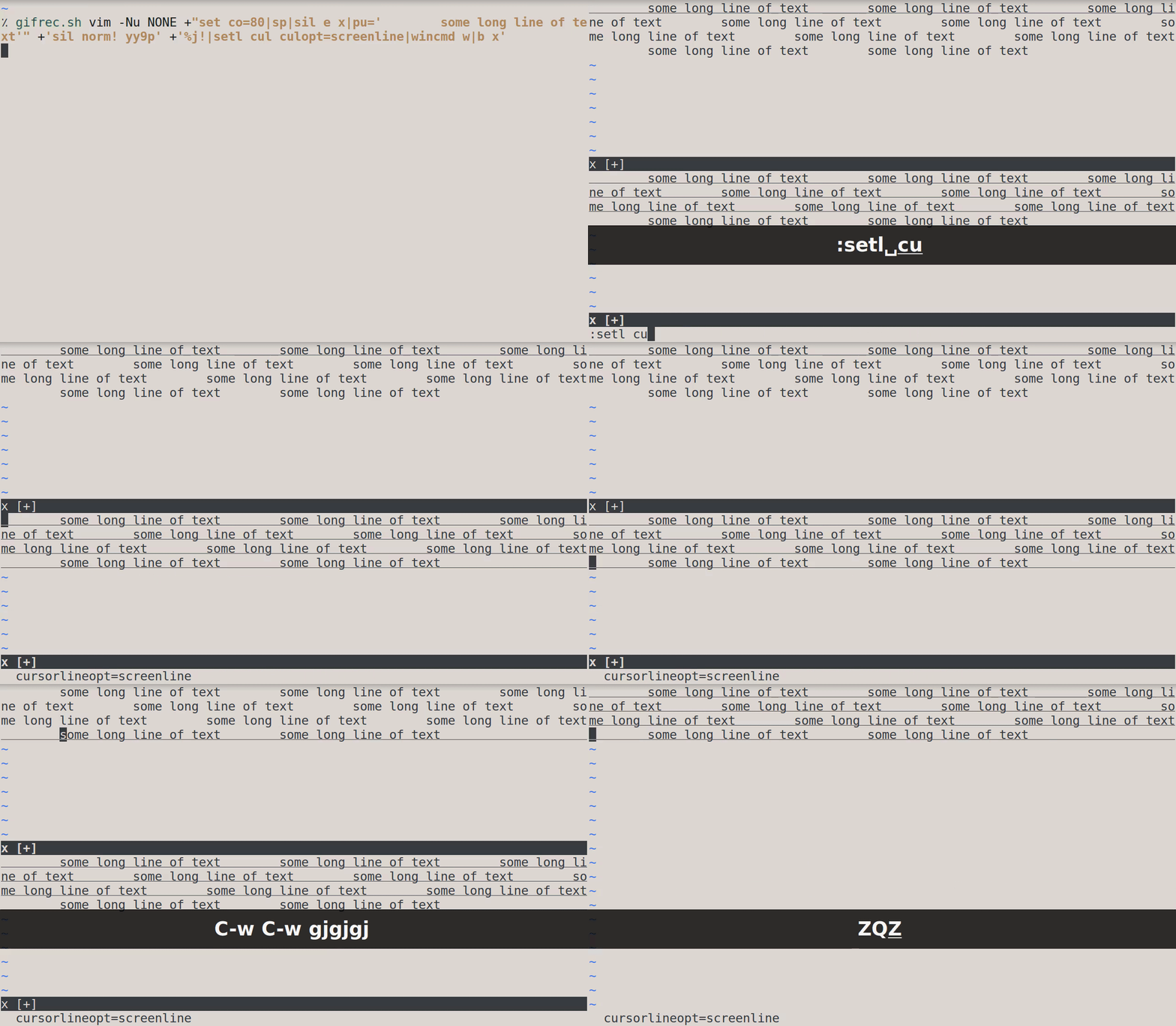
'cursorlineopt' is correctly set in the bottom window (as confirmed by the output of :echo getwinvar(2, '&culopt') which is screenline), but all the text line is highlighted by CursorLine.
-
Write this in
/tmp/vimrc:sp sil e x setl cc=12 wincmd w b x -
Start Vim like this:
$ vim -Nu /tmp/vimrc
Alternatively, just run this shell command:
$ vim -Nu NONE +'sp|e x|setl cc=12|wincmd w|b x'
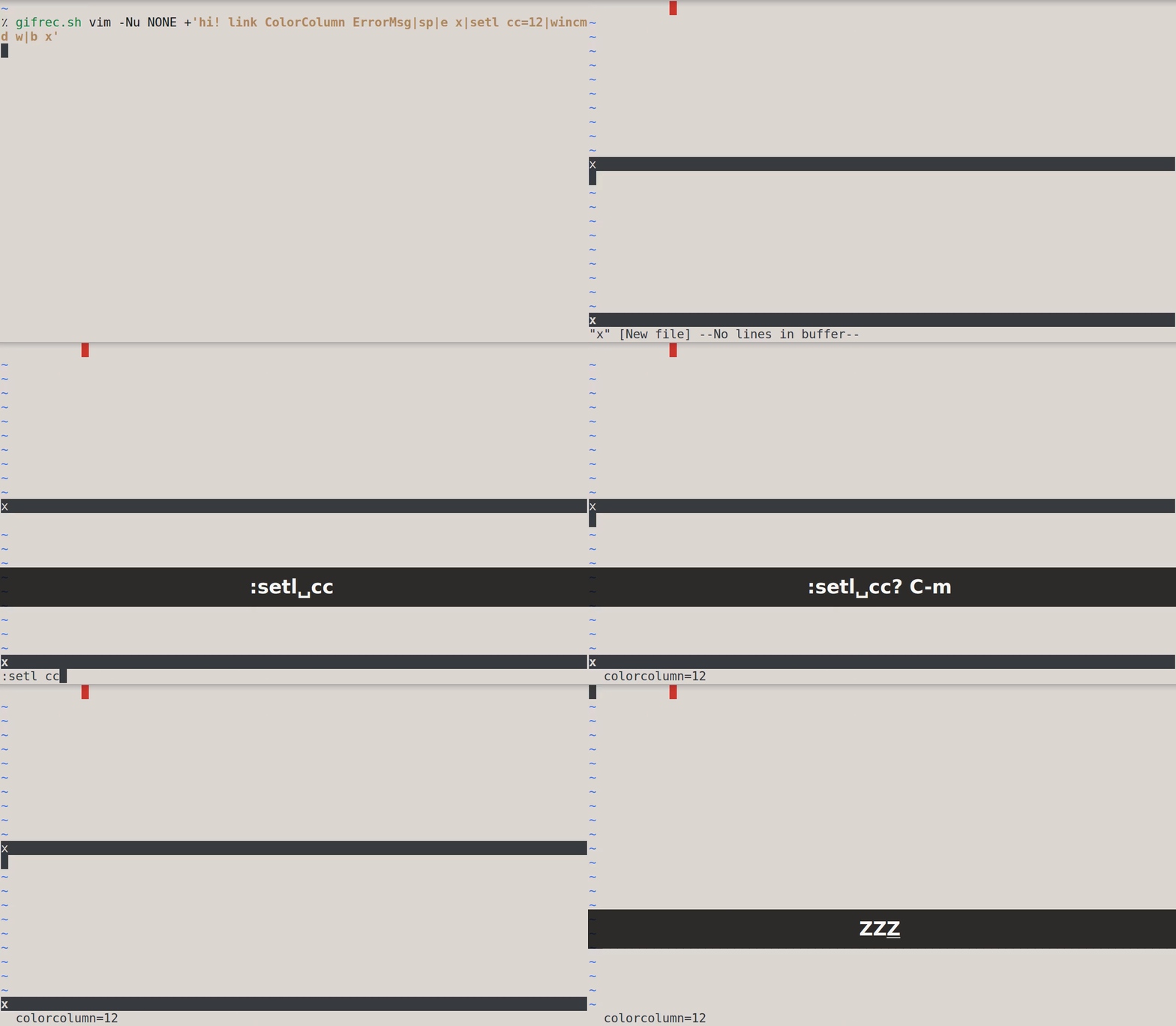
'colorcolumn' is correctly set in the bottom window (as confirmed by the output of :echo getwinvar(2, '&cc') which is 12), but the 12th column is not highlighted by ColorColumn.
Expected behavior
In the first command, in the bottom window, I would expect the 'showbreak' string to be displayed before the additional indent – not afterward – because the local value of 'breakindentopt' is sbr.
In the second command, in the bottom window, I would expect only the screen line to be highlighted – not the whole text line – because the local value of 'cursorlineopt' is screenline.
In the third command, in the bottom window, I would expect the 12th column to be highlighted by ColorColumn because the local value of 'colorcolumn' is 12.
Basically, I would expect both windows to look identical after running each of the three previous commands.
Screenshots
Command 1 ('breakindentopt'):
Command 2 ('cursorlineopt'):
Command 3 ('colorcolumn'):
Environment
- Vim version: 8.1 Included patches: 1-2071
- OS: Ubuntu 16.04.6 LTS
- Terminal: XTerm(322)
Additional context
I found 6 other window-local options which were neither copied nor applied when the same buffer is displayed in a second window:
'previewwindow''scroll''scrolloff''sidescrolloff''winfixwidth''winfixheight'
pedit x

tab sp

b x

" notice how the window is not a preview window

" `'pvw'` has not been copied from the last window where the `x` buffer was displayed


set lines=30

sp

e x

put =range(1,30)

setl scr=3

wincmd w

b x

windo 1

" notice that when you press `C-d`, the cursor moves 6 lines forward, not 3

" `'scr'` has not been copied from the last window where the `x` buffer was displayed


set lines=30

sp

e x

put =range(1,30)

setl so=5

wincmd w

b x

windo 1

" notice that when you keep pressing `j`, no minimal number of screen lines is kept below the cursor

" `'so'` has not been copied from the last window where the `x` buffer was displayed


set columns=80

sp

e x

put =repeat(join(map(range(char2nr('a'), char2nr('z')), {_,v -> nr2char(v)}), ''), 6)

setl siso=40 nowrap

wincmd w

b x

" notice that when you keep pressing `l`, no minimal number of screen columns is kept to the right of the cursor

" `'siso'` has not been copied from the last window where the `x` buffer was displayed


sp | vs | 20vs x

setl wfw

4wincmd w

vs | 20vs

1wincmd w | 2q

3wincmd w | b x | 4q

" notice that the width of the third window is bigger than 20

" `'wfw'` has not been copied from the last window where the `x` buffer was displayed


vs | sp | 5sp x

setl wfh

4wincmd w

sp | 5sp

1wincmd w | 2q

3wincmd w | b x | 4q

" notice that the height of the third window is bigger than 5

" `'wfh'` has not been copied from the last window where the `x` buffer was displayed
I did not include them in this bug report because they seem to be special.
It's possible to set a local window option specifically for a type of buffer as explained in :h local-options (with the 'list' example); that is you can set different local values for different buffers in a given window.
But not with the 6 previous options; once you set their local value in a given window for a given buffer, it's used for any future buffer displayed in that window.
As an example:
pedit x

wincmd P

e y

" the window is still a preview window, even though the displayed buffer has changed

" `'pvw'` has not been initialized by the global value (which is 0)
—
You are receiving this because you are subscribed to this thread.
Reply to this email directly, view it on GitHub, or mute the thread.
Bram Moolenaar
I haven't tried this, but it looks like you split the window before setting options which are local to the window, thus they won't affect the other window, that is expected. And they are really window-local, they stick when editing another buffer. I don't think there is anything wrong here.
lacygoill
Ah ok, thank you very much for the explanation, and sorry for the noise.
lacygoill
Closed #4976.
lacygoill
I haven't tried this, but it looks like you split the window before setting options which are local to the window, thus they won't affect the other window, that is expected.
Sorry but I still think something is wrong.
As an example, here is the third command given in the OP:
$ vim -Nu NONE +'sp|e x|setl cc=12|wincmd w|b x'
In the bottom window, the 12th column is not highlighted by CursorColumn.
If that is expected, then I should be able to replace 'cc' with another window-local option, and observe the same behavior. But that's not the case. Consider this command where 'cc' is replaced by 'wincolor':
$ vim -Nu NONE +'sp|e x|setl wincolor=ErrorMsg|wincmd w|b x'
                        ^^^^^^^^^^^^^^^^^^^^^^
This time, the bottom window is highlighted by ErrorMsg; that is because the local value of 'wincolor' has been copied from the last window where the x buffer was displayed.
I've tested all the window-local options, and for all of them, the same thing happens; the local value in the bottom window is copied from the local value in the top window.
Except for 'briopt', 'culopt' and 'cc'.
What makes those 3 options different from all the other ones?
And they are really window-local, they stick when editing another buffer.
If you're talking about these six options:
'previewwindow''scroll''scrolloff''sidescrolloff''winfixwidth''winfixheight'
Then I agree, they are really window-local, and they stick when editing another buffer.
But that's not the case for the other window-local options.
For example, I can have 3 different local values for 'wincolor' for 3 different buffers in the same window:
$ vim -Nu NONE
:sp
:e x|setl wincolor=ErrorMsg
:e y|setl wincolor=Search
:e z|setl wincolor=IncSearch
:wincmd w
:e x
:e y
:e z
The local value of 'wincolor' does not stick when I load a different buffer in the same window.
lacygoill
Reopened #4976.
lacygoill
Except for
'briopt','culopt'and'cc'.
Sorry, the local values are correctly copied; what I meant is that the local values in the bottom window are not taken into account (they do not have the intended visual effect).
lacygoill
Sorry if I sound confusing. I've been working on this for several days, and I'm getting tired.
I'm going to try and simplify; if I run this command:
$ vim -Nu NONE +'sp|e x|setl cc=12|wincmd w|b x'
In the bottom window, 'cc' is set to 12, which is expected.
What is not expected, is that Vim doesn't care. It doesn't highlight the screen column 12.
lacygoill
Closed #4976.

Bram Moolenaar
> Sorry if I sound confusing. I've been working on this for several
> days, and I'm getting tired.
>
> I'm going to try and simplify; if I run this command:
>
> $ vim -Nu NONE +'sp|e x|setl cc=12|wincmd w|b x'
>
> screen column 12.
correct value, it does not take effect. It looks like
check_colorcolumn() is not called. Oh, it is called too early, when
w_buffer is still NULL.
--
FATHER: Did you kill all those guards?
LAUNCELOT: Yes ... I'm very sorry ...
FATHER: They cost fifty pounds each!
"Monty Python and the Holy Grail" PYTHON (MONTY) PICTURES LTD
/// Bram Moolenaar -- Br...@Moolenaar.net -- http://www.Moolenaar.net \\\
/// sponsor Vim, vote for features -- http://www.Vim.org/sponsor/ \\\
\\\ an exciting new programming language -- http://www.Zimbu.org ///
\\\ help me help AIDS victims -- http://ICCF-Holland.org ///